
58912 - Blender HAMILTON BEACH - Free user manual and instructions
Find the device manual for free 58912 HAMILTON BEACH in PDF.



| Brand | Hamilton Beach |
| Model | 58912 |
| Product type | Blender |
| Jar capacity | 1.8 L |
| Automatic programs | Hot soup, Smoothie, Ice crushing, Whole juice |
| Manual functions | Manual (variable speed), Pulse, Tamper, Emulsion cutter |
| Speed selector | Variable (1 to maximum) |
| Motor protection | Overload protection and resettable circuit breaker |
| Safety | Automatic shut-off in case of overheating, safety lid, protected blades |
| Care and cleaning | Hand wash removable parts (jar, lid, emulsion cutter); wipe base with damp cloth. Do not immerse base. |
| Use | For household use only |
| Power supply | 220-240 V, 50/60 Hz (13 A fuse) |
Frequently Asked Questions - 58912 HAMILTON BEACH
User questions about 58912 HAMILTON BEACH
0 question about this device. Answer the ones you know or ask your own.
Ask a new question about this device
Download the instructions for your Blender in PDF format for free! Find your manual 58912 - HAMILTON BEACH and take your electronic device back in hand. On this page are published all the documents necessary for the use of your device. 58912 by HAMILTON BEACH.
USER MANUAL 58912 HAMILTON BEACH
(Original Instructions) (2)
Visit https://hHamiltonbeach.global for our complete line of products and Use and Care Guides - as well as delicious recipes, tips, and to register your product online.
(16)

Jz
AR
j
https://hAMILtonbeach.global
Hamilton Beach Brands, Inc.
Glen Allen, VA 23060
IMPORTANT SAFEGUARDS
When using electrical appliances, basic safety precautions should always be followed to reduce the risk of fire, electric shock, and/or injury to persons, including the following:
- Read all instructions.
-
This appliance is not intended for use by persons with reduced physical, sensory or mental capabilities, or lack of experience and knowledge, unless they are closely supervised and instructed concerning use of the appliance by a person responsible for their safety.
-
This appliance shall not be used by children. Keep the appliance and its cord out of reach of children.
- Close supervision is necessary when any appliance is used near children. Children should be supervised to ensure that they do not play with the appliance.
- Cleaning and user maintenance shall not be performed by children unless they are supervised.
- To protect against risk of electrical shock, do not put
cord, plug, base, or motor in water or other liquid.
- Turn the appliance OFF(o), then unplug from outlet when not in use, before putting on or taking off parts, and before cleaning. To unplug, grasp the plug and pull from the outlet. Never pull from the power cord.
- Avoid contact with moving parts.
-
Do not operate any appliance with a damaged supply cord or plug, or after the appliance malfunctions or has been dropped or damaged in any manner. Supply cord replacement and repairs must be conducted by the manufacturer, its service agent, or similarly qualified persons in order to avoid a hazard.
Call the provided customer service number for information on examination, repair, or adjustment. -
The use of attachments, including canning jars, not recommended or sold by the appliance manufacturer may cause a risk of injury to persons.
- Do not use outdoors.
- Do not let cord hang over edge of table or counter or touch hot surfaces, including stove.
- Do not place on or near a hot gas or electric burner, or in a heated oven.
- Keep hands and utensils out of the jar and away from the cutting blade, while blending or chopping food, to reduce the risk of severe personal injury and/or damage to the blender or available attachments (attachments may not be provided with blender). A rubber spatula may be used but must be used only when blender is not running.
-
Blades are sharp; handle carefully—especially when emptying or cleaning the blender jar.
-
Do not use a broken, chipped, or cracked blender jar.
- Be careful if hot liquid is poured into the blender as it can be ejected out of the appliance due to a sudden steaming
- Do not use broken, cracked, or loose cutting blade assembly.
- Always operate blender with lid in place. Remove emulsion cup only for adding ingredients or to insert the tamper.



CAUTION: Do not operate without cover in place.
- When blending hot liquids, secure emulsion cup and close any edge cover opening intended for pouring. To prevent possible burns: do not exceed 1000 ml level. Hot liquids may push off lid during blending; therefore, with the protection of an oven mitt or
thick towel, place one hand on top of the lid, keep exposed skin away from the lid, and start blending at lowest speed.
- Ensure cutter assembly is tight and secure to jar. Injury can result if moving blades accidentally become exposed.
- Do not leave blender unattended while it is operating.
- Check that the appliance is OFF (o) before plugging cord into wall outlet. To disconnect, turn the control to OFF (o); then remove plug from wall outlet. To unplug, grasp the plug and pull from the outlet. Never pull from the power cord.
-
Do not use appliance for other than intended purpose.
-
CAUTION! In order to avoid a hazard due to inadvertent resetting of the thermal cut-off, this appliance must not be supplied through an external switching device, such as a timer, or connected to a circuit that is regularly switched on and off by the utility.
- The plug is provided with a 13-amp fuse approved by ASTA to B.S. 1362. If you need a replacement fuse carrier, it must be replaced with the same colour-coded carrier with the same markings. Fuse covers and carriers can be obtained from approved service agents.
- Do not operate more than 2 minutes ON at a time, except during preset programs.
SAVE THESE INSTRUCTIONS
Other Consumer Safety Information
This product is intended for household use only.
The length of the cord used on this appliance was selected to reduce the hazards of becoming tangled in or tripping over a longer cord. If a longer cord is necessary, an approved extension cord may be used. The electrical rating of the extension cord must be equal to or greater than the rating of the appliance. The extension cord must be a grounding-type, 3-wire cord. Care must be taken to arrange the extension cord so that it will not drape over the countertop or tabletop
where it can be pulled on by children or accidentally tripped over.
If the Cutting Blade Assembly locks and will not move, it will damage the motor. Do not use. Call customer service number for information.
Do not place Blender Jar in the freezer filled with food or liquid. This can result in damage to the Cutting Blade Assembly, Jar, Blender, and possibly result in personal injury.
NOTE: This machine is equipped with motor overload protection. If the motor stops during operation due to overheating, unplug and allow it to cool down for approximately 15 minutes. Plug machine back in to resume normal operation.

Recycling the Product at the End of Its Service Life
The wheeled bin symbol marked on this appliance signifies that it must be taken over by a selective collection system conforming to the WEEE Directive so that it can be either recycled or dismantled in order to reduce any impact to the environment. The user is responsible for returning the product to the appropriate collection facility, as specified by your local code. For additional information regarding applicable local laws, please contact the municipal facility and/or local distributor.
Parts and Features
Before first use: After unpacking the Blender, follow the instructions in "Cleaning Your Blender."

Model: 58912-SAU
Type: B79
Ratings:
220-240 V~ 50-60 Hz 1400 W
Parts and Features (cont.)
Emulsion Cup: The Emulsion Cup helps create dressings and sauces that require slowly adding liquid ingredients into the Jar while the Blender is in operation.
Lid: The Lid is easy to put on, take off, and clean. Always use the Lid and the Emulsion Cup when the machine is in operation.
Blender Jar: Volume measures are clearly marked.
Tamper: The Tamper helps mix thick or frozen recipes that cannot be processed with regular blending. It prevents air pockets from forming and is a handy tool when making nut butters or frozen desserts.
RESET/OFF (I/O) (Power) Switch/Circuit Breaker:
The RESET/OFF (I/O) (Power) Switch is located on the right-hand side of the Blender Base. This Switch controls power to the Blender. This Switch is also a circuit breaker that, if tripped, must be turned off and back on to reset.
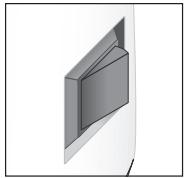

Control Panel
Variable Speed Dial:
The center Variable Speed Dial determines the Blender speed setting when blending in MANUAL mode.

Program Buttons:
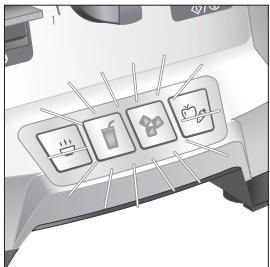
There are four program settings: HOT SOUP (♂), SMOOTHIE (♀), ICE CRUSH (♂), and WHOLE JUICE (♀). Select the desired program by pressing the button for that program.
START/STOP (艹/艹) Switch:
The START/STOP (◇/⊗) Switch is used to begin or end the MANUAL mode or to stop a program before the cycle ends.

PULSE () Switch:
Press and hold down the PULSE (Θ) Switch to blend at the speed setting shown on the Variable Speed Dial in MANUAL mode.

Automatic Overload Protection:
This machine is equipped with motor overload protection. If the motor stops during operation due to overheating, unplug and allow it to cool down for approximately 15 minutes. Plug machine back in to resume normal operation.
Using your Blender
Before first use: After unpacking the Blender, follow the instructions in "Cleaning Your Blender."
IMPORTANT: The Blender Jar and Cutting Blade Assembly are subject to wear during normal use. Always inspect Jar for nicks, chips, or cracks. Always inspect Cutting Blade Assembly for broken, cracked, or loose blades. If Jar or Cutting Blade Assembly is damaged, do not use.

Place Blender Jar on Base.

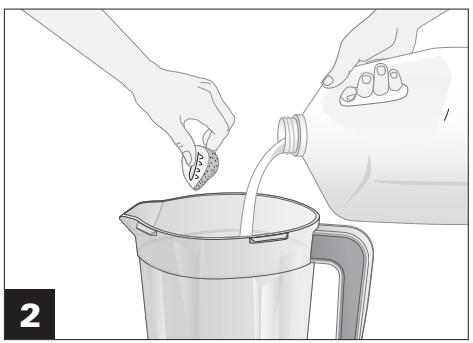
Add ingredients.
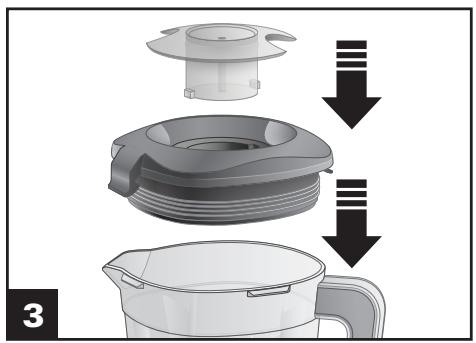
Place Lid and Emulsion Cup on Jar. Insert the Cup into the Lid and secure by turning clockwise. Remove the Emulsion Cup to use the Tamper or to add ingredients.

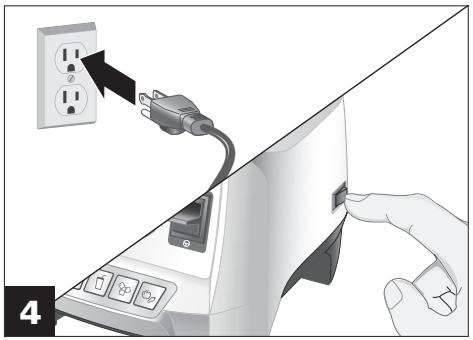
Plug in Blender. Move the RESET/OFF (I/O) Switch to the RESET (I) position to turn on power to the Blender and ready it for blending. The front lights will illuminate. Move the RESET/OFF (I/O) Switch to the OFF (O) position anytime the machine is left unattended. If Blender is plugged in and Switch is in RESET (I) position, but panel lights are not illuminated, the Blender has entered standby mode. This will happen after 3 minutes of inactivity. Press any control panel button or Switch to resume normal operation.
How to Open Blender Lid
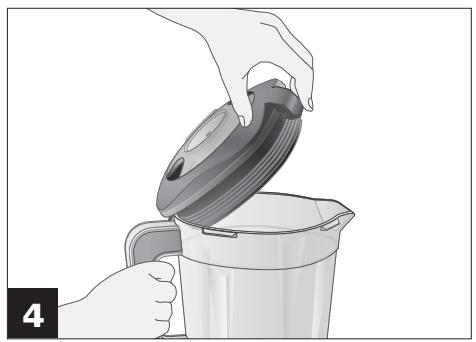
IMPORTANT: To remove the Lid, use your finger to pull up on the front tab. Do not twist the Lid to take it off the Jar — this might harm the Lid material and prevent it from sealing the Blender Jar.

Hold Jar handle firmly.

To open Lid, place a finger on the front tab.
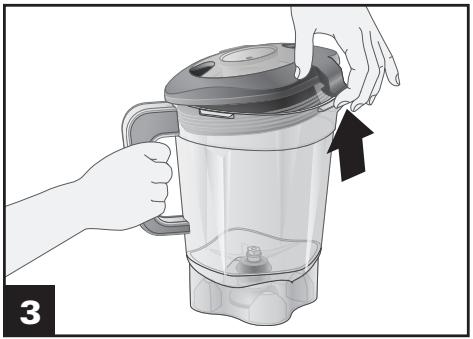
Apply a small amount of force on Lid until Lid is separated from the Jar.

Continue to hold the front tab with your finger and use thumb to support the Lid until it completely opens.
Using Program Settings
Programs are optimized for recipe categories and vary in blending speed and duration. Pressing a program button illuminates only the program selected. The Blender automatically starts when the program button is pressed and automatically stops at the end of the program. To stop Blender before program cycle ends, press START/STOP (◇/⊗). Pressing the program button again will reset the program, and it will start back from the beginning. Should you press START/STOP (◇/⊗) again, the Blender defaults to MANUAL mode.


The HOT SOUP ( ) setting purees and heats ingredients to just under the boiling point. Do not blend more than 1000ml on this program. When making soups, start with cold or room-temperature ingredients. The
Emulsion Cup can be kept in the Lid. Blender runs for 6 minutes, 45 seconds. Please allow blender to cool to room temperature before repeating cycle.
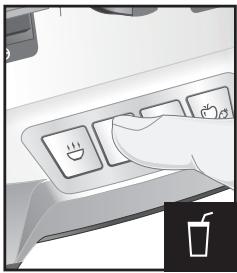
The SMOOTHIE (□) setting blends frozen or fresh smoothies. Blender pulses three times at the beginning to chop ice or frozen ingredients and then ramps up to run on high speed. Blender runs for total 45 seconds.

The ICE CRUSH (setting breaks ice into pieces small enough for slushies or fine cocktails. Blender continuously pulses from low to medium for 1 minute.

When a recipe calls for making a fruit or vegetable juice, run the WHOLE JUICE program. The WHOLE JUICE setting gives a smooth consistency to pureed fruit or vegetables and a fine texture when whole
grains or seeds are included in the juice recipe. It is great for blending more fibrous fruits and vegetables into a delicious, healthy juice. The Blender ramps up from low to high, running for total 55 seconds.
Using Manual Mode

Rotate the Variable Speed Dial to 1.

Press START/STOP (/) and slowly rotate the Variable Speed Dial to the right or left during blending to increase or decrease blending speed. If using PULSE () , the Blender will run at the speed on the dial only when the PULSE () Switch is held down.
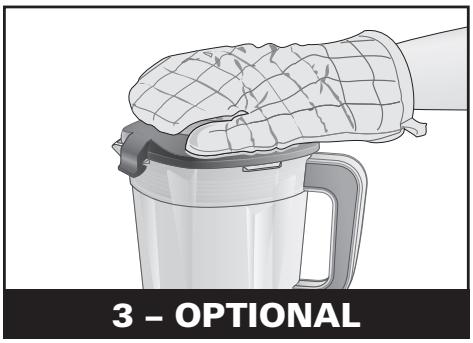
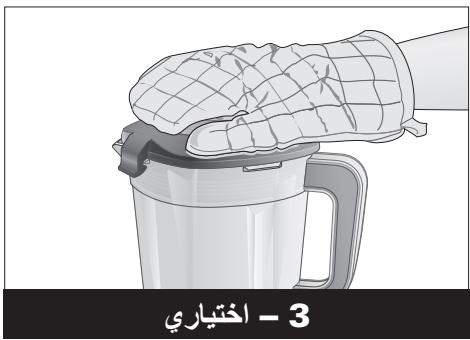
WARNING Burn Hazard. Do not fill Blender Jar with hot liquid beyond the 1000ml level. With the protection of an oven mitt or thick towel, place one hand on top of Lid. Keep exposed skin away from Lid. Start blending at lowest speed.
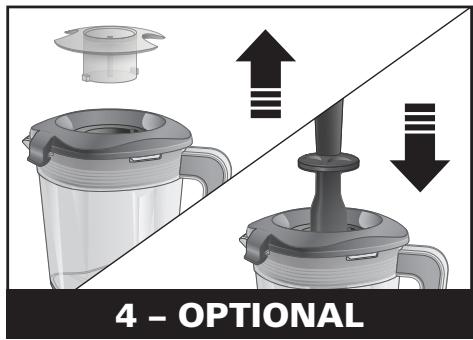
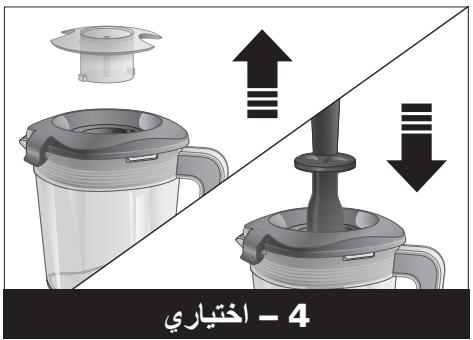
Remove Emulsion Cup and insert Tamper into hole in Lid. Rotate Cup counterclockwise from "locked" to "unlocked" position and lift out. NOTE: Turn Blender OFF (O) before removing Emulsion Cup and when adding the Tamper.
Using Manual Mode (cont.)

Place one hand on top of Lid to move thick mixtures around in Blender Jar.

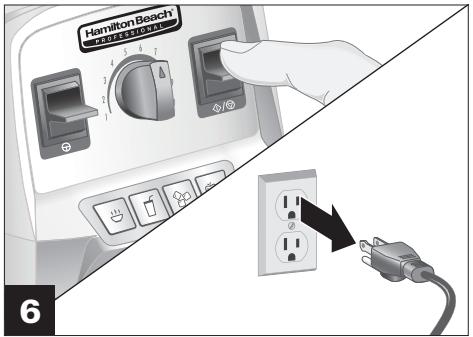
At the end of the blending cycle, rotate the Variable Speed Dial back to the 1 position and press the START/STOP (/) Switch to stop blending. Turn off the Blender with the RESET/OFF (I/O) Switch on the right side of the Base. Unplug Blender after blending.

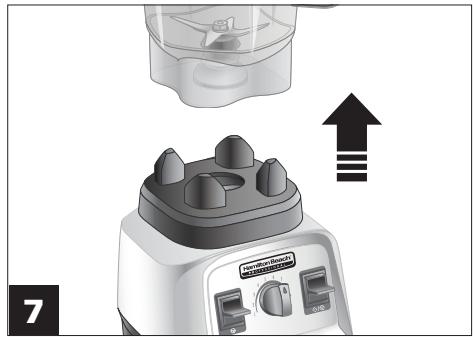
Remove Blender Jar.
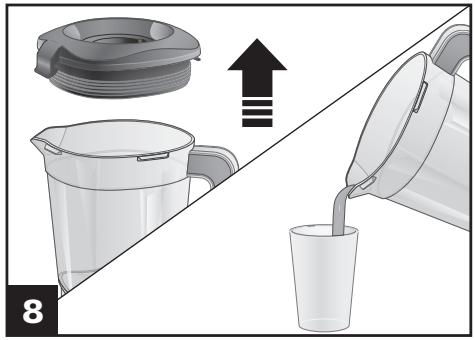
Remove Lid while holding Blender Jar securely. Serve.
WARNING Burn Hazard.
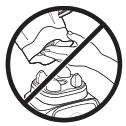
Metal parts under blending Jar get hot after extended use.
Blender Tips
- To add foods when Blender is operating, remove Emulsion Cup and add ingredients through the opening.
- For best performance, the minimum amount of liquid needed per recipe is one cup (8 ounces/237 ml). Add more liquid if food is not blending properly. The amount of liquid needed will vary Based on the other ingredients required for blending.
- If blending action stops during blending or ingredients stick to sides of Jar, insert Tamper to help move the mixture around or add more liquid to Blender Jar.
- Do not store food or liquids in Blender Jar.
- Avoid bumping or dropping Blender when in operation or at any time.
-
Use Tamper when making nut butters and blend in 1-minute intervals.
-
Cutting large whole fruits and vegetables may allow them to blend more quickly.
- Do not fill Blender Jar past highest graduation marking.
Always place liquid in Blender Jar first, then remaining ingredients. - If ice or frozen fruit pieces are not blending, stop the Blender and pulse a few times.
- Do not allow ice to stand or freeze in Jar. Immediately crush ice after placing in Jar.
NOTE: This machine is equipped with motor overload protection. If the motor stops during operation due to overheating, unplug and allow it to cool down for approximately 15 minutes. Plug machine back in to resume normal operation.
Using the Tamper
- The hand protector on the Tamper and the Lid work together to prevent the Tamper from hitting the blades when the Lid is secured properly on the Blender Jar.
- The Blender Jar should not be more than two-thirds full when the Tamper is used during blending.
-
Only use the Tamper provided with this model Blender. Do not use Tampers made for any other Blender or Blender model.
-
If food does not circulate, an air bubble may be trapped in the mixture. Remove the Blender Jar from the Blender Base. Remove the Emulsion Cup. Release the air bubble by inserting the Tamper through the Emulsion Cup opening.
- Holding the Tamper straight down may not help ingredients circulate. If necessary, point the Tamper toward the sides or corners of the Blender Jar. DO NOT try to force the Tamper deeper into the Jar.
Cleaning Your Blender
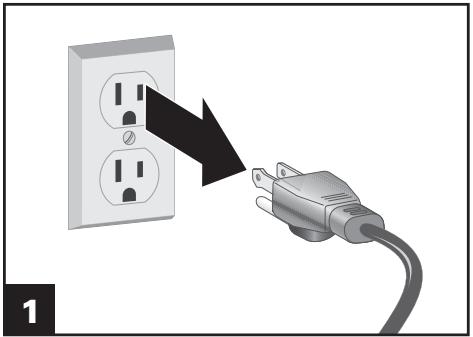
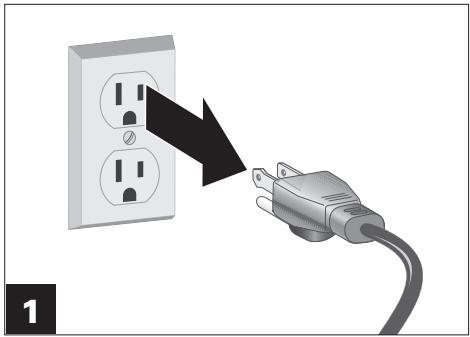
Unplug Blender.
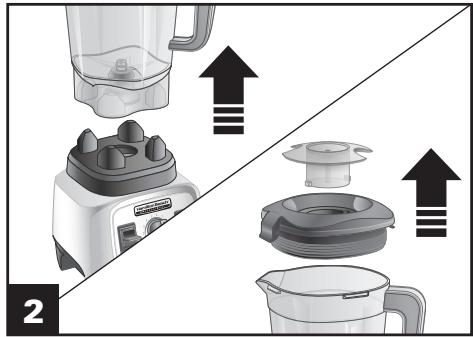
Remove Jar, Lid, and Emulsion Cup.
WARNING Electrical Shock Hazard.
Disconnect power before cleaning. Do not immerse cord, plug, Base, or motor in water or other liquid.
WARNING Burn Hazard.
Metal parts under blending Jar get hot after extended use.
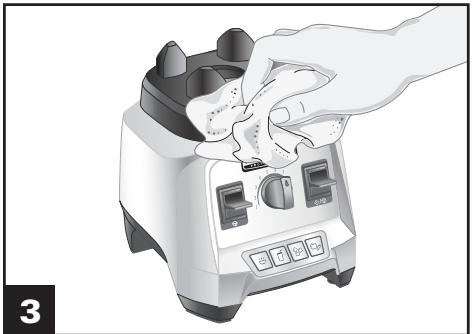
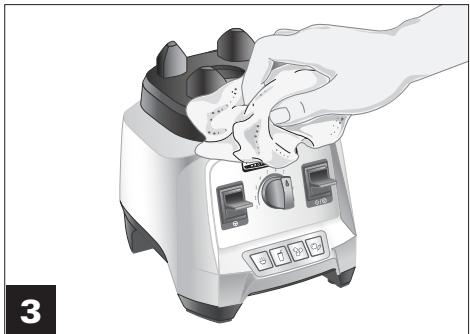
Wipe Blender Base, control panel, and cord with a damp cloth or sponge. To remove stubborn spots, use a mild, nonabrasive cleanser.

DO NOT use the "SANI" setting when washing in the dishwasher. "SANI" cycle temperatures could damage your product. Parts may also be washed with hot, soapy water. Rinse and dry thoroughly. Do not soak.
NOTES:
- HAND-WASH ONLY. Alternative is to fill Jar halfway with water and add 2-3 drops of dish soap. Blend for 30 seconds. Rinse and dry thoroughly.
- To clean after blending oily foods, sprinkle 1/4 cup (59 ml) baking soda in Blender. Add 1 cup (237 ml) white vinegar. Mixture will bubble. When bubbling subsides, add 2 cups (473 ml) water and blend on the HOT SOUP (ü) cycle. Wash any remaining residue with dish soap and water. Rinse and dry thoroughly.
Troubleshooting
Error Messages
PROBLEM
All program buttons are flashing.
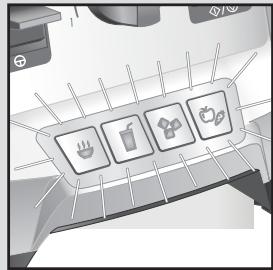
The SMOOTHIE () and ICE CRUSH () buttons are flashing.
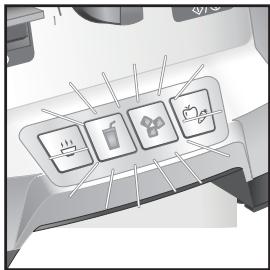
The HOT SOUP (and WHOLE JUICE buttons are flashing.

Blender is plugged in and Switch is in RESET (I) position, but panel lights are not illuminated.
PROBABLE CAUSE/SOLUTION
-
The motor has overheated during use. Turn Power Switch to OFF (O) and allow to cool for 15 minutes. Turn Power Switch to RESET (I), and resume normal operation.
-
Remove the Blender Jar and Lid. Stir contents and top with Lid. Press HOT SOUP (山) cycle. If the problem persists, turn unit off, unplug from electrical outlet, and contact the customer service center.
-
The Blender speed has ramped up to high too quickly and run on high speed. Turn the unit off, unplug from the electrical outlet, and call the customer service center.
-
Blender enters standby mode after 3 minutes of inactivity to conserve power. Press any control panel button or Switch to resume normal operation.
Troubleshooting (cont.)
| PROBLEM | PROBABLE CAUSE/SOLUTION |
| Blender fails to start and program lights are not illuminated. | ·Make sure that the main power RESET/OFF (I/O) button is in the RESET (I) position. ·Check to see if unit is securely plugged into an electrical outlet of the proper voltage and frequency. ·Check to see if the fuse for the electrical outlet has blown or if a circuit breaker has tripped. |
| Blender stops while it is running and the program lights are illuminated. | ·This Blender is equipped with motor overload protection. If the motor stops during operation due to overheating, unplug and allow the Blender to cool down. Plug Blender back in after 15 minutes. ·Resume normal operation. |
| Blender stops while running and START/STOP (◇/◇) light flashes. | ·Mixture in Blender is too heavy of a load on the motor. This Blender is programmed to stop running to protect itself from electrical damage. Remove some of the ingredients from the Blender Jar. Turn Variable Speed Dial to 1 and press the START/STOP (◇/◇) Switch to continue to process in MANUAL mode. Increase speed as necessary. If this issue happens again, remove more of the Blender mixture and start the process again. |
| Ingredients will not mix properly. | ·Check to see if enough liquid has been added to the ingredients. Mixture should be fluid and free-running at all times. ·SoLid pieces are too large. ·Container is too full. Do not fill past highest 1800ml graduation marking. ·Cutting assembly blades are not sharp or are damaged. Inspect container and Cutter Blade Assembly daily. ·Select speed to create a fluid blend. |
| Blender smells like it is burning. | ·Turn off Blender and allow unit to cool. ·Although motors are tested during the manufacturing process, heavy use may cause curing of motor windings. The smell may quickly dissipate after a few heavy uses. ·If smell continues after additional heavy uses, call our customer care center. |
| There is grease around the bottom of the Blender Jar or on the counter top. | ·Monitor the problem and source. This may indicate an issue with the Jar bearings. ·Call our customer care center if the condition persists. |
| Blender Jar is cloudy or stained. | ·Some cloudiness may be natural after use. The minerals from fruits, produce, and leafy greens, in addition to the oils of various nut butters, can sometimes cause a film on the Blender Jar or may be difficult to clean. ·Sprinkle 1/4 cup (59 ml) baking soda in Blender. Add 1 cup (237 ml) white vinegar. Mixture will bubble. When bubbling subsides, add 2 cups (473 ml) water and blend on the HOT SOUP (◇) cycle. Wash any remaining residue with dish soap and water. Rinse and dry thoroughly. |
| Blender fails to start. | ·Jar is not in place. |
Notes
.1
i 1
19
aL 1 1



J 1
AaLb
jie sal iiaiuiu jilgubiz .
y
g g 1.
a5 jglj 1 y:laal
Jilswill gdi d. Jo 100 Jilswill
lll lll ll lll lll
a 1 j j j j
e bll j 11 j 10 gill
aer Jglc bll 1
a 1
jie 1. i.e. will jie, ii. ii
Jia 1
aie 1
JJIJI JJIJI
j 公共 2
ailllll llaill
yS 1000
aLall gJ 1
jJlWgclll g
gj 1iiguiuaai Lsuaia
LgSjpi g 0ai jai yai ai aai (g) ayal oaoi aia puiyui .gaoi
plabll liaa g g jyjgdl g bll clc g g 1
bll o jia aai ci l l l l i y d g g g
la! e g g ll liay g d g bll g clc g
jlll jil
jolz jolz jolz jolz jolz jolz jolz jolz jolz jolz jolz jolz jolz jolz jolz jolz jolz jolz jolz jolz jolz jolz jolz jolz jolz jolz jolz jolz jolz jolz jolz jolz jolz jolz j01
ailllll lllllllllllllllllll
j 1 j 1 j 1 j 1 j 1
j j j j j j j j j j j j j j j j j j j j j j j j j j j j j j j j j j j j j j j j j j j j j j j j j j j j j j j j j j j j j j j j j j j j j j j j j j j j j j j j j j j j j j
- a : 12,b : 14,c : 16
aill jll jlll j aayil kll y
piaiui jaiy i jaiiy jaiiy jaiiy jaiiy jaiiy jaiiy jaiiy jaiiy jaiiy jaiiy jaiiy jaiiy jaiiy jaiiy jaiiy jaiiy jaiiy jaiiy jaiiy jaiiy jaiiy jaiiy jaiiy jaiiy jaiiy jaiiy jaiiy jaiiy jaiiy jaiiy jaiiy jaiiy jaiiy jaiiy

e. c. g. j. 1.
by
"bllll llll" 100000000000000000000000000000000000000000000000000000000000000000000000000
Cull

/1b2l lcl 1 1 1 1 1 1 1 1 1 1 1 1 1 1 1 1 1 1 1 1 1 1 1 1 1 1 1 1 1 1 1 1 1 1 1 1 1 1 1 1 1 1 1 1 1 1 1 1 1 1 0
J (I) I b2l lol ole! g u g (O/I) caiy
I b2l lgl e g u g u b2ll ool ool ool ool ool ool ool ool ool ool ool ool ool ool ool ool ool ool ool ool ool ool ool ool ool ool ool ool ool ool ool ool ool ool ool ool ool ool ool ool ool ool ool ool ool ool ool ool ool ool oel
J (O/I) caiy / b2l lal olal ole! ciau d aai y
Jgall n jcs ydl caiy (O) caiy y g u g
g u g u g u g u g u g u g u g u g u g u g u g u g u g u g u g u g u g u g u g u g u g u g u g u g u g u g u g u g u g u g u g u g u g u g u g u g u g u g u g u g u g u g u g u g u g u g u g u g u g u g u

a 111 111 111 111 111 111 111 111 111 111 111 111 111 111 111 1
1

J 10/0) JJIJIJIJIJIJIJIJIJIJIJIJIJIJIJIJIJIJIJIJIJIJIJIJIJIJIJIJIJIJIJIJIJIJIJIJIJIJIJIJIJIJIJIJIJIJIJIJIJIJIJIJIJIJIJIJIJIJIJIJIJIJIJIJIJIJIJIJIJIJIJIJIJIJIJIJIJIJIJIJIJIJIJIJIJIJIJIJIJIJIJIJIJIJIJIJIJIJIJIJIJ

1 aii iic o yjiaial ac jai
alil j. alill aai g dall lal ylll g j
g 11"glll" g and no alell wla icll uSe
A2jai p cialll
y all j! (O) blll Jauu aqj: abal
dall aeolj dic alill
blll lcll blll aac g
aall aalee all gaiy
jglall jz jzlal aI sll 1 jglal al jz jgl ale xcllall
biolieolololololololololololololololololololololololololololololololololololololololololololololololololololololololololololol
aalee g jilgull aalall jjssaa
Jillie 1
G
sleblly jgjjlljg jia iiaaii
a#
soll
jolalil cie jzj lalil 1iSi ola
c
. 102
Jz 8o jodu dduo ydoy doo y
aal 1
oai jlll jj j j j j j j j j j j
e.g.11112 3002
J 1
a
blislcg
aall plaii iie eell gail biall jy
biol
jll j jall
jE jF 1 aannnll
在 Rt ABD 中:
()
1e 0jiaaiieae jai jai blll 0jaiy jai (O/0) lalj/laii ciia 1e baiai p1 caii pi iuiu blll Jai jai jai blll uacaiy jai jai jai jai gall (O/I) 1aiy /bailaill scl!

jlaal jaaal alall ayai lalai gai iia

blll 120 Jd blll e c g a ll l j
ai a ai 分母最小值为 k .
A
jaiai jai jaiai ai jai jaii jaiai ai jaiai ay bai ale g

L
bill Jilw
Jal/Jaiaaiy
(0)
(1) bala ola! cya yale aill bila clia 10 sdd jyall
dall
A
.

e bai. 1i jie 1i jie 1i jie 1i jie 1i jie
[17]"Clll lll"
()"
aagll Jaaai jaiall aee aalglacg 1aLg bklil ae yolj
eaaaia jay aaiy
(1) "jslalllcll" (5)
( C_20^3) ^ * = 1

Juslll alles joo jorjdoa daiuill g oBdll Jy
a
alalal 1
bYll

C. all 15,24
上
A
ailll allll lal 1. iil bll lgl yse ll
1 1
j 1
jbsbll ele, jaiiaai gaiiaiaai ai jai jnui
aannnnae


aal
aillie glll lirc "SANl" 12y iipii y
"SANl" 0000000000000000000000000000000000000000000000000000000000000000000000000000
a a a a a a a a a a a a a a a a a a a a a a a a a a a
aLi
:
aal jai. jusall aaii jusla jao ci bja+Y aiaia, gajally aiaia iie cie gai jaiu gai jaiu
1
J (Jy) 1s cai blll g kall j (J09) w s / y p a iiaa aae bbl d a aie bill l .
gai gai gai ai i 1
()
This Page Intentionally Left Blank
This Page Intentionally Left Blank
GB For more product and warranty information, please visit https://hamiltonbeach.global
AR
https://hamiltonbeach.global
© 2019 Hamilton Beach Brands, Inc. 4421 Waterfront Drive Glen Allen, VA 23060

- AR
- IMPORTANT SAFEGUARDS
- SAVE THESE INSTRUCTIONS
- Other Consumer Safety Information
- This product is intended for household use only.
- Recycling the Product at the End of Its Service Life
- Parts and Features
- Parts and Features (cont.)
- RESET/OFF (I/O) (Power) Switch/Circuit Breaker:
- Variable Speed Dial:
- Program Buttons:
- START/STOP (艹/艹) Switch:
- PULSE () Switch:
- Automatic Overload Protection:
- Using your Blender
- How to Open Blender Lid
- Using Program Settings
- Using Manual Mode
- Using Manual Mode (cont.)
- WARNING Burn Hazard.
- Blender Tips
- Using the Tamper
- Cleaning Your Blender
- WARNING Electrical Shock Hazard.
- NOTES:
- Troubleshooting
- Error Messages
- PROBLEM
- PROBABLE CAUSE/SOLUTION
- Troubleshooting (cont.)
- Notes
- gj 1iiguiuaai Lsuaia
- by
- 1
- soll
- ()
- L
- Jal/Jaiaaiy
- A
- .
- bYll
- j 1
- aal
- :
Brand : HAMILTON BEACH
Model : 58912
Category : Blender