
DRL 1624J - Refrigerator DE DIETRICH - Free user manual and instructions
Find the device manual for free DRL 1624J DE DIETRICH in PDF.



| Product type | Refrigerator with freezer compartment |
| Brand | De Dietrich |
| Model | DRL 1624J |
| Height (cm) | 122 |
| Width (cm) | 54 |
| Depth (cm) | 56 |
| Net weight (kg) | 55 |
| Electrical supply | 220-240 V ~ 50 Hz |
| Climate class | SN, N, ST, T (from +10°C to +43°C) |
| Refrigeration capacity | Cold zone ≤ +4°C |
| Freezing capacity | Not specified, Super mode for minimum temperature |
| Number of doors | 1 (reversible) |
| Interior lighting | LED (replacement by authorized technician) |
| Defrosting | Automatic for refrigerator compartment |
| Special functions | Smart, Super, door alarm, temperature indicator |
| Temperature setting | Adjust and Mode buttons (1 to 5 + Smart/Super) |
| Included accessories | Glass shelves, vegetable bin, door bins, installation kit |
| Cleaning | Warm water and mild soap; do not use abrasive products |
| Safety | CE compliant, refrigerant R600a (flammable), mandatory earthing |
| Repairability | Spare parts available via after-sales service; LED lamp not replaceable by user |
Frequently Asked Questions - DRL 1624J DE DIETRICH
User questions about DRL 1624J DE DIETRICH
0 question about this device. Answer the ones you know or ask your own.
Ask a new question about this device
Download the instructions for your Refrigerator in PDF format for free! Find your manual DRL 1624J - DE DIETRICH and take your electronic device back in hand. On this page are published all the documents necessary for the use of your device. DRL 1624J by DE DIETRICH.
USER MANUAL DRL 1624J DE DIETRICH
MANUEL D'INSTRUCTION FR
INSTRUCTION MANUAL EN
natural_image
Modern kitchen interior with stainless steel appliances, staircase, and living room (no visible text or symbols)Chère Cliente, Cher Client,
natural_image
Simple line drawing of a rectangular object with a rotating arrow and a small cylindrical component above it (no text or symbols)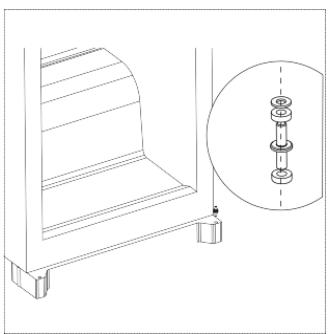
natural_image
Technical line drawing of a mechanical bracket assembly with a magnified inset showing internal components (no text or symbols)natural_image
Technical line drawing of a mechanical bracket assembly with four sequential steps showing pin alignment and rotation (no text or symbols)natural_image
Pure mechanical diagram showing a rotating component mounted on a table with no text or symbolsKits d'installation

Guide x 2

Cache du guide x 2
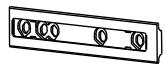
Glissière x 2
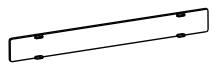
Cache de la glissière x 2

Vis courtes x 13

Vis longues x 2
natural_image
Isometric diagram of a rectangular cabinet with two arrows indicating directional flow or movement (no text or symbols)natural_image
Technical line drawing of a mechanical assembly with no visible text or symbolsnatural_image
Simple line drawing of a mechanical frame with a hanging weight and rotational arrow (no text or symbols)natural_image
Diagram showing a curved pipe or duct with an arrow indicating direction, alongside a magnified inset (no text or symbols)3. UTILISATION DE VOTRE APPAREIL
natural_image
Line drawing of a hand placing a shelf item on top of a rack (no text or symbols)natural_image
Diagram of a container with two upward arrows indicating flow or movement (no text or symbols)natural_image
Diagram of a hand holding a small object with arrows indicating rotation or movement (no text or symbols)REPLACEMENT DE LA LAMPE
You have just acquired a DE DIETRICHfridge and we would like to thank you.
Our research teams have created this new generation of appliances for you. Their quality, design, features and technological advances make them exceptional products, and reveal our unique know-how.
Your new DE DIETRICHfridge will blend harmoniously into your kitchen and will perfectly combinefood preservation performance and ease of use. We wanted to offer you a product of excellence.
In the DE DIETRICHproduct range, you will also find a wide choice of hobs, ovens, microwaves, hoods, dishwashers, cookers, freezers, that you can coordinate with your new DE DIETRICHfridge.
Visit our website www.dedietrich-electromenager.com, where you will find our latest innovations as well as useful and complementary information.
DE DIETRICH
Setting New Values
As part of our commitment to constantly improving our products, we reserve the right to make changes to them based on technical advances to their technical and functional features and appearance.

Warning:
Before installing and using your appliance, please carefully read this Guide to Installation and Use, which will allow you to quickly familiarise yourself with its operation.
www.dedietrich-electromenager.com
CONTENTS
- FOR THE USER'S ATTENTION.... 4
Safety and warning information.... 4
Disposal 5
Installation 6
- INTRODUCTION TO YOUR APPLIANCE......8
Overview....8
Reverse Door....9
Kits for installation ....10
Install the appliance....10
- USING YOUR APPLIANCE....13
Control Panel....13
Operation 13
-
CLEANING AND MAINTENANCE....14
-
TROUBLESHOOTING....15
1. FOR THE USER'S ATTENTION

This appliance is in accordance with the EU guidelines

Safety and warning information
For your safety and correct usage, before installing and first using the appliance, read this user manual carefully, including its hints and warnings.
To avoid to do damage, mistakes and accidents, it is important to make sure that all people using the appliance are thoroughly familiar with its operation and safety instructions.
Save these instructions and be sure that they remain with the appliance if it is moved or sold, so that a using it throughout its life will be properly informed on its correct appliance usage and safety.
Manufacturer cannot be responsible for damages caused by omission.
GENERAL SAFETY AND WARNINGS
This appliance is intended to be used in household and similar applications such as:
- Staff kitchen areas in shops, offices and other working environments;
- Farm houses and by clients in hotels, motels and other residential type environments;
- Bed and breakfast type environments;
- Catering and similar non-retail applications

Safety for children and s who are vulnerable people:
- This appliance can be used by children aged from 8 years and above and persons with reduced physical, sensory or mental capabilities or lack of experience and knowledge if they have been given supervision or instruction concerning use of the appliance in a safe way and understand the hazards involved.
● Children shall not play with the appliance.
- Cleaning and user maintenance shall not be made by children without supervision.
- Keep all packaging away from children as there is risk of suffocation
- Do not let children play with the appliance, keep pets away.
- Old appliances must immediately be operated as unusable. Unplug and turn off the power cable flush with the appliance. Make the door lock inoperable, or better yet, remove the door to prevent such a child or animal may remain trapped inside while playing.
If problems occur, and that you cannot solve with the following advice we give you (see "Troubleshooting"), use only the approved customer service centres or to a qualified professional.

WARNING
- To avoid a hazard due to instability of the appliance, it must be installed, fixed if necessary, in accordance with the instructions.
- Maintain clear of obstruction ventilation openings in the appliance enclosure or in the built-in structure.
- Do not use mechanical devices or
other means to accelerate the defrosting process than those recommended by the manufacturer.
- Do not damage the refrigerant circuit.
- Do not use electrical appliances inside the food storage compartments of the appliance, unless they are clearly recommended by the manufacturer.
- Do not store explosive substances inside this appliance such as aerosols containing flammable gases propellants.
- Do not place the appliance in direct sunlight.
- Do not expose to flame.
- Stop the appliance and unplug it before cleaning or moving it.
- For models equipped with a water dispenser or ice maker compartment, fill or connect only with a drinking water supply.
- If the supply cord is damaged, it must be replaced by the manufacturer, its after sales service or similarly qualified persons in order to avoid a hazard.
Cooling agents and insulation used in this product contain flammable gases. When you scrap the appliance, do it from an authorized collection point. Do not expose to flame
Refrigerant
Refrigerant isobutene (R600a) is contained within the refrigerant circuit of the appliance; it is a gas more environmentally friendly, which is nevertheless flammable.
During transportation and installation of the appliance, ensure that none of the components of the refrigerant circuit is damaged.

Caution: risk of fire
If the refrigerant circuit should be damaged:
- Avoid opening flames and any source
of ignition.
-Thoroughly ventilate the room in which the appliance is located.
It is dangerous to alter the specifications or modify this product in any way.
Any damage to the electric cord may cause short-circuit, fire, and/or electric shock.
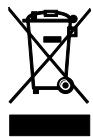
Disposal
This symbol indicates that this product should not be treated as household waste.
Your appliance contains recyclable materials. It is marked with this logo to indicate that used appliances must be delivered to an authorized collection point.
Check with your dealer or technical services in your area to find out the points for used appliances closest to your home. The appliance recycling organized by your manufacturer will be done under the best conditions, according to the European directive on waste electrical and electronic equipment.
Thank you for your help in protecting the environment.
Some packing materials of this device are also recyclable. Recycle them and play a role in protecting the environment by depositing them in the containers provided for this purpose.
In accordance with the most recent legislation on the protection and respect for the environment, your appliance does not contain HFC's, but a refrigerant called R600a. The exact type of refrigerant used in your appliance is also clearly indicated on the rating plate
located inside the appliance, on the left wall down. R600a is a non-polluting gas that does not harm the ozone layer and whose contribution to the greenhouse effect is virtually zero.
Installation

WARNING: Correct installation or device complying with the rules we given in this installation guide we will allow you to keep your food and conditions and with optimized consumption.
- If your appliance has wheels, remember that they are only used to facilitate small movements. Do not move on longer distance.
- Make an initial cleaning before connecting your device to the mains. Before any maintenance, disconnect your device. Do not pull the power cord but directly enter the profile.
- Place the unit in a dry and ventilated room.
- Avoid balconies, porches, decks; excessive heat in summer and cold in winter could prevent proper operation of your device, or even damage.
- Do not place it near a heat source such as radiator or oven for example.
- Keep a minimum distance between your refrigerator and other furniture: 3 to 5 cm on the sides and 10 cm above for good air circulation around the unit.
- Place the appliance at a suitable distance from the wall using the spacers if they provided in the accessory bag.
- Your appliance has been designed for optimum performance in a room temperature. We then say that it is designed for a special "climate class". This climate class is clearly stated on the rating plate located inside your appliance, on the left wall down. Beyond these temperatures, the performance of your appliance may be reduced.
| Classe | Temperature |
| SN | from + 10°C to + 32°C |
| N | from + 16°C to + 32°C |
| ST | from + 16°C to + 38°C |
| T | from + 16°C to + 43°C |
Advice:
After installation of your appliance, set its feet so that it is slightly tilted backwards, it will facilitate the closing of the door.
Before putting food, clean the interior and exterior of your appliance with bicarbonate of soda dissolved in water (1 tablespoon of bicarbonate for 4 litres of water). Do not use alcohol, abrasive powders or detergents which could damage the surfaces. (See chapter "Cleaning your appliance").
ELECTRICAL CONNECTION
The electrical installation must comply with the applicable standards and must be able to withstand the maximum power indicated on the rating plate.
The plug must be properly grounded.
We cannot be held responsible for any incident caused by defective electrical installation.
Electrical Installation Tips
- Do not use extension cable or adapter or power strip.
- Never remove the grounding.
- The socket must be easily accessible but out of reach of children.
In case of doubt, ask to your installer.
Your device is compliant with EU directives and their modifications.
ENERGY SAVING
To reduce the power consumption of
your appliance:
- Install it in a suitable location (see "Installing your appliance").
- Keep doors open for as short time as possible.
- Do not put hot food in your refrigerator or freezer, particularly if they are soups or preparations which emit a large amount of steam.
- Ensure the optimal functioning of your device by not letting accumulate too much frost in the freezer (defrost it when the ice thickness exceeds 5-6 mm) and periodically cleaning the condenser (see "Maintenance your device").
- Regularly check the door seals and make sure that they always close effectively. If this is not the case, please contact service after sales service.
- Do not let it set at too low a temperature.
- Not fulfilling with drawers, bins and shelves arrangement could lead to increased energy consumption.

WARNING:
If the unit was shipped to home in a horizontal position, place it vertically and wait two hours before plugging it in. A small amount of oil may have flowed into the refrigeration circuit, you need to give it time to flow back towards the motor before connecting the appliance, otherwise you may damage it.
Before any maintenance, disconnect the power plug. Do not pull the power cable but directly enter the profile.
CLEANING AND MAINTENANCE
● Before cleaning, unplug the appliance and turn off the power.
- Do not clean the appliance with metal objects, a steam system, volatile oils, organic solvents or abrasives.
- Do not use sharp objects to remove ice. Use a plastic scraper.
- To replace the light bulb, if operation is possible by the user himself, please refer to the "Maintenance" of this manual. Always be sure to unplug your appliance before.
WARNING: If the appliance is equipped with a LED lighting, it can only be replaced by a qualified technician.
2. INTRODUCTION TO YOUR APPLIANCE
Overview
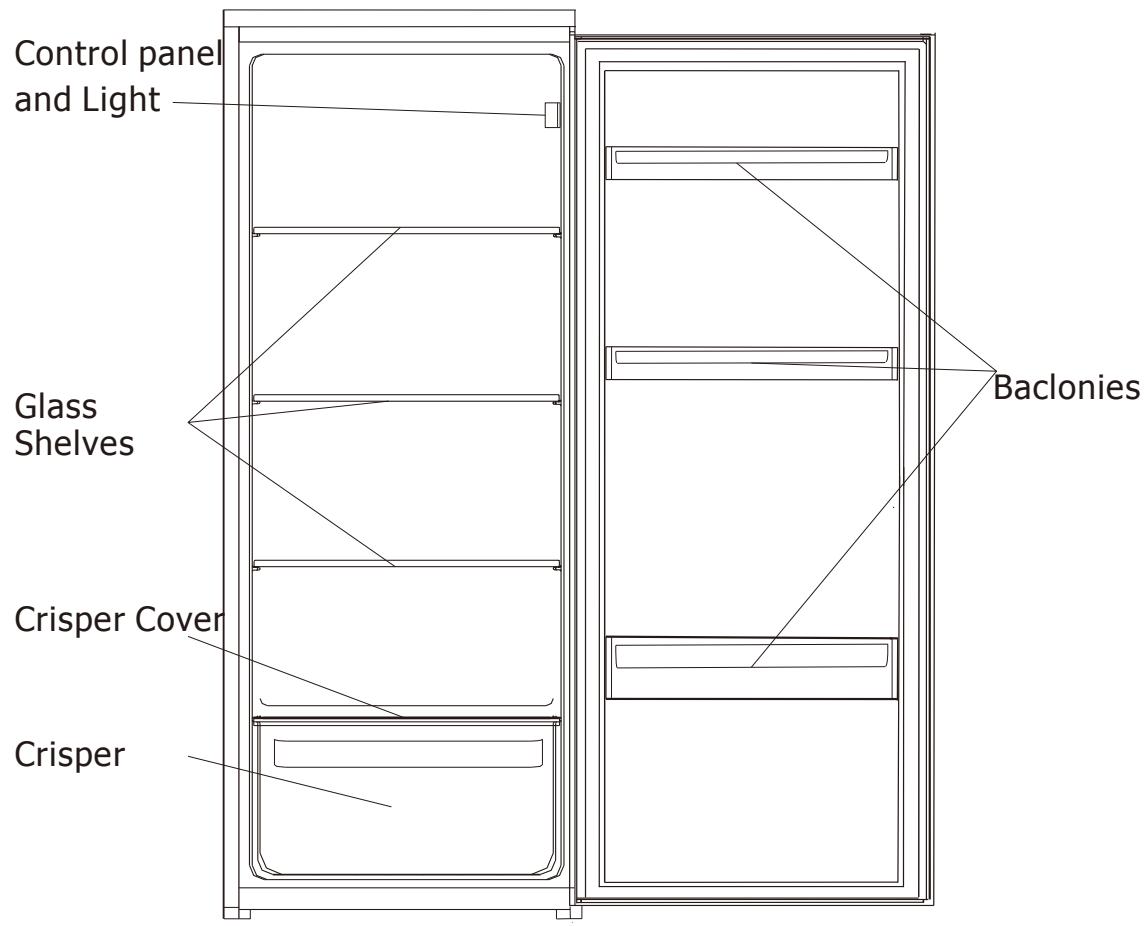
Tools required: Philips screwdriver, Flat bladed screwdriver, Hexagonal spanner.
Important! Reversing the door is a 2-people job
- Ensure the unit is unplugged and empty.
- To take the door off, it is necessary to tilt the unit backwards. Avoid laying it flat as this may damage the cooling system. Rest the unit on something solid so that it will not slip during the door reversing process.
-
All parts removed must be saved to do the reinstallation of the door.
-
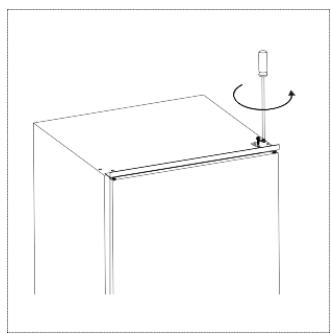
Unscrew the top hinge. Then lift the door and place it on a padded surface to avoid scratching.
natural_image
Simple line drawing of a rectangular object with a curved arrow indicating rotation or motion (no text or symbols)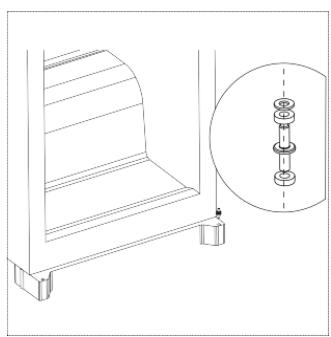
natural_image
Technical line drawing of a mechanical bracket with a magnified inset showing internal components (no text or symbols)- Remove bottom hinge pin from right to left.
- Unscrew top hinge pin from the hinge. Then turn the hinge over and screw hinge pin.
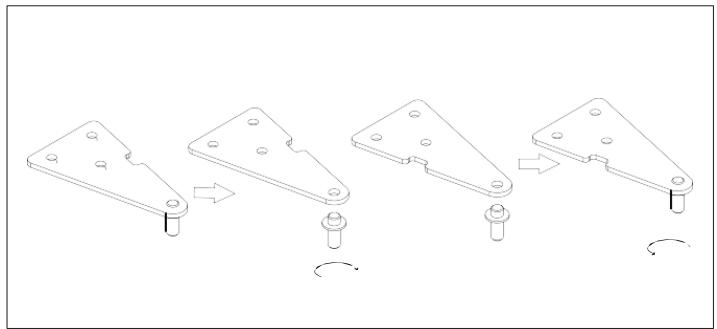
natural_image
Technical line drawing of a mechanical bracket assembly with four sequential steps showing pin alignment and rotation (no text or symbols)- Re-fit the door and then upper hinge on left side. Ensure the door is aligned horizontally and vertically, so that the seals are closed on all sides before finally tightening the upper hinge. If necessary, use a spanner to tighten the hinge.
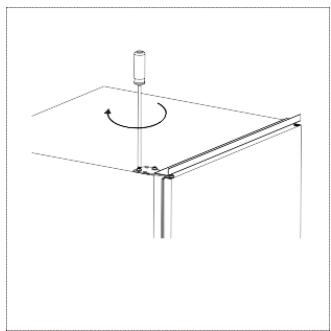
natural_image
Pure mechanical diagram showing a rotating component mounted on a table with no text or symbolsKits for installation

Guide x 2

Guide Cover x 2
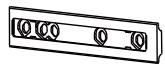
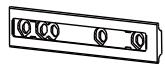
Slider x 2
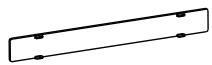
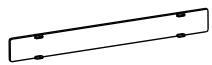
Slider Cover x 2

Short Screw x 13

Long Screw x 2
Rubber Seal x 1
Install the appliance
- Ensure the size of cabinet and ventilation are enough.
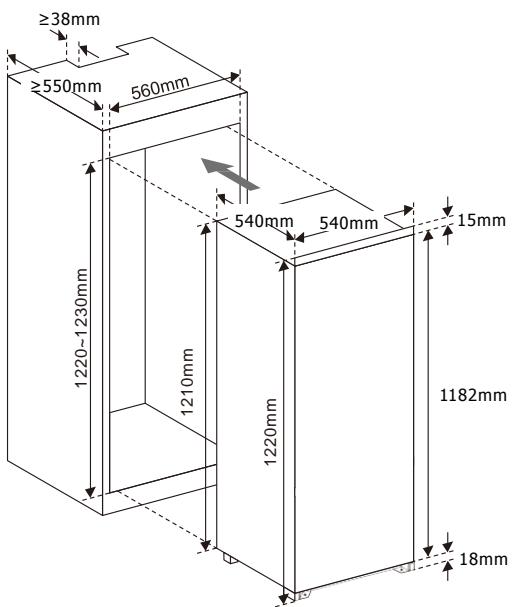
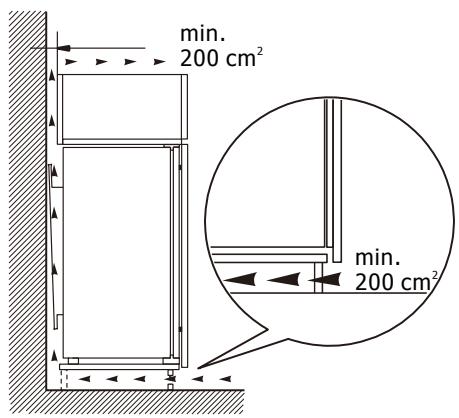
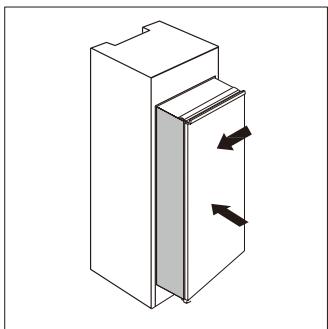
- Slowly and carefully push the appliance into the cabinet. Ensure the opening side is as close to the cabinet wall as possible.
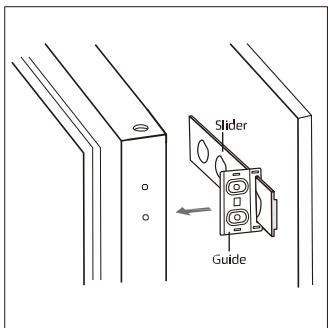
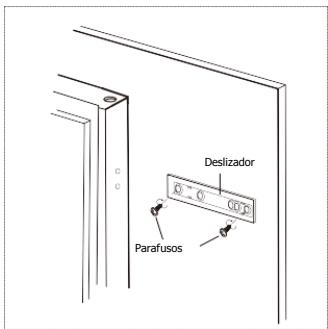
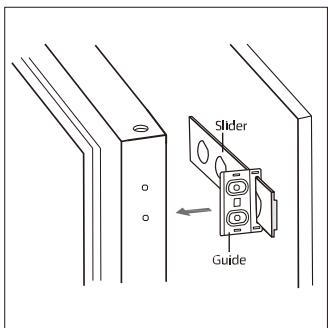
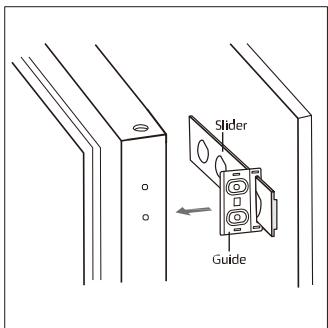
- Screw a guide to holes in the side of appliance door with short screws. Insert the slider into the guide, then fully open and close appliance door and wooden door to check whether wooden door can fully and smoothly close.
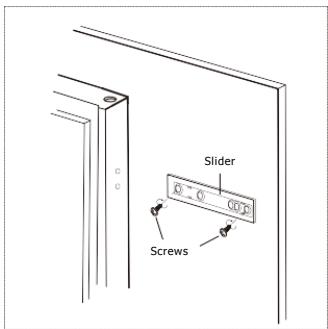
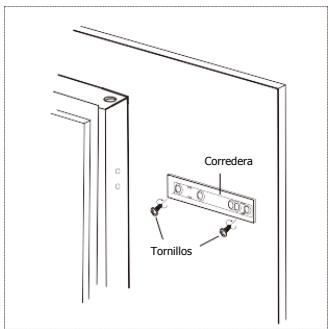
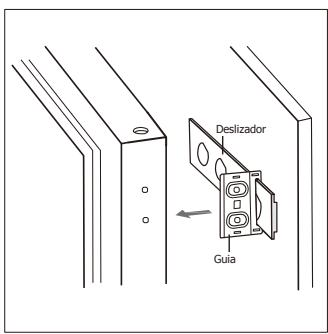
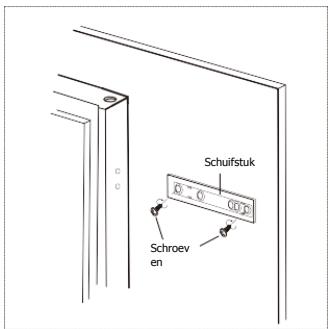
- Open the appliance door and the wooden door together. Once the door opens and closes at all angles, mark the position of the slider. Take slider out of guide and fix slider with wooden door by two short screws. Then fix slider cover onto the slider.
- Unscrew the guide from appliance door.
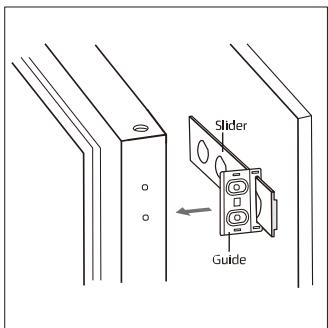
- Repeat step 2 to 5 to fix another slider and cover.
- Fit two guides with sliders and fix them with short screws. Then fix guide covers with guides.
natural_image
Isometric diagram of a rectangular cabinet with two arrows indicating directional flow or movement (no text or symbols)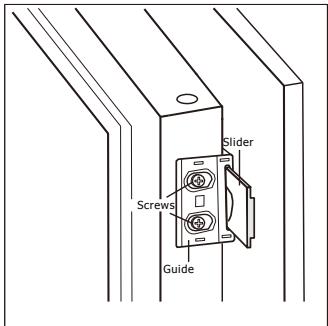
Installation
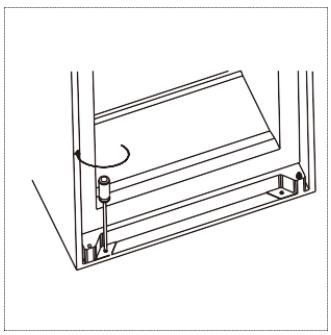
- Double check the door can close and open smoothly and appliance is sealed well. If not, slightly adjust the unit. Then fix bottom bracket with wooden cabinet with two long screws.
natural_image
Technical line drawing of a mechanical assembly with no visible text or symbols- Fix top bracket with wooden cabinet by short screws.
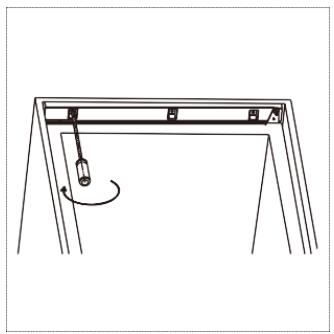
natural_image
Simple line drawing of a mechanical frame with a lever and rotational arrow (no text or symbols)- Attach rubber seal to the gap between unit and wooden cabinet on the side from which the door opens.
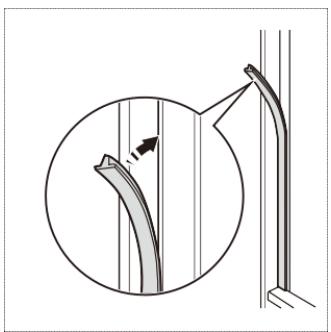
natural_image
Diagram showing a curved pipe or duct with an arrow indicating direction, alongside a magnified inset (no text or symbols)3. USING YOUR APPLIANCE
First use
Cleaning the interior
Before using the appliance for the first time, wash the interior and all internal accessories with lukewarm water and some neutral soap so as to remove the typical smell of a brand new product, then dry thoroughly.
Important! Do not use detergents or abrasive powders, as these will damage the finish.
Control Panel
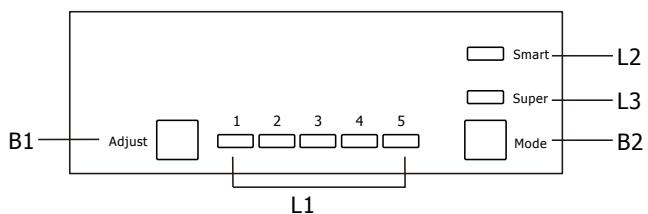
flowchart
graph LR
    B1["Adjust"] --> L1["1"]
    L1 --> L2["2"]
    L1 --> L3["3"]
    L1 --> L4["4"]
    L1 --> L5["5"]
    L2 --> B2["Mode"]
    L3 --> B2
    L4 --> B2
    L5 --> B2
    style B1 fill:#fff,stroke:#000
    style B2 fill:#fff,stroke:#000
    style L1 fill:#fff,stroke:#000
    style L2 fill:#fff,stroke:#000
    style L3 fill:#fff,stroke:#000
    style L4 fill:#fff,stroke:#000
    style L5 fill:#fff,stroke:#000
Buttons
B1- Press to adjust setting of compartment in cycle of 1,2,3,4, to 5.
B2- Press to select mode from Smart, Super and usersetting.
Lights
L1 – show the setting of fridge compartment.
L2 – light on once Smart mode is selected.
L3 – light on once Super mode is selected.
Operation
Temperature Setting
- Press Mode button (B2) to select user setting.
- Press Adjust button (B1) to adjust the setting of appliance. Lower setting means lower temperature.
Smart Mode
Press Mode button (B2) to select Smart mode.
The appliance will automatically run according to the ambient temperature around the appliance.
Super Mode
Press Mode button (B2) to select Super mode.
The appliance will run to make the freezer compartment the coldest. After 54 hours, temperature will automatically be restored to its original setting.
Turn off the appliance
Press and hold Adjust button (B1) for 5 seconds, the appliance will turn off. Press 5 seconds again to turn on the appliance.
Door open alarm
The alarm will sound when door is left open for 90 seconds and it will not stop until the door is closed.
Accessories Movable shelves
The walls of the refrigerator are equipped with a series of runners so that the shelves can be positioned as desired.
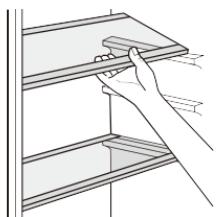
natural_image
Line drawing of a hand holding a shelf with a tray (no text or symbols)Positioning the door shelves
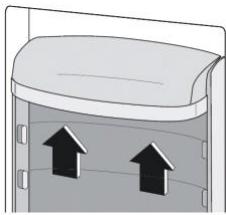
To permit storage of food packages of various sizes, the door shelves can be removed and placed at different heights. To make these adjustments, proceed as follows: gradually pull the shelf in the direction of the arrows until it comes free.
natural_image
Diagram of a container with two upward arrows indicating flow or movement (no text or symbols)Hints for fresh food refrigeration
To obtain the best performance:
- Do not store warm food or evaporating liquids in the appliance.
- Do cover or wrap the food, particularly if it has a strong flavour
- Meat (all types): wrap in polythene bags and place on the glass shelves above the vegetable drawer.
- For safety, store in this way only one or two days at the most.
- Cooked foods, cold dishes, etc....: these should be covered and may be placed on any shelf.
- Fruit and vegetables: these should be thoroughly cleaned and placed in the special drawer(s) provided.
- butter and cheese: these should be placed in special airtight containers or wrapped in aluminum foil or polythene bags to exclude as much air as possible.
- Milk bottle: these should have a cap and should be stored in the balconies on the door.
- Bananas, potatoes, onions and garlic, if not packed, must not be kept in the fridge.
4. CLEANING AND MAINTENANCE
Cleaning
For hygienic reasons, the interior of the appliance, including interior accessories, should be cleaned regularly.

Caution! Before carrying out any maintenance operation, disconnect the power supply.
Never clean the appliance with a steam cleaner. Moisture could accumulate in electrical components, danger of electrical shock! Hot vapors can lead to the damage of plastic parts. The appliance must be dry before it is put back into service.
Important! Ethereal oils and organic solvents can attack plastic parts, e.g. lemon juice or the juice from orange peel, butyric acid, or cleanser containing acetic acid.
- Do not allow such substances to come into contact with the appliance parts.
- Remove the food from the freezer. Cover them well and store them in a cool place.
- Switch off the appliance and remove the plug from the mains. Switch off the circuit breaker, or turn off the fuse.
- Clean the inside and the accessories with lukewarm water and some neutral soap. Regularly check the door seals and wipe clean to ensure they are free from debris.
- Rinse and dry thoroughly.
- Never use detergents, abrasive powders, highly perfumed cleaning products or wax polishes to clean the interior as this will damage the surface and leave a strong odor.
- Once everything is dry, place the appliance back into service.
Clean drain hole
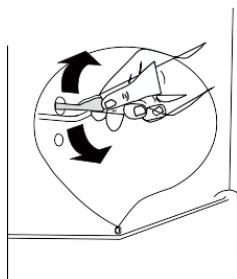
To avoid defrost water overflowing into the fridge, periodically clean the drain hole at back of fridge compartment. Use a cleaner to clean the hole as showed in right picture.
natural_image
Diagram showing a hand holding scissors inside a circular frame with arrows indicating rotation or movement (no text or symbols)Replace the lamp
The internal light is a LED type. To replace the lamp, please contact qualified technician.
5. TROUBLESHOOTING

Caution! Before troubleshooting, disconnect the power supply. Only a qualified electrician of competent person must do the troubleshooting that is not in this manual.
Important! There are some sounds during normal use (compressor, refrigerant circulation).
| Problem | Possible cause | Solution |
| Appliance does not work | Appliance is turned off. | Press “Adjust” button for 5 seconds to turn on the appliance. |
| Mains plug is not plugged in or is loose | Insert mains plug. | |
| Fuse has blown or is defective | Check fuse, replace if necessary. | |
| Socket is defective | Mains malfunctions are to be corrected by an electrician. | |
| The food is too warm. | Temperature is not properly adjusted. | Please look in the initial Temperature Setting section. |
| Door was open for an extended period. | Open the door only as long as necessary. | |
| A large quantity of warm food was placed in the appliance within the last 24 hours. | Temporarily set a colder temperature | |
| The appliance is near a heat source. | Please look in the installation location section. | |
| Appliance cools too much | Temperature is set too cold. | Temporarily set a hotter temperature |
| Unusual noises | Appliance is not levelled | Adjust the wood cabinet if it is not levelled. |
| The appliance is touching the wall or other objects. | Move the appliance slightly. | |
| A component, e.g. a pipe, on the rear of the appliance is touching another part of the appliance or the wall. | If necessary, carefully bend the component out of the way. | |
| Water on the floor | Water drain hole is blocked. | See the Cleaning section. |
If your appliance is still not working properly after making the above checks, please contact the After Sales Center.
natural_image
Simple line drawing of a table with a pointer and rotation arrow (no text or symbols)
natural_image
Technical line drawing of a mechanical bracket with a magnified inset showing internal components (no text or symbols)natural_image
Technical line drawing of a mechanical bracket assembly with four sequential steps showing pin alignment and rotation (no text or symbols)natural_image
Pure mechanical diagram showing a rotating component with no text or symbolsKit de instalación

2 guías y

2 cubreguías
2 correderas
2 cubrecorrederas

13 tornillos cortos

2 tornillos largos
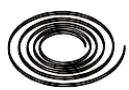
1 junta de plástico
natural_image
Isometric diagram of a rectangular cabinet with two arrows indicating directional flow or movement (no text or symbols)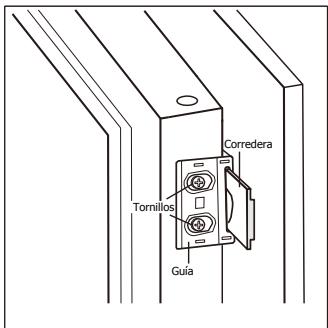
Instalación
natural_image
Technical line drawing of a mechanical assembly with no visible text or symbolsnatural_image
Simple line drawing of a mechanical frame with a hanging weight and rotational arrow (no text or symbols)natural_image
Diagram showing a curved pipe or duct with an arrow indicating direction, alongside a magnified inset (no text or symbols)3. USO DEL APARATO
Primera utilización
Limpieza interior
natural_image
Line drawing of a hand placing a flat surface on a shelf (no text or symbols)natural_image
Diagram of a container with two upward arrows indicating flow or movement (no text or symbols)natural_image
Diagram showing a hand holding scissors inside a circular frame with arrows indicating rotation (no text or symbols)natural_image
Pure technical line drawing of a mechanical component with no text or symbols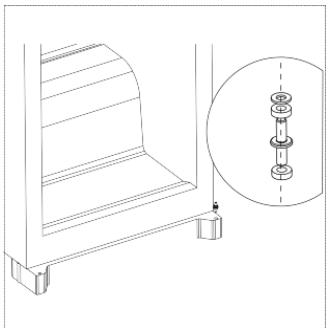
natural_image
Technical line drawing of a mechanical assembly with a magnified inset showing internal components (no text or symbols)natural_image
Technical line drawing of a mechanical bracket assembly with four sequential steps showing pin alignment and rotation (no text or symbols)natural_image
Pure mechanical diagram showing a rotating component mounted on a table with no text or symbolsnatural_image
Isometric diagram of a rectangular cabinet with two arrows indicating directional flow or movement (no text or symbols)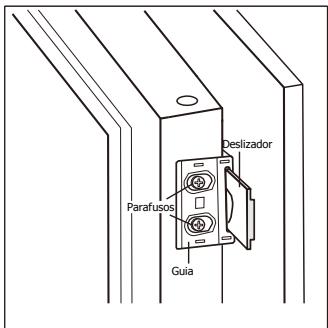
natural_image
Technical line drawing of a mechanical assembly with no visible text or symbolsnatural_image
Simple line drawing of a mechanical frame with a hanging weight and rotational arrow (no text or symbols)natural_image
Diagram showing a curved pipe or duct with an arrow indicating direction, alongside a magnified inset (no text or symbols)natural_image
Line drawing of a hand holding a shelf with a rectangular object on top (no text or symbols)natural_image
Diagram of a container with two upward arrows indicating flow or movement (no text or symbols)natural_image
Diagram showing a hand holding scissors inside a circular frame with arrows indicating rotation (no text or symbols)natural_image
Pure technical line drawing of a mechanical component with no text or symbols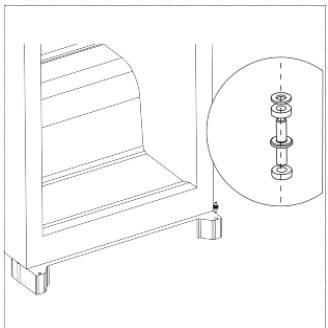
natural_image
Technical line drawing of a mechanical assembly with a magnified inset showing internal components (no text or symbols)natural_image
Technical line drawing of a mechanical bracket assembly with four sequential steps showing pin alignment and rotation (no text or symbols)natural_image
Pure mechanical diagram showing a rotating component mounted on a table with no text or symbolsInstallationssæt

Skinne x 2

Skinnedæksel x 2
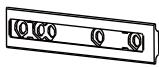
Glider x 2
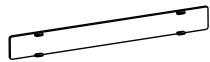
Gliderdæksel x 2

Kort skrue x 13

Lang skrue x 2
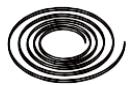
Gummipakning x 1
natural_image
Diagram of a door with arrows indicating direction, no text or symbols present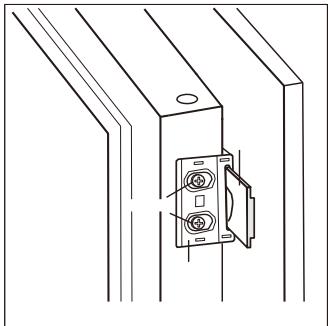
natural_image
Technical line drawing of a mechanical assembly with a bracket and mounting bracket (no text or symbols)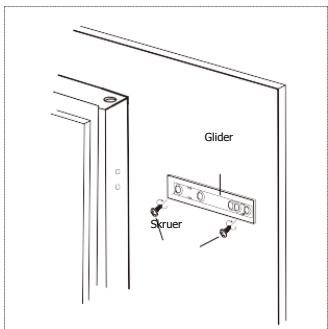
Glider
Skruer
Skinne
Installation
natural_image
Technical line drawing of a mechanical assembly with no visible text or symbolsnatural_image
Simple line drawing of a mechanical frame with a hanging weight and rotational arrow (no text or symbols)natural_image
Diagram showing a curved pipe or duct with an arrow indicating direction, alongside a magnified inset (no text or symbols)3. BRUG AF ENHEDEN
Første ibrugtagning
Rengøring indvendig
natural_image
Line drawing of a hand holding a shelf with a tray (no text or symbols)natural_image
Diagram showing two upward-pointing arrows inside a container (no text or symbols)natural_image
Diagram showing a hand holding scissors inside a circular frame with arrows indicating motion (no text or symbols)natural_image
Simple line drawing of a rectangular object with a curved arrow indicating rotation or motion (no text or symbols)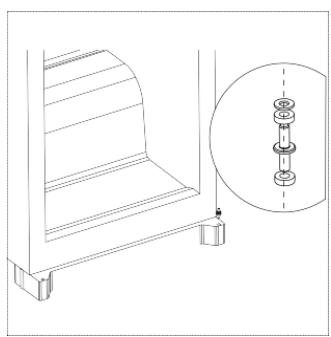
natural_image
Technical line drawing of a mechanical bracket with a magnified inset showing internal components (no text or symbols)natural_image
Technical line drawing of a mechanical bracket assembly with four sequential steps showing pin alignment and rotation (no text or symbols)natural_image
Pure mechanical diagram showing a rotating component with no text or symbolsInstalační souprava

Vodítko x 2

Kryt vodítka x 2
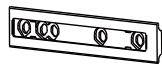
Šoupátko x 2
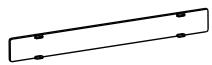
Kryt šoupátka x 2

Krátký šroubek x 13

Dlouhý šroub x 2
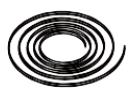
Gumové těsnění x 1
natural_image
Isometric diagram of a rectangular cabinet with two arrows indicating directional flow or movement (no text or symbols)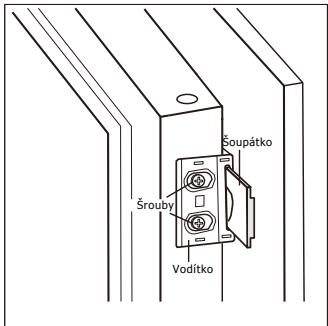
natural_image
Technical line drawing of a mechanical assembly with no visible text or symbolsnatural_image
Simple line drawing of a mechanical frame with a hanging weight and rotational arrow (no text or symbols)natural_image
Diagram showing a curved pipe or duct with an arrow indicating direction, alongside a magnified inset (no text or symbols)3. POUŽÍVÁNÍ VAŠEHO SPOTŘEBIČE
První použití
Čištění interiéru
natural_image
Line drawing of a hand holding a shelf with a rectangular object on top (no text or symbols)natural_image
Diagram of a container with two upward arrows indicating flow or movement (no text or symbols)natural_image
Diagram showing a hand holding scissors inside a circular frame with arrows indicating rotation (no text or symbols)Výměna světla
natural_image
Simple line drawing of a table with a pointer and rotation arrow (no text or symbols)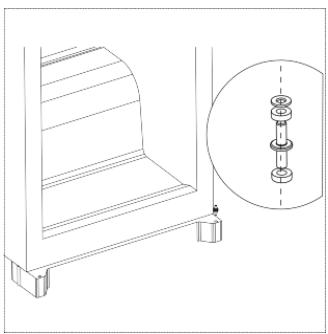
natural_image
Technical line drawing of a mechanical assembly with a close-up inset showing internal components (no text or symbols)natural_image
Technical line drawing of four mechanical bracket components with arrows indicating assembly or transformation (no text or symbols)natural_image
Pure mechanical diagram showing a rotating component mounted on a table with no text or symbolsnatural_image
Isometric diagram of a rectangular cabinet with two arrows indicating directional flow or movement (no text or symbols)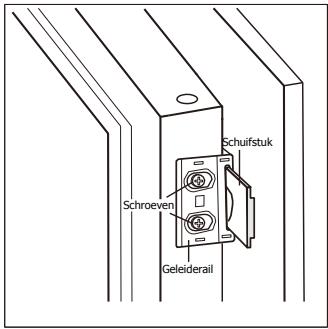
Installatie
natural_image
Technical line drawing of a mechanical assembly with no visible text or symbolsnatural_image
Simple line drawing of a mechanical frame with a pulley and rotational arrow (no text or symbols)natural_image
Diagram showing a curved pipe or duct with an arrow indicating direction, alongside a magnified inset (no text or symbols)3. UW TOESTEL GEBRUIKEN
Eerste gebruik
natural_image
Line drawing of a hand placing a rectangular object on a shelf (no text or symbols)natural_image
Diagram of a container with two upward arrows indicating flow or movement (no text or symbols)natural_image
Diagram of scissors cutting through a circular opening with rotation arrows (no text or symbols)Lamp vervangen
- Kits d'installation
- UTILISATION DE VOTRE APPAREIL
- REPLACEMENT DE LA LAMPE
- Warning:
- CONTENTS
- FOR THE USER'S ATTENTION
- Safety and warning information
- GENERAL SAFETY AND WARNINGS
- WARNING
- Refrigerant
- Caution: risk of fire
- Disposal
- Installation
- Advice:
- ELECTRICAL CONNECTION
- Electrical Installation Tips
- ENERGY SAVING
- CLEANING AND MAINTENANCE
- INTRODUCTION TO YOUR APPLIANCE
- Overview
- Kits for installation
- Install the appliance
- USING YOUR APPLIANCE
- First use
- Cleaning the interior
- Control Panel
- Buttons
- Lights
- Operation
- Temperature Setting
- Smart Mode
- Super Mode
- Turn off the appliance
- Door open alarm
- Accessories Movable shelves
- Positioning the door shelves
- Hints for fresh food refrigeration
- CLEANING AND MAINTENANCE
- Cleaning
- Clean drain hole
- Replace the lamp
- TROUBLESHOOTING
- Kit de instalación
- Instalación
- USO DEL APARATO
- Primera utilización
- Limpieza interior
- Installationssæt
- BRUG AF ENHEDEN
- Første ibrugtagning
- Rengøring indvendig
- Instalační souprava
- POUŽÍVÁNÍ VAŠEHO SPOTŘEBIČE
- První použití
- Čištění interiéru
- Výměna světla
- Installatie
- UW TOESTEL GEBRUIKEN
- Eerste gebruik
- Lamp vervangen
Brand : DE DIETRICH
Model : DRL 1624J
Category : Refrigerator