 ManualGo.com
 NESPRESSO VERTUO YY4606FD - Machine à café KRUPS - Free user manual and instructions
Find the device manual for free NESPRESSO VERTUO YY4606FD KRUPS in PDF.


Download the instructions for your Machine à café in PDF format for free! Find your manual NESPRESSO VERTUO YY4606FD - KRUPS and take your electronic device back in hand. On this page are published all the documents necessary for the use of your device. NESPRESSO VERTUO YY4606FD by KRUPS.
USER MANUAL NESPRESSO VERTUO YY4606FD KRUPS
CO N N E C TI V IT Y ( V E R T U O N E X T / V E R T U O P O P)
M AC H I N E OV E RV I E W
9 Adjustable water tank arm
Unboxing: some dust may be present on the surface of the machine due to the recycled materials used in the packaging. This is not dangerous, simply clean with a soft tissue.
1 Water tank and lid
4 ON/OFF and coffee button
FR Réservoir d’eau et couvercle DE Wassertank und Deckel IT Serbatoio dell’acqua e coperchio ES Depósito de agua y tapa PT Depósito de água e tampa PL Zbiornik na wodę i pokrywa RU Резервуар для воды с крышкой NL Waterreservoir en deksel DA Vandtank og låg NO Vanntank og lokk SV Vattentank och lock FI Vesisäiliö ja kansi CS Nádoba na vodu s víkem SK Nádržka na vodu s vekom HU Víztartály és fedő
www.nespresso.com/help
W H Y S H O U L D Y O U PA I R YO U R V E R T U O N E X T / V E RTU O P O P M AC H I N E:
www.nespresso.com/descaling
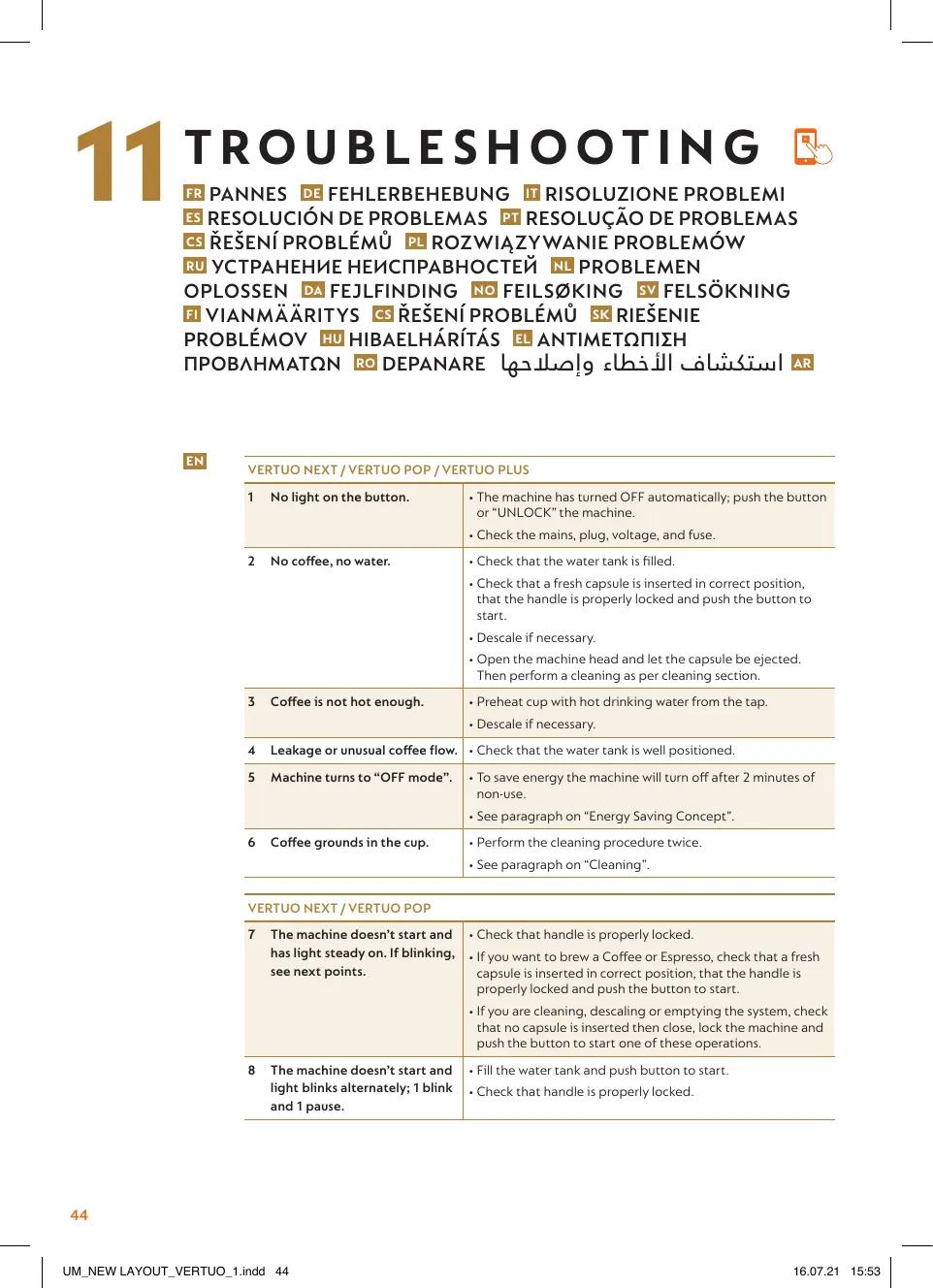
• The machine has turned OFF automatically; push the button or “UNLOCK” the machine. • Check the mains, plug, voltage, and fuse.
No coffee, no water.
• Check that the water tank is filled. • Check that a fresh capsule is inserted in correct position, that the handle is properly locked and push the button to start. • Descale if necessary. • Open the machine head and let the capsule be ejected. Then perform a cleaning as per cleaning section.
Coffee is not hot enough.
Leakage or unusual coffee flow. • Check that the water tank is well positioned.
Machine turns to “OFF mode”.
Coffee grounds in the cup.
• Preheat cup with hot drinking water from the tap. • Descale if necessary.
• To save energy the machine will turn off after 2 minutes of non-use. • See paragraph on “Energy Saving Concept”. • Perform the cleaning procedure twice. • See paragraph on “Cleaning”.
VERTUO NEXT / VERTUO POP 7
he machine doesn’t start and • Check that handle is properly locked. T has light steady on. If blinking, • If you want to brew a Coffee or Espresso, check that a fresh see next points. capsule is inserted in correct position, that the handle is properly locked and push the button to start. • If you are cleaning, descaling or emptying the system, check that no capsule is inserted then close, lock the machine and push the button to start one of these operations.
The machine doesn’t start and light blinks alternately; 1 blink and 1 pause.
• Fill the water tank and push button to start. • Check that handle is properly locked.
Light blinks while machine is running.
• If coffee is flowing normally, this indicates the machine is working properly. • If only water is flowing, the machine is executing a user request for either cleaning, descaling or emptying the system. Refer to the corresponding paragraph in this user manual. • Turn the machine to “OFF mode” by pushing the button for 3 seconds and then push it again to turn the machine ON. Now wait approximately 20 minutes to allow the machine to cool down after extensive use.
10 Light blinks and machine is not • It will take some time before the coffee flow comes out (due to barcode reading and pre-wetting the coffee). running. • Check that a fresh capsule is inserted in correct position, that the handle is properly locked and push the button to start. • Fill the water tank and push button to start. • Turn the machine to “OFF mode” by pushing the button for 3 seconds and then push it again to turn the machine ON. Now wait approximately 20 minutes to allow the machine to cool down after extensive use. 11 Light blinks alternately 2 blinks • During regular Coffee/Espresso preparation: 1) Unlock the handle and open the machine head to check that a fresh undamaged capsule is and 1 pause continuously. inserted in the correct position. Machine is not running. 2) Check that the handle is in “LOCKED” position. 3) Check that the water tank is filled. • During Descaling, Emptying and Cleaning: 1) Check that capsule is ejected. 2) Check that the handle is in “LOCKED” position. • During Programming Volume: 1) Check if a capsule has been well inserted. 2) Please refer to the corresponding chapter. • If problem persists: 1. Unlock the handle and open machine head. 2. Replace capsule (if needed). 3. Disconnect powercord from the outlet and plug the machine back into outlet after 10 seconds. 4. Close the head and press the button to turn ON and press again to start brewing. If problem persists, call Nespresso. 12 Light alternately blinking 3 times and then steady on.
• Descaling needed: machine can be operated when alert appears only a few times after this alert before descaling becomes necessary.
VERTUO PLUS 7b Coffee leakage.
• Open the machine head and let the capsule be ejected. Then perform a cleaning. • Empty and clean the cup support. • Descale if necessary. • If problem persists, call the Nespresso Club.
BNV520, BNV550, BNV530, BNV560, BNV540, BNV570
التخلص من الماكينة وحماية البيئة This appliance complies with the EU Directive 2012/19/EC. Packaging materials and appliance contain recyclable materials. Your appliance contains valuable materials that can be recovered or can be recycled. Separation of the remaining waste materials into different types facilitates the recycling of valuable raw materials. Leave the appliance at a collection point. You can obtain information on disposal from your local authorities. To know more about Nespresso sustainability strategy, go to www.nespresso.com/positive
→ N E S PRE S SO.COM