
UMBRA55UHD - Television TELEFUNKEN - Free user manual and instructions
Find the device manual for free UMBRA55UHD TELEFUNKEN in PDF.



| Brand | TELEFUNKEN |
| Model | UMBRA55UHD |
| Product type | LED TV 55" (140 cm) |
| Resolution | Ultra HD (3840 x 2160 pixels) |
| Dimensions with stand (W x H x D) | 1239 x 777 x 344 mm |
| Dimensions without stand (W x H x D) | 1239 x 716 x 54 mm |
| Power consumption | 140 W |
| Power supply | 220-240 V AC, 50 Hz |
| Tuner | DVB-T2/C (terrestrial and cable) |
| Connectivity | HDMI (x4), USB (x2), Ethernet, Wi-Fi 802.11 a/b/g/n |
| Smart functions | HbbTV, Netflix, YouTube, audio/video sharing |
| USB recording | Yes (PVR, Timeshift) |
| Audio power | 2 x 10 W (RMS) |
| Care and cleaning | Unplug before cleaning. Use a soft, dry cloth. |
| Safety | Do not expose to moisture, do not block ventilation openings, use a stable stand. |
Frequently Asked Questions - UMBRA55UHD TELEFUNKEN
User questions about UMBRA55UHD TELEFUNKEN
0 question about this device. Answer the ones you know or ask your own.
Ask a new question about this device
Download the instructions for your Television in PDF format for free! Find your manual UMBRA55UHD - TELEFUNKEN and take your electronic device back in hand. On this page are published all the documents necessary for the use of your device. UMBRA55UHD by TELEFUNKEN.
USER MANUAL UMBRA55UHD TELEFUNKEN
MANUAL DE INSTRUCTIONS
OPERATING INSTRUCTIONS
UMBRA55UHD
Television LED de 55" (140 cm)
TELEVISION COLOR CON MANDO A DISTANCIA
TVACORESCOMREMOTECONTROL
COLOUR TELEVISION WITH REMOTE CONTROL
Indices
CLASS 1 LASER PRODUCT
funacioneto.
Markings on the Product 62
Environmental Information. 62
Features 63
Accessories Included 63
Standby Notifications. 63
TV Control Buttons & Operation 63
Inserting the Batteries into the Remote 63
Connect Power 64
Antenna Connection 64
Notification. 64
Specification 64
Remote Control 65
Connections. 66
Switching On/Off. 67
First Time Installation 67
MediaPlayback via USB Input 67
Recording a Programme 68
Timeshift Recording. 68
Instant Recording 68
Watching Recorded Programmes 68
Recording Configuration. 68
Media Browser Menu 69
FollowMe TV (if available) 69
CEC and CEC RC Passthrough 69
E-Manual 69
TV Menu Contents. 70
General TV Operation 73
Using the Channel List 73
Configuring Parental Settings. 73
ElectronicProgramme Guide (EPG) 73
Teletext Services 74
Software Upgrade 74
Troubleshooting & Tips 74
PC Input Typical Display Modes. 75
AV and HDMI Signal Compatibility 76
Supported Video File Formats for USB Mode ....77
Supported Picture File Formats for USB Mode ....77
Supported Audio File Formats for USB Mode ....78
Supported DVI Resolutions 79
Internet Browser 84
Safety Information

CAUTION
RISK OF ELECTRIC SHOCK DO NOT OPEN

CAUTION: TO REDUCE THE RISK OF ELECTRIC SHOCK DO NOT REMOVE COVER (OR BACK).
NO USER-SERVICEABLE PARTS INSIDE. REFER SERVICING TO QUALIFIED SERVICE PERSONNEL.
Don't operate your TV in extreme ambient conditions as this may cause damage to your TV.

In extreme weather (storms, lightning) and long inactivity periods (going on holiday) disconnect the TV set from the mains. The mains plug is used to disconnect TV set from the mains and therefore it must remain readily operable.

This sign is present wherever there is very important information on operation and maintenance of the appliance in the literature accompanying it.
Note: Follow the on screen instructions for operating the related features.

IMPORTANT - Please read these instructions fully before installing or operating

WARNING: Never let people (including
children) with reduced physical, sensory or mental capabilities or lack of experience and / or knowledge use electrical devices unsupervised.
- For ventilation purposes, leave a free space of at least 10cm all around the set.
- Do not block ventilation holes.
- Do not place the TV on sloping or unstable surfaces, the TV may tip over.
- Use this device in moderate climates.
- The power cord plug should be easily accessible. Do not place the TV, furniture, etc. on the power cord. A damaged power cord/plug can cause fire or give you an electric shock. Handle the power cord by the plug, do not unplug the TV by pulling the power cord. Never touch the power cord/plug with wet hands as this could cause a short circuit or electric shock. Never make a knot in the power cord or tie it with other cords. When damaged it must be replaced, this should only be done by qualified personnel.
- Do not use this TV in a humid or damp environment. Do not expose the TV to liquids. In case the cabinet contacts any liquids unplug the TV immediately and have it checked by qualified personnel before operating it any further.
- Do not expose the TV to direct sunlight, open flames or place it near intense heat sources such as electric heaters.
-
Listening in excessive volumes from earphones and headphones may cause hearing loss.
-
Ensure that no open flame sources, such as lit candles, are placed on top of the TV.
- To prevent injuries, this TV must be securely attached to a wall by carefully following the instructions (if the option is available).
- Occasionally, a few non-active pixels may appear on the screen as a fixed blue, green or red point. Please note that this does not affect the performance of your product. Take care not to scratch the screen with fingernails or other hard objects.
- Before cleaning, unplug the TV from the wall socket. Only use a soft, dry cloth while cleaning.
| Warning | Serious injury or death risk |
| Risk of electric shock | Dangerous voltage risk |
| Caution | Injury or property damage risk |
| Important | Operating the system correctly |
| Notice | Additional notes marked |
Markings on the Product
The following symbols are used on the product as a marker for restrictions and precautions and safety instructions. Each explanation shall be considered where the product bears related marking only. Note such information for security reasons.

Class II Equipment: This appliance is designed in such a way that it does not require a safety connection to electrical earth.

Class II Equipment With Functional
Earthing: This appliance is designed in such a way that it does not require a safety
connection to electrical earth, the earth connection is used for functional purposes.

Protective Earth Connection: The marked terminal is intended for connection of the protective earthing conductor associated with pply wiring.

Hazardous Live Terminal: The marked terminal(s) is/are hazardous live under normal operating conditions.

Caution, See Operating Instructions: The marked area(s) contain(s) user replaceable coin or button cell batteries.

Class 1 Laser Product: This product contains Class 1 laser source that is safe under reasonably foreseeable conditions of operation.
WARNING
Do not ingest the battery, Chemical Burn Hazard (The accessories supplied with or) This product may contain a coin/ button cell battery. If the coin/ button cell battery is swallowed, it can cause severe internal burns in just 2 hours and can lead to death.
Keep new and used batteries away from children. If the battery compartment does not close securely, stop using the product and keep it away from children.
If you think batteries might have been swallowed or placed inside any part of the body, seek immediate medical attention.
WARNING
Never place a television set in an unstable location. A television set may fall, causing serious personal injury or death. Many injuries, particularly to children, can be avoided by taking simple precautions such as;
- Using cabinets or stands recommended by the manufacturer of the television set.
- Only using furniture that can safely support the television set.
- Ensuring the television set is not overhanging the edge of the supporting furniture.
- Not placing the television set on all furniture (for example, cupboards or bookcases) without acnoring both the furniture and the television set to a suitable support.
- Educating children about the dangers of climbing on furniture to reach the television set or its controls.
If your existing television set is being retained and relocated, the same considerations as above should be applied.
Environmental Information
This television is designed to be environment friendly. To reduce energy consumption, you can follow these steps:
If you set the Energy Saving to Minimum, Medium, Maximum or Auto the TV will reduce the energy consumption accordingly. If you like to set the Backlight to a fixed value set as Custom and adjust the Backlight (located under the Energy Saving setting) manually using Left or Right buttons on the remote. Set as Off to turn this setting off.
Note: Available Energy Saving options may differ depending on the selected Mode in the System>Picture menu.
The Energy Saving settings can be found in the System>Picture menu. Note that some picture settings will be unavailable to be changed.
If pressed Right button while Auto option is selected or Left button while Custom option is selected, "Screen
will be off in 15 seconds." message will be displayed on the screen. Select Proceed and press OK to turn the screen off immediately. If you don't press any button, the screen will be off in 15 seconds. Press any button on the remote or on the TV to turn the screen on again.
Note: Screen Off option is not available if the Mode is set to Game.
When the TV is not in use, please switch off or disconnect the TV from the mains plug. This will also reduce energy consumption.
Features
- Remote controlled colour TV
Fully integrated digital terrestrial/cable TV (DVB-T2/C) - HDMI inputs to connect other devices with HDMI sockets
- USB input
- OSD menu system
- Scart socket for external devices (such as DVD Players, PVR, video games, etc.)
- Stereo sound system
- Teletext
- Headphone connection
Automatic programming system - Manual tuning
Automatic power down after up to eight hours. - Sleep timer
- Child lock
Automatic sound mute when no transmission. - NTSC playback
AVL (Automatic Volume Limiting) - PLL (Frequency Search)
PC input
Game Mode (Optional) - Picture off function
Programme recording
Programme timeshifting - Ethernet (LAN) for Internet connectivity and service
CE 802.11 a/b/g/n built in WIFI Support
Audio Video Sharing
HbbTV
Accessories Included
Remote Control
- Batteries: 2 x AAA
- Instruction Book
- Side AV Connection Cable
- Mini Scart Adapter Cable
Standby Notifications
If the TV does not receive any input signal (e.g. from an aerial or HDMI source) for 5 minutes, it will go into standby. When you next switch-on, the following message will be displayed: "TV switched to stand-by mode automatically because there was no signal for a long time." Press OK to continue.
If the TV is on and it isn't being operated for a while it will go into standby. When you next switch-on, the following message will be displayed. "TV switched to stand-by mode automatically because no operation was made for a long time." Press OK to continue.
TV Control Buttons & Operation
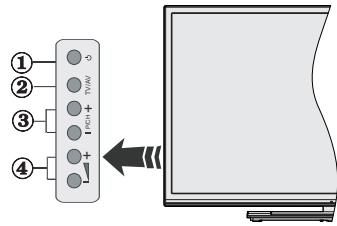
- Standby/On button
- Source button
- Programme +/- buttons
- Volume +/- buttons
Press the Volume + / - buttons simultaneously to view main menu and use Programme + / - buttons to navigate and Volume + / - buttons to change value.
Note: The position of the control buttons may differ depending on the model.
Operation with the Remote Control
Press the Menu button on your remote control to display main menu screen. Use the directional buttons to select a menu tab and press OK to enter. Use the directional buttons again to select or set an item. Press Return/Back or Menu button to quit a menu screen.
Input Selection
Once you have connected external systems to your TV, you can switch to different input sources. Press the Source button on your remote control consecutively to select the different sources.
Changing Channels and Volume
You can change the channel and adjust the volume by using the Volume +/- and Programme +/- buttons on the remote.
Inserting the Batteries into the Remote
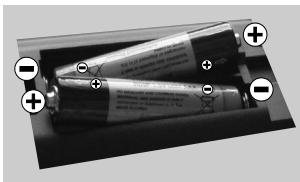
Remove the back cover to reveal the battery compartment. Insert two size AAA batteries. Make sure the (+) and (-) signs match (observe correct polarity). Do not mix old and new batteries. Replace
only with same or equivalent type. Place the cover back on.
Connect Power
IMPORTANT: The TV set is designed to operate on 220-240V AC, 50Hz socket. After unpacking, allow the TV set to reach the ambient room temperature before you connect the set to the mains. Plug the power cable to the mains socket outlet.
Antenna Connection
Connect the aerial or cable TV plug to the AERIAL INPUT (ANT-TV) socket located on the rear bottom side of the TV.
Rear bottom side of the TV


Notification
TRADEMARK ACKNOWLEDGMENT
The terms HDMI and High-Definition Multimedia Interface, and the HDMI Logo are trademarks or registered trademarks of HDMI Licensing LLC in the United States and other countries.

HIGH-DEFINITION MULTIMEDIA INTERFACE
Manufactured under license from Dolby Laboratories. Dolby and the double-D symbol are trademarks of Dolby Laboratories.

DOLBY DIGITAL PLUS
YouTube and the YouTube logo are trademarks of Google Inc.
Information for Users on Disposal of Old Equipment and Batteries
[European Union only]
Equipment bearing these symbols should not be disposed as general household waste.
You should look for appropriate recycling facilities and systems for the disposal of these products.
Notice: The sign Pb below the symbol for batteries indicates that this battery contains lead.
![TELEFUNKEN UMBRA55UHD - [European Union only] - 1](/content/2024/11/224581/images/2310887dcd15e6db8cfb5e161062fb510bb5ef2d2da687fa409e30f4f139fa0e.jpg)
■ Products
![TELEFUNKEN UMBRA55UHD - [European Union only] - 2](/content/2024/11/224581/images/ff4ab2b37b8d75a6b8a53394b37ab2507e495f662f662ecdbd55d3a596fe3e64.jpg)
Battery
Specification
| TV Broadcasting | PAL BG/I/DK/LL' SECAM BG/DK |
| Receiving Channels | VHF (BAND I/III) - UHF (BAND U) - HYPERBAND |
| Digital Reception | Fully integrated digital terrestrial-cable TV (DVB-T-C) (DVB-T2 compliant) |
| Number of Preset Channels | 1.000 |
| Channel Indicator | On Screen Display |
| RF Aerial Input | 75 Ohm (unbalanced) |
| Operating Voltage | 220-240V AC, 50Hz. |
| Audio | German+Nicam Stereo |
| Audio Output Power (WRMS.) (10% THD) | 2 x 10W |
| Power Consumption (W) | 140W |
| TV Dimensions DxLxH (with foot) (mm) | 344 x 1239 x 777 |
| TV Dimensions DxLxH (without foot) (mm) | 32/54 x 1239 x 716 |
| Display | 55" |
| Operation temperature and operation humidity | 0°C up to 40°C, 85% humidity max |
![TELEFUNKEN UMBRA55UHD - [European Union only] - 3](/content/2024/11/224581/images/f4002e8c113742373f6ad19f587fbfb48dfe28c6d37f79f9794c6fa6da236c27.jpg)
(*) MY BUTTON 1 & MY BUTTON 2:
These buttons may have default functions depending on the model. However you can set a special function to these buttons by pressing on them for five seconds when on a desired source or channel. A confirmation message will be displayed on the screen. Now the selected MY BUTTON is associated with the selected function.
Note that if you perform First Time Installation, MY BUTTON 1&2 will return to their default function.
- Source: Shows all available broadcast and content sources
- Netflix: Launches the Netflix application, if this feature is supported by your TV
- YouTube: Launches the YouTube application
- Play: Starts to play selected media
- Record: Records programmes
- Rapid reverse: Moves frames backwards in media such as movies
- Language: Switches between sound modes (analogue TV), displays and changes audio/subtitle language (digital TV, where available)
- Red button
- Green button
- Numeric buttons: Switches the channel, enters a number or a letter in the text box on the screen
- TV: Displays channel list / Switches to TV Source
- Menu: Displays TV menu
- Internet: Opens the portal page, where you can reach many web based applications
- Volume +/-
- Back/Return: Returns to previous screen, opens index page (in TXT mode)
- Favourites: Displays user specified favourite channels
- Screen: Changes the aspect ratio of the screen
- My button 1 (*)
- My button 2 (*)
- Text: Displays teletext (where available), press again to superimpose the teletext over a normal broadcast picture (mix)
- EPG (Electronic programme guide): Displays the electronic programme guide
- Mute: Completely turns off the volume of the TV
- Info: Displays information about on-screen content
- Exit: Closes and exits from displayed menus or returns to previous screen
- OK: Confirms user selections, holds the page (in TXT mode), views channel list (DTV mode)
- Programme + / -
- Directional buttons: Helps navigate menus, content etc. and displays the subpages in TXT mode when pressed Right or Left
- Quick Menu: Displays a list of menus for quick access
- Swap: Quickly cycles between previous and current channels or sources
- Yellow button
- Blue button
- Subtitles: Turns subtitles on and off (where available)
- Rapid advance: Moves frames forward in media such as movies
- Stop: Stops the media being played
- Pause: Pauses the media being played, starts timeshift recording
- Media browser: Opens the media browsing screen
- Standby: Switches On / Off the TV
Connections
| Connector | Type | Cables | Device |
| Mini Scart Connection (bottom) | Mini Scart adapter cable | ||
| VGA Connection (bottom) | |||
| AUDIO IN | PC/YPbPr Audio Connection (back) | YPbPr/PC Audio Cable | |
| HDMI Connection (bottom&side) | |||
| SPDIF | SPDIF (Optical Out) Connection (bottom) | ||
| SIDE AV | Side AV (Audio/Video) Connection (side) | Side Audio/Video Connection Cable | |
| HEADPHONE | Headphone Connection (side) | ||
| YPBPR | YPbPr Video Connection (back) | YPbPr Connection Cable | |
| USB | USB Connection (back&side) | ||
| CI Connection (side) | CAM module | ||
| LAN | Ethernet Connection (back) | LAN / Ethernet Cable | |
| Subwoofer Connection (back) | |||
NOTE: When connecting a device via the YPbPr or Side AV input, you must use the connection cables to enable connection. See the illustrations on the left side. | To enable PC/YPbPr audio, you will need to use the Back Audio inputs with a YPbPr/PC audio cable for audio connection. | If an external device is connected via the SCART socket, the TV will automatically switch to AV mode. | When receiving DTV channels (Mpeg4 H.264) or while in Media Browser mode, output will not be available via the scart socket. | When using the wall mounting kit (available from third party in the market, if not supplied), we recommend that you plug all your cables into the back of the TV before mounting on the wall. | Insert or remove the CI module only when the TV is SWITCHED OFF. You should refer to the module instruction manual for details of the settings. | The USB input on the back of the TV(USB 2.0) supports devices up to 500mA . Connecting devices that have current value above 500mA may damage your TV. For the USB inputs on the side of the TV(USB 3.0) this limit value is 1A. | By connecting an HDMI cable to your TV, you have to use only a shielded HDMI cable to guarantee a sufficient immunity against parasitic frequency radiation. And make sure to use a High-Speed HDMI cable that can transmit high definition signals, such as 4K contents, for trouble-free transmission.
If you want to connect a device to the TV, make sure that both the TV and the device are turned off before making any connection. After the connection is done, you can turn on the units and use them.
Switching On/Off
To Switch the TV On
Connect the power cord to a power source such as a wall socket (220-240V AC, 50 Hz).
To switch on the TV from standby mode either:
- Press the Standby button, Programme +/- or a numeric button on the remote control.
- Press the Standby button or Programme +/- on the TV.
The TV will then switch on.
To Switch the TV Off
Press the Standby button on the remote control or press the Standby button on the TV, then the TV switches into standby mode.
To power down the TV completely, unplug the power cord from the mains socket.
Note: When the TV is switched into standby mode, the standby LED can blink to indicate that features such as Standby Search, Over Air Download or Timer is active. The LED can also blink when you switch on the TV from standby mode.
First Time Installation
When turned on for the first time, the language selection screen is displayed. Select the desired language and press OK.
On the next screen, set your preferences using the directional buttons.
Note: Depending on the Country selection you may be asked to set and confirm a PIN at this point. The selected PIN cannot be 0000. You have to enter it if you are asked to enter a PIN for any menu operation later.
About Selecting Broadcast Type
Digital Aerial: If Digital Aerial broadcast search option is turned on, the TV will search for digital terrestrial broadcasts after other initial settings are completed.
Digital Cable: If Digital Cable broadcast search option is turned on, the TV will search for digital cable broadcasts after other initial settings are completed. According to your other preferences a confirmation message may be displayed before starting to search. Select YES and press OK to proceed. To cancel operation, select NO and press OK. You can select Network or set values such as Frequency, Network ID and Search Step. When finished, press OK button.
Note: Searching duration will change depending on the selected Search Step.
Analogue: If Analogue broadcast search option is turned on, the TV will search for analogue broadcasts after other initial settings are completed.
Additionally you can set a broadcast type as your favourite one. Priority will be given to the selected broadcast type during the search process and the
channels of it will be listed on the top of the Channel List. When finished, press OK to continue.
You can activate Store Mode option at this point. This option will configure your TV's settings for store environment and depending on the TV model being used, the supported features of it may be displayed on the top of the screen as an info banner. This option is intended only for store use. It is recommended to select Home Mode for home use. This option will be available in System>Settings>More menu and can be turned off/on later.
Press OK button on the remote control to continue and the Network/Internet Settings menu will be displayed. Please refer to Connectivity section to configure a wired or a wireless connection. After the settings are completed press OK button to continue. To skip to the next step without doing anything press the Rapid advance button on the remote.
After the initial settings are completed TV will start to search for available broadcasts of the selected broadcast types.
After all the available stations are stored, scan results will be displayed. Press OK to continue. The Edit Channel List menu will be displayed next. You can edit the channel list according to your preferences or press the Menu button to quit and watch TV.
While the search continues a message may appear, asking whether you want to sort channels according to the LCN() . Select Yes and press OK to confirm.
(*) LCN is the Logical Channel Number system that organizes available broadcasts in accordance with a recognizable channel number sequence (if available).
Note: Do not turn off the TV while initializing first time installation. Note that, some options may not be available depending on the country selection.
Media Playback via USB Input
You can connect 2.5" and 3.5" inch (hdd with external power supply) external hard disk drives or USB memory stick to your TV by using the USB inputs of the TV.
IMPORTANT! Back up the files on your storage devices before connecting them to the TV. Manufacturer will not be responsible for any file damage or data loss. Certain types of USB devices (e.g. MP3 Players) or USB hard disk drives/memory sticks may not be compatible with this TV. The TV supports FAT32 and NTFS disk formatting but recording will not be available with NTFS formatted disks.
While formatting USB hard drives which have more than 1TB (Tera Byte) storage space you may experience some problems in the formatting process.
Wait a little while before each plugging and unplugging as the player may still be reading files. Failure to do so may cause physical damage to the USB player and the USB device itself. Do not pull out your drive while playing a file.
You can use USB hubs with your TV's USB inputs. External power supplied USB hubs are recommended in such a case.
It is recommended to use the TV's USB input(s) directly, if you are going to connect a USB hard disk.
Note: When viewing image files the Media Browser menu can only display 1000 image files stored on the connected USB device.
Recording a Programme
IMPORTANT: When using a new USB hard disk drive, it is recommended that you first format the disk using your TV's Format Disk option in the Media Browser>Settings>Recording Settings menu.
To record a programme, you should first connect a USB disk to your TV while the TV is switched off. You should then switch on the TV to enable the recording feature.
To use recording your USB drive should have 2 GB free space and be USB 2.0 compatible. For the USB inputs on the side of the TV, USB 3.0 compatible devices can be used too. If the USB drive is not compatible an error message will be displayed.
To record long duration programmes such as movies, it is recommended to use USB Hard disk drives (HDD's).
Recorded programmes are saved into the connected USB disk. If desired, you can store/copy recordings onto a computer; however, these files will not be available to be played on a computer. You can play the recordings only via your TV.
Lip Sync delay may occur during the timeshifting. Radio record is supported. The TV can record programmes up to ten hours.
Recorded programmes are split into 4GB partitions. If the writing speed of the connected USB disk is not sufficient, the recording may fail and the timeshifting feature may not be available.
It is recommended to use USB hard disk drives for recording HD programmes.
Do not pull out the USB/HDD during a recording. This may harm the connected USB/HDD.
If the AC cord is unplugged while there is an active USB-recording timer setting, it will be cancelled.
Multiparition support is available. A maximum of two different partitions are supported. The first partition of the USB disk is used for PVR ready features. It also must be formatted as the primary partition to be used for the PVR ready features.
Some stream packets may not be recorded because of signal problems, as a result sometimes videos may freeze during playback.
Record, Play, Pause, Display (for PlayDialog) keys can not be used when teletext is on. If a recording starts from timer when teletext is on, teletext is automatically turned off. Also teletext usage is disabled when there is an ongoing playback.
While recording a programme in the background you can use menu options, switch to another source or use Media Browser functions, such as viewing pictures, playing video and music files, and even play back the ongoing recording.
Timeshift Recording
Press Pause button while watching a broadcast to activate timeshifting mode. In timeshifting mode, the programme is paused and simultaneously recorded to the connected USB disk.
Press Play button again to resume the paused programme from where you stopped. Press the Stop button to stop timeshift recording and return to the live broadcast.
Timeshift cannot be used while in radio mode.
You cannot use the timeshift fast reverse feature before advancing the playback with the fast forward option.
Instant Recording
Press Record button to start recording an event instantly while watching a programme. You can press Record button on the remote control again to record the next event after selecting the next programme from within the EPG. Press Stop button to cancel instant recording.
You can not switch broadcasts during the recording mode. While recording a programme or during the timeshifting, a warning message appears on the screen if your USB device speed is not sufficient.
Watching Recorded Programmes
Select Recordings from the Media Browser menu. Select a recorded item from the list (if previously recorded). Press the OK button to view the Play Options. Select an option then press OK button.
Note: Viewing main menu and menu items will not be available during the playback.
Press the Stop button to stop a playback and return to the Recordings.
Slow Forward
If you press Pause button while watching recorded programmes, the slow forward feature will be available. You can use Rapid advance button to slow forward. Pressing Rapid advance button consecutively will change slow forwarding speed.
Recording Configuration
Select the Recording Settings item in the Media Browser>Settings menu to configure the recording settings.
Format Disk: You can use the Format Disk feature for formatting the connected USB disk. Your PIN is required to use the Format Disk feature.
Note: Default PIN can be set to 0000 or 1234. If you have defined the PIN(is requested depending on the country selection) during the First Time Installation use the PIN that you have defined.
IMPORTANT: Formatting your USB drive will erase ALL the data on it and it's file system will be converted to FAT32. In most cases operation errors will be fixed after a format but you will lose ALL your data.
If "USB disk writing speed too slow to record" message is displayed on the screen while starting a recording, try restarting the recording. If you still get the same error, it is possible that your USB disk does not meet the speed requirements. Try connecting another USB disk.
Media Browser Menu
You can play photo, music and movie files stored on a USB disk by connecting it to your TV. Connect a USB disk to one of the USB inputs located on the side of the TV. Pressing the Menu button while in the Media Browser mode will access the Picture, Sound and Settings menu options. Pressing the Menu button again will exit from this screen. You can set your Media Browser preferences by using the Settings menu.
| Loop/Shuffle Mode Operation | |
| Start playback with the Play button and activate | All files in the list will be continuously played in original order |
| Start playback with the OK button and activate | The same file will be played continuously (repeat) |
| Start playback with the Play button and activate | All files in the list will be played once in random order |
| Start playback with the Play button and activate | All files in the list will be continuously played in the same random order. |
FollowMe TV (if available)
With your mobile device you can stream the current broadcast from your smart TV using the FollowMe TV feature. Install the appropriate Smart Center application to your mobile device. Start the application. For further information on using this feature refer to the instructions of the application you use.
Note: This application may not be compatible with all mobile devices. Both of the devices must be connected to the same network.
CEC and CEC RC Passthrough
This function allows to control the CEC-enabled devices, that are connected through HDMI ports by using the remote control of the TV.
The CEC option in the System>Settings>More menu should be set as Enabled at first. Press the Source button and select the HDMI input of the connected CEC device from the Sources List menu. When new CEC source device is connected, it will be listed in source menu with its own name instead of the connected HDMI ports name(such as DVD Player, Recorder 1 etc.).
The TV remote is automatically able to perform the main functions after the connected HDMI source has been selected.
To terminate this operation and control the TV via the remote again, press Quick Menu button on the remote, highlight the CEC RC Passthrough and set as Off by pressing Left or Right button. This feature can also be enabled or disabled under the System>Settings>More menu.
The TV supports also ARC(Audio Return Channel) feature. This feature is an audio link meant to replace other cables between the TV and the audio system (A/V receiver or speaker system).
When ARC is active, TV does not mute its other audio outputs automatically. So you need to decrease TV volume to zero manually, if you want to hear audio from connected audio device only (same as other optical or co-axial digital audio outputs). If you want to change connected device's volume level, you should select that device from the source list. In that case volume control keys are directed to connected audio device.
Note: ARC is supported only via the HDMI3 input.
System Audio Control
Allows an Audio Amplifier/Receiver to be used with the TV. The volume can be controlled using the remote control of the TV. To activate this feature set the Speakers option in the System>Settings>More menu as Amplifier. The TV speakers will be muted and the sound of the watched source will be provided from the connected sound system.
Note: The audio device should support System Audio Control feature and CEC option should be set as Enabled.
E-Manual
You can find instructions for your TV's features in the E-Manual.
To use E-Manual, press to the Info button while main menu is displayed on the screen or press Quick Menu button, select Information Booklet and press OK.
By using the directional buttons select a desired category. Every category includes different topics. Select a topic and press OK to read instructions.
To close the E-Manual screen press the Exit or Menu button.
Note: The contents of the E-Manual may vary according to the model.
TV Menu Contents
| System - Picture Menu Contents | ||
| Mode | You can change the picture mode to suit your preference or requirements. Picture mode can be set to one of these options: Cinema, Game, Sports, Dynamic and Natural. | |
| Contrast | Adjusts the light and dark values on the screen. | |
| Brightness | Adjusts the brightness values on the screen. | |
| Sharpness | Sets the sharpness value for the objects displayed on the screen. | |
| Colour | Sets the colour value, adjusting the colours. | |
| Energy Saving | For setting the Energy Saving to Custom, Minimum, Medium, Maximum, Auto, Screen Off or Off. Note: Available options may differ depending on the selected Mode. | |
| Backlight | This setting controls the backlight level. The backlight function will be inactive if the Energy Saving is set to an option other than Custom. | |
| Advanced Settings | ||
| Dynamic Contrast | You can change the dynamic contrast ratio to desired value. | |
| Noise Reduction | If the signal is weak and the picture is noisy, use the Noise Reduction setting to reduce the amount of noise. | |
| Colour Temp | Sets the desired colour temperature value. Cool, Normal, Warm and Custom options are available. | |
| White Point | If the Colour Temp option is set as Custom, this setting will be available. Increase the 'warmth' or 'coolness' of the picture by pressing Left or Right buttons. | |
| Picture Zoom | Sets the desired image size format. | |
| Film Mode | Films are recorded at a different number of frames per second to normal television programmes. Turn this feature on when you are watching films to see the fast motion scenes clearly. | |
| Skin Tone | Skin tone can be changed between -5 and 5. | |
| Colour Shift | Adjust the desired colour tone. | |
| HDMI Full Range | While watching from a HDMI source, this feature will be visible. You can use this feature to enhance blackness in the picture. | |
| PC Position | Appears only when the input source is set to VGA/PC. | |
| Autoposition | Automatically optimizes the display. Press OK to optimize. | |
| H Position | This item shifts the image horizontally to the right hand side or left hand side of the screen. | |
| V Position | This item shifts the image vertically towards the top or bottom of the screen. | |
| Dot Clock | Dot Clock adjustments correct the interference that appear as vertical banding in dot intensive presentations like spreadsheets or paragraphs or text in smaller fonts. | |
| Phase | Depending on the input source(computer etc.) you may see a hazy or noisy picture on the screen. You can use phase to get a clearer picture by trial and error. | |
| Reset | Reset the picture settings to factory default settings (except Game mode). | |
| While in VGA (PC) mode, some items in Picture menu will be unavailable. Instead, VGA mode settings will be added to the Picture Settings while in PC mode. | ||
| System - Sound Menu Contents | ||
| Volume | Adjusts the volume level. | |
| Equalizer | Selects the equalizer mode. Custom settings can be made only when in User mode. | |
| Balance | Adjusts whether the sound comes from the left or right speaker. | |
| Headphone | Sets headphone volume. Please ensure before using headphones that the headphone volume is set to a low level, to prevent damage to your hearing. | |
| Sound Mode | You can select a sound mode (If the viewed channel supports). | |
| AVL (Automatic Volume Limiting) | Sets the sound to obtain fixed output level between programmes. | |
| Headphone/Lineout | When you connect an external amplifier to your TV using the headphone jack, you can select this option as Lineout. If you have connected headphones to the TV, set this option as Headphone. Please ensure before using headphones that this menu item is set to Headphone. If it is set to Lineout, the output from the headphone socket will be set to maximum which could damage your hearing. | |
| Dynamic Bass | Enables or disables the Dynamic Bass. | |
| Surround sound | Surround sound mode can be changed as On or Off. | |
| Digital Out | Sets digital out audio type. | |
| System - Settings Menu Contents | ||
| Conditional Access | Controls conditional access modules when available. | |
| Language | You may set a different language depending on the broadcaster and the country. | |
| Parental | Enter correct password to change parental settings. You can easily adjust Menu Lock, Maturity Lock, Child Lock or Guidance in this menu. You can also set a new PIN or change the Default CICAM PIN using the related options. Note: Some menu options may not be available depending on the country selection in the First Time Installation. Default PIN can be set to 0000 or 1234. If you have defined the PIN(s requested depending on the country selection) during the First Time Installation use the PIN that you have defined. | |
| Timers | Sets sleep timer to turn off the TV after a certain time. Sets timers for selected programmes. | |
| Date/Time | Sets date and time. | |
| Sources | Enables or disables selected source options. There are Regular, Enhanced and Disabled options available for HDMI sources. Regular and Enhanced options are affecting the colour settings of the selected HDMI source. To be able to watch 4K images from an HDMI source related source setting should be set as Enhanced if the connected device is HDMI 2.0 compatible. Set as Regular if the connected device is HDMI 1.4 compatible. Set accordingly or disable the related HDMI source by setting as Disabled. | |
| Network/Internet Settings | Displays network/internet settings. | |
| Accessibility | Displays accessibility options of the TV. | |
| Hard of Hearing | Enables any special feature sent from the broadcaster. | |
| Audio Description | A narration track will be played for the blind or visually impaired audience. Press OK to see all available Audio Description menu options. This feature is available only if the broadcaster supports it. Note: Audio description sound feature is not available in recording or time shifting mode. | |
| Netflix | If this feature is supported by your TV, you can view your ESN(*) number and deactivate Netflix. (*) ESN number is an unique ID number for Netflix, created especially to identify your TV. | |
| More | Displays other setting options of the TV. | |
| Menu Timeout | Changes timeout duration for menu screens. | |
| HBBTV | You can enable or disable this feature by setting it as On or Off. | |
| Software Upgrade | Ensures that your TV has the latest firmware. Press OK to see the menu options. | |
| Application Version | Displays current software version. | |
| Subtitle Mode | This option is used to select which subtitle mode will be on the screen (DVB subtitle / Teletext subtitle) if both is available. Default value is DVB subtitle. This feature is available only for the country option of Norway. | |
| Auto TV OFF | Sets the desired time for the TV to automatically go into standby mode when not being operated. | |
| Store Mode | Select this mode for store display purposes. Whilst Store Mode is enabled, some items in the TV menu may not be available. | |
| Audio Video Sharing | Audio Video Sharing feature allows you to share files stored on your smartphone or tablet pc. If you have a compatible smartphone or tablet pc and the appropriate software is installed, you can share/play photos on your TV. See instructions of your sharing software for more information. Audio Video Sharing mode will not be available with internet portal feature. | |
| Power Up Mode | This setting configures the power up mode preference. Last State and Standby options are available. | |
| Virtual Remote | Enable or disable the virtual remote feature. | |
| CEC | With this setting you can enable and disable CEC functionality completely. Press Left or Right button to enable or disable the feature. | |
| CEC Auto Power On | This function allows the connected HDMI-CEC compatible device to turn on the TV and switch to its input source automatically. Press Left or Right button to enable or disable the feature. | |
| Speakers | To hear the TV audio from the connected compatible audio device set as Amplifier. You can use the remote control of the TV to control the volume of the audio device. | |
| Installation Menu Contents | |
| Automatic channel scan (Retune) | Displays automatic tuning options. Digital Aerial: Searches and stores aerial DVB stations. Digital Cable: Searches and stores cable DVB stations. Analogue: Searches and stores analogue stations. |
| Manual channel scan | This feature can be used for direct broadcast entry. |
| Network channel scan | Searches for the linked channels in the broadcast system. Digital Aerial: Searches for aerial network channels. Digital Cable: Searches for cable network channels. |
| Analogue fine tune | You can use this setting for fine tuning analogue channels. This feature is not available if no analogue channels are stored. |
| Installation Settings | Displays installation settings menu. Standby Search (Optional): Your TV will search for new or missing channels while in standby. Any new found broadcasts will be shown. |
| Clear Service List | Use this setting to clear channels stored. This setting is visible only when the Country option is set to Denmark, Sweden, Norway or Finland. |
| Select Active Network | This setting allows you to select only the broadcasts within the selected network to be listed in the channel list. This feature is available only for the country option of Norway. |
| First time installation | Deletes all stored channels and settings, resets TV to factory settings. |
General TV Operation
Using the Channel List
The TV sorts all stored stations in the Channel List. You can edit this channel list, set favourites or set active stations to be listed by using the Channel List options. Press the OK/TV button to open the Channel List. You can filter the listed channels by pressing the Blue button or open the Edit Channel List menu by pressing the Green button in order to make advanced changes in the current list.
Managing the Favourite Lists
You can create four different lists of your favourite channels. Enter the Channel List in the main menu or press the Green button while the Channel List is displayed on the screen in order to open the Edit Channel List menu. Select the desired channel on the list. You can make multiple choices by pressing the Yellow button. Then press the OK button to open the Channel Edit Options menu and select Add/Remove Favourites option. Press the OK button again. Set the desired list option to On. The selected channel/s will be added to the list. In order to remove a channel or channels from a favourite list follow the same steps and set the desired list option to Off.
You can use the Filter function in the Edit Channel List menu to filter the channels in the Channel list permanently according to your preferences. Using this Filter option, you can set one of your four favourite lists to be displayed every time the Channel list is opened. The filtering function in the Channel list menu will only filter the currently displayed Channel list in order to find a channel and tune in to it. This changes will not remain the next time the Channel list is opened.
Configuring Parental Settings
The Parental Settings menu options can be used to prohibit users from viewing of certain programmes, channels and using of menus. These settings are located in the System>Settings>Parental menu.
To display parental lock menu options, a PIN number should be entered. After coding the correct PIN number, Parental Settings menu will be displayed.
Menu Lock: This setting enables or disables access to all menus or installation menus of the TV.
Maturity Lock: If this option is set, TV gets the maturity information from the broadcast and if this maturity level is disabled, disables access to the broadcast.
Note: If the country option in the First Time Installation is set as France, Italy or Austria, Maturity Lock's value will be set to 18 as default.
Child Lock: If this option is set to ON, the TV can only be controlled by the remote control. In this case the control buttons on the TV will not work.
Internet Lock: If this option is set to ON, the open browser application in the portal will be disabled. Set to OFF to release the application again.
Set PIN: Defines a new PIN number.
Default CICAM PIN: This option will appear as greyed out if no CI module is inserted into the CI slot of the TV. You can change the default PIN of the CI CAM using this option.
Note: Default PIN can be set to 0000 or 1234. If you have defined the PIN(is requested depending on the country selection) during the First Time Installation use the PIN that you have defined.
Some options may not be available depending on the country selection in the First Time Installation.
Electronic Programme Guide (EPG)
Some channels send information about their broadcast schedules. Press the Epg button to view the Programme Guide menu.
There are 3 different types of schedule layouts available, Timeline Schedule, List Schedule and Now/Next Schedule. To switch between them follow the instructions on the bottom of the screen.
Timeline Schedule
Zoom (Yellow button): Press the Yellow button to see events in a wider time interval.
Filter (Blue button): Views filtering options.
Select Genre (Subtitles button): Displays Select Genre menu. Using this feature, you can search the programme guide database in accordance with the genre. Info available in the programme guide will be searched and results matching your criteria will be highlighted.
Options (OK button): Displays event options.
Event Details (Info button): Displays detailed information about selected programmes.
Next/Prev Day (Programme +/- buttons): Displays the programmes of previous or next day.
Search (Text button): Displays Guide Search menu.
Now (Swap button): Displays current event of the highlighted channel.
Rec./Stop (Record button): The TV will start to record the selected programme. You can press again to stop the recording.
IMPORTANT: Connect a USB disk to your TV while the TV is switched off. You should then switch on the TV to enable the recording feature.
Note: Switching to a different broadcast is not available during a recording.
List Schedule\*
(*) In this layout option, only the events of the highlighted channel will be listed.
Prev. Time Slice (Red button): Displays the programmes of previous time slice.
Next/Prev Day (Programme +/- buttons): Displays the programmes of previous or next day.
Event Details (Info button): Displays detailed information about selected programmes.
Filter (Text button): Views filtering options.
Next Time Slice (Green button): Displays the programmes of next time slice.
Options (OK button): Displays event options.
Rec./Stop (Record button): The TV will start to record the selected programme. You can press again to stop the recording.
IMPORTANT: Connect a USB disk to your TV while the TV is switched off. You should then switch on the TV to enable the recording feature.
Note: Switching to a different broadcast is not available during a recording.
Now/Next Schedule
Navigate (Directional buttons): Press the Directional buttons to navigate through the channels and programmes.
Options (OK button): Displays event options.
Event Details (Info button): Displays detailed information about selected programmes.
Filter (Blue button): Views filtering options.
Rec./Stop (Record button): The TV will start to record the selected programme. You can press again to stop the recording.
IMPORTANT: Connect a USB disk to your TV while the TV is switched off. You should then switch on the TV to enable the recording feature.
Note: Switching to a different broadcast is not available during a recording.
Programme Options
Use the directional buttons to highlight a programme and press OK button to display Event Options menu. The following options are available.
Select Channel: Using this option, you can switch to the selected channel.
Record / Delete Rec. Timer: Select the Record option and press the OK button. If the programme is going to be broadcasted at a future time, it will be added to Timers list to be recorded. If the selected programme is being broadcasted at the moment, recording will start immediately.
To cancel an already set recording, highlight that programme and press the OK button and select the option Delete Rec. Timer. The recording will be cancelled.
Set Timer on Event / Delete Timer on Event: After you have selected a programme in the EPG menu, press the OK button. Select Set Timer on Event option and press the OK button. You can set a timer for future programmes. To cancel an already set timer, highlight that programme and press the OK button. Then select Delete Timer on Event option. The timer will be cancelled.
Notes: You cannot switch to any other channel while there is an active recording or timer on the current channel.
It is not possible to set timer or record timer for two or more individual events at the same time interval.
Teletext Services
Press the Text button to enter. Press again to activate mix mode, which allows you to see the teletext page and the TV broadcast at the same time. Press once more to exit. If available, sections in the teletext pages will become colour-coded and can be selected by pressing the coloured buttons. Follow the instructions displayed on the screen.
Digital Teletext
Press the Text button to view digital teletext information. Operate it with the coloured buttons, cursor buttons and the OK button. The operation method may differ depending on the contents of the digital teletext. Follow the instructions displayed on the digital teletext screen. When the Text button is pressed again, the TV returns to television broadcast.
Software Upgrade
Your TV is capable of finding and updating the firmware automatically via the broadcast signal or via Internet.
Software upgrade search via user interface
On the main menu select System>Settings and then More. Navigate to Software upgrade and press the OK button. In Upgrade options menu select Scan for upgrade and press OK button to check for a new software upgrade.
If a new upgrade is found, it starts to download the upgrade. After the download is completed confirm the question asking about rebooting the TV by pressing the OK to continue with the reboot operation.
3 AM search and upgrade mode
Your TV will search for new upgrades at 3:00 o'clock if Automatic scanning option in the Upgrade options menu is set to Enabled and if the TV is connected to an aerial signal or to Internet. If a new software is found and downloaded successfully, it will be installed at the next power on.
Note: Do not unplug the power cord while led is blinking during the reboot process. If the TV fails to come on after the upgrade, unplug, wait for two minutes then plug it back in.
Troubleshooting & Tips
Tv will not turn on
Make sure the power cord is plugged in securely to wall outlet. Check if batteries are exhausted. Press the Power button on the TV.
Poor picture
- Check if you have selected the correct TV system.
- Low signal level can cause picture distortion. Please check antenna access.
-
Check if you have entered the correct channel frequency if you have done manual tuning.
-
The picture quality may degrade when two devices are connected to the TV at the same time. In such a case, disconnect one of the devices.
No picture
- This means your TV is not receiving any transmission.
Make sure the correct source has been selected. - Is the antenna connected properly?
Is the antenna cable damaged? - Are suitable plugs used to connect the antenna?
If you are in doubt, consult your dealer.
No sound
- Check if the TV is muted. Press the Mute button or increase the volume to check.
- Sound may be coming from only one speaker. Check the balance settings from Sound menu.
Remote control - no operation
- The batteries may be exhausted. Replace the batteries.
Input sources - can not be selected
- If you cannot select an input source, it is possible that no device is connected. If not;
- Check the AV cables and connections if you have tried to connect a device.
- Check the AV cables and connections if you are trying to switch to the input source dedicated to the connected device.
Recording unavailable
To record a programme, you should first connect a USB disk to your TV while the TV is switched off. You should then switch on the TV to enable recording feature. If you cannot record, try switching off the TV and then re-inserting the USB device.
USB is too slow
If a "USB disk writing speed too slow to record" message is displayed on the screen while starting a recording, try restarting the recording. If you still get the same error, it is possible that your USB disk does not meet the speed requirements. Try connecting another USB disk.
PC Input Typical Display Modes
The following table is an illustration of some of the typical video display modes. Your TV may not support all resolutions.
| Index | Resolution | Frequency |
| 1 | 640x350 | 85Hz |
| 2 | 640x480 | 60Hz |
| 3 | 640x480 | 72Hz |
| 4 | 640x480 | 75Hz |
| 5 | 800x600 | 56Hz |
| 6 | 800x600 | 60Hz |
| 7 | 800x600 | 72Hz |
| 8 | 800x600 | 75Hz |
| 9 | 1024x768 | 60Hz |
| 10 | 1024x768 | 70Hz |
| 11 | 1024x768 | 75Hz |
| 12 | 1024x768 | 85Hz |
| 13 | 1152x864 | 75Hz |
| 14 | 1280x768 | 60Hz |
| 15 | 1280x768 | 75Hz |
| 16 | 1280x960 | 60Hz |
| 17 | 1280x960 | 75Hz |
| 18 | 1280x1024 | 60Hz |
| 19 | 1280x1024 | 75Hz |
| 20 | 1360x768 | 60Hz |
| 21 | 1366x768 | 60Hz |
| 22 | 1400x1050 | 59Hz |
| 23 | 1400x1050 | 60Hz |
| 24 | 1400x1050 | 75Hz |
| 25 | 1440x900 | 60Hz |
| 26 | 1440x900 | 75Hz |
| 27 | 1600x1200 | 60Hz |
| 28 | 1680x1050 | 59Hz |
| 29 | 1680x1050 | 60Hz |
| 30 | 1920x1080 | 60Hz |
AV and HDMI Signal Compatibility
| Source | Supported Signals | Available | |
| EXT(SCART) | PAL | O | |
| SECAM | O | ||
| NTSC4.43 | O | ||
| NTSC3.58 | |||
| RGB 50/60 | O | ||
| Side AV | PAL | O | |
| SECAM | O | ||
| NTSC4.43 | O | ||
| NTSC3.58 | O | ||
| YPbPr | 480i, 480p | 60Hz | O |
| 576i, 576p | 50Hz | O | |
| 720p | 50Hz,60Hz | O | |
| 1080i | 50Hz,60Hz | O | |
| HDMI | 480i | 60Hz | O |
| 480p | 60Hz | O | |
| 576i, 576p | 50Hz | O | |
| 720p | 50Hz,60Hz | O | |
| 1080i | 50Hz,60Hz | O | |
| 1080p | 24Hz,25Hz,30Hz,50Hz,60Hz | O | |
| 3840x2160p | 24Hz,25Hz,30Hz,50Hz,60Hz | O | |
| 4096x2160p | 24Hz,25Hz,30Hz,50Hz,60Hz | O | |
(X: Not Available, O: Available)
In some cases a signal on the TV may not be displayed properly. The problem may be an inconsistency with standards from the source equipment (DVD, Set-top box, etc.). If you do experience such a problem please contact your dealer and also the manufacturer of the source equipment.
Supported Video File Formats for USB Mode
| Video Codec | Resolution | Bit Rate | Container |
| MPEG1/2 | 1080Px2@30fps, 1080P@60fps | 40Mbps | MPEG program stream (.DAT, .VOB, .MPG, .MPEG), MPEG transport stream (.ts, .trp, .tp), MP4 (.mp4, .mov), 3GPP (.3gpp, .3gp), AVI (.avi), MKV (.mkv), ASF (.asf) |
| MPEG4 | MPEG program stream (.MPG, .MPEG), MP4 (.mp4, .mov), 3GPP (.3gpp, .3gp), AVI (.avi), MKV (.mkv), ASF (.asf) | ||
| XviD | MP4 (.mp4, .mov), AVI (.avi), MKV (.mkv), ASF (.asf) | ||
| Sorenson H.263 | FLV (.flv), AVI (.avi), SWF(.swf) | ||
| H.263 | MP4 (.mp4, .mov), 3GPP (.3gpp, .3gp), AVI (.avi), MKV (.mkv) | ||
| H.264 | 3840x2160@30fps, 1080P@60fps | 135Mbps | FLV (.flv), MP4 (.mp4, .mov), 3GPP (.3gpp, .3gp), MPEG transport stream (.ts, .trp, .tp), ASF (.asf), AVI (.avi), MKV (.mkv) |
| Motion JPEG | 720P@30fps | 10Mbps | AVI (.avi), 3GPP (.3gpp, .3gp), MP4 (.mp4, .mov), MKV (.mkv), ASF (.asf) |
| VP8 | 1080P@30fps | 20Mbps | MKV (.mkv), WebM (.webm) |
| HEVC | 4K2K@60fps | 160Mbps | MP4 (.mp4, .mov), MKV (.mkv), MPEG transport stream (.ts, .trp, .tp) |
| VP9 | 4K2K@30fps | 100Mbps | MKV (.mkv), WebM (.webm) |
Supported Picture File Formats for USB Mode
| Image | Photo | Resolution (width x height) | Remark |
| JPEG | Base-line | 15360x8640 | The limit for max resolution depends on DRAM size |
| Progressive | 1024x768 | ||
| PNG | non-interlace | 9600x6400 | |
| interlace | 1200x800 | ||
| BMP | 9600x6400 |
Supported Audio File Formats for USB Mode
| Audio Codec | Sample rate | Bit Rate | |
| MPEG1/2 Layer1 | 16kHz ~ 48kHz | 32kbps ~ 448kbps | MP3 (.mp3), AVI (.avi), ASF (.asf), Matroska (.mkv, .mka), MPEG transport stream (.ts, .trp, .tp), MPEG program stream (.DAT, .VOB, .MPG, .MPEG), WAV (.wav) |
| MPEG1/2 Layer2 | 16kHz ~ 48kHz | 8kbps ~ 384kbps | MP3 (.mp3), AVI (.avi), ASF (.asf), Matroska (.mkv, .mka), MPEG transport stream (.ts, .trp, .tp), MPEG program stream (.DAT, .VOB, .MPG, .MPEG), WAV (.wav) |
| MPEG1/2 Layer3 | 16kHz ~ 48kHz | 8kbps ~ 320kbps | MP3 (.mp3), AVI (.avi), ASF (.asf), Matroska (.mkv, .mka), 3GPP (.3gpp, .3gp), MP4 (.mp4, .mov, m4a), MPEG transport stream (.ts, .trp, .tp), MPEG program stream (.DAT, .VOB, .MPG, .MPEG), FLV (.flv), WAV (.wav), SWF (.swf) |
| AC3 | 32kHz, 44.1kHz, 48kHz | 32kbps ~ 640kbps | AC3 (.ac3), AVI (.avi), Matroska (.mkv, .mka), 3GPP (.3gpp, .3gp), MP4 (.mp4, .mov, m4a), MPEG transport stream (.ts, .trp, .tp), MPEG program stream (.DAT, .VOB, .MPG, .MPEG) |
| EAC3 | 32kHz, 44.1kHz, 48kHz | 32kbps ~ 6 Mbps | EAC3 (.ec3), 3GPP (.3gpp, .3gp), MP4 (.mp4, .mov, m4a), MPEG transport stream (.ts, .trp, .tp), MPEG program stream (.DAT, .VOB, .MPG, .MPEG) |
| AAC, HEAAC | 8kHz ~ 48kHz | AAC (.aac), AVI (.avi), Matroska (.mkv, .mka), 3GPP (.3gpp, .3gp), MP4 (.mp4, .mov, m4a), MPEG transport stream (.ts, .trp, .tp), MPEG program stream (.DAT, .VOB, .MPG, .MPEG), FLV (.flv), RM (.ra) | |
| WMA | 8kHz ~ 48kHz | 128bps ~ 320kbps | ASF (.wma, .asf), AVI (.avi), Matroska (.mkv, .mka) |
| WMA 10 Pro M0 | 48kHz | < 192kbps | |
| WMA 10 Pro M1 | 48kHz | < 384kbps | |
| WMA 10 Pro M2 | 96kHz | < 768kbps | |
| G711 A/mu-law | 8kHz | 64kbps ~ 128kbps | WAV (.wav), AVI (.avi), Matroska (.mkv, .mka), 3GPP (.3gpp, .3gp), MP4 (.mp4, .mov, m4a) |
| LBR (cook) | 8kHz, 11.025kHz, 22.05kHz, 44.1kHz | 6kbps ~ 128kbps | RM (.ra) |
| FLAC | 8kHz~96kHz | < 1.6Mbps | Matroska (.mkv, .mka) |
Supported DVI Resolutions
When connecting devices to your TV's connectors by using DVI converter cable(DVI to HDMI cable - not supplied), you can refer to the following resolution information.
| 56Hz | 60Hz | 66Hz | 70Hz | 72Hz | 75Hz | |
| 640x480 | ☑ | ☑ | ||||
| 800x600 | ☑ | ☑ | ☑ | |||
| 1024x768 | ☑ | ☑ | ☑ | |||
| 1280x768 | ☑ | ☑ | ||||
| 1280x960 | ☑ | |||||
| 1360x768 | ☑ | |||||
| 1366x768 | ☑ | |||||
| 1280x1024 | ☑ | ☑ | ☑ | |||
| 1400x1050 | ☑ | |||||
| 1600x900 | ☑ |
Connectivity
Wired Connectivity
Connect to a Wired Network
- You must have a modem/router connected to an active broadband connection.
- Ensure that Nero Media Home software is installed to your PC (for Audio Video Sharing function). See "Nero Media Home Installation" section.
- Connect your PC to your modem/rodter. This can be a wired or wireless connection.
- Connect your TV to your modem/rodter via an ethernet cable. There is a LAN port at the rear (back) of your TV.
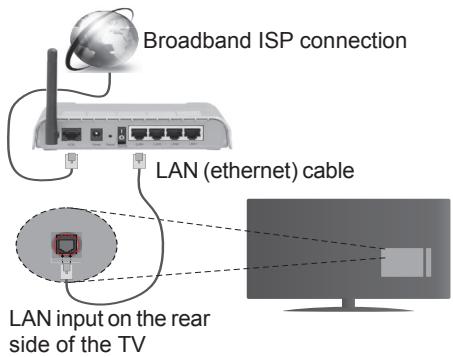
- To access and play shared files, you must select the Media Browser. Press the Menu button and select Media Browser. Press OK to continue. Select the desired file type and press OK. You must always use the Media Browser screen to access and play shared network files.
- PC/HDD/Media Player or any other devices that are compatible should be used with a wired connection for higher playback quality.
To configure wired settings please refer to the Network/Internet Settings section in the System>Settings Menu.
- You might be able to connect your TV to your LAN depending on your network's configuration. In such a case, use an ethernet cable to connect your TV directly to the network wall outlet.
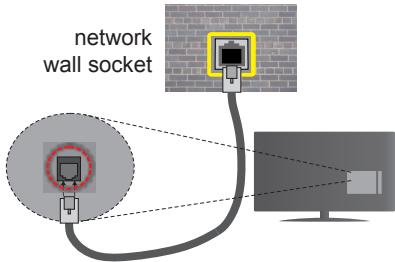
LAN input on the rear side of the TV
Configuring Wired Device Settings
Network Type
The Network Type can be selected as Wired Device, Wireless Device or Disabled, in accordance with the active connection to the TV set. Select this as Wired Device if you are connecting via an ethernet.
Internet Speed Test
Highlight Internet Speed Test and press the OK button. TV will check the internet connection bandwidth and display the result when complete.
Advanced Settings
Highlight Advanced Settings and press the OK button. On the next screen you can change the IP and DNS settings of the TV. Highlight the desired one and press Left or Right button to change the setting from Automatic to Manual. Now you can enter the Manual IP and / or Manual DNS values. Select the related item in the drop down menu and enter the new values using the numeric buttons of the remote. Press the OK button to save settings when complete.
Wireless Connectivity
To Connect to a Wireless Network
The TV cannot connect to the networks with a hidden SSID. To make your modem's SSID visible, you should change your SSID settings via the modem's software.
To Connect to a wireless LAN, you should perform the following steps:
- Ensure that Nero Media Home software is installed to your PC (for Audio Video Sharing function).
- To configure your wireless settings please refer to the Network/Internet Settings section in the System>Settings Menu.
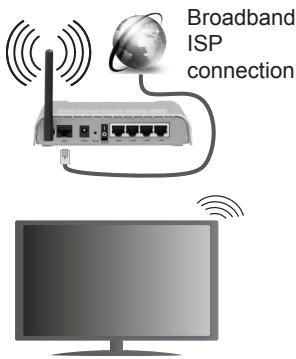
A Wireless-N router (IEEE 802.11a/b/g/n) with simultaneous 2.4 and 5 GHz bands is designed to increase bandwidth. These are optimized for smoother and faster HD video streaming, file transfers and wireless gaming.
- Use a LAN connection for quicker file sharing between other devices like computers.
- The frequency and channel differ depending on the area.
- The transmission speed differs depending on the distance and number of obstructions between the transmission products, the configuration of these products, the radio wave conditions, the line traffic and the products that you use. The transmission may also be cut off or may get disconnected depending on the radio wave conditions, DECT phones or any other WiFi 11b appliances. The standard values of the transmission speed are the theoretical maximum values for the wireless standards. They are not the actual speeds of data transmission.
- The location where the transmission is most effective differs depending on the usage environment.
- The Wireless feature of the TV supports 802.11 a,b,g & n type modems. It is highly recommended that you should use the IEEE 802.11n communication protocol in order to avoid any possible problems while watching videos.
- You must change your modem's SSID when there are any other modems around with the same SSID. You can encounter connection problems otherwise. Use a wired connection if you experience problems with a wireless connection.
Configuring Wireless Device Settings
Open the Network/Internet Settings menu and select Network Type as Wireless Device to start connection process.
The TV will scan the wireless networks automatically. A list of available networks will be displayed. Please select your desired network from the list.
Note: If the modem supports N mode, you should set N mode settings.
If the selected network is protected with a password, please enter the correct key by using the virtual keyboard. You can use this keyboard via the directional buttons and the OK button on the remote control.
Wait until the IP address is shown on the screen.
This means that the connection is now established. To disconnect from a wireless network, highlight Network Type and press Left or Right buttons to set as Disabled.
Highlight Internet Speed Test and press the OK button to check your internet connection speed. Highlight Advanced Settings and press the OK button to open the advanced setting menu. Use directional and numeric buttons to set. Press the OK button to save settings when complete.
Other Information
The status of the connection will be displayed as Connected or Not Connected and the current IP address, if a connection is established.
Connecting to your mobile device via WiFi
- If your mobile device has WiFi feature, you can connect it to your TV via a router, in order to access the content in your device. For this, your mobile device must have an appropriate sharing software.
- Connect to your router following the steps stated above in the Wireless Connectivity section.
- Afterwards, engage your mobile device with the router and then activate the sharing software on your mobile device. Then, select files that you want to share with your TV.
- If the connection is established correctly, you will be able to access the shared files from your mobile device via the Media Browser of your TV.
- Enter the Media Browser menu and the playback device selection OSD will be displayed. Select your mobile device and press the OK button to continue.
- If available, you can download a virtual remote controller application from the server of your mobile device application provider.
Note: This feature may not be supported on all mobile devices.
Wireless Display
Wireless Display is a standard for streaming video and sound content by Wi-Fi Alliance. This feature provides the ability to use your TV as wireless display device.
Using with mobile devices
There are different standards which enable sharing of screens including graphical, video and audio content between your mobile device and TV.
Plug the wireless USB dongle to TV first, if the TV doesn't have internal WiFi feature.
Then press the Source button on the remote and switch to Wireless Display source.
A screen appears stating that the TV is ready for connection.
Open the sharing application on your mobile device. These applications are named differently for each brand, please refer to the instruction manual of your mobile device for detailed information.
Scan for devices. After you select your TV and connect, the screen of your device will be displayed on your TV.
Note: This feature can be used only if the mobile device supports this feature. Scanning and connecting processes differ according to the programme you use. Android based mobile devices should have the software version V4.2.2 and above.
Connectivity Troubleshooting
Wireless Network Not Available
- Ensure that any firewalls of your network allow the TV wireless connection.
Try searching for wireless networks again, using the Network/Internet Settings menu screen.
If the wireless network does not function properly, try using the wired network in your home. Refer to the Wired Connectivity section for more information on the process.
If the TV does not function using the wired connection, check the modem (router). If the router does not have a problem, check the internet connection of your modem.
Connection is Slow
See the instruction book of your wireless modem to get information on the internal service area, connection speed, signal quality and other settings. You need to have a high speed connection for your modem.
Distruption during playback or slow reactions
You could try the following in such a case:
Keep at least three meters distance from microwave ovens, mobile telephones, bluetooth devices or any other Wi-Fi compatible devices. Try changing the active channel on the WLAN router.
Internet Connection Not Available / Audio Video Sharing Not Working
If the MAC address (a unique identifier number) of your PC or modem has been permanently registered, it is possible that your TV might not connect to the internet. In such a case, the MAC address is authenticated each time when you connect to the internet. This is a precaution against unauthorized access. Since your TV has its own MAC address, your internet service provider cannot validate the MAC address of your TV. For this reason, your TV cannot
connect to the internet. Contact your internet service provider and request information on how to connect a different device, such as your TV, to the internet.
It is also possible that the connection may not be available due to a firewall problem. If you think this causes your problem, contact your internet service provider. A firewall might be the reason of a connectivity and discovery problem while using the TV in Audio Video Sharing mode or while browsing via Audio Video Sharing feature.
Invalid Domain
Ensure that you have already logged on to your PC with an authorized username/password and also ensure that your domain is active, prior to sharing any files in your media server program on your PC. If the domain is invalid, this might cause problems while browsing files in Audio Video Sharing mode.
Using Audio Video Sharing Network Service
Audio Video Sharing feature uses a standard that eases the viewing process of digital electronics and makes them more convenient to use on a home network.
This standard allows you to view and play photos, music and videos stored in the media server connected to your home network.
1. Nero Media Home Installation
The Audio Video Sharing feature cannot be used if the server programme is not installed onto your PC. Please prepare your PC with the Nero Media Home programme. For more information about the installation, please refer to the "Nero Media Home Installation" section.
2. Connect to a Wired or Wireless Network
See the Wired/Wireless Connectivity chapters for detailed configuration information.
3. Play Shared Files via Media Browser
Select Media Browser by using the directional buttons from the main menu and press OK. The media browser will then be displayed.
Audio Video Sharing
Audio Video Sharing support is only available in the Media Browser Folder mode. To enable folder mode, go to the Settings tab in the main media browser screen and press OK. Highlight View Style and set to Folder using the Left or Right buttons. Select the desired media type and press OK.
If sharing configurations are set properly, Device Selection screen will be displayed after selecting the desired media type. If available networks are found, they will be listed on this screen. Select media server or network that you want to connect to using the Up or Down buttons and press OK. If you want to refresh the device list, press the Green button. You can press Menu to exit.
If you select the media type as Videos and choose a device from the selection menu. Then select the folder with video files in it on the next screen and all the available video files will be listed.
To play other media types from this screen, you must go back to main Media Browser screen and select the media type as desired and then perform the network selection again. Or press the Blue button to switch to next media type quickly without changing the network. Refer to the Media Browser menu section for further information on file playback.
Subtitle files do not work if you watch videos from your network through Audio Video Sharing feature.
You can connect only one television to the same network. If a problem occurs with the network, please switch your television off at the wall socket and back on again. Trick mode and jump are not supported with the Audio Video Sharing feature.
Note: There may be some PC's which may not be able to utilize the Audio Video Sharing feature due to administrator and security settings (such as business PC's).
For best home network streaming with this TV, the Nero software should be installed.
Nero MediaHome Installation
To install Nero MediaHome, please proceed as follows:
Note: The Audio Video Sharing feature cannot be used if the server programme is not installed onto your PC or if the required media server software is not installed onto the companion device.
- Enter the link below completely in the adress-bar of your web browser.
http://www.nero.com/mediahome-tv - Click the Download button on the opening page. The installation file will be downloaded onto your PC.
- After the download is completed, double click on the installation file to start the installation. The installation wizard will guide you through the installation process.
- The prerequisites screen will be displayed first. The installation wizard checks the availability of required third-party software on your PC. If applications are missing they are listed and must be installed before continuing installation.
- Click the Install button. The integrated serial will be displayed. Please do not change the displayed serial.
-
Click the Next button. The License Conditions (EULA) screen will be displayed. Please read the license agreement carefully and select the appropriate check box if you agree to the terms of the agreement. Installation is not possible without this agreement.
-
Click the Next button. On the next screen you can set your installation preferences.
- Click the Install button. The installation begins and finishes automatically. A progress bar will indicate the state of the installation process.
- Click the Finish button. The installation is completed. You will be directed to the web site of the nero software.
- A shortcut is now placed on your desktop.
Congratulations! You successfully installed Nero MediaHome on your PC.
Run Nero MediaHome by double clicking on the shortcut icon.
HINT: A broadband internet connection is required for high quality viewing. You must set the country option accordingly in the First Time Installation for proper operation of the internet portal.
Portal feature adds your TV a feature that allows you to connect a server on the Internet and view the content provided by this server over your Internet connection. Portal feature allows you to view the music, video, clip or web content with defined short-cuts. Whether you can view this content without interruption depends on the connection speed provided by your internet service provider.
Press the Internet button on your remote control to open internet portal page. You will see icons of the available applications and services on the portal screen. Use the directional buttons on your remote to select the desired one. You may view the desired content by pressing OK after selecting. Press Back/ Return button to return back to the previous screen.
Moreover, you can access some features using the short-cut feature defined for the coloured or numeric buttons of your remote.
Press the Exit button to quit the Internet portal mode.
PIP Window (depending on portal service)
Current source content will be displayed in the PIP window, if you switch to portal mode while on any active source.
If you switch to portal mode while watching TV channels, current programme will be displayed in the PIP window. You can change channels using Programme +/- buttons.
Notes:
Possible application dependent problems may be caused by the content service provider.
Portal service content and the interface may be changed at any time without prior notice.
Third party internet services may change, be discontinued or restricted at any time.
Internet Browser
To use the internet browser, enter the portal first. Then launch the Internet application on the portal.
(*) The appearance of the internet browser logo may change
In the initial screen of the browser, the thumbnails of the predefined (if any) links to web sites available will be displayed as Speed Dial options along with the Edit Speed Dial and the Add to Speed Dial options.
To navigate the web browser, use the directional buttons on the remote or a connected mouse. To see the browser options bar, move the cursor to the top of the page or press the Back/Return button. History, Tabs and Bookmarks options and the browser bar which contains previous/next buttons, the refresh button, the adress/search bar, the Speed Dial and the Opera buttons are available.
To add a desired website to the Speed Dial list for quick access, move the cursor to the top of the page or press the Back/Return button. The browser bar will appear. Highlight the Speed Dial - button and press the OK button. Then select Add to Speed Dial option and press the OK button. Fill in the blanks for Name and Address, highlight OK and press the OK button to add. Whilst you are on the site you wish to add to the Speed Dial list, highlight the Opera-0 button and press the OK button. Then highlight Add to Speed Dial option in the submenu and press the OK button again. Name and Address will be filled automatically according to the site you are visiting. Highlight OK and press the OK button to add.
You can also use the Opera menu options to manage the browser. Highlight the Opera- button and press the OK button to see available page specific and general options.
There are various ways to search or visit websites using the web browser.
Enter the address of a website(URL) into the search/ address bar and highlight the Submit button on the virtual keyboard and press the OK button to visit the site.
Enter keyword/s into the search/address bar and highlight the Submit button on the virtual keyboard and press the OK button to start a search for the related websites.
Highlight a Speed Dial thumbnail and press the OK button to visit the related website.
Your TV is compatible with USB mice. Plug your mouse or wireless mouse adaptor into the USB input of your TV for easier and quicker navigation.
Some web pages include flash content. These are not supported by the browser.
Your TV does not support any download processes from the internet via the browser.
HBBTV System
HbbTV (Hybrid Broadcast Broadband TV) is a new industry standard that seamlessly combines TV services delivered via broadcast with services delivered via broadband and also enables access to Internet only services for consumers using connected TVs and settop boxes. Services delivered through HbbTV include traditional broadcast TV channels, catch-up services, video-on-demand, EPG, interactive advertising, personalisation, voting, games, social networking and other multimedia applications.
HbbTV applications are available on channels where they are signalled by the broadcaster (currently various channels on Astra broadcast HbbTV applications). The broadcaster marks one application as "autostart" and this one is started by the platform automatically. The autostart applications are generally launched with a small red button icon to notify the user that there is an HbbTV application on that channel Press the red button to open the application page. After the page is displayed you can go back to the initial red button icon state by pressing the red button again. You can toggle between the red button icon mode and full UI mode of the application via pressing red button. It should be noted that the red button switching capability is provided by the application and some application may behave differently. If you switch to another channel while an HbbTV application is active (either in red button icon mode or full UI mode), the following scenarios can occur.
The application can continue running.
The application can be terminated.
- The application can be terminated and another autopost red button application can be launched.
HbbTV allows the applications to be retrieved both from broadband or broadcast. The broadcaster may enable both ways or one of them. If the platform does not have an operational broadband connection, the platform can still launch applications transmitted on broadcast.
The autopost red button applications generally provide links to other applications. An example of this is shown below. The user then can switch to other applications by using the links provided. The applications should provide a way to terminate themselves, usually Exit button is used for this.
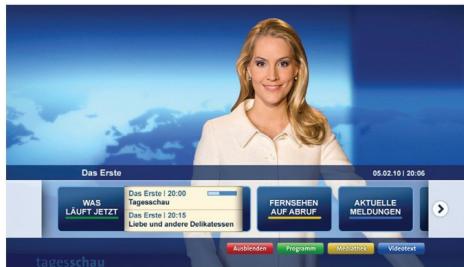
Figure a: Start bar application -84-
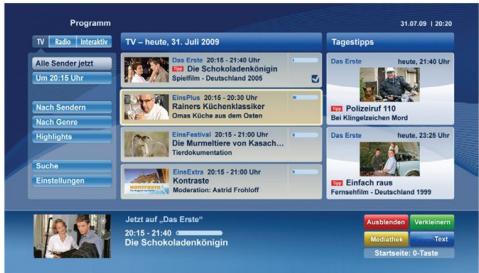
Figure b: EPG application, broadcast video is shown on the left bottom, can be terminated by pressing 0.
HbbTV applications use keys on the remote control to interact with the user. When an HbbTV application is launched, the control of some keys are owned by the application. For example, numeric channel selection may not work on a teletext application where the numbers indicate teletext pages.
HbbTV requires AV streaming capability for the platform. There are numerous applications providing VOD (video on demand) and catch-up TV services. The user can use play, pause, stop, forward, and rewind keys on the remote control to interact with the AV content.
Note: You can enable or disable this feature from the More menu in System>Settings menu.
Smart Center
Smart Center is a mobile application running on iOS and Android platforms. With your tablet or phone, you can easily stream your favourite live shows and programmes from your smart TV. Also; you can launch your portal applications, use your tablet as a remote control for your TV and share media files.
Note: Being able to use all functions of this application depends on the features of your TV.
Getting Started
To use Smart Center features, connections have to be done properly. To get connected to your network wirelessly, plug in the Wi-Fi dongle to one of the USB ports if your TV doesn't have internal wifi feature. To be able to use internet based features, your modem/ router must be connected to the internet.
IMPORTANT: Make sure the TV and mobile device are connected to the same network.
For media sharing feature Audio Video Sharing option should be enabled(if available). Press the Menu button on the remote, select System>Settings>More menu and press OK. Highlight Audio Video Sharing and change as Enabled. Your TV is ready to connect to your mobile device now.
Install the Smart Center application onto your mobile device.
Start the smart center application. If all connections are configured properly, you will see your TV's name
on your mobile device. If your TV's name doesn't appear on the list, wait a while and tap on the Refresh widget. Select your TV from the list.
Mobile Device screen
On the main screen you can find tabs to access various features.
The application retrieves actual channel list from TV first when it starts.
MY CHANNELS: The programmes of first four channels from the channel list retrieved from the TV are shown. You can change the listed channels. Press on the channel thumbnail and hold. A list of channels will be displayed and you can choose your desired channel to be replaced.
TV: You can watch content through the TV tab. In this mode you can navigate through the channel list retrieved from your TV and click on thumbnails to view the detail pages.
RECORDINGS: You can view your active recordings(if available) and reminders through this tab. To delete any item, simply press on the delete icon found on each row.
- EPG: You can view the broadcast schedules of selected channel lists through this tab. You can also navigate through channels by pressing on the selected channel on the EPG grid. Please note that updating / refreshing the EPG information may take a while depending on your network and web service quality.
Note: Internet connection is required for WEB based EPG informations.
PORTAL: This tab displays the Portal applications in scrollable view. Unless FollowMeTV (if available) is active, the selected application will be displayed on your TV screen.
Note: Internet connection is required. This tab is enabled if a portal page is in use.
SETTINS: Configure the application to your liking. You can change;
Auto-lock (Only in IOS): The screen of the device automatically turns off after a certain amount of time. Default is off, which means the screen will always stay on.
Auto-enable FollowMeTV: FollowMeTV function (if available) will start automatically when this setting is enabled. Default is disabled.
Auto-connection to TV: When enabled, your mobile device will automatically connect to last connected TV and skips the TV search screen.
Change TV (Only in IOS): Shows the currently connected TV. You can press on this setting to go to the "TV search" screen and change to a different TV.
Edit custom channel list: You can edit your custom channel list using this setting.
Choose channel list source: You can choose the channel list source to be used in the application. The options are "TV List" and "Custom List". Additionally you can activate "Remember my choice" option to set the selected channel list source as a constant choice. In this case if the selected source is available it will be used in the application.
Version No: Displays the current version of the application.
Detail Page
To open detail page tap on a programme. On the detail page screen you can get detailed information of the programmes you select. There are "Details", "Cast&Crew" and "Videos" tabs to find on this page.
DETAILS: This tab provides summary and information about the selected programme. Also there are links to facebook and twitter pages of the programme selected.
CAST&CREW: Shows all the people contributed to the current programme.
VIDEOs: Provides videos on Youtube related to the selected programme.
Note: For some functions an internet connection may be required.
FollowMe TV Feature (if available)
Tap on the FOLLOW ME TV widget located at the bottom left of the screen of your mobile device to change the layout for FollowMe TV feature.
Tap the play icon to start streaming of the content from the TV to your mobile device. Available if your device is in your routers operation range.
Mirror Mode
This mode of FollowMe TV feature is enabled by deafult and allows streaming the content from any other selected TV sources and Media Browser.
Notes:
Note that only digital(DVB-T/C/S) SD and HD channels are supported.
Multilanguage audio support and subtitle on/off features are not functional.
The streaming performance may change depending on the quality of your connection.
Media Share Page
To access the Media Share widget tap on the Uparrow arrow on the bottom left side of the screen.
If the Media Share widget is pressed, a screen is displayed where you can select the media file type to share with your TV.
Note: Not all image file formats are supported. This function will not work if Audio Video Sharing feature is not supported.
Portal Launcher
To access the Portal Launcher( ) widget tap on the Up-arrow on the bottom left side of the screen.
You can access the portal page by tapping on the Portal Launcher widget.
Note: Internet connection is required. This function will not work if a portal page is not in use.
Smart Remote Feature
You can use your mobile device as a remote control for your TV once it has connected to the TV. To use smart remote's full features tap on the Up-arrow on the bottom left side of the screen.
Voice Recognition
You can tap on the Microphone( ) widget and manage your application, giving voice commands such as "Portal!", "Volume Up/Down!", "Programme Up/Down!".
Note: This feature is only for android based devices available.
Keyboard Page
The keyboard page can be opened in two ways; by pressing the Keyboard(9) widget on the application screen or automatically by receiving a command from the TV.
Requirements
- Smart TV
- Network connection
- Mobile Device based on Android or iOS platform (Android OS 4.0 or higher; IOS 6 or higher version)
- Smart Center app.(to be found on online application stores based on Android and iOS platforms)
- Routermodem
- USB storage device in FAT32 format (required for PVR feature, if available)
Notes:
For Android devices, Normal (mdpi), Large (hdpj) and Extra Large (xhdpi) screen sizes are supported. Devices with 3^ or smaller screen sizes are not supported.
For iOS devices, all screen sizes are supported.
User interface of the Smart Center application is subject to change according to version installed on your device.
| A | Product Fiche | ||
| B | Commercial Brand:TELEFUNKEN | ||
| C | Product No. | 10101411 | |
| D | Model No. | UMBRA5SUHD | |
| E | Energy efficiency class | A+ | |
| F | Visible screen size (diagonal,approx.) (inch/cm) | 55 inches | 140 cm |
| G | On mode average power consumption (Watt) | 86 | |
| H | Annual energy consumption (kWh/annum) | 125 | |
| I | Standby power consumption (Watt) | 0,5 | |
| J | Off mode power consumption (Watt) | 0 | |
| K | Display resolution (px) | 3840x2160 | |
| A | B | C | D | E | F | |
| English | Product Fiche | Commercial Brand | Product No. | Model No. | Energy efficiency class | Visible screen size (diagonal, approx.) (inch/cm) |
| Deutsch | Produkt-Datenblatt | Markenzeichen | Produkt-Num. | Model-Num. | Energieeffizienzklasse | Sichtbare Bildschmärge (diagonal, ca.) (Zoll/cm) |
| Беллар薪酬 | Справочи颤抖 с тенихскіпідампі | Тьговская мarkа | Пробekt № | Model-Ne | Клас на有很大усяпецьшост | Вidдим рasmер на有很大уся (diagonal, an.) (н Luca/cm) |
| Čežťа | Informacični List | Značka výrôbce | Čísole produktu | Model-Č. | Energetická třida | Vididělávelost obrazovky (vlchpóčka, přil.) (palc/ cm) |
| Dansk | Produktodyningskema | Varemaarke | Produktnr. | Model nr. | Energieffektivitetsklasse | Synig skermstørrelse (diagonal, ca.) (HK/cm) |
| Suomi | Tuote fiche | Kaufallinen merki | Tuote nro. | Malli nro. | Virrin tehokkuusluokka | Nákyvan kuvaruudun koko (diagonal,an.) (tuuma/cm) |
| Frâçais | Fiche du produit | Marque commerciale | Produit N° | Modèle N° | Classe d'efficacité énergétique | Taille d'écran visible (diagonal,approx.) (pouce/s/cm) |
| Hrvatski | SAŽETAK PROIZVODA | Trgovačka marka | Br. proizvoda | Br. modela | Klasa energetske učinkovitosti | Vidživa velicina ekran (diagonal,an.) (pbril/no) (inca/cm) |
| Nederlands | Productiche | Commerieel mark. | Productnr. | Modelnr. | Energie efficiéntie klasse | Zichbare schemgroite (diagonal,ca.) (inches/cm) |
| Espanol | Ficha del Producto | Marca Comercial | Nº de Produktо | Nº de Modelo | Clasificación Energética | Tamano de pantállà visible (diagonal,aprox.) (pulgas/cm) |
| Svenska | Produktspecification | Varumärke | Produktnr. | Modellnr. | Energiklass | Synig skarmstörlek (diagonal,ungefärg.) (tum/cm) |
| Italien | Scheda prodotto | Marchio commerciale | Numero prodotto | Numero modello | Classe di efficienza energetica | Dimensioni visibili dell'echemero (diagonal,circa)(polici/cm) |
| Polski | KARTA PRODUKTU | Marka produktu | Nr produktu | Nr modelu | Klasa efektywnošci energetycznej | Widoczný obraz ekruṇ (przektna,okolo) (cali/cm) |
| Magyar | Termékismertő adatlap | Kereskedelmi marka | Termékszám | Modellszám | Energiahatékonysagi osztálny | Lathatokeptartomány (diagonál,kb.) (inches/cm) |
| Norsk | Produktinformasjon | Kommersiell merkevare | Produkt nr. | Modell nr. | Energieffektivitet klasse | Synig skermstørrelse (diagonal,ca.) (tommer/cm) |
| Portugues | Ficha do produits | Marca Comercial | Produito N° | Modelo N° | Classificação eficiência energetica | Tamanno eça visvil (diagonal,aprox.) (polegadas/cm) |
| Română | Fișă produs | Marcă commercială | Nr. Produs | Nr Model | Clasa de eficientă energetica | Dimensione ercanului vizibil (diagonal, aprox. ) (inch/cm) |
| Русckий | Стравочи颤抖 Teyнинские дambихи idзелегп | Toprobая мarkа | Homer niздельno | Homer moedeln | Knacc знegrочире生鲜�я | Вidдим рasmер лжрано (п догонану, Okono) (Дюмов/cm) |
| Бер�усан | Стравочи颤抖 Teyнинские дambихи idзелегп | Toprobая мarkа | Homer niздельno | Homer moedeln | Knacc знegrочире生鲜�я | Вidдим рasmер лжрано (п догонану, Okono) (Дюмов/cm) |
| Мakodemonski | Тechнiquesnodatoци | Коршунларma charta | Плозвord 6р. | Modem nbp. | Knaca на有很大уся exфальстoch | Толемпна на有很大уся ekран (д��агона, okony) (нinh/cm) |
| Ураимький | Тechнiquesdanihi | Коршунla мarkа | Аггун | Modelb | Knacenergosockиеваня | Вidдим рasmер лжрано (д��огонану, Роблино) (Дюмов/cm) |
| Srpski | Tehnicke odike | Komercjalna marka | Proizvod br. | Modelbr. | Klasa energetske ekfasnosti | Večlina vidljivog ekraana (diagonal, tokom) (inca/cm) |
| Slovenčina | Informačny list | Znacka výrobcu | Čísole produktu | Modellbr. | Energetická trieda | Videtě na velkost obrazovsky (uhopriečka, zhruba) (palcovc/cm) |
| Slovensčina | Opis izdelka | Komercjalna znamka | Śt. Izdelka | Śt. Modela | Razred energeticske učinkovitosti | Vdna velkost załona (diagonal, pribl.) (palce/cm) |
| Ельник | Демл'tу国际贸易 | Ельникό στιμa | Ap. Poižovcro | Ap. Movtélou | Kotrygióva ευρείακις ατοδούης | Oporćу megóvo, obóvoj (diayúwovic, trp.) (Ivtravc/cm) |
| Bosanski | Tehnicki podaci | Komercjalna marka | Produktbr. | Modelbr. | Klasa energeticske ekfasosti | Vdvijsva vlinca ekraana (diagonal, prilibno.) (inca/cm) |
| Тучсé | Тучсьй тучсьй | Тучсьй тучсьй | Тучсьй тучсьй | Тучсьй тучсьй | Тучсьй тучсьй | (Doytskaya zhovovovovovovovovovovovovovovovovovovovovovovovovovovovovovovovovovovovovovovovovovovovovovovovovovovovovovovovovovovovovovovovovovovovovovovovovovovovovovovovovovovovovovovovovovovovovovovovovovovovov |
| Štei | TOOTEKIRJELDUS | Tootja filma | Toote nr. | Modeli nr. | Energiaklass | Vadadatava ekraani suurus (diagonal, umbes) (tollicm) |
| G | H | I | J | K | |
| English | On mode average power consumption (Watt) | Annual energy consumption (kWh/annum) | Standby power consumption (Watt) | Off mode power consumption (Watt) | Display resolution (px) |
| Deutsch | Durchschnittlich Stromverbrauch im eingescheltem Zustand (Watt) | Jährlicher Energieverbrauch (kWh/Jahr) | Standby-Stromverbrauch (Watt) | Stromverbrauch im ausgeschltem Zustand (Watt) | Display-Aufüösung (px) |
| Es | durchschnittlich stromverbrauch ohne die kürzer und stichtags-dynamische Sturmstruktur (Watt) | (450000000000000000000000000000000000000000000000000000000000000000000000000000000000000000000000000000) | (450000000000000000000000000000000000000000000000000000000000000000000000000000000000000000000000) | (45,0000000000000000000000000000000000000000000000000000000000000000000000000000000000000000000000000001) | (45,0000000000000000000000000000000000000000000000000000000000000000000000000000000000000000000001) |
| Беллар薪酬 | С的整体 Кonsolidating on the largest amount of earnings and income per share in the year | Толушни посторICALity | Коньсmaя посторICALity | Коньсmaя посторICALity | Разделенец симпбовоста на дослесхета |
| Валculated total earnings per share in the year | Толушни посторICALity | Kоньсmaя посторICALity | Коньсmaя посторICALity | Разделенец симпбовоста на дослесхета | |
| Валculated total earnings per share in the year | Толушни посторICALity | Kоньсmaя посторICALity | Коньсmaя посторICALity | Разделенiec симпбовоста на дослесхета | |
| Bilateral margin of profits | Bilateral margin of profits | Bilateral margin of profits | Bilateral margin of profits | Bilateral margin of profits | |
| Bilateral margin of profits | Bilateral margin of profits | Bilateral margin of profits | Bilateral margin of profits | Bilateral margin of profits | |
| Bilateral margin of profits | Bilateral margin of profits | Bilateral margin of profits | Bilateral margin of profits | Bilateral margin of profits | |
| Bilateral margin of profits | Bilateral margin of profits | Bilateral margin of profits | Bilateral margin of profits | Bilateral margin of profits. | |
| Bilateral margin of profits | Bilateral margin of profits | Bilateral margin of profits | Bilateral margin of profits | Bilateral margin of profits | |
| Bilateral margin of profits | Bilateral margin of profits | Bilateral margin of profits | Bilateral margin of profits | Bilateral margin of profits | |
| Bilateral margin of profits | Bilateral margin of profits | Bilateral margin of profits | Bilateral margin of profits | Bilateral margin of profits; | |
| Bilateral margin of profits | Bilateral margin of profits | Bilateral margin of profits | Bilateral margin of profits | Bilateral margin of profits | |
| Bilateral margin of profits | Bilateral margin of profits | Bilateral margin of profits | Bilateral margin of profits | Bilateral margin of profits | |
| Bilateral margin of profits | Bilateral margin of profits | Bilateral margin of profits | Bilateral margin of profits | Bilateral margin of profits, | |
| Bilateral margin of profits | Bilateral margin of profits | Bilateral margin of profits | Bilateral margin of profits | Bilateral margin of profits | |
| Bilateral margin of profits | Bilateral margin of profits | Bilateral margin of profits | Bilateral margin of profits | Bilateral margin of profits | |
| Bilateral margin of profits | Bilateral margin of profits | Bilateral margin of profits | Bilateral margin of profits | Bilateral margin of profits: | |
| Bilateral margin of profits | Bilateral margin of profits | Bilateral margin of profits | Bilateral margin of profits | Bilateral margin of profits | |
| Bilateral margin of profits | Bilateral margin of profits | Bilateral margin of profits | Bilateral margin of profits | Bilateral margin of profits | |
| Bilateral margin of profits | Bilateral margin of profits | Bilateral margin of profits | Bilateral margin of profits | Bilateral margin of profits 2 | |
| Bilateral margin of profits | Bilateral margin of profits | Bilateral margin of profits | Bilateral margin of profits | Bilateral margin of profits | |
| Bilateral margin of profits | Bilateral margin of profits | Bilateral margin of profits | Bilateral margin of profits | Bilateral margin of profits | |
| Bilateral margin of profits | Bilateral margin of profits | Bilateral margin of profits | Bilateral margin of profits | Bilateral margin of profits1 | |
| Bilateral margin of profits | Bilateral margin of profits | Bilateral margin of profits | Bilateral margin of profits | Bilateral margin of profits | |
| Bilateral margin of profits | Bilateral margin of profits | Bilateral margin of profits | Bilateral margin of profits | Bilateral margin of profits | |
| Bilateral margin of profits | Bilateral margin of profits | Bilateral margin of profits | Bilateral margin of profits | Bilateral margin of profits2 | |
| Bilateral margin of profits | Bilateral margin of profits | Bilateral margin of profits | Bilateral margin of profits | Bilateral margin of profits | |
| Bilateral margin of profits | Bilateral margin of profits | Bilateral margin of profits | Bilateral margin of profits | Bilateral margin of profits | |
| Bilateral margin of profits | Bilateral margin of profits | Bilateral margin of profits | Bilateral margin of profits | Bilateral margin of profit | |
| Bilateral margin of profits | Bilateral margin of profits | Bilateral margin of profits | Bilateral margin of profits | Bilateral margin of profit | |
| Bilateral margin of profits | Bilateral margin of profits | Bilateral margin of profits | Bilateral margin of profits | Bilateral margin of profit | |
| Bilateral margin of profits | Bilateral margin of profits | Bilateral margin of profits | Bilateral margin of profits | Bilateral margin of profit2 | |
| Bilateral margin of profits | Bilateral margin of profits | Bilateral margin of profits | Bilateral margin of profits | Bilateral margin of profit | |
| Bilateral margin of profits | Bilateral margin of profits | Bilateral margin of profits | Bilateral margin of profits | Bilateral margin of profit | |
| Bilateral margin of profits | Bilateral margin of profits | Bilateral margin of profits | Bilateral margin of profits | Bilateral margin of profit3 | |
| Bilateral margin of profits | Bilateral margin of profits | Bilateral margin of profits | Bilateral margin of profits | Bilateral margin of profit | |
| Bilateral margin of profits | Bilateral margin of profits | Bilateral margin of profits | Bilateral margin of profits | Bilateral margin of profit | |
| Bilateral margin of profits | Bilateral margin of profits | Bilateral margin of profits | Bilateral margin of profits | Bilateral margin of profit4 | |
| Bilateral margin of profits | Bilateral margin of profits | Bilateral margin of profits | Bilateral margin of profits | Bilateral margin of profit | |
| Bilateral margin of profits | Bilateral margin of profits | Bilateral margin of profits | Bilateral margin of profits | Bilateral margin of profit | |
| Bilateral margin of profits | Bilateral margin of profits | Bilateral margin of profits | Bilateral margin of profits | Bilateral margin of profit5 | |
| Bilateral margin of profits | Bilateral margin of profits | Bilateral margin of profits | Bilateral margin of profits | Bilateral margin of profit | |
| Bilateral margin of profits | Bilateral margin of profits | Bilateral margin of profits | Bilateral margin of profits | Bilateral margin of profit | |
| Bilateral margin of profits | Bilateral margin of profits | Bilateral margin of profits | Bilateral margin of profits | Bilateral margin of profit6 | |
| Bilateral margin of profits | Bilateral margin of profits | Bilateral margin of profits | Bilateral margin of profits | Bilateral margin of profit | |
| Bilateral margin of profits | Bilateral margin of profits | Bilateral margin of profits | Bilateral margin of profits | Bilateral margin of profit | |
| Bilateral margin of profits | Bilateral margin of profits | Bilateral margin of profits | Bilateral margin of profits | Bilateral margin of profit7 | |
| Bilateral margin of profits | Bilateral margin of profits | Bilateral margin of profits | Bilateral margin of profits | Bilateral margin of profit8 | |
| Bilateral margin of profits | Bilateral margin of profits | Bilateral margin of profits | Bilateral margin of profits | Bilateral margin of profit9 | |
| Bilateral margin of profits | Bilateral margin of profits | Bilateral margin of profits | Bilateral margin of profits | Bilateral margin of profit | |
| Bilateral margin of profits | Bilateral margin of profits | Bilateral margin of profits | Bilateral margin of profits | Bilateral margin of profit | |
| Bilateral margin of profits | Bilateral margin of profits | Bilateral margin of profits | Bilateral margin of profits | Bilateral margin of profit10 | |
| Bilateral margin of profits | Bilateral margin of profits | Bilateral margin of profits | Bilateral margin of profits | Bilateral margin of profit11 | |
| Bilateral margin of profits | Bilateral margin of profits | Bilateral margin of profits | Bilateral margin of profits | Bilateral margin of profit12 | |
| Bilateral margin of profits | Bilateral margin of profits | Bilateral margin of profits | Bilateral margin of profits | Bilateral margin of profit13 | |
| Bilateral margin of profits | Bilateral margin of profits | Bilateral margin of profits | Bilateral margin of profits | Bilateral margin of profit14 | |
| Bilateral margin of profits | Bilateral margin of profits | Bilateral margin of profits | Bilateral margin of profits | Bilateral margin of profit15 | |
| Bilateral margin of profits | Bilateral margin of profits | Bilateral margin of profits | Bilateral margin of profits | Bilateral margin of profit16 | |
| Bilateral margin of profits | Bilateral margin of profits | Bilateral margin of profits | Bilateral margin of profits | Bilateral margin of profit17 | |
| Bilateral margin of profits | Bilateral margin of profits | Bilateral margin of profits | Bilateral margin of profits | Bilateral margin of profit18 | |
| Bilateral margin of profits | Bilateral margin of profits | Bilateral margin of profits | Bilateral margin of profits | Bilateral margin of profit19 | |
| Bilateral margin of profits | Bilateral margin of profits | Bilateral margin of profits | Bilateral margin of profits | Bilateral margin of profit20 | |
| Bilateral margin of profits | Bilateral margin of profits | Bilateral margin of profits | Bilateral margin of profits | Bilateral margin of profit21 | |
| Bilateral margin of profits | Bilateral margin of profits | Bilateral margin of profits | Bilateral margin of profits | Bilateral margin of profit22 | |
| Bilateral margin of profits | Bilateral margin of profits | Bilateral margin of profits | Bilateral margin of profits | Bilateral margin of profit23 | |
| Bilateral margin of profits | Bilateral margin of profits | Bilateral margin of profits | Bilateral margin of profits | Bilateral margin of profit24 | |
| Bilateral margin of profits | Bilateral margin of profits | Bilateral margin of profits | Bilateral margin of profits | Bilateral margin of profit25 | |
| Bilateral margin of profits | Bilateral margin of profits | Bilateral margin of profits | Bilateral margin of profits | Bilateral margin of profit26 | |
| Bilateral margin of profits | Bilateral margin of profits | Bilateral margin of profits | Bilateral margin of profits | Bilateral margin of profit27 | |
| Bilateral margin of profits | Bilateral margin of profits | Bilateral margin of profits | Bilateral margin of profits | Bilateral margin of profit28 | |
| Bilateral margin of profits | Bilateral margin of profits | Bilateral margin of profits | Bilateral margin of profits | Bilateral margin of profit29 | |
| Bilateral margin of profits | Bilateral margin of profits | Bilateral margin of profits | Bilateral margin of profits | Bilateral margin of profit30 | |
| Bilateral margin of profits | Bilateral margin of profits | Bilateral margin of profits | Bilateral margin of profits | Bilateral margin of profit31 | |
| Bilateral margin of profits | Bilateral margin of profits | Bilateral margin of profits | Bilateral margin of profits | Bilateral margin of profit32 | |
| Bilateral margin of profits | Bilateral margin of profits | Bilateral margin of profits | Bilateral margin of profits | Bilateral margin of profit33 | |
| Bilateral margin of profits | Bilateral margin of profits | Bilateral margin of profits | Bilateral margin of profits | Bilateral margin of profit34 | |
| Bilateral margin of profits | Bilateral margin of profits | Bilateral margin of profits | Bilateral margin of profits | Bilateral margin of profit35 | |
| Bilateral margin of profits | Bilateral margin of profits | Bilateral margin of profits | Bilateral margin of profits | Bilateral margin of profit36 | |
| Bilateral margin of profits | Bilateral margin of profits | Bilateral margin of profits | Bilateral margin of profits | Bilateral margin of profit37 | |
| Bilateral margin of profits | Bilateral margin of profits | Bilateral margin of profits | Bilateral margin of profits | Bilateral margin of profit38 | |
| Bilateral margin of profits | Bilateral margin of profits | Bilateral margin of profits | Bilateral margin of profits | Bilateral margin of profit39 | |
| Bilateral margin of profits | Bilateral margin of profits | Bilateral margin of profits | Bilateral margin of profits | Bilateral margin of profit40 | |
| Bilateral margin of profits | Bilateral margin of profits | Bilateral margin of profits | Bilateral margin of profits | Bilateral margin of profit41 | |
| Bilateral margin of profits | Bilateral margin of profits | Bilateral margin of profits | Bilateral margin of profits | Bilateral margin of profit42 | |
| Bilateral margin of profits | Bilateral margin of profits | Bilateral margin of profits | Bilateral margin of profits | Bilateral margin of profit43 | |
| Bilateral margin of profits | Bilateral margin of profits | Bilateral margin of profits | Bilateral margin of profits | Bilateral margin of profit44 | |
| Bilateral margin of profits | Bilateral margin of profits | Bilateral margin of profits | Bilateral margin of profits | Bilateral margin of profit45 | |
| Bilateral margin of profits | Bilateral margin of profits | Bilateral margin of profits | Bilateral margin of profits | Bilateral margin of profit46 | |
| Bilateral margin of profits | Bilateral margin of profits | Bilateral margin of profits | Bilateral margin of profits | Bilateral margin of profit47 | |
| Bilateral margin of profits | Bilateral margin of profits | Bilateral margin of profits | Bilateral margin of profits | Bilateral margin of profit48 | |
| Bilateral margin of profits | Bilateral margin of profits | Bilateral margin of profits | Bilateral margin of profits | Bilateral margin of profit49 | |
| Bilateral margin of profits | Bilateral margin of profits | Bilateral margin of profits | Bilateral margin of profits | Bilateral margin of profit50 | |
| Bilateral margin of profits | Bilateral margin of profits | Bilateral margin of profits | Bilateral margin of profits | Bilateral margin of profit51 | |
| Bilateral margin of profits | Bilateral margin of profits | Bilateral margin of profits | Bilateral margin of profits | Bilateral margin of profit52 | |
| Bilateral margin of profits | Bilateral margin of profits | Bilateral margin of profits | Bilateral margin of profits | Bilateral margin of profit53 | |
| Bilateral margin of profits | Bilateral margin of profits | Bilateral margin of profits | Bilateral margin of profits | Bilateral margin of profit54 | |
| Bilateral margin of profits | Bilateral margin of profits | Bilateral margin of profits | Bilateral margin of profits | Bilateral margin of profit55 | |
| Bilateral margin of profits | Bilateral margin of profits | Bilateral margin of profits | Bilateral margin of profits | Bilateral margin of profit56 | |
| Bilateral margin of profits | Bilateral margin of profits | Bilateral margin of profits | Bilateral margin of profits | Bilateral margin of profit57 | |
| Bilateral margin of profits | Bilateral margin of profits | Bilateral margin of profits | Bilateral margin of profits | Bilateral margin of profit58 | |
| Bilateral margin of profits | Bilateral margin of profits | Bilateral margin of profits | Bilateral margin of profits | Bilateral margin of profit59 | |
| Bilateral margin of profits | Bilateral margin of profits | Bilateral margin of profits | Bilateral margin of profits | Bilateral margin of profit60 | |
| Bilateral margin of profits | Bilateral margin of profits | Bilateral margin of profits | Bilateral margin of profits | Bilateral margin of profit61 | |
| Bilateral margin of profits | Bilateral margin of profits | Bilateral margin of profits | Bilateral margin of profits | Bilateral margin of profit62 | |
| Bilateral margin of profits | Bilateral margin of profits | Bilateral margin of profits | Bilateral margin of profits | Bilateral margin of profit63 | |
| Bilateral margin of profits | Bilateral margin of profits | Bilateral margin of profits | Bilateral margin of profits | Bilateral margin of profit64 | |
| Bilateral margin of profits | Bilateral margin of profits | Bilateral margin of profits | Bilateral margin of profits | Bilateral margin of profit65 | |
| Bilateral margin of profits | Bilateral margin of profits | Bilateral margin of profits | Bilateral margin of profits | Bilateral margin of profit66 | |
| Bilateral margin of profits | Bilateral margin of profits | Bilateral margin of profits | Bilateral margin of profits | Bilateral margin of profit67 | |
| Bilateral margin of profits | Bilateral margin of profits | Bilateral margin of profits | Bilateral margin of profits | Bilateral margin of profit68 | |
| Bilateral margin of profits | Bilateral margin of profits | Bilateral margin of profits | Bilateral margin of profits | Bilateral margin of profit69 | |
| Bilateral margin of profits | Bilateral margin of profits | Bilateral margin of profits | Bilateral margin of profits | Bilateral margin of profit70 | |
| Bilateral margin of profits | Bilateral margin of profits | Bilateral margin of profits | Bilateral margin of profits | Bilateral margin of profit71 | |
| Bilateral margin of profits | Bilateral margin of profits | Bilateral margin of profits | Bilateral margin of profits | Bilateral margin of profit72 | |
| Bilateral margin of profits | Bilateral margin of profits | Bilateral margin of profits | Bilateral margin of profits | Bilateral margin of profit73 | |
| Bilateral margin of profits | Bilateral margin of profits | Bilateral margin of profits | Bilateral margin of profits | Bilateral margin of profit74 | |
| Bilateral margin of profits | Bilateral margin of profits | Bilateral margin of profits | Bilateral margin of profits | Bilateral margin of profit75 | |
| Bilateral margin of profits | Bilateral margin of profits | Bilateral margin of profits | Bilateral margin of profits | Bilateral margin of profit76 | |
| Bilateral margin of profits | Bilateral margin of profits | Bilateral margin of profits | Bilateral margin of profits | Bilateral margin of profit77 | |
| Bilateral margin of profits | Bilateral margin of profits | Bilateral margin of profits | Bilateral margin of profits | Bilateral margin of profit78 | |
| Bilateral margin of profits | Bilateral margin of profits | Bilateral margin of profits | Bilateral margin of profits | Bilateral margin of profit79 | |
| Bilateral margin of profits | Bilateral margin of profits | Bilateral margin of profits | Bilateral margin of profits | Bilateral margin of profit80 | |
| Bilateral margin of profits | Bilateral margin of profits | Bilateral margin of profits | Bilateral margin of profits | Bilateral margin of profit81 | |
| Bilateral margin of profits | Bilateral margin of profits | Bilateral margin of profits | Bilateral margin of profits | Bilateral margin of profit82 | |
| Bilateral margin of profits | Bilateral margin of profits | Bilateral margin of profits | Bilateral margin of profits | Bilateral margin of profit83 | |
| Bilateral margin of profits | Bilateral margin of profits | Bilateral margin of profits | Bilateral margin of profits | Bilateral margin of profit84 | |
| Bilateral margin of profits | Bilateral margin of profits | Bilateral margin of profits | Bilateral margin of profits | Bilateral margin of profit85 | |
| Bilateral margin of profits | Bilateral margin of profits | Bilateral margin of profits | Bilateral margin of profits | Bilateral margin of profit86 | |
| Bilateral margin of profits | Bilateral margin of profits | Bilateral margin of profits | Bilateral margin of profits | Bilateral margin of profit87 | |
| Bilateral margin of profits | Bilateral margin of profits | Bilateral margin of profits | Bilateral margin of profits | Bilateral margin of profit88 | |
| Bilateral margin of profits | Bilateral margin of profits | Bilateral margin of profits | Bilateral margin of profits | Bilateral margin of profit89 | |
| Bilateral margin of profits | Bilateral margin of profits | Bilateral margin of profits | Bilateral margin of profits | Bilateral margin of profit90 | |
| Bilateral margin of profits | Bilateral margin of profits | Bilateral margin of profits | Bilateral margin of profits | Bilateral margin of profit91 | |
| Bilateral margin of profits | Bilateral margin of profits | Bilateral margin of profits | Bilateral margin of profits | Bilateral margin of profit92 | |
| Bilateral margin of profits | Bilateral margin of profits | Bilateral margin of profits | Bilateral margin of profits | Bilateral margin of profit93 | |
| Bilateral margin of profits | Bilateral margin of profits | Bilateral margin of profits | Bilateral margin of profits | Bilateral margin of profit94 | |
| Bilateral margin of profits | Bilateral margin of profits | Bilateral margin of profits | Bilateral margin of profits | Bilateral margin of profit95 | |
| Bilateral margin of profits | Bilateral margin of profits | Bilateral margin of profits | Bilateral margin of profits | Bilateral margin of profit96 | |
| Bilateral margin of profits | Bilateral margin of profits | Bilateral margin of profits | Bilateral margin of profits | Bilateral margin of profit97 | |
| Bilateral margin of profits | Bilateral margin of profits | Bilateral margin of profits | Bilateral margin of profits | Bilateral margin of profit98 | |
| Bilateral margin of profits | Bilateral margin of profits | Bilateral margin of profits | Bilateral margin of profits | Bilateral margin of profit99 | |
| Bilateral margin of profits | Bilateral margin of profits | Bilateral margin of profits | Bilateral margin of profits | Bilateral margin of profit100 | |
| Bilateral margin of profits | Bilateral margin of profits | Bilateral margin of profits | Bilateral margin of profits | Bilateral margin of profit101 | |
| Bilateral margin of profits | Bilateral margin of profits | Bilateral margin of profits | Bilateral margin of profits | Bilateral margin of profit102 | |
| Bilateral margin of profits | Bilateral margin of profits | Bilateral margin of profits | Bilateral margin of profits | Bilateral margin of profit103 | |
| Bilateral margin of profits | Bilateral margin of profits | Bilateral margin of profits | Bilateral margin of profits | Bilateral margin of profit104 | |
| Bilateral margin of profits | Bilateral margin of profits | Bilateral margin of profits | Bilateral margin of profits | Bilateral margin of profit105 | |
| Bilateral margin of profits | Bilateral margin of profits | Bilateral margin of profits | Bilateral margin of profits | Bilateral margin of profit106 | |
| Bilateral margin of profits | Bilateral margin of profits | Bilateral margin of profits | Bilateral margin of profits | Bilateral margin of profit107 | |
| Bilateral margin of profits | Bilateral margin of profits | Bilateral margin of profits | Bilateral margin of profits | Bilateral margin of profit108 | |
| Bilateral margin of profits | Bilateral margin of profits | Bilateral margin of profits | Bilateral margin of profits | Bilateral margin of profit109 | |
| Bilateral margin of profits | Bilateral margin of profits | Bilateral margin of profits | Bilateral margin of profits | Bilateral margin of profit110 | |
| Bilateral margin of profits | Bilateral margin of profits | Bilateral margin of profits | Bilateral margin of profits | Bilateral margin of profit111 | |
| Bilateral margin of profits | Bilateral margin of profits | Bilateral margin of profits | Bilateral margin of profits | Bilateral margin of profit112 | |
| Bilateral margin of profits | Bilateral margin of profits | Bilateral margin of profits | Bilateral margin of profits | Bilateral margin of profit113 | |
| Bilateral margin of profits | Bilateral margin of profits | Bilateral margin of profits | Bilateral margin of profits | Bilateral margin of profit114 | |
| Bilateral margin of profits | Bilateral margin of profits | Bilateral margin of profits | Bilateral margin of profits | Bilateral margin of profit115 | |
| Bilateral margin of profits | Bilateral margin of profits | Bilateral margin of profits | Bilateral margin of profits | Bilateral margin of profit116 | |
| Bilateral margin of profits | Bilateral margin of profits | Bilateral margin of profits | Bilateral margin of profits | Bilateral margin of profit117 | |
| Bilateral margin of profits | Bilateral margin of profits | Bilateral margin of profits | Bilateral margin of profits | Bilateral margin of profit118 | |
| Bilateral margin of profits | Bilateral margin of profits | Bilateral margin of profits | Bilateral margin of profits | Bilateral margin of profit119 | |
| Bilateral margin of profits | Bilateral margin of profits | Bilateral margin of profits | Bilateral margin of profits | Bilateral margin of profit120 | |
| Bilateral margin of profits | Bilateral margin of profits | Bilateral margin of profits | Bilateral margin of profits | Bilateral margin of profit121 | |
| Bilateral margin of profits | Bilateral margin of profits | Bilateral margin of profits | Bilateral margin of profits | Bilateral margin of profit122 | |
| Bilateral margin of profits | Bilateral margin of profits | Bilateral margin of profits | Bilateral margin of profits | Bilateral margin of profit123 | |
| Bilateral margin of profits | Bilateral margin of profits | Bilateral margin of profits | Bilateral margin of profits | Bilateral margin of profit124 | |
| Bilateral margin of profits | Bilateral margin of profits | Bilateral margin of profits | Bilateral margin of profits | Bilateral margin of profit125 | |
| Bilateral margin of profits | Bilateral margin of profits | Bilateral margin of profits | Bilateral margin of profits | Bilateral margin of profit126 | |
| Bilateral margin of profits | Bilateral margin of profits | Bilateral margin of profits | Bilateral margin of profits | Bilateral margin of profit127 | |
| Bilateral margin of profits | Bilateral margin of profits | Bilateral margin of profits | Bilateral margin of profits | Bilateral margin of profit128 | |
| Bilateral margin of profits | Bilateral margin of profits | Bilateral margin of profits | Bilateral margin of profits | Bilateral margin of profit129 | |
| Bilateral margin of profits | Bilateral margin of profits | Bilateral margin of profits | Bilateral margin of profits | Bilateral margin of profit130 | |
| Bilateral margin of profits | Bilateral margin of profits | Bilateral margin of profits | Bilateral margin of profits | Bilateral margin of profit131 | |
| Bilateral margin of profits | Bilateral margin of profits | Bilateral margin of profits | Bilateral margin of profits | Bilateral margin of profit132 | |
| Bilateral margin of profits | Bilateral margin of profits | Bilateral margin of profits | Bilateral margin of profits | Bilateral margin of profit133 | |
| Bilateral margin of profits | Bilateral margin of profits | Bilateral margin of profits | Bilateral margin of profits | Bilateral margin of profit134 | |
| Bilateral margin of profits | Bilateral margin of profits | Bilateral margin of profits | Bilateral margin of profits | Bilateral margin of profit135 | |
| Bilateral margin of profits | Bilateral margin of profits | Bilateral margin of profits | Bilateral margin of profits | Bilateral margin of profit136 | |
| Bilateral margin of profits | Bilateral margin of profits | Bilateral margin of profits | Bilateral margin of profits | Bilateral margin of profit137 | |
| Bilateral margin of profits | Bilateral margin of profits | Bilateral margin of profits | Bilateral margin of profits | Bilateral margin of profit138 | |
| Bilateral margin of profits | Bilateral margin of profits | Bilateral margin of profits | Bilateral margin of profits | Bilateral margin of profit139 | |
| Bilateral margin of profits | Bilateral margin of profits | Bilateral margin of profits | Bilateral margin of profits | Bilateral margin of profit140 | |
| Bilateral margin of profits | Bilateral margin of profits | Bilateral margin of profits | Bilateral margin of profits | Bilateral margin of profit141 | |
| Bilateral margin of profits | Bilateral margin of profits | Bilateral margin of profits | Bilateral margin of profits | Bilateral margin of profit142 | |
| Bilateral margin of profits | Bilateral margin of profits | Bilateral margin of profits | Bilateral margin of profits | Bilateral margin of profit143 | |
| Bilateral margin of profits | Bilateral margin of profits | Bilateral margin of profits | Bilateral margin of profits | Bilateral margin of profit144 | |
| Bilateral margin of profits | Bilateral margin of profits | Bilateral margin of profits | Bilateral margin of profits | Bilateral margin of profit145 | |
| Bilateral margin of profits | Bilateral margin of profits | Bilateral margin of profits | Bilateral margin of profits | Bilateral margin of profit146 | |
| Bilateral margin of profits | Bilateral margin of profits | Bilateral margin of profits | Bilateral margin of profits | Bilateral margin of profit147 | |
| Bilateral margin of profits | Bilateral margin of profits | Bilateral margin of profits | Bilateral margin of profits | Bilateral margin of profit148 | |
| Bilateral margin of profits | Bilateral margin of profits | Bilateral margin of profits | Bilateral margin of profits | Bilateral margin of profit149 | |
| Bilateral margin of profits | Bilateral margin of profits | Bilateral margin of profits | Bilateral margin of profits | Bilateral margin of profit150 | |
| Bilateral margin of profits | Bilateral margin of profits | Bilateral margin of profits | Bilateral margin of profits | Bilateral margin of profit151 | |
| Bilateral margin of profits | Bilateral margin of profits | Bilateral margin of profits | Bilateral margin of profits | Bilateral margin of profit152 | |
| Bilateral margin of profits | Bilateral margin of profits | Bilateral margin of profits | Bilateral margin of profits | Bilateral margin of profit153 | |
| Bilateral margin of profits | Bilateral margin of profits | Bilateral margin of profits | Bilateral margin of profits | Bilateral margin of profit154 | |
| Bilateral margin of profits | Bilateral margin of profits | Bilateral margin of profits | Bilateral margin of profits | Bilateral margin of profit155 | |
| Bilateral margin of profits | Bilateral margin of profits | Bilateral margin of profits | Bilateral margin of profits | Bilateral margin of profit156 | |
| Bilateral margin of profits | Bilateral margin of profits | Bilateral margin of profits | Bilateral margin of profits | Bilateral margin of profit157 | |
| Bilateral margin of profits | Bilateral margin of profits | Bilateral margin of profits | Bilateral margin of profits | Bilateral margin of profit158 | |
| Bilateral margin of profits | Bilateral margin of profits | Bilateral margin of profits | Bilateral margin of profits | Bilateral margin of profit159 | |
| Bilateral margin of profits | Bilateral margin of profits | Bilateral margin of profits | Bilateral margin of profits | Bilateral margin of profit160 | |
| Bilateral margin of profits | Bilateral margin of profits | Bateral margotaleenergies (Kwahlt) (Wetbetruck) (Wetbetruck) (Wetbetruck) (Wetbetruck) (Wetbetruck) (Wetbetruck) (Wetbetruck) (Wetbetruck) (Wetbetruck) (Wetbetruck) (Wetbetruck) (Wetbetruck) (Wetbetruck) (Wetbetruck) (Wetbetruck) |
- MANUAL DE INSTRUCTIONS
- OPERATING INSTRUCTIONS
- UMBRA55UHD
- Indices
- Safety Information
- CAUTION
- Don't operate your TV in extreme ambient conditions as this may cause damage to your TV.
- IMPORTANT - Please read these instructions fully before installing or operating
- children) with reduced physical, sensory or mental capabilities or lack of experience and / or knowledge use electrical devices unsupervised.
- Markings on the Product
- WARNING
- Environmental Information
- Features
- Accessories Included
- Standby Notifications
- TV Control Buttons & Operation
- Operation with the Remote Control
- Input Selection
- Changing Channels and Volume
- Inserting the Batteries into the Remote
- Connect Power
- Antenna Connection
- Rear bottom side of the TV
- Notification
- TRADEMARK ACKNOWLEDGMENT
- DOLBY DIGITAL PLUS
- Information for Users on Disposal of Old Equipment and Batteries
- [European Union only]
- (*) MY BUTTON 1 & MY BUTTON 2:
- Switching On/Off
- To Switch the TV On
- To Switch the TV Off
- To power down the TV completely, unplug the power cord from the mains socket.
- First Time Installation
- About Selecting Broadcast Type
- Media Playback via USB Input
- Recording a Programme
- Timeshift Recording
- Instant Recording
- Watching Recorded Programmes
- Slow Forward
- Recording Configuration
- Media Browser Menu
- FollowMe TV (if available)
- CEC and CEC RC Passthrough
- System Audio Control
- E-Manual
- General TV Operation
- Using the Channel List
- Managing the Favourite Lists
- Configuring Parental Settings
- Electronic Programme Guide (EPG)
- Timeline Schedule
- List Schedule\*
- Now/Next Schedule
- Programme Options
- Teletext Services
- Digital Teletext
- Software Upgrade
- Software upgrade search via user interface
- AM search and upgrade mode
- Troubleshooting & Tips
- Tv will not turn on
- Poor picture
- No picture
- No sound
- Remote control - no operation
- Input sources - can not be selected
- Recording unavailable
- USB is too slow
- PC Input Typical Display Modes
- (X: Not Available, O: Available)
- Supported DVI Resolutions
- Connectivity
- Wired Connectivity
- Connect to a Wired Network
- To configure wired settings please refer to the Network/Internet Settings section in the System>Settings Menu.
- Configuring Wired Device Settings
- Network Type
- Internet Speed Test
- Advanced Settings
- Wireless Connectivity
- To Connect to a Wireless Network
- To Connect to a wireless LAN, you should perform the following steps:
- Configuring Wireless Device Settings
- Other Information
- Connecting to your mobile device via WiFi
- Wireless Display
- Using with mobile devices
- Connectivity Troubleshooting
- Wireless Network Not Available
- Connection is Slow
- Distruption during playback or slow reactions
- Internet Connection Not Available / Audio Video Sharing Not Working
- Invalid Domain
- Using Audio Video Sharing Network Service
- Nero Media Home Installation
- Connect to a Wired or Wireless Network
- Play Shared Files via Media Browser
- Audio Video Sharing
- Nero MediaHome Installation
- To install Nero MediaHome, please proceed as follows:
- PIP Window (depending on portal service)
- Notes:
- Internet Browser
- HBBTV System
- Smart Center
- Getting Started
- Mobile Device screen
- Detail Page
- FollowMe TV Feature (if available)
- Mirror Mode
- Media Share Page
- Portal Launcher
- Smart Remote Feature
- Voice Recognition
- Keyboard Page
- Requirements
Brand : TELEFUNKEN
Model : UMBRA55UHD
Category : Television