
MCD750 - Amplifier MAGNAT - Free user manual and instructions
Find the device manual for free MCD750 MAGNAT in PDF.


| Product type | High-definition CD player (amplifier category) |
| Dimensions (W x H x D) | 433 x 78 x 317 mm |
| Weight | 3.9 kg |
| Power supply | 100–240 VAC / 50/60 Hz, max power consumption 30 W, standby <0.5 W |
| Compatible formats | CD-Audio, CD-R, CD-RW, MP3, WMA |
| Frequency response | 20 Hz – 20 kHz (+/- 0.5 dB) |
| Signal-to-noise ratio | 108 dB (20 Hz – 20 kHz) |
| Channel separation | >110 dB (1 kHz) |
| Output voltage | 2.0 V |
| Distortion rate (analog output) | <0.005% |
| Distortion rate (digital output) | <0.0012% |
| Audio outputs | Analog (RCA), digital coaxial and optical |
| Playback functions | Play, pause, stop, forward/backward search, programming, repeat, shuffle, CD-Text/ID3 |
| Remote control | Yes, with AAA batteries (supplied) |
| Protection class | II (double insulation) |
| Laser class | Class 1 (safe) |
| Maintenance and cleaning | Soft dry cloth, avoid chemical products |
| Safety | Important safety instructions (temperature, humidity, overload, lightning) |
| Warranty | Valid for the first owner, repair or replacement of defective parts |
| Supplied accessories | Manual, remote control, stereo audio jack cable, power cable |
Frequently Asked Questions - MCD750 MAGNAT
User questions about MCD750 MAGNAT
0 question about this device. Answer the ones you know or ask your own.
Ask a new question about this device
Download the instructions for your Amplifier in PDF format for free! Find your manual MCD750 - MAGNAT and take your electronic device back in hand. On this page are published all the documents necessary for the use of your device. MCD750 by MAGNAT.
USER MANUAL MCD750 MAGNAT
Important notes for installation / warranty card
10 Instructions for disposal
10 Declaration of conformity
10 Use as directed
11 -13 Operational elements and connections
11 Front panel
12 Remote control
13 Rear
13 Initial Operation
13 Service and technical problems
13 Specifications
ACCESSORIES
1) Instruction manual
2) Remote control incl. battery (2x AAA)
3) Stereo audio cable, RCA jack on both sides
4) Mains cable
BEFORE STARTING
Dear customer,
Thank you for choosing the Magnat MCD 750 CD player.
Please read the following information carefully before starting to use the MCD 750.
IMPORTANT SAFETY PRECAUTIONS
Please read through the instruction manual carefully before starting to use the device. This manual contains important information concerning operation and safety aspects. It is imperative you observe all of the information. Keep the manual in a safe location.
- WARNING NOTICES: All of the warning symbols on the device, accessories and in the instruction manual itself must be adhered to.
- EXPOSURE TO HEAT: Only operate the device and accessories in a temperature range from 10°C to 40°C.
- The device should not be positioned near heat sources (heaters, ovens, radiant heaters, naked flames, etc.). When setting up close to an amplifier a minimum distance of 10 cm must be maintained.
- No naked flame sources, such as lighted candles, should be placed on the device.
- Pay attention to a sufficient ventilation of the device. The device may not be covered, e.g. by drapes, curtains. Maintain a distance of 20 cm to walls.
- EFFECT OF MOISTURE: The device should not be exposed to dripping or splash water. Neither should it be used to support vases or other containers filled with liquid. Do not expose the device to water or high levels of humidity. There is a danger of electric shock. In the event of contact with moisture or liquids the device should be disconnected from the mains immediately..
- FOREIGN MATERIAL: Ensure that no foreign material enters through the device openings and into the interior. This could trigger short circuits and even result in electric shock and fire.
- CLEANING: Please use a soft, dry cloth with no cleaning agents, sprays or chemical solvents, as these could damage the surfaces.
- ELECTRICAL CONNECTION: Please note the voltage levels on the information signs. The device should only be operated with the voltage and frequency values specified on the signs.
- LIGHTNING PROTECTION/PREVENTIVE MEASURES: If the device is not going to be used for a prolonged period (e.g. when on holiday), it should be disconnected from the mains by removing the plug. The device should also be disconnected from the mains in the event of a thunderstorm. Doing this will prevent damage caused by lightning and overvoltage.
- MAINS CABLE: The mains cable must always be suitable for operation and it should only ever be laid out in a manner that prevents it from being trodden on. It should not be pinched by objects either, as this can damage the cable. When using plugs and power strips it must be ensured that the cable is not kinked at the point where it emerges from the socket. Do not connect or remove the mains cable with damp hands.
- The mains plug is used as the disconnecting device. Disconnecting devices shall remain readily operable.
- OVERLOAD: Sockets, power strips and extension cables should not be overloaded. If an overload occurs, there is a risk of electric shock and fire.
- SETTING UP: Please read the installation instructions.
- The device should only be positioned or mounted on a solid surface and not on moving base frames, otherwise there is a risk of injury.
- Only use attachments/accessories specified by the manufacturer.
- BATTERIES (battery pack or batteries installed) shall not be exposed to excessive heat, such as sunshine, fire and the like.
- CAUTION: Danger of explosion if battery is incorrectly replaced. Replace only with the same or equivalent type.
- The product/remote control may contain a coin/button type battery, which can be swallowed. Keep the battery out of reach of children at all times! If swallowed, the battery can cause serious injury or death. Severe internal burns can occur within two hours of ingestion.
- If you suspect that a battery has been swallowed or placed inside any part of the body, seek immediate medical attention.
- When you change the batteries, always keep all new and used batteries out of reach of children. Ensure that the battery compartment is completely secure after you replace the battery.
- If the battery compartment cannot be completely secured, discontinue use of the product. Keep out of reach of children and contact the manufacturer.
• RISK OF SWALLOWING BATTERIES!
DAMAGE THAT MUST BE RECTIFIED BY A SPECIALIST:
If any of the following damage occurs, disconnect the device from the mains immediately and contact a specialist to conduct the repair work:
- The device should not continue to be operated if there is visible damage to the mains cable. A damaged cable should not be repaired, but must be replaced.
- Damage to the mains socket at the device.
- If moisture or water has entered the device or foreign objects have fallen into the device.
- If the device has fallen and the housing is damaged.
- If the device does not work properly, even though all of the information in the instruction manual has been observed.
Only those subsequent alterations approved by the manufacturer may be conducted.
Only original spare parts should be used for repair.
After conducting any repairs the safety of device should be checked to ensure it is functioning correctly and safely.
Repairs must always be conducted by qualified specialists, as you might otherwise be exposed to dangerous high voltage levels or other hazards.

This symbol warns the user that high voltage is used within the device which can result in electric shock.

This symbol makes the user aware that there are important notes in the enclosed instruction manual which must be observed.

WARNING: DO NOT OPEN! RISK OF ELECTRIC SHOCK!
To reduce the risk of fire or electric shock, do not expose this unit to rain or moisture.

This symbol informs the user that there is a class 1 laser operating inside the device which does not pose any hazardous threat outside the device.

This is Class II apparatus with double insulation, and no protective earth provided.
INSTRUCTIONS FOR DISPOSAL
In accordance with European Directive 2012/19/EU all electrical and electronic appliances must be disposed of separately via local collection points. Please observe the local regulations and do not dispose of your old appliances with normal household waste.
Battery disposal
Old batteries are hazardous waste and must be disposed of in accordance with current regulations.
DECLARATION OF CONFORMITY

Hereby, Magnat Audio-Produkte GmbH declares that the device Magnat MCD 750 is in compliance with the essential requirements and other relevant provisions of directive 2014/53/EU. The Declaration of Conformity can be found at www.mac-audio.de in the download area of the device.
USE AS DIRECTED
This device is designed for indoor use only.
FRONT PANEL
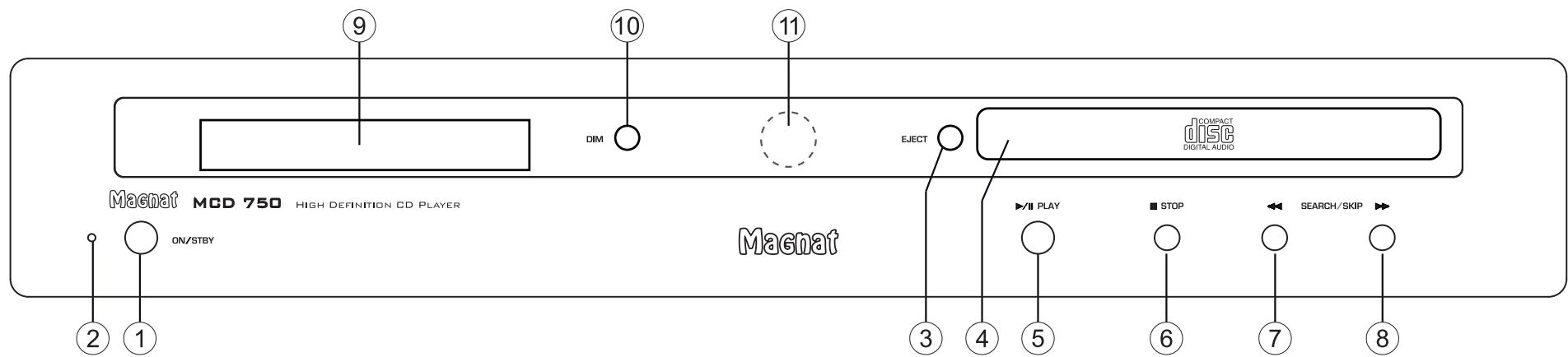
1 ON/STBY
Switches the device on when it is in the standby mode. If the LED does not illuminate, actuate the power switch located on the rear of the device. Conversely the device can be switched from power operation to the standby mode.
2 LED STATUS INDICATION
This illuminated display indicates the MCD 750's
2 possible states:
- LED is illuminated green: The MCD 750 is switched on. The device is ready for use.
- LED is illuminated red: The MCD 750 is in the standby mode.
3 EJECT
Opens or closes the CD compartment.
4 CD COMPARTMENT
Insert the CD into the compartment with the label facing upwards.
5 PLAY/PAUSE
Starts or pauses the playback from a CD.
6 STOP
Stops a CD that is playing.
7 SEARCH/SKIP
Brief press: Playback starts at the beginning of the current track.
Two brief presses: Playback starts at the beginning of the previous track.
Press and hold: High-speed rewind. Remains active as long as the button is depressed.
8 SEARCH/SKIP
Brief press: Playback starts at the beginning of the next track
Press and hold: Fast forward. Remains active as long as the button is depressed.
9 DISPLAY
The following information is indicated in the display:
• After switching on (no CD inserted):
NO DISC
• After a CD has been inserted and read: Total number of tracks on the CD, total playing time of the CD in minutes and seconds
[ ] 15 46:32
- If there are MP3 or WMA files on the CD, the file type and number of files on the CD are displayed:
MP3 IS FILES
- When playing a CD:
Currently played track, elapsed time of the track:
02 03:45
- The operating status is also indicated by the following symbols:
▶ Playback
II Pause
- CD text, ID3 tags
If the CD supports CD text or the MP3 or WMA files contain ID3 tag information, these are displayed in the 2nd line of the display. See also the REMOTE CONTROL section in this regard.
10 DIM
This button can be used to adjust the brightness of the display (3 levels).
11 SENSOR FOR THE REMOTE CONTROL
Please aim at this sensor when using the remote control.
REMOTE CONTROL
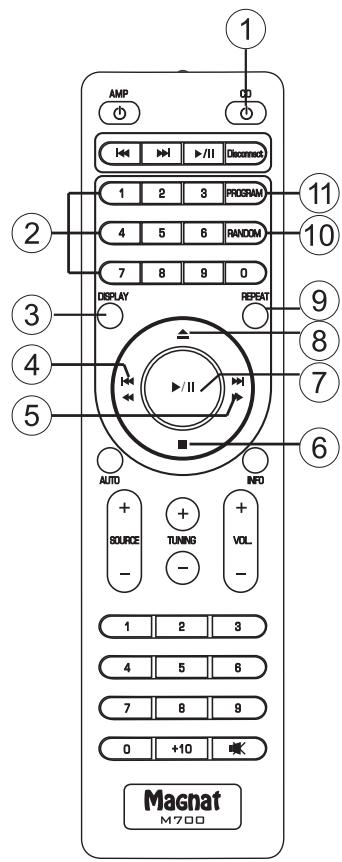
- Before using the remote control the supplied batteries must be inserted into the battery compartment located at the rear of the remote control.
- If the batteries have run out after prolonged use, please replace them (type AAA).
- To prevent causing damage to the remote control please remove the batteries if the device is not going to be used for a prolonged period.
1 CD
Switches the device on when it is in the standby mode. If the LED does not illuminate, actuate the power switch located on the rear of the device. Conversely the device can be switched from power operation to the standby mode.
2 NUMERICAL BUTTONS
Direct selection of a track.
3 DISPLAY
Display of the CD text or ID3 tag (if supported by the CD):
The 2nd line of the display shows the entire CD text/ID3 tag information. Pressing this button displays the individual items of information in the following order:
Title – performer – album – no display
For MP3 and WMA files, the file name and data rate of the current title are displayed additionally.
4 Search/Skip
Brief press: Playback starts at the beginning of the current track.
Two brief presses: Playback starts at the beginning of the previous track.
Press and hold: High-speed rewind. Remains active as long as the button is depressed.
5 Search/Skip
Brief press: Playback starts at the beginning of the next track
Press and hold: Fast forward. Remains active as long as the button is depressed.
6 STOP
Stops a CD that is playing.
7 PLAY/PAUSE
Starts or pauses the playback from a CD.
8 EJECT
Opens the CD compartment.
9 REPEAT
Track/CD repeat playback (repeat function):
- Press once: The current track is repeated. The following appears in the display: REPEAT ONE
- Press twice: The entire CD is repeated. The following appears in the display: REPEAT ALL
- Press again: The repeat function is deactivated. The following appears in the display:
REPEAT OFF
10 RANDOM
Plays the titles of a CD in random order.
- Press once: The function is deactivated.
The following appears in the display:
RANDOM-ON
- Press again: The function is activated.
The following appears in the display:
RANDOM-OFF
11 PROGRAM
Programming tracks on a CD in a particular order.
The Stop mode must be activated to programme tracks.
- Press the PROG button.
Display: PRG 01-00
- Now assign the desired track to memory location 01 by selecting the track number via the numeric keypad or the SKIP button.
Display e.g.: PRG 01-08
- Press the PROG button again. Display: PRG 02-00
- Now enter the desired track for memory location 02.
- Repeat these steps until all of the desired tracks have been programmed. After the last title, press the STOP button. The number of programmed titles and the total playing time of the programme list are displayed.
- Start playing the programmed list by pressing PLAY. A “P” appears to the left of the display, followed by the current track and elapsed time.
Display e.g.: P 08-00:07
- You can manipulate playback within the programmed list by pressing SKIP, SEARCH and PAUSE/PLAY.
- The programme is erased after pressing the STOP or EJECT button.
The non-numbered buttons are reserved for operating the Magnat MR 780 and have no function for the MCD 750.
REAR
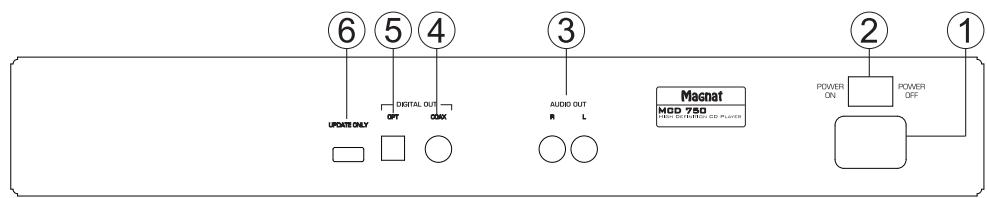
1 MAINS CONNECTION
For connecting the supplied mains cable.
2 POWER SWITCH
Switches the device on and sets it in the standby mode. If the switch is set to the „OFF“ position, the device is disconnected from the mains supply.
3 ANALOGUE AUDIO OUTPUTS
RCA output jacks for connection to a hi-fi audio amplifier.
4 / 5 DIGITAL AUDIO OUTPUTS
For the connection of external devices via the optical (5) or coaxial (4) digital output
6 UPDATE
This connection is intended exclusively for system updates.
INITIAL OPERATION
- Place the MCD 750 on an even surface. Observe the relevant clearance gaps as specified under „Important safety instructions“.
- Connect an audio output (analogue or digital) to a suitable amplifier. Also refer to the operating instructions for the device when doing this.
- Connect the supplied mains cable to the rear and then insert the other end into a 230V socket.
- Actuate the on/off switch on the rear side, the device is now in the standby mode.
- Switch on the device using the remote control or with the ON/STBY key on the front.
SERVICE AND TECHNICAL PROBLEMS
If you should encounter any technical problems, please contact your specialist dealer or Magnat Audio-Produkte GmbH, Tel.: 02234807-0.
SPECIFICATIONS
| Frequency response: | 20 Hz – 20 kHz (+/- 0.5 dB) |
| Signal to noise ratio : | 108 dB (20 Hz – 20 kHz, A-weighted) |
| Channel separation: | >110 dB (1 kHz) |
| Output voltage: | 2.0 V |
| Harmonic distortion: | analogue output: < 0.005%digital outputs: < 0.0012% |
| Mains voltage: | 100 – 240 VAC / 50/60 Hz |
| Electricity consumption: | |
| Max. | 30 W |
| Standby | <0.5 W |
| Playable formats: | CD-Audio, CD-R, CD-RW, MP3, WMA |
| Dimensions (wxhxd): | |
| Main device: | 433 x 78 x 317 mm |
| Main device incl. operationalelements/connecting terminals: | 433 x 78 x 322 mm |
| Remote Control: | 45 x 175 x 20 mm |
| Weight: | 3.9 kg |
Subject to technical change.
For further information please visit our website: http://www.magnat.de.
SOMMAIRE
14 Accessoires
18 Service and technical problems
ATTENTION! NE PAS OUVRIR, RISQUE D'ÉLECTROCUTION!
INSTRUCTIONS POUR LA MISE AU REBUT
DÉCLARATION DE CONFORMITÉ

4 / 5 USCITE AUDIO DIGITALI
Congratulations! You have made a wise selection in becoming the owner of a MAGNAT HiFi equipment.
The equipments are checked and tested continuously during the entire production process. In case you have problems with your MAGNAT HiFi equipment, kindly observe the following:
- The warranty period commences with the purchase of the component and is applicable only to the original owner.
- During the warranty period we will rectify any defects due to faulty material or workmanship by replacing or repairing the defective part at our discretion. Further claims, and in particular those for price reduction, cancellation of sale, compensation for damages or subsequential damages, are excluded.
- Unauthorized tampering with the equipment will invalidate this warranty.
- Consult your authorized dealer first, if warranty service is needed. Should it prove necessary to return the component to the factory, please insure that • the component is packed in original factory packing in good condition • your enclose your receipt as proof of purchase.
- Excluded from the warranty are: • Illuminates • Valves • Batteries • Wear parts • Shipping damages, either readily apparent or concealed (claims for such damages must be lodged immediately with forwarding agent, the railway express office or post office).
- Scratches in cases, metal components, front panels, etc. (You must notify your dealer directly of such defects within three days of purchase.) • Defects caused by incorrect installation or connection, by operation errors (see operating instructions), by overloading or external force. • Equipments which have been repaired incorrectly or modified or where the case has been opened by persons other than us. • Consequential damages to other equipments. • Reimbursement of cools, without our prior consent, when repairing damages by third parties.
F
Toutes nos félicitations!
Name and address of the dealer/stamp
Käufer/Customer
Name/Name ____
Straße/Street ____
PLZ, Ort/City ____
Land/Country ____
Kaufdatum/buying date
No warranty without receipt!