
1211X - Printing calculator IBICO - Free user manual and instructions
Find the device manual for free 1211X IBICO in PDF.



User questions about 1211X IBICO
0 question about this device. Answer the ones you know or ask your own.
Ask a new question about this device
Download the instructions for your Printing calculator in PDF format for free! Find your manual 1211X - IBICO and take your electronic device back in hand. On this page are published all the documents necessary for the use of your device. 1211X by IBICO.
USER MANUAL 1211X IBICO
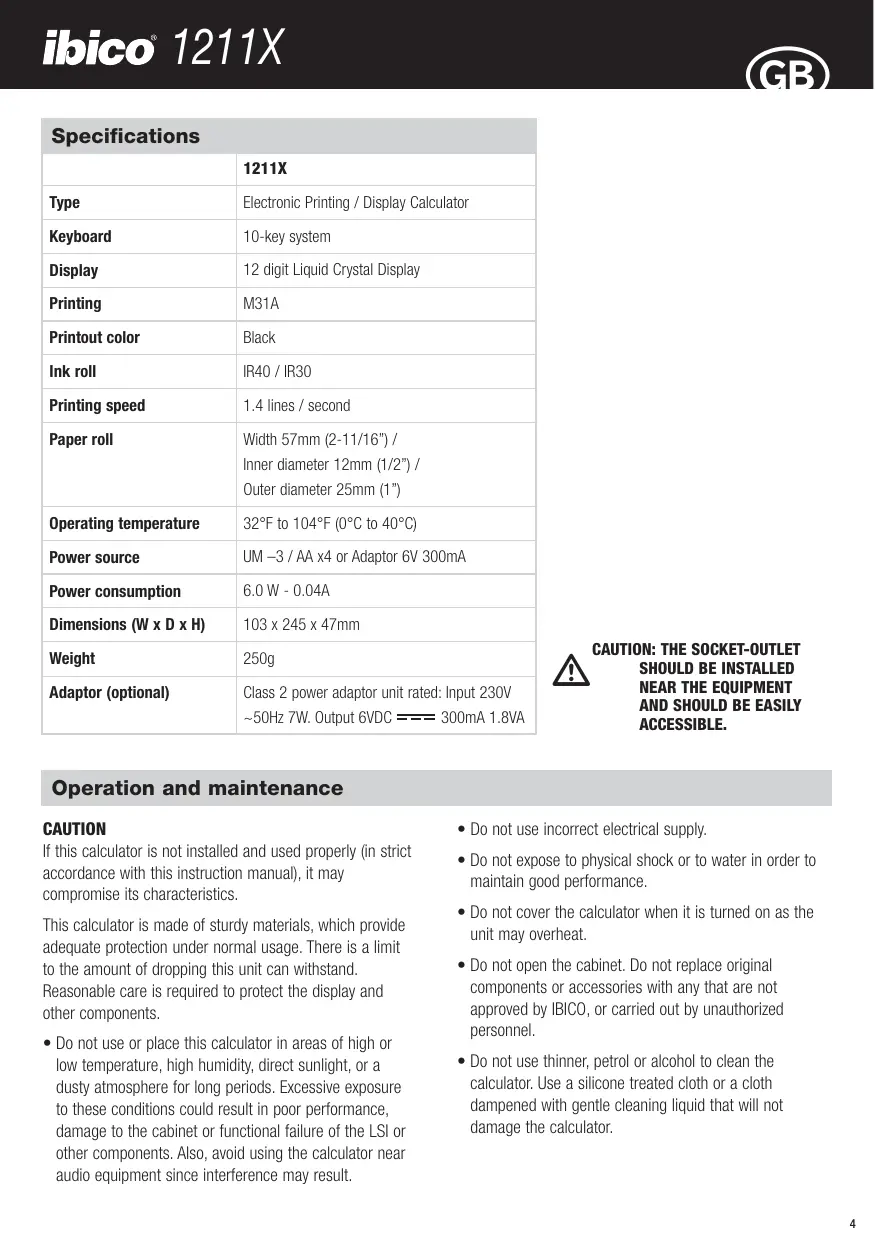
| 1211X | |
| Type | Electronic Printing / Display Calculator |
| Keyboard | 10-key system |
| Display | 12 digit Liquid Crystal Display |
| Printing | M31A |
| Printout color | Black |
| Ink roll | IR40 / IR30 |
| Printing speed | 1.4 lines / second |
| Paper roll | Width 57mm (2-11/16") / Inner diameter 12mm (1/2") / Outer diameter 25mm (1") |
| Operating temperature | 32°F to 104°F (0°C to 40°C) |
| Power source | UM -3 / AA x4 or Adaptor 6V 300mA |
| Power consumption | 6.0 W - 0.04A |
| Dimensions (W x D x H) | 103 x 245 x 47mm |
| Weight | 250g |
| Adaptor (optional) | Class 2 power adaptor unit rated: Input 230V ~50Hz 7W. Output 6VDC = = 300mA 1.8VA |

CAUTION: THE SOCKET-OUTLET
SHOULD BE INSTALLED
NEAR THE EQUIPMENT
AND SHOULD BE EASILY
ACCESSIBLE.
Operation and maintenance
CAUTION
If this calculator is not installed and used properly (in strict accordance with this instruction manual), it may compromise its characteristics.
This calculator is made of sturdy materials, which provide adequate protection under normal usage. There is a limit to the amount of dropping this unit can withstand. Reasonable care is required to protect the display and other components.
-
Do not use or place this calculator in areas of high or low temperature, high humidity, direct sunlight, or a dusty atmosphere for long periods. Excessive exposure to these conditions could result in poor performance, damage to the cabinet or functional failure of the LSI or other components. Also, avoid using the calculator near audio equipment since interference may result.
-
Do not use incorrect electrical supply.
- Do not expose to physical shock or to water in order to maintain good performance.
- Do not cover the calculator when it is turned on as the unit may overheat.
- Do not open the cabinet. Do not replace original components or accessories with any that are not approved by IBICO, or carried out by unauthorized personnel.
- Do not use thinner, petrol or alcohol to clean the calculator. Use a silicone treated cloth or a cloth dampened with gentle cleaning liquid that will not damage the calculator.
How to install or replace the paper roll
1 Turn on the power switch.
2 Allow the paper holder to click into place.
3 Cut the edge of the paper roll straight with scissors for proper feeding through the printer head. Insert the edge of the paper roll into the paper slot (A).
Press the "Paper Feed" key (1) to feed in the paper until it appears through the printer.
Note:
- Do not over-stretch the paper holder.
- To remove the paper roll from the printer mechanism, pull the paper roll forward after cutting the paper on the paper roll side.
How to install or replace the ink roller
1 Turn off the power switch.
Push the printer cover inward and upward in order to remove it from the cabinet (B).
Pull the ink roll lever up and lift out (C).
Slot in the new ink roll until it clicks into place (D).
Return the printer cover to the original position.
Keyboard
1 Paper Feed
Advance the paper roll.
2 Decimal Point
A:Add mode. The decimal point is automatically placed before the last two digits in addition and subtraction.
0, 2, 3, 4 : For multiplication and division, decimal point is set to the result of the calculation. For addition and subtraction, decimal point is set to all entries.
F (not shown in display): Floating decimal point. Automatic floating point for decimally accurate computing.
3 Round-off / Round-down
Depending on decimal point system. If decimal point system is in floating point mode, this switch will be neglected.)
(not shown in display): Calculation in Round-down mode
5/4: Calculation in Round-off mode
4 Print / Non-Print selector
P : Calculation performed on both the display and the printer.
NP : Calculation performed on the display only
5 OFF
Calculator turned off.
6 Foreign currency
Convert the displayed value to foreign currency.
7 Local currency
Convert the displayed value to local currency.
8 Rate
Tax rate and exchange rate setting.
Keyboard
9 TAX Plus
Calculate an amount including VAT with VAT rate preset by RATE key.
10 TAX Minus
Calculate an amount excluding VAT with VAT rate preset by RATE key.
11 Mark up / Gross Profit Margin
To calculate the true retail price from the cost price and a desired gross margin.
12 Percentage
Convert percentage to the decimal value; also, convert for add-on and discount calculation.
13 Memory, Recall and Clear
Recall the result to the display and/or prints out if set to Print mode by pressing this key once. Contents of the memory will be cleared if this key is depressed twice.
14 Memory Plus
Accumulate the displayed number or calculated result directly in the memory.
15 Memory Minus
Subtract the displayed number or calculated result from the memory.
16 Numbers & Double Zero
17 Decimal point
Set the decimal point.
18 Addition
19 Subtraction
20 Equal
To get the result in multiplication or division.
21 Non-Add / Date - Subtotal / Total
Non-Add / Date : displayed content and does not perform calculation.
Subtotal : Obtain intermediate result of addition and subtraction.
Total: Obtains total result in addition and subtraction and printed out when print mode is selected. If this key is depressed twice, the accumulator will be cleared.
22 Division
23 Multiplication
24 ON / Clear Entry / Clear
Displayed symbols
M :Memory occupied
:Minus(negative)
E : Overflow - error
PRINT : Print mode
5/4 : Round off
A0234:Decimal point
RATE : Tax rate and Exchange rate

Foreign Currency
TAX - : Tax rate minus calculation
TAX % : Current tax rate
Printed symbols
1211X
C : Restart / Clear
+ :Add
- :Subtract / negative
x : Multiply
Divide
% : Percentage / Current Tax rate
: Difference to add
:Total
: Subtotal
: Non-add or date
M : Memory / Mark up
:Equal
:Overflow-error
Overflow error conditions
When an overflow error occurs, the overflow error sign "E" appears on the extreme left of the display and the overflow error symbol "... is printed when print mode is selected. Press the CE/C keys to reset. Dividing by zero (0) will result in an error condition.
Guarantee
Operation of this machine is guaranteed for one year from date of purchase, subject to normal use. Within the guarantee period, GBC will at its own discretion either repair or replace the defective machine free of charge. Defects due to misuse or use for inappropriate purposes are not covered under the guarantee. Proof of date of purchase will be required. Repairs or alterations
made by persons not authorised by GBC will invalidate the guarantee. It is our aim to ensure that our products perform to the specifications stated. This guarantee does not affect the legal rights which consumers have under applicable national legislation governing the sale of goods.
\section*{Caracteristiques Techniques}
FACILEMENT ACCESSIBLE.
21 Non addition / Impression - Sous-total / Total
FACILMENTE ACCESIBLE
21 Sinsuma/imprimir - Subtotal / Total
M :Memoria occupies a
- :Menos (negative)
IpeBoNDI NOKa3bIbAeMyIO BELINuHBy B INHOCTpaHHy BOaHOTy.
KnaBnataypes
7 Mecthna Baniota
IpebeoNT Ioka3bIBaEMy BO BELINHHy B MeCTHyIO BAIOTy.
8 CTabka
YCTaHOBka HAIIOBOO CTABKN IO MeHHORO Kypca.
9 Hanel Pnuc
Pacyet cymbl, BKIOUaHa HAnor Ha Do6abJIeHHyIO CTOnMOCTb, CO CTaBKO HAnoRa Ha Do6abJIeHHyIO CTOnMOCTb, yCTaHOBJIeHHOc NOMOuIbIO KlaBnUI RATE.
10 Hanor MmHyc
Pacet cyMMbl, NCKIIOUaHaIOr Ha ДобавLEHHyO CTOMOCTb, CO CTaBKOHaIOra Ha ДобавLEHHyO CTOMOCTb, yCTaHOBJIeHHoN C ПOMOJIbKJIaBUNI RATE.
11 BeDHeHne BbIcNcHn
PaccntbIbae HactoIyIO po3HmHyIO ceHy OTOIeHbI Ce6bctOUMOCTN IKeJaEMOB BaIOBOINpIbJI.
12 Ipozent
IpebeoD npoceHTOB B DecaTNUHyo BEINuHy; TaKke, papeoBD npoceHTOB DnI Onpaun HndabKn n Ckndkn.
13 NamrB, BbIcOB n aHHyInpObaHne coepxHaHnnaPamrTn
OdHOKpaTHbI HaxyM 3ToK HONKN BbI3bIbaeT
CoepKaHHe NAMrTN Ha IINnPeN n/INn
HaheuataHne erO (ecm BNkIOueH npInTeP)
DbYxKpaTHbI HAXIM 3ToK HONKN BHHJInpyeT
CoepKaHHe NAMrTN.
14 NamrB NIOc
Hapmyo akkymnynpyET b lamrtn nokaahoe YnCNo INI BvIcNceHHb pe3yIbTaT.
15 Namrmb Mhyc
BbIHTaET n3 pAmrT NcCNo, nOKa3aHHO Ha dncJIeE, nII BbIHCJIeHHb pe3yIbTaT.
16 00 DBoHbIe Hyn
17 3aTaa, oTeJeIouaI aIeoe ot dpob6
YctaHabJIbBaET 3aIaTyIO,OTdJIaIooUOcIeIOE OT dpo6n.
18 CtoxkeHne
19 BbIHTaHHe
20 PaBHO
IonyeHne pe3yIbTaT a npu yMHOKeHHn IJI nn deJeHHN.
21 He do6abTb / PacneuataKa -PpomexkyTochnb pe3yIbTaT / Total
He do6abTb / PaCneuatKa : CoepkaHne DnCnIe paCneuTaBaeTcR, Ho CteTHoI Onpaun He npOn3BODITcR
Ppomexkytohnype3yIbTaT:Poiyuhenie PpomexkytoHOro pe3yIbTaTata npi onepaunx CLOXEHINY BvIHTAHN.
Pe3yIbTaT:Pi3B0JraTe nOlyuHbpe3yIbTaT CLOXKeHnI NII BbUHTaHn I HaneuTaTaB Hro, ecNI BKJIIOueH pInHTep. DByxKpaTHbI HaXIM 3ToI KHOKN aHHyInpye pe3yIbTaT.
22ДeJIeHne
23 YmHOKeHne
24 ON / CtepeTB 3anncb / CtepeTB
CnmbonblHa dncnnee
M :Памгтбзяпта
Addition and Subtraction
Addition et Soustraction • Addition und Subtraktion • Addizione e Sottrazione
Optelling en aftrekking • Sumas y restas • Somas e Subtraccões
Addition och Subtraction · Dodawanie i odejmowanie · Scitani a odecitani
Osszeadas es kivonas · CnoxeHne n BbIHTaHne
DEC:2
5/4:5/4
P/NP : PRINT
EXAMPLE: 21 + 0.5 + 0.5 - 1.42 - 1.42 = ?
21 +
.5 +
+
1.42
/ST
//ST
21.00
21.50
22.00
20.58
19.16
19.16
19.16
21.00 +
0.50 +
0.50 +
1.42 -
1.42-
19.16
19.16*
Rounding for Addition and Subtraction
EXAMPLE: 110 ÷ 14 = ?
$$ 1 2 0 \div 1 4 = ? $$
$$ 1 1 0 \quad \div $$
$$ 1 4 \quad = $$
$$ 1 1 0. 0 0 $$
$$ 7. 8 6 $$
$$ 1 2 0 = $$
$$ 8. 5 7 $$
$$ 1 1 0. 0 0 \div $$
$$ 1 4. 0 0 = $$
$$ 7. 8 6 * $$
$$ 1 2 0. 0 0 = $$
$$ 8. 5 7 * $$
Subtotal, Non-Add/Date
Non-Addition/Date • Nicht-Addition/Datum • Non Addizionare/Data • Rekenonderdrukking/Datum • No adicón / Fecha
Não Somar / Data • Ej addera/Datum • Czynnik nie bioracy udzialw w obliczeniach i data • Nescitáni/datum • Nincs hozzáadás/datum • He doabvntb (mnu data)
DEC:A
5/4:5/4
P/NP:PRINT
EXAMPLE: #1
$$ 1. 4 7 + 1. 5 9 + 1. 2 3 = ? $$
2
$$ 2. 4 7 + 2. 5 8 + 2. 6 9 = ? $$
$$ # 1 + # 2 = ? $$
$$ 1 \quad # / S T $$
$$ 1 4 7 \quad + $$
$$ 1 5 9 \quad + $$
$$ 1 2 3 \quad + $$
$$ # / S T $$
1.
$$ 1. 4 7 $$
$$ 3. 0 6 $$
$$ 4. 2 9 $$
$$ 4. 2 9 $$
$$ # 1 \dots \dots \dots $$
$$ 1. 4 7 + $$
$$ 1. 5 9 + $$
$$ 1. 2 3 + $$
$$ 4. 2 9 \diamondsuit $$
$$ 2 \quad # / S T $$
$$ 2 4 7 \quad + $$
$$ 2 5 8 \quad + $$
$$ 2 6 9 \quad + $$
$$ # / S T $$
$$ # / S T $$
2.
$$ 6. 7 6 $$
$$ 9. 3 4 $$
$$ 1 2. 0 3 $$
$$ 1 2. 0 3 $$
$$ 2. 0 3 $$
$$ # 2 \dots \dots \dots $$
$$ 2. 4 7 + $$
$$ 2. 5 8 + $$
$$ 2. 6 9 + $$
$$ 1 2. 0 3 \diamond $$
$$ 1 2. 0 3 * $$
DATE PRINTING:
12.03.2003
//ST
$$ 1 2. 0 3 2 0 0 3 $$
$$ # 1 2. 0 3. 2 0 0 3. $$
Percent
Pourcentage • Prozent • Percentuale • Percentage • Percentaje
Percentagem • Procent • Procenty • Procentuinal udaj • Szazalek • Пюент
DEC:2
5/4:5/4
P/NP:PRINT
EXAMPLE: 198 × 5% = ?
198 × 22% = ?
198 x
5 %
198.00
9.90
22 %
43.56
198.00 x
5.00%
9.90*
22.00%
43.56*
Repeat Calculation
Calcul en Chaine • Wiederholung der Kalkulation • Ripeti calcolo • Herhaalde bewerkingen • Repeticion de calculo
Repeticao de Calculo · Repeterad utrakning · Ciagi obliczen · Opakovany vypocet · Ismetldo szamitas · Nobtopntb nocdet
DEC:-
5/4:5/4
P/NP:PRINT
EXAMPLE: (2.5 × 5.75) + (12.5 × 2.3)3.25 × 2.5 = ?
2.5 x
5.75
2.5
+
12.5 x
14.375
2.3
14.375
+
43.125
3.25
2.5
43.125
ON/CE/C
13.2692307692
5.30769230768
2.5 x
5.75 =
14.375*
14.375 +
12.5 x
2.3 =
28.75*
28.75 +
43.125 ÷
3.25 ÷
2.5 =
5.30769230768*
0.C
Memory
Mémoire • Speicher • Memoria • Geheugen • Memoria
Memória • Minne • Pamieć • Paměř • Memória • Пам扼ь
| DEC:2 | 5/4:5/4 | P/NP:PRINT | |||
| EXAMPLE:(2x3)-(4x5) = ? | |||||
| 2 | x | 2.00 | 2.00 x | ||
| 3 | M+ | 6.00 | 3.00 = M | ||
| 6.00 + | |||||
| 4 | x | 4.00 | 4.00 x | ||
| 5 | M- | 20.00 | 5.00 = M | ||
| 20.00 - | |||||
| MRc | -14.00 | M | |||
| -14.00◇ | |||||
| MRc | -14.00 | M | |||
| -14.00* | |||||
Mark up / GPM
Calcul de Marge Brute • Bruttomarge • Profutto Lordo • Bruto winstmarge • Calculo de margen bruto
Cáculo de Margem Bruta • Bruttofortjänstmarginal • Cena brutto z marza • Hrubá marze • Brutó haszonkulcs • Bánovárnípínbíl
| DEC:2 | 5/4:5/4 | P/NP:PRINT | |
| EXAMPLE: Cost price = 645 Margin = 25% Selling price = ? | |||
| 645 MU | 645.00 | 645.00 M | |
| 25 = | 860.00 | 25.00 % | |
| 215.00 Δ | |||
| 860.00 * | |||
| EXAMPLE: Selling price = 860 Margin = 25% Cost price = ? | |||
| 860 MU | 860.00 | 860.00 M | |
| 25 = | -25.00 | 25.00 - | |
| 688.00 | -25.00 % | ||
| -172.00 Δ | |||
| 688.00 * | |||
Tax +/- Function
Taxes automatiques +/- • Steuern +/- Funktion • Funzioni Tax +/- • BTW-functie +/- • Funcion Tax +/- Funcao Tax +/- • Skatt +/- Funktion • Funkcje przycisku Tax +/- • Daiova funkce +/- • Ado +/- fungkcio · Hanor +/- - phyckma
DEC:2
5/4:5/4
P/NP : PRINT
EXAMPLE: TAX = 16%
200 - 16% = ?
200 + 16% = ?
RATE
RATE (Blinking) 0.
(Press until display blinking)
16
TAX+
TAX %
16.00
200
TAX-
TAX-
172.41
200
TAX+
TAX+
232.00
ON/CE/C
0.
16.00%
200.00
16.00%
-27.59△
172.41*
200.00
16.00%
32.00△
232.00*
0.C
Currency Exchange
Conversion de Devises · Währungsumrechnung · Cambiavalute · Wisselkoers · Cambio de divisa
Taxa de Cambio · Vaxelkurs · Przelicznik walut · Vymena meny · Valutaatszamitas · Baniotnbio6men
There are 13 Foreign currency rates available in memory and the default is preset to 1.
- The way to select a position to set your desired rates.
- Press and hold the key RATE until display is blinking.
- Press the key , display will appear "r-01 1".
- Press the key + , to forward to next rate.
- Press the key -, to revert to previous rate.
- Enter required rate followed by pressing the key
- The current rate is now set.
- If you want to change the Foreign Currency to default rate, power OFF the machine, then power ON the machine while pressing 0 and +. Then "r-CC" will appear on the display and the default rate is set.
EXAMPLE: Set foreign currency rate 6.55957 in position r-02.
RATE
RATE (Blinking) 0.
(Press until display blinking)

RATE (Blinking)
R-01 1.

RATE (Blinking) R-02
6.55957
RATE (Blinking) 6.55957


6.55957
6.55957
EXAMPLE: 1 Foreign currency = 6.55957 Local currency 1000 + 2000 = Total ? (15.5 × 9.27) ÷ (1.09 × 2.2) = Total local ?
1000
1000.00
2000
3000.00
/ST
3000.00
/ST
3'000.00


457.35
15.3 x
15.30
9.27
141.831
1.09
130.120183486
2.2
59.15
LOCAL
LOCAL
388.00
1,000.00 +
2,000.00 +
3,000.00
3,000.00*
3,000.00 ÷
6.55957 =
457.35*
15.30 x
9.27 ÷
1.09÷
2.20 =
59.15*
59.15 x
6.55957 =
388.00*