ManualGo.com
NQ5B7993AAA/U1 - NQ5B7993AAK/U1 - Microwave Oven SAMSUNG - Free user manual and instructions
Find the device manual for free NQ5B7993AAA/U1 - NQ5B7993AAK/U1 SAMSUNG in PDF.



Download the instructions for your Microwave Oven in PDF format for free! Find your manual NQ5B7993AAA/U1 - NQ5B7993AAK/U1 - SAMSUNG and take your electronic device back in hand. On this page are published all the documents necessary for the use of your device. NQ5B7993AAA/U1 - NQ5B7993AAK/U1 by SAMSUNG.
USER MANUAL NQ5B7993AAA/U1 - NQ5B7993AAK/U1 SAMSUNG
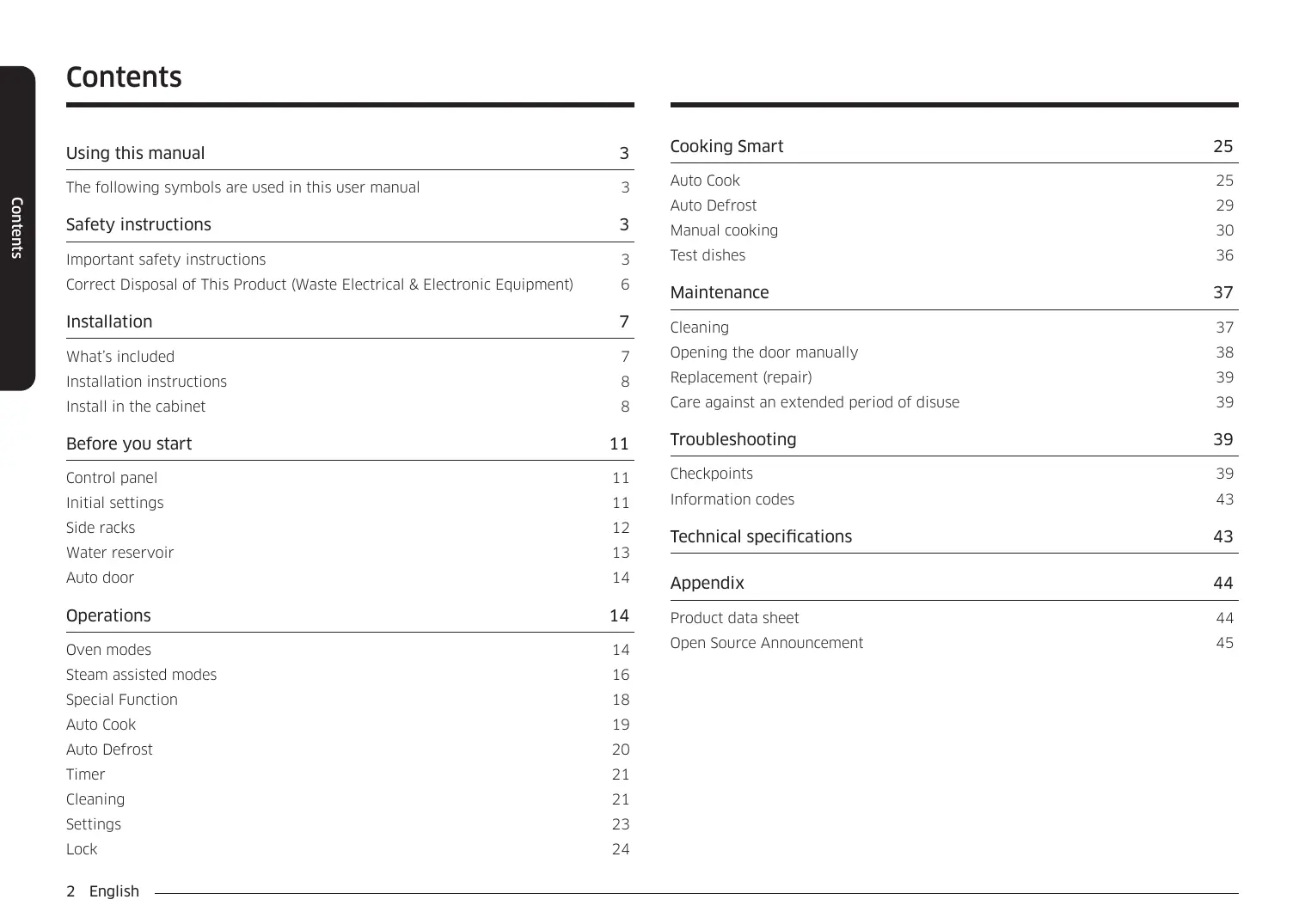
The following symbols are used in this user manual
Important safety instructions
Correct Disposal of This Product (Waste Electrical & Electronic Equipment)
Opening the door manually
Care against an extended period of disuse
Install in the cabinet Before you start
Technical specifications
Open Source Announcement
Steam assisted modes
2 English Safety instructions Thank you for choosing SAMSUNG Built-In Oven. This User Manual contains important information on safety and instructions intended to assist you in the operation and maintenance of your appliance. Please take the time to read this User Manual before using your oven and keep this book for future reference. Installation of this oven must be performed only by a licensed electrician. The installer is responsible for connecting the appliance to the mains power supply in observance of the relevant safety recommendations. The following symbols are used in this user manual WARNING Hazards or unsafe practices that may result in severe personal injury, death and/ or property damage. CAUTION Hazards or unsafe practices that may result in personal injury and/or property damage. NOTE Useful tips, recommendations, or information that helps users manipulate the product. Important safety instructions WARNING This appliance is not intended for use by persons (including children) with reduced physical, sensory or mental capabilities, or lack of experience and knowledge, unless they have been given supervision or instruction concerning use of the appliance by a person responsible for their safety. Children should be supervised to ensure that they do not play with the appliance. The means for disconnection must be incorporated in the fixed wiring in accordance with the wiring rules. This Appliance should be allowed to disconnect from the supply after installation. The disconnection may be achieved by having the plug accessible or by incorporating a switch in the fixed wiring in accordance with the wiring rules. If the supply cord is damaged, it must be replaced by the manufacturer, its service agent or similarly qualified persons in order to avoid a hazard. English 3 Using this manual Using this manual Safety instructions The method of fixing stated is not to depend on the use of adhesives since they are not considered to be a reliable fixing means. Safety instructions This appliance can be used by children aged from 8 years and above and persons with reduced physical, sensory or mental capabilities or lack of experience and knowledge if they have been given supervision or instruction concerning use of the appliance in a safe way and understand the hazards involved. Children shall not play with the appliance. Cleaning and user maintenance shall not be made by children without supervision. Keep the appliance and its cord out of reach of children less than 8 years. During use the appliance becomes hot. Care should be taken to avoid touching heating elements inside the oven.
WARNING: Accessible parts may become hot during use. Young
children should be kept away. Do not use harsh abrasive cleaners or sharp metal scrapers to clean the oven door glass since they can scratch the surface, which may result in shattering of the glass. If this appliance has cleaning function, excess spillage must be removed before cleaning and all utensils should not be left in the oven during steam cleaning or self cleaning. The cleaning function depends on the model. If this appliance has cleaning function, during cleaning conditions the surfaces may get hotter than usual and children should be kept away. The cleaning function depends on the model. Only use the temperature probe recommended for this oven. (Meat probe model only) A steam cleaner is not to be used.
WARNING: Ensure that the appliance is switched off before
replacing the lamp to avoid the possibility of electric shock. The appliance must not be installed behind a decorative door in order to avoid overheating.
WARNING: The appliance and its accessible parts become hot
during use. Care should be taken to avoid touching heating elements. Children less than 8 years of age shall be kept away unless continuously supervised. CAUTION: The cooking process has to be supervised. A short term cooking process has to be supervised continuously. 4 English If this appliance has a vapour or steam cooking function, do not operate this appliance when the water supply cartridge is damaged. (Vapour or steam function model only) The temperature of accessible surfaces may be high when the appliance is operating. The surfaces are liable to get hot during use. When the cartridge is cracked or broken, do not use it and contact your nearest service center. (Vapour or steam function model only) Please put the bent up frame side to the back, in order to support the restposition when cooking big loads. (Depending on model) CAUTION If the oven has been damaged in transport, do not connect it. This oven has been designed only for the cooking of household foods. During use, the oven interior surfaces become hot enough to cause burns. Do not touch heating elements or interior surfaces of the oven until they have had time to cool. Never store flammable materials in the oven. The oven surfaces become hot when the appliance is operated at a high temperature for an extended period of time. When cooking, take care when opening the oven door as hot air and steam can escape rapidly. When cooking dishes that contain alcohol, the alcohol may evaporate due to the high temperatures and the Vapour can catch fire if it comes into contact with a hot part of the oven. This appliance must be connected to the mains power supply only by a specially licensed electrician. For your safety, do not use high-pressure water cleaners or steam jet cleaners. In the event of a fault or damage to the appliance, do not attempt to operate it. Repairs should be performed by a licensed technician only. Improper repair may result in considerable danger to you and others. If your oven needs repair, contact a SAMSUNG Service center or your dealer. Frozen foods such as pizzas should be cooked on the big grid. If the baking tray is used, it may become deformed due to the great variation in temperatures. Electrical leads and cables should not be allowed to touch the oven. The oven door must be closed during cooking. The oven should be connected to the mains power supply by means of an approved circuit breaker or fuse. Never use multiple plug adapters or extension leads. Do not line the bottom of the oven with aluminum foil and do not place any baking trays or tins on it. The aluminum foil blocks the heat, which may result in damage to the enamel surfaces and cause poor cooking results. The power supply of the appliance should be turned off when it is being repaired or cleaned. Fruit juices will leave stains, which can become permanent on the enamel surfaces of the oven. Take care when connecting electrical appliances to sockets near the oven. When cooking very moist cakes, use the deep pan. Children should be kept at a safe distance when the oven is in use. Do not pour water into the bottom of the oven when it is hot. This could cause damage to the enamel surface. Do not rest bakeware on the open oven door. English 5 Safety instructions The door or the outer surface may get hot when the appliance is operating. Safety instructions Keep children away from the door when opening or closing it as they may bump themselves on the door or catch their fingers in the door. Correct Disposal of This Product (Waste Electrical & Electronic Equipment) Do not step, lean, sit or place heavy items on the door. Do not open the door with unnecessarily strong force. Safety instructions
WARNING: Do not disconnect the appliance from the main power supply even after
the cooking process is completed.
WARNING: Do not leave the door open while oven is cooking.
WARNING: If the door opens automatically, it may hit children or pets. Make sure
that there are no children or pets in range of the door. (Auto door(Handleless) model only)
WARNING: If you close or open the door while the product is in operation, make
sure to use oven mitts or potholders. If you touch the door with your bare hands, you may get burned since the surface of the door is hot. (Auto door(Handleless) model only) (Applicable in countries with separate collection systems) This marking on the product, accessories or literature indicates that the product and its electronic accessories (e.g. charger, headset, USB cable) should not be disposed of with other household waste at the end of their working life. To prevent possible harm to the environment or human health from uncontrolled waste disposal, please separate these items from other types of waste and recycle them responsibly to promote the sustainable reuse of material resources. Household users should contact either the retailer where they purchased this product, or their local government office, for details of where and how they can take these items for environmentally safe recycling. Business users should contact their supplier and check the terms and conditions of the purchase contract. This product and its electronic accessories should not be mixed with other commercial wastes for disposal. For information on Samsung’s environmental commitments and product specific regulatory obligations e.g. REACH, WEEE, Batteries, visit: www.samsung.com/uk/aboutsamsung/sustainability/environment/ourcommitment/data/ 6 English Installation Accessories What’s included Make sure all parts and accessories are included in the product package. If you have a problem with the oven or accessories, contact a local Samsung customer centre or the retailer. The oven comes with different accessories that help you prepare different types of food. Oven at a glance
Installation Baking tray Oven rack Steam dish Air fry rack (Useful for air fry mode.) 3 Screws (M4 L25) Door Opener
01 Control panel 02 Water reservoir 03 Side racks 04 Door NOTE See the Cooking Smart on page 25 to determine the appropriate accessory for your dishes. English 7 Installation Installation instructions Install in the cabinet General technical information Kitchen cabinets in contact with the oven must be heatresistant up to 100 °C. Samsung will take no responsibility for damage of cabinets from the heat. Electrical Supply Dimensions (W × H × D) 230 V ~ 50 Hz Required dimensions for installation (This product is dedicated to built-in products.) Set size 595 x 456 x 570 mm Built in size 560 x 446 x 549 mm Oven (mm)
Installation Disposal of packaging and appliance Packaging is recyclable. Packaging may consist of the following materials: cardboard; polyethylene film (PE); CFC-free polystyrene(PS rigid foam). Please dispose of these materials in a responsible manner in accordance with government regulations. The authorities can provide information on how to dispose of domestic appliances in a responsible manner. Safety
This appliance should only be connected by a qualified technician. The Oven is NOT designed for use in a commercial cooking setting. It should be used exclusively for cooking food in a home setting. The appliance is hot during and after use. Exercise caution when young children are present. Electrical connection The house mains to which the appliance is connected should comply with national and local regulations. Appliance should allow to disconnection of the appliance from the supply after installation. The disconnection may be achieved by having the plug accessible or by incorporating a switch in the fixed wiring in accordance with the wiring rules. 8 English
This appliance complies with EU regulations.
Built-in cabinet (mm)
Space for power outlet (30 Ø Hole)
Under-sink cabinet (mm)
Minimum height requirement (C) is for oven installation alone. English 9 Installation
Installation Installing with a hob
Fasten the oven using the two screws (4 x 25 mm) provided.
Make the electrical connection. Check that the appliance works. To install a hob on top of the oven, check the installation guide of the hob for the installation space requirement ( ). Installation Mounting the oven
Slide the oven partly into the recess. Lead the connection cable to the power source. Be sure to hold the appliance with 2 side handles when unpacking the product.
Slide the oven completely into the recess.
01 Side handle 1 02 Side handle 2 After the installation is complete, remove the protective film, tape, and other packing material, and take out the provided accessories from inside of the oven. To remove the oven from the cabinet, first disconnect power to the oven and remove 2 screws on both sides of the oven. 10 English Before you start Initial settings The oven’s control panel features a display (non-touch), dial knob and touch buttons to control the oven. Please read the following information to learn about the oven’s control panel. When you turn on the oven for the first time, the Welcome screen appears with the Samsung logo. Follow the on-screen instructions to complete the initial settings. You can change the initial settings later by accessing the Settings screen.
1. On the welcome screen, select Start setup, and then press the Dial Knob.
2. Set the language.
a. Select the language, and then press the Dial Knob. b. Select Next, and then press the Dial Knob.
3. Agree with the "Terms and Conditions" and "Privacy Policy".
4. Connect your appliance to the SmartThings app.
a. On the Mobile Experience screen, select Next, and then press the Dial Knob. b. Scan the QR code on the screen with your smartphone and follow the onscreen instruction on your phone to complete the connection. - If you do not wish to proceed this step, select Skip, and then press the Dial Knob to proceed next step. c. Once you get the message that you are successfully connected, select OK, and the press the Dial Knob.
01 Screen Displays the menu, information, and cooking progress. 02 Options Tap to see the Options list. 03 Light Tap to turn the oven light on or off. 04 Smart Control Tap to turn the Smart Control function on or off. NOTE Easy Connection should be set prior to use this function. 05 Back Tap to move to the previous screen. 06 Open Door Tap to open the door automatically. 07 Power Tap to turn the screen on or off. 08 Dial Knob Turn left and right to navigate through the menus and lists. An item will be underlined to show you where you are on the screen. Press to select the underlined item. English 11 Before you start Control panel Before you start
Set the time zone. a. Select your time zone, and then press the Dial Knob. b. Select Next, and then press the Dial Knob. Set the date. a. Select the day, month, and year. Press the Dial Knob after selecting each item. b. Select Next, and then press the Dial Knob. Side racks
NOTE Before you start Skip this step if you have connected your appliance to the SmartThings app.
a. Set the hour and minute. Press the Dial Knob after selecting each item. b. Select Next, and then press the Dial Knob. NOTE Skip this step if you have connected your appliance to the SmartThings app.
8. Select Done, and then press the Dial Knob to complete the setting.
Guide for first use screen appears. You can select LEARN MORE, and then press the Dial Knob to see the guide or select LATER, and then press the Dial Knob to skip this step. 12 English
Insert the accessory to the correct position inside of the oven. Take caution in removing cookware and/or accessories out of the oven. Hot meals or accessories can cause burns. Before you start Water reservoir NOTE The water reservoir is used for steam functions. Fill it with water in advance of steam cooking.
Do not exceed the MAX line. Locate the water reservoir in the topright corner. Push the cover to open and pull out the reservoir to remove. NOTE
Make sure the upper case (A) of the water reservoir is closed before using the oven. Open the reservoir cap, and fill the reservoir with 600 ml of drinkable water. Close the cap, and reinsert the reservoir and close the cover. English 13 Before you start
The door will open automatically. CAUTION Operations If the door opens automatically, it may hit children or pets. Make sure that there are no children or pets in range of the door. On the main screen, select Convection, and then press the Dial Knob. Select the desired cook mode, and then press the Dial Knob. (For detailed information of each mode, see “Oven mode descriptions” section on page 15.)
Set the desired temperature. The default temperature and the temperature range differ depending on the cook mode.
Select Cook Time, and then press the Dial Knob to set the desired cooking time. Maximum cooking time is 10 hours. After setting the cooking time, select the option you want to run at the end of cooking, and then press the Dial Knob. You can select Oven Off, Keep Temp., or Keep Warm. The Large Grill mode does not support the Keep Warm option. Fan Conventional 180°C Cook Time START 12:00 Fan Conventional 200°C Cook Time START
NOTE If you start cooking without setting the cooking time or set Keep Temp. for option, you must stop the oven manually. 14 English Operations
12:00 Fan Conventional 200°C 1hr 30min | Oven Off Ready at 13:30 Select Ready at, and then press the Dial Knob to set the desired end time. When you set the cooking time, the oven displays the time cooking will end. (Ex. Ready at 13:30)
Fan Conventional 200°C 1hr 30min | Oven Off Ready at 13:30 START
You can change the temperature and cooking time during cooking. During cooking, select Pause, and then press the Dial Knob to pause. Once you pause cooking, you can either end or continue cooking. Select OFF, and then press the Dial Knob to end cooking. Select Continue, and then press the Dial Knob to continue cooking. When cooking is complete, +5 mins appears on the screen. You can select +5 mins, and then press the Dial Knob to extend the cooking for 5 more minutes. Temperature range (°C) Default temperature (°C) 40-250
The rear heating element generates heat, which is evenly distributed by the convection fan. Use this mode for baking and roasting on different levels at the same time. 40-250 Fan Conventional The heat is generated from the top and bottom heating elements with fans. This setting is suitable for baking and roasting. 40-250 Eco Convection
Eco Convection uses the optimized heating system to save energy while cooking. The cooking times slightly increases, but the cooking results remain the same. Note that this mode does not require preheating. NOTE Eco Convection mode of heating used to determine the energy efficiency class is in accordance with EN60350-1. 150-250
Large Grill The large-area grill emits heat. Use this mode for browning the tops of food (for example, meat, lasagne, or gratin). Fan Grill Two top heating elements generate heat, which is distributed by the fan. Use this mode for grilling meat or fish. 40-250
English 15 Operations Select START, and then press the Dial Knob. If you did not change the end time, the oven starts cooking immediately. If you changed the end time, the oven will automatically adjust the start time to end cooking at the set time. NOTE
The top heating element generates heat, which is evenly distributed by the convection fan. Use this mode for roasting that requires a crispy top (for example, meat or lasagne). 40-250 Bottom Heat + Convection The bottom heating element generates heat, which is evenly distributed by the convection fan. Use this mode for pizza, bread, or cake. 40-250 Intensive Cook Operations Air Fry 16 English
Pro-Roasting runs an automatic pre-heating cycle until the oven temperature reaches 220 °C. Then, the top heating element and the convection fan start operating to sear food such as meat. After searing, the meat will be cooked at low temperatures. Use this mode for beef, poultry, or fish. 150-250 CAUTION Make sure the water reservoir is filled before using the steam assisted modes.
Intensive Cook activates all heating elements alternately to distribute heat evenly inside the oven. Use this mode for large recipes, such as large gratins or pies. 80–200 Pro-Roasting
Steam assisted modes
Air Fry uses hot air for crispier and healthier frozen or fresh foods without, or less oil, than normal convection modes. For best results, use this mode on a Air fry tray. Follow recipe or package directions for set temperature, time and quantity. 12:00 On the main screen, select Convection, and then press the Dial Knob. Select the desired cook mode, and then press the Dial Knob. (For detailed information of each mode, see “Steam assisted mode descriptions” section on page 18.) If you selected Steam Cook, go to step 4. (Step 2~3 is not applicable for Steam Cook.)
Set the desired temperature. The default temperature and the temperature range differ depending on the cook mode.
Set the steam level. The default setting is “Medium”. Steam Convection 160°C Medium Steam Cook Time START 12:00 Steam Convection 200°C Medium Steam Cook Time START
12:00 Steam Convection 200°C High Steam Cook Time START
Select Cook Time, and then press the Dial Knob to set the desired cooking time. Maximum cooking time is 10 hours. After setting the cooking time, select the option you want to run at the end of cooking, and the press the Dial Knob. You can select Oven Off, Keep Temp., or Keep Warm. NOTE
You can change the temperature and cooking time during cooking. During cooking, select Pause, and then press the Dial Knob to pause. Once you pause cooking, you can either end or continue cooking. Select OK, and then press the Dial Knob to end cooking. Select Continue, and then press the Dial Knob to continue cooking. When cooking is complete, +5 mins appears on the screen. You can select +5 mins, and then press the Dial Knob to extend the cooking for 5 more minutes. NOTE 12:00
Select Ready at, and then press the Dial Knob to set the desired end time. When you set the cooking time, the oven displays the time cooking will end. (Ex. Ready at 13:30)
Select START, and then press the Dial Knob. If you did not change the end time, the oven starts cooking immediately. If you changed the end time, the oven will automatically adjust the start time to end cooking at the set time. Steam Convection 200°C High Steam 1hr 30min | Oven Off Ready at 13:30 START 12:00 Steam Convection 200°C High Steam 1hr 30min | Oven Off Ready at 13:30 Operations If you start cooking without setting the cooking time or set Keep Temp. for option, you must stop the oven manually. START English 17 Operations Special Function Steam assisted mode descriptions Mode Steam Cook Temperature range (°C) Default temperature (°C)
Hot steam from the steam generator is injected through several jet nozzles into the oven to cook food. This mode is suitable for cooking vegetables, fish, eggs, fruits, and rice. 100-230 Steam Convection Operations Steam Top Heat + Convection Steam Bottom Heat + Convection
The heat generated by the bottom heating element and the convection heater is shared evenly in the oven by the fan, and the hot steam supports the heating elements. This mode is suitable for crispy baking foods like pizza or apple pie. Always fill the water reservoir with fresh water when cooking with these modes. After using the steam assisted modes, always wipe moisture inside the oven to prevent scale. 18 English Cook Time On the main screen, select Convection, and then press the Dial Knob. Select Special Function, and then press the Dial Knob. START 12:00 Special Function
Select the desired function, and then press the Dial Knob. (For detailed information of each function, see “Special Function descriptions” section on page 19.)
Set the desired temperature. The default temperature and the temperature differ depending on the cook mode.
Select Cook Time, and then press the Dial Knob to set the desired cooking time. Maximum cooking time is 10 hours. Multi-level Cook Keep Warm 12:00 < Multi-level Cook 160°C Cook Time START
The heat generated by the top heater and the convection heater is shared evenly in the oven by the fan, and the hot steam supports the heating elements. This mode is suitable for roasting crusty dishes like meat, poultry, or fish. 100-230 Convection
The heat generated by the convection heater and fans is continuously supported by hot steam. The intensity of the steam can be adjusted to Low, Medium, or High. This mode is suitable for baking puff pastries, yeast cake, bread, and pizza and roasting meat and fish. 100-230
12:00 < Multi-level Cook 180°C 1hr 30min | Oven Off Ready at 13:30 START < Multi-level Cook 180°C 1hr 30min | Oven Off Ready at 13:30 START Auto Cook The oven offers 35 Auto Cook programmes. Take advantage of this feature to save your time or shorten your learning curve. The cooking time and temperature will be adjusted according to the selected programme.
12:00 Select Ready at, and then press the Dial Knob to set the desired end time. When you set the cooking time, the oven displays the time the cooking will end. (Ex. Ready at 13:30)
Use this for cooking with two multi-levels at the same time. 60–100 Keep Warm
Use this only for keeping foods warm that has just been cooked.
12:00 < Chicken pieces Weight 0.5-0.7 g 1.0-1.1 Select the category, and then press the Dial Knob. Select the desired programme, and then press the Dial Knob. For detailed information of each programme, see “Auto Cook” in “Cooking Smart” section on page 25.) Read the tip, select Next, and then press the Dial Knob. Select the weight, and then press the Dial Knob. This step may not apply to some programmes. Available weight differs depending on the selected programme. English 19 Operations Select START, and then press the Dial Knob. If you did not change the end time, the oven starts cooking immediately. If you changed the end time, the oven will automatically adjust the start time to end cooking at the set time. On the main screen, select Convection, and then press the Dial Knob. Select Auto Cook, and then press the Dial Knob. Operations
12:00 < Chicken pieces Place food in oven. Previous START
Pour the water in the water reservoir as instructed on the screen, select Next, and then press the Dial Knob. This step may not apply to some programmes. Prepare food and accessories as instructed on the screen, select Next, and then press the Dial Knob. Select START, and then press the Dial Knob. Auto Defrost The oven offers 5 Auto Defrost programmes. Take advantage of this feature to conveniently defrost items. The cooking time, power level and temperature will be adjusted according to the selected programme.
160°C Cook Time On the main screen, select Convection, and then press the Dial Knob. Select Auto Defrost, and then press the Dial Knob. START 12:00 Operations Auto Defrost
Select the desired programme, and then press the Dial Knob. For detailed information of each programme, see “Auto Defrost” in “Cooking Smart” section on page 29.)
Select the weight, and then press the Dial Knob. Available weight differs depending on the selected programme. Prepare food and accessories as instructed on the screen, select Next, and then press the Dial Knob. Select START, and then press the Dial Knob. Frozen meat Frozen poultry Frozen fish 12:00 < Frozen meat Weight 0.2-0.5 kg 0.8-1.5
< Frozen meat Place food in oven. Previous 20 English START Timer Cleaning Adding the new Timer Steam Clean
Touch the button on the control panel. Select Timer, and then press the Dial Knob. On the Timer screen, select , and then press the Dial Knob. Skip this step if you are adding the timer for the first time. Set the time. Editing the existing Timer
Touch the button on the control panel. Select Timer, and then press the Dial Knob. On the Timer screen, select , and then press the Dial Knob. Select Delete on the right side of the Timer you want to delete, and then press the Dial Knob. Select Done, and then press the Dial Knob. Using the Timer
Touch the button on the control panel. Select Timer, and then press the Dial Knob. Select START on the right side of the Timer you want to use, and then press the Dial Knob. Once you start the timer, you can pause or cancel the timer. WARNING Do not open the door before the cycle is complete. The water inside the oven is very hot, and it can cause burns. NOTE
If the oven is heavily soiled with grease, for example, after roasting or grilling, it is recommended to remove stubborn soil manually using a cleaning agent before activating Steam cleaning. Leave the oven door ajar when the cycle is complete. This is to allow the interior enamel surface to dry thoroughly. While the oven is hot inside, auto cleaning is not activated. Wait until the oven cools down and try again. Do not pour water onto the bottom by force. Do it gently. Otherwise, the water overflows to the front. NOTE When the time has elapsed to a set point, a message of “Time is up.” appears with a melody. Select OK, and then press the Dial Knob to dismiss the message. English 21 Operations
Touch the button on the control panel. Select Timer, and then press the Dial Knob. On the Timer screen, select the Timer you want to edit, and then press the Dial Knob. Change the time. This is useful for cleaning light soiling with steam. This automatic function saves you time by removing the need for regular manual cleaning.
button on the control panel.
2. Select Cleaning, and then press the Dial Knob.
3. Select Steam Clean, and then press the Dial Knob.
4. Follow the instruction on the screen, select Next, and then press the Dial Knob.
5. Select START, and then press the Dial Knob.
Operations Descale CAUTION Clean inside the steam generator to prevent affecting the food quality and taste.
The oven counts the time of steam assisted modes and notifies you to run the Descale function when required. You can still use the steam assisted modes for the next two hours without running the Descale function. However, you cannot use the steam assisted modes after two hours unless you run and complete the Descale function. When you get the notification message, select Start now, and then press the Dial Knob to run the Descale function, or select Later, and then press the Dial Knob to postpone it.
: Descale required. button on the control panel. Touch the Select Cleaning, and then press the Dial Knob. Select Descale, and then press the Dial Knob. Select Next, and then press the Dial Knob. Follow the instruction on the screen, select START, and then press the Dial Knob. If you get a notification message that you have insufficient water, add more water in the water reservoir, select OK, and then press the Dial Knob. When descaling is complete, the oven drains water automatically. Once draining is complete, empty the water reservoir. Refill the water reservoir with 1000 ml of drinkable water as instructed on the screen, select OK, and then press the Dial Knob to start rinsing. When rinsing is complete, empty the water reservoir. After emptying the reservoir, clean it before putting it back to the oven. WARNING
Wear oven gloves when you handle the water reservoir. Use only descaling agents that are specific to steam ovens or coffee machines. 22 English
Do not cancel descaling in the process. Otherwise, you must restart the descaling cycle and complete within the next three hours in order to enable steam assisted modes. To avoid accidents, keep children away from the oven. For the mixture ratio of water and the descaling agent, follow the agent manufacturer’s instruction as it precedes. Drain After using the steam assisted modes, you must drain the remaining water to prevent affecting other cooking modes. Also, if you want to drain again for cleaning purposes, use this function.
button on the control panel.
2. Select Cleaning, and then press the Dial Knob.
3. Select Drain, and then press the Dial Knob.
4. Select START, and then press the Dial Knob.
5. Follow the instruction on the screen, select OK, and then press the Dial Knob.
The oven drains water from the steam generator to the water reservoir.
6. When draining is complete, empty the water reservoir.
After emptying the reservoir, clean it before putting it back to the oven. WARNING
Wear oven gloves when you handle the water reservoir. Do not remove the water reservoir while draining. NOTE Once the oven starts draining, please wait until the draining cycle is complete. Settings Menu Touch the button on the control panel, select Settings, and then press the Dial Knob to change various settings for your oven. Please refer to the following table for detailed descriptions. Menu Connections Submenu Submenu Description Brightness You can change the brightness of the display screen. Screen saver You can turn the screen saver on or off. Description Wi-Fi You can turn the Wi-Fi on or off. Easy Connection You can connect the oven to the SmartThings server via a WiFi connection. When the oven is connected, you can use the SmartThings app to check the status of the oven and/or control it from a mobile device. Select Activate, and then press the Dial Knob to allow the Call Centre to access your oven remotely to check internal information. NOTE
The Screen saver is a function that displays the date and time on your screen if there is no input for a certain time in standby status. Turn on Screen saver to activate Clock theme and Timeout. Clock theme You can select the clock theme. Timeout You can set the length of time before the screen saver turns on. NOTE
Energy consumption may increase depending on your setting. When the timeout setting is set to "Always on", the brightness of the LCD automatically changes to level 2 if there is no action for 3 minutes. English 23 Operations Remote management Display Operations Menu Submenu Date & time Automatic date and time You can turn on or turn off to update time from the Internet. You must be connected to the Wi-Fi network. Select time zone You can select the time zone. (You must disable Automatic date and time.) Set date You can manually set a date. (You must disable Automatic date and time.) Set time You can manually set time. (You must disable Automatic date and time.) Select time format You can select the time format from 12hour or 24-hour format. Operations You can select a language. Language You can adjust the volume of the oven. Volume You can adjust the water hardness of the water you use for steam assisted modes. Soft: Up to 120 ppm Medium: 120-240 ppm Medium-Hard: 240-350 ppm Hard: Over 350 ppm Water hardness Help 24 English Description Troubleshooting You can check the troubleshooting. Guide for first use You can check the simple instructions on basic use of the oven. Menu About device Submenu Description Model name You can check the model name of our oven. SW version You can check the current version of the firmware. When you have new software available, SW update button will appear on this menu. Legal information You can check the legal information. Lock You can lock the control panel to prevent any unintended operation. To activate the Lock function, touch the button on the control panel, select Lock, and then press the Dial Knob. To deactivate the Lock function, touch and hold the button until you see the 'Control is unlocked.' message. Cooking Smart Auto Cook Food Item The following table presents 35 Auto Programmes for Steam cooking, Baking, Grilling, Roasting and Reheat. The tables contains its quantities and appropriate recommendations. Before using those programmes always fill water reservoir up to maximum level with fresh water. The other programmes are running with fan oven mode or grill mode. Use oven gloves while taking out!
Food Item Broccoli florets Weight (kg) Accessory Shelf level 0.2-0.6 Steam dish, perforated
Steamed chicken breast Steam dish, perforated
Egg, mediumboiled 0.2-1.0 Steam dishes, perforated
Steamed potato half 0.2-1.0 Steam dishes, perforated White rice Steamed prawns 0.2-0.5 Steam dishes, perforated Flan, steamed Put prawn (raw / uncooked-peeled or unpeeled) on the steam dishes. Push the start to cook. You can use the baking tray on bottom for dripping. 0.1-0.6 Steam dish, perforated
0.4-0.8 Steam dish, perforated
0.2-0.4 Steam dish, perforated
0.4-0.6 Steam dish, perforated
Put flan mixture in 6 small flan dishes (100 ml in each). Cover with cling film. Put dishes steam dish. Steeping dried fruit
Distribute white rice (basmati or pandan) evenly in a flat pyrex dish. Add for each 100 g of rice, 200 ml cold water. Stir after steaming.
Put fish steak (3 cm) on the steam dishes. Push the start to cook. You can use the baking tray on bottom for dripping. Steam dishes, perforated Cut potatoes (each 150-200 g) into halves and put on the steam dish and push the start to cook. Put fish fillet (2 cm) on the steam dishes. Push the start to cook. You can use the baking tray on bottom for dripping. Steamed fish steak 0.2-1.0 Put 2-10 eggs on the steam dish. If you like more firm eggs, leave the eggs to stand for a couple of minutes. Put cauliflower florets on the steam dish and push the start to cook. Steamed fish fillet Shelf level 0.1-0.5 Steam dish, perforated
Put dried fruits (apricots, plums, apple) on the steam dish. Melting chocolate 0.1-0.3 Steam dish, perforated
Break chocolate (pure or baking chocolate) into pieces, put in a small glass pyrex dish and cover with plastic foil or lid. Put dish on the steam dish. Keep covered during programme. After taking out stir well. (For white or milk chocolate decrease 5 min.) English 25 Cooking Smart 0.2-0.6 Accessory Put chicken breast on the steam dishes and push the start to cook. You can use the baking tray on bottom for dripping. Put broccoli florets on the steam dish and push the start to cook. Cauliflower florets Weight (kg) Cooking Smart
Weight (kg) Accessory Shelf level 1.2-1.4 Oven rack
Food Item Beef steak, thin Put apple pie into a round metal dish. Put on the oven rack. The weight ranges include apple and so on. Base for fruit pie 0.3-0.5 Oven rack
Put dough into a round glass pyrex or ceramic dish on the oven rack. Dutch butter pie 0.5-0.7 Oven rack Chicken pieces
Cooking Smart Put fresh dough into suitable sized rectangular metal baking dish (length 25 cm). Put dish lengthway to the door on oven rack. Muffins 0.5-0.6 Oven rack Chicken drumsticks
Put 300 g dough into 18 cm, 400 g into 24 cm and 500 g into 26 cm diameter round black metal baking dish. Set dish in the middle of oven rack. Homemade pizza 0.6-1.0 Baking tray
Put pizza on the baking tray. The weight ranges include topping such as sauce, vegetables, ham and cheese. 26 English 0.3-0.6 Oven rack / Baking tray 4/1 0.5-0.7 1.0-1.2 Oven rack / Baking tray 4/1 0.5-0.7 Oven rack / Baking tray 4/1 Put the marinated chicken drumsticks side by side on the oven rack and baking tray. Turn the food over when the notification pops up, select OK, and then press the Dial Knob. Then, select Continue, and then press the Dial Knob to resume process. Put muffin dough into metal muffin dish, suitable for 12 muffins. Set dish in the middle of oven rack. Sponge cake Shelf level Brush chilled chicken pieces with oil and spices. Put skinside down on oven rack and baking tray. Turn the food over when the notification pops up, select OK, and then press the Dial Knob. Then, select Continue, and then press the Dial Knob to resume process. Put batter into metal base dish on the oven rack. Dutch loaf cake Accessory Put beef steaks side by side in the middle of oven rack and baking tray. Turn the food over when the notification pops up, select OK, and then press the Dial Knob. Then, select Continue, and then press the Dial Knob to resume process. Put batter into metal base dish on the oven rack. Brownies Weight (kg) Grilled fish steak 0.3-0.6 Oven rack / Baking tray 4/1 Marinate fish fillet (1 cm) and put side by side on oven rack and baking tray. Turn the food over when the notification pops up, select OK, and then press the Dial Knob. Then, select Continue, and then press the Dial Knob to resume process. Food Item Grilled fish fillet Weight (kg) Accessory Shelf level 0.3-0.6 Oven rack / Baking tray 4/1 Marinate fish fillet (1 cm) and put side by side on oven rack and baking tray. Turn the food over when the notification pops up, select OK, and then press the Dial Knob. Then, select Continue, and then press the Dial Knob to resume process. Lamb chops 0.3-0.6 Oven rack / Baking tray
Food Item Whole chicken Accessory Shelf level 1.0-1.1 1.2-1.3 Oven rack / Baking tray 2/1 Brush chilled chicken with oil and spices. Put breast-side-down, in the middle of oven rack and baking tray. Turn the food over when the notification pops up, select OK, and then press the Dial Knob. Then, select Continue, and then press the Dial Knob to resume process. 4/1 Marinate lamb chops. Put lamp chops on oven rack and baking tray. Turn the food over when the notification pops up, select OK, and then press the Dial Knob. Then, select Continue, and then press the Dial Knob to resume process. Weight (kg) Roast beef, medium rare 1.1-1.3 Oven rack / Baking tray 2/1 Roast pork 0.7-0.9 Oven rack / Baking tray 2/1 Put pork roast, brushed with oil and spices, with the fatside down on the oven rack and baking tray. Turn the food over when the notification pops up, select OK, and then press the Dial Knob. Then, select Continue, and then press the Dial Knob to resume process. English 27 Cooking Smart Brush the beef with oil and spices (pepper only, salt should be added after roasting). Put it on the oven rack and baking tray, with the fat-side down. Turn the food over when the notification pops up, select OK, and then press the Dial Knob. Then, select Continue, and then press the Dial Knob to resume process. After roasting and during standing time of 5-10 minutes it should be wrapped in aluminium foil. Cooking Smart Food Item Whole fish Weight (kg) Accessory Shelf level 0.4-0.8 Oven rack / Baking tray 2/1 0.2-0.5 Baking tray
Put vegetables, such as sliced courgette, pieces of pepper, sliced aubergine, mushrooms and cherry tomatoes into baking tray. Brush with a mixture of olive oil, herbs and spices. Cooking Smart Baked potato 0.4-0.8 Baking tray
Use middle sized potatoes. Rinse and clean potatoes. Brush skin with a mixture of olive oil, salt pepper and herbs. Put potatoes side by side on baking tray. 28 English Food Item Frozen pizza Brush skin of whole fish with oil and herbs and spices. Put fish side by side, head to tail on the oven rack and baking tray. Turn the food over when the notification pops up, select OK, and then press the Dial Knob. Then, select Continue, and then press the Dial Knob to resume process. The programme is suitable for whole fishes, like trout, pikeperch or gilthead. Roasted vegetables
Weight (kg) Accessory Shelf level 0.3-0.4 0.4-0.5 Oven rack
Put frozen pizza in the middle of oven rack. Frozen oven chips 0.4-0.5 Baking tray
Distribute frozen oven chips on baking tray. Frozen fish fingers 0.3-0.5 Baking tray
Put frozen fish finger evenly on baking tray. If turnover when beeps, you can get the better results. Auto Defrost Food Item Frozen meat Frozen poultry Food Item Weight (kg) Standing time (min.) 0.2-0.5 0.8-1.5 10-30 0.3-0.6 0.9-1.3 10-30 0.3-0.8 10-30 Frozen bread 0.1-0.3 0.4-0.6 5-10 Always shield the edges with aluminium foil. This programme is suitable for beef, lamb, pork, steaks, chops, minced meat. Put the meat on the oven rack. Insert oven rack in shelf level 2, baking tray in shelf level 1. Always shield the leg and wing tips with aluminium foil. This programme is suitable for whole chicken as well as for chicken portions. Put poultry on the oven rack. Insert oven rack in shelf level 2, baking tray in shelf level 1. Frozen fruit Standing time (min.) 0.2-0.6 5-10 Shelf level Distribute fruits evenly into baking tray, shelf level 2. This programme is suitable for all kinds of sliced fruits or berries. CAUTION
After defrosting meat (particularly poultry), operate the empty oven about 10 minutes in the Convection mode (200 °C) for killing bacteria in the cavity. Do not refreeze food once it has thawed. NOTE
When you have finished defrosting, pour out the water in the tray and wash out the tank. Dry the cooking room with a dry cloth if there is any remaining water. The cooling fan always works for 3-10 minutes after Auto Defrost mode. However, this is not a malfunction and you do not need to worry about this. Always shield the tail of a whole fish with aluminium foil. This programme is suitable for whole fishes as well as for fish fillets. Put fish on the oven rack. Insert oven rack in shelf level 2, baking tray in shelf level 1. Put bread horizontally, lengthways to the door on the baking tray, shelf level 2. This programme is suitable for all kinds of sliced bread, as well as for bread rolls and baguettes. English 29 Cooking Smart Frozen fish Shelf level Weight (kg) Cooking Smart Manual cooking Food Item Steam assisted mode Steam Cook Use settings and times in this table as guide lines for steaming. We recommend to always fill the water reservoir with fresh water to the maximum level. Sometimes you can use the baking tray on bottom for collecting condensation, for example fish fillet. Food Item Time (min.) Accessory (shelf level) Cooking Smart Broccoli florets 12-14 Steam dish, perforated (2) Whole carrots 25-30 Steam dish, perforated (2) Sliced vegetables (pepper, courgettes, carrots, onions) 15-20 Steam dish, perforated (2) Green beans 20-25 Steam dish, perforated (2) Asparagus 10-15 Steam dish, perforated (2) Whole vegetables (artichokes, whole cauliflower, corn on the cob) 25-35 Steam dish, perforated (2) Peeled potatoes (cut into quarters) 30-35 Steam dish, perforated (2) Fish fillet (2 cm thickness) 15-20 Steam dish, perforated (2) Prawns (raw/uncooked) 10-14 Steam dish, perforated (2) Chicken breast 23-28 Steam dish, perforated (2) Boiled eggs (hardboiled) 16-20 Steam dish, perforated (2) Frozen yeast dumplings 25-30 Steam dish, perforated (2) 30 English Time (min.) Accessory (shelf level) White rice (basmati or pandan) (Use a flat pyrex dish, add double quantity of water) 30-35 Steam dish, perforated (2) Milk rice (Use a flat pyrex dish, add double or four times quantity of milk) 40-50 Steam dish, perforated (2) Fruit compote (Use a flat round glass pyrex, add 1 teaspoon sugar and 2 tbsp. water) 25-35 Steam dish, perforated (2) Flan/Crème (6 dessert dishes, each 100 ml, cover dishes with foil) 20-25 Steam dish, perforated (2) Egg custard (Use a large flat glass pyrex dish, cover dish with foil) 30-35 Steam dish, perforated (2) Two level steam cooking Use settings and times in this table as guide lines for steam cooking. We recommend to always fill the water reservoir with fresh water to the maximum level. If you have different food with a similar preparation time, you can put all the items in the oven at the same time. Otherwise put in first the item with the longest preparation time. Put steam dish on level 2 and the oven rack on level 4. Food Item Time (min.) Accessory (shelf level) 2-level cooking: Dual Meals (fish fillets/sliced vegetables) 15-20 Oven rack (4) / Steam dish, perforated (2) 2-level cooking: Dual Meals (chicken breasts/whole vegetables) 25-30 Oven rack (4) / Steam dish, perforated (2) Puff pastry stripes (add grated cheese) Croissants Steam (all ready made Convection croissant dough) Homemade bread Steam Bottom Heat + Convection Vegetable gratin / Steam 160-180 Potato gratin Convection
Mid 30-40 Oven rack (1)
Mid 35-50 Oven rack (2) 1st stage : 2nd stage : 1st stage : 2nd stage : 1st stage : 2nd stage :
High Food item Combi. Steam Temp. (°C) mode Steam Convection Roast beef, 1 kg Medium-welldone Steam Top Heat + Convection Whole chicken Steam Top Heat + Convection Chicken pieces Steam Top Heat + Convection Preheat Time (min.) 15-20 Accessory (shelf level) Baking tray (1) 1st stage : Oven rack 25-35 (2) / Baking 2nd stage : tray (1) 25-35 1st stage : Oven rack 30-40 (2) / Baking 2nd stage : tray (1) 20-30 1st stage : Oven rack 20-30 (2) / Baking 2nd stage : tray (1) 20-30 NOTE
We recommend turning the food over 1st and 2nd stage. If you open the door while oven is cooking, the oven stops. To restart the oven, close the door, select START, and then press the Dial Knob. English 31 Cooking Smart We recommend to use a flat pyrex dish on oven rack. Please increase the cooking time by 20-30 % than a kind of food if you want to cook many different foods at the same time. Steam Convection / Steam Top Heat + Convection / Steam Bottom Heat + Convection Use settings and times in this table as guide lines for baking and roasting. We recommend to always fill the water reservoir with fresh water to the maximum level. Cooking Smart Convection guide Convection Use temperatures and times in this table as guidelines for baking. We recommend to preheat the oven with Convection mode. Food Item Cooking Smart Temp. (°C) Time (min.) Accessory (shelf level) Hazelnut cake square mould 160-170 60-70 Oven rack (1) Lemon cake ringshaped or bowl mould 150-160 50-60 Oven rack (1) Sponge cake 150-160 25-35 Oven rack (1) Fruit flan base 150-170 25-35 Oven rack (1) Flat streusel fruit cake (yeast dough) 150-170 30-40 Baking tray (2) Croissants 170-180 10-15 Baking tray (1) Bread rolls 180-190 10-15 Baking tray (1) Cookies 160-180 10-20 Baking tray (2) Oven chips 200-220 15-20 Baking tray (2) 32 English Top Heat + Convection Use temperatures and times in this table as guidelines for roasting. We recommend to preheat the oven using Top Heat + Convection mode. Put meat on oven rack, follow shelf level advice in the table and use baking tray as oil pan on level 1. Food Item Accessory (shelf level) Temp. (°C) Time (min.) Roast beef (1 kg / medium) 170-190 60-90 Oven rack (2) / Baking tray (1) Pork shoulder joint / Roll (1 kg) 180-200 90-120 Oven rack (2) / Baking tray (1) Roast lamb / Leg of lamb (0.8 kg) 190-210 50-80 Oven rack (2) / Baking tray (1) Whole chicken (1.2 kg) 200-220 50-70 Oven rack (2) / Baking tray (1) Fish whole trouts (2 pcs. / 0.5 kg) 180-200 30-40 Oven rack (2) / Baking tray (1) Duck breast (0.3 kg) 180-200 25-35 Oven rack (2) / Baking tray (1) Bottom Heat + Convection Use temperatures and times in this table as guidelines for baking and roasting. We recommend to preheat the oven with Bottom Heat + Convection mode. Temp. (°C) Time (min.) Accessory (shelf level) Homemade pizza Food Item 180-200 20-30 Baking tray (1) Chilled pre-baked quiche / Pie 180-200 10-15 Oven rack (1) Frozen self rising pizza 180-200 15-20 Baking tray (1) Frozen pizza 180-200 15-25 Baking tray (1) Chilled pizza 180-200 8-15 Baking tray (1) Apple pie 160-180 60-70 Oven rack (1) Puff pastry, apple filling 180-200 10-15 Baking tray (1) Grilling guide Large Grill Use temperatures and times in this table as guidelines for grilling. Set 220 °C grill temperature, preheat for 5 minutes. 2nd Time (min.) Accessory (shelf level) Kebab spits 8-10 6-8 Oven rack (4) / Baking tray (1) Pork steaks 7-9 5-7 Oven rack (4) / Baking tray (1) Sausages 6-8 6-8 Oven rack (4) / Baking tray (1) Chicken pieces 20-25 15-20 Oven rack (4) / Baking tray (1) Salmon steaks 8-12 6-10 Oven rack (4) / Baking tray (1) 15-20
Baking tray (4) Toast 2-3 1-2 Oven rack (4) Cheese toasts 3-5
Oven rack (4) Sliced vegetables English 33 Cooking Smart 1st Time (min.) Food Item Cooking Smart Fan Grill Use temperatures and times in this table as guidelines for grilling. Set 220 °C grill temperature, preheat for 5 minutes. Food Item Eco Convection This mode uses the optimized heating system so that you save the energy during cooking your dishes. The times of this category are suggested to not be preheated before cooking for saving more energy. Time (min.) Accessory (shelf level) 8-10 Oven rack (3) Food Accessory Level Temp. (°C) Time (min.) Potato wedges 20-25 Oven rack (3) Oven rack
190-210 30-40 Fish fillets, baked, 0.4-0.8 kg Oven rack + Baking tray
200-220 25-35 Crispy fish fillets, breaded, 0.4-0.8 kg Oven rack + Baking tray
200-220 30-40 Roast sirloin of beef, 0.8-1.2 kg Oven rack + Baking tray
200-220 20-30 Sausages Cooking Smart Fan Conventional guide Use temperatures and times in this table as guidelines for baking and roasting. We recommend to preheat the oven with Fan Conventional mode. Food Item Temp. (°C) Time (min.) Accessory (shelf level) Lasagne 200-220 20-25 Oven rack (2) Vegetables gratin 180-200 20-30 Oven rack (2) Potato gratin 180-200 40-60 Oven rack (2) Frozen pizza baguettes 160-180 10-15 Baking tray (2) Marble cake 160-180 50-70 Oven rack (1) Loaf cake 150-170 50-60 Oven rack (1) Muffins 180-200 20-30 Oven rack (1) Cookies 180-200 10-20 Baking tray (2) 34 English Energy saving tip If cooking time is more than 30 minutes, you can switch off the oven
5-10 minutes before the end of the cooking time for energy saving. The residual heat will complete the cooking process. Please do not open the door frequently during cooking to keep the temperature in cavity and it will save the energy and time. Intensive Cook guide Air Fry Use temperatures and times in this table as guidelines for roasting. We recommend to preheat the oven with Intensive (Top + Bottom + Convection) mode. Use temperatures and times in this table as guidelines for air frying. No preheating is required. Food Item Temp. (°C) Time (min.) Accessory (shelf level) Lasagne (2 kg) 180-200 20-30 Oven rack (1) Vegetables gratin (2 kg) 160-180 40-60 Oven rack (1) Potato gratin (2 kg) 160-180 60-90 Oven rack (1) Roast beef (2 kg / medium) 160-180 60-90 Oven rack (2) / Baking tray (1) Serving size (g) Temp. (°C) Cooking Time (min.) Shelf level Frozen Oven Chips 500-1000 210–220 20-25
Pro-Roasting This mode includes an automatic heating-up cycle over 200 °C. The top heater and the convection fan is operating during the process of searing the meat. After this stage the food is cooked gently by the low temperature of pre-selection. This process is done while the top and the bottom heaters are operating. This mode is suitable for meat roasts, poultry and fish. Use temperatures and times in this table as guidelines for roasting. Food Item Temp. (°C) Time (hrs.) Accessory (shelf level) Roast beef 80-100 3:30-4:30 Oven rack (2) / Baking tray (1) Roast pork 90-110 3:30-4:00 Oven rack (2) / Baking tray (1) Duck breast 80-100 1:30-2:00 Oven rack (2) / Baking tray (1) Fillet of beef 80-100 1:30-2:00 Oven rack (2) / Baking tray (1) Pork fillet 80-100 1:30-2:00 Oven rack (2) / Baking tray (1) Frozen Frozen Chicken Nuggets 300-500 210–220 15-20
Mushroom, Breaded 100-300
The recommendations for baking refer to preheated oven. Insert baking tray with slanted side towards the door front. Onions, Breaded 100-300
Food According to standard EN 60350 Vegetables Type of food Small cakes Dish & Notes Baking tray NOTE Cooking Smart
Place a baking sheet or tray on the rack below the Air fry tray for getting any drippings. This will help to reduce splatter and smoke. Before using a baking sheet, check the maximum allowable temperature of baking sheet. For cooking fresh or homemade foods, spread the oil over a larger area more evenly, crisping up the food more effectively. Multi-level Cook (Special) Fatless sponge cake Shortbread Baking tray + Baking tray Springform cake tin on Big grid (Dark coated, Ø 26 cm) Baking tray Use temperatures and times in this table as guidelines for baking. We recommend to preheat the oven with Multi-level Cook mode. Food Item Temp. (°C) Time (min.) Accessory (shelf level) Small cakes 150-160 20-30 2 baking trays (4+2) Mini pies 160-180 20-30 2 baking trays (4+2) Croissants 160-180 20-30 2 baking trays (4+2) Puff pastry 180-200 30-40 2 baking trays (4+2) Cookies 170-190 15-20 2 baking trays (4+2) Lasagne 160-180 30-45 Oven rack (4) / Baking Tray (2) Frozen oven chips 180-200 30-50 2 baking trays (4+2) Frozen nuggets 180-200 20-30 2 baking trays (4+2) Frozen pizza 200-220 20-30 Oven rack (4) / Baking Tray (2) 36 English Cooking mode Temp. (°C) Fan conventional Convection 150-160 Cooking time (min.) 20-30 150-160 20-25 150-160 20-30
Convection 150-160 45-55 1 Placed diagonally Bottom Heat + Convection 170-190 70-90
- Turnover after 2/3 of the cooking time.
Apple yeast tray cake Baking tray Apple pie Big grid + 2 Springform cake tins * (Dark coated, Ø 20 cm) 2+4
- Two cakes are arranged on the grid at the back left and at the front right. Maintenance
Cleaning Preheat the empty oven for 5 minutes using Grill function. Type of food White bread toasts Beef burgers (12 ea) Dish & Notes Oven rack Oven rack + Baking tray (to catch drippings) Shelf level
4+2 Cooking mode Grill Grill Cooking Temp. (°C) time (min.) 1st 1-2 2nd 1-2
1st 10-15 2nd 10-15 Clean the oven regularly to prevent impurities from building up on or inside the oven. Also pay special attention to the door and the door sealing (applicable models only). If the door won’t open or close smoothly, first check if the door seals have built up impurities. Use a soft cloth in soapy water to clean both the inner and outer sides of the oven. Rinse and dry well. If there are fingerprints, grease, or stains on the exterior (such as the door surface or display), clean with a soft cloth with a glass cleaner or neutral detergent, and then wipe dry with a soft, clean, dry cloth. To remove stubborn impurities with bad smells from inside the oven
Keep the door and door sealing clean and ensure the door opens and closes smoothly. Otherwise, the oven’s lifecycle may be shortened. Take caution not to spill water into the oven vents. Do not use any abrasive or chemical substances for cleaning. After each use of the oven, use a mild detergent to clean the cooking chamber after waiting for the oven to cool down. English 37 Cooking Smart With an empty oven, put a cup of diluted lemon juice on the centre of the cavity. Heat the oven for 10 minutes at max temperature of the oven mode. When the cycle is complete, wait until the oven cools down. Then, open the door and clean the cooking chamber. Opening the door manually Side racks (applicable models only)
Lift up the front of the rack to release it from the holder. Maintenance Pull the rack forward to remove it. Remove the other side rack in the same way. Clean both side racks. When done, follow steps 1 to 2 in reverse order to assemble them. If the door is not opened automatically and want to open it manually, you can open it by using door opener.
Insert the door opener into the gap between the door and the control panel.
Lift up the door opener.
The door will open manually. NOTE The oven operates without the side racks and racks in position. 38 English Troubleshooting WARNING
The door can get hot. Use oven gloves while opening the door manually. A lot of steam can escape if the door is opened manually. The steam can cause burns. Step back and wait until the steam has dissipated before taking the food out of the oven. NOTE If the door is not opened automatically, unplug the power cord for cooling enough time. When appear same problem, contact a local Samsung service centre. Replacement (repair) You may encounter a problem using the oven. In that case, first check the table below and try the suggestions. If a problem persists, or if any information code keeps appearing on the display, contact a local Samsung service centre. Checkpoints If you encounter a problem with the oven, first check the table below and try the suggestions. Problem The buttons cannot be pressed properly. The time is not displayed. Remove the foreign matter and try again. For touch models: Moisture is on the exterior. Wipe the moisture from the exterior. Child lock is activated. Deactivate Child lock. Power is not supplied. Make sure power is supplied. The display option is off. Turn the display option on. It is normal for the current time to disappear a few minutes after the display option has been turned on. The oven does not work. Power is not supplied. Make sure power is supplied. The door is open. Close the door and try again. The door open safety mechanisms are covered in foreign matter. Remove the foreign matter and try again. English 39 Troubleshooting Foreign matter may be caught between the buttons. Care against an extended period of disuse If you don’t use the oven for an extended period of time, unplug the power cord and move the oven to a dry, dust-free location. Dust and moisture that builds up inside the oven may affect the performance of the oven. Action General WARNING This oven has no user-removable parts inside. Do not try to replace or repair the oven yourself. If you encounter a problem with hinges, sealing, and/or the door, contact a qualified technician or a local Samsung service centre for technical assistance. If you want to replace the light bulb, contact a local Samsung service centre. Do not replace it yourself. If you encounter a problem with the outer housing of the oven, first unplug the power cord from the power source, and then contact a local Samsung service centre. Cause Troubleshooting Problem Cause Action Troubleshooting The oven stops while in operation. The user has opened the door to turn food over. After turning the food over, select Continue, and then press the Dial Knob. The power turns off during operation. The oven has been cooking for an extended period of time. After cooking for an extended period of time, let the oven cool. The cooling fan is not working. Listen for the sound of the cooling fan. Trying to operate the oven without food inside. Put food in the oven. There is not sufficient ventilation space for the oven. There are intake/exhaust outlets on the front and rear of the oven for ventilation. Keep the gaps specified in the product installation guide. Several power plugs are being used in the same socket. Designate only one socket to be used for the oven. There is no power to the oven. Power is not supplied. Make sure power is supplied. There is a popping sound during operation, and the oven doesn't work. Cooking sealed food or using a container with a lid may causes popping sounds. 40 English Do not use sealed containers as they may burst during cooking due to expansion of the contents. Problem Cause Action There is not sufficient ventilation space for the oven. There are intake/exhaust outlets on the front and rear of the oven for ventilation. Keep the gaps specified in the product installation guide. Objects are on top of the oven. Remove all objects on the top of the oven. The door cannot be opened properly. Food residue is stuck between the door and oven interior. Clean the oven and then open the door. The door cannot closed. If the auto door motor is not initialized. Push the door with your hand to keep the door closed, and touch the door auto open button to initialize. The interior light is dim or does not turn on. The door has been left open for a long time. The interior light may automatically turn off when the door stays open for a long time. Close and reopen the door or press the "Light" button. The interior light is covered by foreign matter. Clean the inside of the oven and check again. If the Auto Cook function is being used, this beeping sound means it’s time to turn over the food during thawing. Turn the food over when the notification pops up, select OK, and then press the Dial Knob. Then, select Continue, and then press the Dial Knob to resume process. The oven exterior is too hot during operation. A beeping sound occurs during cooking. Problem Cause Action Problem The oven is installed on an uneven surface. Make sure the oven is installed on flat, stable surface. Cooking is finished, but the cooling fan is still running. There are sparks during cooking. Metal containers are used during the oven/ thawing functions. Do not use metal containers. Grill When power is connected, the oven immediately starts to work. The door is not properly closed. Close the door and check again. There is electricity coming from the oven. The power or power socket is not properly grounded. Make sure the power and power socket are properly grounded. There is water dripping. There may be water or steam in some cases depending on the food. This is not an oven malfunction. Let the oven cool and then wipe with a dry dish towel. Steam leaks from the door. There may be water or steam in some cases depending on the food. This is not an oven malfunction. Let the oven cool and then wipe with a dry dish towel. There is water left in the oven. There may be water or steam in some cases depending on the food. This is not an oven malfunction. Let the oven cool and then wipe with a dry dish towel. The brightness inside the oven varies. Brightness changes depending on power output changes according to function. Power output changes during cooking are not malfunctions. This is not an oven malfunction. Smoke comes out during operation. Cause Action To ventilate the oven, the cooling fan continues to run for about 5 minutes after cooking is complete. This is not an oven malfunction. During initial operation, smoke may come from the heating elements when you first use the oven. This is not a malfunction, and if you run the oven 2-3 times, it should stop. Food is on the heating elements. Let the oven cool and then remove the food from the heating elements. Food is too close to the grill. Put the food a suitable distance away while cooking. Food is not properly prepared and/or arranged. Make sure food is properly prepared and arranged. English 41 Troubleshooting The oven is not level. Troubleshooting Problem Cause Action Oven The oven does not heat. The door is open. Close the door and try again. Smoke comes out during preheating. During initial operation, smoke may come from the heating elements when you first use the oven. This is not a malfunction, and if you run the oven 2-3 times, it should stop. Food is on the heating elements. Let the oven cool and then remove the food from the heating elements. Plastic or non heatresistant cookware is used. Use glass cookware suitable for high temperatures. There is a bad smell coming from inside the oven. Food residue or plastic has melted and stuck to the interior. Use the steam function and then wipe with a dry cloth. You can put a lemon slice inside and run the oven to remove the odour more quickly. Troubleshooting There is a burning or plastic smell when using the oven. 42 English Problem The oven does not cook properly. Cause Action The oven door is frequently opened during cooking. Do not frequently open the door unless you are cooking things that need to be turned. If you open the door often, the interior temperature will be lowered and this may affect the results of your cooking. The oven controls are not correctly set. Correctly set the oven controls and try again. The grill or other accessories are not correctly inserted. Correctly insert the accessories. The wrong type or size of cookware is used. Reset the oven controls or use suitable cookware with flat bottoms. Technical specifications Information codes If the oven fails to operate, you may see an information code on the display. Check the table below and try the suggestions. Code C-20 C-70 Description SAMSUNG strives to improve its products at all times. Both the design specifications and these user instructions are thus subject to change without notice. The temperature sensor is open. Power Consumption The temperature sensor is short. The steam sensor is open. The steam sensor is short. C-F0 If there is no communication between the main and sub MICOM. C-F1 Only occurs when EEPROM Read or Write is not working. The auto door motor is malfunction. C-21 This code appears when the oven temperature high. In case the temperature rises over the limit temperature during operation of each mode. (Fire sensed.) 2850 W Grill 2550 W Convection 2500 W Steam 2850 W Cooling fan motor Cooling Method Dimensions (W x H x D) Main unit 595 X 456 X 570 mm Built-in 560 X 446 X 549 mm 50 liter Volume Weight Net
- This product contains a light source of energy efficiency class <G>. Unplug the power cord for cooling enough time, and restart the oven. C-F2 Stop the oven and then try again. C-d0 Unplug the power cord for cooling enough time, and clean the button. (Dust, Water) When appear same problem, contact a local Samsung service centre. The touch key is malfunction. Maximum power Technical specification C-d4 Unplug the power cord of the oven, and contact a local Samsung service centre. 230 V ~ 50 Hz Power Source Action English 43 Appendix Product data sheet Energy saving tips SAMSUNG Model identification Energy Efficiency Index per cavity (EEI cavity) Energy Efficiency Class per cavity Energy consumption (electricity) required to heat a standardised load in a cavity of an electric heated oven during a cycle in conventional mode per cavity (electric final energy) (EC electric cavity) Energy consumption required to heat a standardised load in a cavity of an electric heated oven during a cycle in fanforced mode per cavity (electric final energy) (EC electric cavity) Number of cavities Heat source per cavity (electricity or gas) Volume per cavity (V) Type of oven Mass of the appliance (M) Overall Standby Power consumption (W) (All network ports is "on" condition) Period of time for the power management (min) WiFi Standby-mode Power Consumption (W) Period of time for the power management (min) Off mode Power consumption Period of time for the power management (min) SAMSUNG NQ5B7993A**
0.61kWh/cycle electricity 50 L Built-in
30 min. Appendix Data determined according to standard EN 60350-1, EN 50564, Commission Regulations (EU) No 65/2014 and (EU) No 66/2014, and Regulation (EC) No 1275/2008. 44 English During cooking, the oven door should remain closed except for turning food over. Do not open the door frequently during cooking to maintain the oven temperature and to save energy. If cooking time is more than 30 minutes, the oven may be switched off 5-10 minutes before the end of the cooking time to save energy. The residual heat will complete the cooking process. Plan oven use to avoid turning the oven off between cooking one item and the next to save energy and reduce the time for re-heating the oven. Wherever possible cook more than one item at a time. NOTE Hereby, Samsung declares that this radio equipment is in compliance with Directive 2014/53/EU and with the relevant statutory requirements in the UK. The full text of the EU declaration of conformity and the UK declaration of conformtiy is available at the following internet address: The official Declaration of conformity may be found at http://www.samsung.com. go to Support > Search Product Support and enter the model name. CAUTION The 5 GHz WLAN function of this equipment may only be operated indoors in all EU countries and in the UK. Wi-Fi Frequency range 2400-2484 MHz 5150-5250 MHz 5250-5350 MHz 5470-5725 MHz Transmitter power (Max) 20 dBm 23 dBm 23 dBm 23 dBm Open Source Announcement The software included in this product contains open source software. You may obtain the complete corresponding source code for a period of three years after the last shipment of this product by contacting our support team via http:// opensource.samsung.com (Please use the “Inquiry” menu.) It is also possible to obtain the complete corresponding source code in a physicalmedium such as a CD-ROM; a minimal charge will be required. The following URL http://opensource.samsung.com/opensource/COMMON_R18_ TZ4_0/seq/0 leads to the open source license information as related to this product. This offer is valid to anyone in receipt of this information. Appendix English 45 Please be advised that the Samsung warranty does NOT cover service calls to explain product operation, correct improper installation, or perform normal cleaning or maintenance. QUESTIONS OR COMMENTS? COUNTRY CALL