
HDW1620DNPD - HDW1620CNPK - Dishwasher HAIER - Free user manual and instructions
Find the device manual for free HDW1620DNPD - HDW1620CNPK HAIER in PDF.



| Product type | Combined refrigerator-freezer |
| Brand | Haier |
| Model | HDW1620DNPD / HDW1620CNPK |
| Minimum required width | 920 mm |
| Minimum required depth | 1137 mm |
| Power supply | 230 V ~ 50 Hz |
| Refrigerator temperature range | 2 °C to 8 °C (adjustable via app with 1 °C precision) |
| Freezer temperature range | -18 °C to -25 °C (Super freeze) |
| Special functions | Super cool, Super freeze, Eco mode, Holiday mode, Automatic defrost, Fine adjustment |
| Built-in Wi-Fi | Yes, compatible with Hon app |
| Door reversibility | Yes |
| Control panel | On/Off and Mode keys, LED indicators |
| Interior lighting | Yes |
| Shelves | Adjustable |
| Vegetable drawer | Yes |
| Freezer drawers | Yes |
| Door bins | Yes |
| Leveling feet | Yes |
| Fan error code | Flashing 6°C LED |
| Demo mode | Can be activated by holding the door open and pressing On/Off then Mode 5 times |
Frequently Asked Questions - HDW1620DNPD - HDW1620CNPK HAIER
User questions about HDW1620DNPD - HDW1620CNPK HAIER
0 question about this device. Answer the ones you know or ask your own.
Ask a new question about this device
Download the instructions for your Dishwasher in PDF format for free! Find your manual HDW1620DNPD - HDW1620CNPK - HAIER and take your electronic device back in hand. On this page are published all the documents necessary for the use of your device. HDW1620DNPD - HDW1620CNPK by HAIER.
USER MANUAL HDW1620DNPD - HDW1620CNPK HAIER
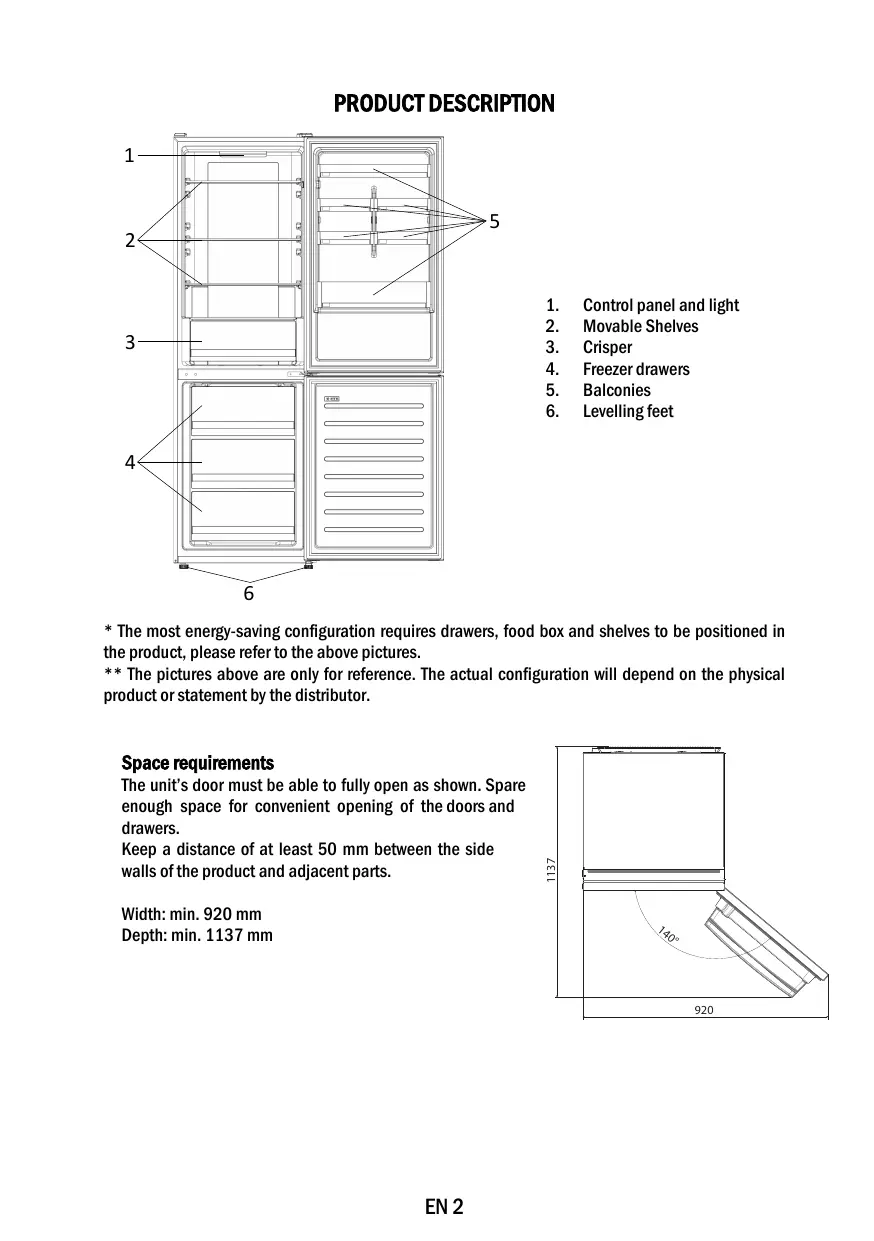
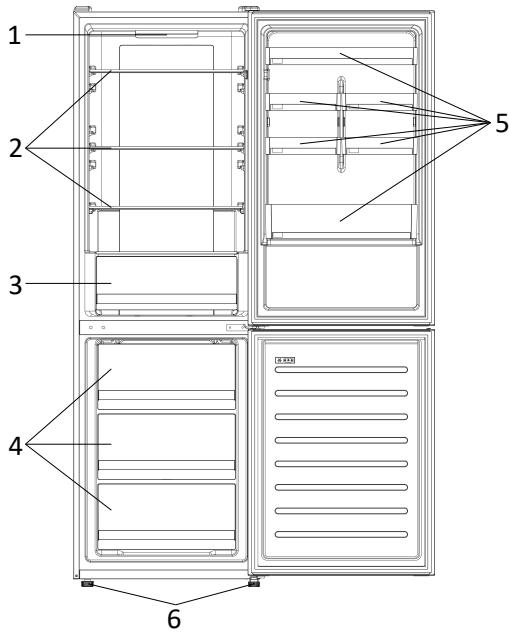
- Control panel and light
- Movable Shelves
- Crisper
- Freezer drawers
- Balconies
-
Levelling feet
-
The most energy-saving configuration requires drawers, food box and shelves to be positioned in the product, please refer to the above pictures.
** The pictures above are only for reference. The actual configuration will depend on the physical product or statement by the distributor.
Space requirements
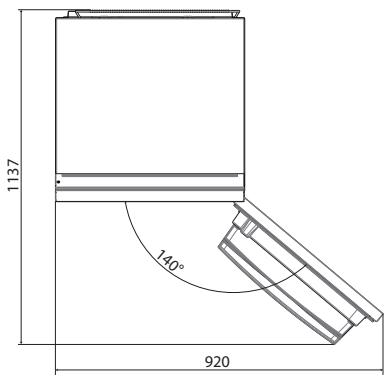
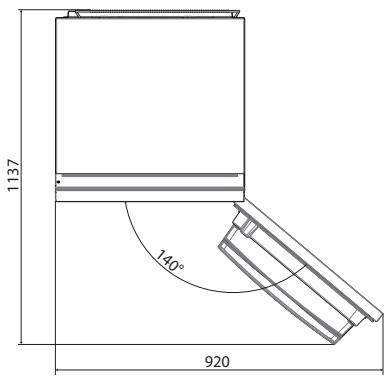
The unit's door must be able to fully open as shown. Spare enough space for convenient opening of the doors and drawers.
Keep a distance of at least 50~mm between the side walls of the product and adjacent parts.
Width: min. 920 mm
Depth: min. 1137 mm

USE
① ON/OFF key, used to switch on/off the appliance.
② Mode key, used to select the fridge temperature or the special functions like.
③ WiFi Icon, shows if the appliance is connected to the app.
④ Super Cool Icon, shows if the function is activated.
⑤ Temperature levels, show which is the selected temperature.
Use
- Plug on the appliance. The appliance will turn on automatically.
The temperature will automatically set at 4^ in the fridge and -18^ in the freezer. - To change the temperature, with the fridge door open, press the mode key. When the setting increases, the corresponding LED light will turn on. An acoustic signal is made every time the mode key is pressed and the temperature is changed.
In case of power loss, the last cooling level set will be restored. - To restore the default setting, at the screen lit, keep pressed the TEMP button, and then press ON/OFF button 5 times in 5 seconds.
- Under the normal operating condition (in spring and autumn), it is recommended to set the temperature at 4^ . In summer when the ambient temperature is high, it is recommended to set temperature at 6 8^ , so as to guarantee the fridge and freezer temperatures and reduce the refrigerator continuous running time; and in winter when the ambient temperature is low, it is recommended to set temperature at 2 4^ to avoid frequent start/stop of the refrigerator.
Customized temperature
From the app, it is possible to customize the temperature of the fridge compartment. The temperature can be set with 1^ sensitivity and it is possible to select a temperature from 2^ to 8^ in the fridge. An acoustic signal is made every time the temperature is changed. When the temperature is selected by the app, there is no indication on the control panel, all the temperature LED lights are turned off, while only the WiFi icon is turned on.
Fine Tuning
The fine tuning selection mode gives to possibility to set the temperatures by sublevels; each temperature level has three sublevels.
How to use the fine tuning function:
- Press the mode key for 8 seconds to enter fine tuning selection mode. When the appliance enters the mode, an acoustic signal is made and the LED of currently selected cooling level blinks.
- By short pressing the mode key within 5 seconds, the fine tuning setting increases and, at each pressing, an acoustic signal is made.
- During fine tuning, the LED of the selected cooling level is fixed, while the LED of the selected sublevel blinks.
- If no key is pressed for 5 seconds, the system automatically exits from fine tuning selection mode. The fine tuning setting is saved and the LED of the selected fridge temperature is fixed.
If the fine tuning is activated again, the setting will start from the previously stored level.
Super Cool function
It is suggested to switch on the Super Cool function if a large quantity of food should be stored (for example after the purchase). The Super-Cool function accelerates the cooling of fresh food and protects the goods already stored from undesirable warming. When the function is activated, the temperature of the fridge is automatically set at 2^ .
How to use the Super Cool function:
- The function can be activated by pressing many times the mode key until the Super Cool LED is turned ON or by selecting it from the app. If the function is activated, the corresponding icon on the control panel will be turned on.
To exit the Super Cool function, press the mode key again.
The Super Cool function automatically ends after 30 hours running. - When the Super Cool ends, the corresponding icon of the control panel turns off and the previously set cooling level is restored.
Super Freeze function
The super freezing function accelerates the freezing of fresh food and protects the goods already stored from undesirable warming. If a large amount of food has to be freeze, it is recommended to set the Super Freeze function on 24h before the usage. When the function is activated, the temperature is automatically set at -25^ .
How to use the Super Freeze function:
The function can be launched only by selecting it from the app. If the function is activated, it will be shown by the app; there is no indication on the control panel.
- To exit the Super Freeze function, turn it off from the app.
- The Super Freeze function automatically ends when the function has lasted for more than 50 hours.
Eco mode
The Eco mode can be activated to optimize the performance of the appliance, whereas obtaining the best food storage. When the function is activated, the temperature is automatically set at 5^ in the fridge, and at -18^ in the freezer.
How to use the Eco mode:
- The function can be activated only by selecting it from the app. If the function is activated, it will be shown by the app; there is no indication on the control panel.
To exit the Eco mode, turn it off from the app; the previously selected temperature will be restored.
The Eco mode automatically ends when another function is chosen from the control panel.
Holiday function
The Holiday function can be used to reduce the energy consumption of the appliance, when it is not used regularly. The function will turn off the LED lights (even if the door is open) and the fridge will work on low power consumption mode), whereas the freezer will keep working normally.
How to use the Holiday function:
- The function can be activated only by selecting it from the app. If the function is activated, it will be shown by the app; there is no indication on the control panel.
- To exit the Holiday function, turn it off from the app; the previously selected temperature will be restored.
The Holiday function automatically ends when another function is chosen from the control panel.
Defrosting
The defrosting of the refrigerator and freezer compartment are done automatically: no manual operation is needed.
HCS
When a certain moisture level is reached, the HCS filter fibers open causing moisture to decrease and then close again.
Demo mode
Keep the refrigerated door open, press and hold the on / off key, and click the set key five times. The refrigerator will enter the Demo mode. To exit the mode, keep pressed the door switch and press again the SET key for 5s.
Error codes
If - 6°C LED light is flashing, it means there has been a fan error. Please, contact the technical assistance to help solve the problem
APP CONNECTION (Content only)
IN APP PAIRING PROCEDURE
Step 1
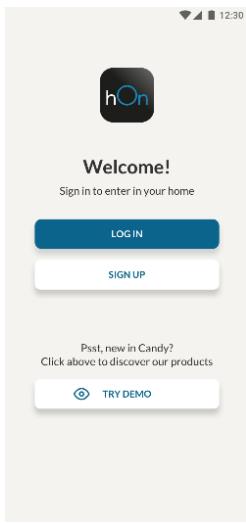
Download the hOn app on the stores


Step 2
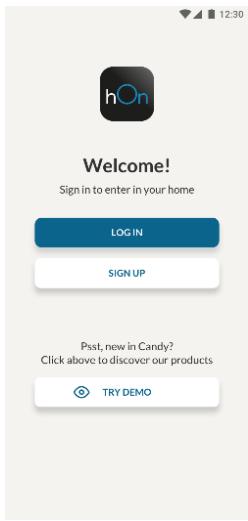
Create your account on the hOn App or log in if you already have an account
Step 3
- Follow pairing instructions in the hOn App
WiFi Use
To activate the Wi-Fi, long press the mode key for 2 seconds, the Wi-Fi icon will turn on and an acoustic signal is made.
If the Wi-Fi has not been configured yet, when the refrigerator turns on, it will automatically enter the configuration mode and keep this status for 30 minutes. To use the configuration mode:
- Press the mode key for 2s but less than 8s, the refrigerator enters the Wi-Fi configuration mode and an acoustic signal is made. The Wi-Fi icon starts blinking.
- Follow in app instructions to configure the Wi-Fi (see above).
- Once the Wi-Fi is configured and the connection established, the Wi-Fi icon is on and fixed.
After 30 minutes without performing any operation, the Wi-Fi will automatically exit the configuration mode. - If the Wi-Fi has already been configured, it will automatically reconnect according to the configuration information.
Radio-module - Technical data
| Frequency rate (OFR) | 2400 MHz-2843.5 MHz |
| Channel frequencies | 2412...2472 MHz(step size 5 MHz) |
| Maximum power(EIRP) | 100 mW |
Radio equipment type is in compliance with Directive 2014/53/EU.
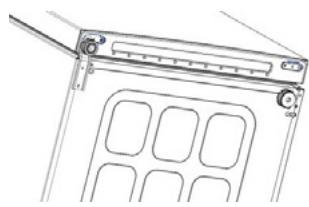
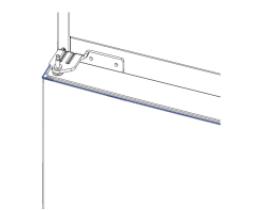
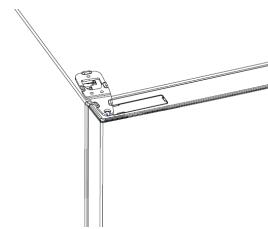
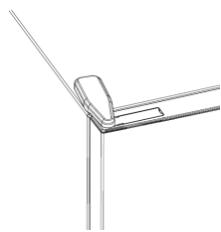
DOOR REVERSIBILITY
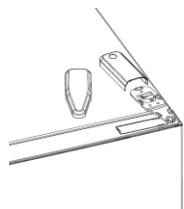
Tools needed: Electric screwdriver
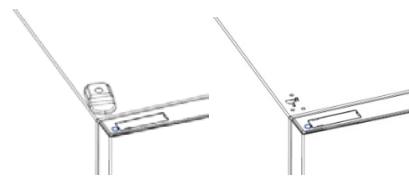
- Remove the top hinge cover
- Unscrew the top hinge
- Remove the top hinge cover (left)
- Remove middle hinge
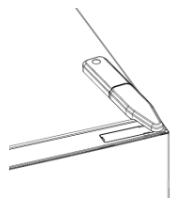
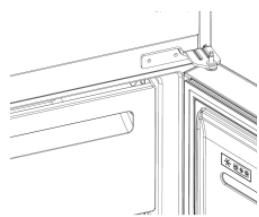
- Remove lower hinge
- Mount hinge foot
- Mount middle hinge
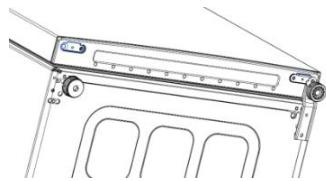
- Mount the upper hinge plate
- Mount the upper hinge cover
Pe3Hcme
ОПИСАНЕ HA ПОДУКТА 10
ИзickBaHЯЗ прocтpaHCTBO 10
YNOTPEBA. 11
YnoTe6a 11
Персанзига Темпера typa. 11
ΦинанactrpoiKa 12
Функця „Super Cool" 12
Функця „Super Freeze" 12
Pekim ,Eco" 13
Функця „Holiday" 13
Pa3Mpa3BaHe 13
Демонстрацноюн реким.. 13
KoIobe 3a rpeuKn 14
Bp3KA C PIPINOXEHNETO (cMo 3a cBbpxkHne).....15
ПОЛЕДУРА 3A СДВОВАСЕВ Б ПИЛОЖЕНETО.........15
CTbIka 1. 15
CTbIka 2. 15
CTbIka 3. 15
I3noJ3BaHe Ha Wi-Fi 16
OBPbIaHE HABPATITE. 17
Описане НА ПОДукTA
- KoHTpOJIeH nAHeJ n CBETJIInHa
- Побикни рафтove
- YeKMeJxE 3a no-DbJIroTpaHnA CBExeCT
- YeKMeJxKeTa HaФрИЗера
- PaoToBe
-
HnBeInpaun Kpaeta
-
Han-eHeprocneTBAaTa KOHΦnHypaunu N3NcKBa YeKMeJxKeTaTa, KytNa 3a XpHa n paΦTOBTe Da 6bDaT P03nUHOHpaHn B IpoDyKtA, MoJr, BIXkTe rOpHnTe CHIMKn.
**I3o6paJxHnraTao-rope ca cAmO 3a cnpaBkA.ДeICTBnTeHnHaTa KOHfUpyaunr Iue 3aBnCn OTФI3uYeckn npOdyKt INI DEKnapaunr Ta Ha DnCTpNbTyTopa.
N3nCKBaHna 3a npocTpaHCTBO
BpaTaHa ypeDa Tp86Ba Da MoKe Da ce OTbapr DOKpaR, KaKTo e NOKa3aHo. OcTabeTe DOCTaTbUHO MRCTO 3a YDO6Ho OTbApRHe Ha BpaTIne N YekMeJKeTa.T.Cna3BaHPe pa3CToRnHe OT Ha-MaJIko 50 MM MeJky CTpaHnHTe CTeHn Ha npOdyKTa n CbCeDHNTE YaCTn.
UInpouHa:MnH.920MM DblboOnHa:MnH.1137 MM
YIOTPEBA

① ByToHbT „ON/OFF“ ce n3noJ3Ba 3a BkNoUBaHe/n3KnIOuBaHe Ha ypeJa.
②БутоньТ „Mode" ce Изполлва 3a Избор Ha Temператypа Т haЯадиннka Или с pineuaJIHHTe Функци.
③ИконаТаWi-Fiпoka3BaДалиуpeдьт ecBbp3aнКьмпрлJOXeHNeTO.
④ IkoHaTa „Super Cool" noka3Ba dajnФункиЯТа e aKtINbnpaHa.
⑤ TemnepaTpyHn HnBa noka3BaT KOe e n36paHaTa TemnepaTpya.
Ynotpe6a
BknHouTe ypeBa B KOHTaKT. YpeBbT ige ce BkNIOuHn ABTomaTHUHO.
TeMnepaTpaTa Ha xJaIINHnKa aBToMaTnHo ige ce 3aJaHe Ha 4^
3aДа npomehnte TemnepaTypaTa,dokaTo BpaTata e OTBopeHa,HaTncheTe 6yToHa „Mode".Korato HacTpoiKaTa ce yBeIuMn,CbOTBtHaTa LED CBETJInHa ce BkIIOUBa.Пив BCЯКо Ha TnCKaHe Ha 6yToHa „Mode"ce noJaBa 3ByKOB CnIHJI N TemnepaTypaTa ce npomehЯ.
BcnyaHa 3ary6a Ha MoUHoc TnOcneHaTa HAcTpoKa Ha HNBOTo Ha oxIaxJaHe Ie 6bDe Bb3CTaHOBeHa.
3a Da Bb3CTaHOBnTE HAcTpoiKaTa No NpOpa3BnPaHe, npN CBeTeU ekpaH, HATnCHete n 3aDpBxTe 6yToHa ,TEMP" n CneI TOBa HATnCHete 6yToHa ,ON/OFF" 5 nbTN B pAMKnTe Ha 5 cekyn.
- ПиHopmaн pa6oTHn yCNoBn (пpe3 npOJeTTa n eCeHtA) ce npenOpbYBa
da 3aJaTe Tempepatyata Ha 4 °C. Пpe3ЯTO, korato Tempepatyata
Ha OKoJIHata CpeDa e BIncOKa, e npenOpbYuTeJIHo Da 3aJaTeTe
Tempepatyata Ha 6~8 °C, 3a Da ce rapaHTnpaT Tempepatynte Ha
XlaIINHka andepaHa da Ce HamaIIpnoJbIXnTeJIHOTo BpeMe Ha pa6oTa
Ha XlaIINHka. Пpe3ЗIMATA, korato Tempepatyata Ha OKoJIHata CpeDa e
HnCKa, e npenOpbYuTeJIHo Da 3aJaTeTe Tempepatyata Ha 2~4 °C, 3a Da ca
n36erHe YecToTO BkIIOUBAHe/N3KJIIOUBAHe Ha XlaIINHka.
Download on the App Store

EXPLORE IT ON AppGallery
Bnua 2
YK BUKOPINCTOByBaTnФyHKcIIO Holiday:
3'EDHAHHH 3 IODATKOM (Jnwe Bmict)
ПОUCEДУРА ПОЕДHAHнь ДОДATКY
Kpok 1
3aBaHTaXTe IoIaTOK hOn


GET IT ON
Google Play

Download on the
App Store

EXPLORE IT ON
AppGallery
Kpok 2
CTbopiTb oBNIKOBn 3aInc ydoataKy hOn a6o yBiNITb y cncTeMy, kUOy BAC BKe e oBNIKOBn 3aInc
Kpok 3
- DotpimyIeCBAk3iBOK i3 noEHaHHB DoaAtky hOn
BukopncTaHnWi-Fi
Ioo6 akTnBvBaTn cyHKzio Wi-Fi, haTnCHiTb Ta yTpMpyTe KhoNky Mode npoTgrom 2 cekyHd, nicra Yoro BBiIMKHeTbcr NiKTOrpama Wi-Fi i 6yde noDaHO 3BykOBni cnHan.
JaKuo Wi-Fi ige He halaTobaHo, nicra BBIMKHeHHXoJOnuNbHnK aBTOMaTuHOBBiJe y pexm KOHphiIpyBaHHi 3aJIuINbCBy B cBomy cTaHi Ha 30 xBnInn. Uo6CKOpNCtATncr pexmOM KOHphiIpyBaHH:
HaTnCKaIe KhoNky Mode npotrarom 2 cekyHd, aane MeHsE 8 cekyHd; XoIoOnbHnK yBiJe B pexIm HaIaNtUyBaHHra Wi-Fi i BnDaactb 3ByKObN CnHAn. NIKTORpaMa Wi-Fi noUHe 6bnMaTHn.
-ДOTPIMyIeC8 Bka3iBOK ydoaTky, lo6 hanaHTyBaTn Wi-Fi (dNv. Bnue).
-Писнаналувань Wi-Fi Ta BCTaHOBNeHHN 3'EDHaHHN nIKTorpama Wi-Fi BBIMKHeTBcra Ta CBITNTIMeTBcR HeNEpePBHO.
- Yepe3 30 xBnIiN 6e3dIajnbHocTi yHKciJ Wi-Fi aBTOMaTNUHO BInDe 3 peXIMy HalaStyBaHHr.
- Ykso Wi-Fi Bxe HanaTObaHo, 3'6dHaHHa bTOMaTnHb BiHOBtbcB iDNOBIDHO Do daHnx KOHphiirypBuHHa.
Papiomodylb - TexhniHa
jia ci jia jia jia jia jia jia jia jia ①
ailllll llllll 0000000000000000000000000000000000000000000
jilll jll lsl Jl oWFi ③
Super Cool 4
5
1
Jlaljll Jlai jlae jia
1 1 1 1 1 1 1 1 1 1 1 1 1 1 1 1 1 1 1 1 1 1 1 1 1 1 1 1 1 1 1 1 1 1 1 1 1 1 1 1 1 1
y. yill s guilal bua jai oaiu wul e lall a
5 5 5 1/12
iill /jillll 2 4 ic jlr lal y iiaiaiaia aai
a
aaiiaaii jll
1 1 1 1 1 1 1 1 1 1 1 1 1 1 1 1 1 1 1 1 1 1 1 1 1 1 1 1 1 1 1 1 1 1 1 1 1 1 1 1 1 1 1
LlWiFi jorj laiy iJrll JdALED
a a a a a a a a a a a a a a a a a a a a a a a a a a a
4yj yj yjssaill
: all aai
Jauo Lioic. jaiill buiall juiig 8 6dmode ciagl ciaie lai
d 1
aiaia Jie y j 5
. 4
LED
aall gill ssannally
15 15
LLED
i j 1
"Super Cool
Joo. (e) Joo.
yj j j j j j j j j j j j j j j j j j j j j j j j j j j j j j j j j j j j j j j j j j j j j j j j j j j j j j j j j j j j j j j j j j j j j
y 2e lalilall a jy b y
Super Cool
Super Cool LED
aill aol g lall jolll jolll jolll jolll jolll jolll jolll jolll jolll jolll jolll jolll jolll jolll jolll jolll jolll jolll jolll jolll jolll jolll jolll jolll jolll jolll jolll jolll jolll jolll jolll jolll jolll jolll
.
Jus 30 y Super Cool
glll glll glll glll glll glll glll glll glll glll glll glll glll glll glll glll glll glll glll glll glll glll glll glll glll glll glll glll glll
i
"Super Freeze
J 1 J 1 J 1 J 1 J 1 J 1 J 1 J 1 J 1 J 1 J 1 J 1 J 1 J 1 J 1 J 1 J 1 J 1 J 1 J 1 J 1 J 1 J 1 J 1
aclw 24 Super-Freeze aabbsy bssy pablln no s k aas ynnn n nn lsl
-25 15
Super Freeze
gill lal abw yie jn e pnnn aaybll buii pi i. gull n la yni yj n bea aybll Jy S
Super Freeze
450 50 no jk klll aag luea Luee Uu Super Freeze
a a a a a a a a a a a a a a a a a a a a a a a a a a a
aaii aai i 1
j111 2
g l aal jaii . paliily jellal alixiu pi y I loic . jall aill dlil . jll jll aia i Jaiu.
J 1
= l1( x2 - x_1)
abw y jy e y aagaaaagaaagaaagaaagaaagaaagaaagaaagaaagaaagaaagaaagaaagaaagaaagaaagaaagaaagaaagaaagaaagaaagaaagaaagaaagaaagaaagaaagaaagaaagaaagaaagaaagaaagaaagaaagaaagaaagaaagaaagaaagaa
a a a a a a a a a a a a a a a a a a a a a
HCS
0 1
S 的
y
aaii biai cia i gai jai, iaiai /jaii ci iie aie aiai aie aiai
a 1
5 5 SET
1. = ( x_1,y_1)
JUULI 150
akilll jg axlll alllxally


2
Jullu ddu jL 1j Uus uauu hOn duu duu duu

WiFi
Ji Jn Jn Wi-Fi jor jn nn nnnn nn nnnn nn nn nn nn nn nn nn nn nn nn nn nn nn nn nn nn nn nn nn nn nn nn nn nn nn nn nn nn nn nn nn nn nn nn nn nn nn nn nn nn nn nn nn nn nn nn nn nn nn nn nn nn nn nn nn nn nn nn nn nn nn nn nn nn nn nn nn nn nn nn nn nn nn nn nn nn nn nn nn nn nn nn nn nn nn nn nn nn nn nn nn
.
30 3d alalalalalalalalalalalalalalalalalalalalalalalalalalal
:Jgill ggsdssll.
Wi-Fi 8 n j 1
Wifi JFJ 1
. (Aeil jail) Wi-Fi 45545545545545545545545545545
Wi-Fi Wi-Fi
30
i 1
4 1