
CCE7T618EX - CCE7T618ES - Refrigerator CANDY - Free user manual and instructions
Find the device manual for free CCE7T618EX - CCE7T618ES CANDY in PDF.




| Product type | Refrigerator-freezer |
| Models | CCE7T618EX, CCE7T618ES |
| Brand | CANDY |
| Minimum required width | 920 mm |
| Minimum required depth | 1137 mm |
| Refrigerator temperature range | 2 °C to 8 °C (adjustable in 1 °C steps) |
| Freezer temperature range | -16 °C to -24 °C (adjustable in 1 °C steps) |
| Special functions | Super Cool, Super Freeze, Eco Mode, Vacation Function, Wi-Fi |
| Defrost | Automatic (no manual operation required) |
| Humidity control | Slider near the vegetable drawer (left: high humidity, right: low) |
| Wi-Fi connectivity | 2.4 GHz, max range 100 mW (EIRP), compatible with hOn app |
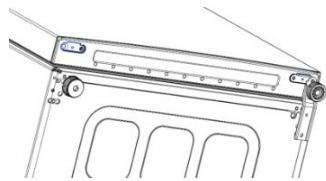
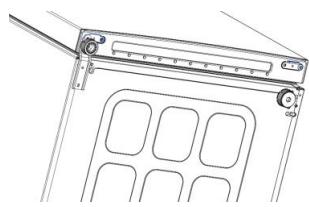
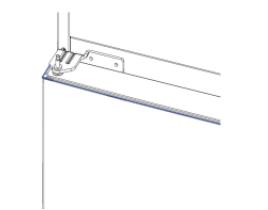
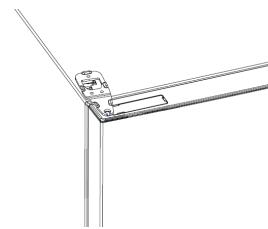
| Door reversibility | Yes, tool required: electric screwdriver |
| Control panel | Touch: On/Off, Wi-Fi, Mode, TEMP |
| Error codes | Communication error (refrigerator LEDs light up in sequence); Fan error (LEDs blink simultaneously) |
| Demo mode | Activable by holding MODE and pressing Wi-Fi 5 times within 5 seconds |
| Factory reset | Hold the door switch pressed and press On/Off for 5 seconds |
Frequently Asked Questions - CCE7T618EX - CCE7T618ES CANDY
User questions about CCE7T618EX - CCE7T618ES CANDY
0 question about this device. Answer the ones you know or ask your own.
Ask a new question about this device
Download the instructions for your Refrigerator in PDF format for free! Find your manual CCE7T618EX - CCE7T618ES - CANDY and take your electronic device back in hand. On this page are published all the documents necessary for the use of your device. CCE7T618EX - CCE7T618ES by CANDY.
USER MANUAL CCE7T618EX - CCE7T618ES CANDY
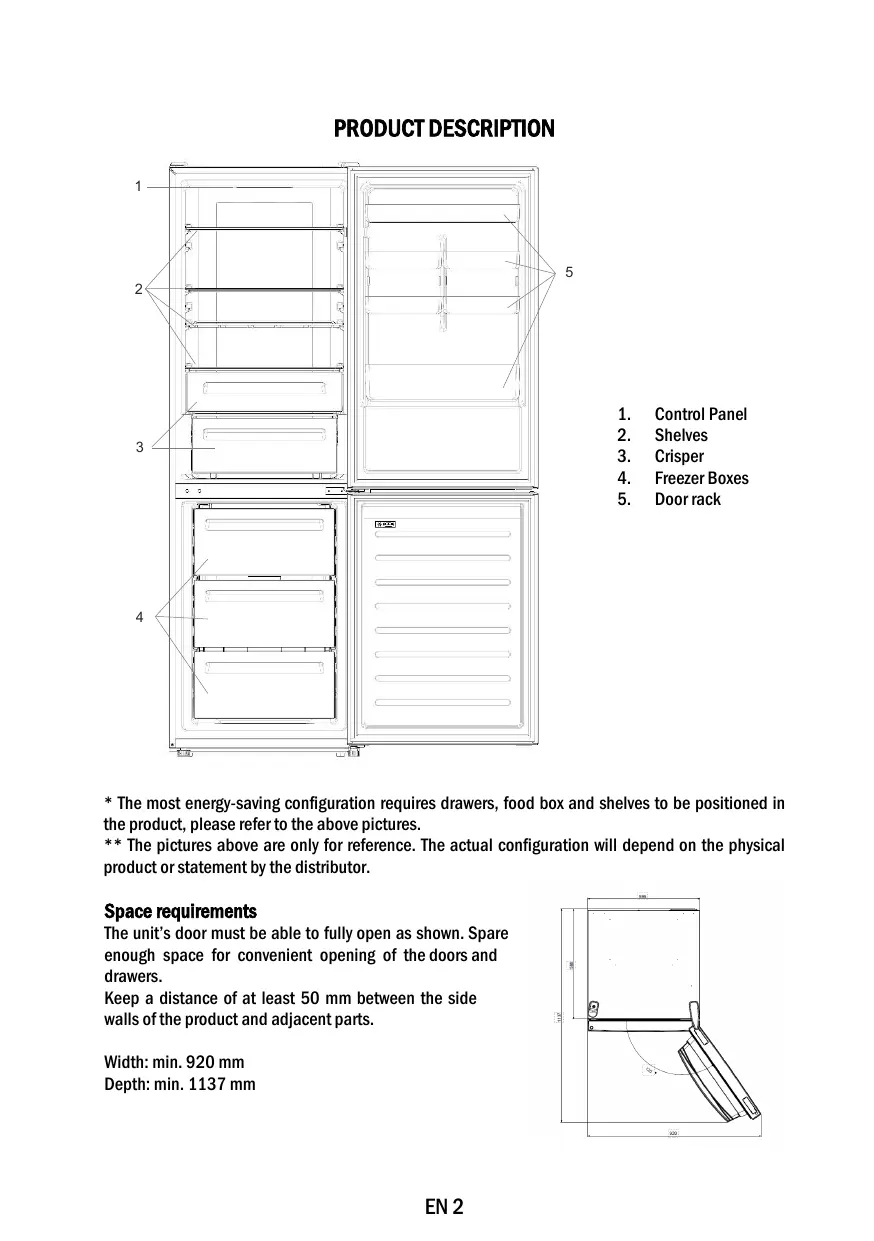
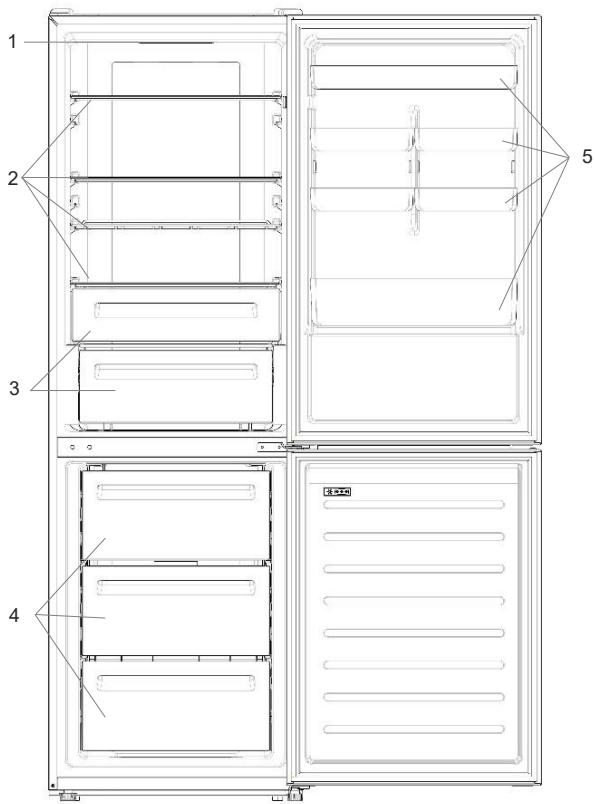
- Control Panel
- Shelves
- Crisper
- Freezer Boxes
- Door rack
- The most energy-saving configuration requires drawers, food box and shelves to be positioned in the product, please refer to the above pictures. ** The pictures above are only for reference. The actual configuration will depend on the physical product or statement by the distributor.
Space requirements
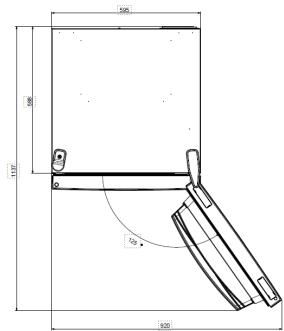
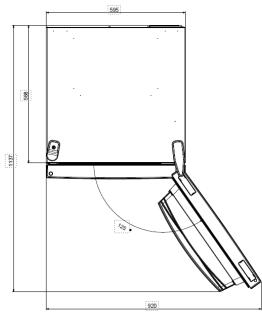
The unit's door must be able to fully open as shown. Spare enough space for convenient opening of the doors and drawers.
Keep a distance of at least 50 mm between the side walls of the product and adjacent parts.
Width: min. 920 mm
Depth: min. 1137 mm
USE
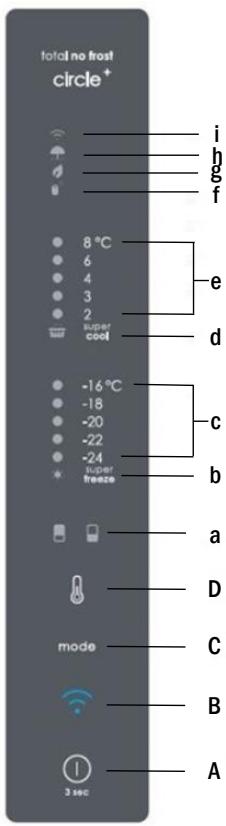
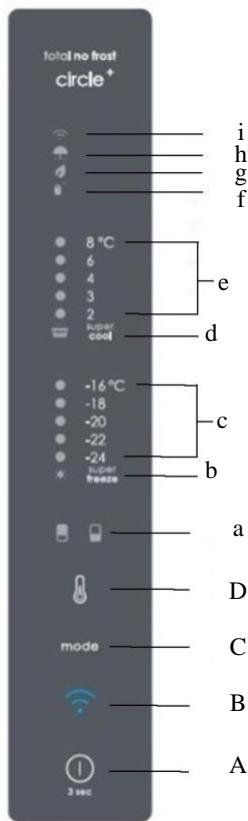
A. ON/OFF key, used to switch on/off the appliance B. Wi-Fi key, used to switch on/off the Wi-Fi C. Mode key, used to select the desired function D. TEMP key, used to select the fridge and freezer temperature
a. Fridge/freezer area icon: shows which compartment of the appliance is selected. b. Super Freeze icon: shows if the Super Freeze function is activated. c. Freezer temperature levels: show the selected temperature in the freezer. d. Super Cool icon: shows if the Super Cool function is activated. e. Fridge temperature levels: show the selected temperature in the fridge. f. Customized temperature icon: shows if the temperature has been selected by app. g. Eco mode icon: shows whether the eco mode is activated. h. Holiday function icon: shows whether the holiday function is activated. i. Wi-Fi icon: shows whether the Wi-Fi is working and the appliance is connected.
Use
- Plug in the appliance; it automatically turns on. The temperature will automatically set at 4°C in the fridge and -18°C in the freezer.
- To change the temperature, press the TEMP key for 5 seconds. An acoustic signal is made and the icon of the selected compartment (fridge or freezer) as well as all the temperature LEDs of the corresponding compartment turn on for 2 seconds. After 2 seconds, the selection of the compartment is confirmed. With the selected compartment icon on, quickly press the TEMP key to change the temperature. When the setting increases, the corresponding LED light will turn on. An acoustic signal is made every time the TEMP key is pressed and the temperature is changed. After 5 seconds, the selection is confirmed. After 30 seconds without operation, the fridge/freezer icon area turns off, while the LEDs of the selected temperatures stay on. When the TEMP key is touched again, the icon of the last selected area (fridge or freezer) turns on. In case of power loss, the last cooling level set will be restored.
- To restore the default setting, with the screen lit, keep the TEMP button pressed and simultaneously press the ON/OFF key for 5 seconds.
- Under normal operating conditions (in spring and autumn), it is recommended to set the temperature at 4°C. In summer when the ambient temperature is high, it is recommended to set the temperature at 6–8°C to guarantee the fridge and freezer temperatures and reduce the refrigerator's continuous running time. In winter when the ambient temperature is low, it is recommended to set the temperature at 3–4°C to avoid frequent start/stop of the refrigerator.
Customized temperature
From the app, it is possible to customize the temperature for both the fridge and freezer. The temperature can be set with 1°C sensitivity. It is possible to select a temperature from 2°C to 8°C in the fridge, and from -16°C to -24°C in the freezer.
When the temperature is selected by the app, the customized temperature icon turns on, while all the temperature LED lights of the affected compartment are turned off (i.e., if the refrigerator temperature is selected from the app, LEDs from 2°C to 8°C are turned off. If the freezer temperature is selected from the app, LEDs from -16°C to -24°C are turned off).
If only a single area (freezer or fridge) has the customized temperature, the temperature selection of the other area is not changed and the LED light of the selected temperature of that area remains on. An acoustic signal is made every time the temperature is changed.
Super Cool function
It is suggested to switch on the Super Cool function if a large quantity of food should be stored (for example after the purchase). The Super Cool function accelerates the cooling of fresh food and protects the goods already stored from undesirable warming. When the function is activated, the temperature of the fridge is automatically set at 2°C.
How to use the Super Cool function:
- The function can be activated by long pressing the TEMP key to select the fridge compartment, and then quickly pressing the TEMP key until the Super Cool icon LED is turned on, or it can be turned on from the app. When the function is activated, the Super Cool LED is always ON.
- To exit the Super Cool function, press the TEMP key or turn it off from the app. The Super Cool function automatically ends when the function has lasted for more than 30 hours.
- When the Super Cool ends, the icon on the control panel is switched off and the previously set cooling level is restored.
Note: Super Cool and Super Freeze functions cannot be activated simultaneously.
Super Freeze function
The super freezing function accelerates the freezing of fresh food and protects the goods already stored from undesirable warming. If a large amount of food has to be frozen, it is recommended to set the Super Freeze function on 24 hours before use. When the function is activated, the temperature is automatically set at -24°C.
How to use the Super Freeze function:
- The function can be launched by long pressing the TEMP key to select the freezer compartment, and then quickly pressing the TEMP key until the Super Freeze icon LED turns on, or it can be turned on from the app. When the function is activated, the Super Freeze LED is always ON. To exit the Super Freeze function, press the TEMP key or turn it off from the app.
- The Super Freeze function automatically ends when the function has lasted for more than 50 hours.
- When the Super Freeze ends, the icon on the control panel is switched off and the previously set freezing level is restored.
Note: Super Cool and Super Freeze functions cannot be activated simultaneously.
Eco mode
The Eco mode can be activated to optimize the performance of the appliance, while obtaining the best food storage. The Eco mode will automatically set the temperature at 5°C in the fridge and at -18°C in the freezer.
How to use the Eco mode:
- The function can be activated from the control panel by pressing the "mode" key until the Eco mode icon turns on (an acoustic signal confirms the selection), or by selecting the function from the app. When the function is activated, the Eco mode icon is always ON. To exit the Eco mode, turn it off from the app or choose another function from the control panel.
- When the Eco mode ends, the icon on the control panel is switched off and the previously set cooling levels are restored.
Holiday function
The Holiday function can be used to reduce the energy consumption of the appliance when it is not used regularly. When the function is on, the LED lights are off (even if the door is open) and the fridge is turned off, whereas the freezer will keep working normally.
How to use the Holiday function:
- The function can be activated from the control panel by pressing the "mode" key until the Holiday icon turns on (an acoustic signal confirms the selection), or by selecting the function from the app. When the function is activated, the Holiday icon is always ON.
- To exit the Holiday function, turn it off from the app or choose another function from the control panel.
- When the Holiday function ends, the icon on the control panel switches off and the previously set cooling levels are restored.
Defrosting
The defrosting of the refrigerator and freezer compartments is done automatically: no manual operation is needed.
Slider
Near the vegetable basket there is a slider that allows you to adjust the humidity inside it: moving it to the right decreases the humidity, moving it to the left increases the humidity.
Demo mode
To enter demo mode, with the display unlocked, keep pressed the MODE key and press the WiFi key 5 times within 5 seconds. To exit demo mode, perform the same operation or power off the refrigerator.
Error Codes
- Communication error
If the lights in the fridge turn on sequentially, it means there has been a communication error between the main control board and the display board. Please contact technical assistance to help solve the problem.
Fan
If the lights in the fridge flash simultaneously, the fan is not working properly. Please contact technical assistance to help solve the problem.
WI-FI USE
Step 1
Download the hOn app from the app stores.


GET IT ON
Google Play

Download on the
App Store

EXPLORE IT ON
AppGallery
Step 2
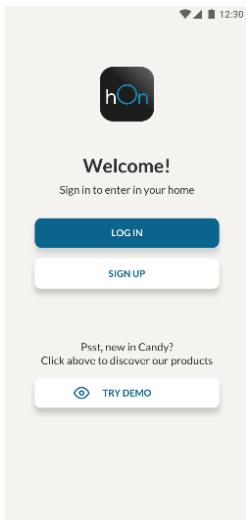
Create your account on the hOn App or log in if you already have an account.
Step 3
- Follow the pairing instructions in the hOn App.
Wi-Fi Use
If the Wi-Fi has not been configured yet, when the refrigerator turns on, it will automatically enter the configuration mode and keep this status for 30 minutes. The Wi-Fi icon blinks and product enrollment can start.
- Follow the in-app instructions to configure the Wi-Fi (see above).
- Once the Wi-Fi is configured and the connection is established, the Wi-Fi icon is on and fixed. After 30 minutes without performing any operation, the Wi-Fi will automatically exit the configuration mode.
- If the Wi-Fi has already been configured, it will automatically reconnect according to the configuration information.
To reset the Wi-Fi, press the Wi-Fi key and the MODE key for 2 seconds.
To turn off the Wi-Fi, press the Wi-Fi key for 3 seconds.
Radio module - Technical data
| Frequency rate (OFR) | 2400 MHz-2843.5 MHz |
| Channel frequencies | 2412...2472 MHz(step size 5 MHz) |
| Maximum power(EIRP) | 100 mW |
The radio equipment type complies with Directive 2014/53/EU.
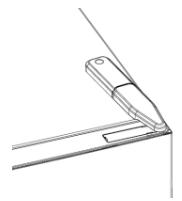
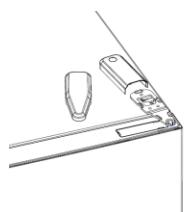
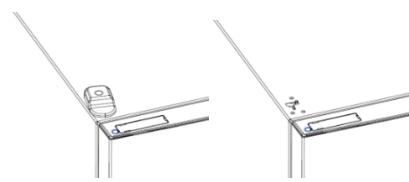
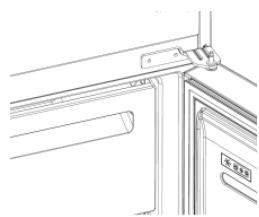
DOOR REVERSIBILITY
Tools needed: Electric screwdriver
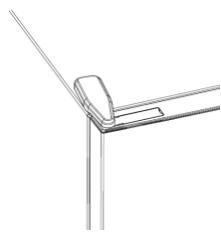
- Remove the top hinge cover.
- Unscrew the top hinge.
- Remove the top hinge cover (left).
- Remove the middle hinge.
- Remove the lower hinge.
- Mount the hinge foot.
- Mount the middle hinge.
- Mount the upper hinge plate.
- Mount the upper hinge cover.
PRODUCT DESCRIPTION 12 INSTALLATION SPACE 12 USE 13 Use 13 Personalized temperature 14 "Super Cool" function 14 "Super Freeze" function 15 "Eco" mode 15 "Holiday" function 16 Defrosting 16 Demonstration mode 16 Drawers for freezing 16 USE OF WI-FI 17 Figure 1 17 Figure 2 17 Figure 3 17 Use of Wi-Fi. 18 CARE AND CLEANING. 19 CARE AND CLEANING 20
PRODUCT DESCRIPTION
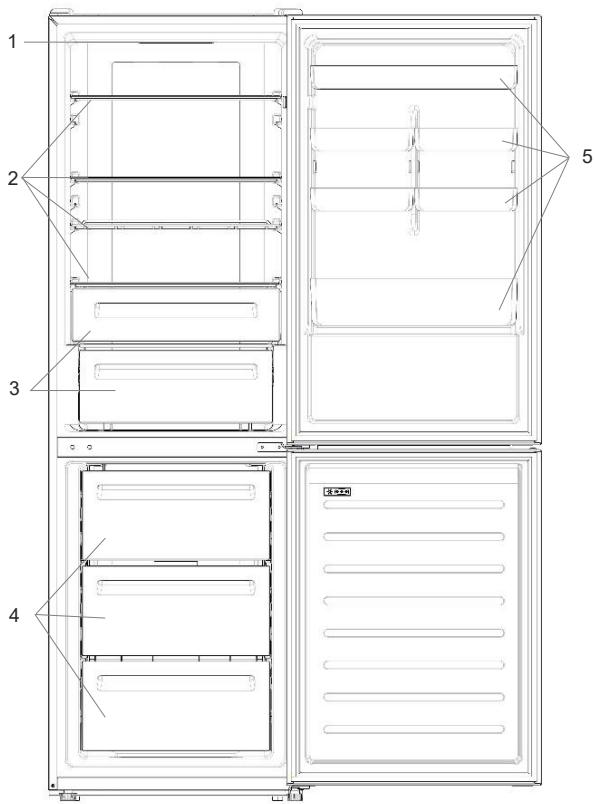
- Control panel
- Shelves
- Drawers for long-term storage
- Freezer drawers
- Door shelves
- The most energy-efficient configuration requires that the drawers, the basket for food and the shelves be positioned in the product as shown in the images above. **The images above are for reference only. The actual configuration depends on the physical product or the distributor's declaration.
INSTALLATION SPACE
The door must be able to open completely, as shown. Leave enough space for easy opening of the doors and drawers. Maintain a distance of at least 50 mm between the side walls of the product and adjacent parts.
Width: Min. 920 mm
Depth: Min. 1137 mm
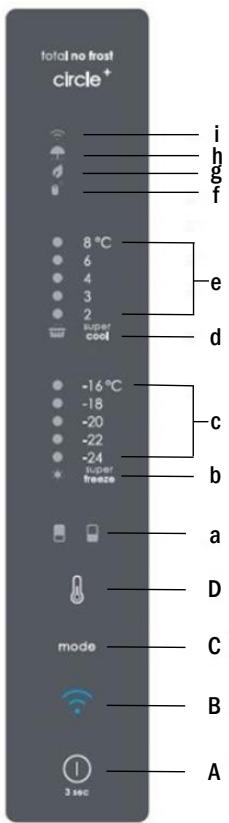
A. Button "ON/OFF" for switching the appliance on/off B. Button "Wi-Fi" for switching Wi-Fi on/off C. Button "Mode" for selecting the function D. Button TEMP for selecting the temperature in the refrigerator and freezer
a. Icon for the refrigerator/freezer zone, showing which compartment of the appliance is selected b. Icon "Super Freeze" showing that the "Super Freeze" function is activated c. Temperature indicators in the freezer showing the selected temperature for the compartment d. Icon "Super Cool" showing that the function is activated e. Temperature indicators in the refrigerator showing the selected temperature f. Icon for personalized temperature showing that the temperature is selected from the app g. Icon for "Eco" mode showing that the eco mode is activated h. Icon for the "Holiday" function showing that the function is activated
i. Icon "Wi-Fi" showing that the Wi-Fi module is functioning and the device is connected
Use
- The appliance starts working automatically after you plug it in. The refrigerator temperature is automatically set to 4°C, and the freezer to -18°C. To change the temperature, press the "TEMP" button for 5 seconds. You will hear a signal and the icon of the selected compartment (refrigerator or freezer) will light up, and all temperature indicators of the corresponding compartment will light up for 2 seconds, after which the compartment selection is confirmed. When the icon of the selected compartment lights up, press the TEMP button quickly to change the temperature. When the setting increases, the corresponding LED light turns on. With each press of
the "TEMP" button, a sound signal is emitted and the temperature changes; after 5 seconds the selection is confirmed. If you do not operate within 30 seconds, the zone icon for the refrigerator/freezer turns off, while the selected temperature indicators remain on. When you press the "TEMP" button again, the icon of the last compartment (refrigerator or freezer) turns on.
Download on the App Store

EXPLORE IT ON AppGallery
Bnua 2
Download on the App Store

EXPLORE IT ON AppGallery
Step 2
Download on the App Store

EXPLORE IT ON AppGallery
Step 2
USING THE WI-FI NETWORK
Step 1
To activate the Holiday function:
In the first field, enter the date; in the second field, enter the time.
Then press the button to confirm, and the settings will be saved.
Connect to the Wi-Fi network by selecting it from the list and entering the password.
(2020 Jiangsu)


"Super Cool"
Joo. (e) 1 Jlal l jy (e) pall no j 8 s k y jn jk Super Cool a b j Supm c j Bge al jzjll no j Jaill bai jzai ll g y jll pall d jy jy jy aai ll aay jy aay jy
Super Cool
Super Cool LED
TETMg Super Cool
Ae 30 2j k y a b g jai Laoie Super Cool
Laaa
Super Freeze Super Cool
"Super Freeze
g j 24 Super-Freeze
Brand : CANDY
Model : CCE7T618EX - CCE7T618ES
Category : Refrigerator