
8H-198ADTCN - Built-in electric oven FAGOR - Free user manual and instructions
Find the device manual for free 8H-198ADTCN FAGOR in PDF.



| Brand | Fagor |
| Model | 8H-198ADTCN |
| Product Type | Built-in electric oven |
| Dimensions (H x W x D) | 59.5 x 59.5 x 57.5 cm |
| Power supply | 230 V ~ 50 Hz single-phase |
| Rated power | 3.6 kW maximum |
| Cooking functions | Natural convection, fan-assisted, grill, turbo grill, pizza, defrost, steam cooking, keep warm |
| Temperature range | 30 °C to 280 °C depending on function |
| Capacity | Approximately 71 L (estimated) |
| Cooking levels | 4 levels with telescopic slides |
| Automatic programs | Presets for meat, poultry, pizza, pastry, etc. |
| Steam cooking | 9 steam programs with integrated water tank |
| Cleaning | Pyrolysis (self-cleaning at high temperature) |
| Maintenance | Automatic descaling of steam circuit |
| Display and controls | Touchscreen LCD, electronic programmer |
| Connectivity | Built-in Wi-Fi (control via mobile app) |
| Safety | Child lock, automatic shut-off, overheat protection |
| Interior lighting | Halogen bulb 25 W, eco mode |
| Included accessories | Wire rack, drip tray, baking tray, cooking probe, telescopic slides |
| Door opening | OpenUp! (touch opening of handle) |
| Warranty | 2 years (parts and labor) |
| Repairability index | 8.3/10 (according to available data) |
Frequently Asked Questions - 8H-198ADTCN FAGOR
User questions about 8H-198ADTCN FAGOR
0 question about this device. Answer the ones you know or ask your own.
Ask a new question about this device
Download the instructions for your Built-in electric oven in PDF format for free! Find your manual 8H-198ADTCN - FAGOR and take your electronic device back in hand. On this page are published all the documents necessary for the use of your device. 8H-198ADTCN by FAGOR.
USER MANUAL 8H-198ADTCN FAGOR
Built-in electric oven
12263.3eTtypiDpsSoJVAdS / 8H-885ADTFTN
ESTIMADO CLIENTE,
Cable neutro N: BU - azul
Cable de tierra PE: GNYE - verde/amarillo
The oven is exceptionally easy to use and extremely efficient. After reading the instruction manual, operating the oven will be easy.
Before being packaged and leaving the manufacturer, the oven was thoroughly checked with regard to safety and functionality.
Before using the appliance, please read the instruction manual carefully.
By following these instructions carefully you will be able to avoid any problems in using the appliance.
It is important to keep the instruction manual and store it in a safe place so that it can be consulted at any time.
It is necessary to follow the instructions in the manual carefully in order to avoid possible accidents.
Caution:
Do not use the oven until you have read this instruction manual.
The oven is intended for household use only.
The manufacturer reserves the right to introduce changes which do not affect the operation of the appliance.
TABLE OF CONTENTS
Safety instructions 42
Description of the appliance 46
Specification of the appliance 47
Installation 48
Operation 50
Baking in the oven - practical hints 65
Test dishes. 69
Cleaning and maintenance 71
Troubleshooting 75
Technical data 76
SAFETY INSTRUCTIONS
Warning: The appliance and its accessible parts become hot during use. Care should be taken to avoid touching heating elements. Children less than 8 years of age shall be kept away unless continuously supervised.
This appliance can be used by children aged from 8 years and above and persons with reduced physical, sensory or mental capabilities or lack of experience and knowledge if they have been given supervision or instruction concerning use of the appliance in a safe way and understand the hazards involved. Children shall not play with the appliance. Cleaning and user maintenance shall not be made by children without supervision.
During use the appliance becomes hot. Care should be taken to avoid touching heating elements inside the oven.
Accessible parts may become hot during use. Young children should be kept away.
Warning: Do not use harsh abrasive cleaners or sharp metal scrapers to clean the oven door glass since they can scratch the surface, which may result in shattering of the glass.
Warning: Ensure that the appliance is switched off before replacing the lamp to avoid the possibility of electric shock.
You should not use steam cleaning devices to clean the appliance.
SAFETY INSTRUCTIONS
Danger of burns! Hot steam may escape when you open the oven door. Be careful when you open the oven door during or after cooking. Do NOT lean over the door when you open it. Please note that depending on the temperature the steam can be invisible.
Ensure that small items of household equipment, including connection leads, do not touch the hot oven as the insulation material of this equipment is usually not resistant to high temperatures.
Do not leave the oven unattended when frying. Oils and fats may catch fire due to overheating or boiling over.
Do not put pans weighing over 15kg on the opened door of the oven.
Do not use the oven in the event of a technical fault. Any faults must be fixed by an appropriately qualified and authorised person.
In the event of any incident caused by a technical fault, disconnect the power and report the fault to the service centre to be repaired.
The rules and provisions contained in this instruction manual should be strictly observed. Do not allow anybody who is not familiar with the contents of this instruction manual to operate the oven.
The appliance has been designed only for cooking. Any other use (for example for heating) does not comply with its operating profile and may cause danger.
HOW TO SAVE ENERGY

Using energy in a responsible way not only saves money but also helps the environment. So let's save energy! And this is how you can do it:
- Do not uncover the pan too often (a watched pot never boils!).
Do not open the oven door unnecessarily often.
- Only use the oven when cooking larger dishes.
Meat of up to 1kg can be prepared more economically in a pan on the cooker hob.
- Make use of residual heat from the oven.
If the cooking time is greater than 40 minutes switch off the oven 10 minutes before the end time.
Important! When using the timer, set appropriately shorter cooking times according to the dish being prepared.
- Make sure the oven door is properly closed.
Heat can leak through spillages on the door seals. Clean up any spillages immediately.
- Do not install the cooker in the direct vicinity of refrigerators/freezers.
Otherwise energy consumption increases unnecessarily.
UNPACKING
During transportation, protective packaging was used to protect the appliance against any

damage. After unpacking, please dispose of all elements of packaging in a way that will not cause damage to the environment.
All materials used for packaging the appliance are environ
mentally friendly; they are 100% recyclable and are marked with the appropriate symbol.
Caution! During unpacking, the packaging materials (polythene bags, polystyrene pieces, etc.) should be kept out of reach of children.
DISPOSAL OF THE APPLIANCE
Old appliances should not simply be disposed
of with normal household waste, but should be delivered to a collection and recycling centre for electric and electronic equipment. A symbol shown on the product, the instruction manual or the packaging shows that it is suitable for recycling.
Materials used inside the appliance are recyclable and are labelled with information concerning this. By recycling materials or other parts from used devices you are making a significant contribution to the protection of our environment.
Information on appropriate disposal centres for used devices can be provided by your local authority.
DESCRIPTION OF THE APPLIANCE
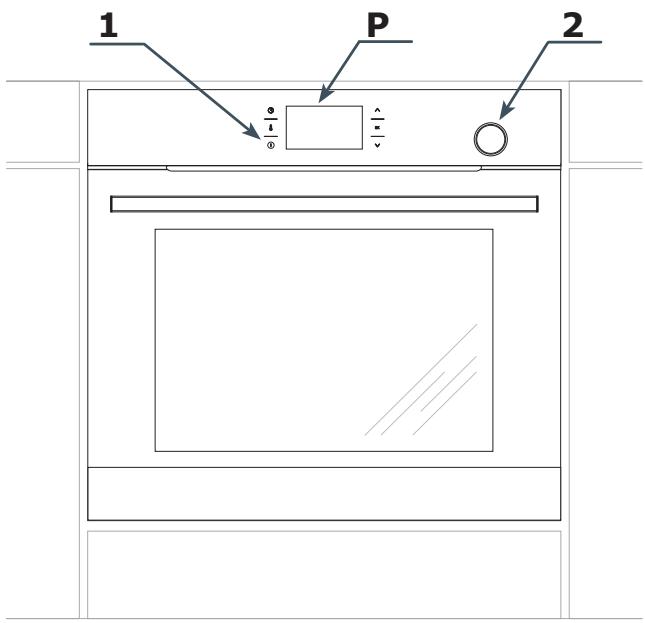
P Electronic programmer
1 On / off switch
2 Water container drawer
SPECIFICATION OF THE APPLIANCE
Oven fittings

Roasting tray
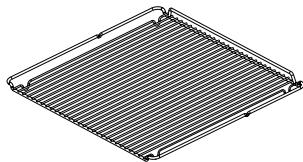
Grill grate (drying rack)
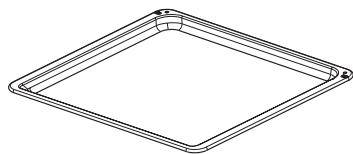
Baking tray
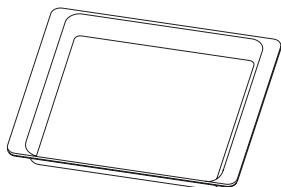
Solid steel bowl
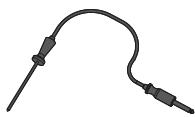
Meat probe
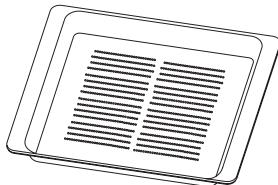
Perforated steel bowl
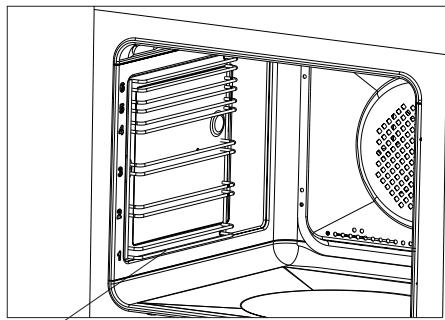
Side racks
INSTALLATION
Installing the oven
The kitchen area should be dry and aired and equipped with efficient ventilation. When installing the oven, easy access to all control elements should be ensured.
- This is a Y-type design built-in oven, which means that its back wall and one side wall can be placed next to a high piece of furniture or a wall. Coating or veneer used on fitted furniture must be applied with a heat-resistant adhesive (100^) . This prevents surface deformation or detachment of the coating.
- Hoods should be installed according to the manufacturer's instructions.
- Make an opening with the dimensions given in the diagram for the oven to be fitted.
Make sure the mains plug is disconnected and then connect the oven to the mains supply.
- Insert the oven completely into the opening without allowing the four screws in the places shown in the diagram to fall out.
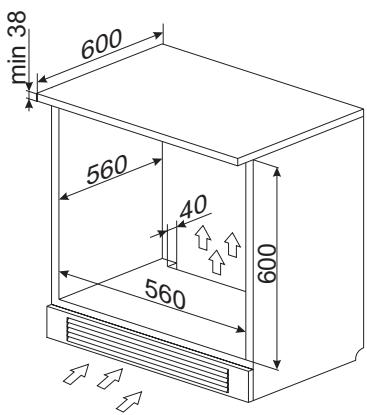
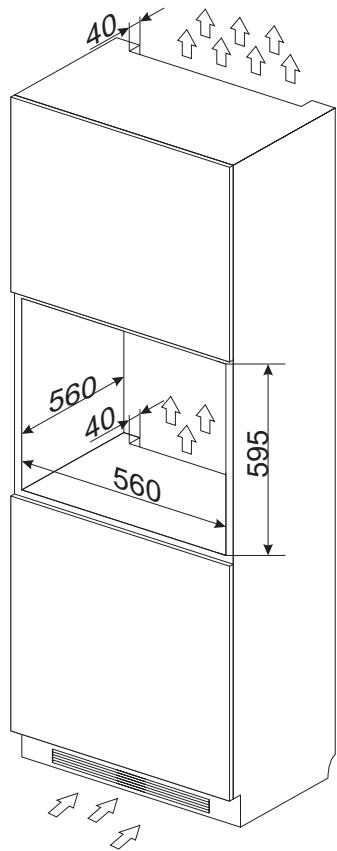
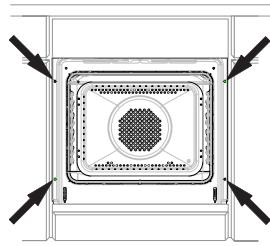
Electrical connection
Warning!
All electrical work should be carried out by a suitably qualified and authorised electrician. No alterations or wilful changes in the electricity supply should be carried out.
The oven is manufactured to work with a one-phase alternating current (230V 1N~50Hz) and is equipped with a 3 × 1,5 ~mm^2 connection lead.
The electricity supply for the oven must have a safety switch which enables the power to be cut off in case of emergency. The distance between the working contacts of the safety switch must be at least 3mm .
Before connecting the oven to the power supply it is important to read the information on the data plate and the connection diagram.
Caution! The installer is obliged to provide the user with "appliance electrical connection certificate" (enclosed with the warranty card).
Connection diagram
Caution! Voltage of heating elements 230V.
Caution! In the event of any connection the safety wire must be connected to the 12 PE terminal.
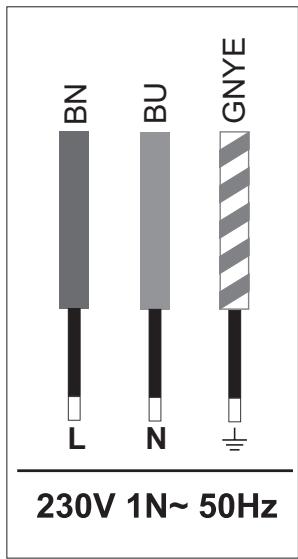
Live L: BN - brown
Neutral N: BU - blue
Earth PE: GNYE -green/yellow
Power circuit should be protected with a 16A fuse.
Recommended type of connection lead:
H05VV-F, 3 x 1,5mm².
Important!
If the fixed power supply cable is damaged, it should be replaced at the manufacturer or at an authorized servicing outlet, or by a qualified person to avoid danger.
OPERATION
Before using the oven for the first time
- Remove all packaging elements, particularly those protecting the interior of the oven chamber during transport.
- Remove all the accessories from inside of the oven and wash them thoroughly in warm water with gentle washing up liquid.
- Remove the protective foil from the surfaces of the telescopic runners.
- Use warm water with the addition of mild detergent to wash the inside of the chamber. Do not use hard brushes or sponges. They could damage the coating of the inside of the chamber.
Warm up the oven chamber
- Turn on the ventilation in the room or open a window.
- Turn the function selector knob and set the position or (there is a detailed description of these functions later in the instructions).
Set the temperature to 250^ . The oven should operate for a minimum of 30 minutes; while it is operating the oven produces a smell, which is only present at the beginning but will eventually go away as the appliance is used. This is perfectly normal and is part of the process of warming up the oven chamber.
Control Panel
On/off switch ① is on the left side of the display. To activate the On/off switch, touch the glass in the place indicated by a pictogram. An acoustic signal will be heard, which was selected in the menu. (See section: Electronic programmer).
Touch sensor surfaces must be kept clean.
Important.
The inside of the oven should only be washed with warm water and a small amount of washing-up liquid.
OPERATION
WiFi function
The oven is equipped with the WiFi function. It can be controlled by mobile application.
Note:
- Touch OK each time to confirm your selection, or touch to adjust the settings.
- When you activate the function, the WiFi menu will be displayed.
- No operation for 30 seconds, the appliance enters Standby mode.
To immediately exit from the menu and switch the appliance to standby mode touch and OK.
To access the WiFi menu in standby mode, touch and hold the sensor. Then touch the sensors select one of the following:
-WIFI,
-PARING,
-MONITOR,
- CONTROL,
- RESET,
- ERROR.
Touch to make your selection and then touch OK to confirm. Then select ON/OFF or YES/NO to RESET. Touch OK to confirm.
Note: By default the WiFi feature is OFF.
Available connection modes:
- Access Point — connect your mobile device directly to the oven without the use of any home wireless network devices.
LAN connect your mobile device to the oven via the home WiFi network, access from outside this network is not possible. - WAN — connect your mobile device to the oven via the Internet – the appliance can be accessed from anywhere in the world.
Note: Active connection is indicated on the display. Access Point is the default connection.
You can change the connection type using the mobile app.
Please visit www.fagorelectrodomestico.com for step-by-step instructions how to configure your network.
Error Codes: When there is a connection failure, you can check the error code in ERRORS or WiFi menu:
| Error | Reason | Solution |
| E20 | Connection error | Try to reconnect and, if unsuccessful, contact your network administrator |
| E21 | Number of users exceeded | The appliance stores all users who connect by Wifi - to erase the list, disconnect the appliance from the power supply and reconnect again. |
Information you need for correct configuration:
Make sure that the oven is connected to the power supply.
In Access Point mode, make sure you are within range (SSID: SmartIN).
- In LAN mode, make sure that your mobile device is connected to the same WiFi home network that the oven is connected to.
- In WAN mode, make sure the Internet connection is available in your WiFi network.
- In LAN and WAN mode, you will need a password (if exist) to connect to your home WiFi network.
OPERATION
Electronic programmer
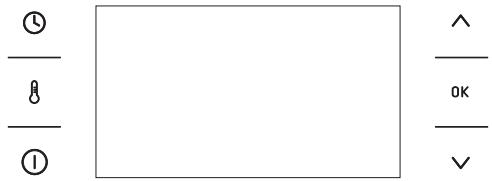
The Control Panel is equipped with an LCD display and 6 touch sensors:
| Sensors | Description | Symbol | Description |
| ① | On / off switch (Standby mode) | # | Child Lock |
| ② | Temperature of the setting | 1 | Adjust temperature |
| ③ | Clock setting | ::1::1 | Active odour catalyst |
| ^ | Plus / up [+] | □ | Door lock (pyrolysis) |
| 0K | Confirm | → | End Time |
| ✓ | Minus / down [−] | ⊢ | Duration |
| ◇ | Automatic power cut out |
Note: You will hear a beep each time you touch a sensor. It is not possible to turn off the acoustic beeps.
Note: When mains power is cut and restored (power outage), the appliance automatically enters standby and immediately displays the current time.
Switch on the appliance and select interface language.
When you connect the appliance to mains power you will be prompted to select your preferred LANGUAGE.
OPERATION
Use the sensor to go through all the items in the LANGUAGE menu. Select the language in which you want the messages to be displayed and touch OK to confirm.
Set current time
Once your preferred language is set you now need to confirm the current time by touching OK or set the time using the sensors.
Time can be set in the range from 0:00 to 23:59 for 24-hour clock system or from 0:00 to 12:00 for the 12-hour clock system.
When current time is set, the appliance enters standby mode in which the display shows the current time only.
You need to touch ① to start setting the current time. Use the sensors to select SETTINGS and touch 0K to confirm. Use the sensors to enter the TIME menu, select TIME and touch 0K to confirm.
Important!
To exit to submenu at any time, simultaneously touch and OK.
Menu
Touch ① to activate the appliance from standby. Use the sensors to navigate the menu.
The following main menu items are available:
- SETTINGS,
- HEATING FUNCTIONS,
- PRE-SET PROGRAMMES
- USER PROGRAMMES,
- STEAM PROGRAMMES
-CLEANING - OPENUP!
-EXIT
Touch OK to select any menu item.
If no changes are made within 60 seconds, the appliance enters standby mode. To im
mediately exit from the menu and switch the appliance to standby mode, select the EXIT icon and touch OK to confirm. To immediately exit from the menu and switch the appliance to standby mode simultaneously touch and OK.
Settings
Touch ① to enter the menu. Use the sensors to select the SETTINGS menu and touch OK to confirm.
The SETTINGS menu items:
- LANGUAGE,
-TIME - LIGHTING
-TONES - DISPLAY BRIGHTNESS
- SERVICE,
- FACTORY SETTINGS,
- EXIT
Use the sensors to navigate the menu. Touch OK to select the chosen item.
To exit from the SETTINGS, navigate to exit using the and touch OK to confirm.
To immediately exit from the SETTINGS menu and switch the appliance to standby mode, simultaneously touch and 0K.
Language
In the LANGUAGE menu select the required language using the sensors and touch OK to confirm.
Available languages:
- DEUTsCH,
- ENGLISH,
- POLSKI,
- PYCCKNI,
- CESKY,
- SRBSKI,
OPERATION
-LIETUVISKAI,
- EESTI,
- LATVISKI,
- FRANÇAIS,
- ESPANOL,
-TURKQE,
- SVENSKA,
NORSK,
- SUOMI,
DANSK,
-ITALIANO,
- NEDERLANDS
- EXIT,
To exit into SETTINGS from the LANGUAGE menu use the sensors to select EXIT and touch OK to confirm.
To immediately exit from the LANGUAGE menu and switch the appliance to standby mode, simultaneously touch and OK.
Time
Use the sensors to select TIME and touch OK to confirm. Items available in the TIME menu
- CURRENT TIME,
-MINUTE MINDER, - CLOCK TYPE,
-TIME FORMAT - EXIT.
Use the sensors to select the required item and touch OK to confirm.
Clock type
Select the clock type menu and touch OK. The following items will be available:
-DIGITAL,
-ANALOGUE.
Use the sensors to make your choice in the CLOCK TYPE menu and touch OK to confirm. The selection is stored by the appliance and the TIME upper level menu is automatically displayed.
The selected clock type will now appear in the upper right corner of the display and during standby.
Time format
Select the TIME FORMAT menu and touch OK. The following items will be available:
-24h,
- AM / PM.
Use the sensors to make your choice of time format and touch 0K to confirm. The selection is stored by the appliance and the TIME upper level menu is automatically displayed.
This option is only available for a digital clock.
Minute Minder
When you select the MINUTE MINDER and touch OK, the appliance will display the time in the following format: 00:00.
When the appliance is in standby you can also access Minute Minder when you touch ① and then ① .
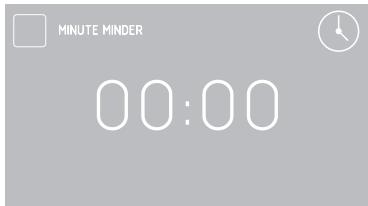
If no changes are made within 5 seconds, the appliance enters standby mode.
Touch the sensors to adjust minute minder in 1 minute steps. Touch OK to confirm and start the countdown.
Touch the sensor to adjust the minute minder setting during countdown.
When the time has elapsed, a beep will sound
OPERATION
and the display will show the time - 00:00.
Touch OK to mute the beeping. The appliance switches to standby mode.
Lighting
Select the LIGHTING menu and touch OK. The following items will be available:
- CONTINUOUS LIGHTING
-ECO LIGHTING
Use the sensors to select the desired lighting option and touch OK to confirm. The selection is stored by the appliance and the SETTINGS upper level menu is displayed.
CONTINUOUS LIGHTING
When continuous lighting mode is selected, the light will be on continuously during the programme (heating function) or when the oven door is opened.
ECO LIGHTING
When this option is selected, the lighting will be on for 30 seconds when you touch any sensor during a programme (heating function). When oven door is opened, light is turned on for as long as the oven door is open, but no longer than 10 minutes, after which the light is turned off.
Tones
Select the tones menu and touch OK. The following items will be available:
Use the sensors to select the desired option and touch OK to confirm. The selection is stored by the appliance and the SETTINGS upper level menu is displayed.
Display brightness
Select the DISPLAY BRIGHTNESS menu and touch OK. The display brightness expressed in % will be shown on the display.
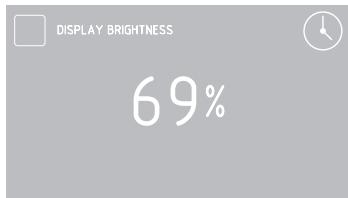
Use the sensors to adjust display brightness within 0 - 100% range in 1 % steps. Touch OK to store the selected display brightness level. The selection is stored by the appliance and the SETTINGS upper level menu is displayed.
Service
Select the SERVICE menu and touch OK. The following message will be shown.
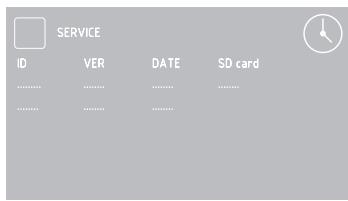
If the appliance detects an error, its code will be displayed on the screen.
Factory settings
Select the FACTORY SETTINGS menu and touch OK. The following message will be shown.
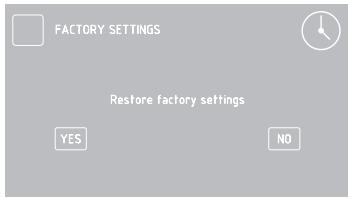
Use the sensors to choose to restore the factory settings or leave the current settings. To keep current settings, select "No" and touch OK to confirm. The appliance will exit to SETTING upper level menu.
Select "Yes" to restore the factory settings.
Heating functions
Use the sensors to select the HEATING FUNCTIONS menu and touch OK to confirm. The following HEATING FUNCTIONS menu items are available:
- RAPID PREHEATING
-CONVENTIONAL - PASTRY
- GRILL
-TURBO GRILL - SUPER GRILL
-FAN COOKING
-PIZZA
-BROWNING
-ROASTING
-DEFROSTING - ECO FAN COOKING
- EXIT.
Please, see the table below for overview of oven functions, oven elements, temperature and default settings.
| Function Description | Oven elements | Temperature [°C] | Default tempera-ture [°C] | Level from the bottom | |
| min. | max | ||||
| RAPID PREHEATING | fan heater + fan + grill | 30 | 280 | 180 | 3 |
| CONVENTIONAL | bottom heater + top heater | 30 | 280 | 180 | 3 |
| PASTRY | bottom heater + top heater + fan | 30 | 280 | 170 | 3 |
| GRILL | grill | 30 | 280 | 280 | 4 |
| TURBO GRILL | grill + Fan | 30 | 280 | 200 | 2 |
| SUPER GRILL | grill + top heater | 30 | 280 | 280 | 4 |
| FAN COOKING | fan heater + fan | 30 | 280 | 170 | 3 |
| PIZZA | fan heater + bottom heater + fan | 30 | 280 | 220 | 2 |
| BROWNING | top heater | 30 | 230 | 180 | - |
| ROASTING | bottom heater | 30 | 240 | 200 | - |
| DEFROSTING | fan | - | - | - | 3 |
| ECO FAN COOKING* | fan heater + fan | 30 | 280 | 170 | 3 |
- ECO Fan Cooking is an optimised heating function designed to save energy when cooking food.
OPERATION
Fan cooking
Use the sensors to select the FAN COOKING and touch OK to confirm. The following screen is displayed showing the default temperature of 170^ and level three.
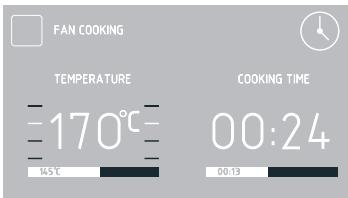
You can adjust the default temperature within 5 seconds when the symbol is flashing. Touch the sensors to adjust the settings. Touch OK to confirm and the symbol will disappear.
Touch to adjust temperature again.
Note. The appliance will beep when the set temperature in the oven cavity is reached.
When Duration is not set, touch ① to turn off the appliance. The appliance switches to standby mode.
Use the meat probe
When select a heating function, set the desired cooking temperature, or accept the default temperature.
Plug the meat probe in the socket. The default meat probe temperature of 80^ will be displayed.
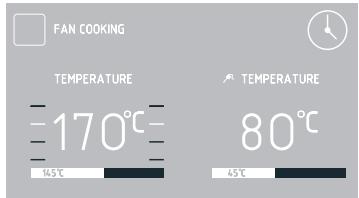
When meat probe is connected, the will flash for 5 seconds. If no changes are made within 5 seconds, the default temperature is set for the meat probe.
Use the sensors to adjust the temperature from 30^ to 99^ in 1^ steps.
Touch OK to confirm. The symbol and current meat probe temperature will be displayed. You can also adjust the temperature during a programme.
To do this touch. When you first touch the sensor, the set meat probe temperature is displayed, the symbol is flashing and you can adjust the temperature.
Touch OK to confirm the adjusted meat probe temperature, the will stop flashing and the appliance will resume normal operation.
Touch 8 twice to adjust the oven temperature setting. Touch the sensors to adjust temperature in 1^ steps. Touch OK to confirm the temperature.
When the time has elapsed you will hear a beep and the continues to flash.
Touch OK to mute the beeping. The appliance switches to standby mode.
The use of meat probe is recommended when cooking large portions of meat (at least 1kg ). The use of meat probe is not recommended when cooking poultry and meat with bones.
When not in use, unplug the meat probe from its socket and remove from oven cavity.
Note:
Only use the meat probe provided with your appliance.
OPERATION
Recommended meat probe temperature settings
| Type of meat | Temperature [°C] |
| Pork | 85 - 90 |
| Beef | 80 - 85 |
| Veal | 75 - 80 |
| Lamb | 80 - 85 |
| Venison | 80 - 85 |
Setting Duration (for a heating function)
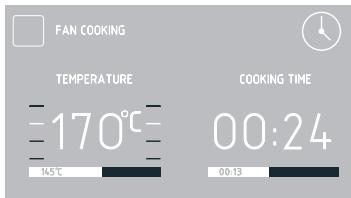
When the heating function is set, touch the sensor. When the symbol flashes, the display will show DURATION and "00:00".
Display before Duration or Duration and End Time are set
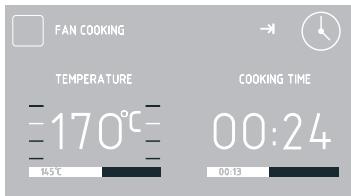
Display when Duration or Duration and End Time are set
If you make no adjustment within 5 seconds
the display will show the temperature only, duration will not be shown and the symbol will stop flashing.
Touch the sensors to adjust duration in 1 minute steps. Touch 0K to confirm and store the duration. DURATION changes to ENDTIME and entered Duration, for example 0:30, changes to the actual end time, while the remaining time is displayed on the bar below the actual end time. The symbol is displayed continuously.
When the time has elapsed you will hear a beep and the continues to flash.
Touch OK to mute the beeping. The appliance switches to standby mode.
Note. Once the Duration has elapsed you can extend it. Do not touch OK and touch ① and adjust the extended duration using the ∨ ∧ sensors.
Set Duration and End Time (for a heating function)
For details on how to set Duration, please refer to the preceding paragraph.
Set the End Time.
When the symbol is displayed touch twice and will be displayed and the symbol will flash, and the DURATION display will show start time.
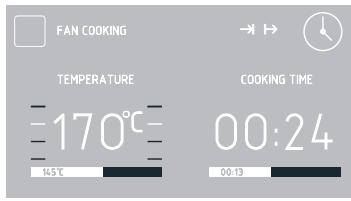
If you make no adjustments within 5 seconds, the appliance will return to previous settings of Duration and the selected heating function.
OPERATION
Use the sensors to adjust End Time in 1 minute steps.
Touch OK to confirm and store End Time. END TIME will change to START TIME and the actual start time will be displayed.
If you do not make any adjustments within 60 seconds the appliance will enter standby and the and symbols will be displayed along with current time.
Touch ① to turn on the appliance and display the entered settings.
Appliance operation in selected mode
When the current time reaches the Start Time, the appliance will start the selected heating function.
START TIME changes to END TIME and the display shows end time and the time remaining to end time is displayed on the bar below the actual end time. When the appliance starts the symbol is off and the symbol is on. When the time has elapsed you will hear a beep and the continues to flash. Touch OK to mute the beeping. The appliance switches to standby mode.
Pre-set programmes
Select PRE-SET PROGRAMMES menu and touch 0K The following items will be available:
- MEAT
POULTRY
-PIZZA - FROZEN PRODUCTS
- PASTRIES
- DOUGH PROVING
- DRYING
- KEEPING WARM
When you select a programme and touch OK to confirm the following submenu items will be available:
MEAT
-BEEF
- PORK
-LAMB
-VEAL
POULTRY
- CHICKEN
- DUCK
- GOOSE
-TURKEY
PIZZA
-THIN BASE
-THICKBASE
-FROZEN
FROZENPRODUCTS
-FISH
- CASSEROLE
LASAGNE
-CHIPS
PASTRIES
Use the sensors to select the desired menu and touch OK to confirm.
You can adjust oven cavity or meat probe temperature at any time, however this will end the pre-set programme.
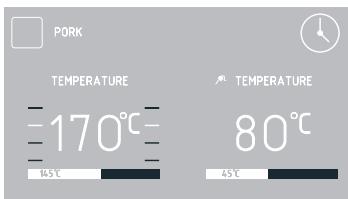
When you adjust the temperature (the
OPERATION
stop flashing) the pre-set programme will change to a regular heating function. Touch ① to stop any programme at any time.
When you touch ① , the appliance switches to standby mode.
In some programs, you can change the weight. When the scale symbol is flashing you can adjust the weight or confirm the default weight. Use the sensors to make adjustments and then touch OK to confirm and store the adjusted weight.
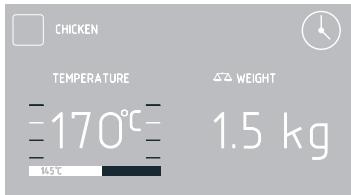
To start a pre-set programme with pre-heating function, select it and touch 0K to confirm. Oven will start preheating to 200^
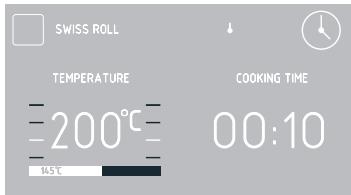
When the temperature reaches 200^ , a beep will sound and the symbol will flash. The temperature of 200^ in the oven cavity will be maintained.
Place food in the oven, close the door and touch OK to start the programme.
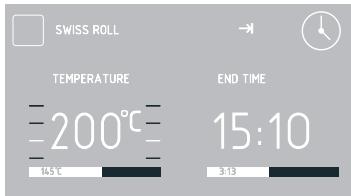
When the pre-set programme completes, you will hear beeping. The display will show the set oven cavity temperature.
Touch OK to mute the beeping. The appliance switches to standby mode.
User programmes
Use the sensors to select user programmes and touch OK to confirm. There are 10 user programmes that can be customized to suit your needs.
Use the sensors to select PROGRAMME 1 THROUGH PROGRAMME 10 and touch OK to confirm. You can then select the heating function, adjust temperature, cooking level and duration.
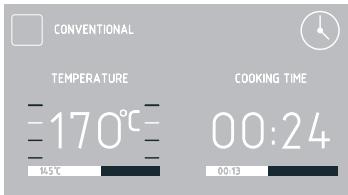
Adjustments are the same as for any heating function.
Once Duration is confirmed, a keyboard will be displayed to enter a custom programme name. Programme name may contain up to 25 characters.
When the user programme completes, you will hear beeping. The display will show the set oven cavity temperature.
Touch OK to mute the beeping. The appliance switches to standby mode.
OPERATION
Steam programmes
Use the sensors to select the STEAM PROGRAMMES menu and touch OK to confirm.
The following STEAM PROGRAMMES menu items are available:
- DEEP STEAM
- STEAM & ROAST
- REHEAT & PASTEURISE
- SLOW COOK PORK
- SLOW COOK TENDER MEAT
-BREAD - POULTRY
- ROAST & STEAM
- BAKE & STEAM
- DESCALE
-EXIT
Use the sensors to select a desired programme and touch OK to confirm.
The oven is equipped with special stainless steel bowls:
- perforated for vegetables and fish
-solid for meat.
Place the steel bowls with food on the wire shelf. Close the oven door.
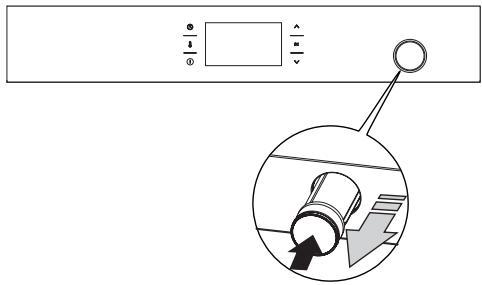
Water container drawer is located in the front panel. Push and then pull the container drawer. Pour 0.5 l of water into the container. (If you need to add water, the message "Add water (0.5l) and press OK" will be shown on the display). When there is enough water in the container you will hear a beep. Close the
container drawer.
Select the P01S-P09S programme and touch OK to confirm and start the programme.
IMPORTANT: The beeping during a programme and flashing message "Add 0.5l of water" on the display mean that you need to add water. Proceed the same as you added water for the first time. The message will stop flashing when you have added enough water.
NOTE: When water runs out the programme is not interrupted!
When the set time has elapsed, you will hear beeping. Touch any sensor to mute the beeping.
Touch OK acknowledge the completed programme. The message "Remove water" will be show on the display.
Open the door ajar to the first position (about 15^ ).
You can open the door all the way after a few seconds.
Then place deep baking tray under the water drain.
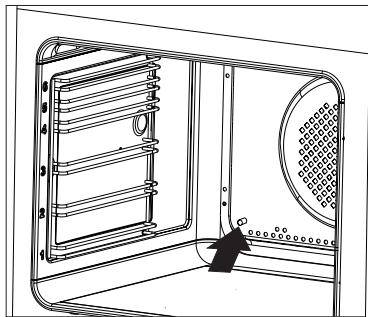
Press OK to drain the remaining water from steam system.
Wipe oven cavity dry with a cloth.
When you have run steam programmes several times, start the oven fan heater for 30 minutes at 180^ .
OPERATION
NOTE: Danger of burns! Hot steam may escape when you open the oven door. Be careful when you open the oven door during or after cooking. Do NOT lean over the door when you open it. Please note that depending on the temperature the steam can be invisible.
IMPORTANT: Ensure there is no water in the steam system when you use standard heating functions. Do not add water into the container drawer when using the standard heating functions.
Descale the steam system
When you have run several steam programmes, a flashing "Descale" message will be shown on the display. This message prompts you to descale the system. You can skip descending twice, by touching the ① sensor. However, eventually the appliance will not allow you to run a steam programmes again until you descale the appliance.
When you select the "Descale" programme, the display will show the message "Add 0.5l of descending agent." During the program, you will see the messages "Add 0.5l of water" and "Remove water" (rinsing).
Descale the appliance.
Prepare the solution of 450~ml of water and 50~ml of liquid descaling agent.
Pour the solution into the water containerer drawer.
Press OK to start the "Descale" programme.
NOTE: During the descending programme, you will need to drain water from the steam system 3 times.
Drain the descending solution from the system when you hear a beep and the "Remove water" message is flashing.
- Open the oven door.
- Then place deep baking tray under the
water drain.
- Press OK to drain the remaining decalging solution from the steam system. Pour the solution out of the baking tray and rinse it with water.
Add water when you hear beeping and the message "Add water" is flashing on the display. To rinse the steam system, pour 0.5 l of clean water into the water container drawer and touch OK to continue the programme.
Drain the water from the system when you hear a beep and the "Remove water" message is flashing.
- Open the oven door.
- Then place deep baking tray under the water drain.
- Press OK to drain the remaining water from the steam system. Pour the solution out of the baking tray and rinse it with water.
IMPORTANT: If water is dripping from the drain tube during the steam programme, flush the system. When the appliance is on but no function is active:
- Place at least 1 litre container under the drain.
- Pour 0.5 litres of water into the water container drawer.
- Simultaneously touch the sensors and drain water out of the system.
Repeat this procedure twice.
If the problem persists, descale the appliance.
IMPORTANT: If you notice scale draining from the steam system after the completed steam programme, select the "Descale" programme from the list and follow the descending instructions.
If you pour water into the container but decide not to run a steam programme, you can touch the sensors to drain water from the steam system.
OPERATION
Special functions
Child Lock
To activate the child lock simultaneously touch and hold the 0K and for about 3 seconds. When the Child Lock function is set, the symbol and the message "Simultaneously touch and 0K to release" The message will be displayed for 3 seconds. When Child Lock is active the message is displayed each time any sensor is touched.
When child lock is enabled, you will not be able to make any changes to the cooking programmes. All the sensors, except 0K, and ① are inactive. When child lock is enabled touch 0K and together to deactivate the child lock or 0K sensor to acknowledge a completed programme. When child lock is enabled the ① sensor serves only to interrupt the programme rather than access the menu.
Simultaneously touch OK and for approximately 3 seconds to deactivate the child lock. When the Child Lock function is released the symbol and the message "Simultaneously touch and OK to release" will be off.
Note. Child Lock continues to be active even after a power outage.
Automatic power cut out
If the oven operates any heating function for a long (excessive) period of time, heating elements are disconnected.
Example: If oven cavity temperature is 200^ heating elements are turned off after about 3 hours. At a temperature of 100^ after about 10 hours.
This prevents overheating.
If all the heating elements are disconnected, this is indicated by a flashing display backlight and the symbol.
To deactivate the automatic power cut out of heating elements, touch ① in standby mode. The appliance exits to the main menu.
Night Mode
Between 22:00 and 6:00 the appliance automatically switches to night mode dimming display backlight intensity.
Open door alert
If the oven chamber door is opened during cooking, an acoustic signal will be sounded after 30 seconds and the message DOOR OPEN will be displayed.
OpenUp!
This function allows you to open the oven door by touching the handle. There are two opening modes to choose from - One-time (□ is displayed) and a Always (□ is displayed). In On-time mode you can touch the handle to open the door once only when the oven is on. In Always mode you can always touch the handle to open the door when the oven is on. IMPORTANT: The OpenUp! function does not work when the oven is turned off (in stand-by mode, when the clock indicates the current time).
To enable the function, use the sensors to select the OpenUp! menu and then one of the following options:
ALWAYS
ONE TIME
POWER OFF
EXIT
To open the oven door, touch the metal strip of the oven door handle. You need to touch the handle for at least 0.5 second. The sensitivity of the handle allows you to open the door with your hand or a covered part of the body, e.g. the elbow or the knee.
OPERATION
Regardless of the OpenUp! settings, the door can be opened manually in any situation by pulling the handle.
Note: When OpenUp! function is active in Always mode, door can be easily opened inadvertently. We recommend to closely supervise children or to deactivate the OpenUp! function.
Cooling fan
Cooling fan operates independently of the set functions and the appliance mode of operation. The cooling fan activates automatically when any function is activated. The cooling fan operates as long as the oven cavity temperature exceeds 80^ . Below this temperature, the cooling fan turns off.
BAKING IN THE OVEN - PRACTICAL HINTS
Baking
we recommend using the baking trays which were provided with your cooker;
- it is also possible to bake in cake tins and trays bought elsewhere which should be put on the drying rack; for baking it is better to use black trays which conduct heat better and shorten the baking time;
- shapes and trays with bright or shiny surfaces are not recommended when using the conventional heating method (top and bottom heaters), use of such tins can result in undercooking the base of cakes;
- when using the ultra-fan function it is not necessary to initially heat up the oven chamber, for other types of heating you should warm up the oven chamber before the cake is inserted;
- before the cake is taken out of the oven, check if it is ready using a wooden stick (if the cake is ready the stick should come out dry and clean after being inserted into the cake);
after switching off the oven it is advisable to leave the cake inside for about 5 min.;
- temperatures for baking with the ultra-fan function are usually around 20 - 30 degrees lower than in normal baking (using top and bottom heaters);
- the baking parameters given in Table are approximate and can be corrected based on your own experience and cooking preferences;
- if information given in recipe books is significantly different from the values included in this instruction manual, please apply the instructions from the manual.
Roasting meat
- cook meat weighing over 1kg in the oven, but smaller pieces should be cooked on the gas burners.
- use heatproof ovenware for roasting, with handles that are also resistant to high temperatures;
- when roasting on the drying rack or the grate we recommend that you place a baking tray with a small amount of water on the lowest level of the oven;
- it is advisable to turn the meat over at least once during the roasting time and during roasting you should also baste the meat with its juices or with hot salty water – do not pour cold water over the meat.
BAKING IN THE OVEN - PRACTICAL HINTS
ECO Heating
- ECO Heating is an optimised heating function designed to save energy when preparing food.
- You cannot reduce the cooking time by setting a higher temperature; preheating the oven is not recommended.
- Do not change the temperature setting and do not open the oven door during cooking.
Recommended setting for ECO Heating
| Type of dish | Type of heating | Temperature (℃) | Level | Time (min.) |
| Sponge cake | Eco | 180 - 200 | 2 - 3 | 50 - 70 |
| Sponge cake | Eco | 180 - 200 | 2 | 50 - 70 |
| Fish | Eco | 190 - 210 | 2 - 3 | 45 - 60 |
| Beef | Eco | 200 - 220 | 2 | 90 - 120 |
| Pork | Eco | 200 - 220 | 2 | 90 - 160 |
| Chicken | Eco | 180 - 200 | 2 | 80 - 100 |
BAKING IN THE OVEN - PRACTICAL HINTS
| Type of dish | Type of heating | Temperature (°C) | Level | Time (min.) |
| Sponge cake | 160 - 200 | 2 - 3 | 30 - 50 | |
| Muffins | 160 - 1701) | 3 | 25 - 402) | |
| Muffins | 155 - 1701) | 3 | 25 - 402) | |
| Pizza | 200 - 2301) | 2 - 3 | 15 - 25 | |
| Fish | 210 - 220 | 2 | 45 - 60 | |
| Fish | 160 - 180 | 2 - 3 | 45 - 60 | |
| Fish | 190 | 2 - 3 | 60 - 70 | |
| Sausages | 220 | 4 | 14 - 18 | |
| Beef | 225 - 250 | 2 | 120 - 150 | |
| Beef | 160 - 180 | 2 | 120 - 160 | |
| Pork | 160 - 230 | 2 | 90 - 120 | |
| Pork | 160 - 190 | 2 | 90 - 120 | |
| Chicken | 180 - 190 | 2 | 70 - 90 | |
| Chicken | 160 - 180 | 2 | 45 - 60 | |
| Chicken | 175 - 190 | 2 | 60 - 70 | |
| Vegetables | 190 - 210 | 2 | 40 - 50 | |
| Vegetables | 170 - 190 | 3 | 40 - 50 |
1) Preheat
2)Baking smaller items
The times are apply to dish that is placed into a cold oven. For the preheated oven, the times should be reduced by about 5-10 minutes.
Note: The figures given in Tables are approximate and can be adapted based on your own experience and cooking preferences.
BAKING IN THE OVEN - PRACTICAL HINTS
Parameters for steam programs
| Programme number | Programme name2) | Oven functions | Temperature [°C] | Time [min] | Level | Dish |
| P01S | Steam cooking | stage 1 steam | 100 | 50 | 3 | Vegetables, rice, cereals, shakshuka, crème brûlée, Viennese eggs |
| P02S | Steam + grill | stage 1 steam | 100 | 25 | 3 | Roasted fish, pasta casseroles |
| stage 2 roaster | 220 | 20 | ||||
| P03S | Warm up and pasteurize | stage 1 steam | 90 | 25 | 3 | |
| P04S | Slow cooked pork | stage 1 steam | 80 | 240 | 3 | Slow cooked pork |
| P05S | Slow cooked tender meat | stage 1 steam | 70 | 120 | 3 | Turkey, pork tenderloins, beef cheeses, halibut, guinea fowl |
| P06S | Basic bread | stage 1 steam | 50 | 30 | 3 | Focaccia, bread rolls |
| Stage 2 convention- al heating | 200 | 30 | ||||
| P07S 1) | Poultry | stage 1 steam | 180 | 75 | 3 | Poultry |
| P08S 1) | Grill + bake and steam | stage 1 roaster | 220 | 20 | 3 | One-pot dishes - goulash, cas- serole with meat, ratatouille, meat |
| stage 2 steam | 120 | 90 | ||||
| P09S | Bake and steam | Stage 1 steam and convention- al heating | 150 | 120 | 3 | Paté, fondant (duration: 12 minutes) |
| P10S | Descale | 100 | 15 |
1) Quick pre-heat activated to quickly reach the set temperature.
2) Please refer to our e-book for recipes made for pre-set programmes.
TEST DISHES. According to standard EN 60350-1.
Baking
| Type of dish | Accessory | Level | Type of heating | Temperature (°C) | Baking time2)(min.) |
| Small cakes | Baking tray | 3 | □ | 160 - 1701) | 25 - 402) |
| Baking tray | 3 | □ | 155 - 1701) | 25 - 402) | |
| Baking tray | 3 | □ | 155 - 1701) | 25 - 402) | |
| Baking tray Roasting tray | 2 + 42 - baking tray or roasting tray4 - baking tray | □ | 155 - 1701) | 25 - 502) | |
| Shortbread | Baking tray | 3 | □ | 150 - 1601) | 30 - 402) |
| Baking tray | 3 | □ | 150 - 1701) | 25 - 352) | |
| Baking tray | 3 | □ | 150 - 1701) | 25 - 352) | |
| Baking trayRoasting tray | 2 + 42 - baking tray or roasting tray4 - baking tray | □ | 160 - 1751) | 25 - 352) | |
| Fatless sponge cake | Wire rack + black baking tin diameter 26cm | 3 | □ | 170 - 1801) | 30 - 452) |
| Apple pie | Wire rack + 2black baking tins diameter 20cm | 2black baking tins placed after the dia-gonal, back right, front left | □ | 180 - 2001) | 50 - 702) |
1)Preheat, do not use Rapid preheat function.
2) The times are apply to dish that is placed into a cold oven. For the preheated oven, the times should be reduced by about 5-10 minutes.
TEST DISHES. According to standard EN 60350-1.
Grilling
| Type of dish | Accessory | Level | Type of heating | Temperature (°C) | Time (min.) |
| White bread toast | Wire rack | 4 | XXX | 220 1) | 1,5 - 2,5 |
| Wire rack | 4 | XXXX | 220 2) | 2 - 3 | |
| Beef burgers | Wire rack + roasting tray (to gather drops) | 4 - wire rack 3 - roasting tray | XXX | 220 1) | 1st side 10 - 15 2nd side 8 - 13 |
1) Preheat for 5 minutes, do not use Rapid preheat function.
2)Preheat for 8 minutes, do not use Rapid preheat function.
Roasting
| Type of dish | Accessory | Level | Type of heating | Temperature (°C) | Time (min.) |
| Whole chicken | Wire rack + roasting tray (to gather drops) | 2 - wire rack1 - roasting tray | 180 - 190 | 70 - 90 | |
| Wire rack + roasting tray (to gather drops) | 2 - wire rack1 - roasting tray | 180 - 190 | 80 - 100 |
The times are apply to dish that is placed into a cold oven. For the preheated oven, the times should be reduced by about 5-10 minutes.
CLEANING AND MAINTENANCE
By ensuring proper cleaning and maintenance of your oven you can have a significant influence on the continuing fault-free operation of your appliance.
Before you start cleaning the oven must be switched off. Do not start cleaning until the oven has completely cooled.
- The oven should be cleaned after every use. When cleaning the oven the lighting should be switched on to enable you to see the surfaces better.
- The oven chamber should only be washed with warm water and a small amount of washing-up liquid.
After cleaning the oven chamber wipe it dry.
Important!
Do not use any abrasive agents, harsh detergents or abrasive objects for cleaning. Only use warm water with a small addition of dishwashing liquid to clean the front of the appliance. Do not use washing powders or creams.
Replacing the halogen bulb in the oven
Before replacing the halogen bulb, make sure the appliance is disconnected from the electric mains to avoid a possible electric shock.
- Unplug the appliance
- Remove shelves and trays from the oven.
- If the oven has telescopic runners, remove them also.
- Use a flat screwdriver to pry the lamp cover loose, remove it, wash and carefully wipe it dry.
- Pull the halogen bulb out by sliding it down using a cloth or paper. If necessary, replace the halogen bulb with a new one.
-type G9
- voltage 230V
-power 25W
6. Replace the halogen bulb in its socket.
7. Replace the lamp cover
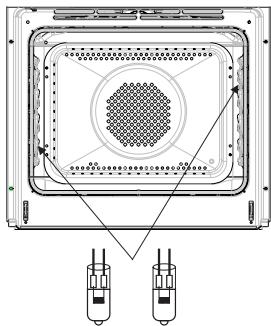
CLEANING AND MAINTENANCE
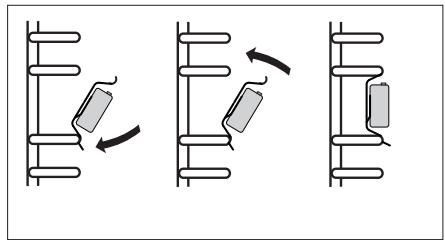
- Oven is equipped with easily removable wire shelf supports. To remove them for washing, pull the front catch, then tilt the support and remove from the rear catch.
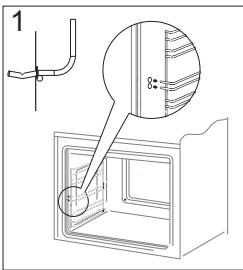
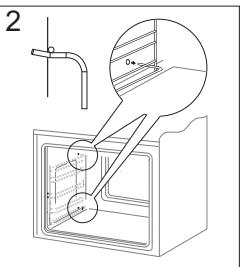
Removing wire shelf supports
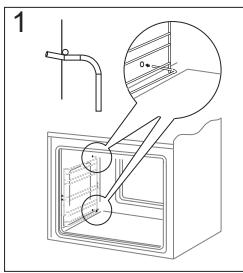
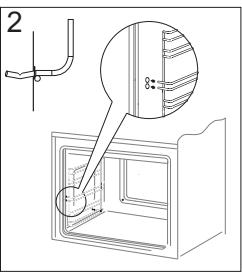
Installing wire shelf supports
- Ovens has stainless steel sliding telescopic runners attached to the wire shelf supports. The telescopic runners should be removed and cleaned together with the wire shelf supports. Before you put the baking tray on the telescopic runners, they should be pulled out (if the oven is hot, pull out the telescopic runners by hooking the back edge of the baking tray on the bumpers in the front part of the telescopic runners) and then insert them together with the tray.
Important!
Do not wash telescopic runners in a dishwasher.
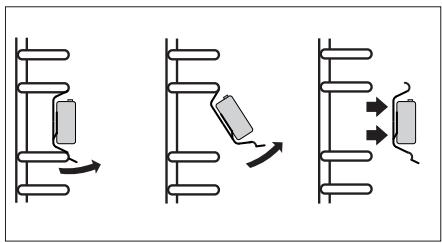
Removing telescopic runners
Installing telescopic runners
CLEANING AND MAINTENANCE
Door removal
In order to obtain easier access to the oven chamber for cleaning, it is possible to remove the door. To do this, tilt the safety catch part of the hinge upwards (fig. A). Close the door lightly, lift and pull it out towards you. In order to fit the door back on to the cooker, do the inverse. When fitting, ensure that the notch of the hinge is correctly placed on the protrusion of the hinge holder. After the door is fitted to the oven, the safety catch should be carefully lowered down again. If the safety catch is not set it may cause damage to the hinge when closing the door.
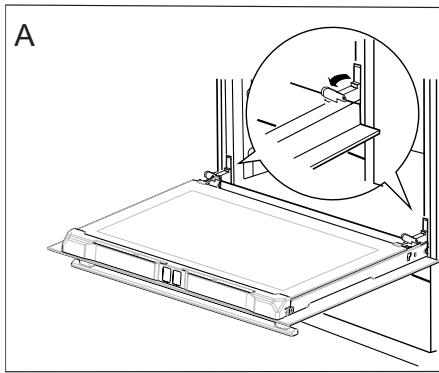
Tilting the hinge safety catches
Removing the inner panel
- Pull the upper door slat loose. (fig. B, C)
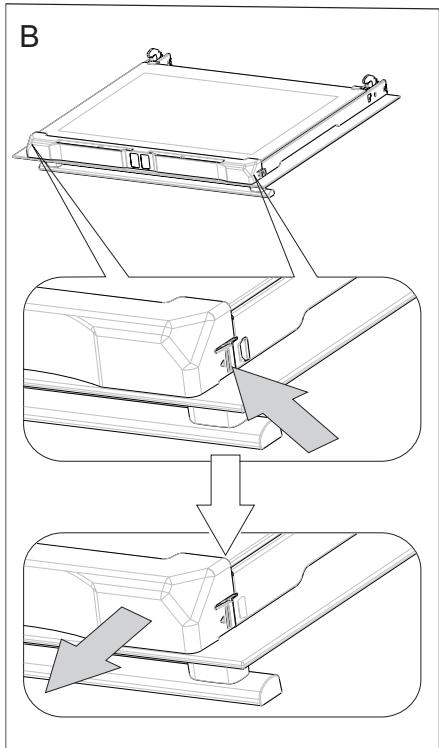
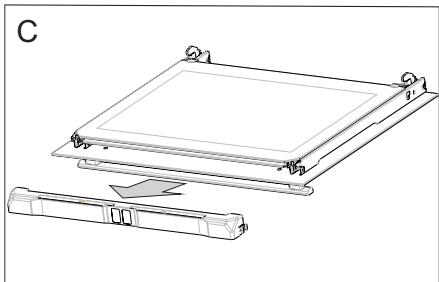
CLEANING AND MAINTENANCE
- Pull the inner glass panel from its seat (in the lower section of the door).
Important! Risk of damage to glass panel mounting. Do not lift the glass panel up but pull it out.
Remove the inner panel (fig. D).
- Clean the panel with warm water with some cleaning agent added.
Carry out the same in reverse order to reassemble the inner glass panel. Its smooth surface shall be pointed upwards.
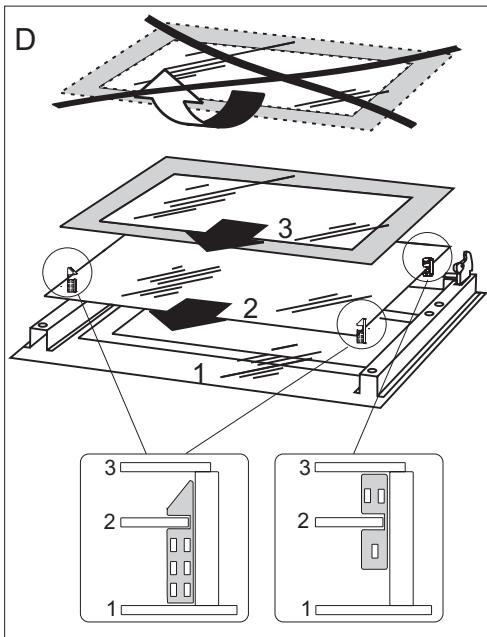
Removal of the internal glass panel
TROUBLESHOOTING
In the event of any fault:
turn off the appliance,
- disconnect the power supply,
- based on the instructions given in the table below, some minor issues can be corrected by the user. Please check the consecutive points in the table before you refer the repair to customer service.
| Problem | Reason | Remedy |
| 1. The appliance does not work | No power | Check the fuse, replace if blown |
| 2. Oven lighting does not work. | Loose or damaged bulb | Replace the blown bulb (see Cleaning and Maintenance section) |
| 3. The programmer display shows “0:00”. | The appliance was disconnected from the mains or there was a temporary power cut. | Set the current time (see ‘Use of the programmer’) |
| 4. Fan does not work | Risk of overheating! Immediately unplug the appliance or switch off the main circuit breaker. Refer the repair to the nearest service centre. | |
If the problem is not solved, disconnect the power supply and report the fault.
Important! All repairs must be performed by qualified service technicians.
TECHNICAL DATA
Voltage rating
Power rating
Cooker dimensions H/W/D
230V 1N~50 Hz
max. 3,6 kW
59,5/59,5/57,5cm
The product meets the requirements of European standards EN 60335-1; EN60335-2-6.
The data on the energy labels of electric ovens is given according to standard EN 60350-1 / IEC 60350-1. These values are defined with a standard workload a with the functions active: bottom and top heaters (conventional heating) and fan assisted heating (forced air heating), if these functions are available.
The energy efficiency class was assigned depending on the function available in the product in accordance with the priority below:
| Forced air circulation ECO (ring heater + fan) | ECO |
| Forced air circulation ECO (bottom heater + top + roaster + fan) | ECO |
| Conventional mode ECO (bottom heater + top) | ECO |
During energy consumption test, remove the telescopic runners (if the product is fitted with any).
Certificate of compliance CE
The Manufacturer hereby declares that this product complies with the general requirements pursuant to the following European Directives:
The Low Voltage Directive 2014/35/EC,
Electromagnetic Compatibility Directive 2014/30/EC,
ErP Directive 2009/125/EC,
and therefore the product has been marked with the C € symbol and the Declaration of Conformity has been issued to the manufacturer and is available to the competent authorities regulating the market.

Electrodomesticos Iberia S.L.
- ESTIMADO CLIENTE,
- TABLE OF CONTENTS
- SAFETY INSTRUCTIONS
- HOW TO SAVE ENERGY
- UNPACKING
- DISPOSAL OF THE APPLIANCE
- DESCRIPTION OF THE APPLIANCE
- SPECIFICATION OF THE APPLIANCE
- INSTALLATION
- Installing the oven
- Electrical connection
- Warning!
- Connection diagram
- Important!
- OPERATION
- Before using the oven for the first time
- Warm up the oven chamber
- Control Panel
- Important.
- WiFi function
- Note:
- Available connection modes:
- Please visit www.fagorelectrodomestico.com for step-by-step instructions how to configure your network.
- Electronic programmer
- Switch on the appliance and select interface language.
- Set current time
- Menu
- Settings
- Language
- Available languages:
- Time
- Clock type
- Time format
- Minute Minder
- Lighting
- CONTINUOUS LIGHTING
- ECO LIGHTING
- Tones
- Display brightness
- Service
- Factory settings
- Heating functions
- Fan cooking
- Use the meat probe
- Recommended meat probe temperature settings
- Setting Duration (for a heating function)
- Set Duration and End Time (for a heating function)
- Set the End Time.
- Appliance operation in selected mode
- Pre-set programmes
- MEAT
- POULTRY
- PIZZA
- FROZENPRODUCTS
- PASTRIES
- User programmes
- Steam programmes
- Descale the steam system
- Special functions
- Night Mode
- Open door alert
- OpenUp!
- Cooling fan
- BAKING IN THE OVEN - PRACTICAL HINTS
- Baking
- Roasting meat
- ECO Heating
- TEST DISHES. According to standard EN 60350-1.
- CLEANING AND MAINTENANCE
- Replacing the halogen bulb in the oven
- Door removal
- Removing the inner panel
- TROUBLESHOOTING
- TECHNICAL DATA
- Certificate of compliance CE
Brand : FAGOR
Model : 8H-198ADTCN
Category : Built-in electric oven