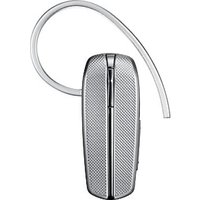
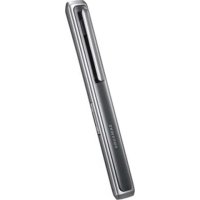
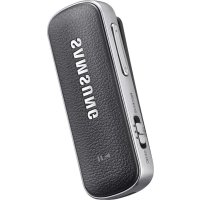
EG920 - Headphones SAMSUNG - Free user manual and instructions
Find the device manual for free EG920 SAMSUNG in PDF.



User questions about EG920 SAMSUNG
0 question about this device. Answer the ones you know or ask your own.
Ask a new question about this device
Download the instructions for your Headphones in PDF format for free! Find your manual EG920 - SAMSUNG and take your electronic device back in hand. On this page are published all the documents necessary for the use of your device. EG920 by SAMSUNG.
USER MANUAL EG920 SAMSUNG
Your headset overview 4
Button functions 5
Charging the headset 6
Wearing the headset 8
Using your headset
Turning the headset on or off 9
Pairing and connecting the headset. 10
Pairing via the Active pairing feature 13
Using call functions 14
Resetting the headset. 17
Appendix
Frequently asked questions 18
Warranty and parts replacement 20
Correct disposal of this product. 21
Correct disposal of batteries in this product 22
Specifications 23
Please read this manual before operating your headset, and keep it for future reference. Graphics used in this manual are for illustration purposes. The actual products may vary.
Copyright
Copyright © 2011 Samsung Electronics
This user manual is protected under international copyright laws.
No part of this user manual may be reproduced, distributed, translated, or transmitted in any form or by any means, electronic or mechanical, including photocopying, recording, or storing in any information storage and retrieval system, without the prior written permission of Samsung Electronics.
Trademarks
- SAMSUNG, and the SAMSUNG logo are registered trademarks of Samsung Electronics.
- Bluetooth® is a registered trademark of the Bluetooth SIG, Inc. worldwide. More information about Bluetooth is available at wwwBluetooth.com.
All other trademarks and copyrights are the property of their respective owners.
Please read all Safety precautions before using your headset to ensure safe and proper use.

Safety precautions

- When using your headset while driving, follow local regulations in the region you are in.
- Never disassemble or modify your headset for any reason. Doing this may cause the headset to malfunction or become combustible. Bring the headset to an authorised service centre to repair it.
- Keep your device and all accessories out of the reach of small children or animals. Small parts may cause choking or serious injury if swallowed.
- Avoid exposing your device to very cold or very hot temperatures (below 0^ or above 45 °C). Extreme temperatures can cause the deformation of the device and reduce the charging capacity and life of your device.
- Do not allow your device to get wet — liquids can cause serious damage. Do not handle your device with wet hands. Water damage to your device can void your manufacturer's warranty.
- Avoid using your device's light close to the eyes of children or animals.
- Do not use the device during a thunderstorm. Thunderstorms can cause the device to malfunction and increase the risk of electric shock.

Excessive exposure to loud sounds can cause hearing damage. Exposure to loud sounds while driving may distract your attention and cause an accident. Use only the minimum volume setting necessary to hear your conversation.
Getting started
Your headset overview
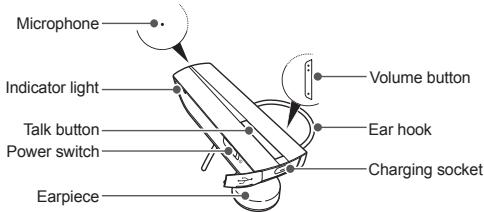

- Make sure you have the following items: Travel adapter, headset and user manual.
- The supplied items may be changeable depending on your region.
Button functions
| Button | Function |
| Power switch | • Slide up or down to turn the headset on or off. |
| Talk | • Press and hold for 3 seconds to enter Pairing mode. • Press to make or answer a call. • Press to end a call. • Press and hold to reject incoming call. • Press and hold to place a call on hold. • Press and hold to switch between calls. |
| Volume | • Press to adjust the volume. • Press and hold to turn the microphone on or off during a call. • Press and hold both Volume up and down buttons simultaneously to turn the indicator light on or off. |
Charging the headset
This headset has a rechargeable internal battery which is non-removable. Make sure the headset is fully charged before using it for the first time. To check the battery level see page 7.
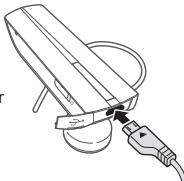
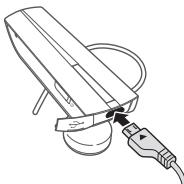
1 Connect the charger to the charging socket on the headset.
2 Plug the charger in to the wall outlet. During charging, the indicator light will turn red. If charging does not begin, unplug the travel adapter and plug it in again.
3 When the headset is fully charged, the red indicator light changes to blue. Unplug the travel adapter from the wall outlet and the headset.

- Use only Samsung-approved chargers. Unauthorized or Non-Samsung chargers could cause damage to the headset or in extreme circumstances an explosion, it could also invalidate any warranty on the product.
- Repeatedly charging and discharging of the headset, over time will cause the battery performance to diminish. This is normal for all rechargeable batteries.

- Never make or receive calls while charging, always disconnect your headset from the charger and answer the call.
- To save energy, unplug the travel adapter when not in use. The travel adapter does not have a power switch, so you must unplug the travel adapter from the outlet to interrupt the power supply. The travel adapter should remain close to the socket when in use.
When the headset battery is low
The headset beeps and the indicator light flashes red. If the headset powers off during a call, the call will be automatically transferred to the phone.
Checking the battery level
To check the battery level, press and hold the Talk button and the Volume down button at the same time.
Depending on the battery level, the indicator light flashes 5 times in one of the following colours:
| Battery level | Indicator light colour |
| Above 80% | Blue |
| 80 ~20% | Violet |
| Below 20% | Red |
Wearing the headset
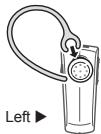
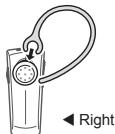
Depending on which ear you are going to wear the headset, simply adjust the ear hook accordingly.
Using your headset
This section explains how to turn the headset on, pair and connect to the phone, and use various functions.

- Activated functions and features may differ depending on the phone type.
- Some devices, especially those that are not tested or approved by Bluetooth SIG, may be incompatible with your headset.
To ensure you get the best performance from your headset
- Keep the distance between your headset and device as small as possible and avoid placing your body or other objects in the signals path.
- If you usually use your mobile phone with your right hand, wear the headset on your right ear.
- Covering your headset or device could effect its performance so keep contact to a minimum.
Turning the headset on or off
To turn the headset on
Slide up the power switch. The blue indicator light flashes 4 times.
To turn the headset off
Slide down the power switch. The indicator light flashes blue and red then turns off.
Pairing and connecting the headset
Pairing means unique and encrypted wireless connection between two Bluetooth devices when they agree to communicate with each other.
In Pairing mode, two devices should be placed close enough to each other.
Pairing and connecting the headset with a phone
1 Enter Pairing mode.
- With the headset turned on, press and hold the Talk button for 3 seconds. The blue indicator light stays lit.
If the headset is turned on for the first time, it will go into Pairing mode immediately and the Pairing mode stays for 3 minutes.
2 Activate the Bluetooth feature on your phone and search for the headset (see your phone's user manual).
3 Select the headset (HM1200) from the list of devices found by your phone.
4 If requested, enter the Bluetooth PIN 0000 (4 zeros) to pair and connect the headset to your phone.

Your headset supports the Simple Pairing feature which allows the headset to be paired with a Bluetooth device without requesting a PIN. This feature is available for devices that are compliant with Bluetooth version 2.1 or higher.
The headset can also be paired via the Active pairing feature, see page 13.
Connecting with two Bluetooth phones
With the Multi-point feature activated, your headset can be connected to 2 Bluetooth phones at the same time.
1 Connect with the first Bluetooth phone.
2 Press and hold the Talk button for 3 seconds to enter Pairing mode.
3 Press and hold the Volume up button to activate Multi-point feature.
4 Activate the Bluetooth feature on the second Bluetooth phone and search for the headset (see your phone's user manual).
5 Select the headset (HM1200) from the list of devices found by the second Bluetooth phone.
6 If requested, enter the Bluetooth PIN 0000 (4 zeros) to connect the headset to the second Bluetooth phone.
7 Reconnect to the headset from the first Bluetooth phone.

When connecting the headset to 2 Bluetooth phones, some phones may not be able to connect as a second Bluetooth phone.
To turn Multi-point feature on
In Pairing mode, press and hold the Volume up button. The blue indicator light flashes twice and you will hear a beep.
To turn Multi-point feature off
In Pairing mode, press and hold the Volume down button. The red indicator light flashes twice and you will hear a beep.
Disconnecting the headset
Turn off the headset or use the Bluetooth menu on your phone to remove the device from your pairing list.
Reconnecting the headset
If the headset loses the connection to the paired phone,
- Press the Talk button on the headset or use the Bluetooth menu on your phone.
Your headset will attempt to automatically reconnect each time you turn it on.
This feature may be unavailable on some phones.

If the Multi-point feature is activated, your headset will attempt to reconnect to the two most recently connected devices.
Pairing via the Active pairing feature
With the Active pairing feature, your headset automatically looks for a Bluetooth device and tries to make a connection with it.
This feature is available for mobile phones, but the phone's Bluetooth visibility option must be set to on.
1 In Pairing mode, press and hold the Talk button to enter Active pairing mode. To enter Pairing mode, see page 10.
2 The violet indicator light turns on and the headset will search for a Bluetooth phone within your phone's range, and attempt to pair with it.

- Ensure the phone you wish to connect to is within range of the headset. Place the headset and phone close to each other to avoid pairing with other devices.
The headset will attempt active paring for up to 20 seconds. - The Bluetooth phone you want to connect with must not be paired with other devices. If the phone is already connected to another device, end the connection and restart the Active pairing feature.
This feature may not be available on some devices.
Using call functions
Available call functions may differ from phone to phone.
Making a call
Redialling the latest number
To radial the latest number on the primary phone,
Press the Talk button.
To redial the latest number on the secondary phone,
Press the Talk button twice.

For some phones, pressing the Talk button opens the call log list. Press the Talk button again to dial the selected number.
Dialling a number by voice
Press and hold the Talk button and say a name.

This function is only available on the primary phone using the Hands-Free profile.
This function may not be available on some devices.
Answering a call
Press the Talk button to answer a call when you hear incoming call tones.

If you receive calls on both connected devices at the same time you can only answer the call on the primary phone.
Ending a call
Press the Talk button to end a call.
Rejecting a call
Press and hold the Talk button to reject a call when a call comes in.

- If you receive calls on both connected devices at the same time you can only reject the call on the primary phone.
This function is only available when using the Hands-Free profile.
Options available during a call
You can use the following functions during a call.
Adjusting the volume
Press the Volume up or down button to adjust the volume.

You will hear a beep when the volume level of the headset reaches it's lowest or highest level.
Muting the microphone
Press and hold the Volume up or down button to turn the microphone off so that the person with whom you are speaking cannot hear you. When the microphone is turned off, the headset beeps at regular intervals. Press and hold the Volume up or down button again to turn the microphone back on.
Transferring a call from the phone to the headset
Press the Talk button to transfer a call from the phone to the headset.
Placing a call on hold
Press and hold the Talk button to place the current call on hold.

- When the headset is connected with two phones, this function is not available.
This function is only available when using the Hands-Free profile.
Answering a second call
- Press the Talk button to end the first call and answer a second call.
- Press and hold the Talk button to place the first call on hold and answer a second call. To switch between the current call and the held call, press and hold the Talk button.

This function is only available when using the Hands-Free profile.
- When the headset is connected with two Bluetooth phones, you cannot answer a second call from the same phone. It may vary depending on your phone.
Resetting the headset
When the headset is paired with a device, it automatically saves connection and feature settings, such as the Bluetooth address or device type of the mobile phone.
If you want to reset the connection settings in the headset:
- In Pairing mode, press and hold both Volume buttons and Talk button at the same time for 3 seconds. The headset will turn on automatically.

When you reset the headset, all connection settings in the headset will be deleted and the connection with your phone will be lost. In order to use the headset, you will have to pair it again.
Appendix
Frequently asked questions
| Will my headset work with laptops, PCs, and PDAs? | Your headset will work with devices that support your headset's Bluetooth version and profiles. For specifications, see page 23. |
| Why do I hear static or interference while on a call? | Appliances such as cordless phones and wireless networking equipment may cause interference, which usually sounds like static. To reduce any interference, keep the headset away from other devices that use or produce radio waves. |
| Will my headset interfere with my car's electronics, radio, or computer? | Your headset produces significantly less power than a typical mobile phone. It also only emits signals that are in compliance with the international Bluetooth standard. Therefore, you should not expect any interference with standard consumer-grade electronics equipment. |
| Can other Bluetooth phone users hear my conversation? | When you pair your headset to your Bluetooth phone, you are creating a private link between only these two Bluetooth devices. The wireless Bluetooth technology used in your headset is not easily monitored by third parties because Bluetooth wireless signals are significantly lower in radio frequency power than those produced by a typical mobile phone. |
| Why do I hear an echo while on a call? | Adjust the headset volume, or move to another area and try again. |
| How do I clean my headset? | Wipe it with a soft dry cloth. |
| The headset does not fully charge. | The headset and the travel adapter may not have been connected properly. Separate the headset from the travel adapter, reconnect, and charge the headset. |
| I cannot use all the features described in the manual. | Available features may vary depending on the connected device. If your headset is connected to two devices at once, some features may be unavailable. |
Warranty and parts replacement
Samsung warrants this product as free of defects in material, design and workmanship for the period of one year from the original date of purchase.*
If during the period of warranty this product proves defective under normal use and service you should return the product to the retailer from whom it was originally purchased or a qualified service centre. The liability of Samsung and its appointed maintenance company is limited to the cost of repair and/or replacement of the unit under warranty.
- The warranty is limited to the original purchaser.
- A copy of your receipt or other proof of purchase is required for a proper warranty service.
- The warranty is void if the product label is removed, or if the product has been subject to physical abuse, improper installation, modification, or repair by unauthorised third parties.
- Specifically exempt from any warranty are limited-life consumable components such as batteries and other accessories.
Samsung will not assume any responsibility for any loss or damage incurred in shipping. All repair work on Samsung products by unauthorised third parties voids any warranty.
Correct disposal of this product

(Waste Electrical & Electronic Equipment)
(Applicable in the European Union and other European countries with separate collection systems)
This marking on the product, accessories or literature indicates that the product and its electronic accessories (e.g. charger, headset, USB cable) should not be disposed of with other household waste at the end of their working life. To prevent possible harm to the environment or human health from uncontrolled waste disposal, please separate these items from other types of waste and recycle them responsibly to promote the sustainable reuse of material resources.
Household users should contact either the retailer where they purchased this product, or their local government office, for details of where and how they can take these items for environmentally safe recycling.
Business users should contact their supplier and check the terms and conditions of the purchase contract. This product and its electronic accessories should not be mixed with other commercial wastes for disposal.
Correct disposal of batteries in this product

(Applicable in the European Union and other European countries with separate battery return systems)
This marking on the battery, manual or packaging indicates that the batteries in this product should not be disposed of with other household waste at the end of their working life. Where marked, the chemical symbols Hg, Cd or Pb indicate that the battery contains mercury, cadmium or lead above the reference levels in EC Directive 2006/66. If batteries are not properly disposed of, these substances can cause harm to human health or the environment.
To protect natural resources and to promote material reuse, please separate batteries from other types of waste and recycle them through your local, free battery return system.
The rechargeable battery incorporated in this product is not user replaceable. For information on its replacement, please contact your service provider.
Specifications
| Item | Specifications and description |
| Bluetooth version | 3.0 |
| Support profile | Headset Profile, Hands-Free Profile |
| Operating range | Up to 10 metres |
| Standby time | Up to 300 hours* |
| Talk time | Up to 8 hours* |
| Charging time | Approximately 2 hours* |
- Depending on the phone type and usage, the actual time may vary.
Declaration of Conformity
Product details
For the following
Product : Bluetooth Headset
Model(s):HM1200

Declaration & Applicable standards
We hereby declare, that the product above is in compliance with the essential requirements of the R&TTE Directive (1999/5/EC) by application of:
SAFETY EN 60950-1:2006+A12:2011
EMC EN 301 489-01 V1.9.2 (09-2011)
and the Directive (2011/65/EU) on the restriction of the use of certain hazardous substances in electrical and electronic equipment.
Representative in the EU
Samsung Electronics Euro QA Lab.
Blackbushe Business Park, Saxony Way,
Yateley, Hampshire, GU46 6GG, UK
2013.03.25
(Place and date of issue)
Joong-Hoon Choi / Lab. Manager
(Name and signature of authorised person)
- This is not the address of Samsung Service Centre. For the address or the phone number of Samsung Service Centre, see the warranty card or contact the retailer where you purchased your product.
Cuprins
Introducere
Prezentare generala a ccastii 28
Functile butoanelor 29
Incarcarea ccasti 30
Purtarea ccasti 32
Utilizarea căstii
Pomirea sau oprirea ccasti 33
Asocierea si conectarea ccastii 34
Asocierea prin functia Asociere activa 37
Utilizarea functiilor de apelare 38
Resetarea căstii 41
Anexa
Blackbushe Business Park, Saxony Way,
Yateley, Hampshire, GU46 6GG, UK
2013.03.25
Joong-Hoon Choi / Manager Laboratory
(Local data eliberarii)
Bpbuane Ha npbohaaHnHe HacpoKn Ha cnyaanKaTa ....67
PpunoxeHue
YeTo 3aDaBAnn BbIpocn 68
TapauncaI N pOdmaHa Ha qactn. 71
PnBnHInoTrepTeNahe Hn3dennMeTo cIeN kpaia HnEKnloTaauONHHMy KXOBt. 72
IpaBnIHNO n3xBpIyHe Ha 6aTePInTe BTo3n npOdyKT.73
Cneunphiauu 74
Mona, npoememe moea pbkoedcme npedu da u3noan3ame cnuyuankama cu u eo na3eme 3a 6bdeua yonnp6a. N3o6paexenura u3noan3aneu e moea pbkoedcme ca c zen uniocmpupane. B3moxho e peanhume npodykmu da ce paanuayam.
3ana3eHn npaba
Copyright © 2011 Samsung Electronics
Toba pbokoCTBO HA noTpe6bHTeR e 3aUHTeHO OT MEXUYHapOHNTE 3AKOH 3a ABTOPOK npAO.
NikakbnactoTOnbTaPbKOBDCTBOHEMOrDa6bDatNoBTOpeHN, paoNPOTcpanHe, npBeDEHnINI pnpDeAeHN B KaKbToN a da eFpOma IIN C KAKBtIO N Da 6bIO cpeCTBa, eNEKTPOHH INI MEXAHNHIN, BKTIIOHTeHNO KKEOPONPAHae, 3aNc INI cBxpaHene H B KaKbTO N da eCtEMa 3a cbxpaHeneH, 63 ne PpBAPrTeHNO nncMeHO Odo6peHne ot Samsung Electronics.
TbproBcN MapK
SAMSUNG N oroto h A SAMSUNG ca pernctprpani Tbropckn Mapkna Samsung Electronics.
- Bluetooth® e perimontpRAPA throbcka MAPka h Bluetooth SIG, Inc. no cenri CBT. Pobeeh nfoopmauna 3a Bluetooth MOxete da hamepirthe na www.bleuht.com.
BcHnKdpTbPBOCKM KAPNI 3aIa3eHN npBaA Ca cO6CTBEHOCT Na CbOTBEHTNE CO6CTBEHNUI.
Mon, npocheeme cucu nppeynpckdhena 3a 6e3onacncm npedu da u3non3ame cyuankama, 3a da ce yeepume, ue je u3non3eae 6e0ancho u npaeunho.

PpeDnA3Hm MepKn
CE
Korato IHOON3BaTe CUYUAnkata CNIpo BEMe HAIoDIPAHane, CNa3BaHTe MeCTHTHe pAnnopeDmB ePBOHNA,B KOTIO CE cHAMIPate.
Hikora He paoTNO6BAAeI INO moDfHcuaepraTe cHyuAnKATA CNo KAKATO N da e npMHNA. ToBa MOKe da BoedeE do HeNsPnBaA paBoTa IINa 3aZanbaVe h A cnhyuAnKATA. 3aHeCete cHyuAnKATA 3a nonPbAka B otropNpHaN aUeTp b no NDdRpKkA.
Дыкгут ectypoTTOH H C6H4N KIXECOAPR N38Bn DOCTbna Ha MAnKI Dea IINXJXBOTHN. ManKNTe enEMENTM MoTAT da npEIM38NKAT 3aDyUbaHE INN cepMO3HN HapArBaHnA, ako B5dart nOrfHfAHtN.
Iz6BraJIte da IaIaIaIe CatoEYO tycPObTeH Ma HMOTo CTZdHI INI MHOTo POeLIu TMepNTApyrn (noo 0^ nHnnn H45. EKCTPmHATE TMepNTApyrn MoRat DA doBeadet Da deOpMaIHa y HcTPObETBOu n Da HAMANr3apekAemaDMANAclTet N XIMBOTA HA YcTOpCTBO Bn
He no3oBraBaeY cyTOBCTO Bo Da ce HAMOKPi -TeHOCNtTE MOrAT da HANECAT cepMO3HN oBpeRn. He dpbtey U cyTOBCTBOc M OCPKn pIIOBpeRn B yctPOCTBO, pIHHENr 0T BOa, MOrAT da NApUayat rapAunrAaT Pa TPO3BDQNTEnr.
- 13648baTe Da n3non3BaTe CBETnHata OT yCTPOCTBTO Cn 6n3o Do OHnte Ha Deua nn JIN XNBOTHN.
He IIOIN3Baire ToBaCTOBNO BO BMEHE BA BYR. TpMOBETMHNITE BYR MOAT DA BOEDAT DO HENIHPABBAPOFTA NO AHTBOCTOBTOA N DO NUHAI POKCA ON ENEKTNCKEUKO

IpyKemcHepTO 3nIaIarabe HA cINHeB 3yM BOeJa DO bAoeBe Do aHApUeHbri N CByXa. CyNtAeHbA HcNInH 3yBzU dOKATO WIOdPATE, MOe A da Paceee BHMANHmE To Bn I da pRHHn KATrApoDa. HsOHN3BaIte cAmo MInHMAnHnata CnHa 3yBxa Heo6DhIMa, 3a Da yCbate rAOpBaBOra cPa
N3rpeHaTelefoha
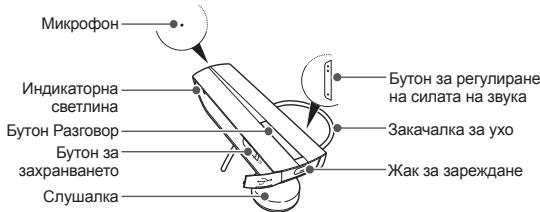

Yubepece ce,ue IMATE cneJHITE HENEMTN:3apraHO yCTPOIcTBO, Cnyuankia pNkoBODCTBO HA nTOPEbITBE.
Bb3MOXHO Ea IMA paaNtkaBB BkIOHOHTe ENEMeHTn B 3ABHCMOCT OT perHOnA B KOITcCe HAMIPate.
Функции Na byToHnTe
| Бутон | Функция |
| Бутон 3a Зхран- ванeto | · Пrinпльзөгете Бутона Нагоpe Или Надоу, 3a за вклочи түлүйсөгете с羊毛ankata. |
| Ра зrogор | · Hatисөгети и за рьхтete 3a 3 секунд, 3a за вклочи тэ на реким Сырзва. · Hatисөгетe, 3a за осыц的一项пүүд, 3a за осыц的一项пүүдүүүүүүүүүүүүүүүүүүүүүүүүүүүүүүүүүүүүүүүүүүүүүүүүүүүүүүүүүүүүүүүүүүүүүүүүүүүүүүүүүүүүүүүүүүүүүүүүүүүү内的 · Hatисөгети и за рьхтete, 3a за осыц的一项пүүд, 3a за осыц的一项пүүдүүүүүүүүүүүүүүүүүүү内的 · Hatисөгети и за рьхтete, 3a за осыц的一项пүүдүүүүүүүүүү内的 · Hatисөгети и за рьхтete, 3a за осыц的一项пүүдүүүүү内的 · Hatисөгети и за рьхтete, 3a за осыц的一项пүүдүүү内的 · Hatисөгети и за рьхтete, 3a за осыц的一项пүүдүү内的 · Hatисөгети и за рьхтete, 3a за осыц的一项пүүдүү内的 · Hatисөгети и за рьхтete, 3a за осыц的一项пүүдү内的 · Hatисөгети и за рьхтete, 3a за осыц的一项пүүдү内的 · Hatисөгети и за рьхтete, 3a за осыц的一项пүүдү内的 · Hatисөгети и за рьхтete, 3a за осыц的一项пүүдү内的 · Hatисөгете, 3a за рьхтete, 3a за осыц的一项пүүдү内的 · Hatисөгете, 3a за рьхтete, 3a за осыц的一项пүүдү内的 · Hatисөгете, 3a за рьхтete, 3a за осыц的一项пүүдү内的 · Hatисөгете, 3a去过彦。 |
| SILA на 3byka | •Нат生态系统, за它可以 PERПИРATE симлata на зык. •Нат生态系统 и за PERПИКTe, за в Клиочине яйи nizkliochite MKNKPOfOHa NO Ваме на обождани. •Нат生态系统 и за PERПИКTe сизука на зурплиаре на Зыка налишат надόюу и harpeе极易оторганно, за в Клиочине яйи nizkliochite Иndikatotportпата лaminiчka. |
3apekdahe hacnywaikata
TasnCnyuanaIIMnPte3apeKdaEmaBbTrepuHa6BaTepy,KOrTOHeMoKeJa ceOTcPr7aRa. YBepeTece,ceNcyuuaKatae 3aepedenaHantbHnO npEn da na H3NO3BATEa3pBnPBt.3aDa npoBepRite HMBOTHa3pArdNa6BaTepyTa, BmKTE cTpaHnla56.
1 Cbpxte 3aepdHOTO yCTPOBTO C pEpaHa3aT0BaJxak3a3apejdahe Ha cnyuankata.
2 BkHIOe 3aepdHOTc yTOPOCTBO K KOHTA. P BOPE H azePaeZdHe IHDNKATOPHTA nAMNnKa 1ue CBeTN B UepeBHe. Ako 3apeXdaHeTo HE 3anoHHe, INKIOHETe 3aepdHOTc yTOPOCTBO n RO BkHIOe OTHoBO.
3 Korato cnyuankata ce 3apei HnBnHIO, nHdkatophata lamnHka ue CBTHE B CMHo. NkHIOHTe 3apJHOTO yCTPOIcTBO OT KOtAKTa nOT cnyuankata.

I3no13BaIte cmo 3apdHn yctpoTcBA OdopeHn ot Samsung. Heo1oBepHn iin paa1iHnOT samsb 3apdHn yctpoCTbA MoRat da npHnHrT NobpeD n Cnyuankata uIN, pn EKCTpeMHn o6ToTertCTBA KATO EKtIO3mN, I3no13BaHTe MIO Me Da hapyui npaHunTa H TeNefoHa.
MHorokpathToAapeXdaHe n papeXdHa He n CnUaIaNkTa c BpeMeTO ue doBe deNoBloeHa paBoTa hBaTepeYra. Toba e HopMaHHO 3a BCNUKn npeseapeXdaEmbSepeN.
- HmKora He ocIeCTBBAITE IIN npEMaJIte oBaJDAHn O n BpMe H azePjaDeAne, BInAHn IM3KIOUbAte CnyUAnkATA OT 3aprJHOTo N Taka npEMaJIte oBaJDAHTe.

3a La cneHTE HEPRIN, H3BAETDE ZAPDHOTO YCTPOHTBO OT KOHTAKTA, KORAto HE noIHN3BATE. 3apdHOTO YCTPOHTBO HMAK OONe 3BaIKIOVAHE nIK3IOVAHE n3ATOBa Tp8bBA da I3BAdITE Ka6ena My OT OKTAHA, Ta aipKePScHete eNEkTO3ApaXbaHETO My. 3apdHOyCTPOCTBO Tp8bBA da e Bn13o DO KO TKAHTA, KORATO ce I3N03BA.
Korato HnBOTO Ha 3apd Ha 6aTePra Ta naHe Hncko
Cnyuankata n3daba CnHn HnINKATOPHATA nAMnHkA pPIMMBA B YeBpeHO. Ako Cnyuankata OCTahe 63 zarne no BpeMa H oAbxdaHe, To ue bJe abOTMAHNO npExbPnEHO kM TenefoHa.
PpOBepeBaHe Ha HnBToHa 3apJd Ha 6aTepeYta
3aДа поверпгун НИВОТУ на зард Ha
6bATEPINA, HATNCHETe и 3aDbXkTe
eHOBPemEHo 6bYToHa Pa3rOBoPи
6bTOHa 3a PeruPaine Ha CINATA ha
3bYka HATNCHAT NaDOny. B aBvICMOCT
OT HNIBOTO Ha 3aRd Ha 6bATEPINA,
HnDInKATOPHATA nAMmNHa npIMMBA
5 PtTb IN B EDIN ON CTcEHNITE CBETOBe:
| Ниво на заряд на батерияа | ЦBSTп на ндікатора |
| Над 80% | Син |
| 80 ~ 20% | Виолетов |
| Поб 20% | Черван |
Hocene Ha cnyuwaankata
B 3aBcHMOCT TO Toba HA KOE yxo Ie HOCITE CUYNAKATA, PIOCTO HAMECTete 3aKaHANKATA CNPMAO HERO.
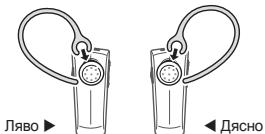
N3KJIOUbaHe Ha cnywaIkaTa
N3knoHETe cuyuAnkatA uHnIouBaBte Bluetooth MeHOTo H aTeNEFOa Cn, 3a da MAXHETE yCPOYTBCTO TCBOR CNICbK 3a CBp3BaA
Повторно CBьрзВане на сnyшankaТа
Ako cnyuankata 3aryb Bpb3kata CN Telepoha:
HATICHETe 6yToHa Pa3roBop Hc SiyuAnkata nn nnon3BaIte Bluetooth MEHOTO Hc Bc0r TeneFOh.
Bauaata Cnyuanka ze oe onnta da ce c6bpxe HANOBO ABOTMATHNO BCEKN bTcIOM a BKIOHNTe. Ta3i yHKUNMOXe Ma de e HANHVA BRHKONTEEOHN

Ako yfnkunraMulti-pointeakmbipanaBauata cnyuanaKue ce onnta da ce cbbpke OTHOBOCDBeteyctpojCTBA,CKOITc e cbbp3bana hainCKOPO
Cbpb3BaHe uepe3 pfynKcunraTa Active pairing (AkTnBHO CBpb3BaHe)
CФунштей자 ACTMЛВО CBp3BaHNe,BauWATA CNUVAIKA ABOTMATMHO TьрсNBluetooth yctpoCTOBNO u cObSECTBRA Bp3ka C Hero.
TaniФИКИДЕСТСТПАЗМОБЛНТENETDOПН,HOОПЦЯТа3BaLbeothB BIVIMOCTTRPBA DA e 3aDADEHAnBa HKnIOHcEO.
1 B pexIM CbIp3BaHe, HATINCHETe 3aIdpbXte 6yTOHa Pa3ROBOP, 3a da BkIOHHTe Ha pexIM AKTINBHO CbIp3BaHE. 3a da BkIOHHTe Ha pexIM CbIp3BaHe, BIXTE cTspaniHa 59.
2 BuONETOBATA INMdkatopHb CBeTINHa Ce BkIOHbA nCnyuankata TBpcn Bluetooth TeneoB O6xbTaHa Na TeneoHbA Bn, 3a da ce onnTa da ce cBpke C hero.

Yepebe Ce, Te neTeoHbT c KOIO nCKATE da ce CbBpXeTe e B 6bxAata Ha cnUyAnkata. Noctabete cnUyAnkata u TenefoHa bIinso eInn do Dpyr, 3a da n36Berhe TcBpBaHae C dpyr TcPtoiOCTBA.
Cnyuankatae 7ece o nnta da ce sbpke ype3 akTMBHO cbp3bae B npodkJENHE na 20 cekyni.
Bluetooth TepeohbC KOIto NcKate Da ce CbPjKeTe He TpR6Ba da e CbPzahC dpyrH yctPoICTBa. Ako TepeohbT e Buee CbPzAH c Dpyo YcTpoICTBO, npEkbHeTe Bp3kata n pectapnpaTne FyHKJnraT AKTMBHO CbP3BaHE.
Ta3nФyHKUmaMOKe Da He e DoCTbHa npHraKoYcTPOiCTBa.
N3noJ3BaHeHaФyHKuIN3aO6axdHnA
Bb3mKHO e HAnuHnTe PfyHKm 3a 06aXdAnHra Da ce pa3nnHabat O TepeOH do TepeOH.
OcbueCTBBAHeHaobaxdaHe
Ppe36bpaHe Ha nocJeHnHa6paH Homep
3a da hahepeTe OTHOBIO nocJeHnHOMep Ha nbpBOcTeeHHN TeIefoH,
- Hatnchete 6yToHa Pa3roBop.
3a da haabepeTe OTHOBIO nocleHnHOmep Ha BTOPOCTeENHHNTeNefoH, - Hatnche 6yToHa Pa3roBOp Dba nTn.

3a HNOK TENEFOH, HATNUCKAHETO Ha 6yToHa Pa3rBOp OTbAp CnCbKa C oBtueCTBeHHa P3rBOpH. HATNCHTe 6yToHa Pa3rBOp OTHOBO, 3a Da Na6epeTe N6pAHHOmeP.
Ha6npahe Ha Homep c rna
HaTnChTe 3aJpBxKTe 6yToHa Pa3roBOp n KaXeTe NMe.

T3aФyHnKUeIocbTbHa cMoA H na bPbOcTeEHnHa TepoHb NpOoHnI CBo6DnH pBJe.
TaznФункцmaMOKe Da He e DoCTbNHa npn Harykon yctpoiCTBa.
OTROBAPRHe Ha NOBVKNBaHe
Hartichete 6bTOna PaarOgoBOP,3a Da OTROBOPITE Na NOBINKBaHe, KOrato CyteTe CINHara IIOBbHBaReA

AkoIPOyUHTe ObAsdAnHn Ha DBeTe CbIp3aHn YcTPOJCTBa NO eHNO HcStIO BpeMe,MOKeTe Da OTROBOpTe CaMo Ha oBaXdHaNETo KbM TbPBOCTeNEHHN TeteNoH.
PpNKIOUcBaHe Ha pa3roBOp
HaTnCHHe 6yToHa Pa3roBOp, 3a da npKInOHTe oaxdAneto.
OTXBbPJIaHe Ha o6aKaDaHe
Hattichete n 3a4b2kte 6by0ta Pa3roBop, 3a da 0xTBpnrte 06kahe, Korato IMATE BXOraIIO NOBKAbe.

- Ako polnyu-ite obaxdaniHЯ Идerte CBp3aHn YCTPOIcTbNo EINO HiCbIO BpeMe, MoKeTe DA OTXbPInTe cAmO obaxdaHeto KbM PtbPoCTeHnHn TeneDFOH.
TataiФунцяе Достьпни само ри иллгане на пофлгСвбднiipbue".
Onu no Bpe Me Ha obaaDaHe
IbpeHa pa3roBOp MOKeTe Da n3nO3BaTe CneHNHe cyHKUIN.
PerynnpaHe Ha 3Byka
Hattichete 6bytona 3a peyirpanae ha cnilata ha 3bya kharope iinn na doyn, 3a da peyirpanate cnilata ha 3bya.

IIe Yeute 3BKYO CnHAn, KOROI HNBOH Na 3ByKa B CnUaNkAto DCOTIHHe HAH-NICKOTO INH HAH-BNCOKOTC N HBO.
3aRnyuwaBaHe Ha 3Byka OT MmKpOfoHa
HATNCHETe H3dBxPbTe 8OyTa 3a perYNPiHaNe HA NtHa 3o Y2kA HATNCHAT HARope INI HNDOTy,3a Da 3kIKHOHTe MInKPODHa, Taka Ye OBeKbT C KOROTOBOPNTe da He MOKe Da Bn CyBa. Korato MInKPODohbT 6bDe n3kIOHcEn, CNYsAnkata IaMDa 38KOB CINTHa Na pAHa INTEpHHe. HATNCHETe H3dBxPbTe 8OyTa 3a perYNPiHaNe HA NtHa 3Ba Y2kA OHTOBO, 3a Da BkIOHcHTe OHTOBO MInKPODHa.
PpexBbprnHe Ha oabkdahe OT TepeoHa KbM Cnywaankata
Hattichete 6byoHa Pa3roBOp, 3a da npexbprnite 06aJdHe oT TenefoHa KbM cnayanikata.
3aIbpxKaHe Ha pa3roBOp
HaTusheTe H3aDpBxTe 6yToHa Pa3roBOp, 3a da 3aDbpxIe TeKyuTo oBaXdaHe.

TaznФункиг He e DoctbHa, Korato Cnyuakata e CBp3aHa c Dba TepefoHa.
TaznФyHKcHnE DocbHa cAmo npn n3noI3BaHe Ha npoPn "CboBodn pbc"
OTROBAPHe Ha BTOPO NOBnKBaHe
HATCHENe 6byToHa P3aRbOpor, 3a Da npriKIOUHTe TbPBOTo 6aXkDaHe n Da OTROBOPrHa BTOPO.
HATINCHETe H3aDpBxTte 6yToHaP3RObOP,3a da 3aDbPkITe TbBPOTo 06aDaJIaHda oTTOBOpHTe H bTOPo.3a da npEbkJIOHITE MeKdy TeKyUToTO 3aDbPxAHO To 06aDaJIaHae, HATINCHETe H3aDpBxTte 6yToHaP3OBop.

Tazhi dyhikzmae eoctbna caMo npri nnoon38aHe na npofoiin Cbo6odn Hpbue.
Korato cnuayankatae e cbpaeha c dBa Bluetooth tenefoha, Bne He MOKeTe da OTROBOPHe h BA TOPO b6aQdAne O TeEIN n CbIu TenefoH. ToBA MOKe Da ce paoNcUba B3aCIMoCT O TenefoHa.
Bpbuane Ha npboHauJIHnTe HAcTPOIKn Ha cnyuJaIkata
Korato cnyuanaikatae Cb5p3aHa cYCTPOIcTB, TAr ABOTMATUHO 3anaMETRAHnactPOKHTHe Na Bp3kataHa yFHKUInTe, KaTO Bluetooth aDpec nINBn HA YCTPOIcBTOHa MOBUNHnTELEOPHo
AOKI sKATe da bPbHete mbPoHaunHite hAcTPOK 3a CbPbBAHe HnCnUkNTa:
B pexmM Cbpy3BaHe, HATCHETe H a4DpbXte 6yTOHnTe 3a perynmuhe H na cInata Ha 3bYka N bSYOna Pa3rObp EHNOBpeMeHHo 3a 3 cekyHd. Cnyuankata ue CE KblIOH n ABOTMATUHO.

Korato BpIaate IIpBOHaAHN HACTPOIKi, BCNUHACTPOIKi 3a CbPbaHae Ce I3TpBnAT INBp3kAta C TepeOAno Bn ue 6yde 3ary6ena.3a da IINON3BATE CNUAnkata,ue TpRbBa DA cBxPkeTe OTHO
PpIIOxKeHne
UcTo 3aDaBaHn Bbnpocn
| Ше пабotingи лі счалankа мі с ялпоти, надостонny компгтpres- и有很大кгочь ороганзер? | Сnéшалкatinga Ви че пабotingи с усторicitва, конто побдьрат Bluteooth вcertс�да и рожд�п'tу. За срешифальп'te, Ви'veх'te стунида 74. |
| № loe me li da doBeve do cmUeHnien Ba p3robovma Ml, doKATO nI3lon3Bam cnyuAnkata cn? | YctrojCTBA kato 6e3JiChn TetefoHOni 6e3JiChnO mpeXO BO6pUDBaHE MoRAT da BoDedat do cmUeHnien B a4rOboGn BAI, kaT o obKIOHOBENo do6abay Iykaa 3ByK. 3a da hAmalitne CMUeHnHra, dpbjxte cnyuAnkata danEOT dpyu NTcPOJCTBA, koTI O N3PON3BAT mIIIN 13bYbAHTa PAIO NO BILHN. |
| Ie doBeve lii cnyuAnkata Ml do CmyUeHnien B eIeKToHnKATA ha KOnata, pAnIO To nII KOMNtBpa Ml? | BaWata cnyuAnk Pono3BExJa 3MaJIHnIO no- mankO eHeprnO tOKIKNOT CTanAdptEH MObUInen TepeHOn. Ta bIoo nI3bYbCA HnAHnI, KOITc A b CbOTBcETBnE C meKdyHapOndHnBEe toothn CtANAdrt. CnDeobatEnHO He Tp8BaDA OHakBate NHKAKBn CmyUeHnnpuHInHEnO OT cTaHdaptHO notpe6IteNtcko eNeKTOPHO 6oBOpDAbe. |
| Dpyr Bluethout TenefoHnHn Notpe6IteHn Morat li da ChyT pa3robovma Ml? | Korato cBbP3BaTE cTyeAnkata C bUeTHePoHa Cn, BVe c3d2aBATE 3I0JIpaHnA Bp3kA cAmo MeKdy Teu n DBe Bluetooth yCTpoJCTBA. Be3JiChnata Bluetooth texHonOri 3I0JIb3BaHn BbB Bauata cnyuAnkne He moEeJa 6bJe necho Na6IoudaHana OT trpTe N cTpaHn, 3aIoTO be3JiChnHnTe Bluetooth cIINHnA ca 3HaHTeNTHO no-HnCKn KATO pAnIO-UeCTOTHa eHeprnO, otKIOKTO OHe3n Ipon3BexJaHn OT cTaHdaptHe MObInen TetefoH. |
Moden () :HM1200

Deknapaunn npnloxmm cTahdaptN
C HACTOJRODJIKIPRAME,HEPORHTI NPODJKT E B COTBETCTBNE C OCHOBHITE H3KOBHARNA HA DIIPEKNTBATA 3A R&TTE(1990/5/0E) Ue3PnIRAHANE A
Be3onachocr
EN 60950-1:2006 +A12:2011
EnektpomamHnTHa
EN 301 489-01 V1.9.2 (09-2011)
CbBMECTMMOCT
Blackbushe Business Park, Saxony Way,
Yateley, Hampshire, GU46 6GG, UK
2013.03.25
(MaTOnI dATo Ha n3dAbaHe)
Joong-Hoon Choi / MeHHdxKbP na6opatopma
Copyright © 2011 Samsung Electronics
Ovo uputstvo za upotrebu je zaštićeno medunarodnim zakonima za zašitutu autoriskh prava.
Nijedan deo ovg upstva se ne sme reproducovati, distribuirati, prevoditi ili prenositi u bilo kom obliku i na bilo koji način, elektronski ili mehanicki, ukjučujuci fotokopiranje, snimanje ili Čuvanje u sistemas za skladistenije i preuzimanje informacija, bez prethodne pismene dozvole kompanjie Samsung Electronics.
Zigovi
- SAMSUNG i SAMSUNG logotip su registrovani zigovi kompanije Samsung Electronics.
- Bluetooth® je registrovani zig Kompanjène Bluetooth SIG, Inc. u celom svetu.
Võfe informacja o uslui Bluetooth dostupno je na adressi wwwBluetooth.com.
Svi ostali zigovi i autorska prava pripadaju odgovarajućim vlasnicima.
Blackbushe Business Park, Saxony Way,
Yateley, Hampshire, GU46 6GG, UK
2013.03.25
Joong-Hoon Choi / Menadzer labororirje
(Ime i potpis ovla-scene osobe)
(Mesto i datum izdavanja)
- Ovo nje adresa Samsung servisnog centra. Adresu iii broj Telefona Samsung servisnog centra potazanje garantojn karti i se obratite prodavcu kon kojeg ste kupil prozvod.
Sadržaj
Upoznavanje s uredajem
Pregled slusalice smikrofonom. 104
Funkcije tipki 105
Punjenje slusalice smikrofonom. 106
Noosenje slusalice smikrofonom. 108
Upotreba slusalice smikrofonom
Uključivanje ili isključivanje slusalice s mikrofonom. 109
Uparivanje i povezivanje slusalice s mikrofonom. 110
Uparivanje upotrebom značajke aktivnog uparivanja 113
Upotreba fungcija pozivanja 114
Vračanje postavki slušalice s mikrofonom na izvorne 117
Dodatak
Cesto postavljana pitanja 118
Jamstvo i zamjena dijelova 120
Ispravno odlaganje proizvoda 121
Ispravno odlaganje baterija iz ovog proizvoda 122
Specifikacao 123
Prije upotrebe slusalicse s mikrofonom svakako proportajte ovaj prirucnik i cuvajte ga za ubudce. Crtezi ov umov prirucniku sluze绡 kao ilustracija. Stvanni se proizvodi mogu razlikovati.
Autorsko pravo
Autorsko pravo © 2011 Samsung Electronics
Ovaj ye priručnik zašićen prema medunarodnim zakonomi autorskim pravima. Ni jegan dio ovg korisničkog priručnka ne smije se umnažati, raspačavati, precedovi di il prenositi u bilo kojem oblokui ni bilo kojim nacinom, elektronickimi ili mehanikim, ukljćujić fotokopieranje, smanja ili pohranjivanje informacija na bilo kojim sustavna za pohranjivanje ili dohvaćanje informacija bez prethodnog pisanog dopusteșanja tvrtke Samsung Electronics.
Zastitni znakovi
- SAMSUNG i logotip SAMSUNG registrarani su zaštini znakovi tvrtke Samsung Electronics.
- Bluetooth® je zaštni zănk vrtke Bluetooth SIG, Inc. u Ľitavom svijetu. Dodatne informaciș o Bluetooth technologii dostupne su na wwwBluetooth.com.
Svi ostali zašitni znakovi i autorska prava imaju svoje vlasnike.
Procitaţă sve sigurnose upute prise nego $to opotrijebite slušalicu s mikrofonom, kaco biste to cinilis sigumu i spasrovne.

Blackbushe Business Park, Saxony Way,
Yateley, Hampshire, GU46 6GG, UK
2013.03.25
Joong-Hoon Choi / ViSi rukovoditelj
EU E. 04/2013. Rev. 1.1