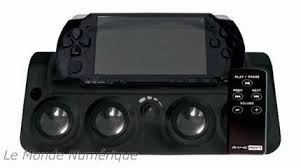
SOUND STATION FOR PSP SLIM - Game Console Accessories AWG - Free user manual and instructions
Find the device manual for free SOUND STATION FOR PSP SLIM AWG in PDF.


| Product type | Portable charging dock with speaker for PSP™ SLIM |
| Brand | AWG |
| Model | SOUND STATION FOR PSP SLIM |
| Power supply | 4 AAA batteries (not included) or official/compatible PSP™ 5V/1A adapter (not included) |
| Remote control | Wireless, range 5 meters, CR2032 battery (included) |
| Speakers | 4 built-in stereo speakers |
| Connectivity | 3.5mm AUX input, 3.5mm LINE OUT headphone output, AV OUT (AV cable not included) |
| Main features | Simultaneous charging and use of PSP™ SLIM, remote control for wireless control of media files (play/pause, next/previous, volume) |
| Compatibility | PSP™ SLIM only |
| Warranty | 3 years from date of purchase (excluding accidental damage, incorrect use, or abnormal wear) |
| Maintenance | Clean with a slightly damp soft cloth; do not use detergents |
| Safety | Do not immerse, do not expose to dust, high humidity, high temperatures or mechanical shocks; do not disassemble (voids warranty) |
| Recycling | Do not dispose of with household waste; drop off at WEEE collection point or used battery collection point |
Frequently Asked Questions - SOUND STATION FOR PSP SLIM AWG
User questions about SOUND STATION FOR PSP SLIM AWG
0 question about this device. Answer the ones you know or ask your own.
Ask a new question about this device
Download the instructions for your Game Console Accessories in PDF format for free! Find your manual SOUND STATION FOR PSP SLIM - AWG and take your electronic device back in hand. On this page are published all the documents necessary for the use of your device. SOUND STATION FOR PSP SLIM by AWG.
USER MANUAL SOUND STATION FOR PSP SLIM AWG
Connecting to a Stereo system using the Aux Output
Connecting to an Audio player using the Aux input
Location of Controls and Control Definitions
Warnings & Precautions
Important Safety Instruction
Service information
Portable charger stand with speaker for PSP^TM SLIM
Preface
This User's Manual is intended for novice users of the Portable charger stand with speaker for PSP^TM SLIM. Finally, we sincerely thank you for choosing our product, and would like to hear back from you.
Fe
1.
2.
3.
4.
5.
6.
7.
8.
9.
10
11
Ba
prc
The
inc
Rel
Rel
The
Ins
Do
1.
2.
Feature:
- Speaker Docking Station with Remote Control for PSPTM
- The best charging cradle for maximum PSPTM movie experience.
- Built-in stereo 4 speakers.
- Remote control included, use the remote to control your PSPTM SLIM wirelessly.
- Remote control Uses CR2032 batteries(included).
- Remote control included effective within 5 meters.
- Charge and use your PSPTM SLIM at the same time. (only when using a power adapter.)
- Operates from 4 x AAA batteries(not included) or official/compatible PSP™ power adapter output 5V/1A(not included)
- Built-in headphone jacks(3.5mm type) LINE OUT. The best way to dock your PSP™ SLIM!
- Aux-In Jack (3.5mm type).
- AV out jack connected PSP^TM SLIM AV cable to TV (not included)
Battery Information
provide power Uses 4 X size AAA batteries for Speaker Docking Station.
There is a danger of explosion if the Speaker Docking Station's batteries are incorrectly Installed. Replace only with the same or equivalent battery.
Removing the Remote Control's Battery
Remote control Uses CR2032 batteries.
There is a danger of explosion if the Remote control's batteries are incorrectly Installed. Replace only with the same or equivalent battery.
- Connect an PSPTM SLIM to the Docking Station.
- Turn switch Power on the Docking Station, unto Power LED light.
- Turn the Volume Buttons to increase or decrease the volume of the unit.
Connecting to a Stereo system using the Aux Output
When connecting two products using an PSP™ SLIM AV cable, match the colored ports with the same Colored connection.(Red to Red, white to white, and Yellow to Yellow)
- Plug one end of a 3.5mm cable (not included)or PSP^TM SLIM AV Cable (not included) into the AV output on the unit.
- Plug the other end of the 3.5mm Audio Cable into the audio input on a television or stereo system.
- Set the television or stereo system to the appropriate audio input channel.
If connect to the headphone output of an audio source, the source's volume controls may need to be adjusted for optimal sound.
Connecting to an Audio player using the Aux input
You can connect an external audio source using an 3,5mm audio cable (not included) into the audio input on the unit.
- Plug one end of a 3.5mm audio cable into the audio input on the unit
- Plug the other end of the 3.5mm audio cable into the an MP3 player or other Audio Source.
Location of Controls
- DC input (official PSPTM power adapter output 5V/1A(not included))
- Power switch.
- Audio input
- Audio output
- AV output
- Volume Buttons
Control Definitions
- Play/pause Button : press the play/pause Button on the Remote to start or pause playing media on the PSP™ SLIM.
- Next/Preview Buttons :press Next Button on the Remote to jump to the next media file on the PSP^TM SLIM or press Preview Button to jump to the previous media file on the PSP^TM SLIM.
- Volume Button : Press the Volume Buttons to turn unit's volume.
Warranty
This product is guaranteed for three (3) years from the date of purchase. In the event of product failure resulting from material or manufacturing defects during this period, the retailer who sold the product will replace this product with an identical or similar model upon presentation of the cash register receipt or valid proof of purchase. This Warranty does not cover damage resulting from accidents, incorrect use, or any use for which this product was not designed.
Important Instructions and Precautions
- Children should not use this product without the supervision of an adult.
- Never expose this product to direct sunlight, bad weather, humidity, high temperatures, or physical shocks.
- Do not immerse this product in liquid.
- Use indoors only.
- Do not use this product if it is damaged.
- Do not disassemble this product. Doing so will void this Warranty.
- Use a humid, soft, clean cloth to clean the product. The use of detergents can damage this product.
艺
Battery Care and Maintenance
- Only use batteries supplied with, or intended for, this product.
- Ensure the batteries are correctly inserted.
- Remove batteries from this product during long periods of non-use.
- Never dispose of batteries in a fire as they may explode.
- Do not put used batteries in the trash. Dispose of them at a proper collection point for used batteries and hazardous waste.
- Children should never replace or charge batteries without supervision.
Recycling
Do not discard this product with common household rubbish. This product must be disposed of at a Waste Electrical and Electronic Equipment (WEEE) collection point for recycling. The recycling and transformation of waste electrical and electronic equipment will contribute significantly to the protection of the environment and reduce the volume of waste in dumps and landfills.
Batteries must be discarded at a designated collection point for the recycling of used-batteries and hazardous waste.

For further recycling information, please contact your local waste disposal services.
This product is not recommended for children under the age of 8 years.
Further Information
All our products (with visual aids, product sheets, and operating instructions) can be found at: www.awq-france.com.
If you encounter any problems installing or using this product, please contact us at: support@waregame.com.
MODE D'EMPLOI
Sommaire
Fonctionnalités
Designed, Distributed and Manufactured by AWG.
AWG
17 Rue Louis Armand
77330 Ozoir La Ferriere
France

- Portable charger stand with speaker for PSPTM SLIM
- Preface
- Feature:
- Battery Information
- Connecting to a Stereo system using the Aux Output
- Connecting to an Audio player using the Aux input
- Location of Controls
- Control Definitions
- Warranty
- Important Instructions and Precautions
- 艺
- Battery Care and Maintenance
- Recycling
- Further Information
- MODE D'EMPLOI
- Sommaire
Brand : AWG
Model : SOUND STATION FOR PSP SLIM
Category : Game Console Accessories