CASQUE GAMING HYPERX CLOUD II GUN METAL GRIS - Gaming headset KINGSTON - Free user manual and instructions
Find the device manual for free CASQUE GAMING HYPERX CLOUD II GUN METAL GRIS KINGSTON in PDF.



User questions about CASQUE GAMING HYPERX CLOUD II GUN METAL GRIS KINGSTON
0 question about this device. Answer the ones you know or ask your own.
Ask a new question about this device
Download the instructions for your Gaming headset in PDF format for free! Find your manual CASQUE GAMING HYPERX CLOUD II GUN METAL GRIS - KINGSTON and take your electronic device back in hand. On this page are published all the documents necessary for the use of your device. CASQUE GAMING HYPERX CLOUD II GUN METAL GRIS by KINGSTON.
USER MANUAL CASQUE GAMING HYPERX CLOUD II GUN METAL GRIS KINGSTON
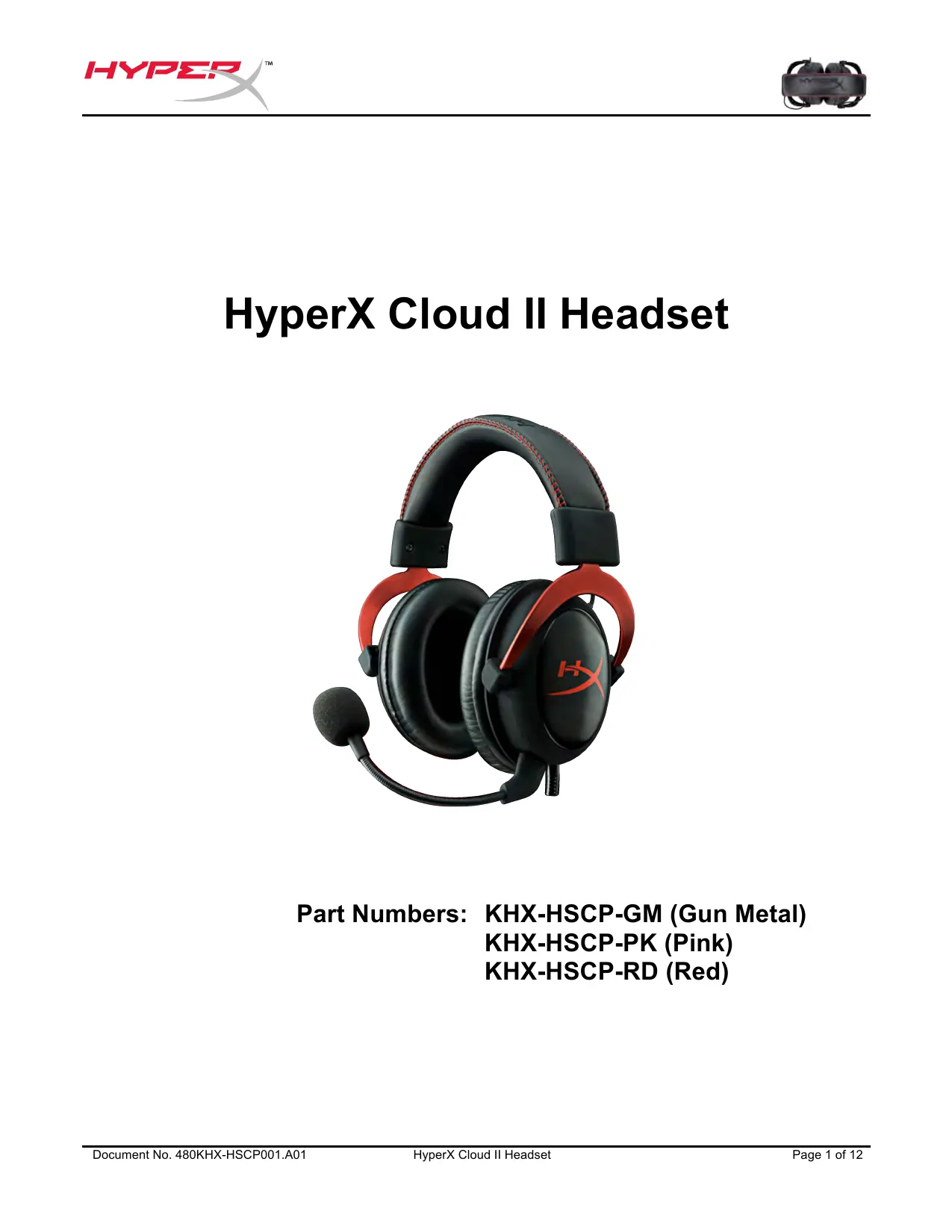
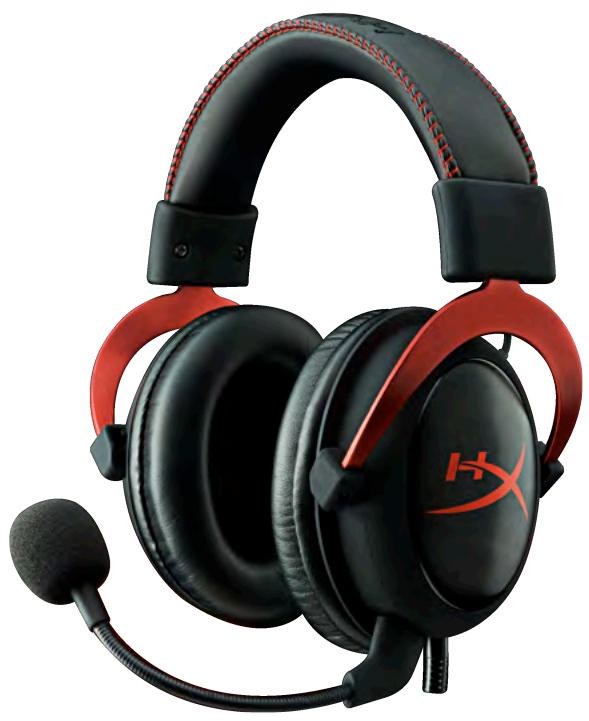
HyperX Cloud II Headset
Find the language and latest documentation for your HyperX Cloud II Headset here.
HyperX Cloud II Installation Guide


............ For instructions in English

Part Numbers: KHX-HSCP-GM (Gun Metal)
KHX-HSCP-PK (Pink)
KHX-HSCP-RD (Red)
Introduction
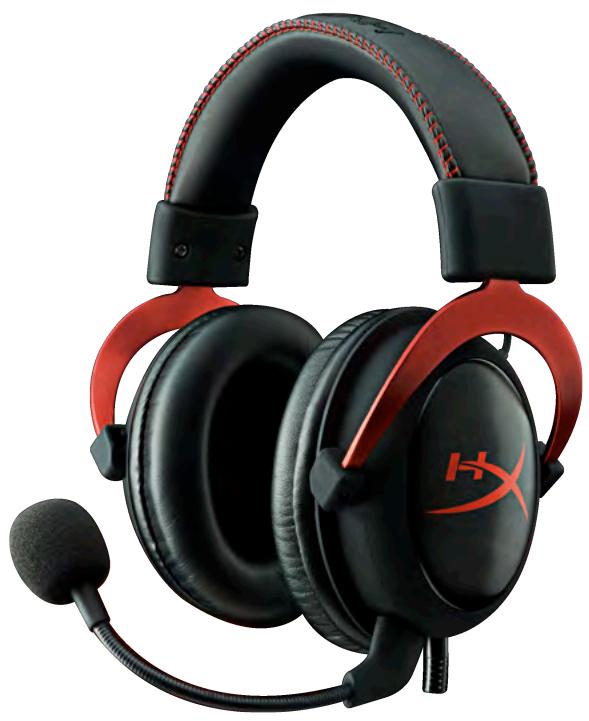
Optimized for pro-gaming, HyperX Cloud II Headset (KHX-HSCP-xx) is a high-quality communicating device that delivers superior sound, style and comfort. It uses an adjustable, soft-padded leatherette headband and features a closed-cup design for enhanced bass reproduction and minimal sound leakage. The HyperX Cloud II headset is HiFi capable and delivers a durable design for the most rugged gaming environments and is compatible with tablets and smartphones for mobile use.
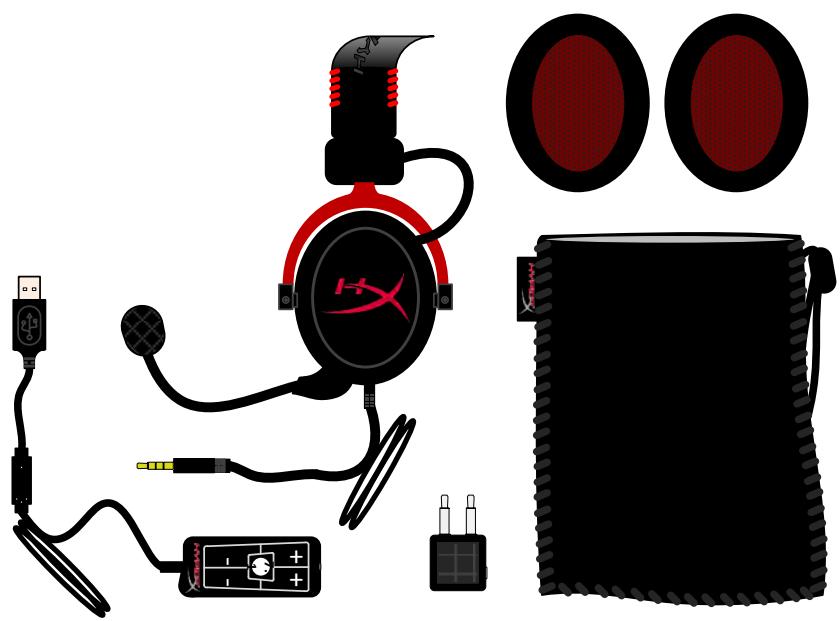
What's Included:
1 HyperX Cloud II Headset
- 1 Detachable Microphone (attached to headset)
1 spare set of velour ear cushions
1 USB control box
1 Airplane headphone adapter
1Meshbag
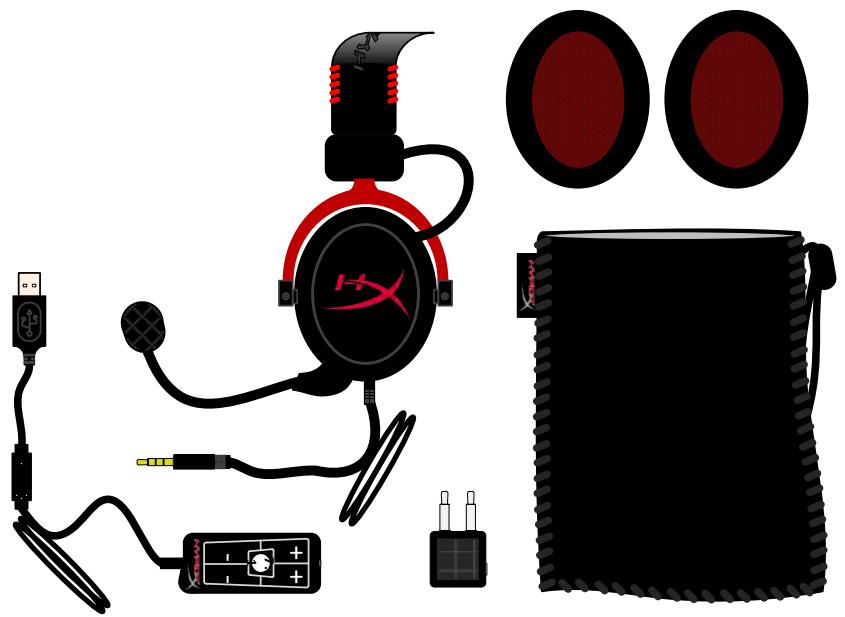
Package Contents
Features:
Hi-fi capable 53mm drivers for supreme audio quality
15-25 KHz frequency response (earphones)
- Detachable microphone (quick and easy to plug/unplug for music-only purposes)
Solid aluminum construction for durability and stability
Super-soft padded leatherette headband and leatherette padding on cups
- Closed cup design for enhanced bass-reproduction and sound leakage
Technical Specifications:
Headset
Transducer type: Dynamic 53mm with Neodymium Magnets
- Operating principle: Closed
Frequency response: 15 ~Hz - 25 KHz (earphones)
Nominal impedance: 60 ohm per system
Nominal SPL: 98+/-3dB
T.H.D: < 2%
Power handling capacity: 150mW
Sound coupling to the ear: Circumaural
- Ambient noise attenuation: approx.20 dBA
Headband pressure: 5 ~N
Weight with microphone and cable: 320g
- Cable length and type: 1m + 2m extension
- Connection: Mini stereo jack plug (3.5MM)
Microphone
- Microphone Transducer type: Condenser (back electret)
- Operating principle: Pressure gradient
- Polar Pattern: Cardioid
Power supply: AB powering
Supply voltage: 2V
Current consumption: Max 0.5 mA
Nominal impedance: ≤ 2.2k ohm + / - 30% - Open circuit voltage at f = 1 kHz 20 mV / Pa
Frequency response: 50 - 18,000 Hz (microphone)
T.H.D: 2% at f = 1kHz
Max. SPL: 105dB SPL (THD ≤ 1.0% at 1KHz) - Microphone output: -39+/-3dB
Dimensions: 6^*5mm
Length mic boom: 150MM(include gooseneck)
Capsule diameter: 6mm
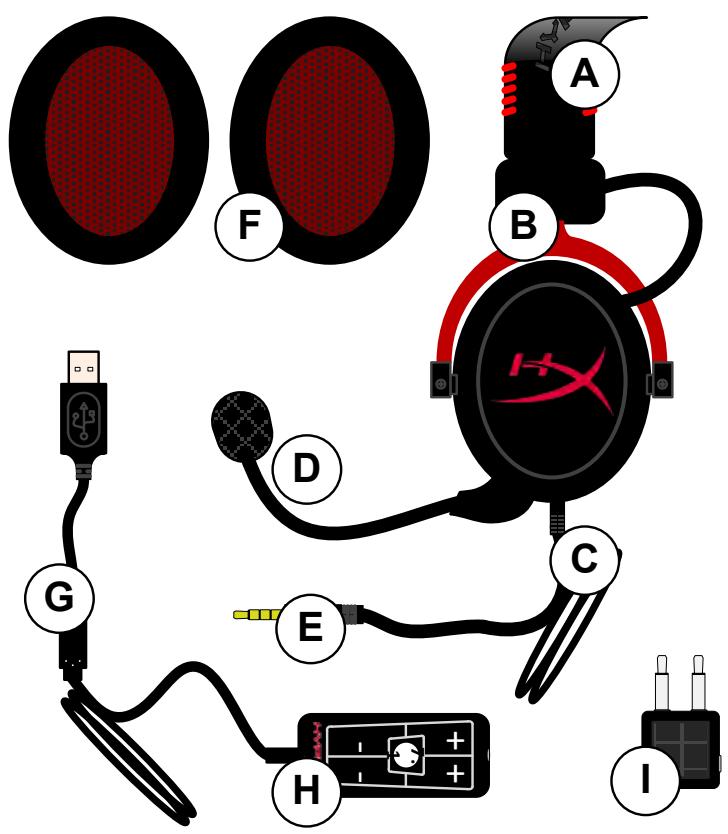
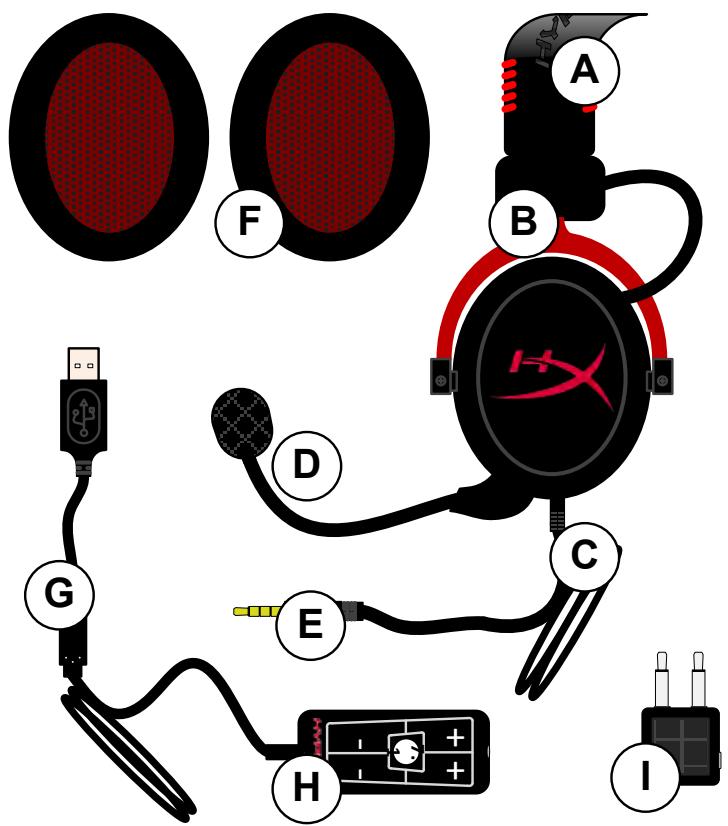
Overview
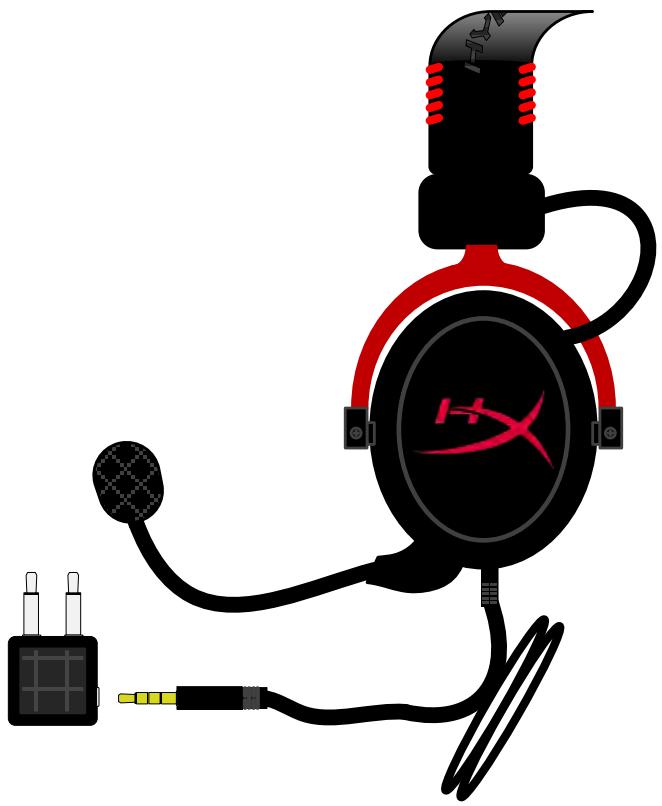
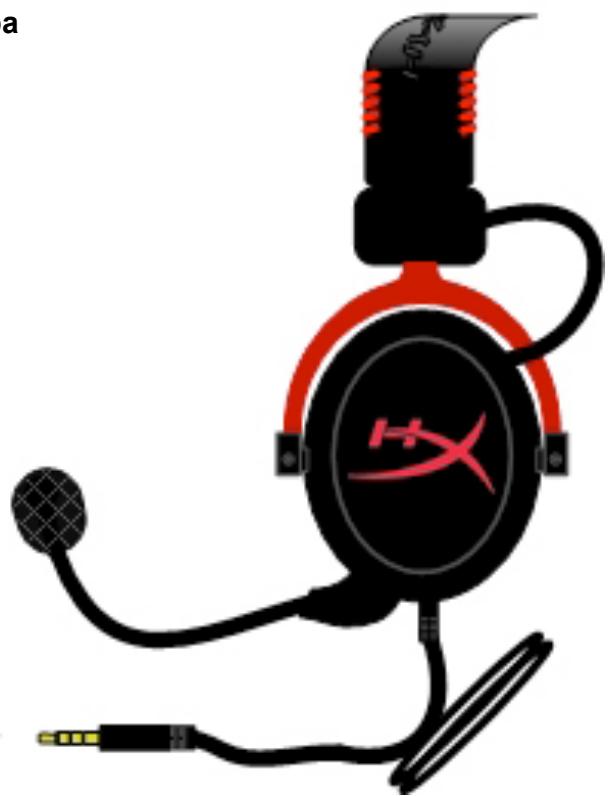
A. Leatherette headband w/ HyperX logo
B. Aluminum arm to adjust headband
C. Attached cable w/ 3.5 ~mm input jack
D. Detachable microphone with adjustable arm and condenser
E. 3.5mm audio input jack
F. Extra set of ear cushions
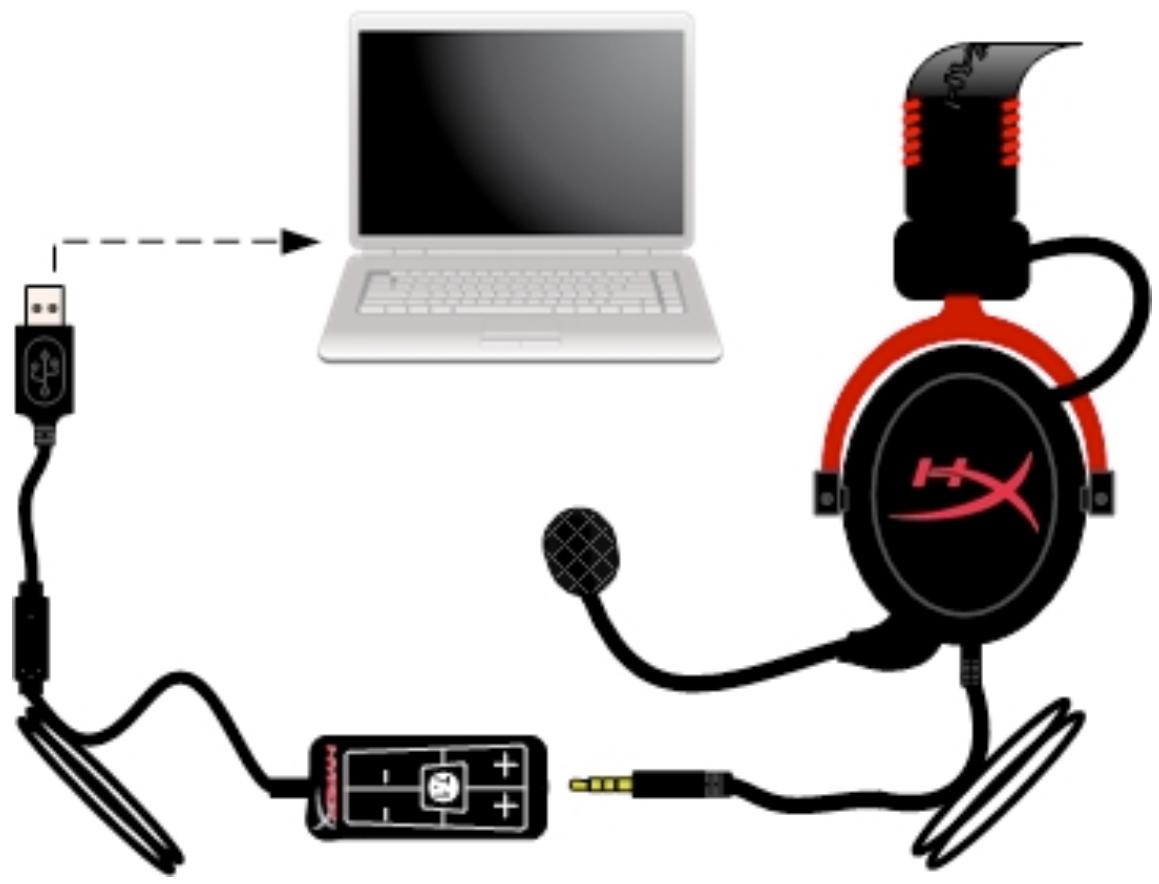
G. Control box cable w/ USB connector and control box (letter H)
H. USB Control box w/ volume controls and 7.1 audio button
I. Airplane adapter w/ 3.5mm audio jacks and input converter jack
Usage (Direct Connect) with No Control Box
Connect your headset directly to your computer, game console, or other device (phone or tablet) that has a 3.5mm audio jack.

Usage (with Control Box)
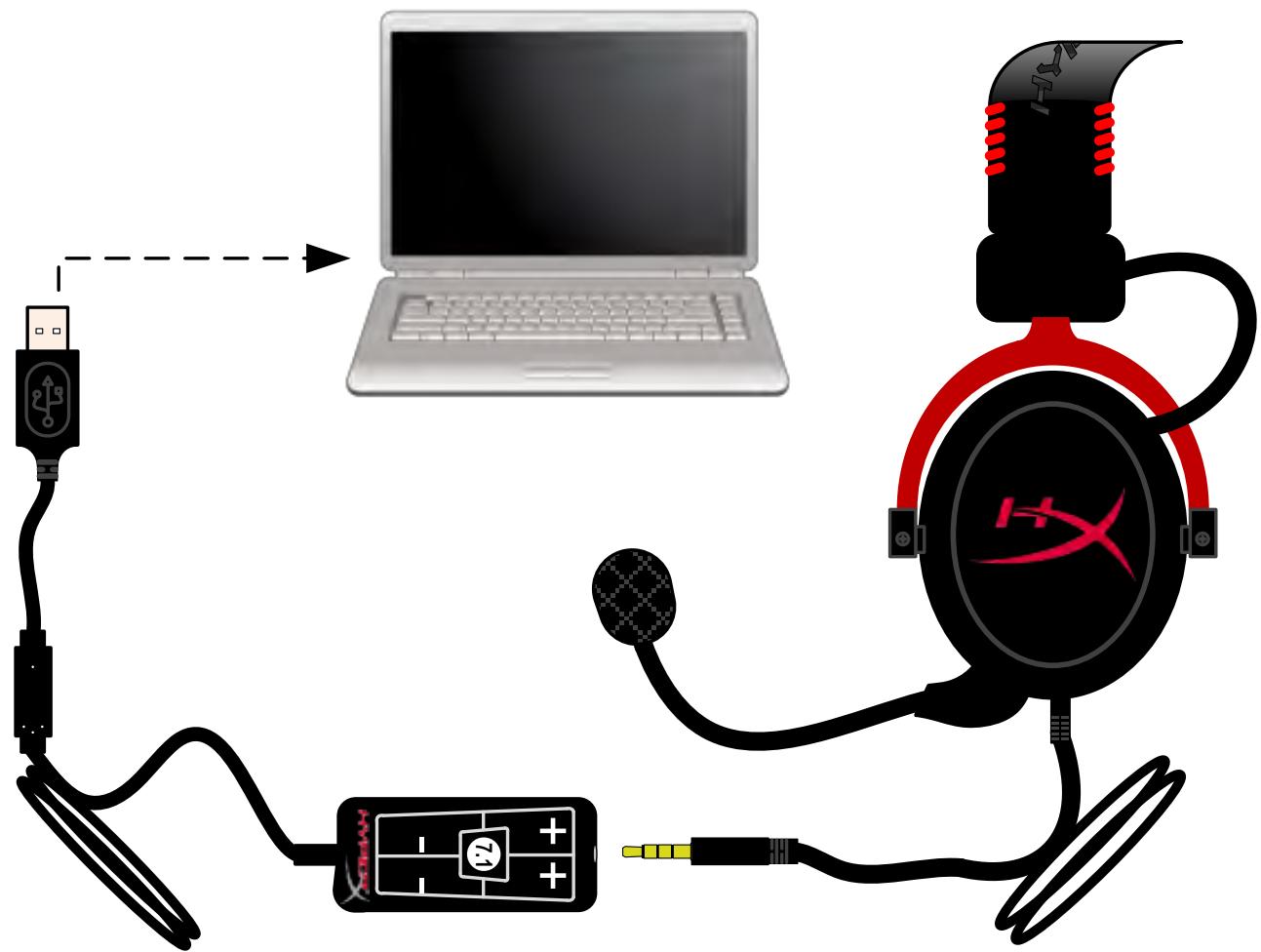
Connect the headset's 3.5mm audio jack to the input jack on the USB control box. The USB control box then connects to a computer using the USB connector on the end of the control box.
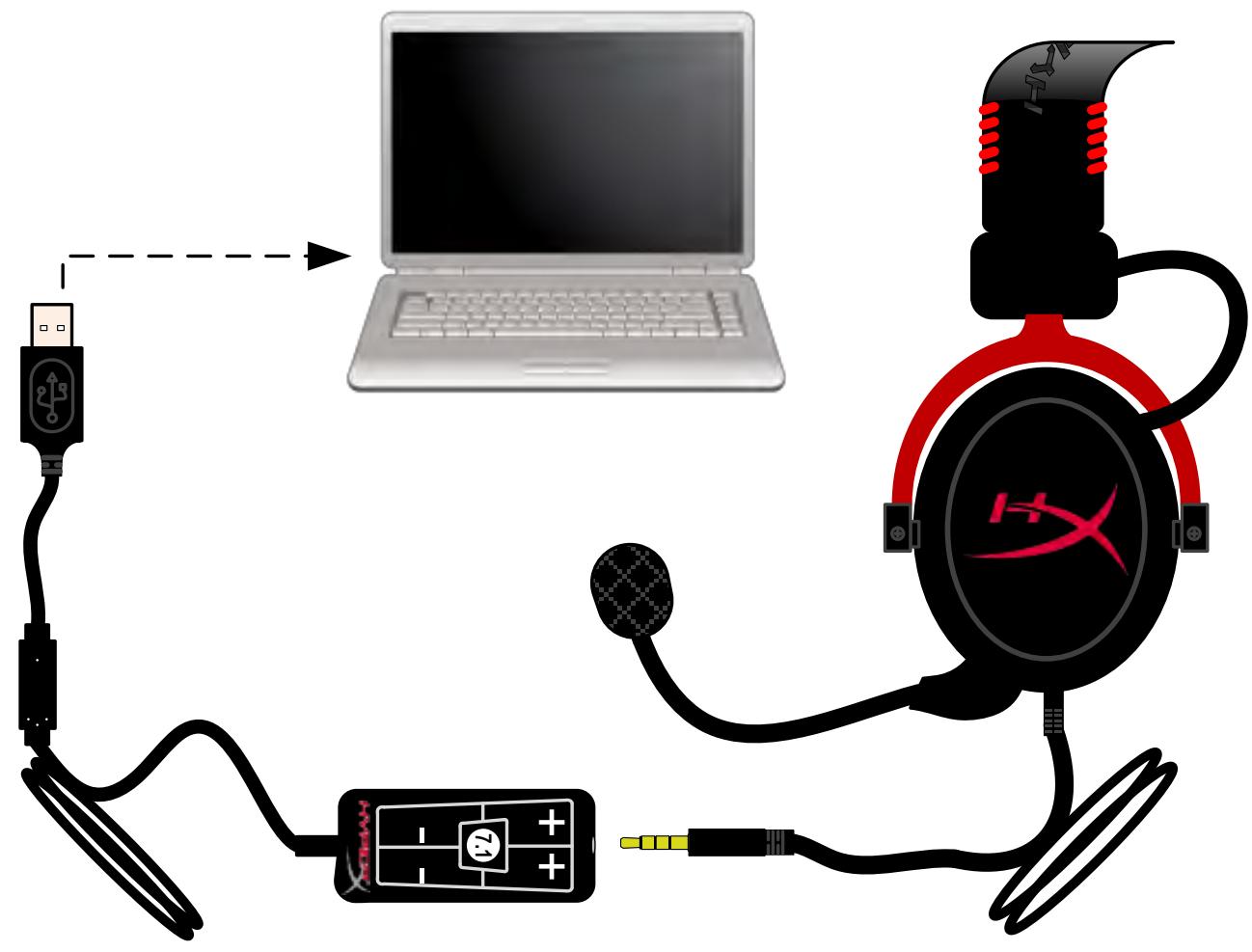
Using Control Box
To ensure that HyperX Cloud II is the default audio device, you must follow these instructions:
For Windows:
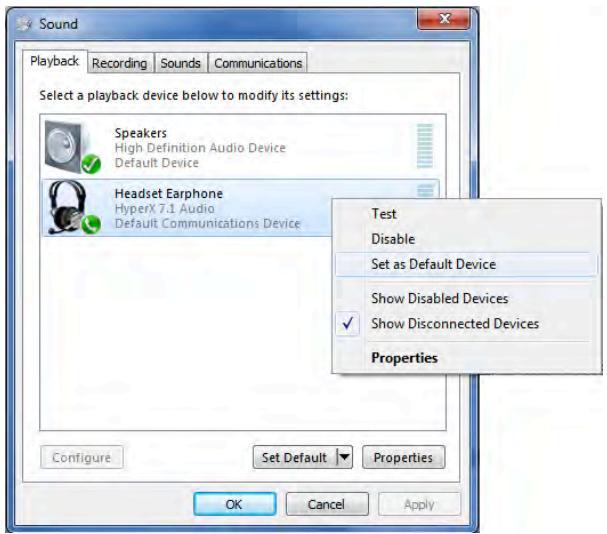
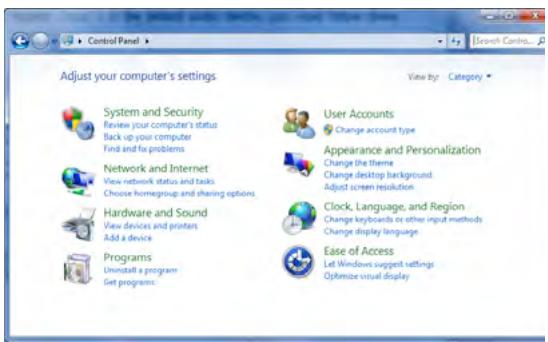
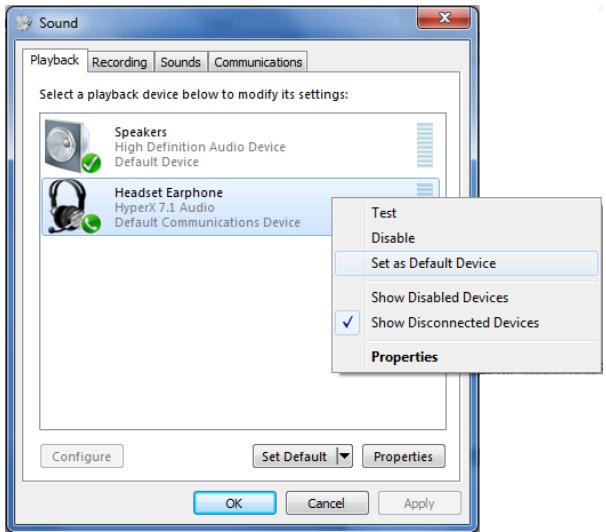
- Open up Control Panel and select Hardware and Sound and then select Sound.
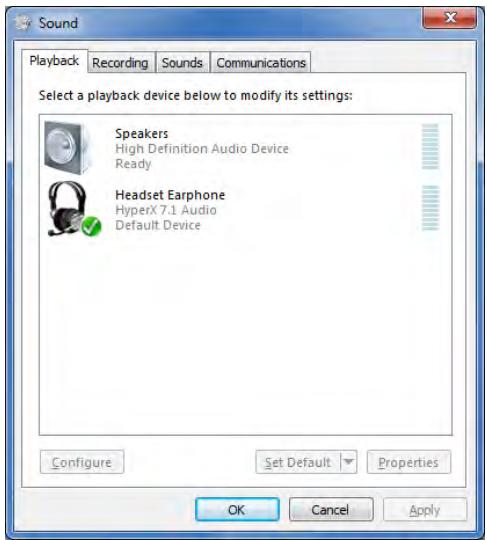
- If the "HyperX 7.1 Audio" is not currently the default audio device, right-click on the option and select "Set as Default Device."
- This should place a green check mark next to the default audio device.
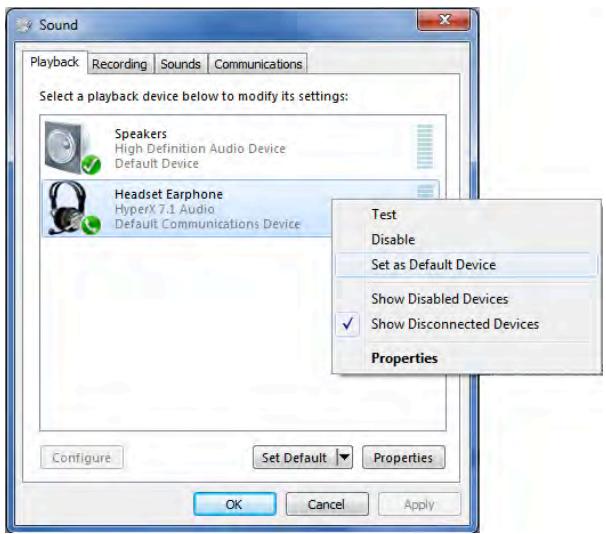
Figure 2 - Right-Click Default Audio

Figure 1 - Control Panel
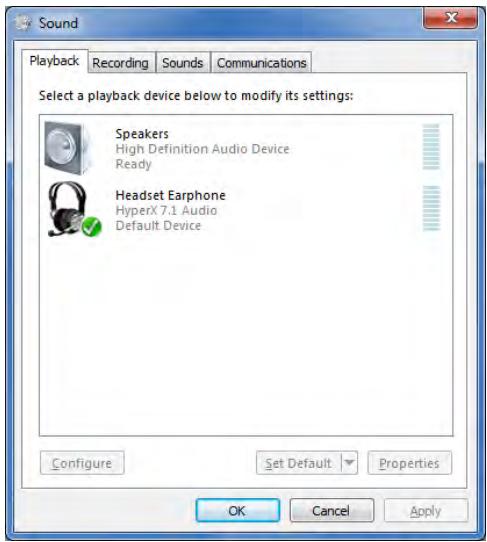
Figure 3 - Default Sound Device
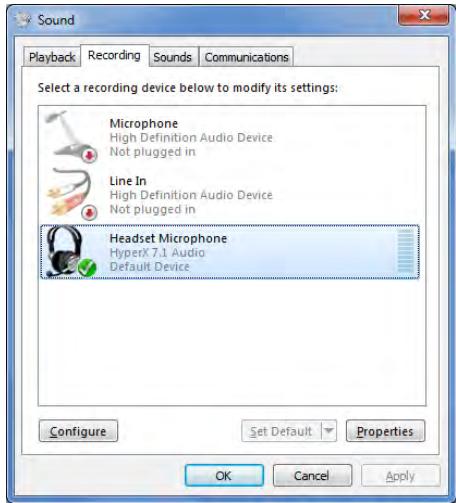
Repeat the same steps for the microphone portion of the headset, located under the "Recording" tab (also found in the Sound program in Control Panel.)
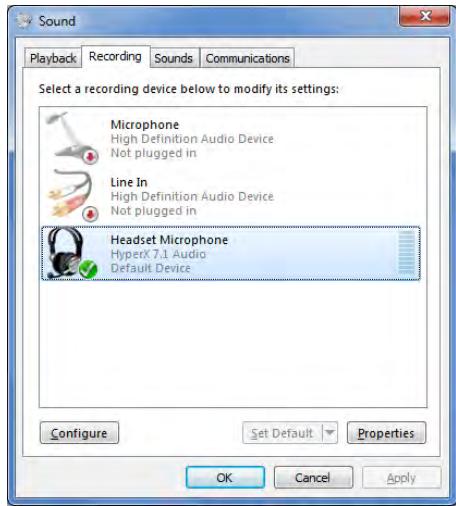
To ensure that HyperX Cloud II is the default audio device, you must follow these instructions:
For Mac:
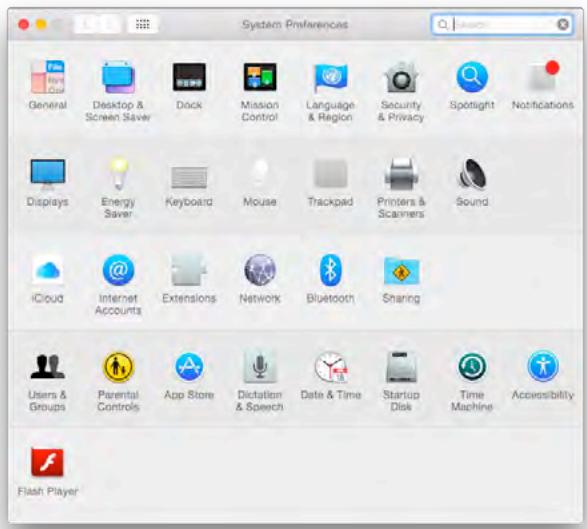
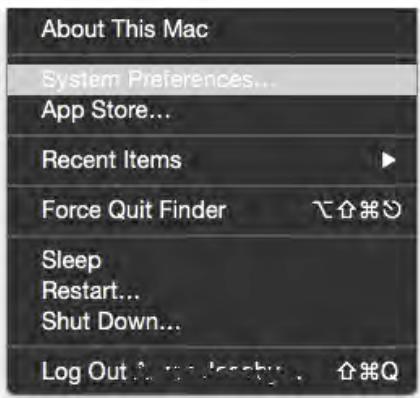
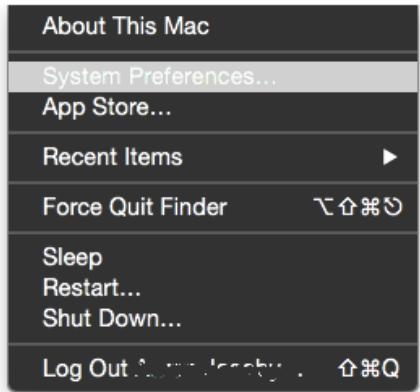
- Click the Apple menu and select "System Preferences" from the drop-down menu.
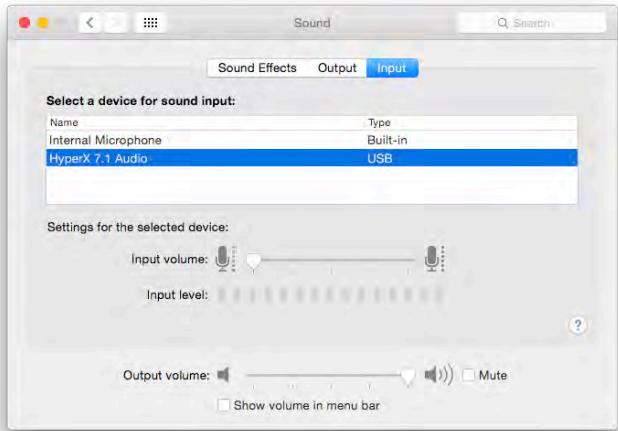
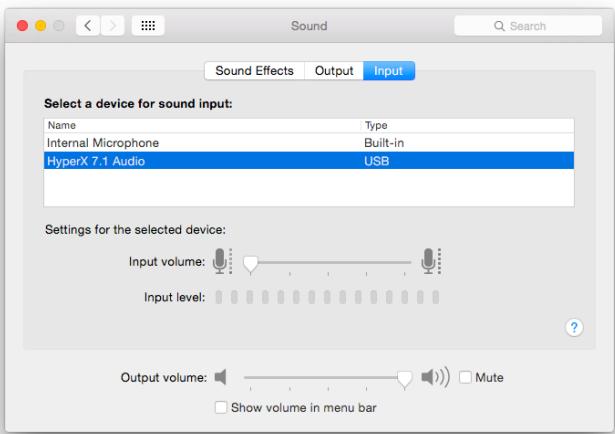
- In "System Preferences", click on the 'Sound' icon.
- Click on the Input tab and select "HyperX 7.1 Audio" for default sound input.
- Click on the Output tab and select "HyperX 7.1 Audio" for default sound output.
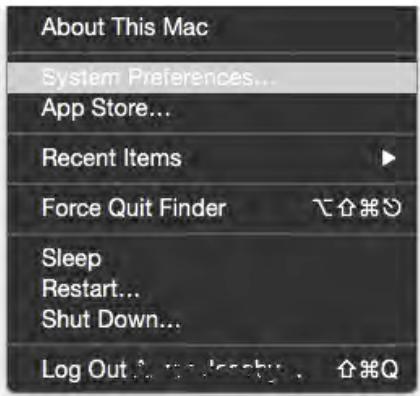
Figure 1 - Apple Menu
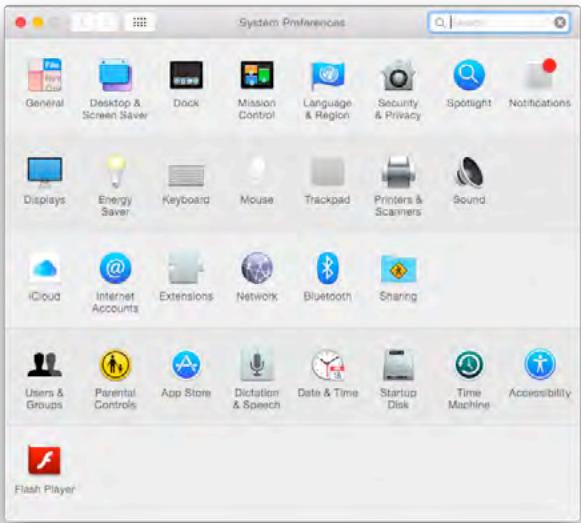
Figure 2 - System Preferences
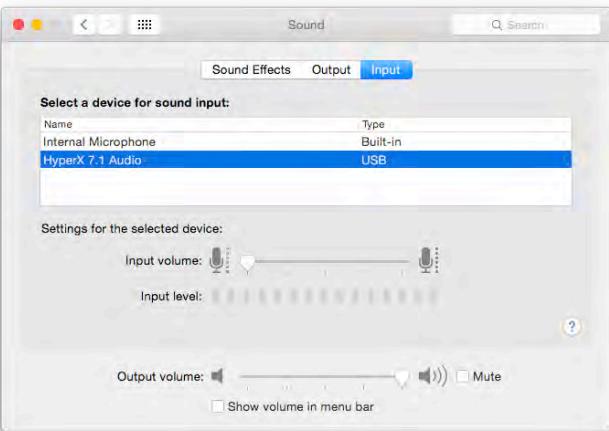
Figure 3 - Sound Preferences
Usage (PlayStation® 4)
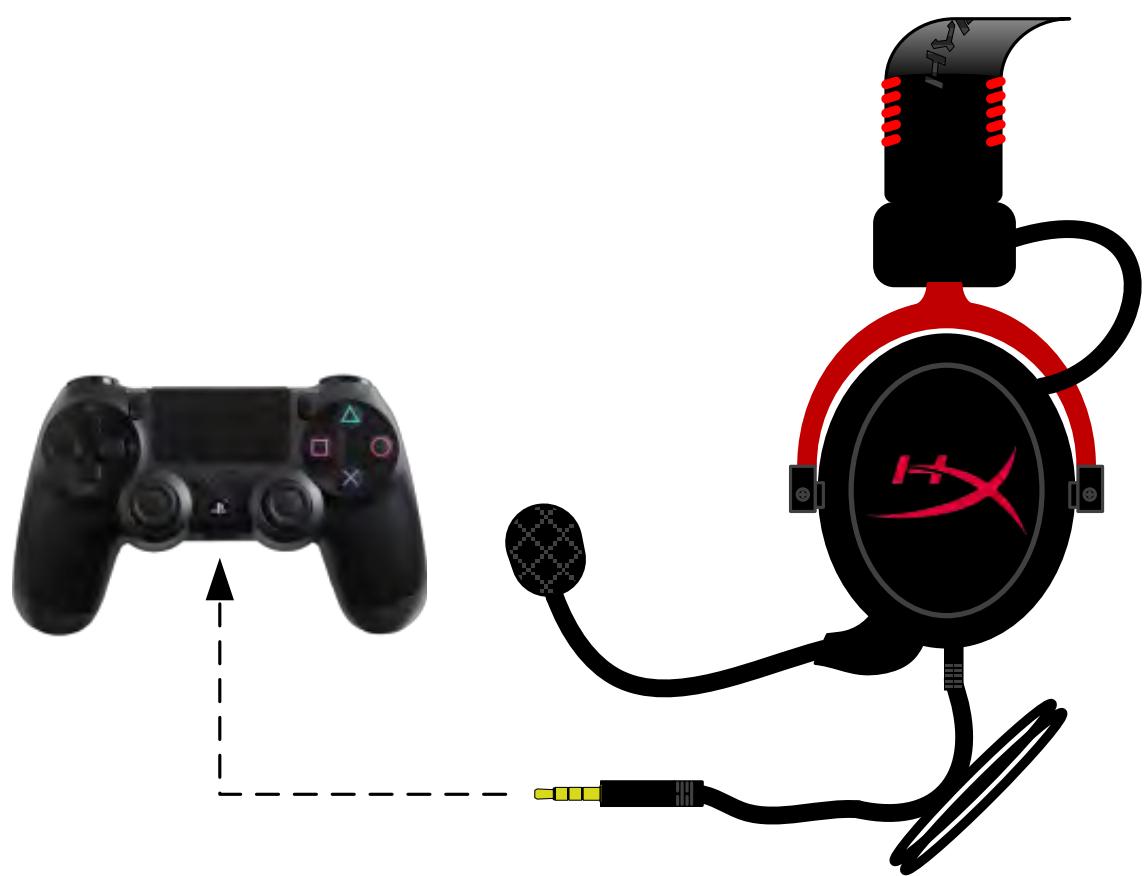
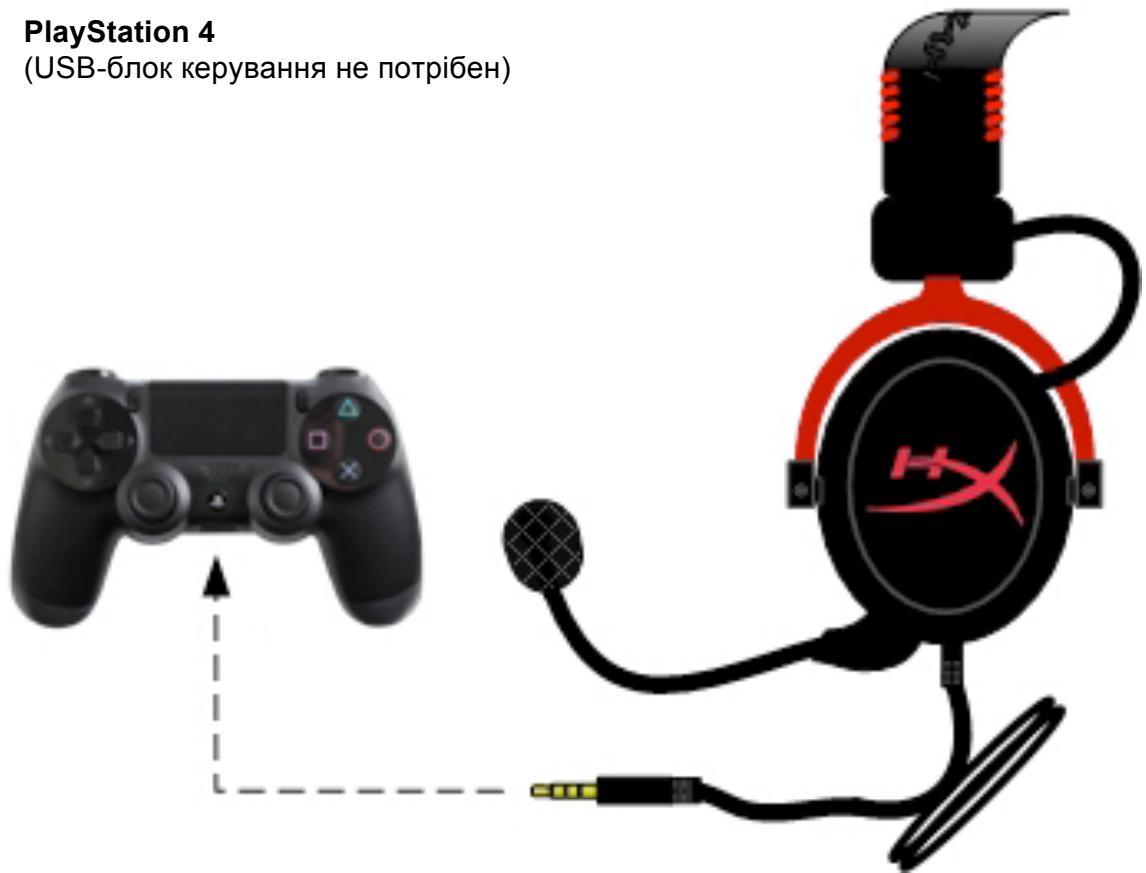
For optimal use with PlayStation® 4 (PS4®), unplug the headset jack from the USB control box and connect audio jack on the headset directly to the PS4 game controller and follow these steps:
- Turn on your PS4® game console.
- Navigate to the Settings Menu and select it.
- Highlight the 'Devices' menu option and select it.
- Scroll down to 'Audio Devices' and select it.
- Choose 'Output to Headphones' and select 'All Audio.'
PlayStation 4
(USB Control Box not needed)
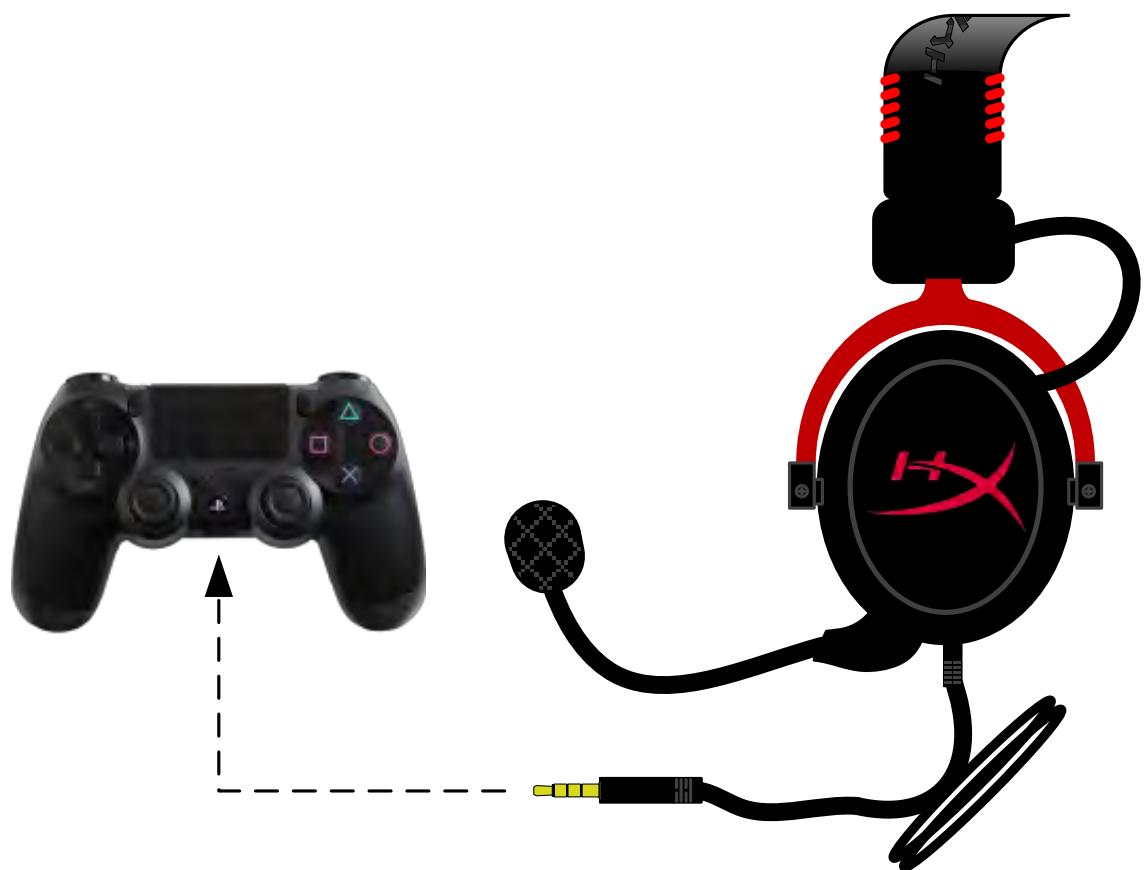
HyperX Cloud II with PS4®
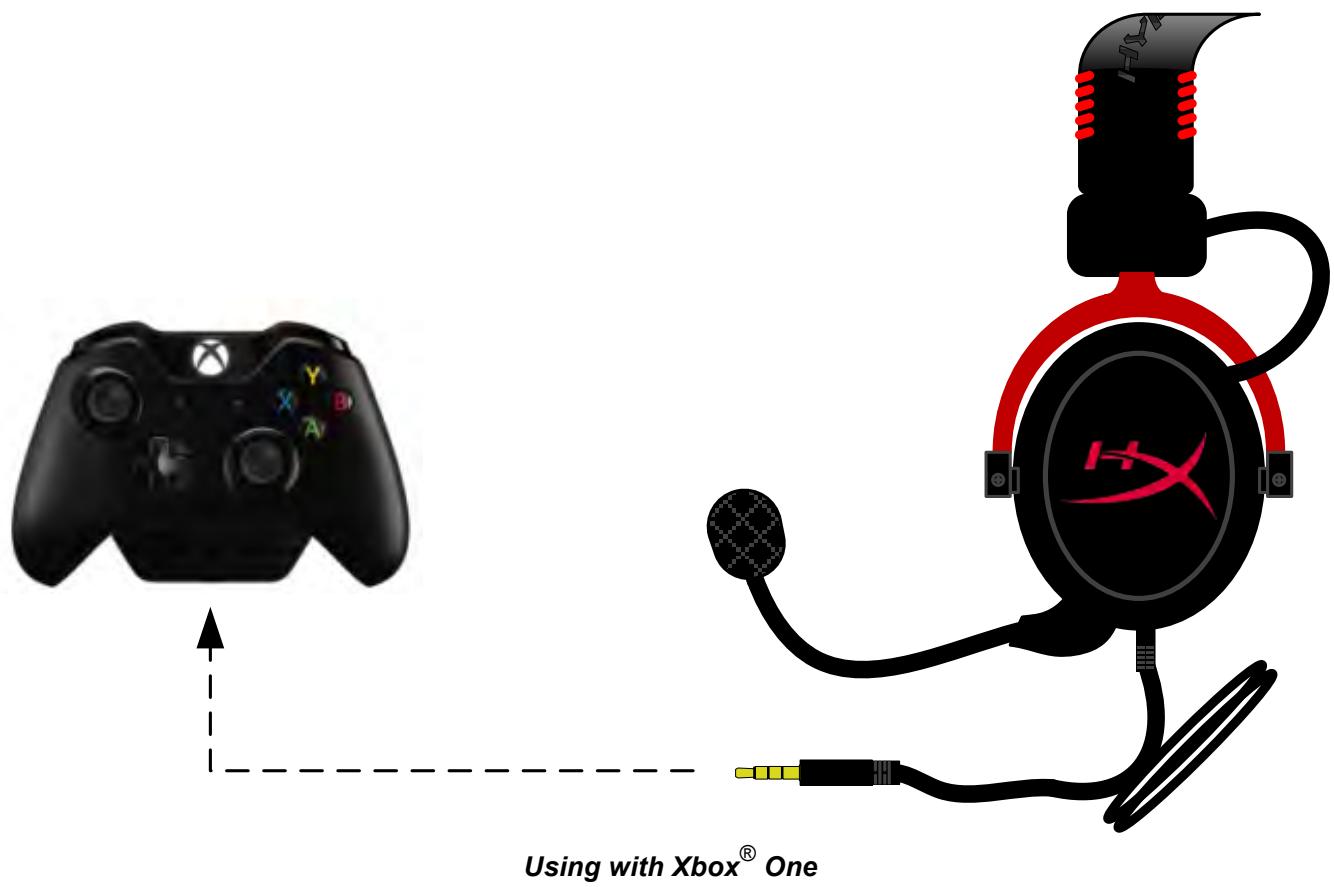
Usage (Xbox® One)
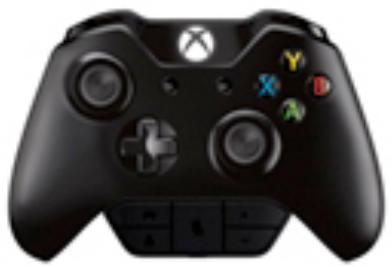
To use the HyperX Cloud II headset with Xbox® One, you will need the Xbox One adapter (sold separately) that plugs into the Xbox® One controller (pictured below.) Because this adapter has built-in volume controls, you will remove the USB control box (that came with your HyperX Cloud II headset) and connect directly to the Xbox One controller.
Xbox One, requires controller adapter
(Adapter sold separately)
(USB Control Box not needed)
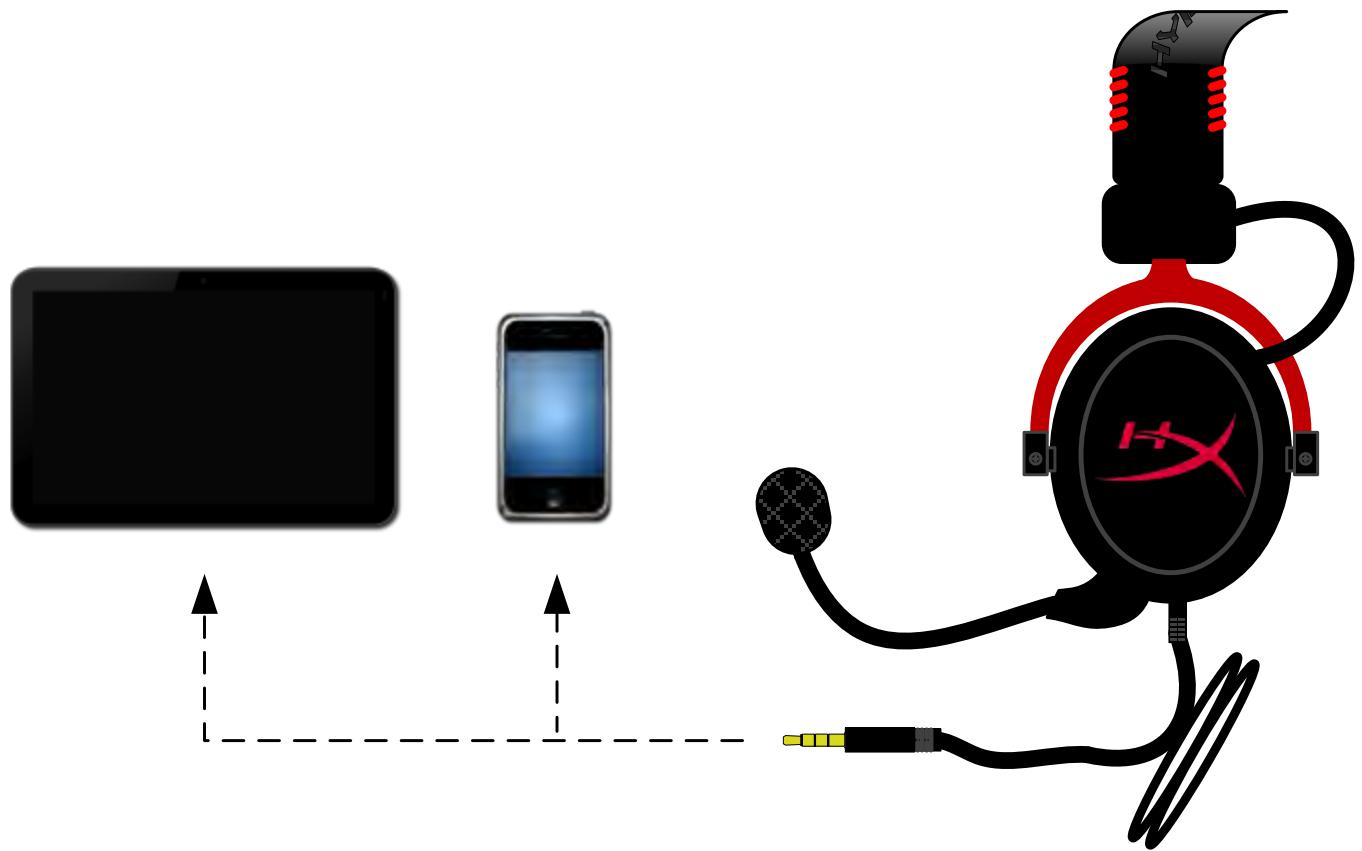
Usage with Mobile Device (Phone or Tablet)
To use the HyperX Cloud II headset with a mobile device, unplug the USB control box and plug the 3.5mm headset jack directly into the audio jack on your phone or tablet.
Mobile (Phone / Tablet)
(USB Control Box not needed)
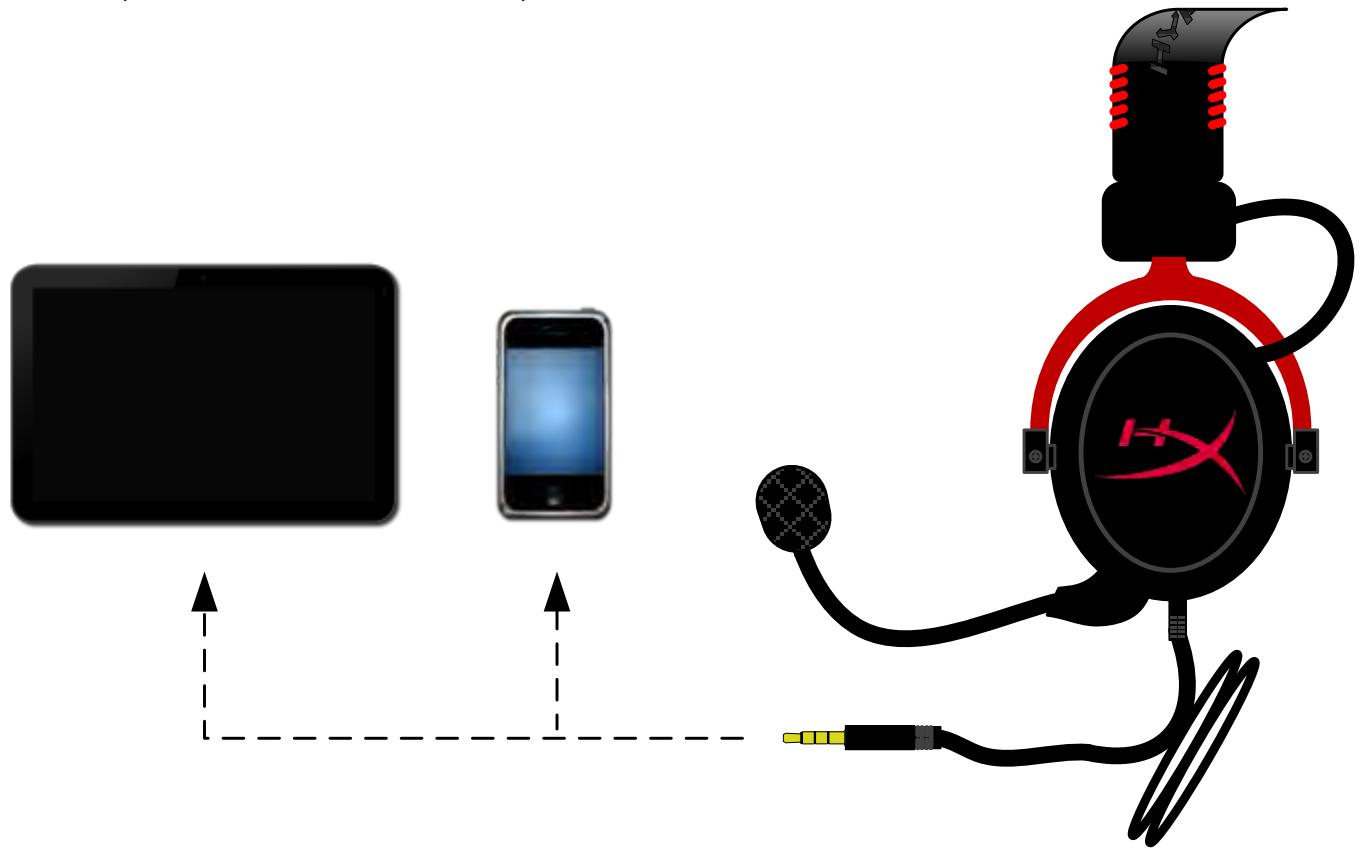
Figure 1.14 - Using with mobile device (phone or tablet)
Usage (with Airplane Adapter)
If you are connecting the Cloud II headset to an airplane jack, you will not be using the USB control box. Just connect the headset audio jack to the airplane adapter (included with your headset) and plug directly into the airplane jack located on the front or inner side of the seat's armrest.
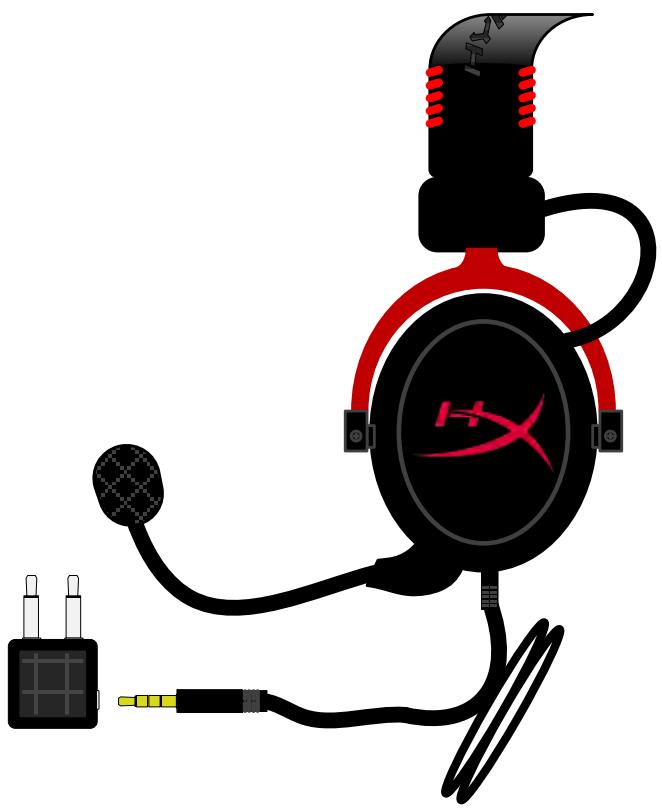
Connecting to Airplane Jack
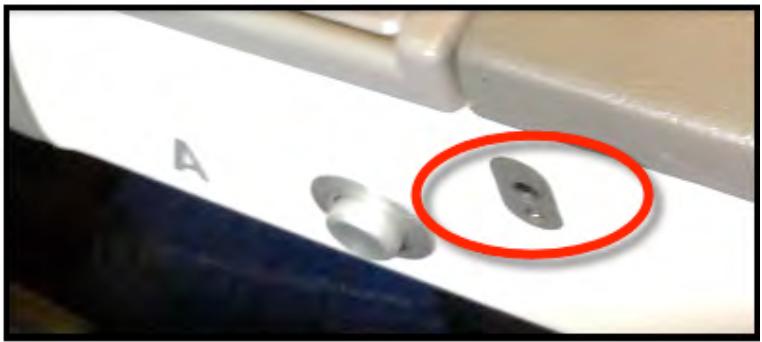
Input Jack on an Airplane Seat (Armrest)
Auriculares HyperX Cloud II
Numeros de parte: KHX-HSCP-GM (metalorado)
KHX-HSCP-PK (rosado)
KHX-HSCP-RD (rojo)
Introduccion
KHX-HSCP-RD (KpacHBi)
BVeJeHne
GarHnTypa HyperX Cloud II (Homep KHX-HSCP-xx) onTmMn3npoBaHa dIy npOceCNoHaJIbHbIX reImePoB n IpeDCTabIaET c6oB BvICOKOKaueCTBeHHoe KOMMyHkaZIOHHOye yCTPOIcTBO, KOTope ObeCneuBAe T pReBOxCoJHOe KaueCTBO 3Byka u yOobCTBO uCNOJIb3OBAHnR u MMeET COBpeMeHHbI BHeUHN BVD. B 3ToI rAPHNType NcPONb3YeTcpeYJIpyEMOe OROIOBBe N3 KOK3aMeHnTeJc MMRKoi NOkJaADKO, a Camn HayshNKn IMeOT 3akpbIyUo KOHCTpyKzHIO, UTO yLnyUaet KaueCTBO BOCpOn3BeDeEHnR 6aCOB u CBoIT KMinHMMy nOTepn 3Byka. GarHnTypa HyperX Cloud ll 6bnaAeT fynKzHOHaJIbHOCTbU yOBnHi HiFi, OTNuaeTc npOhoN KOHCTpyKznei n COBMeTIma C pIaNHeTaAMn i CMaprTfoHAmn dIy NcPOn3OBAHnR B MOBnHOM peXIMe.
KOMnJIeKT nOcTaBKN:
- 1 rapнType HyperX Cloud II
1 cbeMhbl MmKpOΦoH (KpeHITcKaRapHnIType)
1 3aapanchoi KOMPJIeKT BeJIIOpOBbIX am6yUHOp
1 USB-6Jok ynpablenia
1abnaaandTeprapHHTpybl
14exoJ
CodepKumoe ynaKoeku
Функцин:
Hi-Fi-Функуновьсв с ДИнамчecknm Гольками 53 МДлгпревхонlorо каuctBa 3Byka
- YacToTHaY xapaKTepeNCTnKa 15-25 K'U (HauyHnKn)
CbeMHbI MmKpOoHn (npocToe npoknueHne/otklnouehne nJpnocnyuBaHnMy3bIKn)
LcJIbHa aIHomHHeBa KOhCTpyKzua, o6ceuNbAo7a npOvHocT b IOnIroBeHuOCTb
- OroJIOBBe n3 KOx3aMeHInTeTc MЯrKoI npOKJaADKOI n NOdkJaADKa n3 KOx3aMeHInTeTc Ha YaIskax
3akpbTAY KOHCTpyKZnKpIweK dnyuYueHHoro BOCPON3BedeHn 6acOB n ppeDtBpauneHn noTebp 3Byka
TexHnueckne XapaKTepeNCTnKN
TapHnTypa
TnI DaTnka: DInHAMueckn 53 MM C HeODIMOBbIMM MaHTaM
- PpHcHn pa60tby: 3akpyTbIy
- YacToTHaXapaKTepeNCTnKa: 15-25 KΓu (HayuHnKn)
HomHaJIbHbI HmpeJaHc: 60 OM Ha CnCTeMy
HOMINHaJIbHbI yPoBeHb 3ByKOBOrO daBJeHnIy:98+/-3 d6
Ko3ΦΦnIeHT HeINHeHbIX NcKaXeHIn: < 2%
MaKcImaJIbHaJ MoUHocTb: 150 MBT
TnHayuHnKOB:OXBtBbAIOUne
- Побавлике Okupykaюших умов: пимерно 20 ДБа
Давлиец оroловь:5H
Bec minkpofoHOM kabeJeM: 320r
Динани{Tин Кбета:1M+удлпнгтель2M
Pa3bem: MHH-Tekep cTepeo (3,5 MM)
MnKpOoH
Tn daTnka MnkpofoHa: KOHeHcaTophbl (ObaTbI 3JeKtpeThbl)
- PpHnCnI pa60TbI: rpaDneHT daBHeHna
-Диагамma HaprabJIeHNoCTn: KapdnoiHa
- IcToUHnK nTuHaNr: nTuHaHe AB
HanpajkeHne nHTaHn:2B
- Потpeбленье ТOKа: Мкс. 0,5 mA
HOMHaJIbHbI IIMpeJaHc: ≤2,2 KOM +/- 30%
HapjxHeBpeKImeXoJocToxoJa: npf = 1 kT20MB/Pa
- YactotnaXapaKTepeuCTnka: 50-18 000 Γι (Mικρούη)
Ko3ΦΦnζηηHT HeIINHeIhBIX NcKaKeHn: 2% npf = 1 kΓι
Makc. ypoBHeH 3ByKOBOrO daBJeHnIa: 105 dSPL (THD≤1,0% npu cactote 1 KfU)
- BbIXoM MmKpOΦoHa: -39+/-3 έБ
Pa3MepbI:6*5MM
Динан МКрфОна:150MM(BKJIIOUaCToIky)
-Диамер Мьбары:6 MM
0630p
A. OroIobBe n3 KoJ3aMeHnteJIc JIorOTnIOM HyperX
B. Алиоминеевш ретуларороюльья
C.Прилaraemblкавь CBXODHbIM pa3beMOM 3,5 MM
D. CbeMHbIM MmKpOΦOH c peRyInpUyeMbIM DePkaTeJIeM IN KOHdEHCATOpOM
E. BxoIHOy aydnopa3bem 3,5 MM
F. Доволнельньй KOMплект am6ушю
G. Ka6eJb 6Ioka ynpaBneHnca USBpa3beMOM n 6Iok ynpaBneHnra (6yKba H)
H. USB-6лok упраь leни с рergyл对接ам ngрмкости и Кногков 3Byka 7.1
I. ABynaaJaTep c aydnopa3bemamn 3,5 MM IN BXOJHbIM npeo6pa3OBaTeJEM
IcnoIb3OBAHne (npraMoe npdknUoyehne) 6e3 6loka ynpaBHeHna
ПодклочитЕ ragншу HeNOCpeДCTBENHOKOMMbIOTepy,ИгрOBОй KOHCoII ININДpyROMU yctpoiCTBy (TeJIeФOHy IIN ПlaHSeTy) caydnoPazbemom 3,5 MM.
IcnoIb3OBaHne c 6Iokom ynpaBHeHna
BcTaBbTe aydnooTKeep 3,5 MM raphNtypbI BO BXoHoi pa3bEm Ha USB-6JIOke ynpabJeHnna. 3aTeM USB-6JOK ynpabJeHnna POnKJIouaetcra K KompbIoTepy c POMOu USB-pa3bema Ha KOHnce 6JOKa ynpabJeHnna.
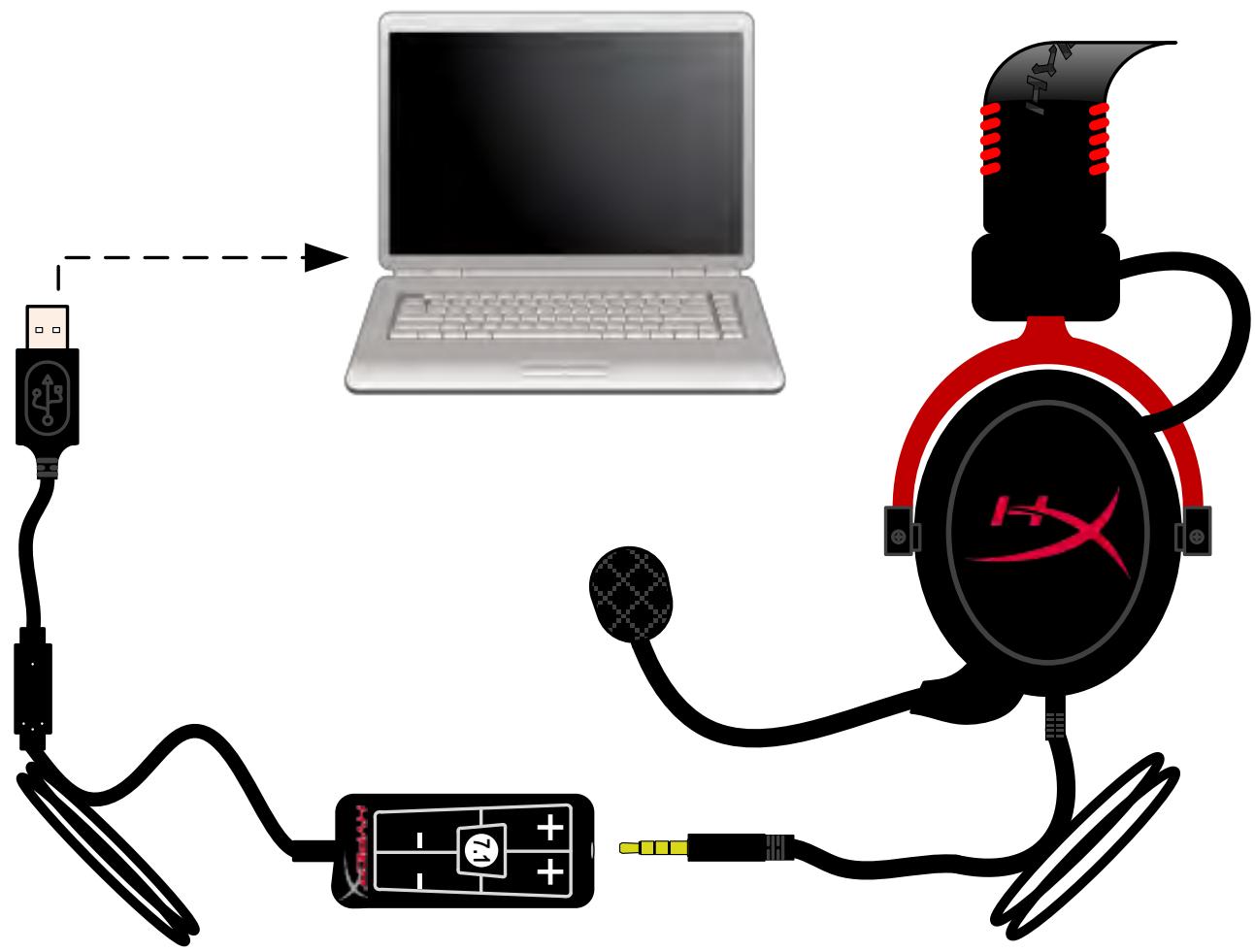
IcnoJIb3O8aHue 6Ioka ynpaAneHna
Чтобы rapнотура HyperX Cloud IIobby aydnoocptpoiCTBOM NO ymoJIaHIO, cIeIyET BbINOJIHTb CJIeDyUOUIne DeIcTBnIa:
Ду Windows:
- OtkpoTe PanaHb ynpaBHeHnI N Bbl6epnte 06opydoBaHue u 38yK, a 3aTeM 38yK.
- Ecnn «HyperX 7.1 Audio»[euple HeявлгетаудюctpoиCTBOM NO yMOJIuaHIO,ШелкнITE npabOй KHOПКоМ Мblшп NO COOTBETCTByUошeй ONцИ N BblберNTe «Выбразь в каестve устpoиCTBa NO yMOЛчанIO».
- ПиэTom aydnooyctpoICTBO NO yMOJuaHIO 6ydet NOMEyeHO 3eJIeHbIM UBEtOM.
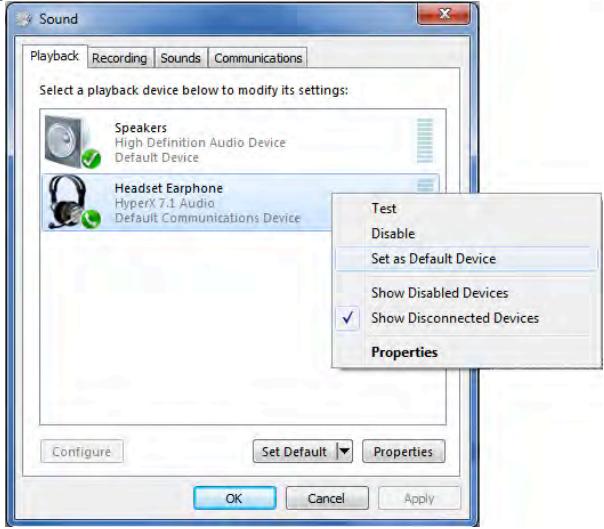
Pnc.2-Bb6op ayuocpoCTBa no yMOunahnIO npabblm 1eJukOMMbIa
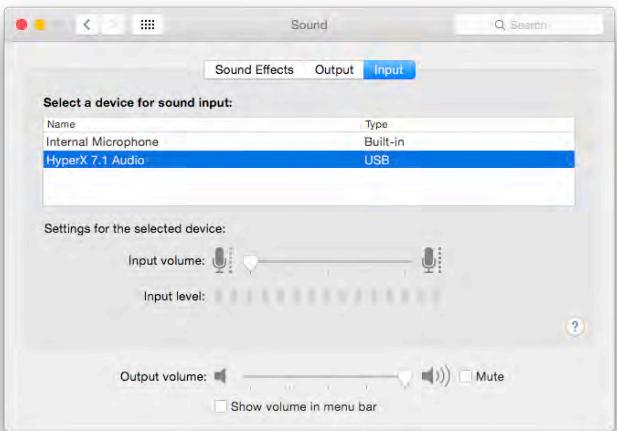
Pnc.3-3BykoBbI npaMeTpbl
(USB-6lnok ynpablenn He tpebyetc)
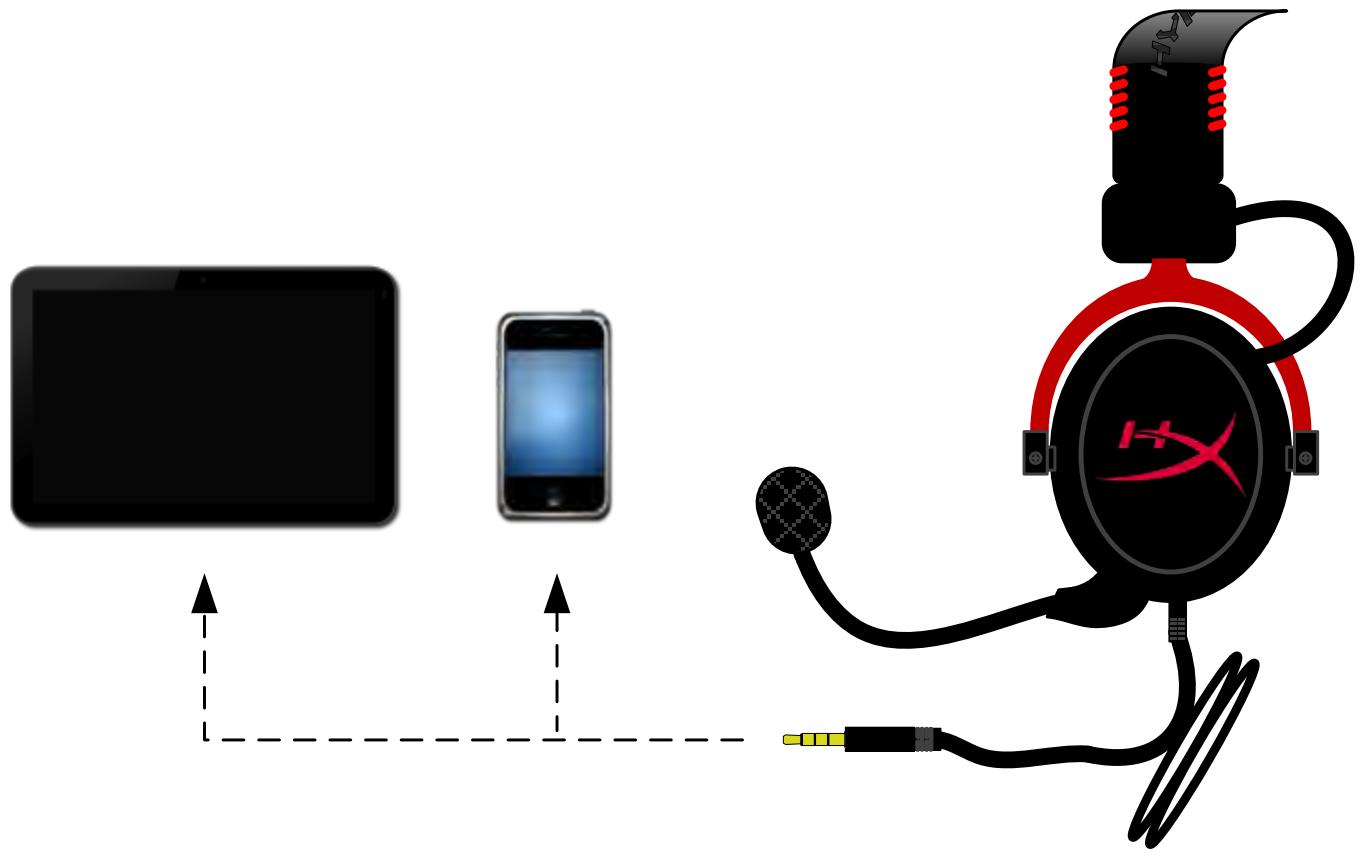
Puc. 1.14 - Исторьограде с мозердемов (melenophoHOM UJU nHaHwemom)
IcnoJb3OBaHne c aBnaaJaantTePOM
При подклочени rapнтурbl Cloud II K pa3bemyвCAMOJeTe USB-6лok управлия не Исноьзуетс. Просто подклочи Te aydnoшт ekр К abnaадантepу (ВКЛючehHomy В КOMплжг NOCTaBKN rapнтурbl) И BCTaBbTe erO B pa3bem, расноожeHHын Ha nepeДнeи Или ВHyтpenHe CTOPОHe NOДLOKOTHnka CnDEHЯ B CAMOJeTe.
PoioknIoueHue K pa3bemy 6 camoJe me

BcmaaBme umekep e pa3bEm Ha cudeHbe (noDIOKOMHuKe cudeHja) e camOJeme
HyperX Cloud II Kulaklik
Parça Numaralari: KHX-HSCP-GM (Top Metali)
KHX-HSCP-PK (Pembe)
KHX-HSCP-RD (Kirmizi)
Giris
aWvWvWvWvWvWvWvWvWvWvWvWvWvWvWvWvWvWvWvWvWvWvWvWvWvWvWvWvWvWvWvWvWvWvWvWvWvWvWvWvWvWvWvWvWvWvWvWvWvWvW

nslnu (nnnaaann)
3.5 3.5 3.5 3.5 3.5 3.5 3.5 3.5 3.5 3.5 3.5 3.5 3.5 3.5 3.5 3.5 3.5 3.5 3.5 3.5 3.5 3.5 3.5 3.5 3.5 3.5
iinaaunn
WaiuHperX Cloud II 1uaaunrueauuuiu uivnnaauaa
Windows:
- Control Panel Hardware and Sound Sound
- wunuAnu "HyperX 7.1 Audio" uuuuauu uuuuuuuuuuuuuuuuuuuuuuuuuuuuuuuuuuuuuuuuuuuuuuuuuuuuuuuuuuuuuuuuuuuuuuuuuuuuuuuuuuuuuuuuuuuuuuuuuuuuuuuuuuuuuuuuuuuuuuuuuuuuuuuuuuuuuuuuuuuuuuuuuuuuuuuuuuuuuuuuuuuuuuuuuuuuuuuuuuuuuuuuuuuuuuuuuuuuuuuuuUU
3.
2-
1-
nW3- aunuue
"Recording" (Sound Control Panel)
WaiuHperX Cloud II 1uaaunrueauuuiu uivnnaauaa
JNnJMac:
- Apple System Preferences
- System Preferences Sound
- nnnnu Input nnuuean "HyperX 7.1 Audio" wannnunu uynuyuauu
- nnnnnu Output anu uan "HyperX 7.1 Audio" wannu u u u
2-System Preferences
wnw1 - wny Apple
3-Sound Preferences
n5u (PlayStation® 4)
Wanrnnnnae nnrnnn narnn rannnne nnnnne nnnnne nnnnne nnnnne nnnnne nnnnne nnnnne nnnnne nnnnne nnnnne nnnnne nnnnne nnnnne nnnnne nnnnne nnnnne nnnnne nnnnne nnnnne nnnnne nnnnne nnnnne nnnnne nnnnne nnnnne nennnne nnnnne nnnnne nnnnne nnnnne nnnnne nnnnne nnnnne nnnnne nnnnne nnnnne nnnnne nnnnne nnnnne nnnnne nnnnne nnnnne nnnnne nnnnne nnnnne nnnnne nnnnne nnnnne nnnnne nnnnne nannnee
- 1
- Settings
- 1
- Audio Devices
- 'Output to Headphones' 'All Audio'
PlayStation 4
(USB)
yperX Cloud II nju PS4
nslnu (Xbox 假 One)
HyperX Cloud II nXbox One 1nua Xbox One (nunuunnu)
One (nwnna) aunnnnunnu unuu
USB aan (wnnaunnuuW HyperX Cloud ll) uauaunnuu Xbox One
Xbox One, iavlaiauuaaiaa
BnKOpncTaHn3 6Jokom KepyBaHHa
Пид'едаite 3,5-miIMeTpOBnШtekep rapHITypndo BuxiHoro po3'Emy ha USB-6IoCi kepyBaHHa.
ПOTIMпд'едаite USB-6Iok kepyBaHHa до komn'IoTepa 3a доноMOrOTo USB-p03'Emy ha Ka6eJIбIoka kepyBaHHa.
Po6oma 3 6Iokom KepyeaHn
IoopekoHaTsc, 0 HyperX Cloud II c OCHOBnM ayioopncTrooM, BnKoHaTe HabeDeH i NxUe dii.
ДЯ OC Windows
- BiДкрип Te eIeMeNT Control Panel (Панель КерУВання) Та ВИбepiТь Hardware and Sound (YCTaTKyВання Ta 3ByK),nicЯчOro ВИбepiТь Sound (3ByK).
2.Якшо HyperX 7.1 Audio He BCTaHOBJIeHOЯK OCHOBHn aydionpncpti,HaTNCHTb npabOIO KhoNkoI uei eJeMeENT i Bn6epiTb y KOHTeKCTHomy MeHIO Set as Default Device (BCTaHOBNTn JIK OCHOBHn npncpti).BiJn OCHOBHOro aydionpncptpo3'YBNTbcra 3eJHe Na03HaUka.
PncyHOK 2. KoHTeKCThe MeHIO nIBACTaHOBJIeHHO OCHOBHOroayionpIcTpoI.
Pucyok 1. MeHIO Apple.
PucyHok 3. HanaUtyBaHHa 3Byky.
Pncyok 2. System Preferences (CnCTemHi nHaJIaHTyBaHHa).
Викорисва PlayStation® 4
(USB-6nok KepyBaHH He notpi6eH)
HyperX Cloud II 3 PS4
ВикорисаннахBoxOne
(USB-6nok KepyBaHH He nOtpi6eH)
BukopucmaHHa 3 Xbox One