
MELODY - Electric wheelchair STERLING - Free user manual and instructions
Find the device manual for free MELODY STERLING in PDF.


User questions about MELODY STERLING
0 question about this device. Answer the ones you know or ask your own.
Ask a new question about this device
Download the instructions for your Electric wheelchair in PDF format for free! Find your manual MELODY - STERLING and take your electronic device back in hand. On this page are published all the documents necessary for the use of your device. MELODY by STERLING.
USER MANUAL MELODY STERLING
Quickie®/Sterling® Melody
Owner's Manual
Supplier:
This manual must be given to the rider of this wheelchair.
Rider:
Before using this wheelchair read this entire manual and save for future reference.
Quickie®/Sterling® Melody
Distribuidor:
Thank you for choosing a Quickie®/Sterling® wheelchair. Before using your wheelchair please read this manual carefully. It will provide you with all the information you will require. If you have any queries about the use, maintenance or safety of your wheelchair, please contact your local Sunrise Medical Service Agent. We want to hear your questions or comments about this manual, the safety and reliability of your chair, and the service you receive from your Sunrise supplier. Please feel free to write or call us at the address and telephone number below:
SUNRISE MEDICAL, INC
Customer Service Department
7477 East Dry Creek Parkway
Longmont, Colorado 80503
USA
(800) 333-4000 or (303) 218-4500
In Canada: (800) 263-3390
Sunrise Medical, LTD
Customer Services
Sunrise Business Park
High Street Wollaston
West Midlands DY8 4PS
ENGLAND
International Telephone: +44 1384 44 66 22
Fax: +44 1384 66 44
E-Mail: sunmail@sunmed.co.uk
This wheelchair is designed for comfort, safety and durability and has been exhaustively researched and tested by our experts. The wheelchair is classified as a category A vehicle under the European Wheelchair Standard EN 12184.
It is intended for the use of people of all ages who may have difficulty walking distances or for periods of time. It is ideal for indoor use and suitable for users up to 113.4kg (250lbs) in weight. Please see specifications. Differing user weights can cause performance variation. Maximum user weight tested using 250 lb test dummy.
It has been manufactured to comply with the requirements of the Medical Device Directive 93/42/EEC, the radio interference requirements of EEC Directive 89/336/EEC and the battery charger requirements of CE EEC Directive 73/23/EEC and 89/336/EEC.
Electro Magnetic fields, such as those emitted by shop alarms may be disturbed by use of the wheelchair. The function of the wheelchair may also be disturbed by Electro Magnetic fields emitted by shop alarms.
Sunrise Medical is dedicated to providing products of exacting quality which conform fully and reliably to the requirements of their intended use. We are BS/EN ISO9001 accredited which is the internationally recognized standard for quality management systems. This approval ensures we provide quality in all areas of our business from development through to final delivery. Should you require any further assistance then please contact your local dealer.
FOR ANSWERS TO YOUR QUESTIONS
Your authorized supplier knows your wheelchair best and can answer most of your questions about chair safety, use and maintenance. For future reference, fill in the following:
Supplier:
Address:
Telephone:
Serial #:
Date/Purchased:

II. TABLE OF CONTENTS
I. INTRODUCTION 2
II. TABLE OF CONTENTS 3
III. YOUR CHAIR AND ITS PARTS 4
IV. NOTICE - READ BEFORE USE 5
V. EMI (ELECTROMAGNETIC INTERFERENCE) 5
A.What is EMI 5
B. What Effect Can EMI Have 5
C. Sources of EMI 5
D Distance From the Source 6
E. Immunity Level 6
F. Report All Suspected EMI Incidents 6
VI. GENERAL WARNINGS 6
A. Notice to Rider 6
B. Notice to Attendants 6
C.Weight Limit 6
D Controller Settings 6
E. EMI 7
F. Safety Check-List.. 7
G.Changes & Adjustments 7
H.When Seated in a Parked Wheelchair 7
I. Environmental Conditions 7
J. Terrain 7
K. Street Use 7
L.Motor Vehicle Safety 7
M. Center of Balance 7
N. Transfers 8
O.Reaching or Leaning. 8
P. Dressing or Changing Clothes 8
Q.Obstacles 8
R.Driving in Reverse 8
S.Ramps,Slopes & Sidehills 9
T To Reduce the Risk of Falls, Tip-over or Loss of Control 9
U.Ramps at Home & Work 9
V.Wheelchair Lifts 9
W.Curbs & Single Steps 9
X.Stairs 9
Y. Escalators 9
VII. WARNINGS: COMPONENTS & OPTIONS 10
A.Armrests 10
B.Batteries 10
C.Cushions 10
D.Fasteners 10
E. Footplate & Footrests 10
F. Motor Locks 10
G. On/Off Switch 10
H.Pneumatic Tires. 10
I. Seating Systems 10
J. Upholstery Fabric 10
K.Wiring 10
VIII. SET UP, ADJUSTMENT & USE
Notes 11
Tools You Will Need
Check Out 11
A. Battery Case Removal 12
B. Armrests Adjustment 12
C.Seat Removal 12
A. Introduction 15
B. Battery Charger.. 15
C.Acid Burns 15
D Connecting Batteries in Battery Well 15
E. Charging Batteries 16
F. Disposing of Batteries 16
XI. MAINTENANCE 17
A. Notes 17
B.Cleaning. 17
C.Storage Tips 17
D.Pneumatic Tires 17
E.To Repair or Replace a Tire. 17
F.MotorBrushes 17
G. Ordering Parts 17
H.Maintenance Chart 17
XII. TECHNICAL SPECIFICATIONS 18
XIII. GUARANTEE (UK ONLY) 19
XIV. SUNRISE LIMITED WARRANTY 20
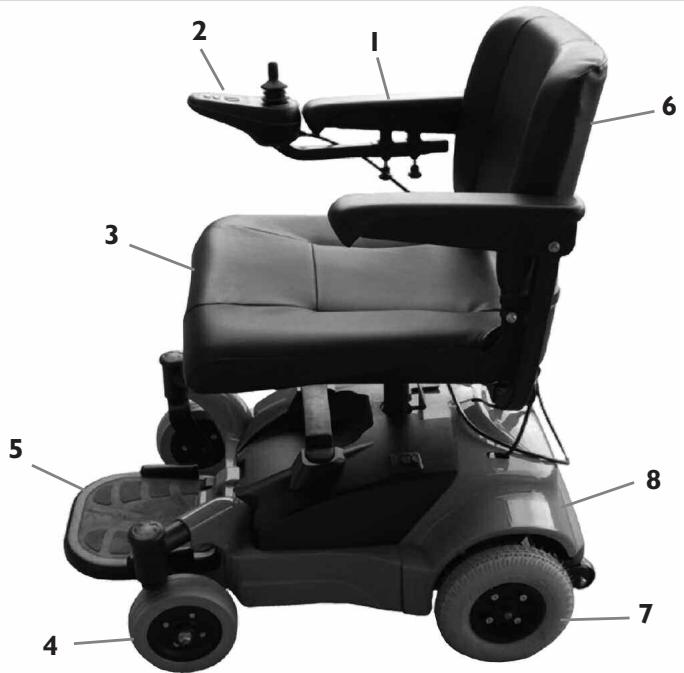
QUICKIE/STERLING MEODY
Weight
51 lbs (base)
85 lbs (base + seat)
22 lbs (battery pack)
Drive Wheels
8" Mag: solid tires
Joystick
Standard: P&G VR2
(right-hand or left-hand mount)
Batteries
(2) 12 Amp HR
Battery Charger
Option: off board 2 amp
Colors
Red
Seats, Upholstery and style
High back chair offers semi recline
Material: vinyl
Color: Black
Width: 18^
Depth: 17^n
- Flip-back armrest
- Programmable joystick
- Contour Seat
- Front caster 6''
- Single plate foot platform
- Folding backrest
- 8" Drive wheels
- Shroud
Footrest
Standard: Foot Platform
Casters (front)
Standard: 6" solid
Armrest
Flip-back, 12" arm pad
IV. NOTICE- READ BEFORE USE
A. CHOOSE THE RIGHT CHAIR & SAFETY OPTIONS
Sunrise provides a choice of many power wheelchair styles, sizes and adjustments to meet the needs of the rider. However, final selection of a wheelchair rests solely with you and your health care professional. Choosing the best chair for you depends on such things as:
- Your size, disability, strength, balance and coordination.
- Your intended use, and your level of activity.
- The types of hazards you must overcome in daily use (in areas where you are likely to use your chair).
- The need for options for your safety and comfort (such as positioning belts or special seat systems).
B. ADJUST CHAIR TO YOUR ABILITY
You need to work with your doctor, nurse or therapist, and your supplier, to fit this chair and adjust the controller settings for your level of function and ability.
C. REVIEW THIS MANUAL OFTEN
Before using this chair you, and each person who may assist you, should read this entire Manual and make sure to follow all instructions. Review the warnings often, until they are second nature to you.
D. WARNINGS
The word "WARNING" refers to a hazard or unsafe practice that may cause severe injury or death to you or to other persons. The "Warnings" are in four main sections, as follows:
I. V-EMI
Here you will learn about electromagnetic interference and how it can affect your chair.
- VI — GENERAL WARNINGS
Here you will find a safety checklist and a summary of risks you need to be aware of before you ride this chair.
- VII — WARNINGS — COMPONENTS & OPTIONS
Here you will learn about your chair. Consult your supplier and your health care professional to help you choose the best set-up and options for your safety.
- XI BATTERIES
Here you will learn about battery and charger safety, and how to avoid injury.
NOTE- Where they apply, you will also find "Warnings" in other sections of this Manual.
V. EMI (ELECTROMAGNETIC INTERFERENCE)
WARNING
Heed all warnings to reduce the risk of unintended brake release or chair movement:
I. Beware of the danger from hand-held transceivers. (A "transceiver" is a device that both sends and receives radio wave signals). Never turn on or use a hand-held transceiver while power to your chair is on. Use extra care if you believe that such a device may be in use near your chair.
2. Be aware of nearby radio or TV stations, and avoid coming close to them.
3. If unintended movement occurs, turn your chair off as soon as it is safe to do so.
A. WHAT IS EMI?
WARNING
I. EMI means: electromagnetic (EM) interference (I). EMI comes from radio wave sources such as radio transmitters and transceivers.
2. There are a number of sources of intense EMI in your daily environment.
Some of these are obvious and easy to avoid. Others are not, and you may not be able to avoid them.
- Powered wheelchairs may be susceptible to electromagnetic interference (EMI) emitted from sources such as radio stations, TV stations, amateur radio (HAM) transmitters, two way radios, and cellular phones.
- EMI can also be produced by conducted sources or electro-static discharge (ESD).
B. WHAT EFFECT CAN EMI HAVE?
WARNING
I. EMI can cause your chair, without warning, to:
- Release its brakes
- Move by itself
- Move in unintended directions
If any of these occurs, it could result in severe injury to you or others.
2. EMI can damage the control system of your chair. This could create a safety hazard, and lead to costly repairs.
C. SOURCES OF EMI
WARNING
The sources of EMI fall into three broad types:
I. Hand-Held Transceivers:
The antenna is usually mounted directly on the unit. These include:
- Citizens band (CB) radios
"Walkie-talkies"
Security, fire and police radios - Cellular phones
- Lap-top computers with phone or fax
- Other personal communication devices
NOTE- These devices can transmit signals while they are on, even if not in use.
2. Medium-Range Mobile Transceivers:
These include two-way radios used in police cars, fire trucks, ambulances and taxi cabs. The antenna is usually mounted on the outside of the vehicle.
3. Long-Range Transceivers:
These include commercial radio and TV broadcast antenna towers and amateur (HAM) radios. Note: The following are not likely to cause EMI problems: Lap-top computers (without phone or fax), Cordless phones, TV sets or AM/FM radios, CD or tape players.
D. DISTANCE FROM THE SOURCE
WARNING
EM energy rapidly becomes more intense as you get closer to the source. For this reason, EMI from hand-held devices is of special concern. (See C.I above) A person using one of these devices can bring high levels of EM energy very close to your chair without you knowing it.
E. IMMUNITY LEVEL
WARNING
I. The level of EM energy is measured in volts per meter (V/m). Every power wheelchair can resist EMI up to a certain level. This is called its "immunity level".
2. The higher the immunity level, the less the risk of EMI. It is believed that a 20V / m immunity level will protect the power wheelchair user from the more common sources of radio waves.
3. The Quickie/Sterling Melody with the following configuration was tested and found to be immune to at least 20V / m : Quickie/Sterling Melody power wheelchair with a right-hand mounted Penny & Giles VR2 integral controller, contour seat, flip-back armrests, solid flip-up footplate and battery pack.
WARNING
Individuals with physical limitations requiring the use of a specialty control input device known not to be immune to 20V / m , or not known, should exercise extra care around known sources of EMI.
WARNING
There is no way to know the effect on EMI if you add accessories or modify this chair. Any change to your chair may increase the risk of EMI. Parts from other suppliers have unknown EMI properties.
F. REPORT ALL SUSPECTED EMI INCIDENTS
WARNING
You should promptly report any unintended movement or brake release. Be sure to indicate whether there was a radio wave source near your chair at the time. Contact: Sunrise Medical Customer Service Department at (800) 333-4000 or +44 1384 44 66 22.
VI. GENERAL WARNINGS
WARNING
Heed all warnings in this section. If you fail to do so a fall, tip-over or loss of control may occur and cause severe injury to you or others.
A. NOTICE TO RIDER
WARNING
I. Before using this chair, you should be trained in its safe use by your health care professional.
2. Every wheelchair is different. Take the time to learn the feel of this chair before you begin riding.
3. Be aware that you must develop your own methods for the safe use of this chair that are best suited to your level of function and ability.
4. Have someone help you practice bending, reaching and transferring until you learn how to do them safely.
5. Never try a new maneuver on your own unless you are sure it is safe.
6. Get to know the areas where you plan to use your chair. Look for hazards and learn how to avoid them.
7. Do not allow additional riders on the chair, armrests or chassis. Doing so may result in injury or damage.
B. NOTICE TO ATTENDANTS
WARNING
Make sure you heed all warnings and follow all instructions in each section of this manual. (Be aware that warnings that apply to the rider also apply to you).
Notes:
I. You need to work with the rider and the rider's doctor, nurse or therapist, to develop safe methods best suited to your abilities and those of the rider.
- To manually push the chair you must release the motor locks. Make sure you have full control over the chair when you release the motor locks. When you do so the chair will not have brakes.
- Propel this chair by the armrest supports only.
C. WEIGHT LIMIT
WARNING
I. Never exceed a total weight of 250 pounds (113.4 kilograms) for rider plus items carried.
2. Never use this chair for weight training if the total weight (rider plus additional weights) exceeds 250 pounds (113.4 kilograms).
3. Exceeding the weight limit is likely to damage the seat, frame, or fasteners and may cause severe injury to you or others from chair failure.
4. Exceeding the weight limit will void the warranty.
D. CONTROLLER SETTINGS
AWARNING
Be aware that you may need to adjust the controller settings of your chair to reduce the risk of a collision, fall or tip-over.
- Check and adjust the settings every six to twelve months (or more often, if needed).
- Consult your supplier to adjust the control settings immediately if you notice any change in your ability to:
Control the joystick.
- Hold your torso erect.
- Avoid running into objects.
E. EMI
WARNING
Read Section V to learn about EMI. To reduce the risk of unintended brake release or chair movement:
I. Never turn on or use a hand-held transceiver while power to your chair is on. Use extra care if you believe that such a device may be in use near your chair.
2. Be aware of nearby radio or TV stations, and avoid coming close to them.
3. If unintended movement or brake release occurs, turn your chair off as soon as it is safe.
F. SAFETY CHECK-LIST
WARNING
Before each use of this chair:
- Make sure the chair operates smoothly. Check for noise, vibration, or a change in ease of use. (They may indicate damage to the flat-free inserts, loose fasteners, or other damage to your chair). If you detect a problem, make sure to repair or adjust the chair. Deferring repair or adjustment could increase the risk for injury. Your supplier can help you find and correct the problem.
- Make sure batteries are charged. Green lights on the controller charge indicator will light up when charge is full. Yellow lights indicate battery charge level is getting low. Red lights indicate batteries are in immediate need of charging.
G. CHANGES & ADJUSTMENTS
WARNING
Never use non-Quickie/Sterling parts or make changes to your chair unless authorized by Sunrise. (Doing so will void the Warranty and may create a safety hazard).
I. If you modify or adjust this chair it may increase the risk of a fall or tip-over.
2. Modifications unauthorized by Sunrise constitutes remanufacturing of the wheelchair. This voids the warranty. The rider then assumes all future liability for the wheelchair.
H. WHEN SEATED IN A PARKED WHEELCHAIR WARNING
I. Always turn off all power to your chair when you are parked, even for a moment. This will prevent:
- Accidental movement from contact with the joystick by you or others.
-
Unintended brake release or movement from EMI sources. (See Section V)
-
Make sure that persons who help you (for example, store clerks) are aware of the joystick and do not touch it. If they do, your chair may move suddenly when you do not expect it.
I. ENVIRONMENTAL CONDITIONS AWARNING
Your chair is not designed for use in a heavy rain storm, or in snowy or icy conditions.
I. Contact with water or excessive moisture can cause an electrical malfunction. The frame, motors and other chair parts are not watertight and may rust or corrode from the inside. To avoid a chair failure:
-
Minimize exposure of your chair to a rain storm or very wet conditions.
-
Never take your chair into a shower, tub, pool or sauna.
- Do not use your chair in fresh or salt water (such as at the edge of a stream, lake, or ocean).
Make sure shroud cover and deck lid are secure. - Replace joystick boot if it becomes torn or cracked.
Make sure all electrical connections are secure. -
Dry the chair as soon as you can if it gets wet, or if you use water to clean it.
-
Proceed slowly and use extra care if you must operate your chair on a wet or slick surface.
-
Do so only if you are sure it is safe.
- Stop if one or both main wheels lose traction. If this occurs, you may lose control of your chair or fall.
- Never operate your chair on a slope or ramp if there is snow, ice, water or oil film present.
-
When in doubt, have someone help you.
-
When not in use, keep your chair in a clean, dry place.
J. TERRAIN
WARNING
I. This chair is designed for use on firm, even surfaces such as concrete, asphalt and indoor flooring.
2. Do not operate your chair in sand, loose soil or over rough terrain. Doing so may damage wheels, bearings, axles or motors, or loosen fasteners.
K. STREET USE
WARNING
In most states, power chairs are not legal for use on public roads. Be alert to the danger of motor vehicles on roads or in parking lots.
I. At night, or when it is hard to see, use reflective tape on your chair and clothing.
2. It may be hard for drivers to see you. Make eye contact with drivers before you proceed. When in doubt, yield until you are sure it is safe.
L. MOTOR VEHICLE SAFETY
WARNING
To date, there is no approved tie down system for transporting this wheelchair in a motor vehicle.
I. Never sit in this chair while in a moving vehicle. In an accident or sudden stop you may be thrown from the chair.
- Wheelchair belts are designed to position the rider only and will not protect you in an accident; further injury may result from the belts.
2. Always move to an approved vehicle seat. You must be secured with proper motor vehicle restraints.
3. Never transport this chair in the front seat of a vehicle. It may shift and interfere with the driver.
4. Always secure this chair so that it cannot roll or shift.
M. CENTER OF BALANCE
WARNING
The point where this chair will tip forward, back or to the side depends on its center of balance and stability.
The Center Of Balance Is Affected By:
I. The seat height and seat angle.
2. A change in your body position, posture or weight distribution.
3. Using this chair on a ramp or slope.
- The use of a back pack or other options, and the amount of added weight.
To Reduce The Risk Of A Fall Or Tip-Over:
I. Consult your supplier for information on modifications authorized by Sunrise before you modify or adjust this chair.
NOTE- You may need to make additional changes to correct the center of balance.
2. Use extreme care until you know the balance points of this chair and how to avoid a fall or tip-over.
N. TRANSFERS
AWARNING
It is dangerous to transfer on your own. It requires good balance and agility. Be aware that there is a point during every transfer when the wheelchair seat is not below you. To avoid a fall:
I. Always turn off power before you transfer to or from your chair. If you fail to do so you may touch the joystick and cause your chair to move when you do not expect it.
2. Make sure motor locks are engaged. This keeps the chair from moving when you transfer.
3. Work with your health care professional to learn safe methods.
- Learn how to position your body and how to support yourself during a transfer.
-
Have someone help you until you are sure you can do a safe transfer on your own.
-
Move your chair as close as you can to the seat you are transferring to. If possible, use a transfer board.
- Rotate the front casters until they are as far forward as possible.
-
Be careful of the foot platform. If you can, remove or flip up out of the way.
-
Never stand on footrest when you transfer. Doing so may damage it or cause your chair to tip.
-
Make sure armrests do not interfere.
- Transfer as far back onto the seat surface as you can. This will reduce the risk that you will miss the seat or fall.
O. REACHING OR LEANING
AWARNING
Reaching or leaning affects the center of balance of your chair. If done improperly, a fall or tip-over is likely. When in doubt, ask for help or use a device to extend your reach.
To Reduce the Risk of injury and/or Damage to the Chair:
I. Never reach or lean if you must shift your weight sideways or rise up off the seat.
2. Never reach or lean if you must move forward in your seat to do so. Always keep your buttocks in contact with the backrest.
3. Never reach with both hands (you may not be able to catch yourself to prevent a fall if you lose your balance).
4. Never try to pick up an object from the floor by reaching down between your knees.
5. Never put pressure on the foot platform while reaching. This may cause the chair to tip if you lean too far.
6. Never reach or lean over the top of the seat back. This may damage the backrest and cause you to fall.
IF YOU MUST REACH OR LEAN, DO SO AT YOUR OWN RISK.
Remember to:
- Move your chair as close as you can to the object you wish to reach.
- Rotate the front casters until they are as far forward as possible. This makes the chair more stable.
NOTE- To do this: Move your chair past the object you want to reach, then back up alongside it. Backing up will rotate the casters forward.
- Turn off all power to your chair. If you fail to do so, you may touch the joystick and cause your chair to move when you do not expect it.
- Firmly grasp an armrest with one hand. This will help to prevent a fall if the chair tips.
P. DRESSING OR CHANGING CLOTHES
AWARNING
Be aware that your weight will shift if you dress or change clothes while seated in this chair. To make the chair more stable, rotate the front casters until they are forward.
Q. OBSTACLES
AWARNING
Obstacles you may have to overcome in daily use include door thresholds, lifts, ramps and hazards such as potholes and broken pavement. These can damage your chair and may cause a fall, tip-over or loss of control.
I. Be aware that thresholds are very dangerous. (Even a small change in height may stop a caster wheel and cause your chair to tip). You may need to:
-
Remove or cover threshold strips between rooms.
Install a ramp at entry or exit doors. -
Keep your eyes moving when you ride; scan the area well ahead of your chair.
-
Make sure the floor areas where you use this chair are level and free of obstacles.
-
To help correct your center of balance:
-
Lean your upper body forward slightly as you go up over an obstacle.
- Press your upper body backward as you go down from a higher to a lower level.
R. DRIVING IN REVERSE
AWARNING
Use extra care when you drive your chair in reverse. You may lose control or fall if one of the rear wheels hits an object.
I. Operate your chair slowly and at an even speed.
2. Stop often and check to make sure your path is clear of obstacles.
S. RAMPS, SLOPES & SIDEHILLS
WARNING
The center of balance of your chair changes when you are on a slope.
NOTE- "Slope" includes a ramp or sidehill. Your chair is less stable when it is at an angle. Never use this chair on a slope unless you are sure it is safe.
When in doubt, have someone help you.
Beware Of:
I. Steep slopes. Do Not use this chair on a slope or incline greater than 7^ .
2. Wet or slippery surfaces (such as when ice, snow, water or oil film is present). A loss of traction may cause a fall or tip-over.
3. A change in grade on a slope (or a lip, bump or depression). These may cause a fall or tip-over.
4. A drop-off at the bottom of a slope. (A drop-off of as small as 3/4 inch can stop a front caster and cause the chair to tip forward).
T. TO REDUCE THE RISK OF A FALL, TIP-OVER OR LOSS OF CONTROL
WARNING
I. Never use your chair on a slope unless you are sure you can do so without losing traction.
2. Always go as straight up and as straight down as you can.
- Do not "cut the corner" on a slope or ramp.
-
Do not turn or change direction on a slope.
-
Always stay in the center of the ramp. Make sure ramp is wide enough that you are not at risk that a wheel may roll off the side.
- Lean or press your body uphill. This will help adjust for a change in the center of balance caused by the slope.
-
Keep your chair moving at a slow, steady speed. Keep control over the chair at all times.
-
On a descent, do not let your chair accelerate beyond its normal speed.
-
If the chair picks up speed, center the joystick to slow down or stop.
NOTE- The solid state controller of your chair has a logic system that will help control your speed when driving on a slope or uphill.
If you stop, re-start slowly.
U. RAMPS AT HOME & WORK
WARNING
Make sure ramps meet all Building Codes for your area.
I. For your safety, have a licensed contractor build or remodel ramp to meet all standards.
2. NOTE- The proper design will vary, depending on such things as: the length and height of the ramp; the need for an intermediate platform; landing size; doors and the direction of swing; and whether the ramp includes a turn or angle.
At A Minimum:
I. Open sides of ramp must have side rails to prevent your chair from going over the edge.
2. Slope must not be steeper than one inch in height for every one foot of slope length.
3. Ramp surface must be even, and have a non-skid surface.
4. You may need to add a section at the top or bottom to avoid a lip or drop-off.
5. Ramp must be sturdy. Add bracing if needed, so ramp does not "bow" when you ride on it.
V. WHEELCHAIR LIFTS
AWARNING
Wheelchair lifts are used in vans, buses, and buildings to help you move from one level to another.
I. Always turn off all power to your chair when you are on a lift. If you fail to do so, you may touch the joystick by accident and cause your chair to drive off the platform. (Be aware that a "roll-stop" at the end of the platform may not prevent this).
2. Make sure there is not a lip or drop-off at the top or bottom of the platform. These may cause a fall or tip-over. When in doubt, have someone help you.
3. Always secure the rider with a positioning belt to help prevent falls during transfers.
4. Avoid moving forward if a wheel is "hung up" on the lip of the ramp. Backup, reposition the caster for a more direct approach and slowly try again.
W. CURBS & SINGLE STEPS
WARNING
- Your chair is not designed to drive up or down a curb or step more than one and a half (1.5) inches high. Doing so may:
Result in a fall or tip-over.
- Damage the frame, wheels, axles or other chair parts, or loosen fasteners.
-
To prevent a fall or tip-over, use wheelchair access ramps or have someone help you.
-
If you must climb or descend a curb or step alone do so at your own risk and use extreme care.
-
Go as straight up or straight down as you can. Never turn or climb or descend at an angle as a fall or tip-over is likely.
-
Proceed slowly, at a steady speed.
-
Avoid driving along curb edges and drop-offs. A minimum distance from the edge of 18" is recommended.
X. STAIRS
WARNING
Never use this chair to go up or down stairs, even with an attendant. Doing so is likely to cause a fall or tip-over.
Y. ESCALATORS
WARNING
Never take this chair on an escalator, even with an attendant. Doing so is likely to cause a fall or tip-over.
VII. WARNINGS: COMPONENTS & OPTIONS
WARNING
Note: If you use parts or make changes not authorized by Sunrise it may create a safety hazard and will void the Warranty.
A. ARMRESTS
WARNING
Armrests flip back and cannot be used to lift chair or the seat.
I. Never lift this chair by its armrests.
2. Lift this chair only by non-detachable parts of the main frame.
B. BATTERIES
WARNING
I. Only Sunrise authorized batteries should be used in this device.
2. To prevent an acid spill, avoid puncturing the batteries.
3. Never smoke or hold an open flame near batteries. They are a known explosion hazard.
4. Read all of section X Batteries before attempting to change or charge batteries.
5. Always remove batteries using straps or handle provided. Pinched fingers may occur if the batteries are removed by grasping the battery casings.
C. CUSHIONS
WARNING
I. Quickie/Sterling Comfort seats are designed for comfort, not specifically for the relief of pressure.
2. If you suffer from pressure sores, or if you are at risk that they will occur, you may need a special seat system or a device to control your posture.
- Consult your doctor, nurse or therapist to find out if you need such a device for your well-being.
D. FASTENERS
WARNING
Many of the screws, bolts and nuts on this chair are special high-strength fasteners. Use of improper fasteners may cause your chair to fail.
I. Only use fasteners recommended by Sunrise.
2. If fasteners become loose, tighten them as soon as you can.
3. Over- or under-tightened fasteners may fail or cause damage to chair parts.
- See Section VIII, "Set-Up, Adjustment & Use", for proper torque settings.
E. FOOTPLATE
WARNING
- At the lowest point, the foot platform should be at least 1.375" off the ground. If set too LOW, it may "hang up" on obstacles you can expect to find in normal use. This may cause the chair to stop suddenly and tip forward.
-
To avoid a trip or fall when you transfer:
-
Make sure your feet do not "hang up" or get caught in the space surrounding the footrest.
-
Avoid putting weight on the footplate, as the chair may tip forward.
-
Flip the footplate back.
F. MOTOR LOCKS
AWARNING
I. Do not engage or disengage motor locks unless power to the chair is off.
2. Be aware that the chair will not have brakes when motor locks are in the free-wheel position. (See Section F of Operating Guide.)
3. Make sure that the person pushing the chair has full control when motor locks are disengaged.
G. ON/OFF SWITCH
WARNING
I. Never use the ON/OFF switch to stop the chair except in an emergency. This will result in an abrupt stop and may cause you to fall.
2. To slow your chair to a stop, return the joystick to neutral, before turning off the chair.
H. PNEUMATIC TIRES WITH FLAT-FREE INSERTS
WARNING
I. Do not use this chair if the tires or inserts show any sign of damage.
2. A damaged insert may cause the chair to veer to one side and result in a loss of control.
3. Driving over sharp objects may cause damage to the tires and/or inserts.
I. SEATING SYSTEMS
WARNING
I. Use of a seating system not approved by Sunrise may alter the center of balance of this chair. This may cause a fall or tip-over.
2. Never change the seating system of your chair unless you consult your supplier first.
J. UPHOLSTERY FABRIC
WARNING
I. Replace worn or torn fabric of the seat as soon as you can. If you fail to do so, the seat may fail and cause you to fall. Worn fabrics may increase the potential for a fire hazard.
2. Fabric will deteriorate with age and use. Look for fraying, thin spots, or stretching of fabric at rivet holes. Replace fabric as required.
3. Be aware that washing may reduce flame retardation of the fabric.
K. WIRING
AWARNING
Never pull on cables directly. This can result in wires breaking inside the connector or harness. To remove a plug or connector, always grasp the plug or connector itself.
VIII. SET-UP, ADJUSTMENT & USE
NOTES:
I. Work Surface For Set-Up:
Use a flat surface, such as a table, to assemble, adjust and check your chair. This makes the steps easier and helps ensure a correct set-up.
2. Fasteners:
- Many of the screws and bolts on this chair are special high-strength fasteners and may have special coatings.
- Many nuts are of the Nylock type. They have a plastic insert to help prevent loosening.
WARNING
- Use of improper fasteners may cause the chair to fail.
- Over- or under-tightened fasteners may fail or cause damage to chair parts.
- If bolts or screws become loose, tighten them as soon as you can. Loose bolts or screws can cause damage to other chair parts causing them to fail.
3. Washers & Spacers:
Note the position of washers and spacers before disassembly.
- To avoid damage to the frame, replace all washers and spacers when you reassemble parts.
4. Torque Settings:
- A torque setting is the optimal tightening for a particular fastener. Use a torque wrench that measures 120 inch-pounds to secure screws, nuts and bolts on this chair.
NOTE- Unless otherwise noted, use a torque setting of 120 inch-pounds for all fasteners.
TOOLS YOU WILL NEED
I. Basic Tool Kit:
To set-up, adjust and maintain your chair you will need the following tools:
- 5mm Allen Wrench
6mm Allen Wrench - 8 mm Open-end Wrench
10 mm Open-end Wrench
13mm Open-end Wrench
17mm Open-end Wrench
Phillips screwdriver #2
13mm Socket Wrench
You can obtain a multi-purpose tool kit from Sunrise, or buy the tools you need from a hardware store.
2. Torque Wrench:
If you plan to adjust and maintain this chair yourself, Sunrise recommends that you use a torque wrench.
NOTE- The wrench must measure inch-pounds. You can buy a torque wrench and proper sockets from a hardware store.
CHECK-OUT
Be sure this chair performs to your chosen operational settings. If it does not, turn the chair off immediately and have your supplier reprogram your wheelchair as needed
NOTE- Repeat this procedure until the chair performs to your specifications.
WARNING
When properly set up, this chair will operate smoothly. Check to see that all components work properly. If you detect a problem, be sure to correct it before use.
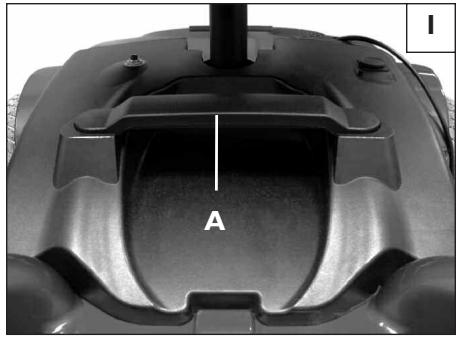
A. BATTERY CASE REMOVAL
To remove the batteries for transporting or servicing:
I. Remove Battery Case
a. To remove battery pack, lift up on battery pack handle (A).
2. Battery Installation
See Section X. Batteries, D for installation.
WARNING
Batteries may weigh up to 25 lbs. Care must be taken to avoid injury when lifting up on battery handle.
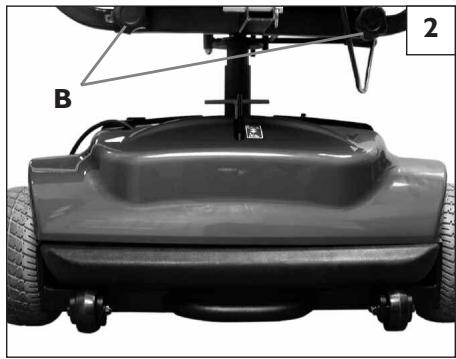
B. ARMRESTS ADJUSTMENT
I.Width Adjustment 2
a. Insert armrest support inside of I" square tube located on back of the seat.
b. Repeat for other side of seat.
c. Position armrest at appropriate width.
d. Tighten knob screws (B) on square tube.
WARNING
Avoid pinching fingers in the flip-back armrest.
C. SEAT REMOVAL
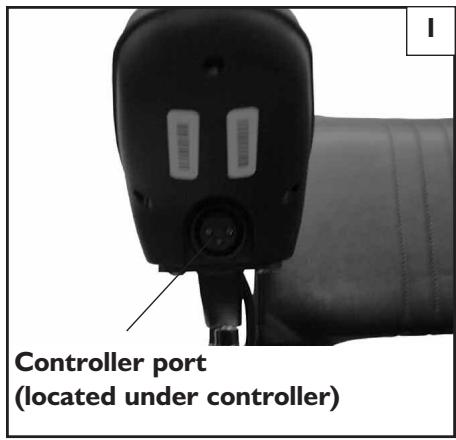
- Unplug the controller connections at the back of the seat.
- Lift the chair straight up off of the seat mount.
- When replacing the seat onto the mount, make sure the seat is aligned properly and does not swivel before sitting.
WARNING
Keep hands away from the seat post when replacing the seat to ensure you do not pinch your fingers.
IX. OPERATING GUIDE
A. PERFORMANCE CONTROL SETTINGS
I. It is vital to match control settings to your level of function and ability.
2. Consult your health care professional and your supplier to select the best control settings for you.
3. Check and adjust the settings every six to twelve months (or more often, if needed).
4. Adjust the control settings immediately if you notice any change in your ability to:
Control the joystick.
- Hold your torso erect.
- Avoid running into objects.
- Control Settings are adjusted through the use of the Sunrise Medical Programming Pad. See your supplier.
B. SUNRISE MEDICAL PROGRAMMER PAD
WARNING
Program settings beyond the ability of the rider can result in serious injury. Consult your health care advisor before you alter settings.
I. Notes:
The Sunrise Medical Programmer lets you adjust the performance control settings of the Melody. You can customize a program for yourself or select the standard program.
acceleration rate
- deceleration rate
- turn acceleration
- turn deceleration
forward speed (max & min)
- reverse speed (max & min)
- turn speed (max & min)
steer correct
Remote systems
4-axis joystick throw
sleep timer
- profile number
- read timer
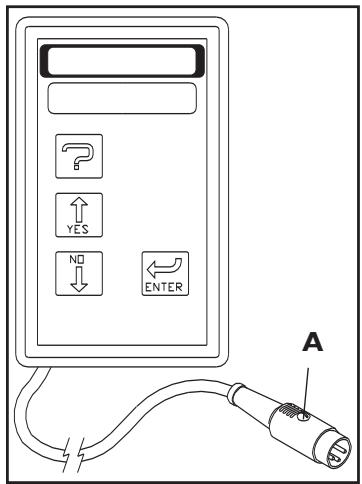
2. To Program Your Chair:
a. Turn off power to the chair.
b. Insert Sunrise Medical Programmer plug (A) into the programmer/charger socket on the front of the joystick.
c. Turn on power to the chair; program as needed.
d. Remove plug and cycle ON/OFF switch to drive chair.
NOTE- Review the Sunrise Medical Programmer Owner's Manual for more details on how to program your chair.
NOTE- Program settings that are not matched for the capabilities of the rider can result in serious injury. Do not alter settings without the advice of your health care professional.
C. THERMAL ROLL-BACK
Your chair has a thermal roll back circuit. This protects the controller from damage due to overheating. In extreme conditions (such as repetitive hill climbing) the circuit will decrease the power to your motors. This allows the chair to operate at a reduced speed. When the controller cools, the chair will return to normal speed.
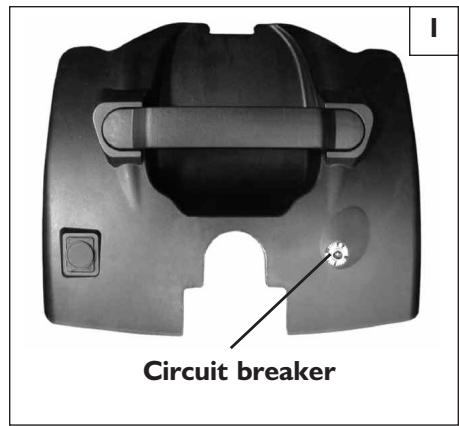
D. CIRCUIT BREAKERS I
I. Notes:
Your Quickie/Sterling Melody has a circuit breaker on the battery case.
In the unlikely event of a short circuit or heavy overload, all power to your chair will be shut off.
- To reset your chair, depress the circuit breaker button located at the rear corner of the chair. A few minutes wait is required before the circuit breaker will reset.
2. Repeated Shutdown:
If the chair continues to shut down after resetting, have it serviced by a supplier.
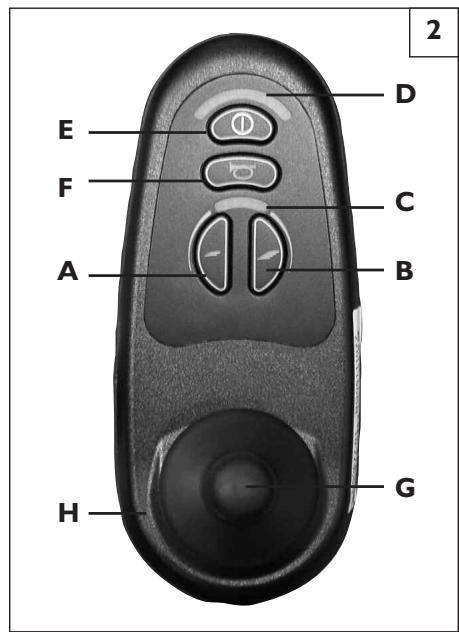
E. JOYSTICK ASSEMBLY 2
The standard VR2 joystick controls the chair's performance. It consists of the following parts:
I. Speed Control or Drive Mode Selection Buttons (A and B)
To decrease the speed level depress button A. Or, when I-5 Drive modes are programmed, depress button A to activate lower drive mode(s).
To increase speed level, depress button B. Or, when I-5 Drive modes are programmed, depress button B to activate higher drive mode(s).
Speed level active, or Drive Mode selected, is indicated on display (C) by a series of five lights. One light indicates slowest level/mode currently active, while five lights indicate highest level/mode currently active.
2. Battery Charge Indicator (D)
- Green lights indicate that batteries are fully charged.
Yellow lights indicate that batteries need recharging. - When the lights stay in the red band, the batteries must be recharged.
3. On/Off Button (E)
Turning the chair on or off is accomplished by depressing button E.
4. Horn (F)
5. Joystick (G)
The joystick controls the direction and speed of your chair. Turn the chair on and move the joystick in the direction you want to go.
- Moving the joystick from the neutral (center) position disengages the motor locks, allowing the chair to move.
The chair will move faster the more you move the joystick away from neutral.
NOTE- If your speed becomes hard to manage, release the Joystick and the chair will come to a complete stop.
- When you release the joystick it will return to neutral; the chair will slow to a stop and the motor locks will reengage.
- We recommend that you switch the chair off if you stop for any length of time. This will conserve battery power.
NOTE- Once the chair stops, switching the chair off will not affect the motor locks.
6. Joystick Boot (H)
Make sure the boot is not torn or cracked (this could allow debris, water or moisture to enter). If the boot is torn or cracked, replace it as soon as you can.
F. MOTOR LOCK 3
Disconnect the motor lock when you need to manually push the chair.
(For example, in an emergency, or if batteries fail).
WARNING
- Do not disengage motor lock unless power to the chair is off.
- With the brake released, the chair will not operate and the battery charge indicator will flash 9 bars rapidly (if power to the chair is on.)
- Be aware that the chair will not have brakes in the free-wheel position.
- Make sure that the person pushing the chair has full control when motor locks are disengaged.
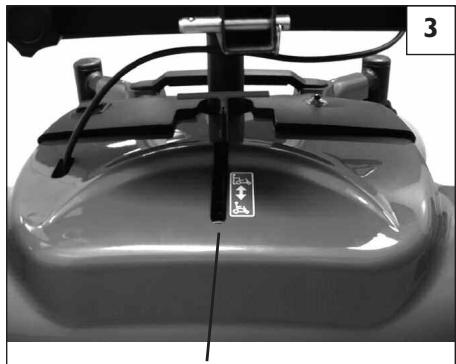
Motor Lock
X. BATTERIES
A. INTRODUCTION
I. Notes:
- Batteries supply the power for your chair. They contain a finite amount of energy and have limits on how long they can store and supply energy.
- You can charge batteries only a certain number of times before they will fail and no longer hold a charge.
- For answers to questions about batteries, consult your supplier.
2. Use Proper Battery Case:
Your chair operates on a 12A battery pack.
Only use an authorized Sunrise battery pack.
3. Breaking In:
- A battery requires "breaking-in" for the first 6 to 12 charges. It will not accept a full charge for this period.
It is best to limit the length of your trips until you break the batteries in and you know the range of your chair.
4. Discharged Batteries:
- Never allow a battery to completely discharge. If you operate your wheelchair until it has almost stopped, you will greatly reduce the life of your batteries.
- Never let a battery sit in a discharged condition. Give unused or stored batteries a full charge once per month.
Always fully charge the batteries. Avoid "topping off" with frequent charges.
AWARNING
Never connect a life support or auxiliary device to a wheelchair battery. The electrical system may fail and result in severe injury to or death of rider.
B. BATTERY CHARGER
A battery charger produces a direct current (DC). When applied to a discharged battery, this reverses the chemical reaction that led to its discharge.
I. Charge Rate. How fast a battery will charge depends on:
- Its electrical capacity, state of charge, electrolyte temperature, and internal condition.
- The DC output of the charger. (The charge rate will vary if the alternating current (AC) supply is higher or lower than 110 volts (or 230V in Europe)).
2. CAUTION- To Avoid Damage to the Charger
- Never expose charger to rain or snow.
- Never unplug charger by pulling on the electrical cord. This will damage the cord.
- Never open a charger or attempt to repair it yourself. Return charger to Sunrise or have repairs made only by a qualified person.
- Keep cord out of the way, where it will not be stepped on, tripped over, or damaged.
3. CAUTION- To Avoid Damage to the Battery
- Make sure you use the correct setting for sealed (gel) batteries (located on the off-board charger) if applicable.
- Never charge a frozen battery. A fully charged battery will rarely freeze, but the fluid in a discharged battery can freeze at 16 degrees Fahrenheit (minus 9 degrees Centigrade). If you suspect a battery is frozen, thaw it before charging.
AWARNING
Lead acid batteries generate explosive gas while charging. Completely read and follow all warnings about the batteries in this user instruction manual and any labels applied to the product. Failure to do so could result in fire, explosion, injury and/or death.
C. ACID BURNS (SEATED LEAD ACID BATTERIES)
Acid in batteries is corrosive. If the battery pack is damaged or punctured, the acid inside can cause serious burns to the eyes and skin and can damage floors, furniture, clothing and your wheelchair.
AWARNING
I. Use extreme care not to damage the battery pack when operating your chair or transporting the battery pack.
2. If battery should leak due to damage, avoid contact of acid with bare skin or clothing.
3. If acid contacts your skin or clothing, wash immediately with soap and water.
4. If acid contacts your eyes, immediately flood eyes with cold running water for at least 15 minutes. Seek medical attention immediately.
D. CONNECTING BATTERIES IN BATTERY PACK AWARNING
I. Each battery weighs up to 25 lbs. Take care to avoid injury when lifting.
2. Before working around batteries, remove all metal personal effects, such as necklaces, rings, watches, pins, and other metal jewelry that might contact battery terminal and cause a short.
AWARNING
Never make direct contact across both battery terminals, as an explosion may occur. A spark may result in an explosion and/or fire resulting in severe injury or death.
E. CHARGING BATTERIES 1 2
WARNING
To avoid the risk of severe injury or death from electrical shock, fire or explosion while charging:
- Ensure the charger is connected to the correct source (110V or (230V in Europe)).
-
Never touch the charger after it is connected to an electrical outlet. This may cause electrical shock.
-
Never connect or disconnect charger from battery while there is power to the charger.
-
Never use an extension cord. Use of an improper cord could damage the charger or cause a fire or electrical shock.
-
A battery emits explosive hydrogen gas during charging. To reduce the risk of fire or explosion:
-
Make sure area is well vented. Never charge battery in a closed-in area.
- Never smoke or allow a spark, flame or high heat near battery during charging.
- Never allow metal tools or chair parts to make direct contact across both battery terminals.
ALWAYS:
I. Use the charger that comes with your wheelchair. Read and follow all instructions and warnings.
2. Make sure room is well ventilated.
3. Turn off all power to your chair.
4. Connect and disconnect battery cables with caution.
5. Make sure to allow enough time to fully charge batteries.
NOTE- Batteries should never be left for long periods in the discharged state. Unused or stored batteries should be given a charge once per month.
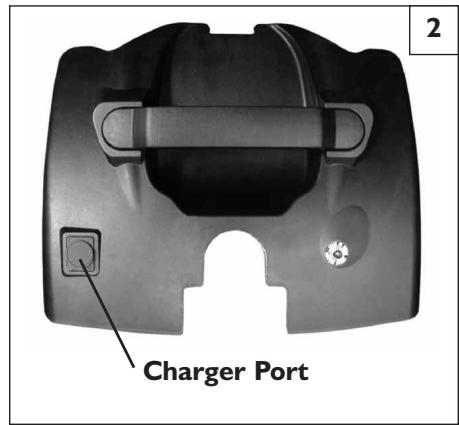
6. Use the off-board charger by plugging it into the VR2 controller or by plugging it into the charger port on the top side of the battery case.
F. DISPOSING OF BATTERIES
WARNING
I. All batteries once they have reached the end of their useful life are deemed to be hazardous waste.
2. For further information on handling and recycling contact your local recycling authority.
3. Always dispose of product through a recognized agent.
XI. MAINTENANCE
A. NOTES
- Proper maintenance will improve performance and extend the useful life of your chair.
- Clean your chair regularly. This will help you find loose or worn parts and will make your chair easier to use.
- To protect your investment, have all major service and repair work done by your supplier.
WARNING
I. Your chair needs regular maintenance for peak performance and to avoid injury from chair failure, damage or premature wear.
2. Inspect and maintain this chair strictly per the "Maintenance Chart".
3. If you detect a problem, make sure to service or repair the chair before use.
4. At least once a year, have a complete safety check and service of your chair performed by a supplier.
B. CLEANING
I. Plastic Shroud Cover:
Clean the plastic finish with mild soapy water monthly.
2. Motors:
- Clean around motor area weekly with a slightly damp (not wet) cloth.
- Wipe off or blow away any fluff, dust, or dirt on or around the motors.
Note: You do not need to grease or oil the chair.
3. Upholstery:
- Hand-wash only as needed. Machine washing may damage fabric.
- Drip-dry only. Heat from a dryer may damage fabric.
NOTE- Washing the fabric may decrease fire retardant properties.
C. STORAGE TIPS
I. Store your chair in a clean, dry area. If you fail to do so, parts may rust or corrode.
2. Before using your chair, make sure it is in proper working order. Inspect and service all items on the "Maintenance Chart".
3. If you store this chair for more than three months, have it inspected by a supplier before use.
D. PNEUMATIC TIRES (IF APPLICABLE)
WARNING
I. Do not use this chair if any of the tires show signs of damage.
2. A damaged insert may cause the chair to veer to one side and result in loss of control.
Check for signs of wear on your tires weekly.
E. TO REPAIR OR REPLACE A TIRE
Drive Wheels:
a. Elevate and securely support chair so that wheel is off the ground.
b. Remove hub cap.
c. Remove lock bolt.
d. Replace wheel. (Make sure washers and shaft key are in the same location.)
e. Install lock bolt.
f. Install hub cap.
F. MOTOR BRUSHES
Check the motor brushes every four (4) months for wear. The brushes should be clean and shiny. Replace worn or blackened brushes.
G. ORDERING PARTS
When you order parts, provide the following:
I. Model of chair
2. Serial number of chair
3. Left hand or right hand control
4. Part number, description and quantity of parts you need.
5. State reason for replacement.
H. MAINTENANCE CHART
You should check the items on this chart at the indicated intervals. If any of the items are loose, worn, bent or distorted, immediately have them checked and/or repaired by your authorized Sunrise supplier. Frequent maintenance and servicing will improve performance and extend wheelchair life, and help prevent injuries.
| Daily | Weekly | Monthly | Quarterly | Annually | Check... |
| ✓ | Charge batteries | ||||
| ✓ | Check tires for damage | ||||
| ✓ | Check plugs and connectors for proper connections | ||||
| ✓ | Check all moving parts for wear | ||||
| ✓ | Inspect all nuts, bolts and fasteners for looseness or wear | ||||
| ✓ | Inspect upholstery for wear | ||||
| ✓ | Remove and inspect motor brushes | ||||
| ✓ | Service by authorized supplier |
XII. TECHNICAL SPECIFICATIONS
QUICKIE/STERLING MEODY
| CHAIR | |
| Curb Climbing | 1.5" (3.8 cm) |
| Speed | 4.5 mph (7.24 kph) |
| Turning Radius | 18" (46.7 cm) |
| Ground Clearance | 2" (5.1 cm) |
| Maximum Range* | 10 miles (16.09 km) |
| Chair Length (with footplate) | 31" (78.7 cm) |
| Chair Length (without footplate) | 27" (68.6 cm) |
| Chair Width | 22.5" (57.2 cm) |
| Overall Weight | 113 lbs (51.3 kg) / 90 lbs (40.8 kg) w/o battery |
| Seat Weight | 26.5 lbs (12 kg) / 22.5 lbs (10.2 kg) w/o armrests |
| Base Weight | 85 lbs (38.6 kg) / 61.5 lbs (27.9 kg) w/o battery |
| Weight Capacity | 250 lbs (113.4 kg) |
| Seat-to-Floor Height | 19.5" - 20.5" (49.5 cm - 52.1 cm) |
| Seat Height Adjustments | 2 positions, 1" (2.5 cm) |
SEATING
| Upholstery | Black Vinyl |
| Seat Size Options | 18" x 17" (45.7 cm x 43.2 cm) |
| Back Height | 14.5" (36.8 cm) |
| Back Angle | 95° |
| Armrest Length | 12" (30.5 cm) |
| Armrest Style | Flip-back |
| Footrest Depth | 8" (20.3 cm) |
| Footrest Width | 10.5" (26.7 cm) |
| Drive Tire Size | 8" (20.3 cm) |
| Front Caster Size | 6" (15.2 cm) |
| Frame Color | Red |
| Battery Type | 2 ea - 12 Amp-HR |
| Reimbursement Code | None |
*Range is calculated under test conditions. Weight, terrain and weather conditions can affect range.
XIII. GUARANTEE (UK ONLY)
A. YOUR GUARANTEE
The guarantee form is included in the Sunrise Pack, please fill in the relevant details and return to us to register your entitlement.
THIS IN NO WAY AFFECTS YOUR STATUTORY RIGHTS.
B. WARRANTY CONDITIONS
I. The repair or replacement will be carried out by an authorised Sunrise Medical Dealer/Service Agent.
2. To apply the warranty conditions should your wheelchair require attention under these arrangements, notify the designated Sunrise Medical Service Agent immediately giving full information about the nature of the difficulty. Should you be operating the wheelchair away from the locality of the designated Sunrise Medical Service Agent, work under the "Warranty Conditions" will be carried out by any other Service Agent designated by the manufacturer.
3. Should any part of the wheelchair require repair or replacement as a result of specific manufacturing or material defect within two years from the date on which the possession of the wheelchair was transferred to the original purchaser, and subject to it remaining within that ownership, the part or parts will be repaired or replaced completely free of charge if returned to the authorised Service Agent.
Note: This guarantee is not transferable.
- Any repaired or replaced part will benefit from these arrangements for the balance of the warranty period applicable to the wheelchair.
- Parts replaced after the original warranty has expired are covered for a further three months.
- Items of consumable nature will not generally be covered during the normal warranty period unless such items have clearly suffered undue wear as a direct result of an original manufacturing defect. These items include amongst others upholstery, tyres, inner tubes, and similar parts.
- The above warranty conditions apply to all wheelchair parts, for models purchased at full retail price.
- Under normal circumstances, no responsibility will be accepted where the wheelchair has required repair or replacement as a direct result of-
a. The wheelchair or part not having been maintained in accordance with the manufacturer's recommendations, where such exist. Or failing to use only the specified original equipment parts.
b. The wheelchair or part having been damaged by neglect, accident or improper use.
c. The wheelchair or part having been altered from the manufacturer's specifications, or repairs having been attempted prior to the Service Agent being notified.
Please keep a note of your local Service Agent's address and telephone number in the space provided. In the event of a breakdown, contact them and try to give all relevant details so they can help you quickly.
The wheelchair shown and described in this manual may not be exactly the same in every detail as your own model. However, all instructions are still entirely relevant, irrespective of detail differences.
The manufacturer reserves the right to alter without notice any weights, measurements, or other technical data shown in the manual. All figures, measurements, and capacities shown in this manual are approximate, and do not constitute specifications.
Please remember to fill in and post the guarantee registration card enclosed with this manual. Sunrise Medical Limited recommend that you do not undertake maintenance tasks other than those explained in this manual. Your local authorised Sunrise Medical service agent is fully trained by Sunrise Medical to carry out detailed maintenance as and when required. Use only genuine Sunrise Medical replacement parts.
Your local service agent:
Your local service agent:
QUICKIE/STERLING MEODY
I. FOR FIVE YEARS
We warrant the main frame of this wheelchair against defects in materials and workmanship for 5 years use of the first consumer purchaser.
2. ADDITIONAL WARRANTY
We warrant Sunrise-made components of this wheelchair against defects in materials and workmanship as follows:
a. Main electronic controller—For two (2) years from the date of first consumer purchase.
b. Motors, gear boxes and remote joystick—For one (1) year from the date of first consumer purchase.
c. All other original components (such as wheels, upholstery, plastic, rubber parts and painted surfaces)—For three (3) months from the date of first consumer purchase.
3. LIMITATIONS
a. We do not warrant damage due to:
- Neglect, misuse, or improper installation or repair.
Use of parts or changes not authorized by Sunrise.
- Exceeding the weight limit of 250 lbs.
b. This warranty is void if the original chair serial number tag is removed or altered.
c. This warranty applies in the USA only. Check with your supplier to find out if international warranties apply.
4. WHAT WE WILL DO
Our sole liability is to repair or replace covered parts. This is your only remedy for consequential damages.
5. WHAT YOU MUST DO
a. Return the warranty card.
b. Obtain from us, while this warranty is in effect, prior approval for return or repair of covered parts.
c. Return the wheelchair or part(s), freight pre-paid, to Sunrise Mobility Products Division at: 2842 Business Park Ave., Fresno, CA 93727-1328.
d. Pay the cost of labor to install or repair parts.
6. NOTICE TO CONSUMER
There are no other express warranties. To the extent permitted by law, any implied warranty (including a warranty of merchantability or fitness for a particular purpose) is limited to:
a. One (I) year from the first consumer purchase, and
b. Repair or replacement of the defective part only.
This warranty gives you certain legal rights. You may also have other rights that vary from state to state.
I. INTRODUCCION
SUNRISE ESCUCHA
7477 East Dry Creek Parkway
Longmont, Colorado 80503
(800) 333-40006 (303) 218-4500
PARA CONTESTAR A SUS PREGUNTAS
Los reposabrazos se doblan hacía más y noSEOSEOSEOSEOSEOSEOSEOSEOSEOSEOSEOSEOSEOSEOSEOSEOSEOSEOSEOSEOSEOSEOSEOSEOSEOSEOSEOSEOSEOSEOSEOSEOSEOSEOSEOSEOSEOSEOSEOSEOSEOSEOSEOSEOSEOSEOSEOSEOSEOSEOSEOSEOSEOSEOSEOSEOSEOSEOSEOSEOSEOSEOSEOSEOSEOSEOSEOSEOSEOSEOSEOSEOSEOSEOSEOSEOSEOSEOSEOSEOSEOSEOSEOSEOSEOSEOSEOSEOSEOSEOSEOSEOSEOSEOSEOSEOSEOSEOSEOSEO SEO
E. CÓMOCARGARLASBATERIAS 1 2
ADVERTENCIA
7477 East Dry Creek Parkway
23.1 kg (51 lbs) (base)
38.6 kg (85 lbs) (base + siège)
9.8 kg (22 lbs) (battery)