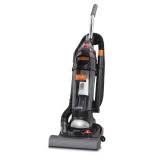
MRY6100 - Cordless vacuum DIRT DEVIL - Free user manual and instructions
Find the device manual for free MRY6100 DIRT DEVIL in PDF.


| Product Type | Bagless Stick Vacuum |
| Brand | DIRT DEVIL |
| Model | MRY6100 |
| Power | 120 V, 60 Hz, power cord |
| Power Rating | Not specified |
| Dust Cup Capacity | Not specified |
| Filter | Washable F1 Filter, part number 3-JC0280-000, replace once a year |
| Brush Roll | Replaceable, with model 10 belt |
| Bulb | Automotive bulb No. 906, 13 V |
| Features | Floor/carpet cleaning, above-floor cleaning, Turbo Tool, headlight, height adjustment |
| Included Accessories | Crevice tool, extension wand, dusting brush, Turbo Tool, hose |
| Protection | Thermal protection, grounded |
| Warranty | 1 year, parts and labor |
| Weight | Not specified |
| Dimensions | Not specified |
| Maintenance | Empty dust cup after each use, clean filter regularly, replace belt and brush roll if worn |
| Customer Service | 1-800-321-1134 (United States and Canada) |
Frequently Asked Questions - MRY6100 DIRT DEVIL
User questions about MRY6100 DIRT DEVIL
0 question about this device. Answer the ones you know or ask your own.
Ask a new question about this device
Download the instructions for your Cordless vacuum in PDF format for free! Find your manual MRY6100 - DIRT DEVIL and take your electronic device back in hand. On this page are published all the documents necessary for the use of your device. MRY6100 by DIRT DEVIL.
USER MANUAL MRY6100 DIRT DEVIL
- Please read these instructions carefully before using your cleaner.
- Let us help you put your vacuum together or answer any questions, call:
1-800-321-1134
(USA & Canada)
www.royalvacuums.com

WARNING:
Cleaner assembly may include small parts. Small parts can present a choking hazard.
For quick reference, please record your vacuum information below.
Model #:
Mfg. Code:
(Mfg. code located on the lower backside of cleaner)
THIS VACUUM CLEANER IS INTENDED FOR COMMERCIAL USE ONLY. IMPORTANT SAFETY INSTRUCTIONS
When you use an appliance, basic precautions should always be followed, including the following:
- READ ALL INSTRUCTIONS BEFORE USING THIS APPLIANCE.
- ALWAYS FOLLOW THESE SAFETY INSTRUCTIONS.
DO NOT LEAVE CLEANER UNATTENDED WHEN PLugged IN. - REGULARLY CHECK THE FILTERS TO CLEAN OR REPLACE.
- WARNING: DO NOT USE ANY SHARP OBJECTS TO CLEAN OUT HOSE SINCE THEY COULD CAUSE DAMAGE TO THE HOSE.
- WARNING: FULY ASSEMBLE CLEANER BEFORE OPERATING
- OCCASIONALLY REMOVE BRUSHROLL AND CLEAN DEBRIS FROM END CAPS TO KEEP BRUSH ROTATING SMOOTHLY.
- WARNING: THE CORDS, WIRES AND/OR CABLES SUPPLIED WITH THIS PRODUCT CONTAINS CHEMICALS, INCLUDING LEAD OR LEAD COMPOUNDS, KNOWN TO THE STATE OF CALIFORNIA TO CAUSE CANCER AND BIRTH DEFECTS OR OTHER REPRODUCTIVE HARM. WASH HANDS AFTER USING.
WARNING: TO REDUCE THE RISK OF FIRE, ELECTRIC SHOCK OR INJURY:
- Do not leave appliance when plugged in. Unplug from outlet when not in use and before servicing.
- Do not use outdoors or on wet surfaces.
- Do not allow to be used as a toy. Close attention is necessary when used by on near children.
- Use only as described in this manual. Use only manufacturer's recommended attachments.
- Do not use with damaged cord or plug. If appliance is not working as it should, has been dropped, damaged, left outdoors, or dropped into water, return it to a service center for inspection. Call 1-800-321-1134 for the nearest service center.
- Do not pull or carry by cord, use cord as a handle, close a door on cord, or pull cord around sharp edges or corners. Do not run appliance over cord. Keep cord away from heated surfaces.
- Do not unplug by pulling on cord. To unplug, grasp the plug, not the cord.
- Do not handle plug or appliance with wet hands.
- Do not put any object into openings. Do not use with any opening blocked; keep free of dust, lint, hair and anything that may reduce air flow.
- Keep hair, loose clothing, fingers, and all parts of body away from openings and moving parts.
- Turn off all controls before unplugging.
- Use extra care when cleaning on stairs.
- Do not use to pick up flammable or combustible liquids, such as gasoline, or use in areas where they may be present.
- Look on your vacuum cleaner and follow all label and marking instructions.
-
Do not use an extension cord with this cleaner.
-
Keep end of hose, wands and other openings away from your face and body. Keep your hands, feet, hair and clothing away from moving parts; especially the revolving brush.
- Do not use the vacuum cleaner without dust bag and/or filters in place.
- Do not pick up anything that is burning or smoking, such as cigarettes, matches, or hot ashes.
- Connect to a properly grounded outlet only. See Grounding Instructions.
- Unplug before connecting *Turbo Tool®.
*NOT AVAILABLE ON ALL MODELS
SAVE THESE INSTRUCTIONS
Your cleaner contains a thermal protective device to shut off the motor to avoid overheating. If this happens, turn switch off and unplug the cleaner. Inspect the exhaust, inlet, and filters for any blockage. Empty the dirt container and clean filters. After approximately 30 minutes the motor will have cooled and the vacuum will be ready to use. Note: the cleaner must remain unplugged during the 30 minute cooling period.
GROUNDING INSTRUCTIONS
This appliance must be grounded. If it should malfunction or breakdown, grounding provides a path of least resistance for electric current to reduce the risk of electric shock. This appliance is equipped with a cord having an equipment-grounding conductor and grounding plug. The plug must be inserted into an appropriate outlet that is properly installed and grounded in accordance with all local codes
and ordinances.
WARNING: Improper connection of the equipment-grounding conductor can result in a risk of electric shock. Check with a qualified electrician or service person if you are in doubt as to whether the outlet is properly grounded. Do not modify the plug provided with the appliance--if it will not fit the outlet, have a proper outlet installed by a qualified electrician.
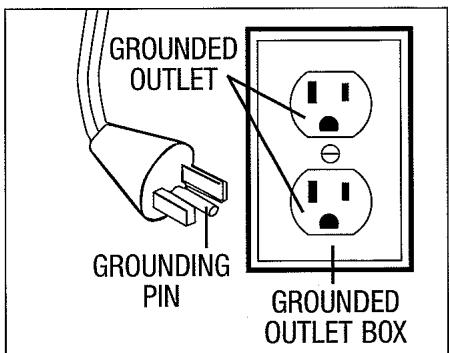
This appliance is for use on a nominal 120-volt circuit and has a grounding attachment plug that looks like the plug illustrated in the sketch above. Make sure that the appliance is connected to an outlet having the same configuration as the plug. No adapter should be used with this appliance.
CONGRATULATIONS
You are now the proud owner of a Royal® Upright. We trust your new purchase will bring you many years of satisfaction.
Our company designed and developed this product with you in mind.
We are very proud of our products and hope that you are equally satisfied with their quality and performance.
Thank you for your support of Royal® products.
Visit our website at www.royalvacuums.com
TABLE OF CONTENTS
Safety Instructions. Page 2, 3
Features. Page 5
How to Assemble. Page 6, 7
Body to Nozzle . Page 6
Tool Caddy . Page 6
Handle to Body . Page 6
How To Operate. Page 7, 8
Floor/Carpet Cleaning . Page 8
Above Floor Cleaning. Page 8
Dirt Container & Filter: Removal & Replacement . Page 9
Belt or Brush: Removal & Replacement . Page 10, 11
Lightbulb: Removal & Replacement . Page 11
General Maintenance. Page 11
Troubleshooting Guide Page 12
WARRANTY
To the consumer, Royal Appliance Mfg. Co. warrants this vacuum cleaner to be free of defects in material or workmanship for 1 year from the date of the original purchase. Save your original sales receipt to validate start of warranty period.
If the vacuum cleaner should become defective within the warranty period, we will repair or replace any defective parts free of charge. The complete machine must be delivered prepaid to any ROYAL® Authorized Sales & Warranty Service Station. Please include complete description of the problem, day of purchase, copy of original sales receipt and your name, address and telephone number. If you are not near a Warranty Station, call the factory for assistance in the USA & CANADA: 1-800-321-1134. Use only genuine Royal® replacement parts.
The warranty does not include unusual wear, damage resulting from accident or unreasonable use of the vacuum cleaner. This warranty does not cover brushes, bags, flat belts, filters, bulbs or fan damage. This warranty does not cover unauthorized repairs. This warranty gives you specific legal rights and you may also have other rights. (Other rights may vary from state to state in the USA).
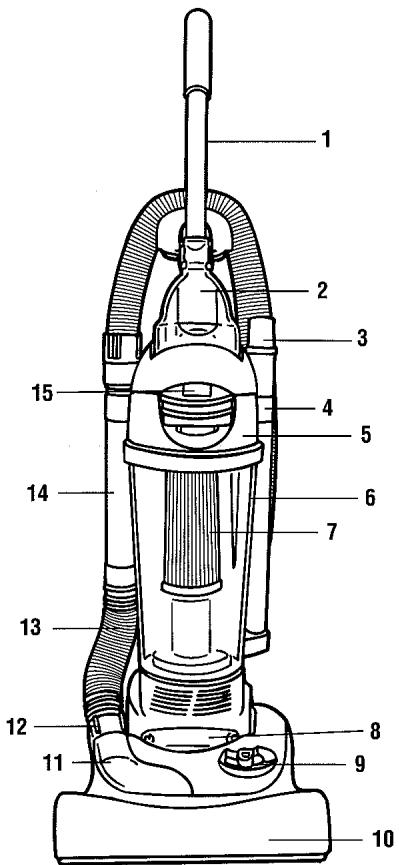
FRONT
FRONT
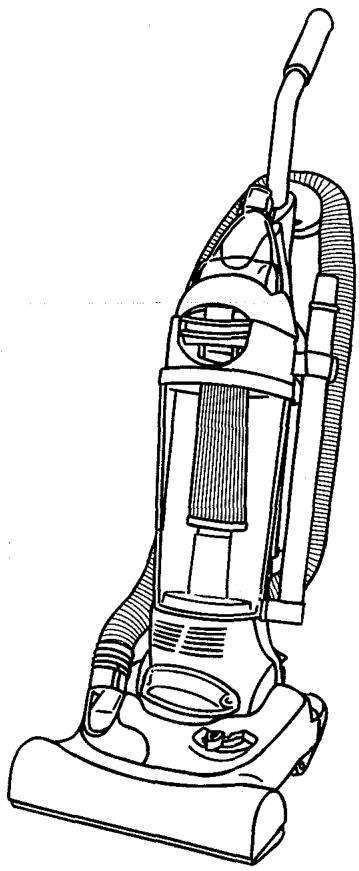
- Metal Handle
- Turbo Tool
- Crevice Tool (inside extension wand)
- Extension Wand
- Dirt Container Lid
- See Through Dirt Container
- Dirt Container Filter
- Headlight
- Height Adjust Lever
- Bumper
- Clear Dirt Path Window
- Lower Hose Cuff
- Lower Hose
- Hose Wand
- Dirt Container Release Latch
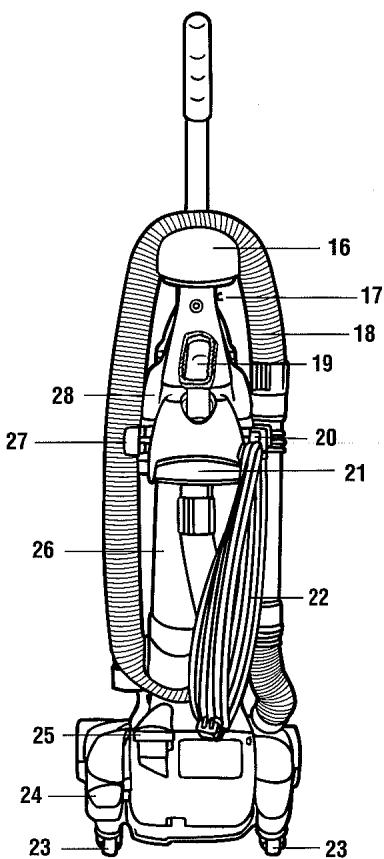
BACK
BACK
- Hose Caddy
- Cord Guide
- Hose
- Dust Brush
- Cord Wrap with Quick Cord Release
- Carrying Handle
- Long Power Cord
- Swivel Casters™
- Handle Release Pedal
- On/Off Pedal
- Back Panel
- Hose Clip
- Upper Tool Caddy
HOW TO ASSEMBLE
TOOL REQUIRED: PHILLIPS OR FLAT HEAD SCREWDRIVER BODY TO NOZZLE
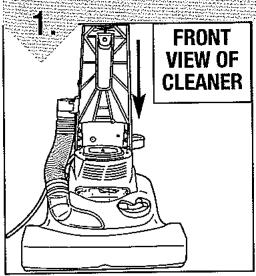
Slide the back panel onto base.
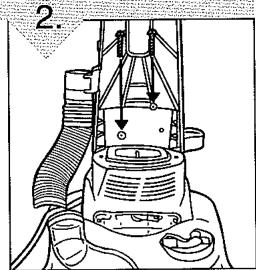
To secure, insert two (2) screws into the front of the back panel.
UPPER TOOL CADDY (BACK)
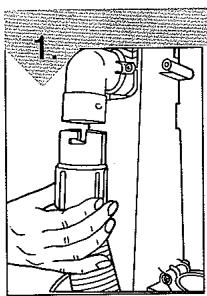
Slide end of long hose onto back panel dirt tube. Turn counterclockwise to secure.
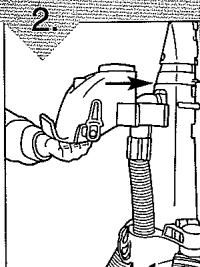
Align carry handle holes with holes on back panel. Slide caddy forward. Insert two (2) screws into the holes and tighten until secure.
HANDLE (BACK) AND TURBO TOOL® CADDY (FRONT) ASSEMBLY
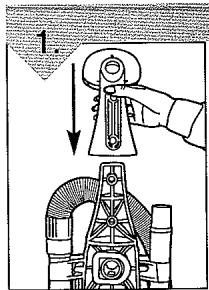
Place hose caddy on to the top of body base.
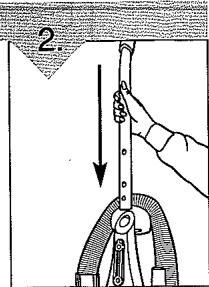
Gently push metal handle down into hole on hose caddy.
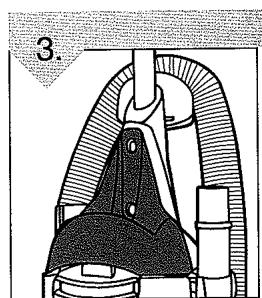
Place Turbo Tool® caddy onto the front of the vacuum mid-section.
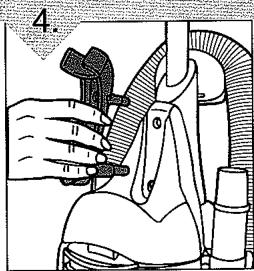
Attach Turbo Tool clip into turbo tool caddy.
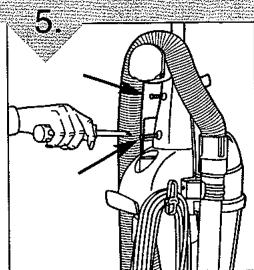
Insert the two (2) screws into the back of the handle and tighten, making sure the tool caddy is attached.
HOW TO ASSEMBLE: CONTINUED
INSTALL TURBO TOOL
Clip Turbo Tool onto the front of the turbo tool caddy.
SECURE BACK HOSE
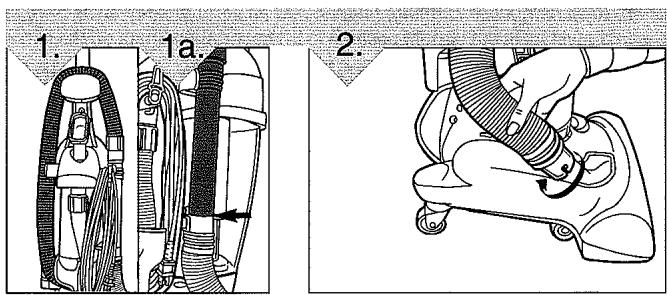
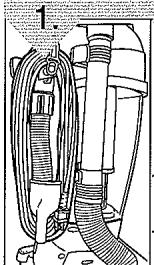
Wrap hose around back of hose caddy (Diagram 1). Push hose wand down into the right side of cleaner (Diagram 1a).
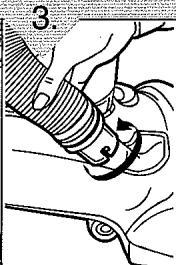
Align tabs on clear dirt passage window with the slots on the lower hose cuff. Push and turn hose clockwise until secure.
SECURE SIDE HOSE
TOOL STORAGE
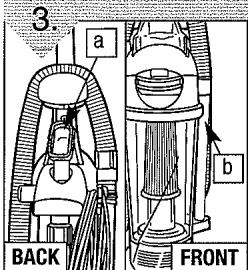
Attach tools: (a) Slide the dust brush onto post on the upper tool caddy with bristles facing out. (b) Slide the extension wand/crevice tool into round slot on the front right side of tool caddy.
INSTALL DIRT CONTAINER
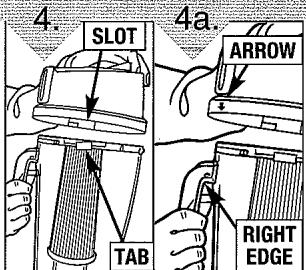
Align slots on lid with tabs on container (Diagram 4). Push the lid down and twist clockwise. NOTE: There is a guide arrow on back of lid. Align arrow with right edge of dirt container handle and turn clockwise until secure (Diagram 4a).
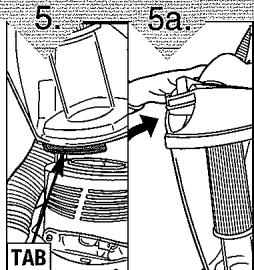
Set aligning tab on bottom of dirt container into rectangular slot on cleaner (Diagram 5), and push to snap into place (Diagram 5a).
HOW TO OPERATE
CORD RELEASE
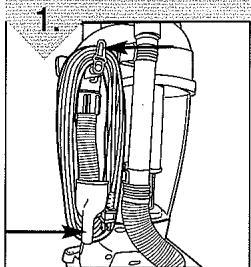
Turn Quick Cord Release for easy cord removal. Store cord in cord guide (see Features - pg. 5) to keep out of the way while vacuuming.
HEIGHT ADJUST LEVER
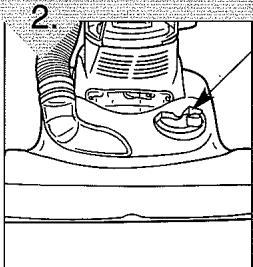
Slide the height adjust lever to match the surface being cleaned. IMPOR-TANT: FOR EASIEST ADJUSTMENT, PLACE CLEANER IN FULL UPRIGHT POSITION.
HOW TO OPERATE: CONTINUED
CAUTION: Brush agitator continues to rotate while hose is removed or in use and at all times while cleaner is on. Keep hair, loose clothing, fingers, and all parts of body away from brush area while cleaner is on. Cleaner must be in the upright position to lift the rotation brush off the carpet when cleaning above the floor.
ON/OFF PEDAL
HANDLE RELEASE PEDAL
FLOOR/CARPET CLEANING
Plug cord into electrical outlet. Turn cleaner on by depressing foot pedal located on the back left side of the cleaner.
To release handle, push the handle release pedal located on the lower left side of the cleaner.
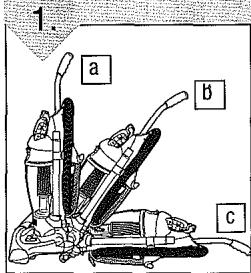
Move the handle and adjust it to the desired position for (a) storing the upright, (b) operating the cleaner, and (c) de-press the handle release pedal again to
clean under furniture. NOTE: Rotating brush could cause area rug fringe to become tangled within cleaner. Use caution when vacuuming throw rugs with fringe.
ABOVE FLOOR CLEANING
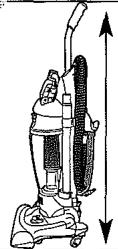
Cleaner must be in its upright position to raise brushroll.
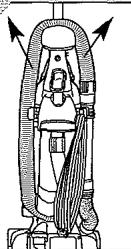
2.
Remove the hose from the tool caddy.
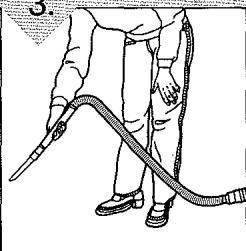
3.
Choose any of the handy accessories or use the hose alone. Simply push the attachment firmly onto the end of the wand
or hose handle. To remove tool, twist and pull apart gently.
EXTENSION WAND
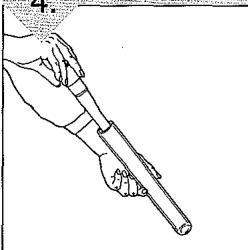
4.
If additional length is needed, use the extension wand and crevice tool. Pull crevice tool out of extension wand. Use extension wand and crevice tool together or separately.
CARRY HANDLE
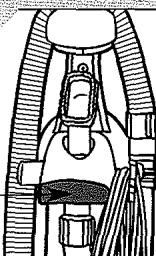
1
Use the carry handle on the back of the cleaner to move the cleaner from room to room. NOTE: Do not push cleaner forward while leaning on back casters. Do not pull cleaner back on casters.
DIRT CONTAINER & FILTER: REMOVAL & REPLACEMENT
WARNING: TO REDUCE THE RISK OF INJURY FROM MOVING PARTS - UNPLUG BEFORE SERVICING.
NOTE: Unplug cleaner before changing filter.
NOTE: For best performance, replace filter yearly.

For F1 filter replacement (Part # 3-JC0280-000), please call 1-800-321-1134 or visit our website at www.royalvacuums.com to locate a dealer nearest you.
EMPTY AND CLEAN DIRT CONTAINER
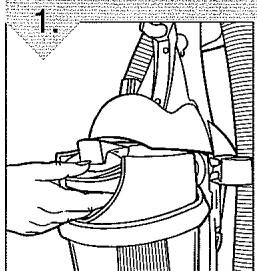
Depress latch to remove dirt container from cleaner.
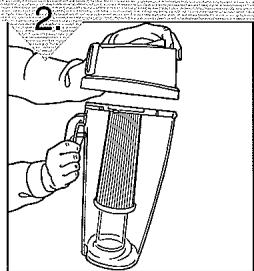
Remove lid by grasping dirt container handle and turning lid counterclockwise.
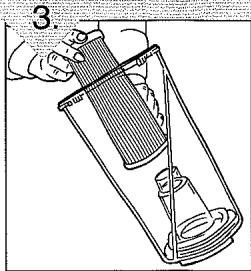
Hold the dirt container and grasp the top of filter.
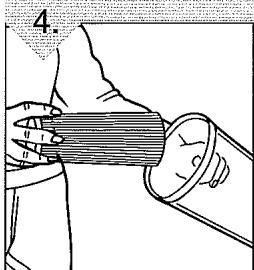
Twist and pull the filter up and out.
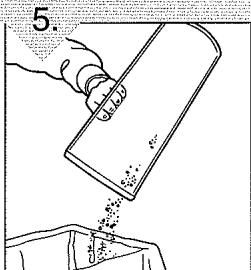
Clean filter and empty dirt container completely. See "Regular Maintenance" note below for instructions on cleaning the filter.
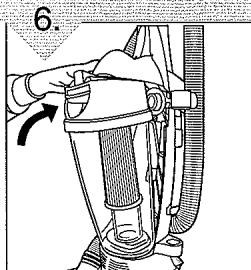
Return filter to dirt container. Push filter into place to prevent dirt leakage. Return dirt container to cleaner (see Page 7, Install Dirt Container).
*REGULAR MAINTENANCE: Each time the dirt container is emptied, the filter should be cleaned. Tap the filter firmly against the inside of a trash can until the dirt stops falling from the filter. (Filter will be discolored after use, this will not affect the filter's performance.) Do not brush the filter. The cleaning instructions may vary depending on the dirt conditions. In some cases, more or less cleaning of the filter may be required. It is recommended that the F1 filter Part # 3-JC0280-000 be replaced once per year. Please use reminder label located on filter cap to record replacement date.
BELT OR BRUSHROLL: REMOVAL & REPLACEMENT
TOOL REQUIRED: PHILLIPS SCREWDRIVER
WARNING: TO REDUCE THE RISK OF INJURY FROM MOVING PARTS - UNPLUG CLEANER BEFORE CHANGING BELT OR BRUSHROLL.

For Belt Style 10 replacement, please call 1-800-321-1134 or visit our website at www.royalvacuums.com to locate a dealer nearest you.
TO REMOVE BELT
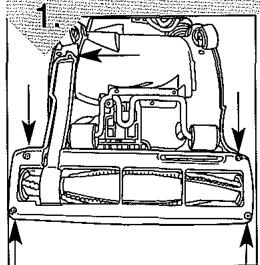
Lay cleaner flat and flip cleaner to expose nozzle base. Base should lay flat and face up. To remove nozzle guard, use Phillips screwdriver to remove the five (5) screws. Arrows show location of screws.
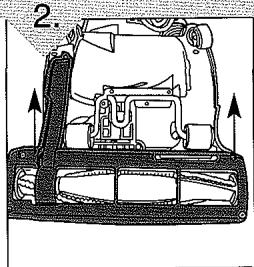
Lift nozzle guard off.
Lift and remove brushroll. Dispose of old belt.
TO REPLACE BELT OR BRUSHROLL
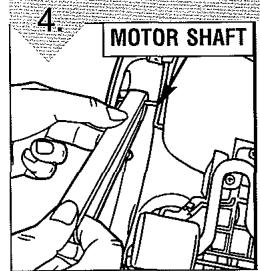
Slide belt onto motorshaft.
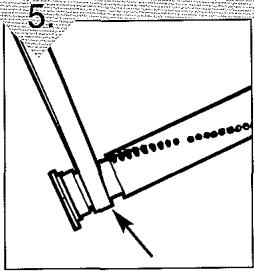
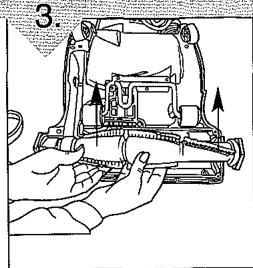
Place new belt in area of brushroll without bristles.
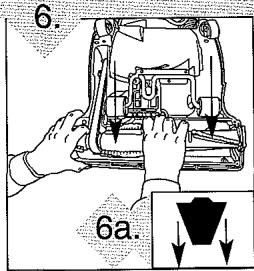
With new belt in place, pull and slide brushroll into nozzle making sure that the brushroll end caps are in the correct orientation (6a inset). Rotate brushroll manually to make sure belt is properly aligned.
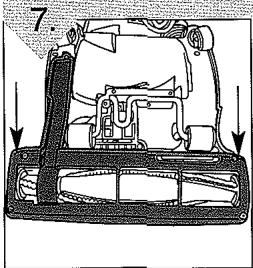
Reattach nozzle guard.
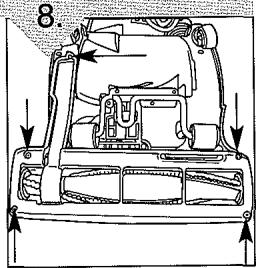
Replace all five (5) screws to secure nozzle guard.
LIGHTBULB: REMOVAL & REPLACEMENT
TOOL REQUIRED: FLATHEAD SCREWDRIVER
WARNING: TO REDUCE THE RISK OF ELECTRIC SHOCK - UNPLUG CLEANER BEFORE REMOVOING OR REPLACING LIGHTBULB.
This cleaner uses a common automotive lamp #906, 13.0 volts. For bulb replacement call 1-800-321-1134 or your local auto parts store.
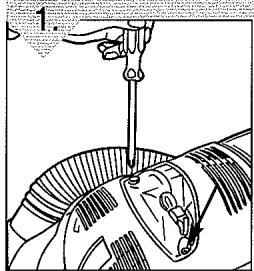
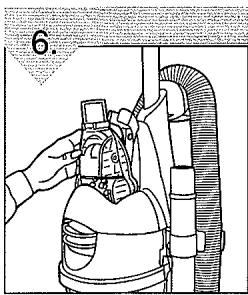
Lean cleaner handle back. Remove the two (2) screws located on either side of the headlight lens.
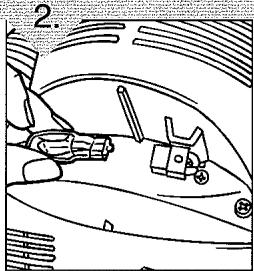
Pull bulb out of socket to remove. Do NOT twist. Gently push bulb into socket to replace.
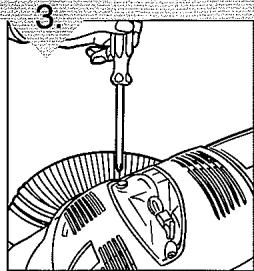
Secure the headlight lens by replacing the two (2) screws.
GENERAL MAINTENANCE
WARNING: TO REDUCE THE RISK OF INJURY FROM MOVING PARTS - UNPLUG BEFORE SERVICING.
DEBRIS REMOVAL/HOSE
-
Check to see if dirt cup is full; empty if needed.
-
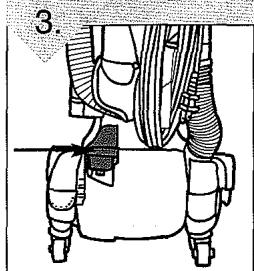
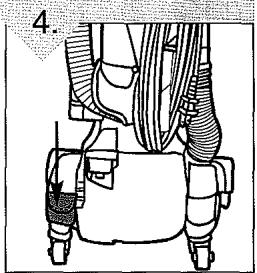
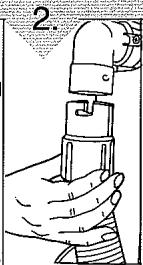
Plug cleaner in and check to see if there is any suction at end of hose (Diagram 1). If there is suction at end of hose, move on to Diagram 4. If there is no suction at the end of hose, clear dirt path window and lower hose. Follow these steps: 1. Remove hose from upper hose inlet (Diagram 2) by twisting clockwise. 2. Unwrap hose from caddy. Remove obstruction. 3. Remove hose from clear dirt path window (Diagram 3) by reversing Step 2, Page 7, under heading "Secure Side Hose". Remove obstruction.
DEBRIS REMOVAL/ DEBRIS REMOVAL/TURBO TOOL® NOZZLE GUARD
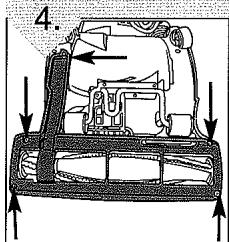
Remove nozzle guard (see Diagram 4) by removing the five (5) screws. Look for any obstructions and remove.
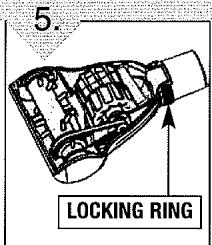
Rotate locking ring 180^ and turn Turbo Tool over.
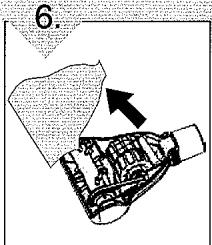
Pivot lower housing and remove clog.
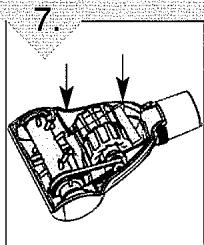
To reassemble, be sure tabs are engaged and pivot the lower housing closed.
TROUBLESHOOTING GUIDE
WARNING: TO REDUCE RISK OF PERSONAL INJURY - UNPLUG CLEANER BEFORE SERVICING
| PROBLEM | POSSIBLE REASON | POSSIBLE SOLUTION |
| Cleaner won't run | 1. Power cord not firmly plugged into outlet. | 1. Plug unit in firmly. |
| 2. Blown fuse or tripped breaker. | 2. Check fuse or breaker in home. Replace fuse/reset breaker. | |
| 3. Needs service. | 3. Take to service center or call 1-800-321-1134. | |
| Cleaner won't pick-up or low suction | 1. Dirt container not installed correctly. | 1. Review dirt container removal & replacement - Pg. 9. |
| 2. Dirt container full. | 2. Empty dirt container - Pg. 9. | |
| 3. Brushroll worn. | 3. Replace brushroll - Pg. 10. | |
| 4. Broken or worn belt. | 4. Replace belt - Pg. 10. | |
| 5. Clogged filter. | 5. Remove filter and clean - Pg. 9. | |
| 6. Nozzle/dirt passage hose clogged. | 6. Remove lower hose, remove obstruction - Pg. 7, 11. | |
| 7. Carpet height setting is incorrect. | 7. Set carpet height adjust lever to appropriate setting for carpet being cleaned - Pg. 7. | |
| Dust escaping from cleaner | 1. Dirt container full. | 1. Empty dirt container - Pg. 9. |
| 2. Dirt container not installed correctly. | 2. Review dirt container removal & replacement - Pg. 9. | |
| 3. Hose not connected correctly. | 3. Review hose installation - Pg. 7. | |
| 4. Filter not installed completely. | 4. Review filter removal & replacement - Pg. 9. | |
| Cleaner tools won't pick-up | 1. Hose clogged. | 1. Remove hose and tools, remove obstruction - Pg. 7, 11. |
| 2. Dirt container full. | 2. Empty dirt container - Pg. 9. | |
| 3. Filter clogged. | 3. Clean filter - Pg. 9. | |
| Headlight not working | 1. Bulb burnt out. | 1. Replace bulb - Pg. 11. |
| 2. Loose electrical wires. | 2. Call 1-800-321-1134 for nearest authorized Royal® Dealer. | |
| Cleaner is difficult to push | 1. Carpet height setting is incorrect. | 1. Set carpet height adjust lever to appropriate setting for carpet being cleaned - Pg. 7. |
ANY OTHER SERVICING SHOULD BE DONE BY AN AUTHORIZATION SERVICE REPRESENTATIVE CUSTOMER SERVICE (1-800-321-1134)
In the event that further assistance is required, see your Yellow Pages for an authorized Royal® Dealer. Costs of any transportation to and from any place of repair are to be paid by the owner. The service parts used in this unit are easily replaced and readily available from an authorized Royal® Dealer or retailer. Always identify your cleaner by the model number and manufacturing code when requesting information or ordering replacement parts. (The model number appears on the bottom of the cleaner.)
COMERCIAL
ASPIRADORA VERTICAL SIN BOLS A
www.royalvacuums.com
ADVERTENCIA:
www.royalvacuums.com