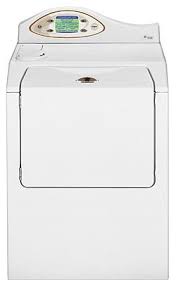
MAH7550AGW - Washing machine MAYTAG - Free user manual and instructions
Find the device manual for free MAH7550AGW MAYTAG in PDF.



| Product type | Washing machine |
| Brand | MAYTAG |
| Model | MAH7550AGW |
| Maximum capacity | 8 kg (cotton) |
| Loading type | Front-load |
| Available programs | Cotton, synthetics, delicates, wool, quick wash, rinse and spin, spin only, self-clean |
| Wash temperatures | Cold, 30°C, 40°C, 50°C, 60°C |
| Spin speeds | 500, 600, 700, 800, 900, 1000 rpm |
| Special functions | Touch screen, Stain Memory (50+ stains), Favorites (6 programs), Lock, Preference selection |
| Options | Pre-wash, pre-soak, extra rinse, no final spin, eco mode, half load, signal, delayed start (up to 12h45), short program |
| Power supply | 120 V, 60 Hz, 15 A |
| Safety | Door lock, automatic stop, instructions to avoid fire/explosion |
| Maintenance | Distributor cleaning (manual/automatic), interior refresh, winter storage |
| After-sales service | Contact the dealer or Maytag (phone number provided according to region) |
Frequently Asked Questions - MAH7550AGW MAYTAG
User questions about MAH7550AGW MAYTAG
0 question about this device. Answer the ones you know or ask your own.
Ask a new question about this device
Download the instructions for your Washing machine in PDF format for free! Find your manual MAH7550AGW - MAYTAG and take your electronic device back in hand. On this page are published all the documents necessary for the use of your device. MAH7550AGW by MAYTAG.
USER MANUAL MAH7550AGW MAYTAG
Important Safety Instructions 1-2
Getting Started 3-4
Laundry 3
Touchscreen 3
Status Display 4
Water Use 4
Operating Instructions 4-7
Load the Clothes Washer 4
Close the Washer Door 5
Add Laundry Detergent and Additives
to the Dispenser 5-6
Setting the Wash Programme. 7
Favourites at a Glance 8-9
Using Help 10-13
Stain Removal Guide. 10
Troubleshooting
Laundry Hints. 11
Operating Tips. 12
Lock Out 12
Select Preferences 13
Care & Cleaning 14-15
Cleaning the Washer 14
Cleaning the Dispenser 14
Freshening your Washer 15
Storing the Washer 15
Service and Troubleshooting. 16-18
Troubleshooting 16-17
Operating Sounds 18
Service Information 19
Welcome and congratulations on your purchase of a Maytag Neptune® washer! Your complete satisfaction is very important to us. For best results, we suggest reading this material to help acquaint you with proper operating and maintenance procedures.
Save time and money. If something should go wrong, we suggest consulting the "Service and Troubleshooting" section in the back of this book and in the HELP screen displays. It is designed to help you solve basic problems before consulting a servicer.
However, should you need assistance in the future, it is helpful to:
1) Have complete model and serial number identification of your washer. This is located on a data plate on the centre top edge of the control panel. Record these numbers below for easy access:
Date of Purchase
Model Number
Serial Number
2) IMPORTANT: Keep this guide and the sales receipt in a safe place for future reference. Please attach your sales receipt here.
If you have questions, please contact the dealer from whom you purchased the washer.
For service information, see page 19.
NOTE: In our continuing effort to improve the quality of our appliances, it may be necessary to make changes to the appliance without revising this guide.
IMPORTANT SAFETY INSTRUCTIONS
Read before operating your washer.
WARNING: To reduce the risk of fire, explosion, electric shock, property damage or injury to persons when using your appliance, follow basic precautions, including the following:
1 Read all instructions before using the appliance. It is for use only in washing, rinsing and spin drying household textiles and garments.
As with any equipment using electricity and having moving parts, there are potential hazards. To use this appliance safely, the operator should become familiar with the instructions for operation of the appliance and always exercise care when using it.
3 Do not install or store this appliance where it will be exposed to the weather.
4 Install and level the clothes washer on a floor that can support the weight.
This appliance must be properly earthed. Never plug the appliance cord into an electrical socket outlet that is not adequately earthed and in accordance with local and national codes. See installation instructions for earthing this appliance.
6 To avoid the possibility of fire or explosion:
- Do not wash items that have been previously cleaned in, washed in, soaked in, or spotted with petrol, dry-cleaning solvents, other flammable or explosive substances as they give off vapours that could ignite or explode. Hand wash and line dry any items containing these substances.
Any material on which you have used a cleaning solvent, or which is saturated with flammable liquids or solids, should not be placed in the clothes washer until all traces of these liquids or solids and their fumes have been removed.
These items include acetone, denatured alcohol, petrol, paraffin, kerosene, some liquid household cleaners, some spot removers, turpentine, waxes and wax removers.
- Do not add petrol, dry-cleaning solvents, or other flammable or explosive substances to the wash water. These substances give off vapours that could ignite or explode.
- Under certain conditions, hydrogen gas may be produced in a hot water system that has not been used for 2 weeks or more. HYDROGEN GAS IS EXPLOSIVE. If the hot water system has not been used for such a period, before using a washing machine or combination washer-dryer, turn on all hot water taps and let the water flow from each for several minutes. This will release any accumulated hydrogen gas. As the gas is flammable, do not smoke or use an open flame during this time.
7 Do not reach into the appliance if the tumbler (drum) is moving.
8 Do not allow children to play on or in the appliance. Close supervision of children is necessary when the appliance is used near children. This appliance is not intended for use by young children or infirm persons without supervision. Young children should be supervised to ensure that they do not play with the appliance.
9 Do not tamper with controls.
10 Do not repair or replace any part of the appliance or attempt any servicing unless specifically recommended in published user-repair instructions that you understand and have the skills to carry out. Repairs and servicing should only be carried out by qualified service personnel.
11 Unplug power supply cord when not in use, before cleaning or carrying out any user maintenance tasks on your clothes washer.
12 Store laundry aids and other material in a cool, dry place where children cannot reach them.
13 Do not wash or dry items that are soiled with vegetable or cooking oil. These items may contain some oil after laundering. Due to the remaining oil, the fabric may smoke or catch fire by itself.
14 Do not use chlorine bleach and ammonia or acids (such as vinegar or rust remover) in the same wash. Hazardous fumes can form.
15 Do not machine wash fiberglass materials. Small particles can stick to fabrics washed in following loads and cause skin irritation.
Before the appliance is removed from service or discarded, remove the door to the washing compartment.
17 Do not sit or stand on top of the clothes washer.
18 Inlet hoses are subject to damage and deterioration over time. Check the hoses periodically for bulges, kinks, cuts, wear or leaks and replace them every five years. Do not store hoses at temperatures below freezing.
A door interlock is fitted for your safety. It prevents the door being opened if the drum is rotating at speed. If the door will not open, do not try to force it. Wait for the interlock to release.
20 Do not continue to use this appliance if it appears to be faulty.
If the supply cord is damaged, it must be replaced with a specifically terminated cord by an authorised service agent or a similarly qualified person in order to avoid a hazard.
22 If the touchscreen clear membrane becomes damaged (for instance, by a split or hole), do not continue to use the machine until it has been repaired.
23 Water taps and power supply should be turned off when the washing has been completed.
SAVE THESE INSTRUCTIONS
LAUNDRY
To complete a load of laundry the following steps are taken. They are discussed in greater detail in later sections.
I. Load the clothes washer
2. Close the washer door
3. Add laundry detergent and additives to the dispenser
4. Set wash programme
5. Start the wash programme
TOUCHSCREEN
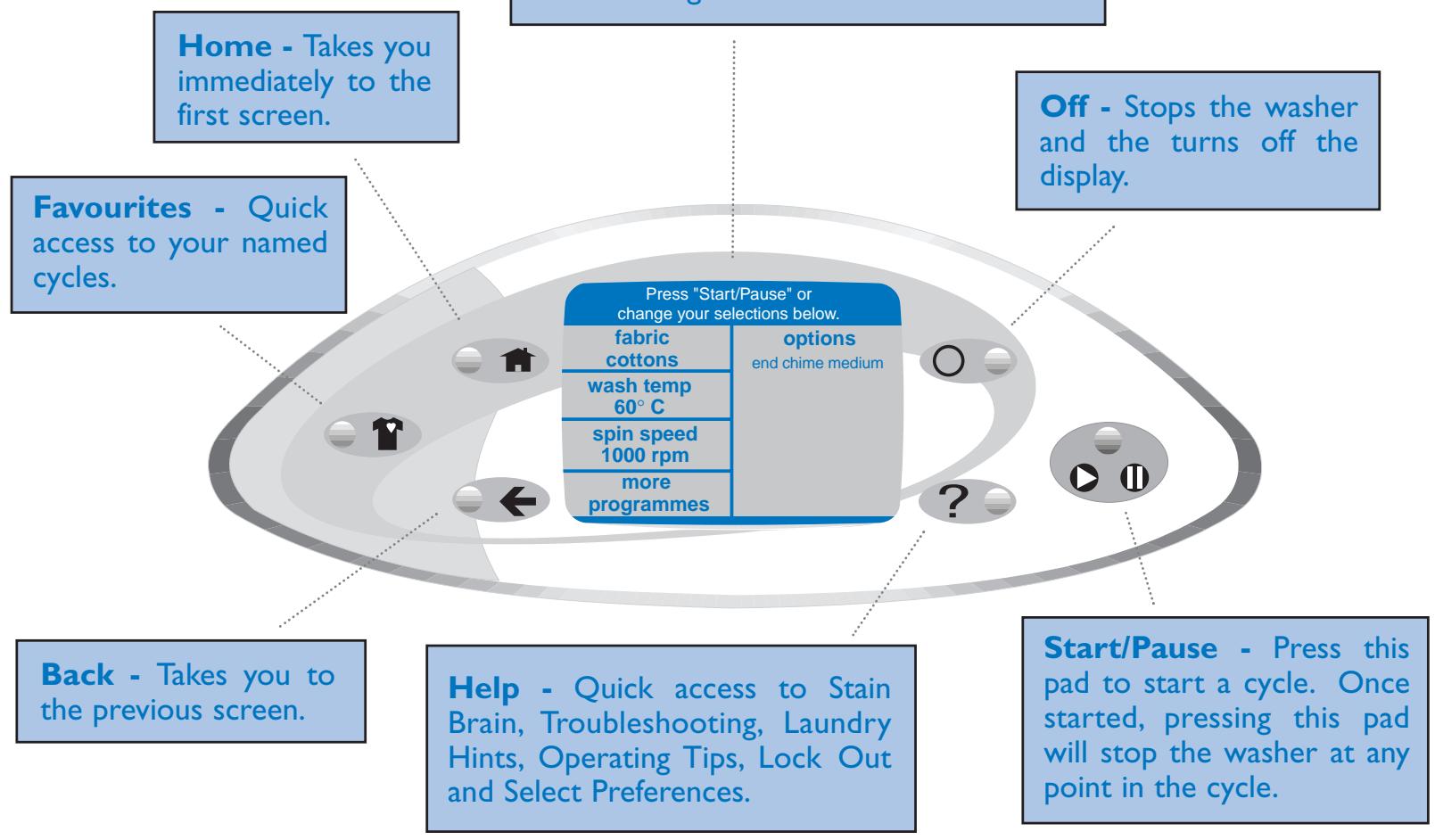
If there are no words on the touchscreen, open the door, touch any key (except OFF), or touch the screen to "wake" the controls.
The machine will beep three short beeps if an invalid key sequence is pressed.
As you use the touchscreen, if you feel you are lost, press Back or Home.
STATUS DISPLAY
ESTIMATED TIME
After pressing Start/Pause, this display will show the estimated time remaining in the programme.
DOOR LOCK
This display will show whenever the door of the clothes washer is locked. The door can be unlocked by pressing the Start/Pause touchpad to stop the washer.
WATER USAGE
The amount of water used to wash loads of laundry will vary with each load. The Maytag Neptune® clothes washer uses an adaptive fill to provide the appropriate amount of water for efficient cleaning performance and conservation of water and energy.
OPERATING INSTRUCTIONS
For detailed information on sorting, pre-treating stains, etc., see the Help topic "Laundry Hints" (see Using Help, page 11).
LOAD THE CLOTHES WASHER
- The tub can be loaded completely full with dry unfolded clothes. However, do not pack the tub tightly.
NOTE: Max. clothes load capacity: 8.0 Kg Cottons.
Overloading may reduce wash performance and possibly cause creasing or wrinkling of the load.
- When washing big bulky items or a couple of small items that do not fill the tub completely, such as a rug or two sweaters, a few towels should be added for improved tumbling and spin performance.
CLOSE THE WASHER DOOR
- To load a forgotten item, press the Start/Pause touchpad, wait for the washer to stop and the door to unlock, add the item(s), close the door and press the Start/Pause touchpad. After a 30 second pause, the programme will resume.
NOTE: To assure that your additional item(s) get clean, do not wait more than ten minutes after the programme has started to add the item(s).
ADD LAUNDRY DETERGENT AND ADDITIVES TO THE DISPENSER
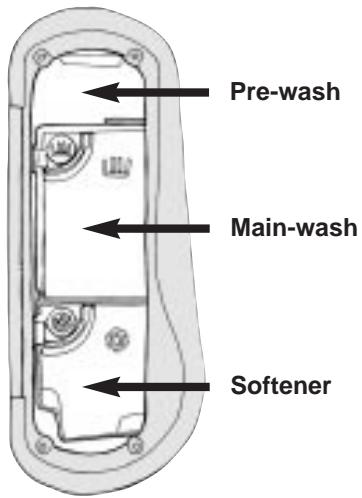
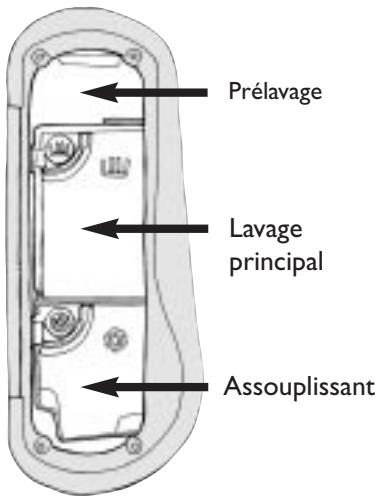
The automatic dispenser consists of three compartments for:
I. Liquid or granular detergent for main wash.
2. Liquid or granular detergent for pre-wash.
3. Liquid fabric softener.
All laundry products can be added at once in their respective dispenser compartments. They will be dispensed at the appropriate time for most effective cleaning.
NOTE: It is important to pay close attention to the soil level of the load, load size, and water hardness* and to use the appropriate amount of detergent to reduce or eliminate suds. When less suds are produced, the load tumbles more efficiently and cleaning results are maximized. To avoid over-sudsing, reduce the amount of detergent used with soft water or with small or lightly soiled loads.
- To determine water hardness in your area, contact your local water utility.
MAIN DETERGENT COMPARTMENT
Either liquid or granular detergent may be used in the main wash compartment to wash clothes. Follow the directions on the box or bottle to determine the appropriate amount of detergent to pour into its compartment. Do not exceed 500ml of granular detergent in the main wash compartment. When using liquid detergent, do not exceed the level on the bottom of the siphon cap marked by an arrow. Usually about 240ml of liquid will fill the cup to this mark.
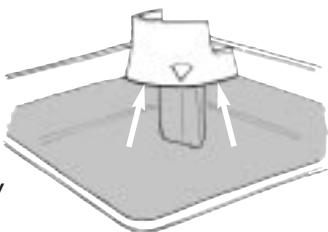
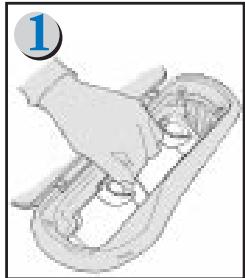
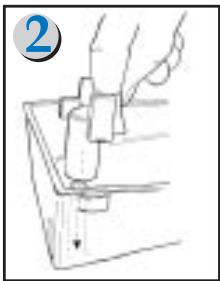
The dispenser is shipped from the factory ready to be used with liquid detergent (all liquid cups and siphon caps are installed). If you wish to use granular detergent, you need to remove these items first. You can remove these items by following the steps below (in the future, if using liquid detergent, the liquid detergent cup and siphon cap must be installed in the dispenser):
- Remove the main cup assembly, (with siphon cap and liquid cup installed), from the dispenser by pulling up and out on the cup.
- Remove main liquid siphon cap from the assembly.
- Remove main liquid cup from assembly.
- Reinstall the main cup back into the dispenser by leading with the inside edge and pushing down and to the right. Do not force the cups.
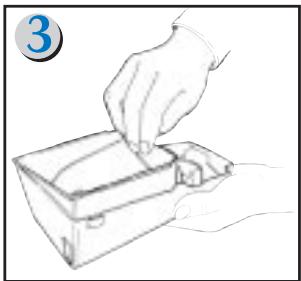
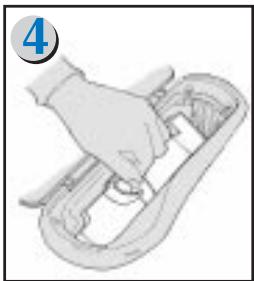
NOTE: Reverse steps to install cups and siphon caps and set up dispenser for liquid detergent. Make sure the siphon cap "snaps" into place when installing it.
Adding detergent to the dispenser:
Pour laundry detergent directly into the main wash compartment, and if necessary, the pre-wash compartment, before starting the cycle or as the washer is filling. (See pre-wash detergent compartment section below).
NOTE: Some concentrated liquid detergents will not fully dispense. Concentrated liquid detergents should be diluted with water prior to adding it to the dispenser. See "Care and Cleaning" section for directions on how to clean your dispenser. To prevent liquid detergent residue in the dispenser, a detergent ball can be used in the machine as a substitute for the use of liquid detergent in the dispenser.
PRE-WASH DETERGENT COMPARTMENT
It is not necessary to use the pre-wash compartment for every wash cycle. Loads will be adequately cleaned without using the pre-wash cycle. A pre-wash cycle should be used when washing heavily soiled loads or difficult soils. The "stain brain" will also provide recommended times to use pre-wash.
Either liquid or granular detergent may be used in the pre-wash compartment to wash clothes. Follow the directions on the box or bottle to determine the appropriate amount of detergent for the pre-wash compartment. If the box or bottle does not say how much detergent to use, divide the recommended amount of main wash detergent and put 13 of it into the pre-wash compartment. Do not exceed 200ml of granular detergent in the pre-wash compartment. If the pre-wash compartment is overfilled with detergent, flooding of the dispenser can occur.
NOTE: Due to the large capacity of the washer, when using extra large loads (greater than 5kg ) or heavily soiled loads, use 13 of the amount of the recommended main wash detergent in the pre-wash compartment in ADDITION to the full recommended amount used in the main wash compartment.
SOFTENER COMPARTMENT
This compartment automatically dilutes and releases liquid fabric softener at the proper time during the programme. Follow these steps when using liquid fabric softener:
Pour the recommended amount of liquid fabric softener into the softener compartment. For smaller loads use less than one cap full. Do not exceed the level at the bottom of the siphon cap which is marked by an arrow. Usually, about 135ml of liquid will fill the cup to this mark.
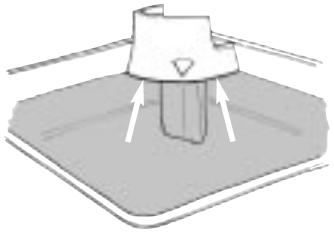
NOTE:
- Do not pour fabric softener too quickly. A fast pour can result in premature siphoning of the softener cup.
- Never pour fabric softener directly on the load. It may leave spots and stains.
- Use the softener compartment only for liquid fabric softeners.
After loading the laundry additives into the dispenser, close the dispenser lid.
For care and cleaning of the dispenser, see the "Care and Cleaning" section.
SETTING A WASH PROGRAMME
If there are no words on the touchscreen, open the door, touch any key (except off), or touch the screen to "wake" the controls.
| Press "Start/Pause" or change your selections below. | |
| fabric cottoms | options end chime medium |
| wash temp 60°C | |
| spin speed 1000 rpm | |
| more programmes | |
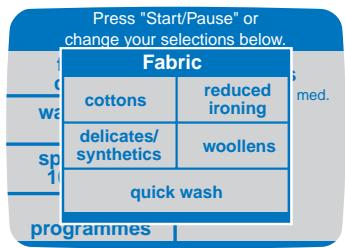
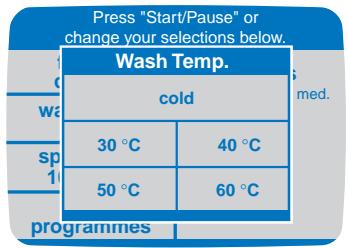
Step ①
Home Screen - You may immediately start a cycle using the default wash settings or choose "More Programmes" for other types of programmes. If you wish to modify the wash cycle, the following variables can be changed:
Fabrics - Select "Fabric" to select the appropriate fabric setting.
Wash Temp - Select "Wash Temp" to select the appropriate wash temperature.
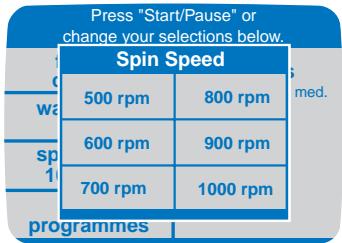
Spin Speed - Select "Spin Speed" to select the appropriate spin speed.
| More Programmes | |
| rinse & spin | spin only |
| automatic dispenser & machine cleaning | |
| favourites | |
| Options | |
| pre-soak on off | final spin on off |
| pre-wash on off | economy on off |
| extra rinse on off | 1/2 load on off |
| continue | |
| Options | |
| remind chime on off | end chime medium |
| delay wash on off | short programme on off |
| continue | |
More Programmes - Select "More Programmes"
to choose between the following four options:
Rinse and Spin (allows up to four rinses)
Spin Only
Automatic Dispenser and Machine Cleaning
Favourites
Options – This has two screens that has many different options which can be toggled on and off. To access the additional screen press the arrow key in the upper right corner of the screen. Press “Continue” to return to the review screen. Below is a table showing all the options and a brief description of each one.

Step 2
If you are satisfied with the selections, press the Start/Pause touchpad to begin the programme.
As you use the touchscreen, if you feel you are lost, press Back or Home.
NOTE: Not all Wash Temps, Spin Speeds, and options will be available for the various fabric selections. Some will appear "greyed out."
| Options | Description |
| Add a Pre-wash | Adds a pre-wash. The Pre-wash compartment is flushed during this step, followed by the main wash compartment during the main wash. |
| Add a Pre-soak period | Adds a standing soaking period of 15 minutes before the main programme sequence starts. |
| Add Extra Rinse | Adds an extra rinse at the end of the normal programme's rinse sequence, and just before the final spin. |
| No Final Spin | Will not advance the programme into a final spin. Clothes load will be wet at the end of the programme. |
| Economy | Limits all wash fills to "Low" and rinse fills to "Medium" and limits the wash water temperature to 40C regardless of selection. Cancels Pre-wash if chosen. |
| 1/2 Load | Reduces water levels by one setting from "Medium" to "Low" and/or from "High" to "Medium". |
| Remind Chime | Chimes at the end of the programme, every 5 minutes for up to 2 hours. |
| End Chime | Chimes once when wash programme is complete. |
| Short Programme | Shortens programme time. |
| Delay Wash | Sets the machine to start at a predetermined delay time set by the user. Delay can be set up to 12 hours and 45 minutes, in 15 minute increments. |
Favourites allows you to create, name and save up to 6 commonly used wash programmes.
CREATING A FAVOURITE

Step 1
Press the Favourites touchpad.
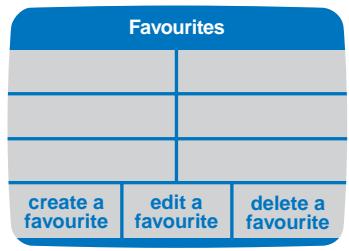
Step 2
Select "Create a Favourite".
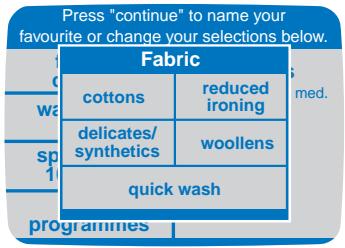
Step 3
Fabrics - Select "Fabric" to select the appropriate fabric setting.
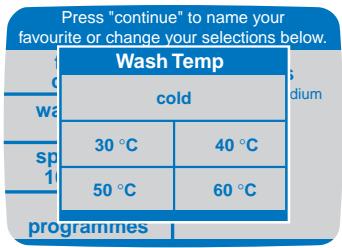
Step 4
Wash Temp - Select "Wash Temp" to select the appropriate wash temperature.
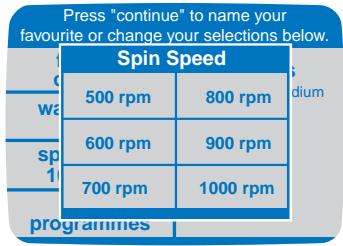
Step 5
Spin Speed - Select "Spin Speed" to select the appropriate spin speed.
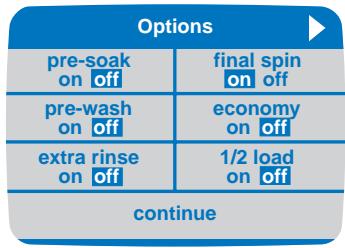
Step 6
Options Screen –This has two screens that has many different options which can be toggled on and off. To access the additional screen press the arrow key in the upper right corner of the screen.

Step 7
Review Screen - If satisfied with your selections, press "Continue" to name your Favourite programme.
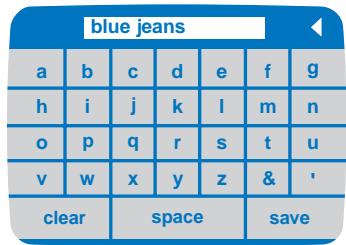
Step 8
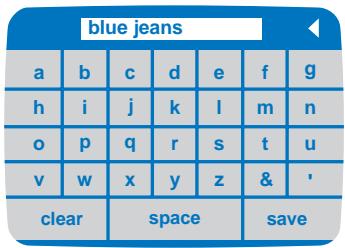
Touch the corresponding letter and space combination to spell out your Favourite programme name, up to 12 characters. Use the arrow at the top of the screen to delete characters. Press "Save". Your new Favourite programme will be displayed on the Favourites page.
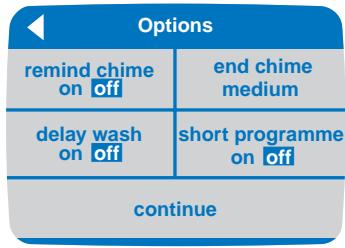
EDITING A FAVOURITE

Step ①
Press the Favourites touchpad.
Step 4
If the current Favourite programme name still applies, touch "Save". If you prefer a new name, type in the new name and touch "Save".
DELETING A FAVOURITE

Step 1
Press the Favourites touchpad.
| Select a favourite to edit | |
| blue jeans | |
| return without making changes | |
Step 2
Touch "Edit A Favourite". Touch the Favourite programme you want to edit.
| Select a favourite to delete | |
| blue jeans | |
| return without making changes | |
Step 2
Touch "Delete A Favourite". Touch the Favourite programme you want to delete.
| Press "continue" to name your favourite or change selections below. | |
| fabric cottoms | options end chime medium |
| wash temp 60°C | |
| spin speed 1000 rpm | |
| continue | |
Step 3
Review Screen - The review screen for that specific cycle will be displayed. Make the appropriate changes by touching the area. Press "Continue" once all changes have been made.
| Are you sure you want to delete "blue jeans"? | |
| yes | no |
Step 3
Press "Yes" if you want to delete the favourite and "No" to return back to the original screen.
The Help feature offers a variety of detailed information on stain removal (Stain Brain), Troubleshooting Tips, Laundry Hints and Operating Tips. The Help screen is also where you can access the Lock Out feature and Select Preferences.
STAIN REMOVAL GUIDE
The Stain Brain provides detailed steps to treat over 50 of the most common stains. The Stain Brain also offers you the option of automatically setting the washer programme for the particular stain.

Step 1
Touch the Help touchpad.
| Help Menu | |
| stain brain | troublesheathing tips |
| laundry hints | operating tips |
| lock-out feature | select preferences |
Step 2
Select "Stain Brain" to begin.
| Touch first letter of stain | ||||||
| a | b | c | d | e | f | g |
| h | i | j | k | l | m | n |
| o | p | q | r | s | t | u |
| v | w | x | y | z | unknown stains | |
Step 3
Select the first letter of the stain you want to remove.
| "B" Stains | |
| baby milk | beverages |
| blood | butter |
| Baby Milk |
| 1. Use the pre-soak option or soak in warm water for 1/2 hour. |
| 2. Launder with appropriate detergent in warm water. |
| 3. If the stain persists, re-launder. |
| 4. Use the pre-wash option with 40°C water for heavily soiled loads. |
| set washer for this stain |
| Press "Start/Pause" or change your selections below. | |
| fabric cottoms | options end chime medium extra rinse ON pre-soak ON |
| wash temp 40°C | |
| spin speed 1000 rpm | |
| more programmes | |
Step 4
Select the appropriate stain listing. Use the arrows at the top of the screen to scroll from letter to letter.
Step 5
To automatically set the washer to run the appropriate programme for the selected stain, touch "Set Washer For This Stain".
Step 6
Review Screen - This screen reviews the selections made by the Stain Brain before starting the washer. Press Start/Pause to begin washing, or press a displayed choice to change selections.
As you use the touchscreen, if you feel you are lost, press Back or Home.
TROUBLESHOOTING
This feature allows you to review the more common troubleshooting topics. For more detailed information, see the "Service and Troubleshooting" section (pages 16-18), or contact your dealer for service information.

Step 1
Touch the Help touchpad.
| Help Menu | |
| stain brain | troublesheooting tips |
| laundry hints | operating tips |
| lock-out feature | select preferences |
Step 2
Select "Troubleshooting
Tips" on the Help screen.
| Troubleshooting Tips | |
| won't fill | won't tumble |
| won't spin or drain | is noisy |
| washer stops | leaks water |
| contact your dealer for service information. | |
Step 3
Here you will see headings for common troubleshooting topics. Touch one of the displayed areas to see specific information. Touch the arrows at the top of the screen to move forward or back through the topics.
LAUNDRY HINTS
The Laundry Hints feature provides information to help you care for your clothes and achieve optimum cleaning performance.

Step 1
Touch the Help touchpad.
| Help Menu | |
| stain brain | troublesheathing tips |
| laundry hints | operating tips |
| lock-out feature | select preferences |
Step 2
Select "Laundry Hints" to begin.
| Laundry Hints | |
| washer additives | washer sorting |
| detergents | pre-treating |
| water temperature | programmes |
Step 3
Here you will see the available topics. Touch the topics to see specific information.
| Washer Additives |
| fabric softener |
| starch |
| blueing |
Step 4
Select the appropriate sub-topic to see more detailed information.
As you use the touchscreen, if you feel you are lost, press Back or Home.
OPERATING TIPS
The Operating Tips feature provides information on maximizing the touchscreen controls and use of your washer.

Step 1
Touch the Help touchpad.
| Help Menu | |
| stain brain | troublesheathing tips |
| laundry hints | operating tips |
| lock-out feature | select preferences |
Step 2
Select "Operating Tips" to begin.
| Operating Tips | |
| dispensers | control panel |
| control settings | unique sounds |
| washer care | |
Step 3
Here you will see the available topics. Touch the topics to see specific information.
Lock-Out
The Lock-Out feature deactivates the touchscreen or touchpads. Use this feature for cleaning the control panel or to prevent unwanted use of the washer.

Step ①
Touch the Help touchpad.
| Help Menu | |
| stain brain | troublesheooting tips |
| laundry hints | operating tips |
| lock-out feature | select preferences |
Step 2
Select "Lock-Out Feature" from the Help Screen.
| Lock-Out Feature |
| To lock out the controls, touch the area below for three seconds. |
| To activate lock-out, press here |
Step 3
Press the area labeled "To activate lock-out, press here" for three seconds. After activating the lock out feature, press the area labeled "To deactivate lock-out, press here" for three seconds to deactivate.
As you use the touchscreen, if you feel you are lost, press Back or Home.
SELECT PREFERENCES
The Select Preferences feature allows you to change the display language from English (default) to French, Spanish or German, set the contrast of the screen display, select the volume of the touchscreen beeps, and toggle the "fill hoses switched" message on or off.

| Help Menu | |
| stain brain | troublesheathing tips |
| laundry hints | operating tips |
| lock-out feature | select preferences |
| Select Preferences | |
| change to English | séléctionner le français |
| zu Deutsch überwechseln | cambiar a español |
| change monitor contrast | touch screen volume medium |
| disenable "fill hoses switched" message | |
Step ①
Touch the Help touchpad.
Step 2
Touch the "Select Preferences" area.
Step 3
Here you will see the available topics. Touch the topics to see specific information.
CHANGE LANGUAGE
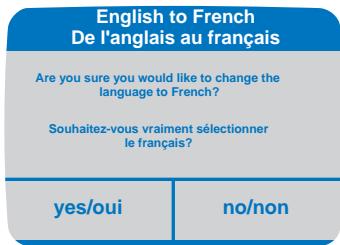
You have the ability to change the language between English, French, Spanish and German. You will always see the next screen in the selected language to make sure you want to change the language.
CHANGE MONITOR CONTRAST
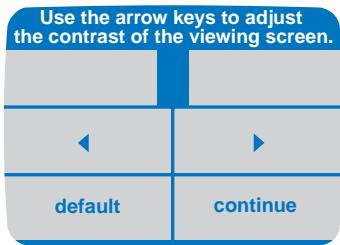
Depending on the lighting in your home and other factors, you may want to adjust the contrast of your touchscreen. Touch the arrows to lighten or darken the display. Touch "Continue" when finished.
CHANGE TOUCHSCREEN VOLUME
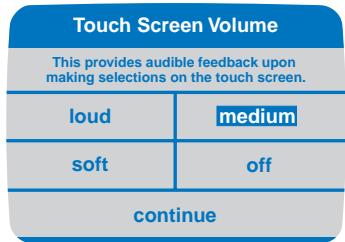
Touch "Loud", "Medium", "Soft" or "Off" to set the volume level of the touchscreen beeps. Touch "Continue" to accept the selected volume setting.
DISABLE FILL HOSES SWITCHEDMESSAGE

If the washer detects that the hot and cold inlet hose connections have been reversed, the machine will display a message stating such. If you have checked the hoses and determined that they are correctly connected, you can turn off the algorithm that detects this condition by touching "Algorithm Off".
As you use the touchscreen, if you feel you are lost, press Back or Home.
CLEANING THE WASHER
- Remove the electrical plug and turn off the water taps after finishing the day's washing. This will shut off the water supply to the clothes washer and prevent the unlikely possibility of damage from escaping water.
- Use a soft cloth to wipe up all detergent or other spills as they occur.
-
Clean the following as recommended:
-
Control Panel - clean with a soft, damp cloth. Do not use abrasive powders or cleaning pads. Do not scratch
CLEANING THE DISPENSER
The dispenser may need to be cleaned periodically due to laundry additive build-up. There are two options for cleaning the dispenser; automatic and manual.
The Automatic Dispenser and Machine Cleaning programme is used to rinse out the dispenser and the tub. The machine circulates cold water through the dispenser, goes through a minimal tumble and then drains. To access the Automatic Dispenser & Machine Cleaning programme:
I. Press "More Programmes" on the Home screen.
2. Press "Automatic Dispenser & Machine Cleaning."
3. Press the Start/Pause button to run programme.
To clean the dispenser by hand, use the following steps:
1. Remove the main cup from the dispenser by pulling up and out on the cup.
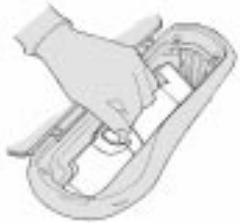
or scrape the control panel with any sharp object, including fingernails. Do not spray cleaners directly on the panel.
- Cabinet - clean with soap and water followed with an appliance wax, if desired.
-
Interior - hard water deposits may be removed, if needed, using a recommended cleaner labeled clothes washer safe.
-
Once the two-compartment main cup is removed from the main dispenser, take it to a sink.
- Remove the softener siphon cap covering the siphon tube in the softener compartment.
- Run warm water and a soft brush or cloth over the two parts to remove any excess laundry additives. Clean the main dispenser area using water and a soft cloth.
- Once the main dispenser is clean, follow the illustrations in reverse order to replace pieces back into the dispenser.
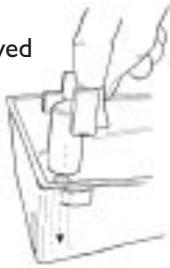
NOTE: Do not use any cleaning substance but water in the main dispenser. It is possible for cleaning substances to drain into the tub. If this should happen, set the washer for a rinse and spin cycle to remove any cleaning substance from the washer before doing a load of laundry.
FRESHENING YOUR WASHER
Periodically, it is recommended that you freshen and clean the inside of your clothes washer.
-
Open the door and wash the lower portion of the grey door seal with a solution of 1 cup chlorine bleach to 2 cups water.
-
Go to "More Programmes" and select the "Automatic Dispenser and Machine Cleaning" programme.
STORING THE WASHER
Washers can be damaged if water is not removed from hoses and internal components before storage. Prepare the washer for storage as follows:
I. Turn the machine off and then on.
2. Select "Options," scroll to the next screen by hitting the arrow in the top right hand corner of the screen, and switch the "Short Programme" to the "On" position. Then add one cup of bleach or white vinegar to the detergent dispenser without clothes in the tumbler. Run the clothes washer through the complete programme.
3. Turn the water taps off and disconnect the inlet hoses from them.
4. Activate the "Spin Only" setting by going through "More Programmes" and lower the drain hose to
- Pour a 12 cup of bleach into the main wash compartment of the detergent dispenser and then start the programme.
- Allow the washer to complete the programme.
- At the end of the programme, open the door and dry the grey door seal.
eliminate any water that may be in the drain hose. Be sure to remove the bracket holding the drain hose and use a pan to catch any water.
- Disconnect the clothes washer from the electrical supply and leave the washer door open to let air circulate inside the tumbler.
- If the washer has been stored in below-freezing temperatures, allow time for the washer to thaw out prior to use.
For information on long-term storage or storage of your washer during extreme cold temperatures, contact your dealer for Maytag Customer Service information.
TROUBLESHOOTING
CHECK THESE POINTS IF YOUR MAYTAG NEPTUNE® WASHER...
| Load is Too Wet at End of Programme | ·Use highest spin speed safe for fabric type. ·Load is too small. Very small loads (one or two items) may not spin out completely. |
| Leaks Water | ·Make sure door is firmly closed. ·Make sure hose connections are tight. ·Make sure end of drain hose is correctly inserted and secured to drain facility. ·Avoid overloading. ·Too much detergent was used in the pre-wash compartment. Do not exceed 200ml of detergent. |
| Won't Spin or Drain | ·Check fuse or reset electricity supply. ·Straighten drain hoses. Eliminate kinked hoses. If there is a drain restriction, call for service. ·Close the door and push the Start/Pause touchpad. For your safety, washer will not tumble or spin unless the door is closed. ·After pressing the Start/Pause touchpad, it will take 30 seconds before the clothes washer begins to spin. The door must lock before spin can be achieved. |
| Stops | ·Plug cord into live electrical outlet. ·Check adapter and power cord connection in cord lock. Remove cord lock to check. ·Check fuse or reset electricity supply. ·Close door and push the Start/Pause touchpad to start the clothes washer. For your safety, washer will not tumble or spin unless door is closed. ·There may be a pause or soak period in the cycle. Check display to confirm. ·Check screens on inlet hoses at the water taps for obstructions. Clean screens periodically. |
| Tub is Completely Full of Suds | ·Run the clothes washer through another complete cycle using cold water. ·Reduce detergent amount for that specific load size, soil level and water hardness. |
| Fills with the Wrong Temperature Water | ·Turn both water taps on fully. ·Make sure temperature selection is correct. ·Make sure hoses are connected to correct taps and inlet connections. Flush water supply before filling washer. ·Check your hot water supply heater. It should be set to deliver a hot water between 49°C (120°F) and 60°C (140°F) at the tap. Also check water heater capacity and recovery rate. ·Disconnect hoses and clean filters. Hose and valve filters may be blocked. ·All rinses will be cold. ·While the washer is filling for cold or warm wash temperatures, both hot and cold water will go through the dispenser as the automatic temperature control feature checks incoming water temperatures. |
| Won't Fill | ·Be sure the door is tightly closed. ·Plug cord into a live electrical outlet. ·Check fuse or reset electricity supply. ·Open and close the door, then push the Start/Pause touchpad. ·Turn both water taps on fully. ·Straighten inlet hoses. ·Disconnect hoses and clean filters. Hose and valve filters may be blocked. |
CHECK THESE POINTS IF YOUR MAYTAG NEPTUNE® WASHER...
| Won't Tumble | ·Check fuse or reset electricity supply. ·Open and close the door and press the Start/Pause touchpad. For your safety, the clothes washer will not tumble or spin unless the door is closed. |
| Door Locked Shut; Will Not Open | ·Press the Start/Pause touchpad to stop the washer. ·Pull on the door indentation opposite the hinges. ·To emergency unlock the door, pull on the green rip cord located in the opening just inside the front end of the detergent dispenser. It may be necessary to remove the 4 cover screws and remove the dispenser cover to access this cord. |
| Is Noisy | ·Clothes washer should be leveled properly as outlined in installation instructions. ·Weak floors can cause vibration and walking. ·Be sure rubber feet are installed on leveling legs. ·Check that the leveling leg lock nuts are tightened. ·For information on normal operating sounds, see page 18. |
NORMAL OPERATING SOUNDS OF YOUR MAYTAG NEPTUNE® CLOTHES WASHER
| High pitched sound during a spin cycle. | The motor increases speed to spin the tub to remove moisture from the load. |
| Flushing water sound coming from the dispenser area. | Detergent is dispensed at the start of the cycle. Fabric softener is dispensed during the final rinse while the washer is filling. |
| Sloshing or gurgling water sound when washer is off and the tub is rotated. | The sealed balance ring around the tub contains a liquid and is designed to make the washer spin smoothly. |
| “Whirring” or “Sloshing” sound followed by a pause, repeated throughout the wash cycle. | The tub rotates one direction followed by a pause. The tub reverses direction and pauses. This action continues throughout the cycle. |
| Clothes washer maintains a slightly reduced spin speed after achieving a higher spin speed. | After reaching the maximum spin speed, the machine may reduce spin speed slightly to create less noise and vibration. |
| The spin speed slows down dramatically when it sounds like an out-of-balance load. | The tumbler will begin to accelerate to speed, then slows back down to redistribute the load more evenly when an unbalanced load occurs. |
| Water is added after the washer has been tumbling for a while. | The Maytag Neptune® clothes washer uses a true adaptive fill and adds more water during the wash cycle as it is needed. OR Water flows through the dispenser to dilute and add fabric softener at the appropriate time. This will occur even if fabric softener is not used. |
| Clicking/draining sounds when washer is started. | Before the washer starts to fill, it will make a series of clicking noises to check the door lock and do a quick drain. |
For service, please contact the Maytag dealer from whom you purchased this appliance.
For service in Australia, please contact Maytag appliances on | 800 819 925
For service in the United Kingdom, please contact Maytag U.K. on 01737 231000.
Manufacturer: MAYTAG APPLIANCES: I Dependability Square, Newton, Iowa 50208, U.S.A.
LAVE-LINGE MAYTAG NEPTUNE®
GUIDE
DE L'UTILISATUER
TABLE DES MATIÈRES
Bienvenue 21
REMARQUE : It is important to pay close attention to the soil level of the load, load size, and water hardness* and to use the appropriate amount of detergent to reduce or eliminate suds. When less suds are produced, the load tumbles more efficiently and cleaning results are maximized. To avoid over-sudsing, reduce the amount of detergent used with soft water or with small or lightly soiled loads.
GUIDE D'ENLÈVEMENT DES TACHES

- IMPORTANT SAFETY INSTRUCTIONS
- Read before operating your washer.
- SAVE THESE INSTRUCTIONS
- LAUNDRY
- TOUCHSCREEN
- STATUS DISPLAY
- ESTIMATED TIME
- DOOR LOCK
- WATER USAGE
- OPERATING INSTRUCTIONS
- LOAD THE CLOTHES WASHER
- CLOSE THE WASHER DOOR
- ADD LAUNDRY DETERGENT AND ADDITIVES TO THE DISPENSER
- MAIN DETERGENT COMPARTMENT
- Adding detergent to the dispenser:
- PRE-WASH DETERGENT COMPARTMENT
- SOFTENER COMPARTMENT
- NOTE:
- SETTING A WASH PROGRAMME
- Step ①
- Step 2
- CREATING A FAVOURITE
- Step 1
- Step 3
- Step 4
- Step 5
- Step 6
- Step 7
- Step 8
- EDITING A FAVOURITE
- DELETING A FAVOURITE
- STAIN REMOVAL GUIDE
- TROUBLESHOOTING
- LAUNDRY HINTS
- OPERATING TIPS
- Lock-Out
- SELECT PREFERENCES
- CHANGE LANGUAGE
- CHANGE MONITOR CONTRAST
- CHANGE TOUCHSCREEN VOLUME
- DISABLE FILL HOSES SWITCHEDMESSAGE
- CLEANING THE WASHER
- CLEANING THE DISPENSER
- FRESHENING YOUR WASHER
- STORING THE WASHER
- LAVE-LINGE MAYTAG NEPTUNE®
- GUIDE
- DE L'UTILISATUER
- TABLE DES MATIÈRES
- GUIDE D'ENLÈVEMENT DES TACHES
Brand : MAYTAG
Model : MAH7550AGW
Category : Washing machine