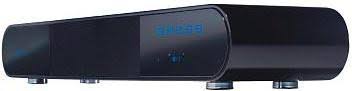
FTS 100 - Soundbar AUDIOVOX - Free user manual and instructions
Find the device manual for free FTS 100 AUDIOVOX in PDF.



| Product type | Soundbar |
| Brand | AUDIOVOX |
| Model | FTS 100 |
| Maximum output power | 150 W (peak) |
| Audio inputs | 3 AUX cinch inputs |
| Subwoofer output | Yes (RCA connector) |
| 3D sound effect | Yes |
| Built-in clock | Yes |
| Remote control | Yes (with included lithium battery) |
| Power supply | External power adapter |
| Operating temperature | 0°C to 40°C |
| Care and cleaning | Dry cloth only, no solvents |
| Safety instructions | Do not open, do not expose to water |
| Included accessories | Remote control, cinch cable, power adapter, manual |
Frequently Asked Questions - FTS 100 AUDIOVOX
User questions about FTS 100 AUDIOVOX
0 question about this device. Answer the ones you know or ask your own.
Ask a new question about this device
Download the instructions for your Soundbar in PDF format for free! Find your manual FTS 100 - AUDIOVOX and take your electronic device back in hand. On this page are published all the documents necessary for the use of your device. FTS 100 by AUDIOVOX.
USER MANUAL FTS 100 AUDIOVOX
Important notes for installation / warranty card
Instructions for disposal 11
Description of the FTS 100 12/13
Connections 14
Description of the Remote Control 15
Operation 16
Specifications 17
Warranty conditions / warranty card 46/47
F
Sommaire
thank you for choosing the Audiovox FTS 100.
Please read the following information carefully before starting to use your FTS 100.
Safety precautions
- Do not expose the device, the mains adapter and the remote control to water or moisture.
- Only operate the device in the specified temperature range of 0ircC to 40ircC .
- Make sure there is sufficient ventilation for the device. There must be a minimum gap of 10cm between objects to the side, to the rear and above the device.
- In the event of contact with moisture or liquids remove the mains adapter immediately.
- Only clean the device using a dry cloth. Do not use any cleaning agents or chemical solvents when cleaning, as these could damage the surface of the device.
- Never open the device.
- The device should not continue to be operated if there is visible damage to the mains cable. Adamaged cable should not be repaired, but must be replaced.
- Always refer to a qualified specialist for any maintenance or repair work.
Instructions for disposal
In accordance with European Directive 2002/96/EC all electrical and electronic appliances must be disposed of separately via local collection points. Please observe the local regulations and do not dispose of your old appliances with normal household waste.

DESCRIPTION OF THE FTS 100
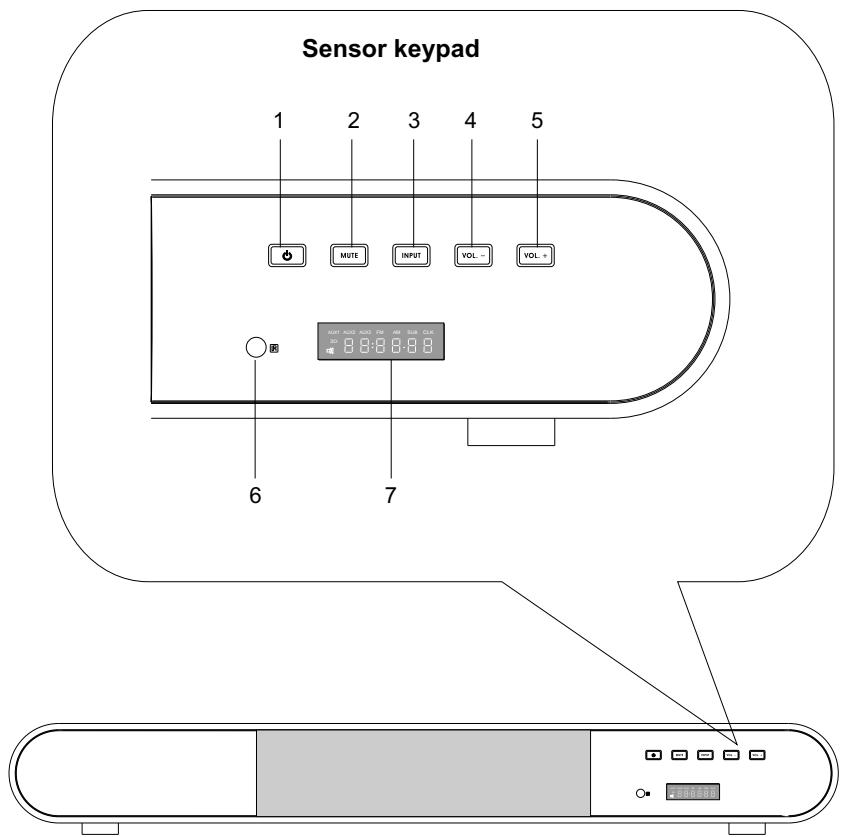
Front panel
- Standby/power button
- Mute button, mute function
- Input button, select the input
-
Volume-Down button, quieter
-
Volume-Up button, louder
- Sensor for the remote control
- LED display
DESCRIPTION OF THE FTS 100
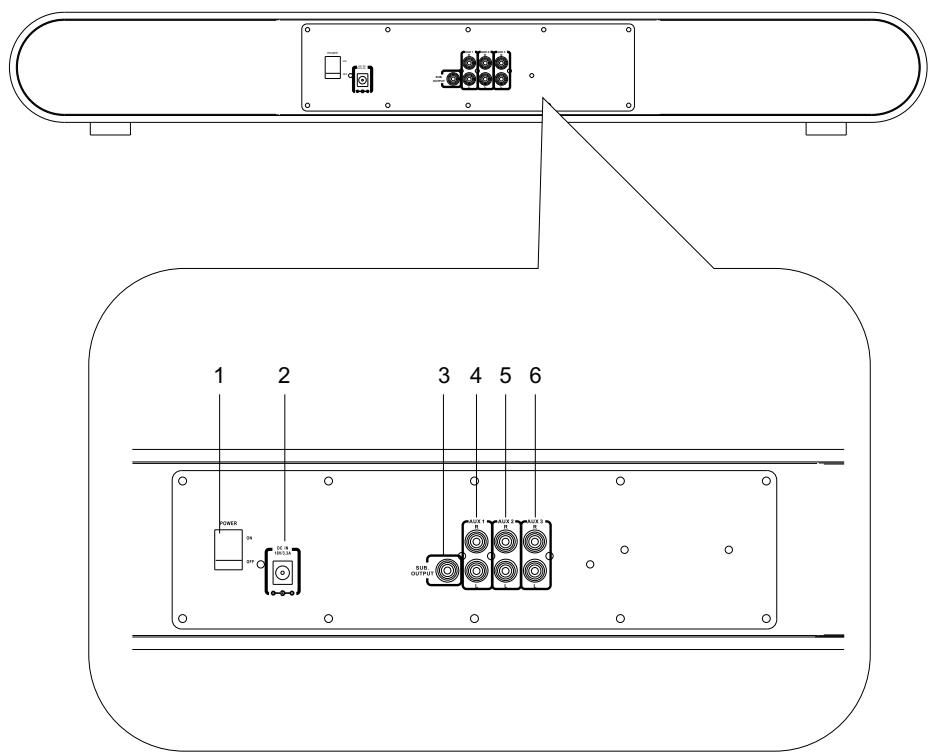
Rear panel
- Power switch
- Input for the separate mains adapter
- Subwoofer output
- AUX1 RCA jack input
- AUX2 RCA jack input
- AUX3 RCA jack input
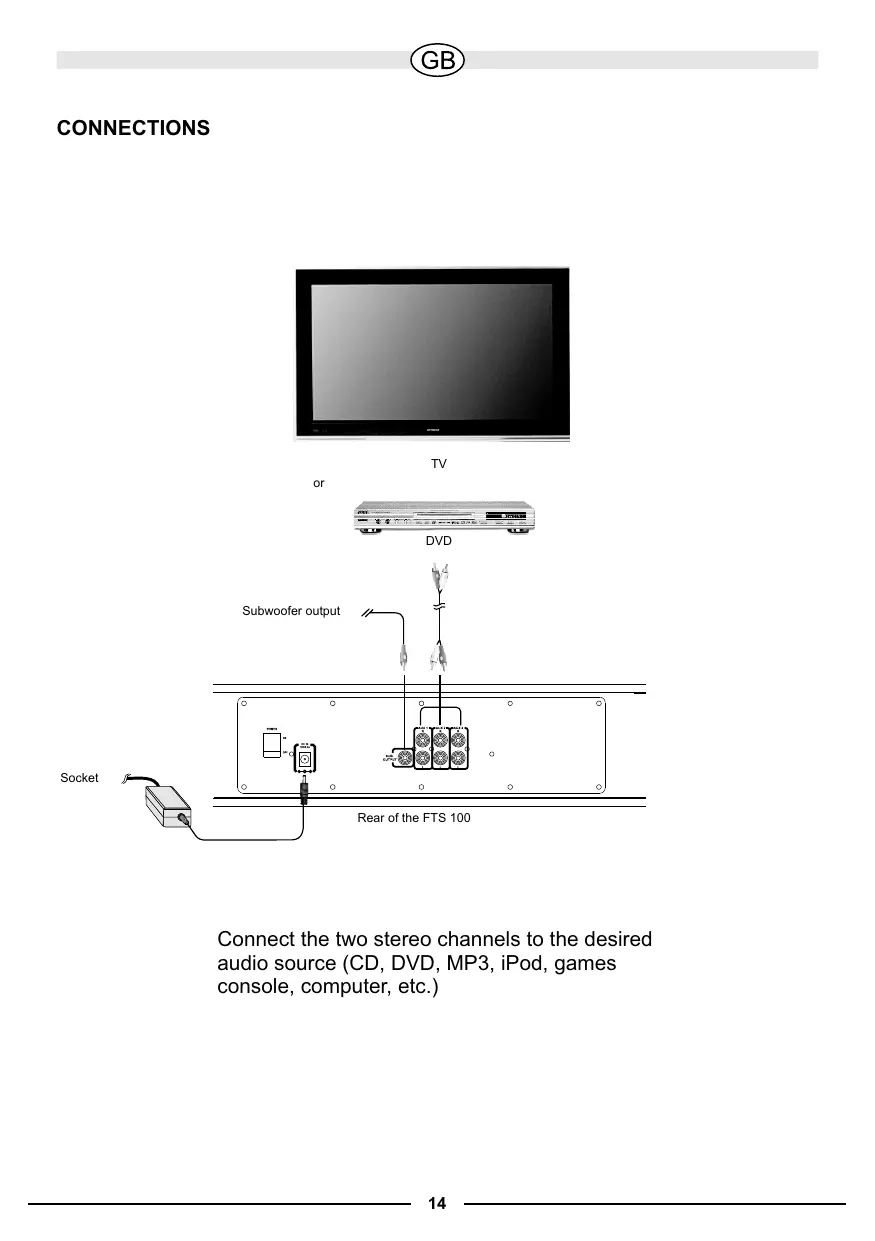
CONNECTIONS
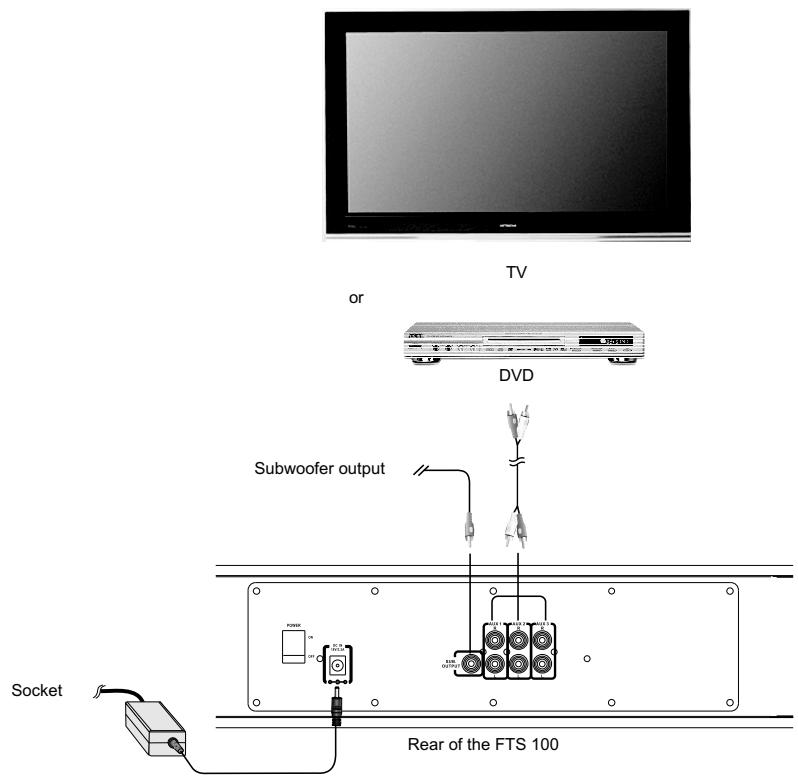
Connect the two stereo channels to the desired audio source (CD, DVD, MP3, iPod, games console, computer, etc.)
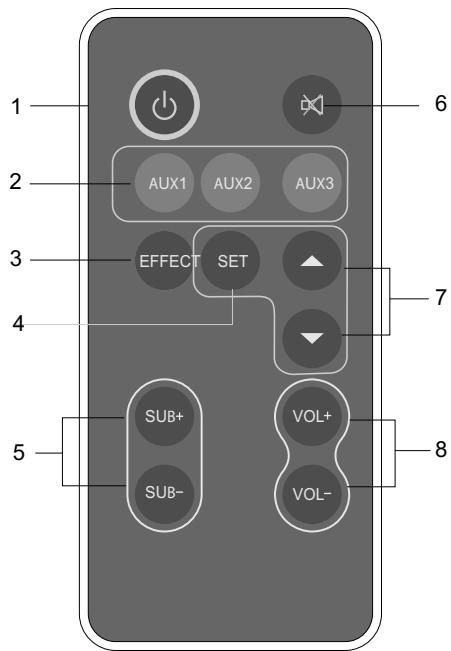
DESCRIPTION OF THE REMOTE CONTROL
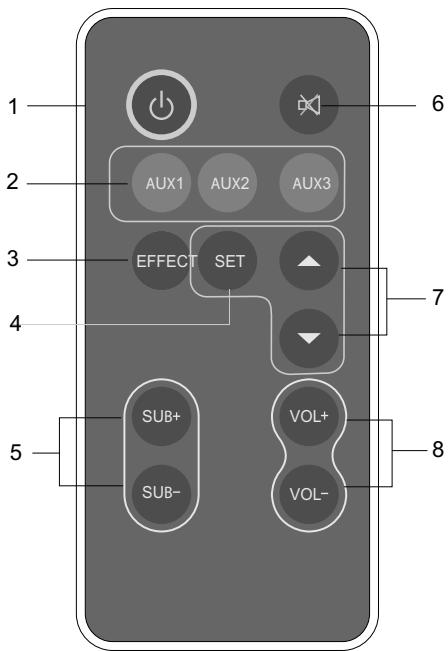
- Standby/Power Switches the device on/off.
- Input
AUX1: Press this button to activate the AUX1 input.
AUX2: Press this button to activate the AUX2 input.
AUX3: Press this button to activate the AUX3 input.
- Effect
Pressing this button will activate the 3D sound effect. Pressing the button again will deactivate the 3D sound effect.
4.Set
Button for setting the time.
5.Subwoofer Volume + / -
Increases/decreases the volume of the subwoofer.
6.Mute
Switches the sound on/off.
7.[▲][▼]
Press these buttons to set the desired time.
- Master Volume +/-
Increases/decreases the overall volume
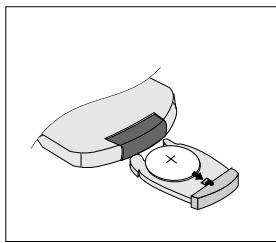
Inserting/replacing the battery
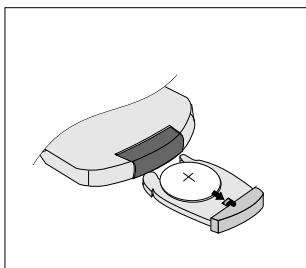
The remote control is powered by a pre-installed lithium battery. An isolating strip has been inserted to prevent the battery from running out before the device is used. Please remove this before the first use.
If the remote control doesn't work flawlessly, the battery must be replaced with a new battery of the same type.
Open the battery compartment. Remove the battery from the compartment in the direction of the arrow. Before removing the empty battery please observe its exact position. The "+" symbol must face upwards otherwise the remote control will not work and it could become damaged. Exchange the battery and slide the compartment closed again.
Battery disposal
Old batteries are hazardous waste and must be disposed of in accordance with current regulations.
INITIAL OPERATION
ON/OFF
Connect the separate mains adapter to the rear of the FTS 100. Connect the audio sources to the desired AUX inputs (RCA) on the rear of the device, as well as the subwoofer if available. Insert the mains adapter into an electric socket and switch on the FTS 100 using the power switch on the rear. Now press the STANDBY button on the front of the device or on the remote control. The device is now in the STANDBY mode.
INPUT MODE
Press the INPUT button on the front of the device and choose between AUX1, AUX2 and AUX3. You can select these inputs directly by using the AUX buttons (1, 2, 3) on the remote control.
VOLUME CONTROL
You can use the MASTER VOLUME controller on the front of the FTS 100 or the VOL (+/-) buttons on the remote control.
The volume of the subwoofer can be adjusted by using the SUB VOLUME (+/-) buttons on the remote control.
MUTE
If you press the MUTE button on the front or on the remote control, the sound of the FTS 100 will be muted. Pressing one of these buttons again will deactivate the mute function.
SETTING THE TIME
If you press the SET button on the remote control, the hours will start to flash. You can now set the correct time by using the “▲” “▼” buttons. Pressing the SET button again will make the minutes start to flash; use the same method to set the minutes. Confirm the correct time by pressing the SET button once again.
PLEASE NOTE
Please also observe the instruction manuals for the other connected devices.
Some DVD players deliver a very high output level. If distortions occur at high volumes, decrease the volume on the device by using the MASTER VOLUME controller; doing this will prevent causing damage to the amplifier or the speakers.
SPECIFICATIONS
OUTPUT POWER
Subwoofer (rated power) 30 W
Front / Centre speaker (rated power) 3 × 10 W
Remote control incl. battery
RCA cable
Instruction manual
Mains adapter
Subject to technical change.
Chere cliente, cher client,
Active/désactive la reproduction sonore.
7.[▲][▼]
Dimensions (L x W x P) 800 x 96 x 170 mm
Eléments fournis
Subwoofer (nominal) 30 W
Altavoz frontal / central (nominal) 3 × 10 W
- CeTeBOB BbIKIouaTeIb
2.BxoD nIy OTdIeIbHoro 6Ioka nITaHnIa - BbIXoI dIaScaBvpepa
- KOHTaKTHbI BxOd AUX1
- KoHTaKTbI BxOd AUX2
- KoHTaKTbI BxOd AUX3
PA3bEMbl
TV
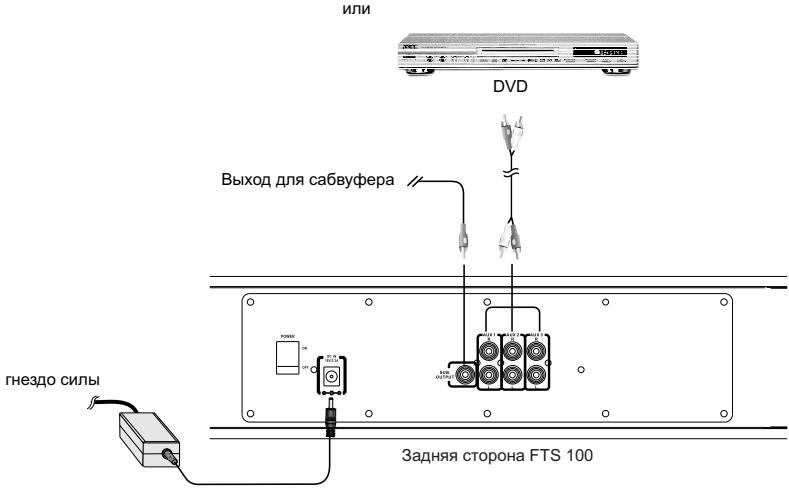
CoeHnHTe o6a CtepeoKaHaHa c HxKhbIM nCTOuHnKom 3Byka (CD, DVD, MP3, iPOD, nRpoBaJ npNCtAbKa, KOMNbIoTeP u T.d.)
ONICAHNE NylbTA DnCTAHcIOHHOTo YIpABJIeHnA
- Power/Standby
BkIIOaET/BbIKIOaET yCTPOIcTBO.
- Input
AUX1:HaKMMTe Ha 3Tu KHONKy, YTO6bl aKTINBnPoBaTb BxOJ AUX1.
AUX2:HaKMMTe Ha 3Tu KHONKy, YTO6bl aKTINBnPoBaTb BxOJ AUX2.
AUX3:HaKmnte Ha 3Tu KhoNky, YTo6bl aKtINBnPoBaTb BxOД AUX3.
- Effect
При нахати Na 3Ty KhoIGNky BkHIOyaeTcR 3ФФeKr 3D-Sound. ПocJIe eIe OJHoro haxatna Ha KhoIGNky 3ФФeKr 3D-Sound BbIKHIOyaeTcR.
- Set
KhoIka dIy yCTaHOBKn BpeMeHi.
- Subwoofer Volume +/-
YBENUHBAET/YMeHbIaET rPOMKoCTb ca6ByΦepa.
- Mute
BbIKHouaET/BKHouaET 3ByK.
- [▲][▼]
Haxmamte Ha 3TN KHOPIK, YTObI yCTaHOBnTb HxHHOe Bpemr.
- Master Volume +/-
YBéJIiUHbAeT/YMeHbShaetO6IyU rPOMKoCTb
BCTaBtB/3aMeHnTb 6aTapeiKy
IITAHHe NylbTa DY OcyuEcTBJareTcO T IITnEBOB 6aTapeiKn, BXoJaSeB KOMPJIeKT N BCTaBHeHHoB N yIbT DY. DnI npEdOTbPaAeHn pa3prAn Do EKcnIpyataun nynbTa DY 6blNa BCTaBHeHa n30InpyUoiqan noIOcka. Nepei nepBbIM nCNoJIb3OBAHm NylbTa DY ee CneDyET BbIHytb.
Ecnn nyIbT Ny He yHKUOnHpye T63ynpeuHo, 6aTaapeKc cNeIyE T3aMeHHTb Ha 6aTaapeKy TAKoro-Jke TIna.
OTKpoIte oTcEKДЯ 6aTapeiKn. BbInbTe 6aTaapeiKy u3 OTCeKa nO cTpeJIke. IpeXJe Yem BbHyTb N3pacXoIOBaHHyUo 6aTaapeiKy, 3aONMHnte, B KaKOM ToUHO NpOJOKeHn OHa hAnOuINacb. CmBON "+" DOJKeH yKa3bIBaTb BBepx, B npOTNBHom cnyae nyIbT y He 6yDet pa60TaTb n DaJKe MoKET BblTN i3 cTpor. 3aMeHnte 6aTaapeiKy n CHOBA 3aKpoIte OTcEK.
YtNi3aun6BaTapeek
CTapbIe 6aTapeKn OTHOcTcK OOCbIM OTXoJam IPOJnxKaT yTNJIIN3aCm CORNaCHO DeiCTByUOUsM PpeDnICAHnA M.
BKJIIOUCHNE
ON/OFF (BKJI./BbIKJI.)
IoiKIOUHTe OTdEhBbI 6NOK NITAHnHa 3aDHei CTOpOHe FTS 100. CoeINHte ayDNONCTOCHNIc C HxHbIMn BxODaMn AUX (KOHTaKTbIe) Ha 3aDHei CTOpOHe npIBopa, ecn nImeTc, taKxe i caSByep. BCTabTe 6NOK NITAHnBa CEteByo pO3ETky i BKIOUHTe FTS 100 c NOMOsbIO ceTEBO r BbIKIOuTaTeIHa 3aDHei CTOpOHe. Tepeb haxmnte Ha KhoNkY STANDBY Ha nepeJHnei CTOpOHe npIBopa IINn Ha PylBe DY. Tepeb npIBop haxoNTcB peXmme STANDBY (OxNiDaHnra).
INPUT MODUS (PEXKIM BBOIDA)
HaxmTe Ha KhoNky INPUT Ha nepeIdHe cToPoHe np6opa N BbI6epnTe AUX1, AUX2 nnn AUX3. C nomouy KoHOnkAUX (1, 2, 3) Ha nyIbTe Dv BxOdb MoKHO Bbl6npaTb Haprymyo.
PEYJINPOBAHNE POMKOCTN
Mожно BOCNoJIb3OBAtbcpeулЯTopoM MASTER VOLUME ha nepeДнeСтороH FTS 100 nIи KhoNkamu VOL (+/-)Ha nIyIte DY.
C nOMOJIbIO KHOJOK SUB VOLUME (+/-) Ha nyJIbTe IY MOxHOb peRyIINpOBaTb rPOMKocTb ca6ByΦepa.
MUTE(BbIKJIIOUOHEHNE3BYKA)
Ecnn HaxaTb Ha KhoNky MUTE Ha nepedHei cToPoHe npnbopa nnHa nYbTe Dy, 3Byk FTS 100 BblKIOUaETc. NOBTOpHOe HaxaTne Ha OdHy n3 3tNX KHOJOK ONrTaB BKIIIOUaET 3ByK.
HACTPOIKA BPEMEHN
Ecnn HaxaTb Ha KhoNky SET Ha npIbTe DY, INHdkaTOp BpeMeHn HauHET MraTb. C NOMOu bKHOJOK 一 " 一 " MOxHo yCTaHOBHTb HuxHoe BpEmr. Pocne eUe odHoro Haxatna Ha KhoNky SET HaunHaet MraTb INHdkaTOp MInHy, NOBtOpnte pOceDpy No ppebldyuSeMy ppeIIOXeHNIO. 3aTeM npabINbHoe BpeMn OndTBepXdaETcA eUe pa3 KhoNkoi SET.
ПОНМЕЧАЙ
YuHTbIbaTe n pyKOBODCTBa nO 3KcNpyaTauIN dpynX pOJKNIOHeHHbIX np6bOpOB.
HekotopbIe npoIrpbIbATEJI DVD daOT ouEnb BbICOKN BbIXoHDou ypOBen. Ecnn
Pn BBICOKOM yPOBHe rPOMKOCTN BO3HNKaOT NCKaKeHn, CJeDyET yMeHbSNTb
rPOMKOCTb npi6opa c NOMOsbU peRyTAToPA MASTER VOLUME, YTO6bl
PpeDfTbPaTtB NOBpeKdEHe yCNIITeJI nII rPOMKOrOBOpnteJIeN.
BbIXOHa MOsHOCTb
Ca6ByΦep (HomHaJIbHaЯ MoIHoCTb) 30BT
ΦροHTaJIbHbI/ζεHTpaJIbHbI ΓρOMKOrObpιTeJIb
(HomHaJIbHaЯ MoIHOCTb) 3x10Bt
MaKc. BbIXoHaMoUHocTb (IMnYJbCha MoUHocTb) 150BT
Pa3MepbI (UxBxΓ) 800x96x170MM
OBbEM IOCTABKN
BO3MOXHbI TEXHnueCKNE I3MEHEHnI.
D
Congratulations! You have made a wise selection in becoming the owner of a Audiovox equipment. Due to high quality Audiovox products have earned an excellent reputation through the western world. And this high quality standard enables us to grant a 2-years warranty for Audiovox products. The equipments are checked and tested continuously during the entire production process. In case you have problems with your Audiovox equipment, kindly observe the following:
- The 2-years guarantee period commences with the purchase of the component and is applicable only to the original owner.
- During the guarantee period we will rectify any defects due to faulty material or workmanship by replacing or repairing the defective part at our discretion. Further claims, and in particular those for price reduction, cancellation of sale, compensation for damages or subsequential damages, are excluded. The guarantee period is not altered by the fact that we have carried out guarantee work.
- Unauthorized tampering with the equipment will invalidate this guarantee.
- Consult your authorized dealer first, if guarantee service is needed. Should it prove necessary to return the component to the factory, please insure that the component is packed in original factory packing in good condition the quality control card has been filled out and enclosed with the component, your enclose your receipt as proof of purchase.
- Excluded from the guarantee are: • Illuminates • Wear parts • Batteries • Shipping damages, either readily apparent or concealed (claims for such damages must be lodged immediately with forwarding agent, the railway express office or post office). • Scratches in cases, metal components, front panels, etc. (You must notify your dealer directly of such defects within three days of purchase.) • Defects caused by incorrect installation or connection, by operation errors (see operating instructions), by overloading or by external force. • Equipments which have been repaired incorrectly or modified or where the case has been opened by persons other than us. • Consequential damages to other equipments. • Reimbursement of costs, without our prior consent, when repairing damages by third parties.
GARANTIEKARTE WARRANTY CARD
Typ/Type
No warranty without receipt!
AUDIOVox®
- F
- Safety precautions
- Instructions for disposal
- DESCRIPTION OF THE FTS 100
- CONNECTIONS
- DESCRIPTION OF THE REMOTE CONTROL
- Inserting/replacing the battery
- Battery disposal
- INITIAL OPERATION
- ON/OFF
- INPUT MODE
- VOLUME CONTROL
- MUTE
- SETTING THE TIME
- PLEASE NOTE
- SPECIFICATIONS
- OUTPUT POWER
- Eléments fournis
- PA3bEMbl
- ONICAHNE NylbTA DnCTAHcIOHHOTo YIpABJIeHnA
- BCTaBtB/3aMeHnTb 6aTapeiKy
- YtNi3aun6BaTapeek
- BKJIIOUCHNE
- ON/OFF (BKJI./BbIKJI.)
- INPUT MODUS (PEXKIM BBOIDA)
- PEYJINPOBAHNE POMKOCTN
- MUTE(BbIKJIIOUOHEHNE3BYKA)
- HACTPOIKA BPEMEHN
- ПОНМЕЧАЙ
- BbIXOHa MOsHOCTb
- OBbEM IOCTABKN
- D
- GARANTIEKARTE WARRANTY CARD
- AUDIOVox®
Brand : AUDIOVOX
Model : FTS 100
Category : Soundbar