ManualGo.com
PM-9906 - Turntable SHERWOOD - Free user manual and instructions
Find the device manual for free PM-9906 SHERWOOD in PDF.


Download the instructions for your Turntable in PDF format for free! Find your manual PM-9906 - SHERWOOD and take your electronic device back in hand. On this page are published all the documents necessary for the use of your device. PM-9906 by SHERWOOD.
USER MANUAL PM-9906 SHERWOOD
PRECAUTIONS Thank you for purchasing this fine product - STEREO TURNTABLE. Taking time to read these operation instructions carefully. Read this manual carefully before using the unit and be sure to store the manual in a safe place for future reference.
This product should be operated only from the type of power source indicated on the marking label. If you are not sure of the type of power supply to your home, consult your product dealer or local Power Company
2. Do not block the ventilation holes
Do not block the ventilation holes. If objects are placed on top of this model, the heat generated inside will not be able to dissipate. This will cause the internal temperature to rise and will adversely affect the performance of the various parts. Remember that a great deal of heat is generated when the model is used for long periods of time at high power out put levels. OPERATION PRECAUTIONS
1. Always clean the stylus both before and after
playing à record with a soft brush, and try to make it a rule to clean the record with a soft brush and try to make it a rule to clean the records with a good quality cleaner.
2. Be careful not to make the turntable vibrate while
a record is playing, since this can result in damage to the stylus and record.
3. When clanging over the headshell, clamp the
tonearm to the arm rest so that the tonearm shaft is not strained in any way.
3. Installation precautions
Do notinstall the unit in any of the following locations since this may result in a deterioration in performance or malfunction: + Locations exposed to direct sunlight or near object radiating heat such as heating appliances + Locations exposed to moisture or humidity. + Cartridge may pick up slight sound pressure or vibrations of the speakers coming along the floow or though the air resulting in feedback or howling sound. Find a location which is very stable and vibration free. + The legs have functions for adjusting the height of the unit itself. Adjust the legs to stabilize the main body horizontally..
4. The model may not be able to perform at its best in
an extremely cold envirnment. The optimum ambient temperature range is 0°C to 35°C.
4. Place only one record at a time on the platter. If
two or more records are sacked on the platter, the stylus will not make proper contact with the grooves, and this will impair the quality of reproduction
5. Volatile materials should not be used, such as :
alcohol, thinner, benzone etc. They may remove the painter or damage the lustre, please avoid.
Pitch Control Slider (+/- 10%) Tonearm Cueing Lever Arm Rest Anti-skate Knob Stylus-P ressure Ring Counterweight Position for Preparing Cartridge Hinge for Dust Cover
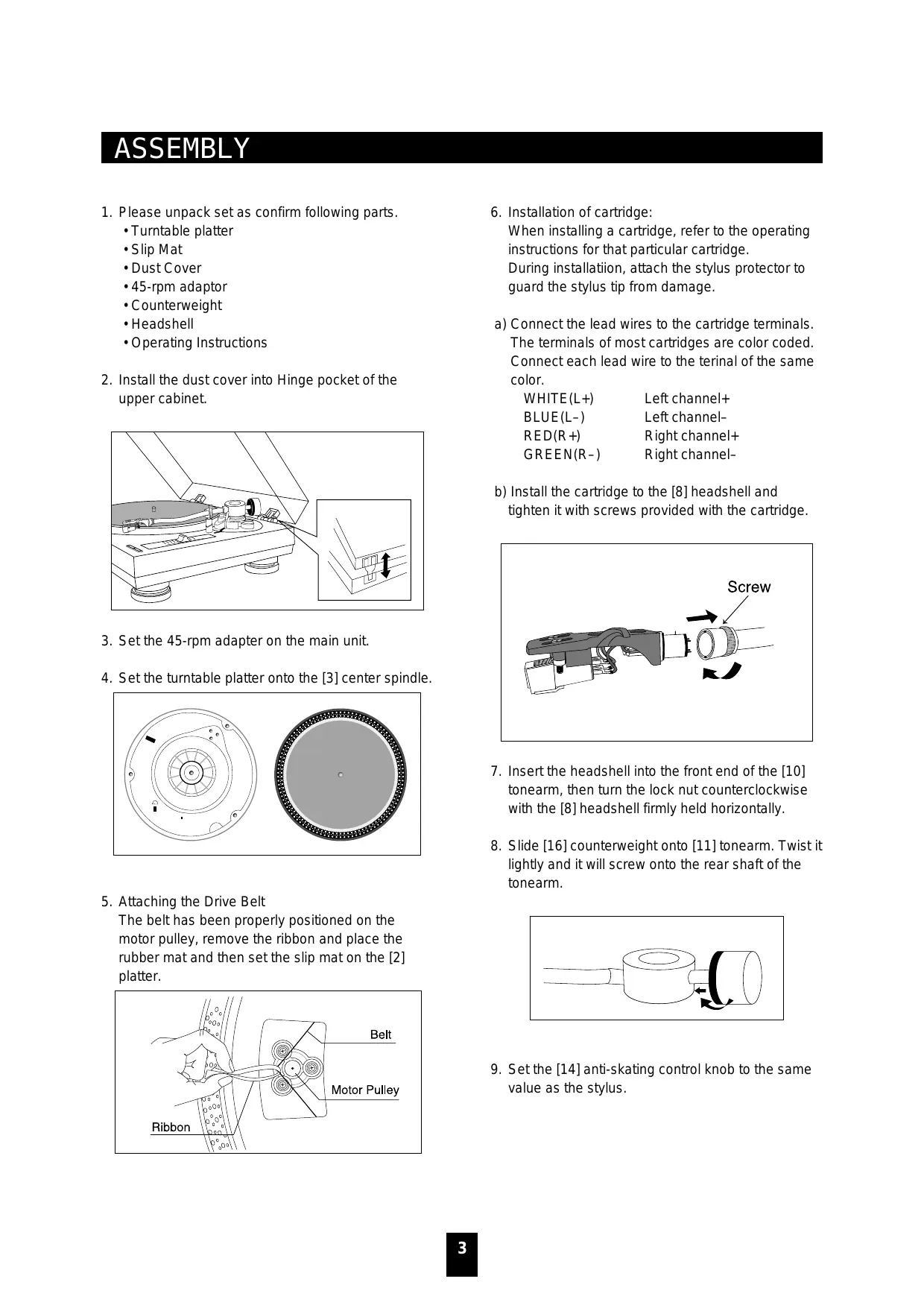
1. Please unpack set as confirm following parts.
-Turntable platter «Slip Mat
- Dust Cover +45-rpm adaptor + Counterweight *Headshell + Operating Instructions
2. Install the dust cover into Hinge pocket of the
3. Setthe 45-rpm adapter on the main unit.
4. Setthe turntable platter onto the [3] center spindle.
5. Attaching the Drive Belt
The belt has been properly positioned on the motor pulley, remove the ribbon and place the rubber mat and then set the slip mat on the [2] platter.
Installation of cartridge: When installing a cartridge, refer to the operating instructions for that particular cartridge. During installation, attach the stylus protector to guard the stylus tip from damage a) Connect the lead wires to the cartridge terminals. The terminals of most cartridges are color coded. Connect each lead wire to the terinal of the same color. WHITE(L+ Left channel+ BLUE(L-) Left channel- RED(R+) Right channel+ GREEN(R-) Right channel- b) Install the cartridge to the [8] headshell and
tighten it with screws provided with the cartridge. Screw
. Insert the headshell into the front end of the [10] tonearm, then turn the lock nut counterclockwise with the [8] headshell firmly held horizontally. . Slide [16] counterweight onto [11] tonearm. Twist it lightly and it will screw onto the rear shaft of the tonearm. Setthe [14] anti-skating control knob to the same value as the stylus.
Level Balance Adjustment
1. Setthe ANTI-SKATE knob to “0”.
2. Release the arm clamp and move the tonearm to
the space between the arm rest and the platter, taking care not to damage the stylus
3. Setthe CUEING lever to the down position
4. Support the headshell's finger-lift with one hand
and attain the level balance by turning the counter- weight either clockwise or counter-clock wise. “Level balance" means that the tonearm is parallel to the record on the platter, and that the tonearm pipe, therefore, should not tilt toward the counterweight side or the headshell side.
5. Return the tonearm to the arm rest and fasten the
6. Since the tracking force is zero when the tonearm
is balanced level, turn just the tracking-foce scale ring in front of the counter-weight, and set the “0” on the scale to the index line on the shaft. When doing so, be sure to hold the counterweight with the other hand so that it does not turn together with the scale ring. Tonearm properly balanced Counterweight Headshell Headshell end is too heavy-Turn the counter weight in this direction of arrow.
Counterweight end is heavy-Tum the counterweight the direction of the arrow. Es Ps
Tracking Force Adjustment Turning the counterweight, set the correct tracking force opposite the index line on the counterweight shaft. The tracking-force scale ring has 0.25g steps and one full turn of the counterweight will yield a tracking force of 3g. Scale ring \ NOTE: The MG-2831 cartridge that comes with the set has a tracking force of 2g. Turn the counterweight to the 2 mark. Anti-Skating Adjustment To adjust the Anti-skating mechanism, turn the Anti-Skate Knob so that the number corresponding to the required tracking force is opposite the index line The numbers on the Anti-Skate Knob correspond to 1g of tracking force. Index line Anti-skate knob
. Turn the (On/Off Switch) clockwise to turn on the power, the speed indicator and the strobe- iluminator, which is located beneath the On/Off switch, will light up. . Place a record on the slip mat. When playing a 45- rpm record with a large center hole, place the 45- rpm adapter on the center spindle. . Setthe speed to match the record. . Remove the stylus protector from the Headshell Stylus, release the Tonearm clamp . Setthe cueing lever to the up position . Press the Start/Stop Button, the turntable platter will start to rotate.
7. Move the tonearm over he desired groove.
8. Setthe cueing lever to the down position, the
tonearm will descend slowly onto the record and begin playing.
9. When play is finished, raise the cueing lever, move
the tonearm onto the Tonearm clamp.
10. Press the Start/Stop Button to stop the platter
from rotating. Turn the On/Off Switch counterclockwise to turn off the power. SUSPEND PLAY Set the cueing lever to “UP” position during play, the stylus tip of the cartridge will be lifted from the record
\ J This set's phono cables and ground lead are attached to the rear panel of the turntable. The phono cable with the white plug is for the left channel and the one with the red plug is for the right channel. The thin wire with the Y-shaped connector at the end is the ground lead.
This should be firmly connected to the ground terminal on the mixer. The way in which the phono cables are attached will depend on the type of cartridge used. Read the instructions in the booklet that comes with the cartridge as well as the operating instructions of the mixer and connect the phono cables properly. Finally, plus the power cord into the power consent.
STYLUS REPLACEME The life expectancy of the stylus tip is 500 hours. For k the sake of maximum sound quality reproduction, we Stylus tip recommend replacement within the minimum time limit.
1. The stylus tip is replaced by grasping the stylus
holder and pulling it away from the body of the cartridge.
2. The new stylus tip s then inserted by pushing it into
Remove the headshell from thd tonearm, and the screws that hold the cartridge. Pull out the four lead wires from the cartridge itself. To protect the lead wires at this point, remove the terminal pins with É— Screws pliers or the tip of the screwdriver. Washer <T: Headshell The terminals on the accessory headshell are aligned according to the arrangement below. Check the location and polarity of each of the cartridge's terminal pins and then connect the lead wires, taking care not to get the polarities mixed up. Lead wire Red : Right channel CR Terminal pin White : Left channel N Cartridge Green _: Right channel ground Blue : Left channel ground
GENERAL SPECIFICATION APPLICATION : This spectftcation applies to the belt drive turntable unit PM-9805 STANDARD TEST CONDITION : 2-1 Ambient Temperrature 2-2 Relative Humidity 23A2LC 65% À 5% NOTE : Measurements can be carried out betwee 5LC and 45% to 85% relative humidity. TURNTABLE SECTION: 3-1_ | Type 2-speed full manual 3-2 Motor DC motor 3-3 Driving Method belt drive 3-4 Turntable plater 330mm dia. Plastic 3-5 Speeds 33-1/3 and 45 rpm 3-6 Wow and Flutter Less than 0.25% WRMS{(JIS WTD) 3-7 SIN ratio More than 50 dB(DIN-B) 3-8 Pitch Controls + 10% 3-9 Starting Time Less than 1 sec. 3-10 Time for speed change Less than 1 sec. 3-11 Speed to lerance at pitch=0 Within +/- 1.3% 3-12 High of cue (first track) Normal 7-9.5mm, Limit 6-10.5mm TONEARM SECTION 4-1 Type Static balanced S-shaped tone arm with detachable headshell 4-2 Effective Arm Length 220mm 4-3 Overhang 10mm 4-4 Tracking error Less than 3 degree 4-5 Tracking Force Adiustment range 0-4g 4-6 Applicable cartidge weight 6-10g 4-7 Anti-skating range 0-4g 4-8 Tracking force range of attached cartridge 3.5 #/-0.5g . GENERAL SECTION: 5-1 Power Supply AC 230V -50Hz 5-2 Power consumption 8 Watts 5-3 Dimensions 450(W) x 350(D) x 139(H) mm 5-4 Weight 4.38Kgs . ACCESSORIES SUPPLIED . SPECIFICATION:
ROUBLE SHOOTING Sometimes, an operational fault can be mistaken for a malfunction or failure. Check the following points and see if you can find the symptoms of the trouble below before you get in touch with the serviceman. If you cannot locate the symptoms, contact your nearest dealer. Symptom Possible Trouble Remedy Platter does not Power cord is unplugged Plug cord securely into wall outlet. rotate. No Sound Phono cables are not connected properly. Connect cables securely to the PHONO input jacks on the amplifier(see page 5). Headshell is not properly attached. Fimly secure tonearm locking collar (see page 2). Cartridge lead wires are loose. Attach lead wires inside headshell properly. Amplifier is not being operated properly. Read the operating instructions that come with (function switch, tape monitor switch, speak amplifier. switches, etc. are not set correctiy). Musical tempois Platter speed is not set properly. Refer to “Controls and operation” and their off. uses on page 4. SPEED ADJUSTMENT knobis not set Refer to “Operating Procedure” on page 5. properly in accordance with the platter speed. Excessive noise. Ground lead is not connected. Connect properly to the amplifier's ground terminal (see page 6). Tracking for is not correct. Refer to tracking force adjustment on page 3. Dust or dirt has collected on the stylus tip. Clean the stylus tip with a soft brush Dust or dirt has collected on the record Clean the record with a good quality cleaner. Sound is distorted. | Dust or dirt has collected on the stylus tip. Clean the stylus tip with a soft brush Tracking force is not correct. Refer to tracking force adjustment on page 3. Stylus is worn. Replace with new stylus Amplifier's tone controls are settoo high. Set tone conrols to lower position Tonearm does not | Cueing Laver is setto UP position. Setto DOWN position descend. Trading force is not correct. Refer to tracking force adjustment on page 3. intermittent sound. | Tracking force is not correct. Refer to tracking force adjustment on page 3. Stylus is worn. Replace with new stylus Record is scratched or warped. Replace record.