
AX860 80PLUS PLATINUM - Food CORSAIR - Free user manual and instructions
Find the device manual for free AX860 80PLUS PLATINUM CORSAIR in PDF.


| Product type | ATX Power Supply |
| Model | AX860 80PLUS PLATINUM |
| Brand | Corsair |
| Rated power | 860 W |
| Certification | 80 PLUS Platinum |
| Dimensions (L x W x H) | 150 x 180 x 86 mm |
| Weight | 2.5 kg |
| Input voltage | 100-240 V AC, 50-60 Hz |
| Fan | 120 mm temperature-controlled |
| Semi-passive mode | Yes (fan stops at low load) |
| Modular cables | Fully modular, flat |
| Key features | Digital control, Corsair Link, self-test, OVP/OCP/OTP/SCP protections |
| Max current on +12V rail | 71.7 A (860 W) |
| MTBF | 100,000 hours |
| Maintenance and cleaning | Unplug the device, clean with a soft dry cloth. Do not use any liquid. |
| Safety | Do not open the unit, contains high voltages. Indoor use only. Do not expose to moisture. |
| Spare parts and repairability | No user-serviceable parts. Use only the provided cables. |
| General information | High-end power supply for desktop PCs, compatible with ATX12V v2.4 and EPS12V. |
Frequently Asked Questions - AX860 80PLUS PLATINUM CORSAIR
User questions about AX860 80PLUS PLATINUM CORSAIR
0 question about this device. Answer the ones you know or ask your own.
Ask a new question about this device
Download the instructions for your Food in PDF format for free! Find your manual AX860 80PLUS PLATINUM - CORSAIR and take your electronic device back in hand. On this page are published all the documents necessary for the use of your device. AX860 80PLUS PLATINUM by CORSAIR.
USER MANUAL AX860 80PLUS PLATINUM CORSAIR
DIGITAL ATX POWER SUPPLY

CORSAIR®
corsair.com
English 4
Français 11
Deutsch 19
Italiano 27
Espanol 34
Pocci 41
Congratulations on the purchase of your new Corsair Professional Series AX1200i digital ATX power supply.
The Corsair AX1200i is a groundbreaking new design. It is a departure from traditional PSU designs and is packed with features that will make building your ultimate dream PC even more enjoyable. The AX1200i introduces some new and exciting technologies, so please read below for more information.
Product Features
Digitally Controlled Power
Unlike traditional power supply designs, the Corsair AX1200i uses a Digital Signal Processor (DSP) for optimized efficiency and tighter voltage regulation, which improves overall system stability and component reliability.
Quiet, Efficient Operation
Upgrading to digital provides increased efficiency. The AX1200i is certified 80 PLUS® Platinum, which results in lower heat generation and a quieter fan profile. The AX1200i is so efficient that the 140mm fan doesn't even spin at low loads for completely noiseless power delivery.
Corsair LinkTM
The built-in Corsair Link™ functionality shows you how your AX1200i is performing at any given moment and lets you quickly tweak its performance. Server-inspired diagnostic tools monitor real-time efficiency, power usage, configurable over-current protection points and fan profiles.
Brilliant Design
The fully modular cables make it easy to install and the self-test switch lets you quickly determine if the AX1200i is functioning normally before you even attach cables to your motherboard.
Technology and Benefits
Digital Control
The AX1200i Digital ATX Power Supply features an advanced control architecture to produce outstanding dynamic response. It features a true digital engine that provides superior on-the-fly performance optimization across the full operating range while maintaining stable operation.
80 PLUS* Platinum Efficiency
The sophisticated electrical design, incorporating advanced hybrid digital control and state of the art magnetics delivers extremely high energy efficiency (92% and above).
- User-Selectable Over-Current Protection
The AX1200i has a massive 100.4 Amp (1204.8 Watt) single +12V rail, which makes it the ideal power supply for ultra-high end multi-GPU systems based around power-hungry CPUs. If you prefer multi-rail architecture, the PCI-E Over-Current Protection trip points can be configured individually via the Corsair Link™ Dashboard software.
Outstanding DC Voltage Regulation
Due to its digital design, the AX1200i delivers exceptionally stable power over the whole load range and automatically compensates for DC output cable voltage drop,
ensuring tight DC output voltage regulation without the ripple/noise, transient response, and converter stability drawbacks associated with conventional power supply designs.
Low DC Output Voltage Ripple and Noise
The AX1200i features individual DC-DC regulation for 3.3V, 5V and 12V rails, and secondary side synchronous rectification, utilizing MOSFETs that have lower losses than the conventional output rectification schemes. An advanced 4-layer modular connector board PCB ensures a better ground return plane, lower resistance and low voltage drops. This, combined with circuit trace optimization and advanced filtering techniques, helps to minimize ripple and noise.
- Reduced Component Count and Increased Reliability
The digital control of the AX1200i eliminates many external components required by more conventional PSU solutions to offer an extremely small, high density, high reliability solution that allows incremental space to add extra features - like real time parameter monitoring and power supply control.
User Friendly Features
Fully Modular Cable System
The fully-modular, low-profile cable system provides maximum flexibility when building or upgrading your PC, and maximum airflow through your chassis. This allows you to utilize only the cables that you need, reducing cable clutter and maximizing the cooling performance of your PC.
- Ultra Low Noise Design
The AX1200i utilizes a low-noise, thermally-controlled 140mm fan, and employs sophisticated techniques to enhance cooling performance and reduce noise. This includes a specially designed PCB that channels airflow to reduce back-pressure and maximize the cooling effect of the airflow. The fan remains off under light load conditions and can be controlled via a graphical user interface.
Self Test Switch
The power supply can be validated prior to system installation via a self test switch, which confirms all DC output voltage rails are present and the fan is functional.
Safety and Protection
Over-Voltage Protection (OVP)
Over-voltage protection for the 12V, 5V and 3.3V DC outputs is required to comply with the ATX specification. OVP shuts down the PSU in the event that the DC outputs exceed a set level, determined by the PSU manufacturer. The minimum voltage levels required for compliance are 13.4V for the +12V rail(s), 5.74V for the +5V rail and 3.76V for the 3.3V rail.
Over-Current Protection (OCP)
The AX1200i features OCP on the 3.3V, 5V and 12V rails. OCP ensures that the output of the DC voltage rails remains within safe operating limits. The AX1200i can be configured as a single rail or multi-rail OCP solution.
Over-Temperature Protection (OTP)
OTP ensures that the PSU will shut down when the internal temperature reaches a set point. This is usually as a result of internal current overloading or a fan failure.
Short-Circuit Protection (SCP)
A short-circuit is defined as any output impedance of less than 0.1 ohms. Amongst other things, SCP ensures that the PSU shuts down should the 3.3V, 5V and 12V rails short to any other rail, or to ground. It also ensures that no damage should occur to the unit, or your PC's components, in the event of a short.
Power Supply Specifications
Dimensions: 150mm(W) × 86mm(H) × 200mm(L)
MTBF:100,000Hours
Package Contents
- Corsair Professional Series power supply unit
Modular cable set - User Manual
AC power cord
Cable ties
Mounting screws - Corsair case badge
- Carrying bag
- Corsair Link™ Digital interface cable
Corsair Link™ USB Dongle

Corsair Link™ Digital interface cable

Corsair Cable Configuration
| AX1200i | |||
| Qty | Length | Connector/Cable | |
| 1 | 610mm ± 10mm | 1 | ATX Cable 24-PIN (20+4) |
| 2 | 650mm ± 10mm | 1 | EPS/ATX12V Cable 8-PIN (4+4) |
| 6 | 600mm ± 10mm | 1 | PCI-E Cable 8PIN (6+2) |
| 3 | 700mm ± 10mm | 4 | SATA Cable (4 SATA) |
| 1 | 850mm ± 10mm | 4 | SATA Cable (4 SATA) |
| 3 | 750mm ± 10mm | 4 | Peripheral Cable (4 PIN) |
| 2 | 101mm ± 5mm | 1 | Floppy Drive Cable (4 PIN) |
| 1 | 800mm ± 10mm | 1 | PMBUS Cable (4PIN) |
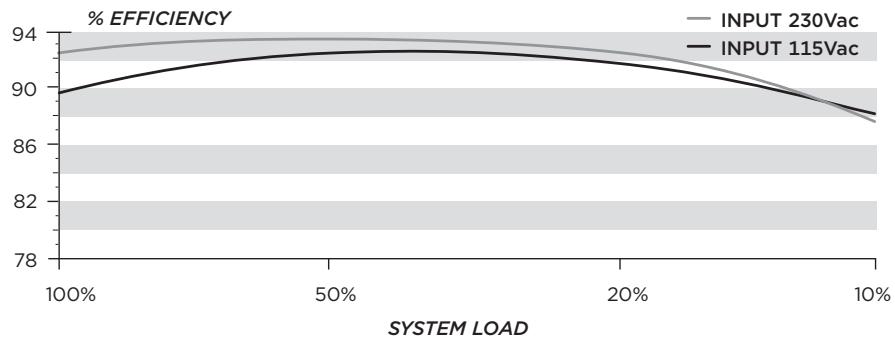
Power Supply Efficiency
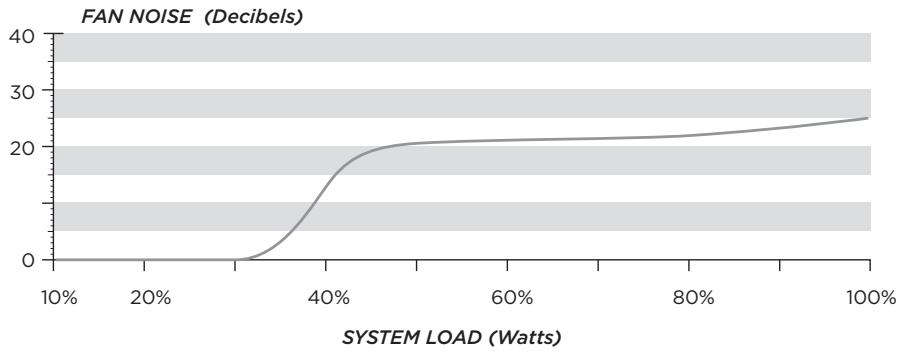
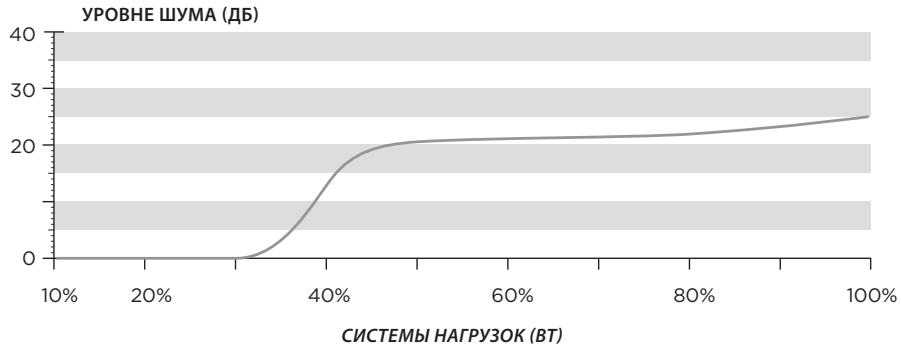
Power Supply Fan Noise Curve
Using the Self Test Feature
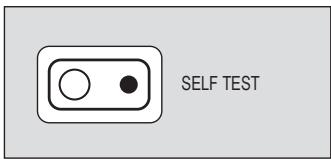
In order to use the self-test feature, please follow the steps below.
- Connect the PSU to an AC power source, and flip the power indicator on the back of the PSU to the On position (I).
- Press the self-test button on the modular connector side of the PSU.
- If the button lights up green and the fan spins for a moment, you're good to go!
- If the button lights up red or does not light up at all, please contact Corsair customer service for further technical support.
Installing your New AX1200i
Step A: Removing your existing power supply
If you are building a new system, skip to Step B.
- Disconnect the AC power cord from your wall outlet or UPS and from the existing power supply.
- Disconnect all the power cables from your video card, motherboard and all other peripherals.
- Follow the directions in your chassis manual and uninstall your existing power supply.
- Proceed to Step B.
Step B: Installing the Corsair Gaming Series power supply
- Make sure the power supply's AC power cable is not connected.
- Follow the directions in your chassis manual and install the power supply with the screws provided.
- The main 24-pin power cable has a detachable 4-pin mechanism in order to support either a 24-pin or a 20-pin socket on the motherboard.
a. If your motherboard has a 24-pin socket, you may connect the 24-pin main power cable from the power supply directly to your motherboard.
b. If your motherboard has a 20-pin socket, you must detach the four-pin cable from the 24-pin connector, and then plug the 20-pin cable onto your motherboard without connecting the four-pin connector.
- Connect the eight-pin +12V (EPS12V) cable to the motherboard..
a. If your motherboard has an eight-pin +12V socket, connect the eight-pin cable directly to your motherboard.
b. If your motherboard has a four-pin socket, detach the four-pin from the eight-pin cable, and then plug this four-pin cable directly to your motherboard.
WARNING: The detachable four-pin from the 24-pin main connector is not a "P4" or "+"12V" connector. Serious damage can be caused if you use it in place of a "P4" or "+"12V" connector.
- Connect the peripheral cables, PCI-Express cables, and SATA cables.
a. Connect the peripherals cables to your hard drive and CD-ROM/DVD-ROM power sockets.
b. Connect the SATA cables to your SATA SSD or hard drive's power sockets.
c. Connect the PCI-Express cables to the power sockets of your PCI-Express video cards if required.
d. Connect the peripheral cables to any peripherals requiring a small 4-pin connector.
e. Make sure all the cables are tightly connected.
- Connect the AC power cord to the power supply and turn it on by pushing the switch to the ON position (marked with "I").
Using Corsair Link™ with your New AX1200i
Before you are able to monitor your new PSU with Corsair Link™ you must connect the power supply to an internal USB header using the Digital Interface Cable and USB Dongle.
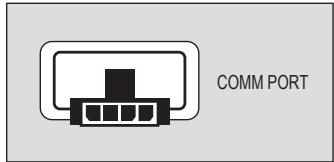
- Plug one end of the Digital Interface Cable into the COMM PORT of the AX1200i, seen here:
- Plug the other end of this cable into the USB Dongle, as shown below.
- Plug the other end of the USB Dongle into a standard USB header on your motherboard. (Check your motherboard manual for locations and compatibility).
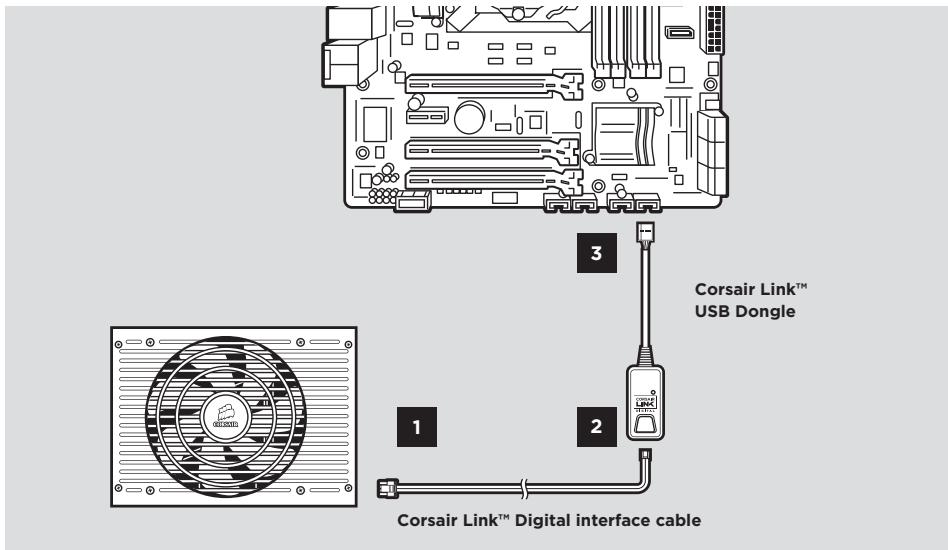
- Download the Corsair Link Dashboard software from www.corsair.com and follow the instructions.
Important Safety Information CAUTION ELECTRIC SHOCK HAZARD!

- Install in accordance with all manufacturer instructions and safety warnings. Failure to do so may result in damage to your power supply or system, and may cause serious injury or death.
- High voltages are present in the power supply. Do not open the power supply case or attempt to repair the power supply; there are no user-serviceable components.
- This product is designed for indoor use only.
- Do not use the power supply near water, or in high temperature or high humidity environments.
- Do not install near any heat sources such as radiators, heat registers, stoves, or other apparatus that produce heat.
- Do not insert any objects into the open ventilation or fan grill area of the power supply.
- Do not modify the cables and/or connectors included with this power supply.
- If this power supply uses modular cables, use only manufacturer supplied cables. Other cables might not be compatible and could cause serious damage to your system and power supply.
- The 24-pin main power connector has a detachable 4-pin connector. This 4-pin connector is not a P4 or ATX 12V connector. Do not force this cable in the P4 or ATX +12V socket on the motherboard.
- Failure to comply with any manufacturer instructions and/or any of these safety instructions will immediately void all warranties and guarantees.
Safety and Agency Approvals
FCC FCC Rules Part 15, Class B
ICES ICES-003
CE EN 55022:2006 + A1:2007, Class B
EN61000-3-2:2006+A1:2009+A2:2009 Class A
EN61000-3-3:2008
EN55024:1998 + A1:2001 + A2:2003
IEC61000-4-2
IEC61000-4-3
IEC61000-4-4
IEC61000-4-5
IEC61000-4-6
IEC61000-4-11
UL/CUL UL60950-1
CSA C22.2 NO.60950-1
C-Tick/RCM AS/NZS CISPR 22:2009
AS/NZS 4417
TUV EN 60950-1
CB IEC 60950-1
CCC GB4943
GB9254
GB17625.1
BSMI CNS14336
CNS13438
GOST R IEC 60950-1-2005
R 51318.22-99
R 51318.24-99
R 51317.3.2-2006
R 51317.3.3-99
IRAM IEC 60950-1
KC Mark K 60950-1(2006-12), K00022(2009-12), K00024(2009-12)
ROHS 2002/95/EC, Restriction of Hazardous Substances Directive
WEEE 2002/96/EC, Waste Electrical and Electronic Equipment Directive
ROHS China Order No.39, Administration on the Control of Pollution Caused By
(China) Electronic Information Products
The sophisticated electrical design, incorporating advanced hybrid digital control and state of the art magnetics delivers extremely high energy efficiency (92% and above).
FCC FCC Rules Part 15, Class B
ICES ICES-003
CE EN 55022:2006 + A1:2007, Class B
EN61000-3-2:2006 Class D
EN61000-3-3: 1995 + A1:2001 + A2:2005
EN55024:1998 + A1:2001 + A2:2003
IEC61000-4-2:1995 + A1:1998 + A2:2000
IEC61000-4-3:2006
IEC61000-4-4:2004
IEC61000-4-5:2005
IEC61000-4-6:2003 + A1:2004 + A2:2006
IEC61000-4-8:1993 + A1:2000
IEC61000-4-11:2004
UL/CUL UL60950-1
CSA C22.2 NO.60950-1
C-Tick/
RCM AS/NZS CISPR 22:2009
AS/NZS 4417
TUV EN 60950-1
CB IEC 60950-1
CCC GB4943
GB9254
GB17625.1
BSMI CNS14336
CNS13438
GOST R IEC 60950-1-2005
R 51318.2
R 51318.24-99
R 51317.3.2-2006
R 51317.3.3-99
IRAM IEC 609
KC Mark K 60950-1(2006-12), K00022(2009-12), K00024(2009-12)
ROHS 2002/95/CE, Restriction of Hazardous Substances Directive
ROHS (China) China Order No. 39, "Administration on the Control of Pollution
Caused By Electronic Information Products" (Gesetz zur Eindammung
- Mehbwe KOMNHOENTOB, 6oIbwe HaedxHOctn
CnCTema zuΦpOBOrO ynpaBHeHn6I0ka nITaHnAX1200i IIO3bONaETn36aBNbCSrOT 6oJIbWoRO KOnUeCTBa TpaDNIUHOHHbIX KOMNHOHeTOB, NcPONb3yeMbIX B 6OJIe TpaDNIUHOHHbIX 6I0KaX PNTaHn, O6ecNEuVBa KOMNaKTHOE nHaJExKHoe peSeHne I EKOHOm JDCtAToHOb MeCTa DlI DOnOJIHnTeJIbHbIX fHyHKLm, HApNiMpE oTcNeJINBaHnna npaMeTpnuCeCKnx DaHHbIX B pexIme peaJIbHOro BVPeMeHn IIN ynpaBHeHn 3JeKTPoNITaHnEM.
3aunTa OT npeBbIeHn cIbI ToKa (OCP)
BLOK nITAHN AX1200i OCHaIeH 3aIHTOJ OT pReBbIeHn CINIb TOKa IJN 3,3 B,5Bn 12 B.Cntema OCP rapaHTnpyET, YTO BbIXoHHe HapRjEHe NocTOrHHOr TOkA Ha WInHax nITAHN He BbIXoHt 3a IpeJeIbI 6eOanCbX pa6OuHX 3HaueHn. BLOK nITAHN AX1200i MOxHO HAcTPONTB DnI PA6ObI COnIHAPHO WInHO nITAHN INI C HeCKONkIMn WInHaMn.
3aunTa OT npeBbIeHn TemnepaTpybl (OTP)
3aunTa OT npeBbIeHnI TEmnepaTybl rapaHTnpyET, YTO 6LOK nITaHnI 6yTeT OTKnIOueH, ecIn BHyTpENHr TEMnepaTypa DOCTINHET 3aDaHHoro 3NaueHnI. KaK npAByIO, 3TO npOxCoMDT B pe3yIbTaTe BHyTpENHe Npeperpy3kn nn HeNCnPabBOcTn BeHTNIJTopa.
3aunta ot KopoTkoRo 3ambikaHn (SCP)
KopotKoe 3aMbKaHne BO3HnKaet,ecn 3HaueHHe BbIXoHOro NolHOro cOnpOtnBLeHnA onyckaetc HnKe 0,1 Om. POMMIO npouero, CnCTema SCP rapaTnpyET, UTO 6NOK nITAHnI 6yET OTKnIOUeH, ecn 5INHb IITAHnI 3,3 B,5 B n 12 B 3aKOpOeHb Ha dpTyIu 5HNy IITAHnI INn Ha 3emLIO.CnCTema TAKJee rapaTnpyET, UTO 6NOK nITAHnI n DpyrIe KOMNoHEnbTI PK He 6yDyT NOBpeXJeHb B pe3yNbTaTe KOPOTKOrO 3aMbKaHnI.
Texhneckx xapaKtepncn6loka nntahm
Pa3mepbI:150MM(II)X86MM(B)X200MM(D)-(5,9"X3,4"X7,8")
CpeDHee Bpem 6e30Ka3HOn pa6Obl: 100 000 yacOB
Komnlektaua
-
Бл_OK петань Corsair Professional Series
Ha6opMoynbHbIXKa6eNei
PykoBoIcTBO IOnb3ObaTeIa
Ka6eJIb nHTaHnI nepemEnHOro ToKa
CTaKnIpaKa6eNei
MOHTIPOBOUHbE 60NTbl -
Hakleika Corsair ha cnCTemhB 6JOK
Cymka - INTepfchnbKabeb Corsair LinkTM Digital.
USB-áansep Corsair LinkTM


KoHnpyaunna Ka6enei Corsair
| AX1200i | |||
| Кол-ВО | Длина | Разьемов/Кабел | |
| 1 | 610mm ± 10mm | 1 | Кабелы ATX 24-контaktний (20+4) |
| 2 | 650mm ± 10mm | 1 | Кабелы EPS/ATX12V 8-контaktний (4+4) |
| 6 | 600mm ± 10mm | 1 | КабелыPCI-E 8-контaktний (6+2) |
| 3 | 700mm ± 10mm | 4 | КАБЕЛь SATA (4 SATA) |
| 1 | 850mm ± 10mm | 4 | КАБЕЛь SATA (4 SATA) |
| 3 | 750mm ± 10mm | 4 | Кабелы对于我们пснистrosу устros CTB (4-контaktний) |
| 2 | 101mm ± 5mm | 1 | Кабелы Флорп - дисковoda (4-контaktний) |
| 1 | 800mm ± 10mm | 1 | Кабелы PMBUS (4-контaktний) |
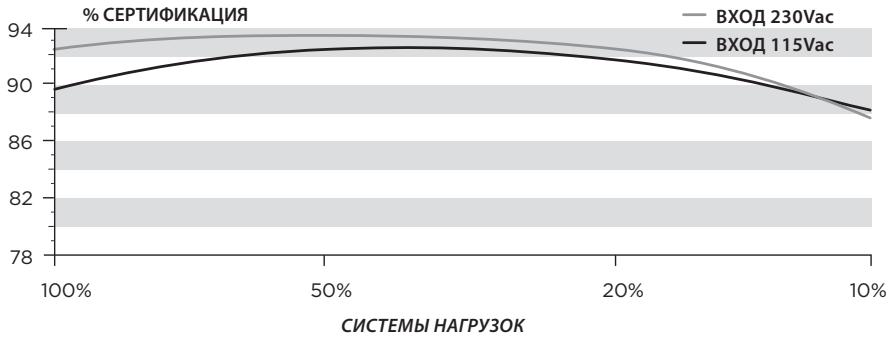
3ΦΦeKTHBHOCTb 6noka nHTAHNA
Kpmba ypobn yumBa BENTnIyTopa 5Pi
UcnoIb3OBAHHe ΦyHKcunncamOJaNaTHOCTNKn
SELF TEST
Uar b. UctaHOBka 6Joka nHTaHnCrsair Professional Series
- Y6eNTecb, yTO Ka6eBn nepemEHORo TOKa 6Noka nHTaHn He noKJIoueh.
- Cnéduy yka3aHnM pykoBODCTBa nO kCkPnyatauN nCtEmHO 6NoKa, yctahOBnTe 6NoK nHTaHnI n 3aKePiTE npINOxKeHHbIMn BnHTaMn,
- OchOBHoi 24-KoHTaKTHbI Ka6eJIb PiTaHnO cHaSeH CbeMbIM 4-KoHTaKTHbIM MExAHINOM, 6NaToDapr YEmy 0e6cneuBaETc RoMecTmOCt b KaK c 24-KoHTaKTHbIM, TaK n c 20-KoHTaKTHbIM pa3BeMaMn Ha MaTepHcknx PnaTax.
a. EcIN Ha MaTePNHCKoI PnATE IMeETcA 24-KoHTaKTbHpa3bEm, K He MoXHO HApPMyIO NOKJIIOuTb 24-KoHTaKTbH OCHOBHO Ka6eJb NITaHnO t 6Noka NITaHnI.
b. Ecn MaTePHNcKa Pnata OChaueHa 20-KoHTaKTHbIM pa3beMOM, CneIyET OTCoeHNHtB 4-KoHTaKTHbIKa6eNb OT 24-KoHTaKTHORO pa3bema I 3aTEM NOkJIIOUHTb 20-KoHTaKTHbIKa6eNb K MaTePHNcKO nnate, He NOkJIIOUaY 4-KoHTaKTHORO pa3beMa.
- Пождклочи Te-koHTaKTHbI Ka6eIb +12 B (EPS12V) K MaTePunHcKoI nlaTe.
a. EcnM MaTePHNCKaY PnTaO cHAneHa 8-KoHTaKTHbIM WTeNcEJIbHbIM pa3bEMOM +12 B, CLeNyET NOkJIIOuNTb Ka6eIb C 8-KoHTaKTHbIM pa3bEMOM HEnOCpeIcTBENHO K MaTePHNCKo PnAte.
b. Ecnn MaTePNHcKa PnIaT OCHaIeHa 4-KoHTaKTHbIM pa3bEmOM, CneIyET OTOeDHNITb 4-KoHTaKTHbI Ka6eJIb OT 8-KoHTaKTHOrO pa3bEm I 3aTEM IOKJIIOuHTb 3TOT 4-KoHTaKTHbI Ka6eJIb HENOCpeDCTBeHHO K MaTePNHcKoi PnIate.
- Пождлочи Te Ka6eI n dIЯ nepiФeprinHbIx yCtpoIyCTB, Ka6eI n PCI-Express n SATA.
a. Пдклочи Кабел Ддп пернферийьх устpoюст В раьемam птаня лескову диска и CD-ROM/DVD-ROM.
b. Поdkлочи Кабелподкоченя SATAК pa3ьемam петаня SSD-hakonnteЯ SATA Или яжесTKOROДИСКА.
c. Пин Heo6xOIMOCtN IOKJIQUHite COOTBeTCTByUOuIe Ka6eIi PCI-Express K pa3bemy nItaHnHa BVNeOKeApTe PCI-Express.
d. Дял подкюченипегиферийньх усточ CB Maileньим 4-KoHTaKTHbIM pa3beMOM ИсрльзуITE ka6elen петиферийньх усточ CB.
e. Y6eHNTecb, yTO BCE ka6eHn HauJExKHO NOkJIouYeHbI. He 3a6yIbTe coXpaHHTb BCE HeNCPOJb3OBAHHble MOyIbHbIe Ka6eHn Ha 6yDuEe, OHn npiroTcra npi NOkJIIOUeHn DOJONHITeJIbHbIX KOMNoHeHTOB.
EMAIL: support@corsair.com
FACEBOOK: facebook.com/corsair
BLOG: blog.corsair.com

FORUM: forum.corsair.com
TWITTER: twitter.com/corsairmemory
PSU PAGE: corsair.com/powersupplyunits
USA and CANADA: (800) 205-7657
INTERNATIONAL: (510) 657-8747
FAX: (510) 657-8748

CORSAIR
46221 Landing Parkway • Fremont • California • 94538 • USA
- DIGITAL ATX POWER SUPPLY
- CORSAIR®
- Product Features
- Digitally Controlled Power
- Quiet, Efficient Operation
- Corsair LinkTM
- Brilliant Design
- Technology and Benefits
- Digital Control
- PLUS* Platinum Efficiency
- - User-Selectable Over-Current Protection
- Outstanding DC Voltage Regulation
- Low DC Output Voltage Ripple and Noise
- - Reduced Component Count and Increased Reliability
- User Friendly Features
- Fully Modular Cable System
- - Ultra Low Noise Design
- Self Test Switch
- Safety and Protection
- Over-Voltage Protection (OVP)
- Over-Current Protection (OCP)
- Over-Temperature Protection (OTP)
- Short-Circuit Protection (SCP)
- Power Supply Specifications
- Package Contents
- Using the Self Test Feature
- Installing your New AX1200i
- Step A: Removing your existing power supply
- Step B: Installing the Corsair Gaming Series power supply
- Using Corsair Link™ with your New AX1200i
- Important Safety Information CAUTION ELECTRIC SHOCK HAZARD!
- Safety and Agency Approvals
- - Mehbwe KOMNHOENTOB, 6oIbwe HaedxHOctn
- 3aunTa OT npeBbIeHn cIbI ToKa (OCP)
- 3aunTa OT npeBbIeHn TemnepaTpybl (OTP)
- 3aunta ot KopoTkoRo 3ambikaHn (SCP)
- Texhneckx xapaKtepncn6loka nntahm
- Komnlektaua
- UcnoIb3OBAHHe ΦyHKcunncamOJaNaTHOCTNKn
- Uar b. UctaHOBka 6Joka nHTaHnCrsair Professional Series
Brand : CORSAIR
Model : AX860 80PLUS PLATINUM
Category : Food