XDOM EMML - Remote control EDOBE - Free user manual and instructions
Find the device manual for free XDOM EMML EDOBE in PDF.


| Product type | Wireless micro-transmitter for lighting |
| Brand | EDOBE |
| Model | XDOM EMML |
| Power supply | CR2032 3V battery (included) |
| Compatibility | EDOBE home automation range |
| Installation | Recessed, 65 mm diameter hole, 40 mm depth |
| Range | Approximately 30 m in free field |
| Frequency | 433 MHz |
| Codes | 16 house codes (A-P) x 16 unit codes (1-16) |
| LED indicator | Red, green, orange LED for programming |
| Functions | On, off, code programming |
| Maintenance | Clean with a soft, dry cloth |
| Safety | Do not open; risk of electric shock |
| Weight | Approximately 50 g (with battery) |
| Dimensions | Approximately 50 x 50 x 30 mm |
Frequently Asked Questions - XDOM EMML EDOBE
User questions about XDOM EMML EDOBE
0 question about this device. Answer the ones you know or ask your own.
Ask a new question about this device
Download the instructions for your Remote control in PDF format for free! Find your manual XDOM EMML - EDOBE and take your electronic device back in hand. On this page are published all the documents necessary for the use of your device. XDOM EMML by EDOBE.
USER MANUAL XDOM EMML EDOBE
General Security Note
For carefree and safe use of this product, please read this manual and safety information carefully and follow the instructions. Technical manipulation of the product or any changes to the product are forbidden, due to security and approval issues.
Please take care to set up the device correctly - consult your user guide. WARNING: Do Not Open! Risk of Electrical Shock. Voltages in this equipment are hazardous to life. No user-serviceable parts inside. Refer all servicing to qualified service personnel.
Important: the product must be used according the instructions in this manual and is not suitable for other purposes.
Please avoid the following: strong mechanical wear and tear, high temperature, strong vibrations, and high humidity.
Please also respect the additional security notes in the various user guide chapters. To ensure correct set up please read the manual and security notes carefully.

The wireless Micro Transmitter allows you to add a switch for extra incandescent, halogen, low-voltage, energy saving and LED light fixtures.
- Wireless and inconspicuous, the Micro Transmitter conceals itself behind a switch of your choosing..
- It integrates with existing switches eliminating the need of pulling wires or cutting extra holes in the wall.
- It installs in just minutes.
- It's compatible with all ebode radio home automation devices. Visit the site www.ebodeelectronics.eu
DESCRIPTION
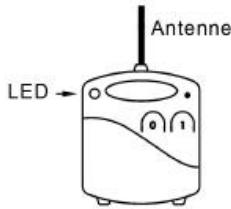
LED indicator
(1) For switching on/programming
(0) For switching off/programming

INSTALLATION
- Cut out a 65~mm hole 40~mm deep with a hole saw.
- Set the insert box in the wall.
- Remove the battery's protective tab then press the buttons to test. Pressing the (0) lights the red panel light. Pressing the (1) lights the green panel light.
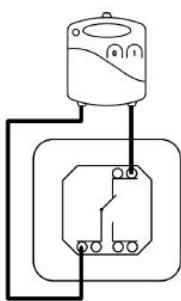
- Connect the Micro Transmitter's wires to the switch (see opposite diagram)
- Place the Micro Transmitter and the switch in the insert box taking care to pull out the antenna as much as you can.
- Verify proper On/Off switch operation.

PROGRAMMING
In order to add the Micro Transmitter to a different installation from the original one, or to one with interference from a nearby system, it is necessary to program a different code.
The programming address is made up of a "HOUSE" code (from A through P) and a "UNIT" code (from 1 through 16). The factory default address of the transmitter/ receiver pair is set at A1; proceed as follows to set a different code.
A. Accessing programming mode.
- Press the Micro Transmitter's START (1) and STOP (0) buttons briefly and simultaneously. The LED turns YELLOW.
Then the LED lights up RED once (for the HOUSE CODE), then GREEN once (for the UNIT code). The Micro Transmitter is in the A-1 setting.
You have 6 seconds to program a new code.
B. Setting the HOUSE CODE.
- Press the (1) button as many times as needed to get to the desired HOUSE CODE and then release it.
Example: A = Press once, B = Press twice, C = Press three times, ... P = Press 16 times.
- After having set the HOUSE CODE, the LED will flash YELLOW 3 times to confirm the code has been memorized and exit from programming mode.
C. Set the UNIT CODE.
-
Repeat step A only.
-
Press and release the (0) button as many times as needed to get to the desired UNIT CODE and then release it.
Example: 1 = Press once, 2 = Press twice, 3 = Press 3 times... 16 = Press 16 times.
- After having set the UNIT code, the LED will flash YELLOW 3 times.

VERIFICATION
Let the Micro Transmitter be recognized by the receivers.
Verify On/Off switch operation.
You must wait about a second between each On / Off command.
When changing the battery, the registered code will be retained by the Micro Transmitter.
Troubleshooting - please check FAQ and technical support on
www.ebodeelectronics.eu

EINFUHRUNG
CE DECLARATION OF CONFORMITY
UK - We, BMB Electronics BV, Kortakker 10 - 4264 AE Veen - The Netherlands, herewith declare that the following designated product EML, is in compliance with the essential requirements and other relevant provisions of Directive 1999/5/EC.
Device: The use of the symbol indicates that this product may not be treated as household waste. By ensuring this product is disposed of correctly, you will help prevent potential negative consequences for the environment and human health, which could otherwise be caused by inappropriate waste handling of this product. For more detailed information about recycling of this product, please contact your local city office, your household waste disposal service or the shop where you purchased the product.
Batteries: Do not dispose of used batteries in the household rubbish! They should be deposited at a collection point for used batteries.

Also available from ebode electronics:
On-Wall Modules
| Product | Description |
| EM | 2-position RF wall switch, ideal for retro fit installations to e.g. control blinds, shutter, home cinema screens but also lighting or appliances. |
| IMRF | Single position RF wall switch, ideal for retro fit installations to e.g. control applications or an inside or outside light. |
| RMV | Control your shutter, blind or e.g. cinema screen via the front panel keys, or remotely via any ebode / X10 compatible controller. |
| RMA | Control your appliance, light or e.g. pump via the front panel keys, or remotely via any ebode / X10 compatible controller. |
| RPA, RPL, RPT | Ideal for retro fit installations, the classic X10 plugin module in a new and stylish jacket. Control your appliance or lamps etc, via any ebode or X10 compatible controller via PLC AND RF! |
| TPC/ TMML | New stylish RF remote to control any ebode or X10 compatible RF receiver. |
In-Wall Modules
| Product | Description |
| EMML | 2-position RF in-wall module to install behind any mechanical wall switch. The EMML is battery operated. |
| RMML | In-wall RF receiver, ideal for any switches lights and appliances up to 300W. |
| PMML | A package containing both the EMML and the RMML. |
Under development
| Product | Description |
| RMP | Update on existing RMV with dry contact output. Ideal to control e.g a motorized gate. |
| RMSN | In-wall RF receiver without Neutral for light applications including incandescent, halogen, fluorescent, LED (even 0.5W charge). |
ebode
www.ebodeelectronics.eu