USB 3.0 PC-EXPRESS CARD - USB expansion card US ROBOTICS - Free user manual and instructions
Find the device manual for free USB 3.0 PC-EXPRESS CARD US ROBOTICS in PDF.



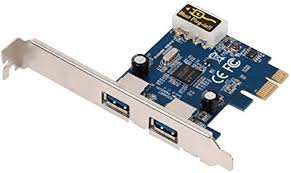
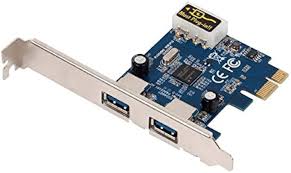
| Product type | USB 3.0 ExpressCard Extension Card |
| Brand | US Robotics |
| Model | USB 3.0 PC-EXPRESS CARD |
| Interfaces | 2 USB 3.0 ports (compatible with USB 2.0 and 1.1) |
| Supported speeds | SuperSpeed (5 Gbit/s), High Speed (480 Mbit/s), Full Speed (12 Mbit/s), Low Speed (1.5 Mbit/s) |
| Host connector | ExpressCard 34/54 mm (conforms to ExpressCard Release 1.0) |
| Power supply | Via PCI Express bus (100 mA max per port) or external 5V/2.5A power adapter (up to 900 mA per port) |
| Dimensions (approx.) | 34 × 75 × 5 mm (standard ExpressCard) |
| Weight (approx.) | 20 g |
| Supported operating systems | Windows XP/Vista/7/8/10, Linux (with generic drivers) |
| Installation | Plug-and-Play after driver installation from included CD (driver for Windows XP required) |
| Box contents | PC-Express Card, power adapter, CD-ROM, quick installation guide |
| Certifications | FCC Part 15 Class B, EN 55022 Class B, WEEE |
| Warranty | US Robotics limited warranty (see www.usr.com/support) |
| Maintenance | No special maintenance required; clean with a dry cloth if needed. |
Frequently Asked Questions - USB 3.0 PC-EXPRESS CARD US ROBOTICS
User questions about USB 3.0 PC-EXPRESS CARD US ROBOTICS
0 question about this device. Answer the ones you know or ask your own.
Ask a new question about this device
Download the instructions for your USB expansion card in PDF format for free! Find your manual USB 3.0 PC-EXPRESS CARD - US ROBOTICS and take your electronic device back in hand. On this page are published all the documents necessary for the use of your device. USB 3.0 PC-EXPRESS CARD by US ROBOTICS.
USER MANUAL USB 3.0 PC-EXPRESS CARD US ROBOTICS
USB 3.0 PC-Express Card
User Guide Guide de l'utilisateur Bedienungsanleitung Guia del usuario
Contents
English. 1
English 1
Installation 1
Specifications 3
Regulatory 4
Regulatory 4
Francais 6
Francais 6
Installation 6
The USB 3.0 PC-Express Card is compliant with USB 3.0 specifications. The card lets your connect USB 3.0 devices to your computer, such as an MP3 players, digital cameras, external USB drives, or USB printers.
Features
- Add 2 ports to USB 3.0 devices.
Install easily into any laptop ExpressCard slot.
Supports USB 3.0 transfer rates.
Plug and play.
Package Contents
USB 3.0 PC-Express Card
Power Adapter
CD-ROM
- Quick Installation Guide
System Requirements
An available ExpressCard slot
Installation
-
Insert the provided CD into your disc drive. Double-click the setup.exe file in the Driver folder to launch the installation program.
-
Accept the End User License Agreement and click Next.
- Click Browse to choose the Destination Folder, then click Next.
- Click Install.
- Click Finish.
- Insert the USB 3.0 PC-Express Card into the ExpressCard slot.
- Windows XP Users: Complete the Found New Hardware Wizard to complete the installation of the USB 3.0 PC-Express Card.
Verification
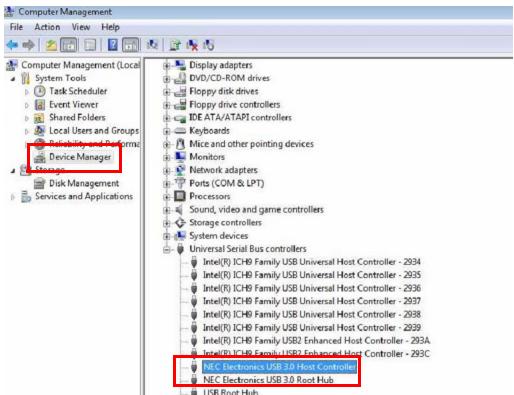
After finishing driver installation, the system will detect the USB 3.0 PC-Express Card. You can go to Device Manager on your computer to verify the entire installation.
Windows XP
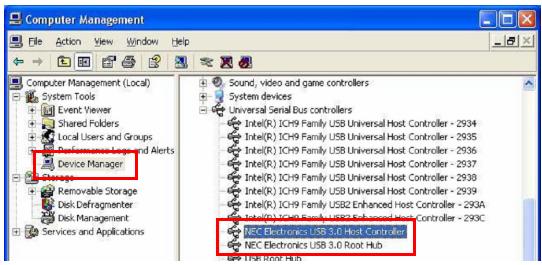
Windows Vista/ Windows 7
This product is subject to the U.S. Robotics Corporation Limited Warranty. To view a copy of the Limited Warranty and for information on how to contact U.S. ROBOTICS Technical Support, please see the U.S. ROBOTICS corporate web site at: www.usr.com/support
Power Adapter
The USB 3.0 PC-Express Card comes with an external Power Adapter. Use of the Power Adapter is recommended for high-power consumption devices.
Specifications
- Compliant with Universal Serial Bus 3.0 Specification Revision 1.0.
Supports the following speed data rates:
Low-speed (1.5 Mbps)
Full-speed (12 Mbps)
High-speed (480 Mbps)
Super-speed (5 Gbps)
Supports 2 downstream ports for all levels of speed.
Supports all USB compliant data transfer types:
Control
Bulk
Interrupt
Isochronous transfer
Supports ExpressCard Standard Release 1.0.
Support Bus Power each port 100mA (Max); Self power by external power adapter: 5V / 2.5A (each port up to 900mA ).
Regulatory
FCC Conditions
This equipment has been tested and found to comply with Part 15 of the FCC Rules. Operation is subject to the following two conditions:
(1) This device may not cause harmful interference
(2) This device must accept any interference received. Including interference that may cause undesired operation.
CE
This equipment is in compliance with the requirements of the following regulations: EN 55 022: CLASS B
WEEE Information
For EU (European Union) member users: According to the WEEE (Waste electrical and electronic equipment) Directive, do not dispose of this product as household waste or commercial waste. Waste electrical and electronic equipment should be appropriately collected and recycled as required by practices established for your country. For information on recycling of this product, please contact your local authorities, your household waste disposal service or the shop where you purchased the product.