USER MANUAL VSX 531 PIONEER
AV Receiver / Amplificateur AV VSX-531
For detailed descriptions of this unit, see the "Operating Instructions". (En)
http://www.pioneer-audiovisual.com/manual/vsx531/euen.pdf
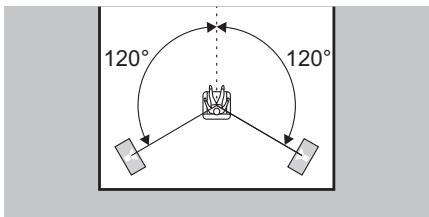
Front Speakers, Center Speaker
Front speakers output front stereo sound and a center speaker outputs center sound such as dialogs and vocals.
The optimal positioning is for front speakers to be at ear height. Center speaker should be set up facing the listening position.
Fr
1 Front Right Speaker
2 Front Left Speaker
Center Speaker
4 Surround Right Speaker
⑤ Surround Left Speaker
6 Subwoofer
45
En
Surround Speakers
Surround speakers create back sound field.
The optimal positioning is just above ear height.
Fr
Subwoofer reproduces bass sounds and creates rich sound field.
Place it anywhere in the front of the listening position. Placing it between the center speaker and either of the front speakers enables more natural playback of music sources.
Fr
Caisson de basse
Supplied Accessories
Accessoires fournis
En/Fr/Es:Back Cover/Cache arrriere/
Cubierta trasera
En
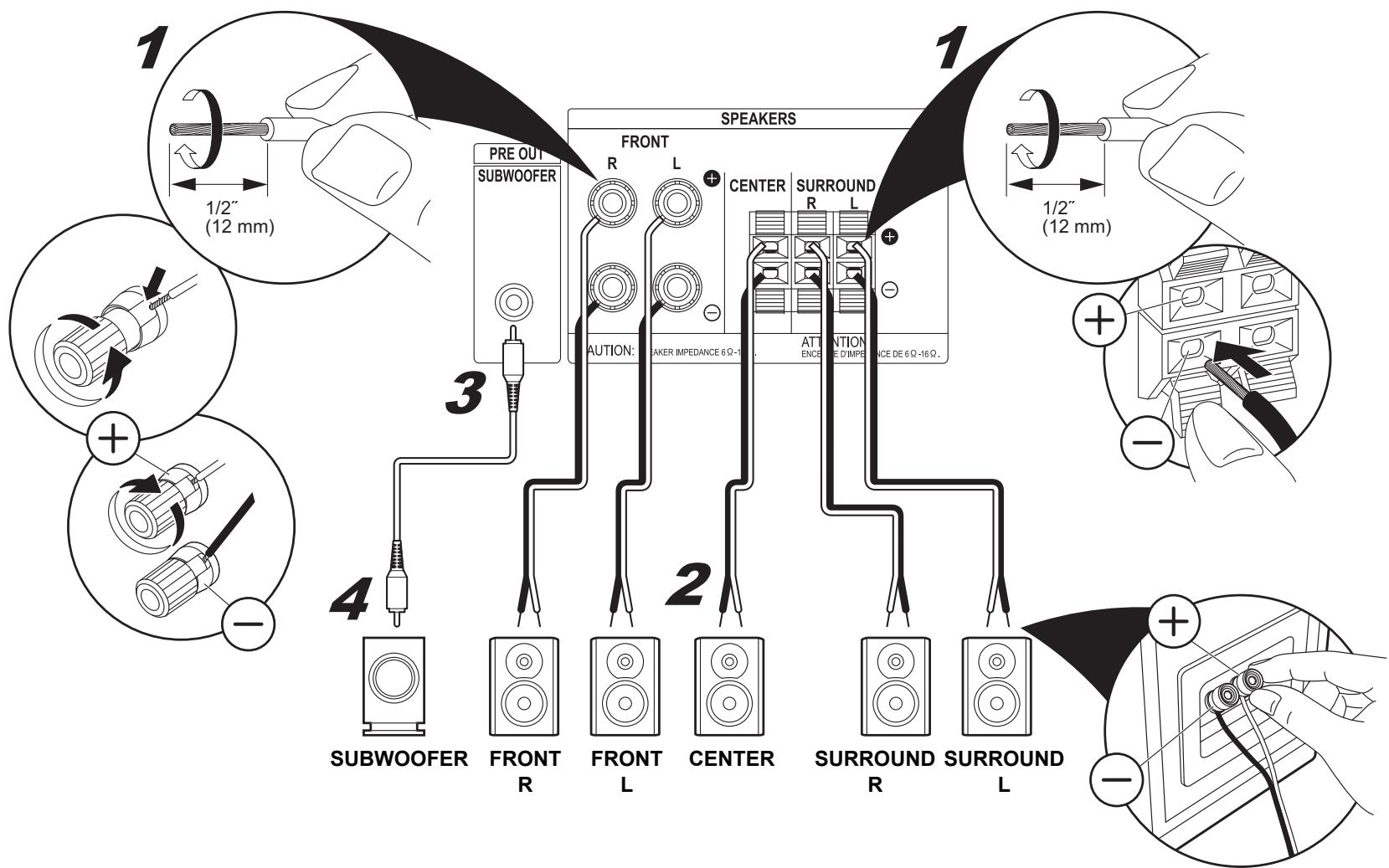
The power cord must be connected only after all other connections are completed.
Connect speakers with 6 to 16 impedance.
Match the + and - terminals on this unit with the + and - terminals on the speakers when connecting.
After all connections are complete, make speaker settings in "Automatic Speaker Setting (MCACC)
(⇒ 12)".
Fr
Make sure the exposed wires of the speakers do not stick out of the speaker terminals when connecting. If the exposed wires of the speakers touch the rear panel or the + and - wires touch each other, the protection circuit will be activated.
Fr
This describes the connections for a TV that supports the ARC (Audio Return Channel) feature. With this connection, set ARC to ON in "HDMI Setup ( 12)". To hear audio from the TV, press TV on the remote control.
- This unit does not support linked operations with other devices.
- Please refer to the TV's operation manual for directions on connections and setup for the TV.
Fr
This describes the connections for a TV that does not support the ARC (Audio Return Channel) feature.
Connect using an optical cable along with a HDMI cable.
To hear audio from the TV, press TV on the remote control.
- Please refer to the TV's operation manual for directions on connections and setup for the TV.
Fr
To play the player, press INPUT SELECTOR on the remote control with the same name as the jack to which you connected the player so that the input on the unit is selected.
- This unit does not support linked operations with other devices.
Fr
When making this connection, the setup screen for this unit is not displayed on the TV. Perform the settings while looking at the display on this unit. To play the player, press INPUT SELECTOR on the remote control with the same name as the jack to which you connected the player so that the input on the unit is selected.
Fr
Connect using a coaxial cable or analog audio cable.
To play the player, press CD on the remote control.
Fr
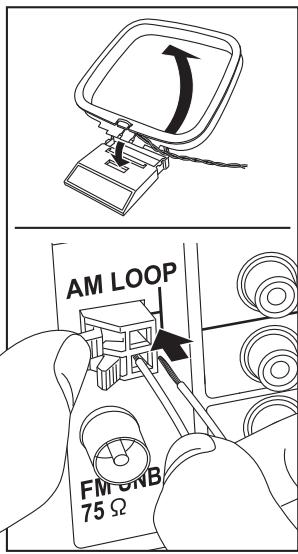
Move the antenna around while playing the radio to find the position with the best reception. Use a thumb tack or similar to attach the FM wire antenna to a wall.
Fr
Connect the power cord to the power outlet after completing all other connections. Switch between on and standby using ☑ RECEIVER on the remote control or ☑ STANDBY/ON on the main unit.
Fr
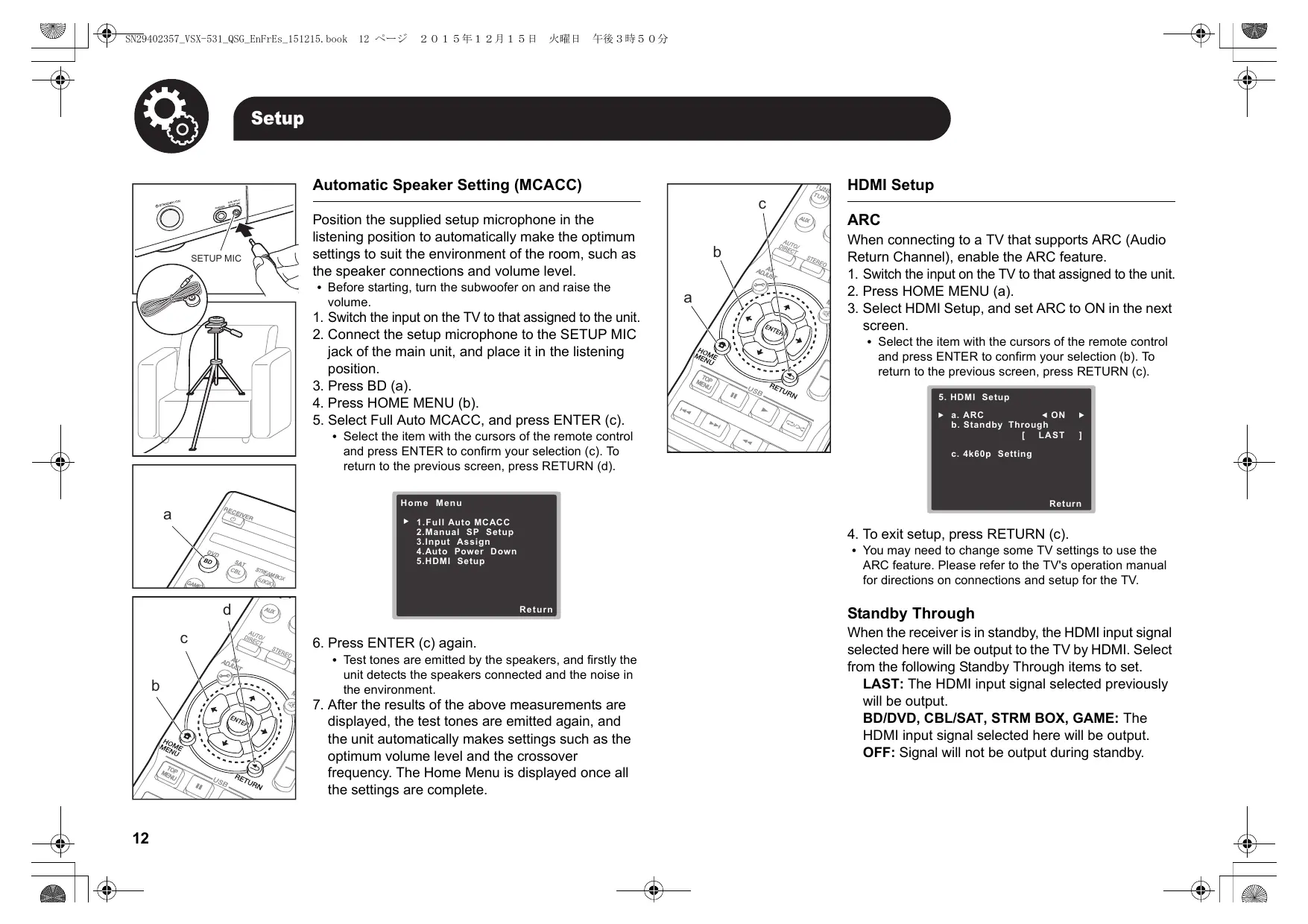
Automatic Speaker Setting (MCACC)
Position the supplied setup microphone in the listening position to automatically make the optimum settings to suit the environment of the room, such as the speaker connections and volume level.
- Before starting, turn the subwoofer on and raise the volume.
- Switch the input on the TV to that assigned to the unit.
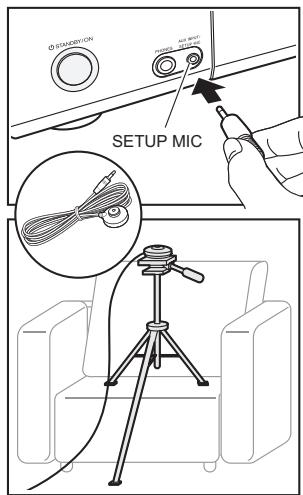
- Connect the setup microphone to the SETUP MIC jack of the main unit, and place it in the listening position.
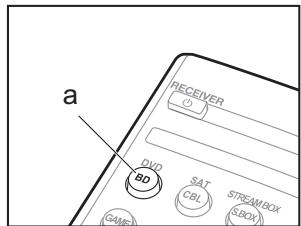
- Press BD (a).
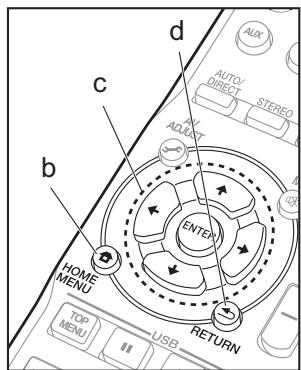
- Press HOME MENU (b).
-
Select Full Auto MCACC, and press ENTER (c).
-
Select the item with the cursors of the remote control and press ENTER to confirm your selection (c). To return to the previous screen, press RETURN (d).
1.Full Auto MCACC
2. Manual SP Setup
3.Input Assign
4.Auto Power Down
5.HDMI Setup
Return
-
Press ENTER (c) again.
-
Test tones are emitted by the speakers, and firstly the unit detects the speakers connected and the noise in the environment.
- After the results of the above measurements are displayed, the test tones are emitted again, and the unit automatically makes settings such as the optimum volume level and the crossover frequency. The Home Menu is displayed once all the settings are complete.
HDMI Setup
ARC
When connecting to a TV that supports ARC (Audio Return Channel), enable the ARC feature.
- Switch the input on the TV to that assigned to the unit.
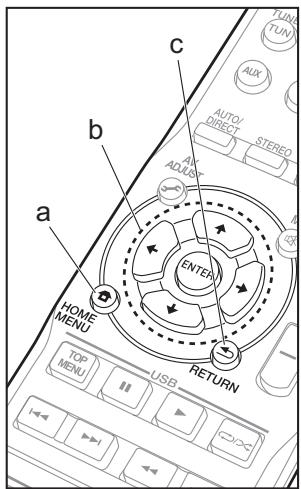
- Press HOME MENU (a).
-
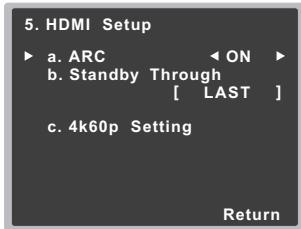
Select HDMI Setup, and set ARC to ON in the next screen.
-
Select the item with the cursors of the remote control and press ENTER to confirm your selection (b). To return to the previous screen, press RETURN (c).
-
To exit setup, press RETURN (c).
-
You may need to change some TV settings to use the ARC feature. Please refer to the TV's operation manual for directions on connections and setup for the TV.
Standby Through
When the receiver is in standby, the HDMI input signal selected here will be output to the TV by HDMI. Select from the following Standby Through items to set.
LAST: The HDMI input signal selected previously will be output.
BD/DVD, CBL/SAT, STRM BOX, GAME: The HDMI input signal selected here will be output.
OFF: Signal will not be output during standby.
Basic Playback
- Switch the input on the TV to that assigned to the unit.
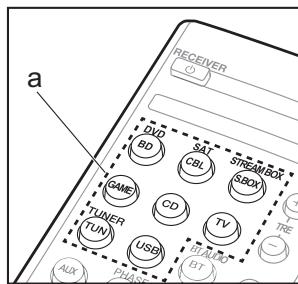
- Press INPUT SELECTOR (a) on the remote control with the same name as the jack to which you connected the player to switch the input.
- Start play on the player.
-
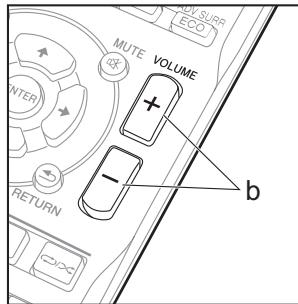
Use VOLUME + / - (b) to adjust the volume.
-
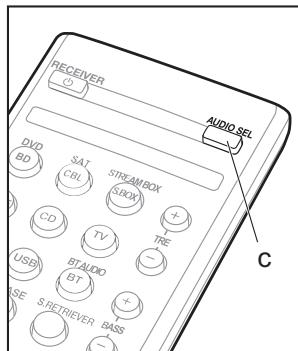
You can switch the audio to suit the connected cable. Press AUDIO SEL (c) to select H (HDMI cable), C1 (coaxial cable), O1 (optical cable), or A (analog audio cable).
Listening To the Radio
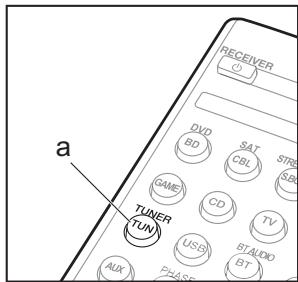
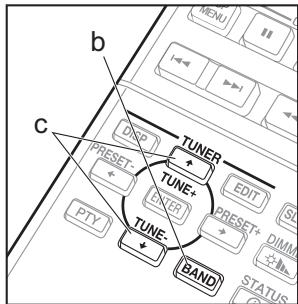
- Press TUN (a).
- Press BAND (b) several times to select either AM or FM.
- Press and hold TUNE+ or TUNE- (c) for about a second to start automatic tuning to a radio station. Tuning stops when one is found.
You can preset up to 30 stations.
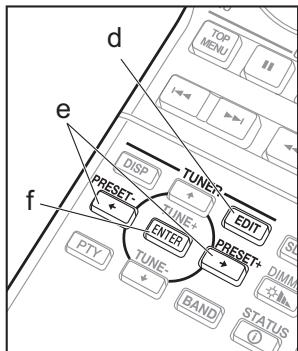
- Tune into the AM/FM radio station you want to register.
- Press EDIT (d) so that the preset number on the display flashes.
- Press PRESET+ or PRESET- (e) to select a number between 1 and 30 while the preset number is flashing.
- Press ENTER (f) to confirm.
To select a preset radio station, press TUN (a) then press PRESET+ or PRESET- (e).
| PRESET |
| A1 | B1 | C1 |
| 111 | 110 | 101 |
| MHz | 111 | |
BLUETOOTH®Playback
You can wirelessly enjoy music files stored in a smartphone or other BLUETOOTH-enabled device. The coverage area is about 33 feet (10 meters).
Note that connection is not always guaranteed with all BLUETOOTH-enabled devices.
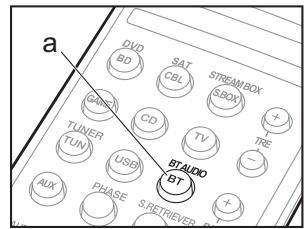
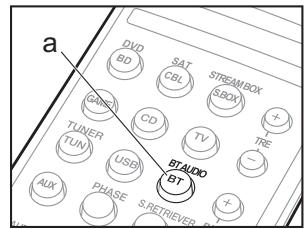
1. Press BT (a).
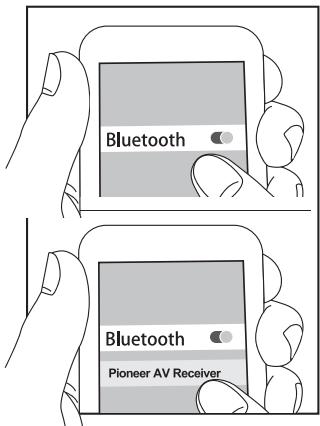
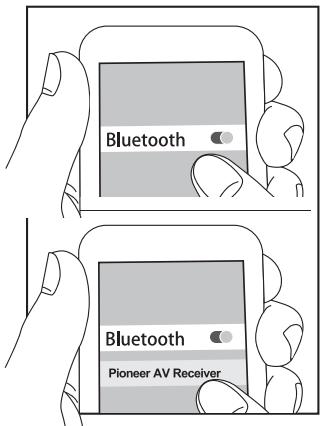
2. Enable (turn on) the BLUETOOTH function of the BLUETOOTH-enabled device.
3. On the screen, etc., of the BLUETOOTH-enabled device, select "Pioneer AV Receiver". After a short time "CONNECT" is displayed and pairing is completed.
-
If a password is requested, enter "0000".
-
Play some music on the BLUETOOTH-enabled device. Increase the volume of the BLUETOOTH-enabled device to an appropriate level.
Playing a USB Device
Play music files on a USB storage device. This unit supports play of WMA/MP3/MPEG-4 AAC music files.
Note that operation is not guaranteed with all USB storage devices.
1. Switch the input on the TV to that assigned to the unit.
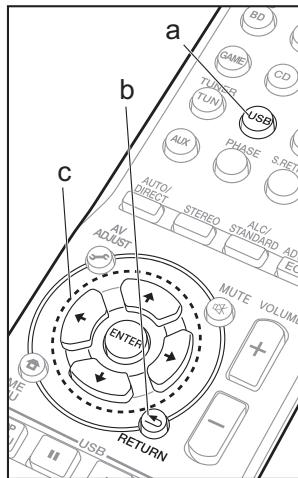
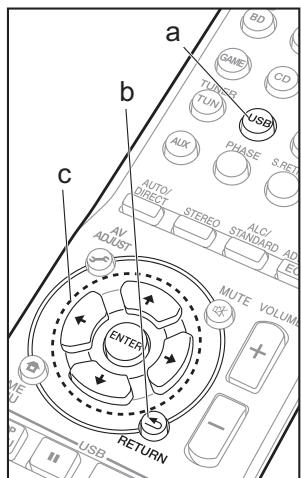
2. Press USB (a).
3. Connect the USB storage device to the USB port on the main unit.
-
Play of the first file starts automatically when the USB storage device is detected.
-
To play another file, press RETURN (b) to display the list of files and folders on the TV, then use the cursors to select and ENTER to confirm (c).
- If characters that cannot be read are recorded on the USB file, they are replaced with * marks.
About Listening Modes
The default setting is for the EXT.STEREO mode to be selected which plays a stereo image from the front and rear, irrespective of the input audio format.
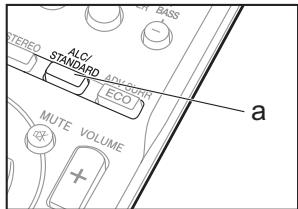
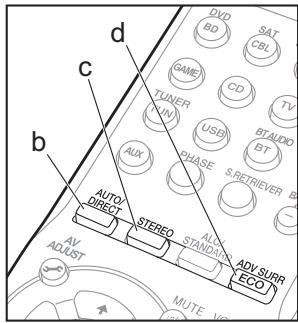
You can select the Dolby Digital and DTS listening modes. When the input signal is multi-channel, the listening mode switches to Dolby Digital or DTS-HD MasterAudio, for example, to suit the input audio format. When the input signal is 2-channel, you can select the DOLBY PRO LOGIC, DOLBY PLII MOVIE/MUSIC/GAME and NEO:6 CINEMA/MUSIC listening modes which expand playback to 5.1 channels. Select STEREO ALC to play at a balanced level even when there are differences in sound level between tracks, for example.
You can select listening modes such as AUTO SURROUND, DIRECT, and PURE DIRECT that play the sound field according to the number of channels in the input signal. The DIRECT mode bypasses circuits that can affect sound quality, such as the tone control circuits, so you can enjoy even better sound quality. The PURE DIRECT mode allows you to shut down additional circuits and processing that affect sound quality.
You can select the STEREO mode to playback only from the front speakers and subwoofer.
You can select original surround modes such as the EXT.STEREO and DRAMA modes.
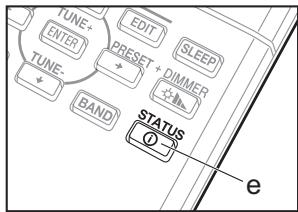
Press STATUS (e) several times to check various settings in the following order: listening mode volume input audio format input source.
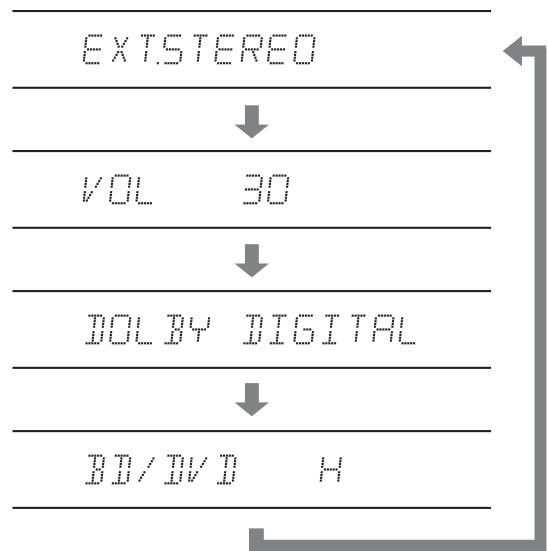
You can also see which audio format is being input by checking the indicators in the lower part of the display.
DTS HD 96/24 NEO:6 HD D+PL II
This unit is compatible with the following digital audio formats. (with HDMI connection)
- Dolby Digital
- Dolby Digital Plus
- Dolby TrueHD
DTS
DTS 96/24
- DTS Express
- DTS-HD MasterAudio
- PCM (32 kHz to 192 kHz sampling frequencies)
SACD (DSD 2ch only)
DVD Audio (including 192 kHz)
Important: The listening modes may not be available depending on the current source, settings and status of the receiver.
Troubleshooting
- When a sound can not be heard from center and rear speakers, press ALC/STANDARD or ADV SURR to change listening modes. E.g.) Press ADV SURR for several times to select EXT.STEREO.
- In order to listen to the audio from the source component that is connected to this receiver, press AUDIO SEL to select H (HDMI cable), C1 (coaxial cable), O1 (optical cable), or A (analog audio cable).
- If there is no sound from the subwoofer: When the front speaker is set to LARGE then, in some cases, no sound may come from the subwoofer. Change the front speaker setting to SMALL or change the subwoofer to PLUS and the sound should be restored.
-
If the power suddenly turns off:
-
Check that there are no loose strands of speaker wire touching the rear panel or another set of wires. If so, re-attach the speaker wires, making sure there are no stray strands.
-
When Auto Power Down is set, the power automatically turns off at the set time.
-
We will not accept responsibility for any damage arising from the connection of equipment manufactured by other companies.
Resetting the Main Unit
Use this procedure to reset all the receiver's settings to the factory default. Use the front panel controls to do this.
- Switch the receiver into standby.
-
While holding down BAND, press and hold STANDBY/ON for about two seconds.
-
When you see RESET? appear in the display, press AUTO SURROUND/STREAM DIRECT. OK? shows in the display.
- Press ALC/STANDARD SURR to confirm.
| PRESET |
| I M I | I I I I I | I I |
| I I I | I I I I I | MHz I I |
Anteros Building, Odyssey Business Park, West End Road, South Ruislip,
Middlesex, HA4 6QQ United Kingdom
Tel: +44(0)208 836 3612
6, Avenue de Marais F - 95816 Argenteuil Cedex FRANCE
Tel: +33(0)969 368 050
Kopnpaun O 3nI
Discover the benefits of registering your product online at
http://www.pioneer.co.uk (or http://www.pioneer.eu).
© 2015 Onkyo & Pioneer Corporation. All rights reserved.
"Pioneer" is a trademark of Pioneer Corporation, and is used under license.
Printed in Vietnam / Imprimé au Vietnam / HaneuTaHo BO BbeTHaMe
5707-00001-074-0V
SN 29402357
Supplied Accessories/Accessoires fournis/Accesorios suministrados
Before use, check the packaging for the main unit and the accessories below.
Batteries/Piles/Pilas (AAA/R03) --- (2)
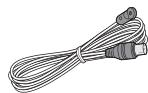
FM wire antenna/Antenne filaire FM/
Antena de hilos de FM --- (1)
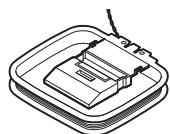
AM loop antenna/Antenne cadre AM/
Antena en bucle de AM---(1)
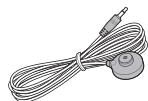
Setup microphone/
Microphone de configuration/
When installing this unit, make sure to leave space around the unit for ventilation to improve heat radiation (at least 40~cm at top, 20~cm at rear, and 20~cm at each side).
PRECAUTION DE VENTILATION