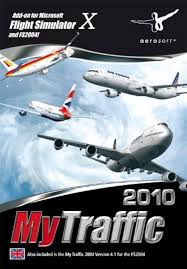
MY TRAFFIC 2010 - Air Traffic Simulator AEROSOFT - Free user manual and instructions
Find the device manual for free MY TRAFFIC 2010 AEROSOFT in PDF.


| Product type | Air traffic simulator (add-on for Microsoft Flight Simulator X) |
| Brand | AEROSOFT |
| Model | MY TRAFFIC 2010 |
| Compatibility | Microsoft Flight Simulator X (FSX) and FS2004 (separate version) |
| Minimum system requirements | 2.6 GHz processor, 1 GB RAM, 256 MB graphics card, 4.5 GB free hard drive space, DVD drive |
| Recommended system requirements | Dual Core 2.5 GHz processor, 2 GB RAM, 320 MB graphics card |
| Installation media | DVD-ROM |
| Number of airports | 8,100 airports (including 2,100 with enhanced traffic) |
| Number of aircraft | 146 aircraft types |
| Number of liveries | Over 4,100 liveries |
| Simulated traffic | Approximately 800,000 flights per day |
| Main features | Realistic AI traffic generation, MyTraffic editor included, demos of Super Traffic Board and Boeing 777 HD |
| Supported languages (call signs) | German, English, Spanish, French |
| Installation | Requires a serial key and administrator rights |
| Technical support | Forum (forum.aerosoft.com), email (support@aerosoft.de), phone (Mon-Fri 2:30 PM - 5:00 PM) |
| Update | Update available via the official Aerosoft website |
Frequently Asked Questions - MY TRAFFIC 2010 AEROSOFT
User questions about MY TRAFFIC 2010 AEROSOFT
0 question about this device. Answer the ones you know or ask your own.
Ask a new question about this device
Download the instructions for your Air Traffic Simulator in PDF format for free! Find your manual MY TRAFFIC 2010 - AEROSOFT and take your electronic device back in hand. On this page are published all the documents necessary for the use of your device. MY TRAFFIC 2010 by AEROSOFT.
USER MANUAL MY TRAFFIC 2010 AEROSOFT
Concept FSX/FS2004 Details, Design and Development, Programming, Painting, Manual, Coordination, Financing.
A very big thank you to Kambiz Agazi, Andrew Baker, Ben Citak, Jan Höfermann, Mikael Hojstedt, Mike Janacek, Simon Jones, Mathew Miller, Thorsten Reichert and Peter Werlitz for their help.
Copyright:
Airport Paderborn/Lippstadt
33142 Bueren, Germany
Tel: +49 (0) 29 55 / 76 03-10
Fax: +49 (0) 29 55 / 76 03-33
All trademarks and brand names are trademarks or registered trademarks of their respective owners.
All rights reserved.
MyTraffic 2010
Handbuch / Manual
Erweiterung zum:
Add-on for
Microsoft Flight Simulator X
Inhalt
Das Konzept 6
MyTraffic 2010 consists of four main parts: 23
Additional functions in MyTraffic 2010. 29
System requirements 30
Installation 31
De-installation 32
MyTraffic 2010 in Flight Simulator 33
Frequently asked questions 34
Das Konzept
AI Traffic has become an essential element in flight simulation. You never fly alone and you'll see other aircraft moving around on the taxiways or commuting between different airports. Unfortunately the default AI traffic supplied with the simulator is not very realistic. There are only a few fictional airlines and the frequency of takeoffs and landings would probably have been realistic 40 years ago.
MyTraffic 2010 generates AI traffic at 8,100 airports, Aircraft like the 737 fly to around 1500 of them. You will normally see commuter aircraft at the other airports and most of them are the smaller general aviation airfields. There are also a number of purely military airfields. Airliners represent only a part of the aviation whole. MyTraffic 2010 has taken all of this into consideration and provides a large number of general aviation aircraft has been added including military and numerous navy aircraft as well as helicopters.
Take a look at San Diego, International Airport, North Island Naval Station for instance. Fly around the harbor bay and pay a short visit to the aircraft carrier „Nimitz".
If you find it a little too loud there, go to Loch Lomond in Scotland or another sea-plane landing area in Norway, Australia or Canada or the Maldives islands.
MyTraffic 2010 contains 146 aircraft types in more than 4100 different liveries. You will encounter airlines from all regions of the world. The textures were so designed influence the framerate as little as possible and achieve a good balance between speed of execution and realism.
It is no secret that FSX requires a large part of the computer's resources. This is the reason why it is very important that any additional programs make as little impact on the computer's resource as possible. MyTraffic was the AI package for FS2004 with the best performance.
We have provided both a high and reduced quality model in each case for FSX. The high-quality model is used normally. In this way, the models change later to the simplified representation in the simulator and this helps to improve the optical quality.
You can change this if you wish by substituting the -quality with the -performance attribute in the corresponding Model.cfg. If you change a number of the aircraft in this way, it leads to an improvement in framerates.
MyTraffic 2010 consists of four main parts:
Aircraft and aircraft liveries
Contains repairs of the FS default as well as 146 additional aircraft, which have been created from scratch for FSX, each in the liveries of various different airlines. The following list shows you which aircraft types have been added. If all different variations including the different registration numbers are added together, MyTraffic provides 55,000 simulated AI aircraft. In other words, around three quarters of the entire worldwide airliner fleet. The table shows all aircraft, that you will encounter in FSX.
| Manufacturer | Aircraft Series | Number of variations |
| Airbus | A300B | 50 |
| Airbus | A300-600 | 31 |
| Airbus | A310-200 | 20 |
| Airbus | A310-300 | 62 |
| Airbus | A318 | 8 |
| Airbus | A319 | 94 |
| Airbus | A320 | 144 |
| Airbus | A321 | 64 |
| Airbus | A330-200 | 57 |
| Airbus | A330-300 | 30 |
| Airbus | A340-200 | 14 |
| Airbus | A340-300 | 32 |
| Airbus | A340-500 | 10 |
| Airbus | A340-600 | 11 |
| Airbus | A380 | 6 |
| Antonov | An 12 | 24 |
| Antonov | An 24 | 20 |
| Antonov | An 26 | 11 |
| Antonov | An 30 | 1 |
| Antonov | An 32 | 3 |
| Antonov | An 74 | 9 |
| Antonov | An 124 | 8 |
| ATR | ATR 42 | 49 |
| ATR | ATR 72 | 43 |
| Beechcraft | 1900C | 20 |
| Beechcraft | 1900D | 44 |
| Boeing | B707-100 | 2 |
| Boeing | B707-300 | 59 |
| Boeing | B720 | 2 |
| Boeing | B717-200 | 16 |
| Boeing | B727-100 | 38 |
| Boeing | B727-200 | 94 |
| Boeing | B737-200 | 194 |
| Boeing | B737-300 | 130 |
| Boeing | B737-400 | 90 |
| Boeing | B737-500 | 61 |
| Boeing | B737-600 | 11 |
| Boeing | B737-700 | 70 |
| Boeing | B737-800 | 90 |
| Boeing | B737-900 | 7 |
| Boeing | B747 SP | 15 |
| Boeing | B747-100 | 6 |
| Boeing | B747-100 (SF) | 4 |
| Boeing | B747-200 | 71 |
| Boeing | B747-200 (SF) | 15 |
| Boeing | B747-200F | 19 |
| Boeing | B747-300 | 28 |
| Boeing | B747-300 (SF) | 4 |
| Boeing | B747-400 | 60 |
| Boeing | B747-400 (BCF) | 11 |
| Boeing | B747-400F | 17 |
| Boeing | B757-200 | 124 |
| Boeing | B757-200F | 12 |
| Boeing | B757-300 | 8 |
| Boeing | B767-200 | 62 |
| Boeing | B767-200F | 3 |
| Boeing | B767-300 | 117 |
| Boeing | B767-300F | 7 |
| Boeing | B767-400 | 2 |
| Boeing | B777-200 | 41 |
| Boeing | B777-200LR | 5 |
| Boeing | B777-300 | 8 |
| Boeing | B777-300ER | 16 |
| Boeing | E3 Awacs | 6 |
| Boeing | C135 | 9 |
| Boeing | CH 47 | 20 |
| Boeing | KC135 | 63 |
| Boeing | KC137 | 9 |
| Bombardier | DHC6 Twin Otter | 3 |
| Bombardier | DHC6 float plane | 5 |
| Bombardier | CRJ 200 | 56 |
| Bombardier | CRJ 700 | 16 |
| Bombardier | CRJ 900 | 17 |
| Bombardier | CRJ 1000 | 2 |
| Bombardier | Dash 8-100 | 69 |
| Bombardier | Dash 8-300 | 61 |
| Bombardier | Dash 8-400 | 13 |
| Bombardier | Challenger 300 | 6 |
| Bombardier | Challenger 601 | 5 |
| Bombardier | Challenger 604 | 6 |
| Bombardier | Challenger 850 | 5 |
| Bombardier | Global Express | 8 |
| British Aerospace | Nimrod | 1 |
| British Aerospace | BAe146-100 | 25 |
| British Aerospace | BAe146-200 | 39 |
| British Aerospace | BAe146-300 | 38 |
| British Aerospace Aerospatiale | Concorde | 5 |
| Cessna | 150 | 6 |
| Cessna | 150a | 6 |
| Cessna | 206 | 16 |
| Cessna | 206a | 40 |
| Dornier | Do 328 | 13 |
| Dornier | Do 328 Jet | 20 |
| Embraer | 120 | 39 |
| Embraer | RJ 135 | 8 |
| Embraer | RJ 140 | 2 |
| Embraer | RJ 145 | 28 |
| Embraer | RJ 170 | 20 |
| Embraer | RJ 175 | 8 |
| Embraer | RJ 190 | 16 |
| Embraer | RJ 195 | 7 |
| Embraer | R99 | 1 |
| Eurofighter | Typhoon | 11 |
| Fokker | Fokker 27 | 32 |
| Fokker | Fokker 28 | 27 |
| Fokker | Fokker 50 | 48 |
| Fokker | Fokker 70 | 5 |
| Fokker | Fokker 100 | 48 |
| Grumman | E2C | 14 |
| Grumman | EA6 | 16 |
| Grumman | S3 Viking | 10 |
| Iljushin | II 62 | 17 |
| Iljushin | II 76 | 35 |
| Iljushin | II 86 | 15 |
| Iljushin | II 96 | 6 |
| McDonnell | F18 Hornet | 70 |
| McDonnell Douglas | DC10 | 19 |
| McDonnell Douglas | DC10F | 10 |
| McDonnell Douglas | KC10 | 4 |
| Douglas | DC8-61 | 2 |
| Douglas | DC8-62 | 15 |
| Douglas | DC8-63 | 10 |
| Douglas | DC8-71 | 5 |
| Douglas | DC8-72 | 3 |
| Douglas | DC8-73 | 6 |
| Douglas | DC9-10 | 20 |
| Douglas | DC9-30 | 36 |
| Douglas | DC9-40 | 4 |
| Douglas | DC9-50 | 14 |
| McDonnell | MD 80 | 113 |
| McDonnell | MD 90 | 11 |
| McDonnell | MD 87 | 18 |
| McDonnell | MD 11 | 26 |
| McDonnell | MD 11F | 22 |
| Panavia | Tornado | 27 |
| Saab | 340 | 62 |
| Piper | PA32 R | 6 |
| Piper | PA32 T | 6 |
| Saab | S100 | 1 |
| Sikorsky | CH 53 | 18 |
| Transall | C160 | 5 |
| Tupolev | 134 | 17 |
| Tupolev | 154 | 49 |
| Tupolev | 204 | 11 |
| Yakolev | Yak 40 | 58 |
| Yakolev | Yak 42 | 35 |
| MODELS: | 146 | 4,100 |
The Traffic .bgl-file
This file contains all information (flight plans) for the AI traffic. If MyTraffic is installed, FSX will simulate approx.. 800.000 flights per day. MyTrafficcommercial.bgl is the file , which shows all passenger and cargo flightplans, MyTrafficglobal.bgl the General Aviation, MyTrafficmil.bgl holds the flightplans of all military aircraft. If you don't want to see the military aircraft to save some performance just re-name the according file MyTrafficmil.bgl to MyTraffic.bgl.passive.
Additional airports
More than 2,100 airports contain enhanced AI traffic functions many of which previously did not have any AI traffic at all up until now. Others were rebuilt to accommodate aircraft types which can be seen here in real life. Other airports not featured in FSX were added , e.g. the big regional airports of Moscow. All MyTraffic airports can be found in the folder MyTraffic\scenery , here you can also find
The sound files
Adaptation of the sound files makes sure that the aircraft are addressed with their correct call sign. Currently only German, English, Spanish and French are supported in FSX.
Additional functions in MyTraffic 2010
MyTraffic Editor:
You can modify the worldwide AI air traffic in FSX with the help of this program by adding additional aircraft, Airlines or airports. Further details on this are in the manual for MyTraffic Editor that can be found in the „Flight Simulator X\MyTraffic\Manuals“ folder.
System requirements
In order for MyTraffic 2010 to run without any problems, your computer will need to meet the following minimum system requirements:
Microsoft Flight Simulator X
- Processor with 2.6 GHz
4.5 GB free hard disk space
1 GB memory (RAM)
DVD drive
3D graphic card with 256 MB
For optimal results we recommend the following minimum requirements:
Dual core processor with 2.5 GHz or faster
2048 MB memory (RAM) or more
3D graphic card with 320 MB
Installation
You must log on with administrator rights before you begin with the installation of MyTraffic 2010. The setup program normally starts automatically. The setup program installs MyTraffic 2010 for Microsoft Flight Simulator X.
If the setup program does not start automatically after you have inserted the DVD-ROM into the drive, click „START | RUN" and enter „D:\setup.exe" (D represents the drive letter of the device). You will need to enter a valid serial number in order to install MyTraffic X. This serial number is printer on the DVD sleeve.
In the opening screen, you must indicate whether you wish to install MyTraffic 2010 for FSX or MyTraffic 2006 for FS2004. Click on the corresponding button in order to install MyTraffic 2010 for FSX.
After you have stated your preferred language for installation, you will be greeted and presented with some additional information on MyTraffic 2010.
The license agreement on the use of MyTraffic 2010 will then be displayed. You must accept the license agreement before you can continue with the installation of MyTraffic 2010. Click on „Next".
You will now be asked to enter your serial number. You'll find the serial number on the DVD sleeve. The serial number is case-sensitive so you must enter it exactly as it is printed on the label. Click on „Next".
The install path (Microsoft Flight Simulator folder) will be automatically determined and checked. If the install program is unable to determine the path to Flight Simulator folder or you wish to install into another folder, click on the „Browse“ button. Click on „Next“.
A summary of the most important data is displayed before the actual installation procedure begins. The MyTraffic 2010 install program will copy all files into the FSX folder. A separate window is displayed for each single aircraft. If data for the aircraft already exists on your hard disk (e.g. from a previous installation), you can indicate within the window whether it should be overwritten or not. Confirm your choice by clicking „Start".
The MyTraffic scenery will be automatically added to the scenery library. All necessary changes will be made within the „fsx.cfg" and „dll.xml" files. Backup copies of those files will be made before any changes are written.
Finally you can select whether the MyTraffic 2010 official sound patch should be executed or not. This will adapt the call signs of the various different airlines. Activate the „Run the Sound patch now“ option on the final screen and click „Finish“ in order to install the sound patch and complete the installation. The install window for the sound patch will then be displayed. The flight simulator language version will be automatically determined. Click „OK“ to install the sound patch. The time needed for installing the sound patch will depend on your computer's configuration and could take up to 30 minutes. Do not manually cancel the installation under any circumstances. Otherwise it's possible that no controllers will be heard. Please wait until installation of the sound patch is complete even if you think the process has „hung up“.
The install program will automatically create a new program group in the Windows Start menu:
"Program Files" - "Aerosoft" - "MyTraffic 2010".
Here you can access „Select AI Year“, „MyTraffic Editor“, the online documentation and the sound patch installation.
De-installation
If you wish to remove MyTraffic 2010, start via the menu MyTraffic Manager, from the menu „Configure MyTraffic“ select the „Remove aircraft, scenery and schedules in MyTraffic folder“, and wait for the procedure to end. We recommend to only start FSX once, to allow it to change some structures. Then click the „Start“ button on the „Windows task bar. Click „Settings“ and select „Control Panel“. Click the „Add/Remove“ icon in the control panel. You will then be presented with a list of all programs installed on your system. Double click „aerosoft's - MyTraffic 2010“. De-installation of all MyTraffic files from your hard disk will begin. The entry in the scenery library will also be removed during de-installation.
MyTraffic 2010 in Flight Simulator
After installation the FSX automatically uses the MyTraffic-airplanes and -flight schedules to create the AI-air traffic in connection to the dense settings for traffic. No other adjustments are needed. If you want to change air traffic or the density you can do this via the FSX menu "Settings - Traffic".
You can also use the Traffic Toolbox if you have it installed.
MyTraffic gave some authors the opportunity to create add-ons for this add-on. We have added to of these tools in a demo version.
Super Traffic Board is a departure and arrival board, showing a lot of infos about the MyTraffic-aircraft, while allowing the user to take control of some of the action. The demo shows all ist functionality buut is restricted to London Heathrow The full version which is available at Aerosoft works on all airports of FSX.
Boeing 777 High Definition contains high resolution Boeing 777 repairs. The full version will give you a 2048x2048 pixel resolution, which can show you details in a size of only 2 cm. For MyTraffic 2010 we have added liveries for the Boeing 777-200 of British Airlines and American Airlines in a resolution of 1024x1024 pixel. The full package can be purchased at Simarket.
Frequently asked questions
F I have got a new painting for a particular aircraft and would like to use this in MyTraffic.
A This is easy. Locate the Texture folder for the corresponding aircraft and copy the new textures into it. However, you should consider the following: All textures for aircraft at an airport are stored in the graphic card's memory. If this is full, they are stored in your PC's main memory and are constantly copied between this and the graphic card's memory. This leads to less memory bandwidth for CPU functions and therefore to a decrease in flight simulator performance. I have carried out tests with additional textures and observed a decrease in framerates at larger airports such as Frankfurt of up to 8 frames per second.
Whereas other AI traffic-products claiming to use real flight plans only display fewer liveries at the larger hubs (which becomes a little boring), MyTraffic provides up to 100 various different liveries. This creates an unbelievably genuine feeling. On the other hand however, this requires care when determining the size of the textures.
Aircraft may be arriving almost every second at some of the busiest airports but only will one will actually land.
A The reason for this is the way FSX controls the AI traffic. Arrival times of the AI aircraft at the destination airport depend strongly on what is happening at the departure airport and during the actual flight. Generally it can be said that the aircraft's arrival time can only be estimated with an accuracy of +/- 15 minutes. This effect can only be completely ruled out if there are less than 4 aircraft per hour landing at an airport. We have done our best to keep this effect to a minimum.
F Where do all those aircraft models actually come from?
A All 146 models were created by the author from scratch after publication of the SDK SP1 for FSX and only for FSX in order to take full advantage of its superior graphic abilities. MyTraffic 2010 does not contain any models from previous versions.
Technical support
The fastest way to get help and support with questions on MyTraffic or other programs from Aerosoft is to visit our support forum under: www.Forum.aerosoft.com
Answers to frequently asked questions can be found on our support page in the internet under: www.aerosoft.de. Our hotline staff can be contacted by email at: support@aerosoft.de or by telephone from Monday to Friday from 14:30 to 17:00 under: +49 29 55 / 76 03- 11
Rise of Flight
The First Great Air War