
SGALAXY EVO - Computer power supply ENERMAX - Free user manual and instructions
Find the device manual for free SGALAXY EVO ENERMAX in PDF.



| Product Type | Computer Power Supply |
| Brand | ENERMAX |
| Model | SGALAXY EVO (series) |
| Compatibility | SSI PSDG 2008/2009, EPS12V V2.92, 2.91, 2.8 |
| Fan | 13.5 cm, speed 800-1800 RPM (±10%) |
| PowerGuard LED | Tricolor: off, orange, green, red |
| HeatGuard Function | Fan continues 30-60 sec after system shutdown |
| SafeGuard Protection | Automatic shutdown in case of malfunction (short circuit, overheating) |
| Modular Connectors | Black sockets (3.3V/5V/12V) and red sockets (12V) |
| 24P Motherboard Cable | Built-in, distributed by 12V1 |
| CPU 8P (4+4P) Cable | Built-in, distributed by 12V1 and V2 |
| PCI-E 6+2P Cable | Built-in, distributed by 12V3 |
| Connectors Provided (Modular) | SATA, Molex, FDD, additional PCI-E depending on model |
| Available Models | EGX850EWT, EGX950EWT, EGX1050EWT, EGX1250EWT |
| Recommended UPS Power | See table (e.g., 850W -> 1000W/1400VA) |
| Warning | Not compatible with ISA motherboards (requires -5V) |
| Installation | ON/OFF button (I=ON, O=OFF), check all connections |
| Maintenance | Do not obstruct air intakes, clean regularly |
| Documentation | Multilingual manual available for download |
Frequently Asked Questions - SGALAXY EVO ENERMAX
User questions about SGALAXY EVO ENERMAX
0 question about this device. Answer the ones you know or ask your own.
Ask a new question about this device
Download the instructions for your Computer power supply in PDF format for free! Find your manual SGALAXY EVO - ENERMAX and take your electronic device back in hand. On this page are published all the documents necessary for the use of your device. SGALAXY EVO by ENERMAX.
USER MANUAL SGALAXY EVO ENERMAX
Only a technician, authorized by ENERMAX, is allowed to perform maintenance service! Warranty is subject to void under unauthorized attempt to open the power case or modification of any kinds, even attempted only, of the power supply or its components!
ENERMAX will not be responsible for damages caused by following situations:
- Opening of the PSU case and/or modification of any component or cable without ENERMAX' written authorization.
- Ignoring connector's wrong insertion prevention design by attaching a connector to a device in wrong orientation.
- Connecting too many devices to one cable unit by using additional adaptor (Y cables).
Usage of non-genuine ENERMAX modular cables. - Damage caused by natural phenomena or uncontrollable forces, such as lightning, flooding, fire, earthquake, etc.
This ENERMAX Technology Corporation product is warranted to be free from defects in material and workmanship for a period of three (3) years from the date of purchase.
ENERMAX Technology Corporation agrees to repair or replace the product, at its own option and at no charge, if, during the warranty period, it is returned to nearest ENERMAX
Technology Corporation subsidiary/agent with all shipping charges prepaid and bearing a return merchandise authorization (RMA) number, and if inspection reveals that the product is defective. Charges for removing or installing the product are excluded under the terms of this warranty agreement. This warranty shall not apply to any product, which has been subject to connection to a faulty power source, alteration, negligence, or accident, or to any product, which has been installed other than in accordance with these instructions. In no event shall ENERMAX Technology Corporation, or its subsidiaries, or agents be liable for damages for a breach of warranty in an amount exceeding the purchase price of this product!
If you are uncertain whether or not your ENERMAX PSU is defective, please contact your dealer/reseller for support!
Web Site: http://www.enermax.com
E-mail: enermax@enermax.com.tw
ENERMAX Technology Corporation, 15F-2, No. 888, Jing-Guo Road, Taoyuan City (330), Taiwan (R.O.C.), Tel. +886-3-316-1675, Fax. +886-3-346-6640
©2008 ENERMAX Technology Corporation. All rights reserved. Specifications are subject to change without prior notice. Actual product and accessories may differ from illustrations. Omissions and printing errors excepted. Content of delivery might differ in different countries or areas. Some trademarks may be claimed as the property of others. Reproduction in any manner without the written permission of ENERMAX is strictly forbidden.
ENERMAX SGALAXY EVO Series Power Supply Specification
| EGX850EWT | EGX950EWT | EGX1050EWT | EGX1250EWT | |||||
| AC Input Voltage | 115-240VAC, 50-60Hz(Maximum range: 100-264VAC, 47-63Hz) | |||||||
| AC Input Current | 9-4.5A | 10-5A | 11-5.5A | 15-6A | ||||
| DC Output | ||||||||
| Rated | Combined | Rated | Combined | Rated | Combined | Rated | Combined | |
| 3.3V | 0-25A | 160W | 0-25A | 170W | 0-25A | 170W | 0-25A | 170W |
| 5V | 0-25A | 0-25A | 0-25A | 0-25A | ||||
| 12V1 | 0-30A | 840W(70A) | 0-30A | 948W(79A) | 0-30A | 1044W(87A) | 0-30A | 1248W(104A) |
| 12V2 | 0-30A | 0-30A | 0-30A | 0-30A | ||||
| 12V3 | 0-30A | 0-30A | 0-30A | 0-30A | ||||
| 12V4 | 0-30A | 0-30A | 0-30A | 0-30A | ||||
| 12V5 | 0-30A | 0-30A | 0-30A | 0-30A | ||||
| 12V6 | 0-30A | 0-30A | 0-30A | 0-30A | ||||
| -12V | 0-0.6A | 7.2W | 0-0.6A | 7.2W | 0-0.6A | 7.2W | 0-0.6A | 7.2W |
| 5Vsb | 0-5A | 25W | 0-5A | 25W | 0-5A | 25W | 0-5A | 25W |
| Total Power | 850W | 950W | 1050W | 1250W | ||||
| Peak Power | 1020W | 1140W | 1260W | 1500W | ||||
| Protection Circuit | ||||||||
| Over Current Protection | DC Rail | OCP trigger range | ||||||
| 3.3V | 30-45A | |||||||
| 5V | 30-45A | |||||||
| 12V1/2/3/4/5/6 | 34-45A | |||||||
| (DC)Under Voltage / Over Voltage Protection | DC Rail | UVP trigger range | OVP trigger range | |||||
| 3.3V | 2.0-2.4V | 3.9-4.5V | ||||||
| 5V | 3.3-3.7V | 5.7-6.5V | ||||||
| 12V1/2/3/4/5/6 | 8.5-9.5V | 13.3-14.5V | ||||||
| -12V | -8.5- -9.5V | -13.3- -14.5V | ||||||
| (AC)Under Voltage Protection | Activated when AC input voltage < 70VAC. | |||||||
| Over Power Protection | Activated when output power > 110~160% of rated max load. | |||||||
| Over Temperature Protection | Activated when PSU heat sink > 90~110°C / 194~230°F. | |||||||
| Short Circuit Protection | Activated when any DC rails short-circuited. | |||||||
| Surge & Inrush Protection | Sustain 2KV surge stroke.Sustain up to 70A inrush current @ 240VAC at cold start. | |||||||
| ENVIRONMENT | ||||||||
| Temperature | Operation ambient: 0~50°C/32~122°F (for full rated output)Storage ambient: -40~70°C/-40~158°F | |||||||
| Humidity | Operation: to 85% relative humidity, non-condensing at 25°C/77°FStorage: to 95% relative humidity, non-condensing at 50°C/122°F | |||||||
| OTHERS | ||||||||
| Cooling | One 13.5cm two-ball bearing fan, speed auto controlled. | |||||||
| MTBF | > 100,000 hours at 70% of full rated load, 230VAC/50Hz, 25°C(MIL-HDBK-217F standard) | |||||||
| Dimension | 150 (w) x 86 (h) x 190 (d) mm | |||||||
| Weight | 2.95kg (without modular cables) ±50g | |||||||
| Safety | UL/cUL(Level 6), TUV, CCC, GOST, CB, BSMI (850W only) | |||||||
| EMC | CE, FCC, MIC | |||||||
User's Manual
Dear customer,
Thank you for choosing this ENERMAX SGALAXY EVO power supply unit (PSU)! Please read this manual carefully and follow its instructions before installing the PSU.
We would like to draw your attention that a computer required very specific conditions to work best for you without failing. To avoid failures and to increase lifetime of the system, we suggest that:
- Your system is NOT located near a radiator or any other heat producing device
- Your system is NOT located near a magnetic device
- Your system is NOT located in a moist and/or dusty and/or vibrating environment
- Your system is NOT exposed to direct sunshine
- Your system is sufficiently cooled by additional fans
- If you use AC extension cables, please make sure it can support all connected appliances' potential peak power draw. Or redistribute other high power consumption equipment, such as laser printers or monitors to other AC wall outlets. Exceeding the extension cable's loading capacity could trigger its circuit breaker and cut off the power.
- If you want to add the UPS (Uninterruptible Power Supply) for your system, please choose adequate Watts/VA capacity UPS. Ex.
| PSU Model | Suggested minimum UPS output power capacity (Based on efficiency & PFC at respective load) |
| EGX850EWT | 1000W / 1400VA |
| EGX950EWT | 1200W / 1700VA |
| EGX1050EWT | 1300W / 1900VA |
| EGX1250EWT | 1500W / 2100VA |
- If you intend to add other appliance powered by the same UPS, such as monitor or printer, please use higher capacity UPS according to all connected devices' rated power draw.
- Please do not mistake VA capacity as Watts, or use insufficient power UPS. This would result in less UPS battery runtime or the inability to power the system in battery mode.
COMPATIBILITY
- ENERMAX SGALAXY EVO series is compliant with:
SSI PSDG 2008/2009 Power Supply Design Guide specification and downward compatible with SSI PSDG 2008 1.0, EPS12V V2.92, 2.91 and 2.8
- This PSU does not support MB with ISA expansion slot, which might need -5V power. -5V has been cancelled from Intel ATX12V v1.3 specification onwards.
NAME OF PARTS
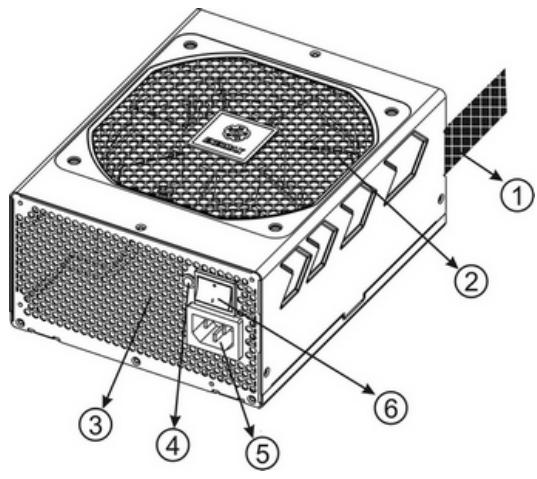
① Output cable: Please check "Cables & Connectors" section.
② 13.5cm fan.*1
③ Honeycomb air vent. #1
④ PowerGuard LED
⑤ AC Inlet #2
⑥ ON/OFF switch: (I=ON, O=OFF). #2
1 To ensure best system cooling, do not block PSU fan's air in-take and air vent area.
This PSU offers a special HeatGuard function. When the system is turned off, or goes into ACPI S3/S4 sleep mode, the PSU fan will keep dissipating the remaining heat for 30 60 seconds and prolonging system lifetime.
2 When assembling or maintaining the system, please remove AC cord from AC inlet, or turn ON/OFF switch into "OFF" position, and wait PowerGuard LED light off. Then you can safely service the system.
CABLES & CONNECTORS
All connectors are designed to prevent insertion in wrong orientation. If you cannot easily insert a connector, please check if you are inserting the connector in the right orientation. Do not try by force to insert it nor modify the connectors. This might damage power supply and system components, and warranty shall be void.
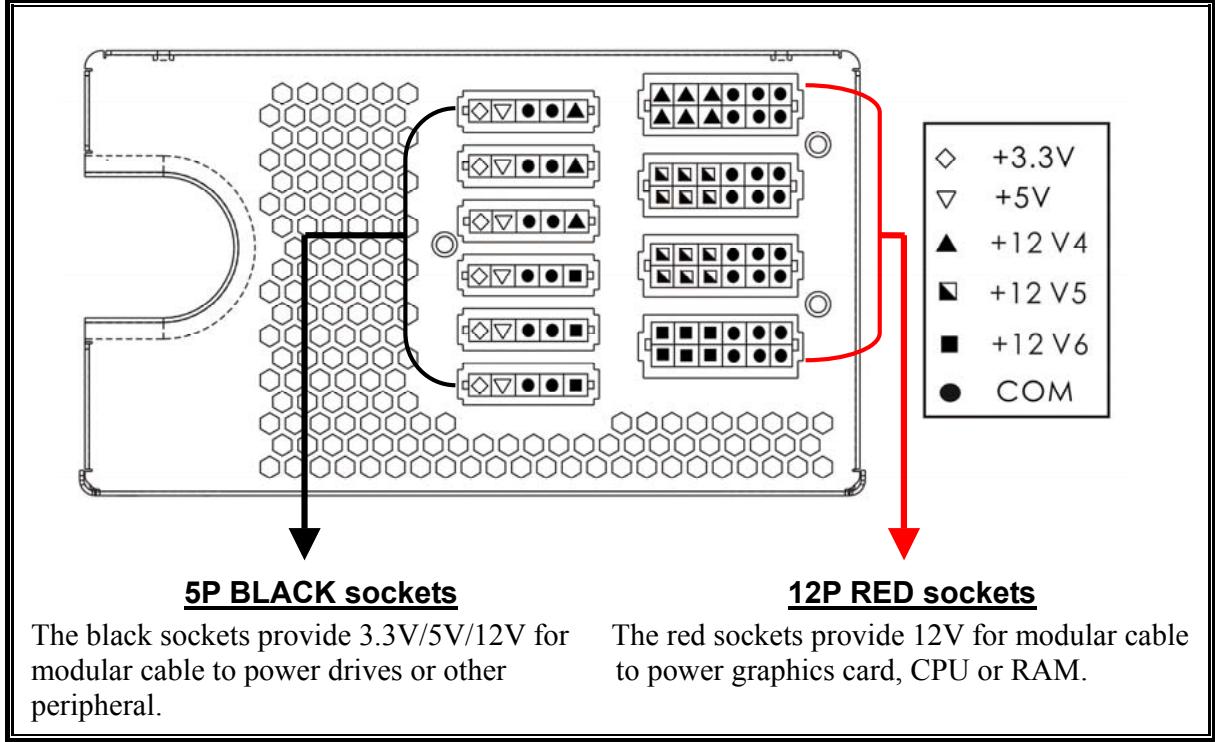
Following graphic illustrates the modular sockets layout and its DC rail distribution.
| 24P Mainboard Native cable, 12V rail supplied by 12V1 For new generations of ATX/EEB/CEB server/workstation MB. | |
| 8P CPU +12V Native cable, 12V rail supplied by 12V1 & V2 Supports multi-CPU server/workstation systems and some single socket systems. | |
| 4+4P (8P) CPU +12V, in combined mode Native cable, 12V rail supplied by 12V1 & V2 8-pin configuration supports multi-CPU server/workstation systems and some single extreme CPU systems. | |
| 4+4P (8P) CPU +12V, in split mode Native cable, 12V rail supplied 12V1 & V2 4-pin configuration supports certain single CPU systems. Some multi-CPU workstation/server system might also need this extra 4-pin 12V connector. Please use the connector with “12V” marking. | |
| 6+2P (8P) PCI Express, in combined mode Native cable, 12V rail supplied by 12V3 8-pin configuration supports latest extreme graphic cards, which require 8-pin PCI-E connector. | |
| 6+2P (8P) PCI Express, in split mode / 6P PCI Express Native cable, 12V rail supplied by 12V3 6-pin configuration supports most performance PCI-E graphic cards, which require 6-pin PCI-E connector. | |
| SATA #1 For SATA/SAS drives. | |
| 4P Molex #2 For IDE/SCSI/SAS drives or some AGP graphic card with traditional 4P power in socket. | |
| FDD For floppy drive or certain add-on card. | |
| FM (FAN RPM MONITOR) #3 For 13.5cm fan RPM detection. Fan speed: 800-1800RPM (±10%). |
1 Some SATA drives might accept SATA or 4P Molex power. Normally, use either one of power connector to power the driver, BUT NOT BOTH! Please check the drive's manual for details.
2 Some MB might require this connector to share the +12V current from 24-pin Mainboard connector to PCI-E slot. If your MB already supports 24-pin Mainboard connector, you may not need to add the 4P Molex connector on it. Please check the MB's manual for details.
3 Most MB offer 2 4 3-pin system/PSU fan power sockets, but only one or two socket(s) might support the fan RPM signal. If you connect the PSU FM connector on the MB, but BIOS or system monitor software cannot read the PSU fan RPM, please relocate the PSU FM connector to another socket.
- MODULAR CABLES SUPPLIED
Use ONLY genuine ENERMAX modular cables coming with ENERMAX PSU. Third party cables might not be compatible and might cause damage to your PSU and/or system, and use of third party cable shall void PSU warranty.
| EMC012: 3 x 4P Molex (IDE/SCSI) drives Modular cable for IDE/SCSI/SAS drives and other peripherals. | |
| EMC013: 3 x 4P Molex (IDE/SCSI) drives & 1 X FDD connector Modular cable for IDE/SCSI/SAS drives and peripheral, plus 1 FDD power connector. | |
| EMC014: 2 x 6+2P (8P) PCI-E 2.0 Modular cable for 1 or 2 performance PCI Express graphic cards, which needs 6P or 8P PCI-E connector. | |
| EMC017: 4 x SATA drives Modular cable for SATA/SAS drives like ODD and HDD. | |
| EMC018: 8P & 4P +12V CPU/RAM power (optional) Modular cable to support special heavy-duty workstation/server with more than 4 CPUs and 16 RAMs. |
Supplied modular cables might differ by models and in different region.
We offer more optional cables. Please visit our website for more information: www.enermax.com
Special note for System Integrators: If your system requires special modular cable configuration or design, please contact an ENERMAX sales representative.
- ATTACHING / DETACHING THE MODULAR CABLES
| Attaching the modular cable to PSU 5-pin / 12-pin connector on modular cable and PSU's modular socket has an arrow mark. To make correct connection is easy: 1. Black connector to black socket, and red to red. 2. Arrow mark to arrow mark. 3. Then you can easily plug in the connector. | |
| Detaching the modular cable from PSU 5-pin / 12-pin connector on modular cable has two hooks to lock with the PSU's modular sockets. When unplug the modular cable from PSU, please press two hooks together and gently pull out the cable. |
BOOTING YOUR SYSTEM
Before booting your system, please check that:
- Main power connector (24P) is properly connected.
- CPU +12V power connector (4 or 8-pin configuration), and/or a 4P Molex connector (if required by MB) is properly connected.
- All other needed connectors are properly connected.
- AC cord is properly connected to wall outlet and PSU AC inlet.
- Close your system chassis.
- Turn on the PSU by switching the ON/OFF switch to "ON", and your system is ready.
PROTECTION, SAFETY & SECURITY
This PSU features PowerGuard & SafeGuard function to monitor the PSU itself. With tri-color LED, PowerGuard tells you the current PSU status. In case of abnormal situations, the power supply will automatically turn off to avoid potential danger to itself and other system components.
PowerGuard indication
| LED | ON/OFF switch | Information & what to do |
| OFF | OFF | * No AC input - Turn the I/O switch to ON position. |
| OFF | ON | * No AC input or PSU malfunction - Check if AC cable is firmly plugged into wall outlet and AC inlet. If LED still does not turn to orange light, then - Contact ENERMAX service center. |
| Orange | ON | PSU normal and system in standby/ sleep mode |
| Green | ON | PSU normal and system in operation |
| Red | ON | * System abnormal, protection circuit activated. If you push the system power button, and PSU refuse to turn on, the LED turn from orange to red light: - Short-Circuit protection activated. - Completely check if all connectors are correctly inserted, and clean the chassis to prevent undesired objects, which might short circuit any device/terminal. If during system operation, the PSU suddenly shut down - Touch the PSU housing and check if it is hot. If yes, wait till it cool down and restart the system to see if all system fans and PSU fan are running. Add or replace the system fan if required. - If same situation repeat, recheck if all connectors are well connected to system, or redistribute certain drives/PCI-E power to different 12V rail connector. |
If you have any question or need support, please contact your reseller or nearest ENERMAX subsidiary/agent or ENERMAX headquarters service center.
©2008 ENERMAX Technology Corporation. All rights reserved. Specifications are subject to change without prior notice. Actual product and accessories may differ from illustrations. Omissions and printing errors excepted. Content of delivery might differ in different countries or areas. Some trademarks may be claimed as the property of others. Reproduction in any manner without the written permission of ENERMAX is strictly forbidden.
Benutzerhandbuch
Indications PowerGuard
ACCENSIONE DEL SISTEMA
3AIIHTA, MEPbI IPEJOCTOPOXHOCTH IIIPABUNJA TEXHNK B20JIACHOCTH
Даннь BП oblaдаeТ Функией самоКонтpoЛя PowerGuard/SafeGuard. Tekyиee coctoHne BП OTOбражаetса на ТрexцьетHom LED.В aHOMaJIbHOJ сИтуаци INITaHne OTKJIIOuaetc aBTOMaTHueCKN BO H36жанe ПОВпжденя сamOTO BП Иpyrnx KOMПОHTOB сHCTembl.
Показань PowerGuard
©2008 ENERMAX Technology Corporation. All rights reserved. Specifications are subject to change without prior notice. Actual product and accessories may differ from illustrations. Omissions and printing errors excepted. Content of delivery might differ in different countries or areas. Some trademarks may be claimed as the property of others. Reproduction in any manner without the written permission of ENERMAX is strictly forbidden.
使用说明书
亲爱的使用者:
uwrnrn rnrnnr PowerGuard u nnrnne nrnrnnn nnrnnn
wWuaa 201
y 1 1 1 1 1 1 1 1 1 1 1 1 1 1 1 1 1 1 1 1 1 1 1 1 1 1 1 1 1 1 1 1
w 1 w 1 w 1 w 1 w
| 8P CPU +12V 4P CPU +12V / 12V PWM / 12V1 4P CPU PWM PWM PWM PWM PWM PWM PWM PWM PWM PWM PWM PWM PWM PWM PWM PWM PWM PWM PWM PWM PWM PWM PWM PWM PWM PWM PWM PWM PWM PWM PWM PWM PWM PWM PWM PWM PWM PWM PWM PWM PWM PWM PWM PWM PWM PWM PWM PWM PWM PWM PWM PWM PWM PWM PWM PWM PWM PWM PWM PWM PWM PWM PWM PWM PWM PWM PWM PWM PWM PWM PWM PWM PWM PWM PWM PWM PWM PWM PWM PWM PWM PWM PWM PWM PWM PWM PWM PWM PWM PWM PWM PWM PWM PWM PWM PWM PWM PWM PWM PWM_PWM PWM PWM PWM PWM PWM PWM PWM PWM PWM PWM PWM PWM PWM PWM PWM PWM PWM PWM PWM PWM PWM PWM PWM PWM PWM PWM PWM PWM PWM PWM PWM PWM PWM PWM PWM PWM PWM PWM PWM PWM PWM PWM PWM PWM PWM PWM PWM PWM PWM PWM PWM PWM PWM PWM PWM PWM PWM PWM PWM PWM PWM PWM PWM PWM PWM PWM PWM PWM PWM PWM PWM PWM PWM PWM PWM PWM PWM PWM PWM PWM PWM PWM PWM PWM PWM PWM PWM PWM PWM PWM PWM PWM PWM PWM PWM PWM PWM PWM PWM EEPROM PWM EEPROM EEPROM EEPROM EEPROM EEPROM EEPROM EEPROM EEPROM EEPROM EEPROM EEPROM EEPROM EEPROM EEPROM EEPROM EEPROM EEPROM EEPROM EEPROM EEPROM EEPROM EEPROM EEPROM EEPROM EEPROM EEPROM EEPROM EEPROM EEPROM EEPROM EEPROM EEPROM EEPROM EEPROM EEPROM EEPROM EEPROM EEPROM EEPROM EEPROM EEPROM EEPROM EEPROM EEPROM EEPROM EEPROM EEPROM EEPROM EEPROM EEPROM EEPROM EEPROM EEPROM EEPROM EEPROM EEPROM EEPROM EEPROM EEPROM EEPROM EEPROM EEPROM EEPROM EEPROM EEPROM EEPROM EEPROM EEPROM EEPROM EEPROM EEPROM EEPROM EEPROM EEPROM EEPROM EEPROM EEPROM EEPROM EEPROM EEPROM EEPROM EEPROM EEPROM EEPROM EEPROM EEPROM EEPROM EEPROM EEPROM EEPROM EEPROM EEPROM EEPROM EEPROM EEPROM EEPROM EEPROM EEPROM EEPROM EEPROMEEPW:800-1800 AGP w/ u/ u (±10%) | |||
| 4+4P (8P) CPU +12V, 4P CPU +12V PWM PWM PWM PWM PWM PWM PWM PWM PWM PWM PWM PWM PWM PWM PWM PWM PWM PWM PWM PWM PWM PWM PWM PWM PWM PWM PWM PWM PWM PWM PWM PWM PWM PWM PWM PWM PWM PWM PWM PWM PWM PWM PWM PWM PWM PWM PWM PWM PWM PWM PWM PWM PWM PWM PWM PWM PWM PWM PWM PWM PWM PWM PWM PWM PWM PWM PWM PWM PWM PWM PWM PWM PWM PWM PWM PWM PWM PWM PWM PWM PWM PWM PWM PWM PWM PWM PWM PWM PWM PWM PWM PWM PWM PWM PWM PWM PWM PWM PWM DDR 64G | |||
| 4+4P (8P) CPU +12V, 4P CPU +12V PWM PWM PWM PWM PWM PWM PWM PWM PWM PWM PWM PWM PWM PWM PWM PWM PWM PWM PWM PWM PWM PWM PWM PWM PWM PWM PWM PWM PWM PWM PWM PWM PWM PWM PWM PWM PWM PWM PWM PWM PWM PWM PWM PWM PWM PWM PWM PWM PWM PWM PWM PWM PWM PWM PWM PWM PWM PWM PWM PWM PWM PWM PWM PWM PWM PWM PWM PWM PWM PWM PWM PWM PWM EEPROM EEPROM EEPROM EEPROM EEPROM EEPROM EEPROM EEPROM EEPROM EEPROM EEPROM EEPROM EEPROM EEPROM EEPROM EEPROM EEPROM EEPROM EEPROM EEPROM EEPROM EEPROM EEPROM EEPROM EEPROM EEPROM EEPROM EEPROM EEPROM EEPROM EEPROM EEPROM EEPROM EEPROM EEPROM EEPROM EEPROM EEPROM EEPROM EEPROM EEPROM EEPROM EEPROM EEPROM EEPROM EEPROM EEPROM EEPROM EEPROM EEPROM EEPROM EEPROM EEPROM EEPROM EEPROM EEPROM EEPROM EEPROM EEPROM EEPROM EEPROM EEPROM EEPROM EEPROM EEPROM EEPROM EEPROM EEPROM EEPROM EEPROM EEPROM EEPROM EEPROM EEPROM EEPROM EEPROM EEPROM EEPROM EEPROM EEPROM EEPROM EEPROM EEPROM EEPROM EEPROM EEPROM EEPROM EEPROM EEPROM EEPROM EEPROM EEPROM EEPROM EEPROM EEPROM EEPROM EEPROM EEPROMEEP W SATA | |||
| 4P Molex 4P Molex WIDE/SCSI/SAS w/ w/ w/ w/ w/ w/ w/ w/ w/ w/ w/ w/ w/ w/ w/ w/ w/ w/ w/ w/ w/ w/ w/ w/ w/ w/ w/ w/ w/ w/ w/ w/ w/ w/ w/ w/ w/ w/ w/ w/ w/ w/ w/ w/ w/ w/ w/ w/ w/ w/ w/ 4P Molex w/ w/ w/ w/ w/ w/ w/ w/ w/ w/ w/ w/ w/ w/ w/ w/ w/ w/ w/ w/ w/ w/ w/ w/ w/ w/ w/ w/ w/ w/ w/ w/ w/ w/ w/ w/ w/ w/ w/ w/ w/ w/ w/ w/ w/ w/ w/ w/ w/ w FDD 4P Molex w/ w/ w/ w/ w/ w/ w/ w/ w/ w/ w/ w/ w/ w/ w/ w/ w/ w/ w/ w/ w/ w/ w/ w/ w/ w/ w/ w/ w/ w/ w/ w/ w/ w/ w/ w/ w/ w/ w/ w/ w/ w/ w/ w/ w/ w/ u/ u/ u/ u/ u/ u/ u/ u/ u/ u/ u/ u/ u/ u/ u/ u/ u/ u/ u/ u/ u/ u/ u/ u/ u/ u/ u/ u/ u/ u/ u/ u/ u/ u/ u/ u/ u/ u/ u/ u/ u/ u/ u/ u/ u/ u/ u/ u/ u/ u/ w/ w/ w/ w/ w/ w/ w/ w/ w/ w/ w/ w/ w/ w/ w/ w/ w/ w/ w/ w/ w/ w/ w/ w/ w/ w/ w/ w/ w/ w/ w/ w/ w/ w/ w/ w/ w/ w/ w/ w/ w/ w/ w/ w/ w/ w/ w/ w/ w/ u/ u/ u/ u/ 4P Molex w/ w/ w/ w/ w/ w/ w/ w/ w/ w/ w/ w/ w/ w/ w/ w/ w/ w/ w/ w/ w/ w/ w/ w/ w/ w/ w/ w/ w/ w/ w/ w/ w/ w/ w/ w/ w/ w/ w/ w/ w/ w/ w/ w/ w/ w FDD 4F Molex w/ w/ w/ w/ w/ w/ w/ w/ w/ w/ w/ w/ w/ w/ w/ w/ w/ w/ w/ w/ w/ w/ w/ w/ w/ w/ w/ w/ w/ w/ w/ w/ w/ w/ w/ w/ w/ w/ w/ w/ w/ w/ w/ w/ w/ w/ w/ w/ u/ u/ 4F Molex w/ w/ w/ w/ w/ w/ w/ w/ w/ w/ w/ w/ w/ w/ w/ w/ w/ w/ w/ w/ w/ w/ w/ w/ w/ w/ w/ w/ w/ w/ w/ w/ w/ w/ w/ w/ w/ w/ w/ w/ w/ w/ w/ w/ w/ w/ u/ u/ v 4F Molex w/ w/ w/ w/ w/ w/ w/ w/ w/ w/ w/ w/ w/ w/ w/ w/ w/ w/ w/ w/ w/ w/ w/ w/ w/ w/ w/ w/ w/ w/ w/ w/ w/ w/ w/ w/ w/ w/ w/ w/ w/ w/ w/ w/ w/ w 4F Molex w/ w/ w/ w/ w/ w/ w/ w/ w/ w/ w/ w/ w/ w/ w/ w/ w/ w/ w/ w/ w/ w/ w/ w/ w/ w/ w/ w/ w/ w/ w/ w/ w/ w/ w/ w/ w/ w/ w/ w/ w/ w/ w/ w/ w/ w/ 4F Molex w/ w/ w/ w/ w/ w/ w/ w/ w/ w/ w/ w/ w/ w/ w/ w/ w/ w/ w/ w/ w/ w/ w/ w/ w/ w/ w/ w/ w/ w/ w/ w/ w/ w/ w/ w/ w/ w/ w/ w/ w/ w/ w/ w/ w/ w |
1 4P Molex
wnn nn nnnn nn nnnn nn nnnn nn nnnn nn nnnn nn nnnn nn nnnn nn nnnn nn nnnn nn nnnn nn nnnn nn nnnn nn nnnn nn nnnn nn nnnn nn nnnn nn nnnn nn nnnn nn nnnn nn nnnn nn nnnn nn nnnn nn nnnn nn nnnn nn nnnn nn nannn nn nannn nn nannn nn nannn nn nannn nn nannn nn nannn nn nannn nn nannn nn nannn nn nannn nn nannn nn nannn nn nannn nn nannn nn nannn nn nannn nn nannn nn nannn nn nannn nn nannn nn nannn nn nannn nn nannn nn nannn nn nennn nn nannn nn nannn nn nannn nn nannn nn nannn nn nannn nn nannn nn nannn nn nannn nn nannn nn nannn nn nannn nn nannn nn nannn nn nannn nn nannn nn nannn nn nannn nn nannn nn nannn nn nannn nn nannn nn nannn nn nannn nn nnnn nn nannn nn nannn nn nannn nn nannn nn nannn nn nannn nn nannn nn nannn nn nannn nn nannn nn nannn nn nannn nn nannn nn nannn nn nannn nn nannn nn nannn nn nannn nn nannn nn nannn nn nannn nn nannn nn nannn nn nennnn ne
-
ENERMAX ENERMAX PSU u u
u u u u u u u u u u u u u u u u u u u u u u u u u u u u u u u u u u u u u u u u u u u u u u u u u u u u u u u u u u u u u u uuuuuuuuuuuuuuuuuuuuuuuuuuuuuuuuuuuuuuuuuuuuuuuuuuuuuuuuuuuuuuuuuuuuuuuuuuuuuuuuuuuuuuuuuuuuuuuuuuuuuuuuuuuuuuuuuuuuuuuuuuuuuuuuuuuuuuuuuuuuuuuuuuuuuuuuuuuuuuuuuuuuuuuuuuuuuuuuuUU
| EMC012: 3 x 4P Molex (IDE/SCSI) drives 掺料液 | EMC013: 3 x 4P Molex (IDE/SCSI) drives & 1 X FDD connector 掺料液 | EMC014: 2 x 6+2P (8P) PCI-E 2.0 掺料液 | EMC017: 4 x SATA drives 掺料液 | EMC018: 8P & 4P +12V CPU/DRAM power (optional) 掺料液 | EMC019: 4 x SATA SATA/SAS 16 | CPU 掺料液 | EMC020: 4 x SATA SATA/SAS 16 | CPU 掺料液 |
- uunuun uun uunuun uun uunuun u
- www.enermax.com
HUNH Hn Hn Hn Hn Hn Hn Hn Hn Hn Hn Hn Hn Hn Hn Hn Hn Hn Hn Hn Hn Hn Hn Hn Hn Hn Hn Hn Hn Hn Hn Hn Hn Hn Hn Hn Hn Hn Hn Hn Hn Hn Hn Hn Hn Hn Hn Hn Hn Hn Hn H
ENERMAX
nnu nnuuauvnu
a 1
- Connector 24Pin u auiu u u u u u u u
- 10000000+12V wav CPU (nwnnn n u 4 n a 8 Pin) u/wn a 4P Molex (n nn nn n nn nn n) n nn nn nn nn nn nn nn nn nn nn nn nn nn nn nn nn nn nn nn nn nn nn nn nn nn nn nn nn nn nn nn nn nn nn nn nn nn nn nn nn nn nn nn nn nn nn nn nn nn nn nn nn nn nn nn nn nn nn nn nn nn nn nn nn nn nn nn nn nn nn nn nn nn nn nn nn nn
- 1
- anwnsuaanrnnn nn nwnnnaa aonnnsaaeau PSU nae
- CASE
- PSU 1nunnnr nI nI nI nn nnnu "n" snuynn w
nun nn nnnnnnnnnnnnnnnnnnnnnnnnnnnnnnnnnnnnnnnnnnnnnnnnnnnnnnnnnnnnnnnnnnnnnnnnnnnnnnnnnnnnnnnnnnnnnnnnnnnnnnnnn
PSU PowerGuard PSU
Wra yannnnaa nn nwnnnae Psu u
unun n nn ananunn u unnn u annu wau uauau uuu u uauu uua uauu uuu
PowerGuard indication
©2008 ENERMAX Technology Corporation. www enermax.com.