
CV-2004 - Portable Refrigerator DOMETIC - Free user manual and instructions
Find the device manual for free CV-2004 DOMETIC in PDF.
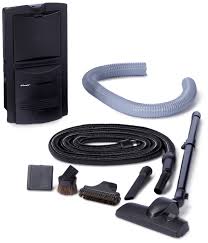


| Product Type | Portable compressor refrigerator |
| Brand | DOMETIC |
| Model | CV-2004 |
| Capacity | 40 L |
| Dimensions (L × W × H) | 650 × 380 × 420 mm |
| Weight | 15 kg |
| Power Supply | 12/24 V DC and 220-240 V AC |
| Power Consumption | 45 W |
| Temperature Range | -18 °C to +10 °C |
| Main Functions | Cold retention, battery protection, digital display |
| Climate Class | N/ST |
| Insulation | High performance |
| Maintenance and Cleaning | Regular cleaning of surfaces with a damp cloth |
| Safety | Reverse polarity protection, built-in fuse |
| Included Accessories | 12 V cable, 230 V cable, storage basket |
| Warranty | 2 years |
Frequently Asked Questions - CV-2004 DOMETIC
User questions about CV-2004 DOMETIC
0 question about this device. Answer the ones you know or ask your own.
Ask a new question about this device
Download the instructions for your Portable Refrigerator in PDF format for free! Find your manual CV-2004 - DOMETIC and take your electronic device back in hand. On this page are published all the documents necessary for the use of your device. CV-2004 by DOMETIC.
USER MANUAL CV-2004 DOMETIC
Central vacuum cleaner
Installation and Operating Manual. . 19
FR
Aspirateur central
Please read this manual carefully prior to installation and start-up and store it in a safe place. If the device is passed on to another person, this manual must also be handed over with it.
Contents
1 Notes on using the manual 19
2 Safety instructions 20
3 Scope of delivery 22
4 Accessories 22
5 Intended use 23
6 Mounting 23
7 Using CV 2004. 24
8 Servicing and cleaning CV 2004 25
9 Troubleshooting 26
10 Guarantee 27
11 Disposal 27
12 Technical data 27
1 Notes on using the manual

Caution!
Safety instruction: Failure to observe this instruction can cause material damage and impair the function of the device.

Warning!
Safety instruction relating to a danger from an electrical current or voltage. Failure to observe this instruction can cause material damage or personal injury and impair the function of the device.

Note
Supplementary information for operating the device.
Action: This symbol indicates that action is required on your part. The required action is described step-by-step.
This symbol describes the result of an action.
fig. 1 5, page 3: This refers to an element in an illustration. In this case, item 5 in figure 1 on page 3.
Please observe the following safety instructions.
2 Safety instructions
The manufacturer will not be held liable for claims for damage resulting from the following:
- Faulty assembly or connection
- Damage to the appliance resulting from mechanical influences and excess voltage
- Alterations to the device without express permission from the manufacturer
- Use for purposes other than those described in the operating manual
2.1 General safety

- Before you start up the device for the first time, verify that the operating voltage matches the mains voltage (see type plate).

- Do not operate the device if it is visibly damaged.
- This device may only be repaired by qualified personnel. Improper repairs can lead to considerable hazards. Should your device need to be repaired, please contact customer services.
- Persons whose physical, sensory or mental capabilities or lack of experience and knowledge prevent them from using the device safely should not use it without initial supervision or instruction by a responsible person.
- Electrical devices are not toys. Always keep the device out of the reach of children.
-
Children must be supervised to ensure that they do not play with the device.
-
Never expose the device to moisture.
- Do not use accessories that have not been recommended by the manufacturer. This can lead to injury and damage to material.
- Only use accessories recommended by the manufacturer.
- Do not lean any objects against the vacuum cleaner.
2.2 Operating the device safely

- Before you disconnect the power plug, remove the hose from the hose socket.
- Never pull the plug out of the socket by the cable.
- Remove the power plug from the socket if you plan to carry out maintenance work.

- Never use the device in rooms where flammable materials are stored or flammable gases have built up. Sparks from the motor could ignite them.
-
Do not vacuum any
-
wet objects
solvents or caustic liquids
hot, glowing, hard or sharp objects - poisonous materials
These could damage the device or the filter.
- Do not vacuum any large objects, such as waste paper or cloths. These could block the hose.
- If the motor is dirty, rinse it in warm water or insert a new filter. Only insert filters that are completely dry.
- Only use the device in indoors, never outside.
- Make sure that none of the outlets are blocked. If necessary, clean the outlets before you use the device.
- Do not use the device without a filter or a dust bag.
- Keep the nozzles away from eyes, ears and face while operating. Ensure that hair, loose clothing and fingers do not get in the outlets or moving parts.
- Keep children and pets at a safe distance when operating the device.
- Do not use the device with wet hands.
- Do not tread on the hose and do not pull too tightly on it.
3 Scope of delivery
| No. in fig. 1, page 3 | Quantity | Designation |
| 1 | 1 | Central vacuum cleaner |
| 2 | 1 | Floor nozzle |
| 3 | 1 | Attachment brush |
| 4 | 1 | Dust nozzle |
| 5 | 1 | Crevice nozzle |
| 6 | 1 | Telescopic tube |
| 7 | 1 | Suction hose |
| 8 | 1 | Hose socket |
| 9 | 2 | Vacuum cleaner bag |
| 10 | 1 | Accessory bag |
| 11 | 4 | Fastening connectors |
| 12 | 1 | Connection hose (50 cm) |
| - | 1 | 220–240 V connection cable |
| - | 1 | 24 V connection cable |
| - | 1 | Set of fastening material |
| - | 1 | Drill template |
4 Accessories
| Designation | Item no. |
| Vacuum cleaner bags (5 pcs) | 9103500005 |
5 Intended use
The CV 2004 central vacuum cleaner (item no. 9103500002) is a vacuum cleaner for installing in a caravan or on a suitable wall. This device is not intended for commercial use. It may not be used outdoors.
6 Mounting

Warning
Danger of electrocution and serious injury.
Beware of electrical cables in the wall.

Caution
Mount the vacuum cleaner in a dry place.
Do not mount the vacuum cleaner in an area which is subject to high temperatures.
Do not bend the connection cable round sharp edges or corners.
Keep the connection cable away from heated surfaces.
Ensure that the dust bag, the motor filter and the outlet filter are in place.
Check the vacuum cleaner works before mounting it.
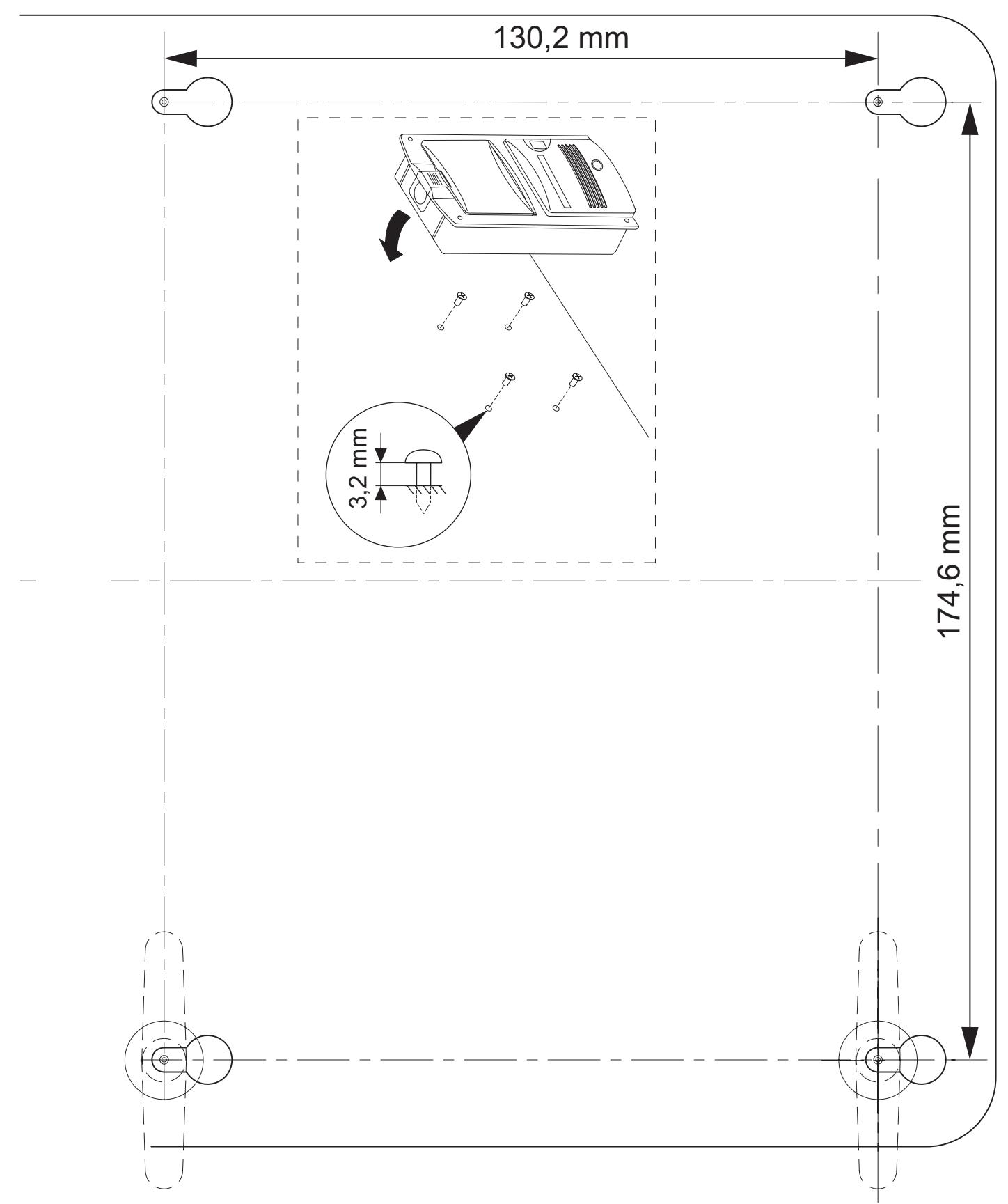
Mount the vacuum cleaner as shown in fig. 2, page 3 to fig. 4, page 4.
Lay the connection hose as shown in fig. 5, page 4 to fig. 7, page 4.
You can find various fastening connectors to do this in the scope of supply.
Connecting electrical power to the vacuum cleaner
Connect the 24V cable to the hose socket and the two yellow wires on the vacuum cleaner, as shown in fig. 8, page 4.

Warning
Danger of electrocution and serious injury.
Only use the 220-240 V connection cable supplied or a suitable cable for 220-240 V.
Connect the 220-240 V cable as shown in fig. 9, page 4 to fig. 12, page 5.
7 Using CV 2004

Caution
Do not use the vacuum cleaner without a dust bag or motor filter. Only use spare parts and accessories recommended by the manufacturer.
7.1 Fitting the dust bag
Insert the dust bag as shown in fig. 13, page 5 to fig. 15, page 6.
7.2 Switching the vacuum cleaner on and off
To switch on, connect the hose to the hose socket.
The vacuum cleaner switches on automatically.
To switch off, disconnect the hose from the hose socket.
The vacuum cleaner switches off automatically.
7.3 Changing the dust bag

Note
Replace or clean the motor filter after you have changed the dust bag five times.
Change the dust bag as shown in fig. 16, page 6 to fig. 19, page 6.
7.4 Replacing and cleaning the motor filter

Note
Replace or clean the motor filter after you have changed the dust bag five times or if it is heavily soiled.
You can wash the motor filter by hand in mild soapy water. Do not wash it in a washing machine or with hard objects. Leave it to dry before fitting it in the vacuum cleaner.

Caution
Insert the new motor filter in the housing. Press the corners of the filter down so that it is lying flat on top of the grid.
Remove the motor filter and insert a new or clean one again, as shown in fig. 20, page 7 to fig. 24, page 7.
7.5 Changing the outlet filter
Remove the motor filter and insert a new or clean one again, as shown in fig. 25, page 8 to fig. 27, page 8.
8 Servicing and cleaning CV 2004

Caution
Always disconnect the plug before you clean and service the device.

Caution
Never clean the device under running water or in dish water. Do not use abrasive cleaning agents or hard objects during cleaning as these can damage the device.
Clean the exterior of the device occasionally with a damp cloth.
Clean the dirt container and the nozzles occasionally with warm soapy water.
9 Troubleshooting

Note
The vacuum cleaner is equipped with a thermal overload protection which prevents the motor from overheating.
Remove the suction hose from the hose socket. The overload protection is deactivated after approx. one and a half hours. If this fault occurs more than three times, contact the manufacturer or your dealer.
If the motor stops, switch off the vacuum cleaner and proceed as follows:
Check whether the suction hose is blocked.
Hold the suction hose up and drop a small coin in from above. If the coin does not fall through the hose, it is blocked. Push the dirt ball through the hose using a long rod.
Check the dust bag.
If a large amount of dirt which is not household dust (plasterboard dust, fine sawdust etc.) is vacuumed up, the pores in the dust bag can get blocked.
Insert a new dust bag.
Clean the suction hose if it is heavily soiled.
- Hold the ends of the suction hose up high.
- Pour liquid detergent into both ends.
- Use a garden hose to fill up with water while holding both ends up.
- Shake the suction hose to and fro to loosen the dirt.
- Pull the suction hose apart as far as possible.
Rinse out the dirt with the garden hose. - Repeat this procedure until the suction hose is clean.
- Hang the suction hose up from the middle and leave it to dry before using it again.
Check whether the suction system is blocked.
Clean the suction system.
Check the motor filter.
Clean or replace the motor filter.
Check the outlet filter.
Clean or replace the outlet filter.
10 Guarantee
The statutory warranty period applies. If the product is defective, please contact the manufacturer's branch in your country (see the back of the instruction manual for the addresses) or your retailer.
For repair and guarantee processing, please include the following documents when you send in the device:
A copy of the receipt with purchasing date
A reason for the claim or description of the fault
11 Disposal
Place the packaging material in the appropriate recycling waste bins wherever possible.
If you wish to finally dispose of the device, ask your local recycling centre or specialist dealer for details about how to do this in accordance with the applicable disposal regulations.
12 Technical data
| CV 2004 | |
| Item no.: | 9103500002 |
| Voltage: | 220–240 V ~ |
| Current consumption: | 5.5 A |
| Fuse: | 15 A |
| Capacity: | 3 l |
| Suction power: | 2500 mm water column |
| Operating temperature: | from -15 °C to +40 °C |
| Dimensions (W x H x D) | |
| Front: | 243 x 460 x 30 mm |
| Rear: | 209 x 413 x 100 mm |
| Weight: | 3.7 kg |
Variations, technical improvements and delivery options reserved.
7.1 Sette inn stovpose
C H Dometic Switzerland AG
Riedackerstrasse 7a
CH-8153 Rümlang (Zürich)
+41448187171
+41448187191
Mail: info@waeco.ch
DK Dometic Denmark A/S
Nordensvej 15, Taulov
DK-7000 Fredericia
+4575585966
+4575586307
Mail: info@waeco.dk
E Dometic Spain S.L.
Avda. Sierra del Guadarrama, 16
E-28691 Villanueva de la Canada
Madrid
+34902111042
+34 900 100 245
Mail: info@dometic.es
F Dometic S.N.C.
Dometic Italy S.p.A.
Via Virgilio, 3
I-47100 For
+390543754901
+390543756631
Mail: info@dometicwta.com
N Dometic Norway AS
Skolmar 24
N-3232 Sandefjord
+4733428450
+47 33428459
Mail: firmapost@waeco.no
Dometic Benelux B.V.
Ecustraat 3
NL-4879 NP Etten-Leur
+31765029000
+31765029090
Mail: info@dometic.nl
S Dometic Scandinavia AB
Gustaf Melins gata 7
Overseas + Middle East
AUS WAECO Pacific Pty. Ltd.
1 John Duncan Court
Varsity Lakes QLD 4227
+61755076000
+61755076001
Mail: sales@waeco.com.au
HK WAECO Impex Ltd.
Suites 2207-2211 · 22/F · Tower 1
The Gateway · 25 Canton Road,
Tsim Sha Tsui · Kowloon
Hong Kong
+852 24611386
+852 24665553
Mail: info@waeco.com.hk
ROC WAECO Impex Ltd.
Taipei Office
2 FL-3 · No. 56 Tunhua South Rd, Sec 2
Taipei 106, Taiwan
+886227014090
+886227060119
Mail: marketing@waeco.com.tw
UAE WAECO Middle East FZCO
R/A 8, SD 6
Jebel Ali, Dubai
+97148833858
+97148833868
Mail: waeco@emirates.net.ae
- CENTRAL VACUUM CLEANER
- ASPIRATEUR CENTRAL
- CONTENTS
- NOTES ON USING THE MANUAL
- CAUTION
- WARNING
- NOTE
- SAFETY INSTRUCTIONS
- GENERAL SAFETY
- OPERATING THE DEVICE SAFELY
- SCOPE OF DELIVERY
- ACCESSORIES
- INTENDED USE
- MOUNTING
- CONNECTING ELECTRICAL POWER TO THE VACUUM CLEANER
- USING CV
- FITTING THE DUST BAG
- SWITCHING THE VACUUM CLEANER ON AND OFF
- CHANGING THE DUST BAG
- REPLACING AND CLEANING THE MOTOR FILTER
- CHANGING THE OUTLET FILTER
- SERVICING AND CLEANING CV
- TROUBLESHOOTING
- GUARANTEE
- DISPOSAL
- TECHNICAL DATA
- SETTE INN STOVPOSE
- OVERSEAS + MIDDLE EAST
Brand : DOMETIC
Model : CV-2004
Category : Portable Refrigerator