
307PA - Speaker ECLIPSE - Free user manual and instructions
Find the device manual for free 307PA ECLIPSE in PDF.


User questions about 307PA ECLIPSE
0 question about this device. Answer the ones you know or ask your own.
Ask a new question about this device
Download the instructions for your Speaker in PDF format for free! Find your manual 307PA - ECLIPSE and take your electronic device back in hand. On this page are published all the documents necessary for the use of your device. 307PA by ECLIPSE.
USER MANUAL 307PA ECLIPSE
Thank you for purchasing the 307 speaker or the 307 PA speaker/amplifier.
Please read this Owner's Manual before use.
Be particularly sure to read the Safety Instructions section.
Keep this Owner's Manual together with the Warranty in a safe place for later reference.
Foreword
Contents
Important safety Instructions 3
Notes on Use 6
Part Names and Functions/Connections 7
Installing 10
Connection examples 11
Specifications 12
Accessories
| NO | Accessories | Quantity | |
| 307 | 307PA | ||
| 1 | 65mm [2/16"] dia. Speaker | 1 | 2 |
| 2 | Amplifier | 1 | |
| 3 | AC adapter | 1 | |
| 4 | stereo mini plug cable (1.5m) | 1 | |
| 5 | Speaker cable 3m parallel-wire (⊕:gray, ⊙:gray/black) | 2 | |
| 6 | Owner's Manual | 1 | 1 |
| 7 | Warranty | 1 | 1 |
| 8 | Hexagonal wrench | 1 | 1 |
| 9 | Rubber spacer | 1 | 2 |
| 10 | Cable tie | 2 | |
| 11 | LOGO Sticker | 1 | 2 |
| 12 | Stereo mini/RCA plug cable (1.5m) | 1 | |
Stereo mini/RCA plug cable(1.5m) is for connecting the amplifier with a playback equipment which has RCA stereo output terminal such as CD player.
WARNING :…To avoid the danger of suffocation, keep plastic bags out of the reach of children.
This product is an amplifier system which has been designed using time domain theory in order to maximise quality of speaker operation and performance.
What is time domain theory?
Time domain recreates the changes that occur in sound waves over time from the moment of output until their disappearance. Its purpose is to reproduce those sound waves that are as close as possible to the original recorded sound.
Time domain audio systems allow sound orientation and the nuances that are added by recorded performers to be faithfully reproduced.
Important Safety Instructions
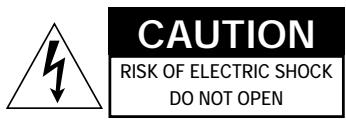
CAUTION: TO REDUCE THE RISK OF ELECTRIC SHOCK, DO NOT REMOVE COVER (OR BACK). NO USER-SERVICEABLE PARTS INSIDE. REFER SERVICING TO QUALIFIED SERVICE PERSONNEL.
WARNING
TO REDUCE THE RISK OF FIRE OR ELECTRIC SHOCK, DO NOT EXPOSE THIS APPLIANCE TO RAIN OR MOISTURE.
Explanation of Graphical Symbols
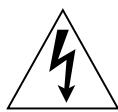
The lightning flash with arrowhead symbol, within an equilateral triangle, is intended to alert you to the presence of uninsulated "dangerous voltage" within the product's enclosure that may be of sufficient magnitude to constitute a risk of electric shock to persons.
The exclamation point within an equilateral triangle is intended to alert you to the presence of important operating and maintenance (servicing) instructions in the literature accompanying the appliance.
CAUTION (for customers who concerned) TO PREVENT ELECTRIC SHOCK, MATCH WIDE BLADE OF PLUG TO WIDE SLOT FULLY INSERT.
1. Read instructions
All safety and operating instructions should be read before operating unit.
2. Follow instructions
All operating and other instructions should be followed.
3. Retain instructions
The safety and operating instructions should be retained for future reference.
4.Warnings
All warnings on the unit and in the operating instructions should be adhered to.
5. Power supply
Power supply should be operated only from the power source indicated on the marking label. If you are not sure of the type of power supply to your home, consult your product dealer or local power
company.
6. General care of unit
Do not open or modify the unit as fire or electric shock may result. Do not place flower vases, potted plants, cups, cosmetics, drugs, containers holding liquids, or small metal objects on or near the unit. Do not place any objects on the unit and do not insert or drop metal, combustible objects or liquids into the unit as such actions can cause fire or electric shock. If liquid or foreign objects enter the unit, disconnect immediately since continued use may result in fire or electric shock. Do not place the unit on tuners, audio decks or other electric equipment. Do not use the unit as a step or seat. The unit may tip over and cause damage or injury. Consult a company customer
service facility for interior inspection, adjustment or repair.
7. Where not to use unit
Do not use the unit in bathrooms, areas exposed to rain or snow, on the shore, near water or in humid conditions. Do not place the unit in unstable locations, in kitchens,near humidifiers, or in any location with likely exposure to smoke or steam. Do not place the unit in direct sunlight, near heating equipment or close to open flames. Fire, accident or malfunction may result. Do not place the unit in locations exposed to cold air or direct draft. Condensation, leakage current or thermal damage may result. Do not use the unit in dusty or dirty locations. Decreased heat ventilation can cause thermal damage
8. Unit heat
The bottom and sides of the unit can heat up during use and should not be touched. Burns may result. Only connect or disconnect speaker cables after the power supply has cooled down.
9. Moving the unit
When moving the unit, shut off power to all connected equipment, and disconnect power cords, connectoins cables, speaker cables and other wires. Moving the unit while cable are connected can cause damage to cables, fire or electric shock. The unit is heavy and care should be taken when unpacking, moving or lifting.
Manufacturing also creates sharp areas on the unit; use thorough care in handling.
Because the volume knob can be separated from the amplifier, never hold the volume knob when moving the amplifier.
10. Power cord
Only use the power cord supplied and do not bend, twist, modify it for repair, or pin it under the unit. Heavy objects, heat or tension may also damage the power cord and cause fire or electric shock. When disconnecting the power cord from an outlet, do not pull the cord. Pulling on the cord can damage it and cause fire or electric shock. Do not touch the power cord with wet hands. Do not place the power cord near heating equipment and
do not use the unit. If the plug fits loosely in an electric outlet or the plug or cord is hot. If the cord is damaged replace it as continued use may result in fire or electric shock.
11. Unit plug
Insert the plug into an outlet all the may to its base. Incomplete insertion can cause heat production, and dust build-up can cause fire. Contact with the prongs of the plug can also cause electric shock. Do not connect the unit to an outlet where the connection is loose even when the plug is inserted all the way to its base. Do not use the unit if the plug is hot. Heat production can cause fire.
If dust or metal accumulates on or near the prongs of the plug, wipe the plug with a dry cloth after disconnection. Continued use may cause fire or electric shock.
12. Danger signs
If you notice a strange noise, smoke, unusual odour or other abnormal condition, shut off the unit, disconnect the power cord from the outlet and have the unit inspected. Continued use may result in fire or electric shock.
13. Electric storms
During electrical storms disconnect the unit and avoid contact with the antenna and power cord. Lightning can cause fire, electric shock and malfunction.
14. Internal temperature rise
To avoid internal temperature rise when installing the unit, leave space between the unit and walls or other equipments. When installed in a rack or similar fixture, leave a 10cm (4") or larger gap on top and at sides since internal temperature rise can result in fire. The unit is provided with ventilation holes to prevent internal temperature rise. Blockage of these holes decreases ventilation and can result in fire. Note the following:
Do not place the unit in a poorly ventilated area
Do not place the unit on carpeting or on bedding
Do not obstruct the ventilation holes
Do not tilt the unit or turn upside down
15. AC Adapter
Only use the AC adapter supplied and ensure that you use it in a well-ventilated location free from dampness.
16. Extended non-use
If the unit is likely to be unused for an extended period, shut off power and disconnect from power supply.
17. Volume Adjustment
If abnormal noise is produced during play at high volume, reduce the volume level. Distorted sound can cause overheating of speakers and amplifier. Before switching power supply on, set the amplifier volume to minimum. Sudden, loud noise can cause damage to hearing.
18. Connecting TV/other audio equipment
When connecting a TV or other audio equipment, always shut off power, read the operating manual for each device and follow the instructions for connection. Use only designated cables.
Use of non-designated cables or extension cables can cause heat production, burns, and fire.
19. Antenna
An outdoor antenna should be located away from power lines.
20. Maintenance.
Before undertaking maintenance disconnect from power supply. Have the interior of the unit cleaned approximately once a year by qualified personnel. Accumulated dust inside and long intervals without cleaning can cause fire or malfunction. Before cleaning this product make sure that the power is turned off and the power cord is disconnected from the wall outlet. Clean with a soft cloth. If the product is particularly dirty, moisten the cloth and wring out before use. Complete by wiping with a soft, dry cloth. Do not use liquid solvents such as alcohol or thinner to clean this product, as such chemicals can damage the cabinets.
21. Servicing
The unit should be serviced by qualified personnel when:
The power-supply cord or plug has been damaged, or
Objects or liquid have entered the unit,
or
The unit has been exposed to rain; or
The unit is malfunctioning, or
The unit has been dropped or the cabinet has been damaged.
22. Children
Use particular care in households where children are present.
23. Temporary Fault
If this product receives a strong external shock (such as from an impact, static electricity or a power surge due to lightning), or if this product is used incorrectly, it may stop working properly. In such cases, press the power button to turn the power off and then back on again, and check if this product is working normally.
Notes on Use
Volume Setting
Before switching ON minimise the volume.
Sudden, large output can damage the speakers.
Volume Etiquette
To avoid disturbance in your neighbourhood, enjoy your unit at an appropriate volume.
Remember that at night, even low volume carries into surrounding areas.
Help to maintain a pleasant living environment.
Speaker Cord Connection
Always connect speaker systems with power OFF.
If a speaker cable is inadvertently shorted, the protection circuit in the amplifier will operate, and audio output will stop temporarily.
In this event, disconnect the power cord from the outlet, correct the shorted area and reconnect the power cord to the outlet.
The output of this amplifier is in BTL format; avoid connecting the negative side to the negative side of another device by a speaker selector or the like (the negative side is not GND voltage).
Volume knob
Attach the volume knob to the amplifier as shown in the following figure.
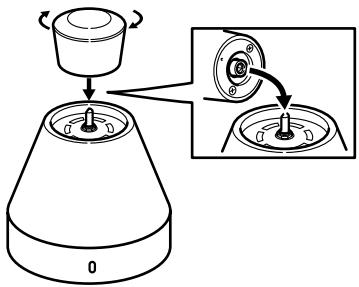
Caution
In order to protect internal parts, the volume knob will separate from the amplifier if excessive force is applied to the knob.
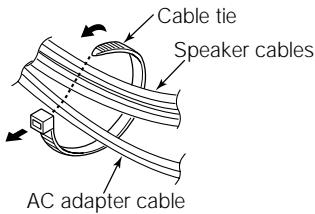
Speaker Cable Routing
Bind the speaker cables using the accessory cable ties.
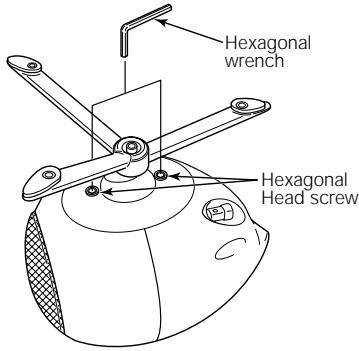
Hexagonal Head Screw
If the base of the speaker unit is loose after you have adjusted the angle, use a hexagonal wrench to tighten the hexagonal head screw in the base of the speaker.
Part Names and Functions/Connections
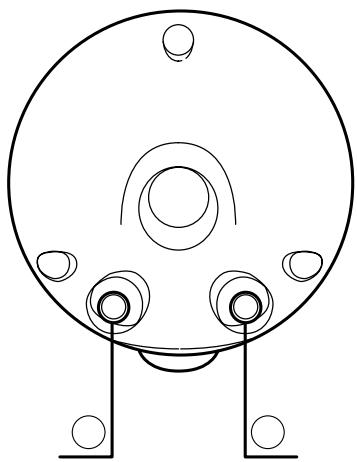
Speaker input terminals
When connecting the speakers, insert the ends of the speaker cables so that they do not touch neighbouring terminals.
While pressing the terminal with your finger, insert the speaker cable into the hole. Check that the speaker cable does not pull out after the terminal is released.
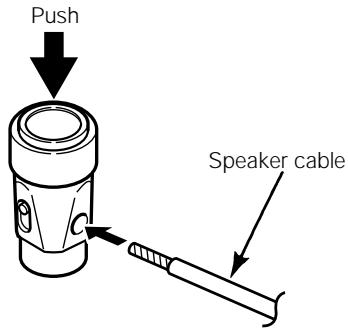
Connect the cable with the black stripe to the black terminal.
It is recommended that the accessory speaker cables are used. (These cables are designed to provide optimum sound quality for this system.)
The 307 is not provided with accessory cables, so you will need to purchase them separately. (Make sure that the and cables are connected correctly.)
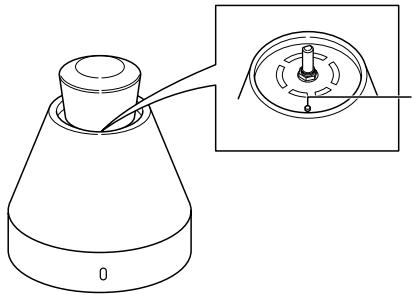
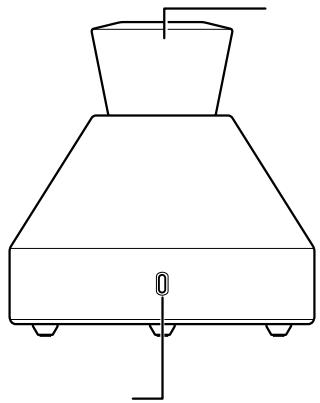
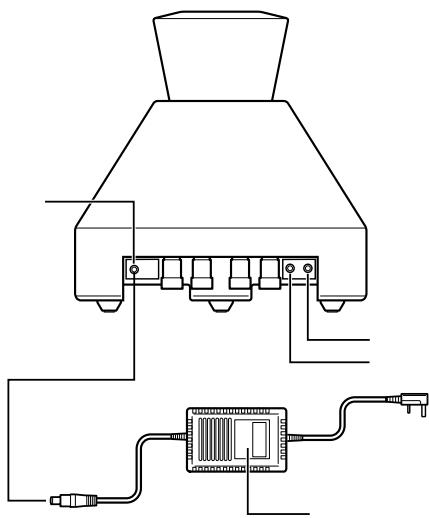
Power indicator
Power button "ON": indicator lights
Power button "OFF"
Volume control knob.
This knob is used to adjust the volume.
If the amplifier is connected to a playback device such as a portable CD player or to the headphone jack of a computer, adjust the volume to the appropriate level at the playback device or computer
Line-input terminal
Use a stereo mini cable to connect a device to this terminal.
If the amplifier is connected to a playback device such as a portable CD player or to the headphone jack of a computer, use the accessory stereo mini cable.
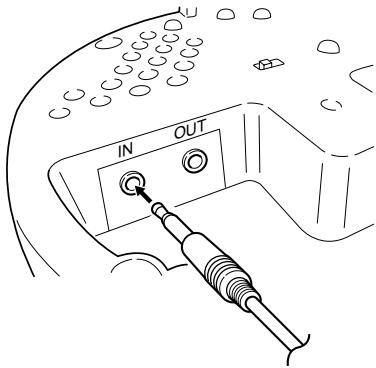
Line-output terminal
This terminal is used to output signals from the amplifier to a sub-woofer. For stereo output, the output signal volume will increase when the volume control knob is turned clockwise.
Power button
Turns power ON and OFF.
Power connector
Connect power supply here.
Do not connect anything other than the AC adapter, otherwise it may cause problems with operation and/or fire.
AC adapter
Input voltage and the shape of plug vary in the destination.
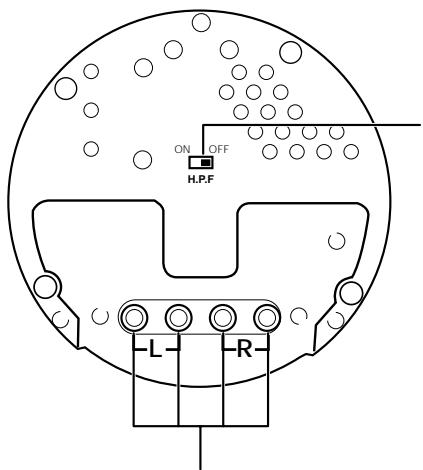
Bottom view of amplifier
Speaker output terminals
When connecting the speakers, insert the ends of the speaker cables so that they do not touch the speaker body or neighbouring terminals.
While pressing the terminal with your finger, insert the speaker cable into the hole. Check that the speaker cable does not pull out after the terminal is released.
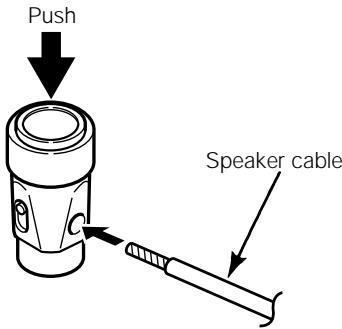
Connect the cable with the black stripe to the black terminal.
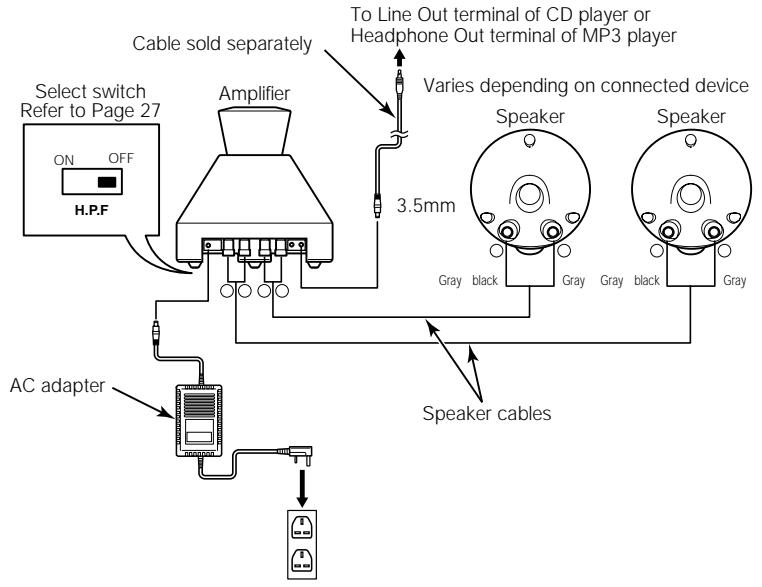
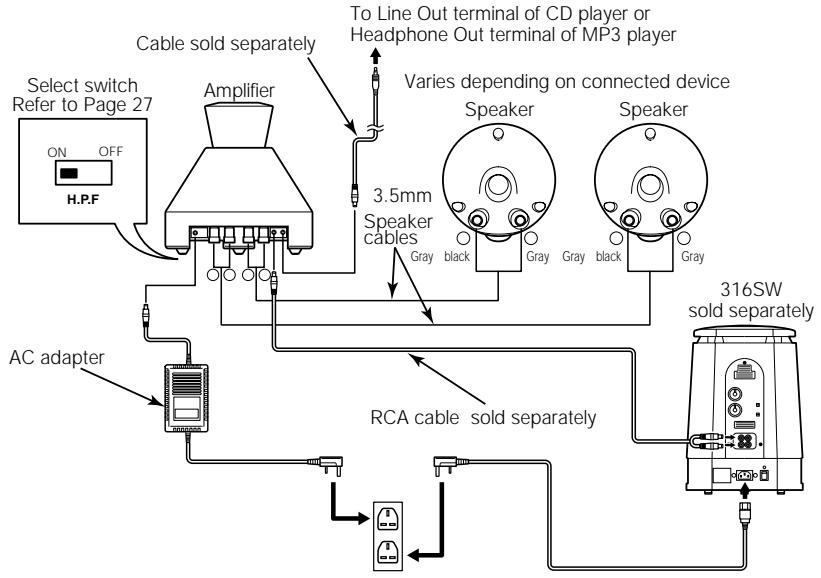
H.P.F. switch
When a sub-woofer is connected to the amplifier, set this switch to "ON" to cut out the bass range of the speaker output signal.
Installing
Speaker installation position
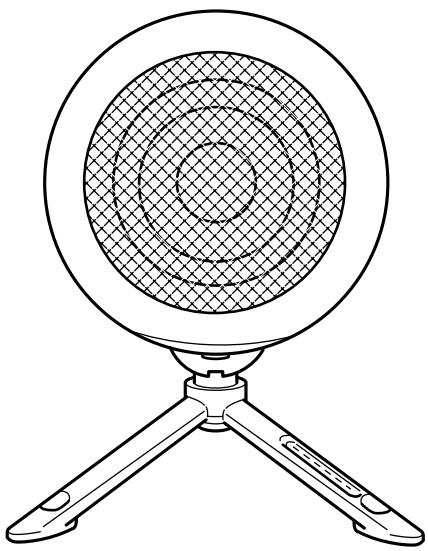
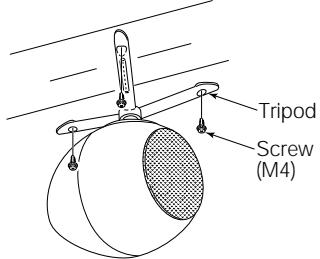
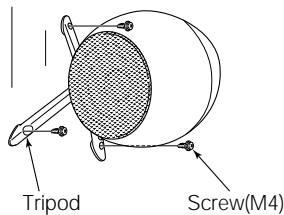
The speaker can be suspended from the ceiling or attached perpendicularly to the wall as well as being placed on the floor. Insert screws through the holes in the tripod legs to secure the speaker to surfaces such as these.
Caution
Consult a qualified technician for advice on installation locations and installation methods. If the speaker is installed in an inappropriate place or by using an inappropriate installation method, it may fall down.
Installing to a ceiling
Installing to a wall
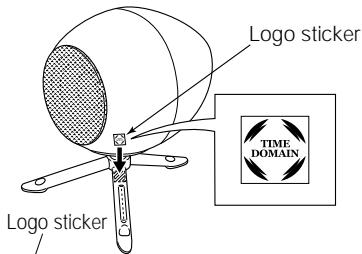
Attaching the "TIME DOMAIN" logo sticker Attach the "TIME DOMAIN" logo sticker to the speaker.
Remove and stick the released paper.
Attachment example

ECLIPSE TO
Removing the protective net and installing the rubber spacer
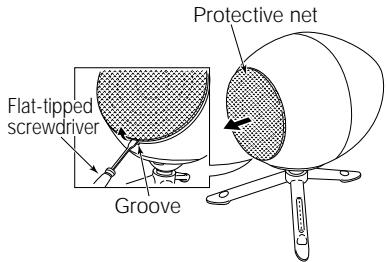
The speaker's protective net can be removed if desired. When the protective net is removed, install the rubber spacer before using the speaker.
1 Removing the protective net
- Insert a flat-tipped screwdriver or similar tool into the groove of the protective net and lift it up to raise the protective net.
- Remove the protective net.
2 Installing the rubber spacer
- Push the rubber spacer into the groove of the speaker starting from the notch in the speaker.
Rubber spacer
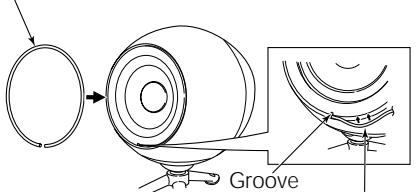
Rubber spacer
Caution
Do not touch the paper cone of the speaker with your hands.
- Use scissors to cut off any unneeded part of the rubber spacer.
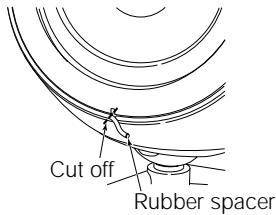
Caution
Be careful not to damage the cone of the speaker with the scissors.
Connection examples
Player+Amplifier+Speakers
Player+Amplifier+speakers+316SW (sold separately)
Specifications
Specifications
Specifications and appearance are subject to change without prior notification.
[Amplifier]
Rated output: 12 W
(at 8 load, T.H.D: 1%)
Max. output: 15 W
5 W at 8 load, T.H.D : 10%)
BTL
Total high harmonic distortion: 0.03% (at 0 W output; HK12)
Frequency characteristics: 20Hz -- 100kHz (±3dB)
Input sensitivity: 180mVrms (at 12 W output)
Signal-to-noise ratio: 65dB
Separation rate: 50dB
Input impedance: 10k
Applicable load impedance: 8
Dimensions: 144 (W)x148 (D)x145 (H)
4^23 / 32^ (W)x6^5 / 16^ (D)x6^3 / _8^ (H)
Weight: Approx. 1.5kg 3^1 / 4 lbs
[AC Adapter]
Input voltage: 230V ± 10 (50Hz)
Output voltage: +15V DC
Output current: 3A DC
Dimensions: 130 (W)x92 (D)x67 (H)
5^1 / 8 "W)x3/8"Dx25/8"(H)
Weight: Approx. 1.6kg 3^1 / 2 lbs
[Speakers]
Diameter: 6.5cm 2^9 / 16
Type: Bass ref/box
Input resistance: Rated 12 W/Maximum 24 W (with box)
Impedance: 8
Dimensions: 120 (W)x160 (D)x162 (H)
4^23 / 32^ (W)× 6^5 / 16^ (D)× 6^3 / _8^ (H)
Weight: Approx. 1.2kg 2^5 / 8 lbs