
FV9240 - Iron T-FAL - Free user manual and instructions
Find the device manual for free FV9240 T-FAL in PDF.



User questions about FV9240 T-FAL
0 question about this device. Answer the ones you know or ask your own.
Ask a new question about this device
Download the instructions for your Iron in PDF format for free! Find your manual FV9240 - T-FAL and take your electronic device back in hand. On this page are published all the documents necessary for the use of your device. FV9240 by T-FAL.
USER MANUAL FV9240 T-FAL
A. Shot of steam button For removing creases
B. Spray button To moisten linen
C. Thermo-Alight light (depending on model)
D. Auto-shut off safety warning light (depending on model)
E. Ergonomic grip
F. Electric power cord
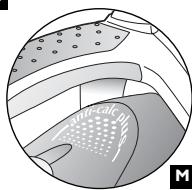
G. Integral anti-scale system
H. Extra-large heel with non-slip pad
I. Water tank filler hole
J. Thermostat indicator light Goes out when the temperature has been reached.
K. Dry/Steam control
L. Program selector
M. Soleplate
N. Spray
O. 8-program control panel
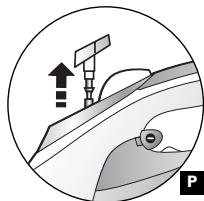
P. Anti-scale valve release button
ESPANOL
When using your clothes iron, basic safety precautions should always be followed, including the following :
- Use iron only for its intended use.
- To protect against a risk of electric shock, do not immerse the iron or the base of the iron in water or other liquids.
- When fitted with an on/off switch the iron should always be turned OFF before plugging or unplugging from outlet. Never yank cord to disconnect from outlet ; instead, grasp plug and pull to disconnect.
- Do not allow cord to touch hot surfaces. Let iron cool completely before putting away. Wrap cord loosely around iron when storing.
- Always disconnect iron from electrical outlet when filling with water or emptying and when not in use.
- Do not operate iron with a damaged cord or if the iron has been dropped or damaged. To avoid the risk of electric shock, do not disassemble the iron. Contact our Consumer Service Department for examination, repair or adjustment. Incorrect reassembly can cause a risk of electric shock when the iron is in use.
- Close supervision is necessary for any appliance being used by or near children. Do not leave iron unattended while connected or on an ironing board.
- Burns can occur from touching hot metal parts, hot water or steam. Use caution when you turn a steam iron upside down - there may be hot water in the reservoir.
- This appliance is only for domestic and personal use.
SPECIAL INSTRUCTIONS
- To avoid a circuit overload, do not operate another high-wattage appliance on the same circuit.
- If an extension cord is absolutely necessary, a 13 ampere cord should be used. Cords rated for less amperage may overheat. Care should be taken to arrange the cord so that it cannot be pulled or tripped over.
SAVE THESE INSTRUCTIONS
Warning! Remove the soleplate protector before heating up the iron (depending on the model).
Warning!
Prior to first use of your iron using steam on fabric, we recommend that you turn it on for a few seconds in the horizontal position, and press the Burst of Steam button several times.
During the first few uses, the iron may give off an odor and smoke; both are harmless. This will not affect the use of the iron and will quickly disappear.

What water to use?
Your appliance has been designed to function with tap water. However, it is necessary to use the Auto-Cleaning feature to clean the steam chamber regularly in order to eliminate hard water deposits. If your water is very hard you may mix tap water with demineralized water in the following proportions: 50% tap water, 50% demineralized water.

What water not to use :
Heat concentrates the elements contained in water during evaporation. The types of water listed below contain organic waste or mineral elements that can cause spitting, brown staining, or premature wear of the appliance: water from clothes dryers, scented or softened water, water from refrigerators, batteries, or air conditioners, pure distilled water, or rain water. Do not use any de-scaling agents in your iron, you may do permanent damage to the unit.
I- STEAM IRONING

Filling the water reservoir
- Unplug your iron before filling it.
- Set the steam control to DRY (A)
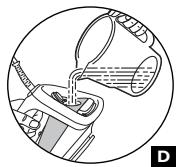
- Take the iron in one hand and tilt it slightly, soleplate downwards (D).
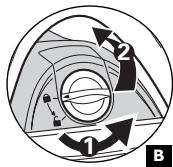
- To open the water tank stopper, turn it anticlockwise until the arrow on the stopper points to the "open padlock" symbol (B). It will lift automatically.
- Fill the tank up to the "MAX" line (D).
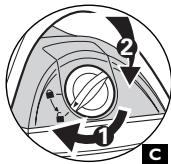
- Re-close the tank stopper (C).To close the stopper, align the arrow with the "open padlock" symbol then turn it clockwise until the arrow is aligned with the "closed padlock" symbol.
- You can now plug in your iron.
Choose your ironing program
Your iron has 8 ironing programs:
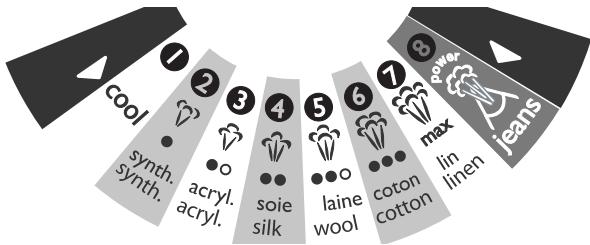
- For each program corresponding to a type of textile to be ironed, your iron automatically and precisely determines the most suitable temperature and steam flow to guarantee best results.
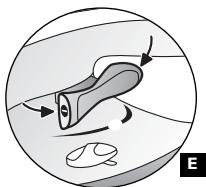
- To select the appropriate ironing program, use the program selector beneath the grip (E).
- Pressing on the left side : selects the programs requiring low temperature and steam levels. Beyond program I, pressing the program selector has no effect.
- Pressing on the right side : selects the programs requiring high temperature and steam levels. Beyond program 8, pressing the program selector has no effect.
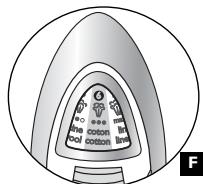
- The program selected appears automatically on the indicator panel at the front of the iron (F).
- Set the steam control to steam (
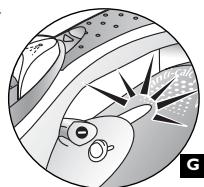
- When your iron reaches the required temperature, the thermostat indicator goes out (G). You can start ironing.
Recommendations:
Fabrics and ironing temperatures:
- Your iron heats up quickly: so begin by ironing fabrics that are ironed at low temperatures first, then go on to those requiring a higher temperature,
- if you change to a program requiring lower temperatures, wait for the thermostat light to come on again before continuing to iron (for models fitted with the "Thermo-A Alert", refer to the section "Thermo-A lert function").
- when ironing fabrics with mixed fibres, set the ironing temperature for the most delicate fibre.
For delicate fabrics we recommend testing the fabric first on an inconspicious place eg (inside them). - For best results we recommend you use a vented ironing board to allow the powerful steam to penetrate through the fabric more efficiently.
- Ensure that the fabric you are ironing is flat to avoid steam venting sideways whilst ironing.
Moistening the fabric (Spray)

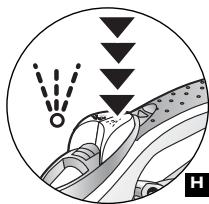
- While ironing, press a few times in succession on the Spray button to dampen the fabric (H) and iron out obstinate creases.
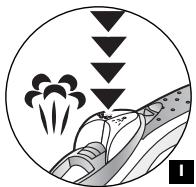
For more steam (shot of steam button)

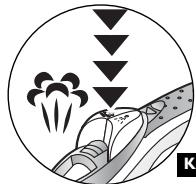
- Press the Shot of Steam button from time to time (I)
- Wait a few seconds between each shot before pressing the button again.
Vertical steam ironing
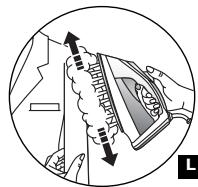
- Ideal for removing creases from suits, jackets, skirts, hanging curtains etc
- Hang the garment on a hanger and hold the fabric slightly taut with one hand.
The steam is very hot, so you should always do this with the garment on a hanger - never while someone is wearing it.
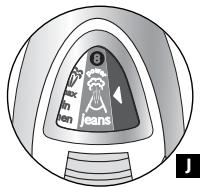
- Set the iron to program 8 (J).
- Hold the iron a few inches from the fabric to avoid burning delicate fabrics.
- Press the Shot of Steam button () repeatedly (K), moving the iron from top to bottom. (See illustration) (L).
Integral anti-scale system
You iron is equipped with an integral anti-scale system (M).
- This system will help to provide :
- a better ironing quality with a constant flow of steam,
- a longer life for your iron.
Anti-drip function
- The principle of automatic selection of the steam according to the fabric selected, reduces the steam flow at lower temperatures and avoids water dripping from your iron onto the fabric.
Auto-Shut off safety feature (depending on model)
- The electronic system cuts off the electric power and the Auto-Stop warning light flashes if the iron is left vertically on its heel for more than 8 minutes, or in a horizontal position for more than 30 seconds, for your security (N).
- To restart the iron, just move it gently until the warning light stops flashing.
Note : when the Auto-Stop warning light is on, it is normal for the thermostat light to remain off.

M
"Thermo-Alert" function (depending on model)
- The "Thermo-A Alert" light (O) comes on when you choose a program requiring a lower temperature (for example, changing from program 8 to program 6). It remains lit while the soleplate temperature is too high.
- When it goes out, you can iron without risk of burning the fabric.

2- DRY IRONING

- Choose your ironing program.
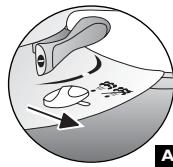
- Set the steam control to DRY (see diagram A).
- You may start ironing when the thermostat light goes out.
3-CARING FOR YOUR IRON
BE CAREFUL! Unplug your iron and let it cool down before cleaning it.
- CLEANING THE ANTI-CALC VALVE (Once per month):
- Unplug your iron and empty the water tank.
- To remove the anti-calc valve, select program 8, press the release button (P) and pull the valve upwards.
NEVERTOUCH THE END OF THE VALVE.
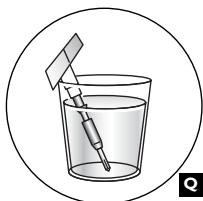
- Soak the valve in a cup of white spirit vinegar or plain lemon juice for 4 hours (Q).
- Rinse the valve under running water.
- Replace the anti-calc valve.
THE IRON WILL NOT FUNCTION WITHOUT THE ANTI-CALC VALVE.
SELF-CLEANING:
In order to extend the life of your iron, use the Self-Cleaning function once a month.
- Allow your iron to heat up with the tank full and standing on its heel (on program 8).
- When the thermostat light goes out, unplug the iron and hold it in a horizontal position, over a sink.
- Remove the anti-calc valve.
- Shake the iron gently, over the sink, until some of the water in the water tank (with the impurities) has flowed out through the soleplate.
- At the end of the operation, push the anti-calc valve back into position.
- Turn the iron back on for 2 minutes, setting it on its heel, to dry the soleplate.
- Unplug the iron, and when the soleplate is just warm, wipe it with a soft cloth.
Recommendations :
the self-cleaning function helps to slow down the scaling up of your iron.
CLEANING THE SOLEPLATE :
- While the soleplate is still just warm, clean it by rubbing it with a moist non-metallic pad.
4- STORING YOUR IRON
- Unplug the iron and wait for the soleplate to cool down.
- Empty the water tank and set the steam control to DRY. A little water may remain in the tank.
- Wind the cord not too tightly around the heel at the back of the iron.
- Store the iron on its heel.
FOR YOUR SECURITY
- If it drops or falls on the floor, the iron must not be used if there is any visible sign of damage or if it leaks.
- Your iron must be placed on a flat and stable, heat-resistant surface.
- Warning! The voltage of your electrical installation must correspond to that of the iron (120V). Connecting to the wrong voltage may cause irreversible damage to the iron and will invalidate the guarantee.
- This iron must always be plugged into an earthed socket.
- If using a main extension lead, ensure that it is correctly rated (13A).
Cords rated for less amperage may overheat.
- If the electrical cord becomes damaged, it must be immediately replaced. Please contact T-FAL's Consumer Service Department to avoid any danger.
- Never immerse your iron in water!
- The appliance must be unplugged before filling or emptying the water tank.
- If the appliance falls, have it checked by a suitably qualified person before using it again; unseen damage may be dangerous.
-
The soleplate may be very hot :
-
Never touch it.
- Always let it cool off before putting it away.
- Never leave your iron unattended when it is plugged in or while the soleplate is still hot.
- Always keep your iron out of the reach of children.
-
Be careful of hot steam especially when ironing close to the edge of the ironing board.
-
When placing the iron on its stand, ensure that the surface on which the stand is placed is stable.
- NEVER DISASSEMBLE YOUR IRON ON YOUR OWN; PLEASE REFER ALL SERVICE AND TECHNICAL QUESTIONS TO T-FAL'S CONSUMER SERVICE DEPARTMENT.
- This product has been designed for domestic use only. Any professional use, inappropriate use or failure to comply with the instructions, the manufacturer accepts no responsibility and the guarantee will not apply.
5- IF THERE IS A PROBLEM
Problem
Water drips from the holes in the soleplate.
Possible causes
- The chosen temperature is too low and does not allow for the formation of steam.
- You are using the Shot of Steam button too often.
- You have stored the iron horizontally, without emptying it and without setting it to DRY.
Solutions
- Choose a program from 2 to 8 and wait for the light to go out.
-
Wait a few seconds between each use of the button.
See the section "Storing your iron". -
Brown streaks come through the holes in the soleplate and stain the linen.
-
You are using chemical descaling agents.
- You are using pure distilled/demineralised or softened water.
-
Fabric fibres have accumulated in the holes of the soleplate and are burning.
-
Do not add any descending agents to the water in the water tank.
-
See section "Types of water not to use".
-
Your linen has not been rinsed sufficiently or you have ironed a new garment before washing it.
-
Carry out a self-clean.
- Clean the soleplate with a non-metallic sponge.
Vacuum the holes of the soleplate from time to time. -
Ensure linen is rinsed thoroughly to remove any soap deposits or chemicals on new garments which may be sucked up by the iron.
-
The soleplate is dirty or brown and can stain the linen.
-
Your are ironing with an inappropriate program (temperature too high).
-
You are using starch.
-
Select the appropriate program.
-
Clean the soleplate as indicated above. Always spray starch onto the reverse side of the fabric to be ironed.
-
There is little or no steam.
-
The water tank is empty.
- The anti-calc valve is dirty.
-
Your iron has a build-up of scale.
-
Fill it.
- Clean the anti-calc valve.
- Clean the anti-calc valve and carry out a self-clean.
- Carry out a self-clean.
-
Wait for the soleplate to reach the correct temperature
-
The soleplate is scratched or damaged.
-
You have placed your iron flat on a metallic rest-plate or ironed over a zip.
-
Always set your iron on its heel.
Water is running out of the tank filler hole.
-
You have not closed the tank stopper properly.
-
Make sure that the stopper is properly closed and that the arrow points to the "closed padlock" symbol.
- Check that the steam control is set to the DRY position.
-
Check that the steam control is set to the DRY position.
-
Steam or water come from the iron as you finish filling the tank.
-
The steam control is not set to the DRY position.
-
The program selector has no effect.
-
The selection is already at one extreme of the range.
-
Operate the selector in the opposite direction.
-
The spray does not spray
-
The tank is empty.
-
Fill the tank.