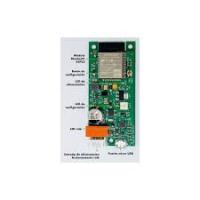
BLUETOOTH STAND-ALONE ACCESS CONTROL - Access Control FERMAX - Free user manual and instructions
Find the device manual for free BLUETOOTH STAND-ALONE ACCESS CONTROL FERMAX in PDF.



| Product type | Stand-alone Bluetooth access control |
| Brand | FERMAX |
| Model | BLUETOOTH STAND-ALONE ACCESS CONTROL |
| References | 4477 (receiver with flush-mount box), 4476 (Citymax module for door panel) |
| Power supply | 12 Vdc / 12 Vac |
| Consumption at rest (12 Vdc) | 80 mA |
| Consumption when activated (12 Vdc) | 200 mA |
| Consumption at rest (12 Vac) | 50 mA |
| Consumption when activated (12 Vac) | 80 mA |
| Relay type | Double contact, 2 A |
| Opening delay | 1 to 99 seconds (adjustable) |
| Bluetooth range | 2 m (short), 9 m (medium), 20 m (long) - adjustable |
| User capacity (allowed list mode) | Up to 40 phones |
| User capacity (all-comer mode) | Unlimited |
| Operating modes | Without list (PIN required) / With list (automatic, with confirmation or with PIN) |
| Compatibility | Any mobile phone with Bluetooth |
| Receiver dimensions (Ref. 4477) | 130 x 128 mm |
| Flush-mount box dimensions | 115 x 114 x 45 mm |
| Default user PIN code | 1234 |
| Default administrator PIN code | 4444 |
| Maintenance | Clean with a soft, dry cloth. Do not use abrasive products. |
| Installation | Flush-mounted or surface-mounted. Can be integrated into an electric door entry panel. |
| Programming software | Downloadable from www.fermax.com (Products > Downloads > Software) |
Frequently Asked Questions - BLUETOOTH STAND-ALONE ACCESS CONTROL FERMAX
User questions about BLUETOOTH STAND-ALONE ACCESS CONTROL FERMAX
0 question about this device. Answer the ones you know or ask your own.
Ask a new question about this device
Download the instructions for your Access Control in PDF format for free! Find your manual BLUETOOTH STAND-ALONE ACCESS CONTROL - FERMAX and take your electronic device back in hand. On this page are published all the documents necessary for the use of your device. BLUETOOTH STAND-ALONE ACCESS CONTROL by FERMAX.
USER MANUAL BLUETOOTH STAND-ALONE ACCESS CONTROL FERMAX
Technical publication for information purposes, edited by FERMAX ELECTRONICA S.A.E.
FERMAX ELECTRONICA S.A.E., in a policy of ongoing improvement, reserves the right to modify the contents of this document and the features of the products cited herein at any time and with no prior notice.
Any modification shall be reflected in subsequent editions of this document.
ENGLISH
INDEX
INTRODUCTION 4
CONNECTION DIAGRAM 5
Technical Features 5
Coverage 5
System Operating Modes 6
Operating Mode Configuration 7
Factory Configuration 7
FREQUENTLY ASKED QUESTIONS 9
INTRODUCTION
Now your mobile telephone also serves for something else: open the garage door, the office or the gate of your home. Why carry more keys or remote controls? Your inseparable telephone, if it incorporates Bluetooth® technology, will let you open the doors.
All you need to do is install a Bluetooth access control receiver and connect it to the electric lock or motor of the garage door, in parallel with the current door release system.
Extremely quick and simple installation.
- Requires no outdoor installation: vandalism-proof protection.
- Operating options:
○ Authorised Telephones: Automatic door release / PIN request.
Any Telephone: PIN request. As a portable personal keyboard.
- Ideal for vehicle or pedestrian hands-free access.
Option of embedded or flush fitting. - Can be integrated in electronic entry system outdoor panels.
The receiver can also be used as a panoramic card slot to lodge a card with the name of the building, stree number, ... etc., unseen by non-residents. All you need to do is replace the card that the receiver has by default.
References:
4477-Bluetooth Receiver (130x128mm - 5,12"x5,04").
Includes fitting case S1 (115x114x45 mm - 4,53x4,5x1,8").
4476- Citymax Bluetooth Module for integration in electronic entry system panels as panoramic card slot. The receiver is concealed behind the name of the building.
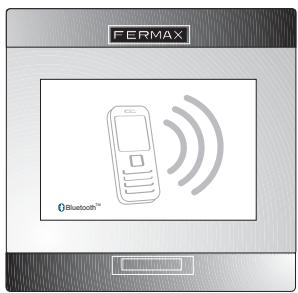
Ref. 4477
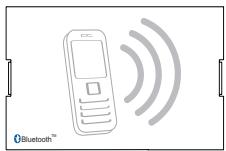
Ref. 4476
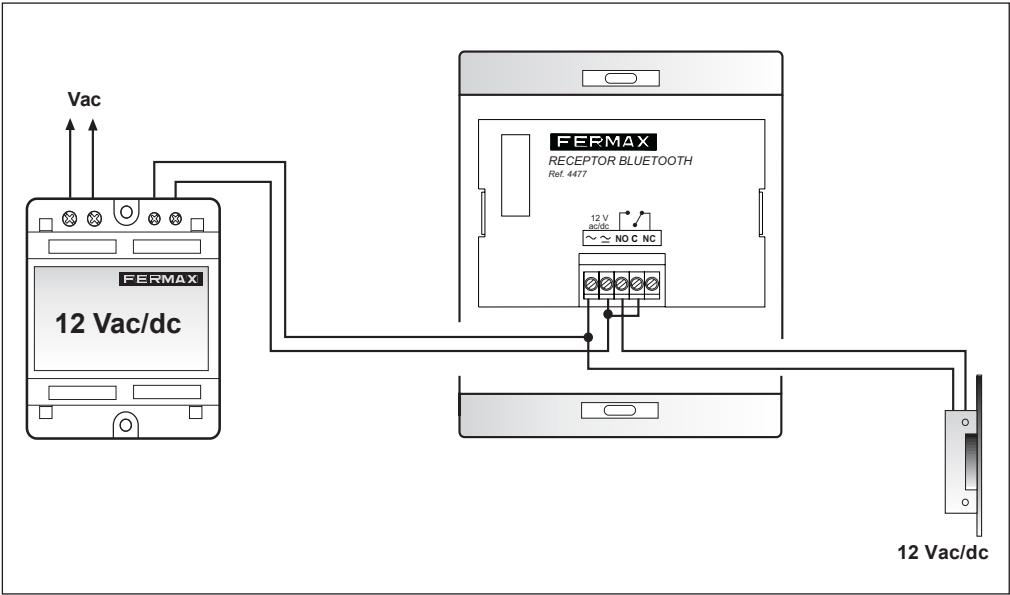
Technical Features:
- Power supply: 12 Vdc/Vac
- Consumption:
12 Vdc:
in standby: 80mA
active: 200 ~mA
12 Vac:
in standby: 50mA
active: 80 ~mA
-
Configurable reading range:
-
up to 2 mtrs (6.5 feet), - up to 9 mtrs (30 feet) - up to 20 mtrs (65 feet).
-
Valid telephones: Any with Bluetooth technology.
- Capacity: 40 users in Authorised mode / no limit in Any Telephone mode.
- Programming: By telephone with Bluetooth, validated with password and special PIN code.
- Door release relay: 2 Amps, double contact. Timing: 1 to 99 seconds.
- The bluetooth receiver includes BlueKey® technology. Brand registered by COLTEC.
Coverage Notes:
May be modified with an administration command (see Configuration section).
May vary between 2 mtrs (6.5 feet), 9 mtrs (30 feet) or 20 mtrs (65 feet).
It is important to note that coverage testing must be carried out simulating a real situation of approaching the door, not stationary, at a certain distance and in the most realistic possible position.
It must be added that the bluetooth access control works even in places where there is no telephone coverage (GSM), since it uses another communication system that does not entail any cost.
Compatible Telephone Types
Bluetooth access control works with any mobile telephone that includes Bluetooth connectivity among its features.
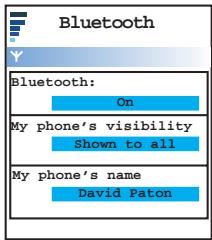
The telephone must have Bluetooth «Activated» and Visibility «Enabled».
System Operating Modes
Depending on the security needs, the system can operate in different modes:
-
Working with list of authorised telephones: A list memorised in the receiver that is used to specify which telephones have the right to open the door. The list can hold up to 40 different mobile telephones. This working mode allows three possibilities.
-
Request PIN: When the receiver detects a phone from the list, it asks for the PIN (4 digit code configurable by the administrator).
- Request Confirmation: When the receiver detects a telephone from the list, it asks for confirmation before opening the door. The user has to press key 1 and OK in order to open the door.
Automatic Mode (Without PIN): The door opens when the presence of an authorised telephone is detected.
If the telephone remains near to the receiver and no other authorised telephone appears, the door will not open again until after approximately 20 seconds. If another authorised telephone does appear, the door will open without waiting for 20 seconds.
- Working without list of authorised telephones (default configuration): Any telephone nearby with bluetooth activated will be asked for their PIN, and the door will only be opened if it is entered correctly.
When working with PIN code request (with or without authorised telephones list), the receiver detects any nearby telephones, and if there is more than one authorised telephone, rotates the PIN request among the telephones detected, to avoid asking for the same phone PIN twice.
If only one authorised telephone is detected, the PIN is requested approximately every 6 seconds.
Operating Mode Configuration
All bluetooth receptors can be configured from a mobile phone with bluetooth connectivity.
To configure the receiver, it is necessary to temporarily modify the bluetooth name of the telephone designated as administrator. This can be done with the corresponding bluetooth configuration option of the telephone.
The configuration commands will be entered with this name.
The telephone designated as administrator does not need to be on the list of authorised telephones.
The steps to follow are:
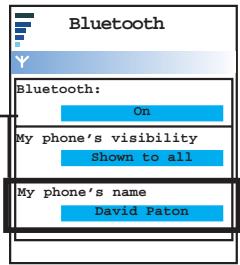
- Modify the bluetooth name of the telephone that is to act as administrator by the code, in capital letters, corresponding to the function to be carried out (authorise users, delete...).
The table on the next page shows the list of codes and the action associated with each of them. - Place the telephone that is to be administrator and the telephones to be added to the list, if any, close to the receiver.
- Reset the receiver power supply.
- After approximately 20 seconds, the telephone acting as administrator will be asked for the Administrator PIN, NOT the User PIN. The administrator PIN code comes preset from the factory.
Once the administrator PIN has been introduced, the receiver will open the door twice, indicating that the maintenance order has been carried out. If the PIN is not entered correctly, the administration order will not be carried out.
From this moment, the system returns to normal operating mode, and any PIN requested will always refer to the normal PIN used to open the door.
- Change the name of the bluetooth telephone for another different one of the administrator codes.
Note: Version 1.3 receptors or subsequent versions can also be configured from a PC or PDA with bluetooth connectivity and the corresponding programming software.
The programming software can be downloaded from the Fermax webpage: www.fermax.com, in the Products-Downloads-Software.
System «Default» Configuration
The factory configuration of the system is:
- Operating mode WITHOUT authorised phones list with PIN request
-UserPIN: 1234 - Administrator PIN: 4444
- Door open timing: 3 sec.
- Power Value: High
| CODE | DESCRIPTION |
| ADMADD | Used to create the list of authorised telephones. Sets the receiver in stand-alone learning mode, automatically adding any telephones nearby at that moment to the list. They are added after those already in the list, without exceeding the maximum limit of 40. At every stand-alone learning session, a maximum of 4 new telephones can be added. So, if you need to add another one, you will have to do it in blocks of 4. It is important that there are no more than 4 in the coverage radius, because otherwise we shall not know which ones have been added. This process is carried out at low power level, regardless of the power level programmed. |
| ADMDEL | Completely empties the list of authorised telephones. |
| ADMUSRxxxxx | User PIN: Used to configure a new User PIN value «xxxx» (4 numerical digits) to open the door. |
| ADMCTAxx | Change Open Door Timing: Used to specify the open door duration in seconds (2 digits «XX»); example: 05 seconds, 12 seconds. |
| ADMSUPxxxxx | Administrator PIN: Used to configure a new Administrator PIN value «xxxx» (4 numerical digits). |
| ADMCVPx | Change Power Values (Coverage) x = 0: Low coverage: approx. 2 mtrs (6.5 feet). x = 1: Medium coverage: approx. 9 mtrs (30 feet) x = 2: High coverage: approx 20 mtrs (65 feet). Default. |
| ADMMODxy | Change Operating Mode (x) and Opening Type (y) - Change Operating Mode: x =T: Operation WITHOUT list of authorised telephones. All bluetooth enabled devices near the receiver will be asked for their PIN. x =L: Operation WITH list of authorised telephones. In this option, the PIN may be requested or not, or confirmation only, depending on how it is configured. - Change Opening Type: y =N: Without PIN When an authorised telephone is detected, the door opens, without asking for the PIN or confirmation. The «N» configuration is not permitted if working WITHOUT the list of authorised telephones. y =T: With confirmation. When the receiver detects a telephone from the list, it asks for confirmation before opening the door. The user has to press key 1 and OK in order to open the door. The «T» configuration is not permitted if working WITHOUT the list of authorised telephones. y =P: With PIN. In «P» configuration, when a telephone, authorised or otherwise (depending on the operating mode) is detected, the receiver asks for the PIN; if the user enters it correctly, the door opens. |
FREQUently ASKED QUESTIONS
Where is the Bluetooth connectivity menu on my mobile telephone screen?
It varies, depending on the manufacturer or model, although it is usually found under the following headings:
- Bluetooth
- Config
- Configuration
Connectivity
.
If I change telephones, do I need to register it in the receiver again?
Depends on the working mode configured from the receptor. If the receptor works with a list of authorised telephones, it will be necessary to activate the telephone from the receptor; if it works without a list of authorised telephones this will not be necessary.
Does it work with Bluetooth PDAs?
NO. The system is designed to work exclusively with Bluetooth mobile telephones.
The PDA can only be used to programme the receptor (if the programming software is installed, which is available from the fermax webpage).
What happens if there are several telephones near the receiver?
a) In PIN code request mode (with or without list of authorised telephones) or with Confirmation:
The receiver detects the nearby telephones and alternates the PIN request among the telephones detected, with a 20 second interval, in order to avoid asking the same telephone twice in a row.
b) Automatic Mode (with list of authorised telephones without PIN):
The receiver detects the telephones nearby, and if there is more than one authorised telephone will open the door with an interval of 6 seconds.
Why does my mobile take longer than normal to be detected by the Bluetooth receiver?
Telephones with older versions of Bluetooth take longer to detect than telephones with the latest versions.
Does it work with Bluetooth hands-free car kits?
Yes, but its operation will vary depending on the model of mobile telephone.
The newest mobile phone models with the latest versions of bluetooth let you have telephone conversations while opening the door.
CONTROLE DES ACCÉS BLUETOOTH
Code 97091c V02 08
- INDEX
- INTRODUCTION
- References:
- Technical Features:
- Coverage Notes:
- Compatible Telephone Types
- System Operating Modes
- Operating Mode Configuration
- System «Default» Configuration
- FREQUently ASKED QUESTIONS
- Where is the Bluetooth connectivity menu on my mobile telephone screen?
- If I change telephones, do I need to register it in the receiver again?
- Does it work with Bluetooth PDAs?
- What happens if there are several telephones near the receiver?
- Why does my mobile take longer than normal to be detected by the Bluetooth receiver?
- Does it work with Bluetooth hands-free car kits?
- CONTROLE DES ACCÉS BLUETOOTH
Brand : FERMAX
Model : BLUETOOTH STAND-ALONE ACCESS CONTROL
Category : Access Control