
PA1200.1 - Power amplifier POLK AUDIO - Free user manual and instructions
Find the device manual for free PA1200.1 POLK AUDIO in PDF.



| Product Type | Power Amplifier |
| Brand | POLK AUDIO |
| Model | PA1200.1 |
| Continuous RMS Power (1 Ohm) | 1200 W x 1 |
| Continuous RMS Power (2 Ohms) | 800 W x 1 |
| Dynamic Power (1 Ohm) | 2400 W x 1 |
| Frequency Response | 20 Hz – 250 Hz |
| Low-Pass Filter | Variable 30-250 Hz, 12 dB/octave slope |
| Subsonic Filter | Yes, 24 dB/octave at 30 Hz |
| Bass Boost | Yes, +8 dB switchable |
| Input Impedance | 20 kOhms |
| Input Sensitivity | 150 mV to 7.5 V |
| Minimum Output Load | 1 Ohm |
| Fuses | 3 x 40 A |
| Power Supply | 12 V DC (vehicle battery) |
| Amplifier Class | Class D PWM |
| Built-in Protection | Thermal, short-circuit, reverse polarity, DC offset |
| Special Features | Master/Slave, remote control, RCA pass-through outputs |
| Maintenance and Cleaning | Dust with a dry cloth; avoid liquids |
| Safety | Disconnect battery before installation; use fuses |
Frequently Asked Questions - PA1200.1 POLK AUDIO
User questions about PA1200.1 POLK AUDIO
0 question about this device. Answer the ones you know or ask your own.
Ask a new question about this device
Download the instructions for your Power amplifier in PDF format for free! Find your manual PA1200.1 - POLK AUDIO and take your electronic device back in hand. On this page are published all the documents necessary for the use of your device. PA1200.1 by POLK AUDIO.
USER MANUAL PA1200.1 POLK AUDIO
Polk Audio—A Passion for Sound
Please take a moment and read through this manual before you get started. Installing a car audio system is a serious project. If you have any doubts about your ability to execute any of the installation steps found in this manual, save yourself a lot of grief and contact your local authorized Polk Audio AutoSound dealer. He (or she) is a professional installer and ready to help you get the most for your autosound dollar.
More information—including audio how-to articles, FAQs, and online manuals—is available on our award-winning website www.polkaudio.com/car. And if you ever have a question or comment, please feel free to call us or email us. In North America and Canada, call Polk Audio Customer Service 800-377-7655 (M-F, 9-6 EST) or via email polkcs@polkaudio.com. Outside the US, call 410-358-3600. We love to hear from you!
Here at Polk Audio, building loudspeakers and audio equipment is more than just our business—it's our passion. We're happy to share it with you.
Sincerely,

Matthew S. Polk
Co-Founder
High-powered car audio systems may produce sound pressure levels that exceed the threshold at which hearing loss may result.
They may also impair a driver's ability to hear traffic sounds or emergency vehicles. Use common sense and practice safe listening habits when listening to or adjusting your audio system.
FEATURES
Super-efficient Class D PWM design runs much cooler than conventional amps.
- High-speed MOSFET switching power supply.
- High-current complementary Class D MOSFET outputs stable into one ohm loads.
- Thermal, DC offset, reverse polarity and short circuit protection with status LED.
- Master/slave function supports two amps bridged to one load. (PA600.1/PA1200.1)
- Continuously variable 12dB/octave low-pass crossover.
- Switchable subsonic filter 24dB/octave.
- Switchable 8 dB bass EQ function.
- Switchable 180^ phase inversion.
- Remote subwoofer level control function.
- Variable input sensitivity optimizes match with different signal sources.
- Chrome-plated wire terminals and RCA connectors ensure maximum signal transfer.
Rugged heat sink and cover.
- Unity gain pass-through RCA jacks.
GETTING STARTED
Take Inventory
Check to ensure you have everything in your Polk Audio amplifier carton to start enjoying your system. Inside, you should find:
- Polk Audio Amplifier (either PA400.1, PA600.1 or PA1200.1)
- Phillips Screws (4)
- Mounting Washers (4)
- Locking Washers (4)
- Rubber Washers (4)
-
Fuse Replacements
-
Wire Harness
-
Owner's Manual
-
Online Registration Card
-
Remote Volume Module
-
Phone Line Cord
Important Note: If anything is missing or damaged, or if your Polk Audio amplifier fails to operate, notify your dealer immediately. We recommend keeping your original carton and packing materials in case you need to ship the unit in the future.
In the event that your amplifier requires service or is ever stolen, you will need to have a record of the product's serial number. Please take the time to enter that number in the space provided below. The serial number can be found on the bottom panel of the amplifier and on the amplifier packaging.
Serial Number:
Polk Audio Customer Service 800-377-7655
(M-F, 9-6 EST, US & Canada only) or via email polkcs@polkaudio.com. Outside the US &
Canada, call 410-358-3600. To learn more about Polk Audio 12V amplifiers go to www.polkaudio.com
Polk Audio, Inc. 5601 Metro Drive Baltimore, MD 21215
READ THIS FIRST
Installing a car audio system is a serious project. If you have any doubts about your ability to execute any of the installation steps found in this manual, save yourself a lot of grief and contact a professional installer. Your Polk Audio dealer is a good place to find one. If you intend to do the installation yourself we assume you possess some skill in the proper use of hand and power tools. No matter how much installation experience you have, we recommend that you...
- Read this manual thoroughly before you begin.
- Plan your installation carefully.
- Allow enough time to complete the installation without rushing.
Take steps to protect your car and upholstery from unwanted scratches and punctures. - Wear proper protective safety gear.
Tools You May Need
- Phillips head screwdriver
- Solderless, crimp-on connectors and a crimping tool
- Safety glasses
- Wire strippers and cutters
- Electrical tape
Grommets for passing wires through metal car walls - Amplifier Power Wire Kit (available at your authorized Polk Audio Dealer)
Polk Audio specifies the recommended amplification range for each of its passive (non-amplified) loudspeakers. Typically that specification will be expressed as a range of power such as 20-200 Watts (per channel). It is important to understand what those numbers mean when choosing a receiver or amplifier for your Polk loudspeakers. The lower number indicates the lowest continuous rated power that will yield acceptable performance in a typical listening environment. The higher number indicates the highest per channel power that should be used with your Polk speakers. That number should not be confused with a "Power Handling" specification and it does not imply that the speaker will safely handle that full amount of power on a long-term basis. We specify a wide range of power ratings because not all electronics manufacturers use the same method for rating power. In fact, high quality lower-rated amplifiers sound better and play louder than low quality units with higher power rating.
Automobile horsepower is good analogy. Your car probably has far more horsepower than it needs for your daily commute and is likely capable of going well over 120 MPH (190KM/hr). Having that extra power is good for on-ramp acceleration and danger avoidance (like getting away from brain-eating zombies) but that doesn't mean that it is advisable to operate your car on North American highways at full power and maximum speed for an extended period of time. Just ask your local state trooper if you are in doubt. Similarly, we recommend using amplifiers and receivers with rated power above the Power Handling limits of our speakers because having extra power available for short terms peaks is conducive to better sound quality, maximum dynamic range and effortless high volume output. But we strongly urge you not to use the full power of your amp or receiver for daily listening.
Loudspeakers can be damaged when an amplifier, regardless of its wattage, is made to play at higher listening levels than its power can clearly produce. Operation at this level can result in very high levels of audible distortion originating in the amplifier, which can add a harsh, gritty sound to your
listening material. If you hear distortion—turn the volume down or risk damaging your speakers. You can damage just about any speaker, regardless of power rating, if you drive an amplifier to or beyond the point of distortion.
INSTALLATION GUIDELINES
- Please read this owner's manual carefully before installing this amplifier.
- Disconnect the battery ground terminal prior to making any electrical connections.
- Check for any hazards or obstructions such as gas tanks, fuel or brake lines, and wiring harnesses before mounting the amplifier.
- Pick a mounting location that will provide adequate access and ventilation and protect the amplifier from heat, moisture, and dirt.
- To securely mount your amplifier you must first remove the top cover assembly. Unscrew the four (4) top cover assembly retaining screws.
- Avoid sharp metal areas when routing cables to the amplifier, and run RCA cables away from the power cables and other potentially noisy car harnesses.
- The amplifier should be grounded with a short, heavy gauge wire connected directly to the car at a bare metal surface, preferably scraped body sheet metal. Do not use factory ground locations, seat bolts, or brackets that are spot welded.
- Always fuse your power connection within 8 to 10 inches of the battery terminal. Use a fuse or circuit breaker rated slightly more than the on-board fuse(s) of the amplifier(s). The gauge of power wire used should take into account the total current draw of the system, and the length of wire used. IASCA and other auto sound competition organizations have charts available for this; you can also find a chart in the MECP study guide. Minimum wire gauge recommendations for the individual amplifiers are listed on the specification page. Always use the same gauge wire for the amplifier ground that you use for the power wire. Be sure to examine the battery ground cable of the vehicle, and if necessary, upgrade it by adding an additional ground wire that is the same gauge as the amplifier's power wire. Remember, the amplifier can only deliver its rated output when it is not current limited by the power and ground supply wires.
-
This amplifier is designed to drive a speaker load that measures from 1 to 4 Ohms. Keep in mind that heat is the long-term enemy of automotive electronics and the lower your speaker load, the more heat is generated. For low-impedance speaker applications or restricted ventilation installations, an external cooling fan may be advisable.
-
Battery and ground connections to the vehicle should be made with crimped ring terminals of the appropriate size (surface area is what counts); soldering the terminals after crimping is also recommended.
- Due to the high-frequency MOSFET switching power supply, filtering the power cable is not generally required
(remember that the amp can't deliver full output if the power supply is restricted.) Proper grounding of the signal source is mandatory for the amplifier to reach its performance peak. If the RCA inputs are not grounded adequately via the signal source, electrical noise from the vehicle may be picked up in the system.
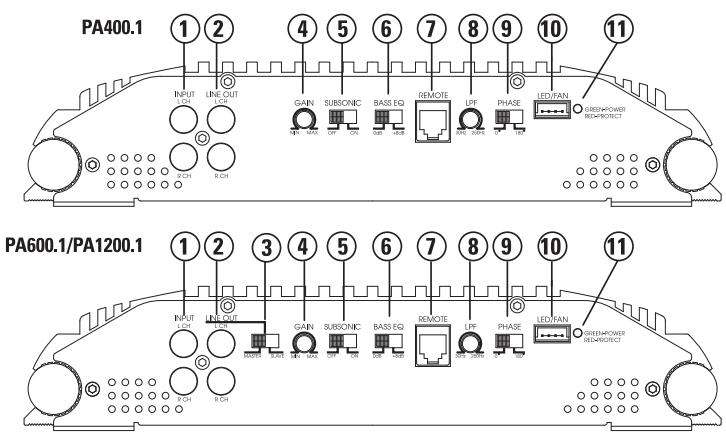
FIGURE 1a—AMPLIFIER CONNECTIONS/CONTROLS—FRONT (PA400.1/PA600.1/PA1200.1)
FIGURE 1b—REMOTE
Remote-Controls the subwoofer amplifier gain, from a remote location for ease of adjustment during listening
Warning: DO NOT connect a level control knob from other manufacturers to the Remote Sub Level Control of any Polk Audio amplifier. Even though the connectors fit properly, the control knob and connector pin positions may be different and the amplifier will be damaged.
FRONT PANEL CONNECTIONS/CONTROLS
- RCA Input Jacks—Accepts line level outputs from head units or signal processors at voltages between 150mV and 7.5 volts.
- RCA Line Output Jacks—These pass through RCA jacks can be used to send the input signal to a second amplifier.
- Slave/Master Switch—Controls whether the amplifier is a slave or master when connected in combined amplifier configurations. (Refer to the Combined Amplifiers section of this guide.)
- Gain Control—Controls the amplifier's sensitivity and is used to match the input level of the amplifier to the output level of the signal source.

- Subsonic Switch—The subsonic filter attenuates frequencies below 30Hz by 24dB per octave.
- Bass EQ Switch—Adds 8dB of bass boost to the subwoofer when selected.
- Remote—Controls the subwoofer amplifier gain, from a remote location for ease of adjustment during listening.
Warning: DO NOT connect a level control knob from other manufacturers to the Remote Sub Level Control of any Polk Audio amplifier. Even though the connectors fit properly, the control knob and connector pin positions may be different and the amplifier will be damaged.
-
LPF Control—Controls low pass filter cutoff from 30Hz to 250Hz.
-
Phase Switch 0^ or 180^ selectable for switching the phase output to the woofer.
-
LED/FAN Connector—Allows connection of an optional cooling fan for the amplifier.
-
Status LED—Will illuminate GREEN to indicate the amplifier is on and operating normally, and will be illuminated RED if the amplifier shuts down due to short circuit, DC offset, or overheating detected by onboard protection circuitry.

FIGURE 2—LED/FAN HARNESS
REAR PANEL CONNECTIONS
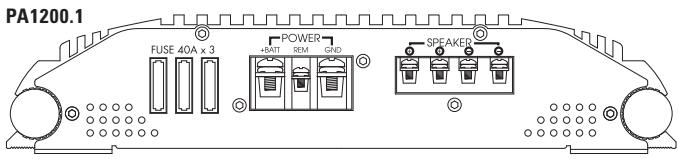
- Fuses—These fuses protect the amplifier against internal electrical damage and are meant to protect the amplifier only. All other power connections should be fused at the source. The PA400.1 uses 2-25A fuses, the PA600.1 uses 2-30A fuses and the PA1200.1 uses 3-40A fuses.
- (+) 12 Volt Power—Connect this terminal through a FUSE or CIRCUIT BREAKER to the positive terminal of the vehicle battery or the positive terminal of an isolated audio system battery.
WARNING: Always protect this power wire by installing a fuse or circuit breaker of the appropriate size within 12 inches of the battery terminal connection.
- Remote Turn On—This terminal turns on the amplifier when (+) 12 volt is applied to it. Connect it to the remote turn on lead of the head unit or signal source.
- Ground—Connect this terminal directly to the sheet metal chassis of the vehicle, using the shortest wire necessary to make this connection. Always use wire of the same gauge or larger than the (+) 12 volt power wire. The chassis connection point should be scraped free of paint and dirt. Use only quality crimped and/or soldered connectors at both ends of this wire. DO NOT connect this terminal directly to the vehicle battery ground terminal or any other factory ground points.
- Speaker Terminals—Connect subwoofoers to these terminals. (Refer to the Speaker Wiring Diagrams section of this guide.)

FIGURE 3—AMPLIFIER CONNECTIONS—REAR (PA400.1/PA600.1/PA1200.1)

Single Subwoofer Connection (top view)
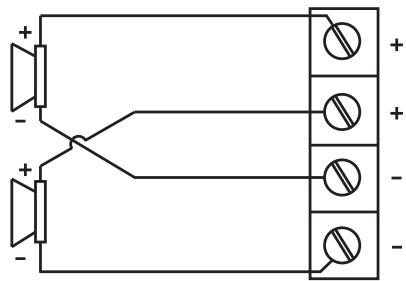
Two Subwoofer Connection (top view)


NOTE: The dual (+) and (-) sub-out terminals of the PA400.1, PA600.1 and PA1200.1 are paralleled internally, and the combined load impedance should be taken into consideration when connecting multiple subwoofer.
COMBINING AMPLIFIERS
The Polk 600.1 and 1200.1 subwoofer amplifiers have the capability of connecting two or more amplifiers of the same power rating together in a master/slave combination for increased power with accurate level matching. They are the Parallel Synced Gain and External Synced Bridged combinations.
WARNING: DO NOT attempt to combine amplifiers of different power ratings. These amplifier combinations work correctly only if the MASTER and SLAVE amplifiers are identical models.
PARALLEL SYNCED GAIN
In this MASTER/SLAVE combination the master amplifier pre-amp controls remain active and the slave amplifier pre-amp is bypassed. This allows the master amplifier to control gain, filter, and sub-level on both amplifiers. This combination allows the amplifiers to drive their own separate subwoofer(s) while being synchronized together via an in-phase audio pre-amp signal from the master amplifier. Wiring connections to the amplifier subwoofer outputs in this combination should be standard in-phase configurations, creating a parallel speaker connection. (Refer to Parallel Synced Gain section of this guide for amplifier and speaker connection diagrams.)
NOTE: One master amplifier can control up to three slave amplifiers in this combination. Multiple identical MASTER/SLAVE combinations can be added to any given system.
EXTERNAL SYNCED BRIDGED
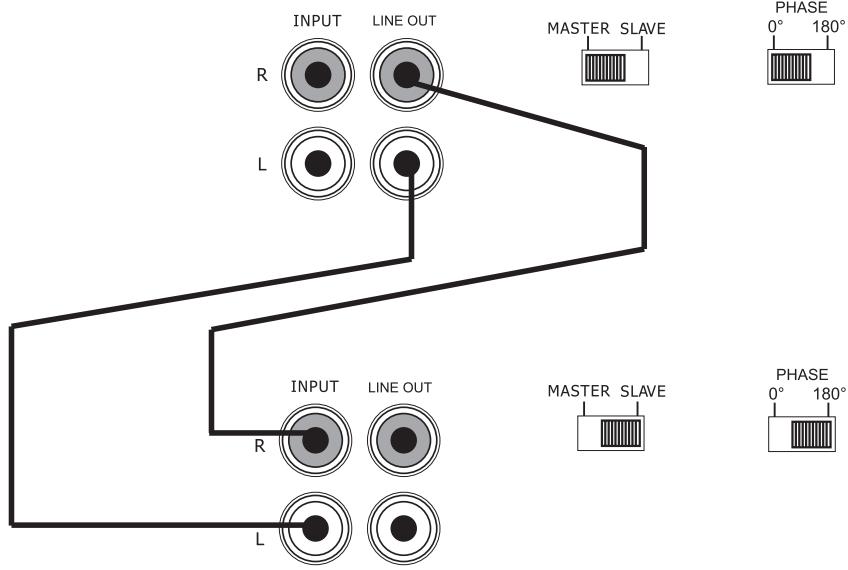
In this MASTER/SLAVE combination the master amplifier pre-amp controls remain active and the slave amplifier pre-amp is bypassed. This allows the master amplifier to control gain, filter, and sub-level on both amplifiers. This combination allows the amplifiers to drive common subwoofer loads while being synchronized together via an out-of-phase audio pre-amp signal from the master amplifier. In this subwoofer wiring configuration the master amplifier sends the positive signal to the subwoofer while the slave amplifier sends the negative signal, making an externally bridged speaker connection. (Refer to External Synced Bridged section of this guide for amplifier and speaker connection diagrams.)
NOTE: Amplifiers in this combination can only be connected in matched pairs. Multiple matched pairs may be added to drive separate subwoofer loads in a given system.
COMBINED AMPLIFIERS GAIN AND FILTER SETTIN
NOTE: You MUST set the Subsonic, EQ, and other filter settings on the masteramplifier to the same positions to achieve safe, optimal results. Adjustment guidelines are discussed in the Crossover and Gain Adjustment section of this guide.
PARALLEL SYNCED GAIN CONNECTIONS/ SETTINGS
Refer to Figure 5 for wiring details.
- Input Signal—Connect these RCA jacks as described in the Front Panel Connection section of this guide.
2. SLAVE/MASTER Switch
- Set the SLAVE/MASTER switch on the master amplifier to the MASTER position.
- Set the SLAVE/MASTER switch on the slave amplifier to the SLAVE position.
- Setting the SLAVE/MASTER switch on both amplifiers will automatically set the I/O RCA jack configuration according to each amplifier's slave or master designation.
NOTE: One master amplifier can control up to three SLAVE amplifiers in this combination. Multiple identical MASTER/SLAVE combinations can be added to any given system.
-
Phase Switch—Set the phase switches of all synced amps to the same position (all at 0^ or all at 180^ ).
-
To Achieve Safe, Optimal Performance—The LPF, Bass EQ, and Subsonic Filter controls on all synced amps must be set to the same position.
- Signal Connection—Connect an RCA cable between the OUT RCA jack of the master amplifier and the SLAVE IN RCA jack of the slave amplifier as shown in the Figure 5.
- Subwoofer Speaker Connection—In this amplifier combination, each amplifier must drive its own separate subwoofer(s). Connect the speaker terminals of each amplifier to any combination of one or more subwoofoers that results in nominal impedance between 1 and 4 ohms. Make sure that each amplifier sees the same speaker impedance.
WARNING: The amplifier's gain control is bypassed completely in SLAVE mode. DO NOT move the MASTER/SLAVE switch to SLAVE position when the amplifier is connected and playing. DO NOT connect any signal source to the amplifier in SLAVE mode that exceeds 200mV .
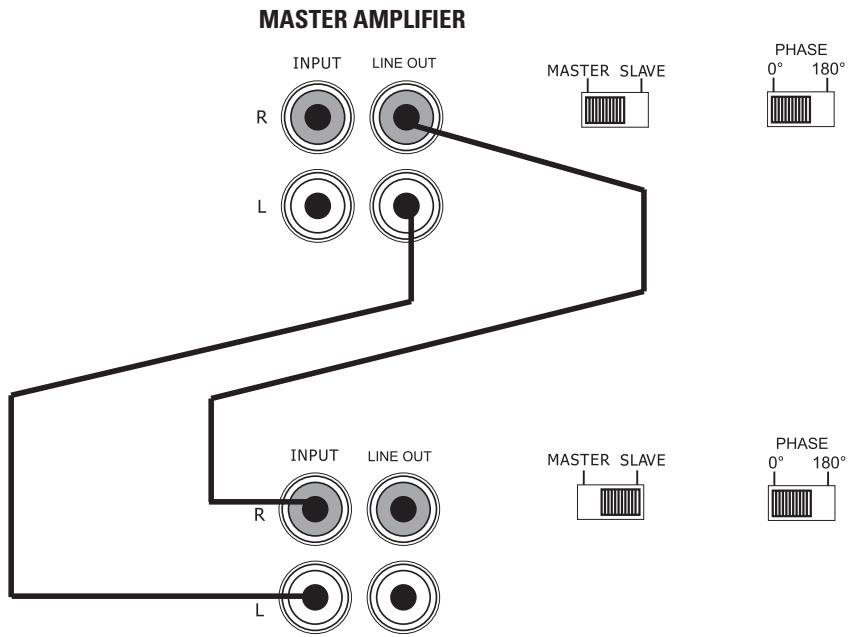
FIGURE 5—PARALLEL SYNCED GAIN (PA600.1/PA1200.1)
SLAVE AMPLIFIER
Master
Slave

NOTE: The dual (+) and (-) sub-out terminals are paralleled internally and the combined load impedance should be taken into consideration when connecting multiple subwoofer.
EXTERNAL SYNCED BRIDGED CONNECTIONS/ SETTINGS
-
Input Signal—Connect these RCA jacks as described in the Front Panel Connection section of this guide.
-
SLAVE/MASTER Switch
-
Set the SLAVE/MASTER switch on the master amplifier to the MASTER position.
- Set the SLAVE/MASTER switch on the slave amplifier to the SLAVE position.
- Setting the SLAVE/MASTER switch on both amplifiers will automatically set the I/O RCA jack configuration according to each amplifiers slave or master designation.
NOTE: Amplifiers in this combination can only be connected in matched pairs. Multiple Matched pairs may be added to drive separate subwoofer loads in a given system.
- Phase Switch—Set the phase switches of all synchronized MASTER amps to 0^ . Set the phase switches of all synchronized SLAVE amps to 180^ . The master and slave amps must be set to the opposite phase mode in order for External Synced Bridged operation to work.
-
To Achieve Safe, Optimal Performance—The LPF, Bass EQ, and Subsonic Filter controls on all synchronized amps must be set to the same position.
-
Signal Connection—Connect an RCA cable between the OUT RCA jacks of the Master amplifier and the INPUT RCA jack of the Slave amplifier as shown in Figure 6.
- Subwoofer Speaker Connection—In this amplifier combination, the Subwoofer speaker terminals of both amplifiers drive common subwoofer(s). Use the following speaker connection diagram when connecting the subwoofer to the amplifiers. Connect the amplifiers speaker terminals to any combination of one or more subwoofer that results in a nominal impedance between 2 and 4 Ohms. DO NOT connect loads of less than 2 Ohms when connecting to amplifiers in the External Synced Bridged combination.
WARNING: Two wires of 12AWG minimum must be connected between the negative sub out terminals of the MASTER and SLAVE amplifiers.
WARNING: The amplifier's gain control is bypassed completely in SLAVE mode. DO NOT move the MASTER/SLAVE switch to SLAVE position when the amplifier is connected and playing. DO NOT connect any signal source to the amplifier in SLAVE mode that exceeds 200mV .
MASTER AMPLIFIER
SLAVE AMPLIFIER

Subwoofer Wiring (top view)
MULTIPLE AMPLIFIER COMBINATIONS
The PA400.1, PA600.1, and PA1200.1 subwoofer amplifiers can also be used in Multiples of the MASTER/SLAVE combinations allowing for unlimited expansion to a system's subwoofer section. To use multiples of amplifier combinations the following directions must be adhered to for best results.
- Audio Signal—Divide the head unit or processor audio signal to the master amplifiers by using RCA Y adapters. Be sure to divide them an even number of times to ensure the input level at each master amplifier is matched.
- Amplifier Configuration—Set up each MASTER/ SLAVE amplifier combination as described for the combination type being used. (Refer to the Parallel Synced Gain or the External Synced Bridged section of this guide for amplifier and speaker connection descriptions.)
CROSSOVER SETTINGS AND GAIN ADJUSTMEN
Your Polk Audio power amplifier needs to be adjusted carefully to achieve maximum performance. These are some guidelines to follow when fine-tuning the amplifier.
- Because this amplifier is only designed for subwoofer applications, the low-pass crossover is active at all times. The crossover point is adjustable to allow more precise system operation.
-
Try and keep the setting low enough to prevent image smearing (you should not be able to hear male voices from the subwoofer) but not so low as to create a gap between the subwoofer and the mid-bass/midrange speakers. It will be to your advantage to spend some extra time with this adjustment, listening to familiar music or system set-up discs to achieve the kind of musical reproduction that you prefer.
-
The gain adjustment allows you to set proper signal match for clean, quiet amplifier operation. Start by playing some music you are familiar with. With the gain adjustment on the amplifier in the middle of its rotation, bring up the volume on your head unit to the 3/4 volume setting or until you start to hear distortion or clipping. If you hear distortion before you reach the 3/4 volume setting of your head unit, reduce the gain setting on the amplifier and start to raise the head unit volume again. When you can listen to the music at or slightly above 3/4 on your head unit without audible distortion, slowly raise the gain of the amplifier until distortion is heard, then back off the gain until the distortion is not audible. This setting will allow you to reach full output with all but the quietest of source material, while avoiding excessive noise in the system.
-
For systems using the Remote Sub Level Adjustment, increase the subwoofer gain on the amplifier by 25% and set the Remote Sub Level knob to the center position after making all system gain and filter adjustments. This will give the Remote Sub Level Control a wider range of adjustment to the subwoofer output.
- You should take into consideration the effect that gain adjustment has on system frequency response and staging. Again, plan on spending some time with music that you know getting the gain and crossover settings the way you like. Test discs and analyzers may help with this process, but in the end it's your ears that count, listen to the music!
LED TUBE INSTALLATION (OPTIONAL)
NOTE: If the optional fan IS NOT being used, we recommend that the second LED tube be wired to this circuit. If the optional fan is being used, we recommend that the second LED tube be wired in parallel with the first LED tube.
CEA SPECIFICATIONS

PA400.1 Power Output: 200 Watts RMS x 1 at 4 Ohms and ≤ 1% THD+N Signal to Noise Ratio: -60 dBA (reference 1 Watt into 4 Ohms) Additional Power: 400 Watts RMS x 1 at 1 Ohm and ≤ 1% THD+N

PA600.1 Power Output: 300 Watts RMS x 1 at 4 Ohms and ≤ 1% THD+N Signal to Noise Ratio: -60 dBA (reference 1 Watt into 4 Ohms) Additional Power: 600 Watts RMS x 1 at 1 Ohm and ≤ 1% THD+N

PA1200.1 Power Output: 400 Watts RMS x 1 at 4 Ohms and ≤ 1% THD+N Signal to Noise Ratio: -60 dBA (reference 1 Watt into 4 Ohms) Additional Power: 1200 Watts RMS x 1 at 1 Ohm and ≤ 1% THD+N
| SPECIFICATIONS | PA400.1 | PA600.1 | PA1200.1 |
| Dynamic Power Rating @ 1 Ohm | 800W x 1 | 1200W x 1 | 2400W x 1 |
| RMS Continuous Power @ 1 Ohm1 | 400W x 1 | 600W x 1 | 1200W x 1 |
| RMS Continuous Power @ 2 Ohms2 | 300W x 1 | 400W x 1 | 800W x 1 |
| Frequency Response | 20-250Hz | 20-250Hz | 20-250Hz |
| Damping Factor | 150 | 150 | 150 |
| Variable Low Pass Crossover 12dB slope | 30-250Hz | 30-250Hz | 30-250Hz |
| Subsonic Filter | Yes | Yes | Yes |
| Bass Boost | Yes | Yes | Yes |
| Input Impedance | 20K | 20K | 20K |
| Input Sensitivity | 150mV/7.5V | 150mV/7.5V | 150mV/7.5V |
| Output Load | 1 ohm | 1 ohm | 1 ohm |
| Fusing | 2 x 25A | 2 x 30A | 3 x 40A |
| Illuminated LED Driver | Yes | Yes | Yes |
| External Fan Driver | Yes | Yes | Yes |
| Pass Through RCA Jacks | Yes | Yes | Yes |
1 RMS continuous power driven into 1 Ohm from 20 to 250Hz @ 14.4VDC with lessthan 1% THD+N.
^2 RMS continuous power driven into 2 Ohms from 20 to 250Hz@14.4VDC with lessthan 1% THD+N.
FRANCAIS
AVERTISSEMENT
Los sistemas de sonido de automóvil de alta potenciaSEOSEOSEOSEOSEOSEOSEOSEOSEOSEOSEOSEOSEOSEOSEOSEOSEOSEOSEOSEOSEOSEOSEOSEOSEOSEOSEOSEOSEOSEOSEOSEOSEOSEOSEOSEOSEOSEOSEOSEOSEOSEOSEOSEOSEOSEOSEOSEOSEOSEOSEOSEOSEOSEOSEOSEOSEOSEOSEOSEOSEOSEOSEOSEOSEOSEOSEOSEOSEOSEOSEOSEOSEOSEOSEOSEOSEOSEOSEOSEOSEOSEOSEOSEOSEOSEOSEOSEOSEOSEOSEOSEOSEOSEOSEOSEOSEOSEOSEOSEO SEOEO SEOEO SEOEO SEOEO SEOEO SEOEO SEOEO SEOEO SEOEO SEOEO SEOEO SEOEO SEOEO SEOEO SEOEO SEOEO SEOEO SEOEO SEOEO SEOEO SEOEO SEOEO SEOEO SEOEO SEOEO SEOEO SEOEO SEOEO SEOEO SEOEO SEOEO SEOEO SEOEO SEOEO SEOEO SEOEO SEOEO SEOEO SEOEO SEOEO SEOEO SEOEO SEOEO SEOEO SEOEO SEOEO SEOEO SEOEO SEOEO SEOEO SEOEQ
Los amplificadores de subwoofer Polk 600.1 y 1200.1 seSEOSEOSEOSEOSEOSEOSEOSEOSEOSEOSEOSEOSEOSEOSEOSEOSEOSEOSEOSEOSEOSEOSEOSEOSEOSEOSEOSEOSEOSEOSEOSEOSEOSEOSEOSEOSEOSEOSEOSEOSEOSEOSEOSEOSEOSEOSEOSEOSEOSEOSEOSEOSEOSEOSEOSEOSEOSEOSEOSEOSEOSEOSEOSEOSEOSEOSEOSEOSEOSEOSEOSEOSEOSEOSEOSEOSEOSEOSEOSEOSEOSEOSEOSEOSEOSEOSEOSEOSEOSEOSEOSEOSEOSEOSEOSEOSEOSEOSEOSEOEO
EXTERNAL SYNCED BRIDGED
Polk Audio is an award-winning designer and manufacturer of high performance audio products and the largest audio brand of Directed Electronics, Inc. (NASDAQ, DEIX). Founded in 1972 by three Johns Hopkins University graduates, Polk Audio holds over 50 patents for advances in loudspeaker design and technology. Polk's products include loudspeakers and electronic components for home, auto and marine applications, the first satellite radio home component tuner, the world's first audiophile-grade active IP-addressable loudspeaker, the first THX Ultra2 Certified in-ceiling loudspeaker, and I-Sonic—the first entertainment system to include HD Radio, XM Connect & Play capability and a DVD player. Polk products are available through authorized specialist consumer electronics retailers worldwide.
For more information and the location of a Polk retailer or distributor in your area please visit www.polkaudio.com or call us at 1-800-377-7655 (M-F, 9-6 EST, US & Canada only). Outside of North America call +1 (410) 358-3600.
Polk Audio, Inc.
5601 Metro Drive, Baltimore, MD 21215
www.polkaudio.com
FRANÇAIS
POLK AUDIO
5601 Metro Drive, Baltimore, MD 21215
www.polkaudio.com
ESPANOL
ACERCA DE POLK AUDIO
5601 Metro Drive, Baltimore, MD 21215
www.polkaudio.com
DEUTSCH
ÜBER POLK AUDIO
5601 Metro Drive, Baltimore, MD 21215
www.polkaudio.com
5601 Metro Drive, Baltimore, MD 21215
www.polkaudio.com
PORTUGUES
SOBRE A POLK AUDIO
5601 Metro Drive, Baltimore, MD 21215
www.polkaudio.com
Polk Audio is a Directed Electronics company which trades on NASDAQ under the symbol DEIX. Investor information can be found at http://investor.directed.com.
"Polk Audio" and "I-Sonic" are registered trademarks of Britannia Investment Corporation used under license by Polk Audio, Inc.
Polk Audio, Inc., warrants to the original retail purchaser only. This warranty will terminate automatically prior to its stated expiration if the original retail purchaser sells or transfers the Product to any other party.
Polk Audio, Inc., warrants, to the original retail purchaser only, that the LOUDSPEAKER(S), PASSIVE CROSSOVER COMPON-ENT(S) and ENCLOSURE on this Polk Audio Loudspeaker Product will be free from defects in material and workmanship for a period of one (1) year from the date of original retail purchase from a Polk Audio Authorized Dealer, and 2 years if installed by the same dealer.
To allow Polk Audio to offer the best possible warranty service, please register your new product online at: www.polkaudio.com/registration or call Polk customer service 800-377-7655 in the USA and Canada (outside the USA: 410-358-3600) within ten (10) days of the date of original purchase. Be sure to keep your original purchase receipt.
Defective Products must be shipped, together with proof of purchase, prepaid insured to the Polk Audio Authorized Dealer from whom you purchased the Product, or to the Factory at 2550 Britannia Boulevard, Suite A, San Diego, California 92154. Products must be shipped in the original shipping container or its equivalent; in any case the risk of loss or damage in transit is to be borne by you. If upon examination at the Factory or Polk Audio Authorized Dealer it is determined that the unit was defective in materials or workmanship at any time during this Warranty period, Polk Audio or the Polk Audio Authorized Dealer will, at its option, repair or replace this Product at no additional charge, except as set forth below. All replaced parts and Products become the property of Polk Audio. Products replaced or repaired under this warranty will be returned to you, within a reasonable time, freight prepaid.
This warranty does not include service or parts to repair damage caused by accident, disaster, misuse, abuse, negligence, inadequate packing or shipping procedures, commercial use, voltage inputs in excess of the rated maximum of the unit, cosmetic appearance of cabinry not directly attributable to defect in materials or workmanship, or service, repair, or modification of the Product which has not been authorized or approved by Polk Audio. This warranty shall terminate if the Serial number on the Product has been removed, tampered with or defaced.
This warranty is in lieu of all other expressed Warranties. If this Product is defective in materials or workmanship as warranted above, your sole remedy shall be repair or replacement as provided above. In no event will Polk Audio, Inc. be liable to you for any incidental or consequential damages arising out of the use or inability to use the Product, even if Polk Audio, Inc. or a Polk Audio Authorized Dealer has been advised of the possibility of such damages, or for any claim by any other party. Some states do not allow the exclusion or limitation of consequential damages, so the above limitation and exclusion may not apply to you.
All implied warranties on this Product are limited to the duration of this expressed Warranty. Some states do not allow limitation on how long an implied Warranty lasts, so the above limitations may not apply to you. This Warranty gives you specific legal rights, and you also may have other rights which vary from state to state.
This Warranty applies only to Products purchased in Canada, the United States of America, its possessions, and U.S. and NATO armed forces exchanges and audio clubs.
The Warranty terms and conditions applicable to Products purchased in other countries are available from the Polk Audio Authorized Distributors in such countries.