
PA410E - Laptop lock TARGUS - Free user manual and instructions
Find the device manual for free PA410E TARGUS in PDF.



| Product Type | Laptop Lock |
| Brand | TARGUS |
| Model | PA410E |
| Cable Length | 2.1 m |
| Cable Diameter | 4 mm |
| Cable Material | Vinyl-coated Steel |
| Weight | 184.3 g |
| Lock Dimensions | 31 x 29.9 x 20.8 mm |
| Color | Black Nickel |
| Locking Type | 4-Digit Combination |
| Default Code | 0000 |
| Included Accessories | DEFCON CL lock, security spacers (1.6 mm, 0.8 mm, 0.4 mm), mounting plate, screws, abrasive pad, and alcohol pad |
| Lock Type | Cable Lock with Resettable Combination |
| Security | Combination lock, standard laptop security slot |
Frequently Asked Questions - PA410E TARGUS
User questions about PA410E TARGUS
0 question about this device. Answer the ones you know or ask your own.
Ask a new question about this device
Download the instructions for your Laptop lock in PDF format for free! Find your manual PA410E - TARGUS and take your electronic device back in hand. On this page are published all the documents necessary for the use of your device. PA410E by TARGUS.
USER MANUAL PA410E TARGUS
Targus Notebook Security DEFCON® CL Combination Cable Lock 5
BG -Блгарский (e3nk)
TAPYC 3AUNTHO YCTPOICTBO 3A HOYTBK DEFCON*CL 3AKJIUCHBAUO YCTPOICTBO C KOMBUNHAUJIA 15
CZ - Ceitina
BEZPECNOST NOTEBOOKU TARGUS DEFCON® CL KOMBINAÇNI KABELOVY ZAMEK 25
DE - Deutsch
Thank you for purchasing the Targus Notebook Security DEFCON® CL Combination Cable Lock. The DEFCON CL helps protect your valuable notebook computer from theft using a resettable four-digit combination lock. The resettable combination lock eliminates the need for keys and enables you to change your combination periodically for increased security.
In addition to this user's guide, this package contains:
- DEFCON CL
- DEFCON SecureSpacers

WARNING: TO USE THE DEFCON CL OR RESET THE COMBINATION YOU MUST SET THE LOCK TO THE CURRENT COMBINATION.
Setting the Combination
- Locate the combination dials and windows on the lock.
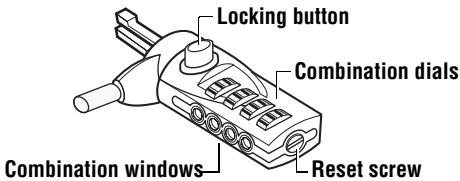
DEFCONCL
2 Using the dials, enter the current combination.
If you are setting the combination for the first time, enter the preset combination 0000.
The combination appears in the windows.
3 Using a small flat-head screwdriver or similar object, push in and rotate the reset screw 90 degrees clockwise so that the screw's groove appears horizontal.
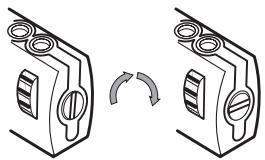
Unlocking the combination lock
4 Using the dials, enter the new combination.
5 Rotate the reset screw 90 degrees anti-clockwise, back to its original vertical position, to save the new combination.
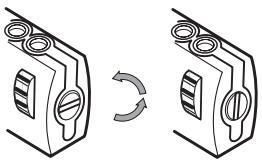
Locking the combination lock
6 Record the combination in either the space provided at the end of this guide or another secure, easy-to-find place.
Testing the Combination
Before attaching the lock to your notebook computer:
1 Turn the dials to disguise the combination.
2 Return to the combination you set.
3 Check that the locking button depresses completely.
Securing the DEFCON CL
Select an object in the room to which you will secure your notebook computer with the DEFCON CL. Choose a large, heavy piece of furniture such as a table or desk.
1 Take the looped end of the cable and wrap it around the selected object.

NOTE: WRAP THE CABLE AROUND A PART OF THE OBJECT THAT WILL DETER AN INTRUDER FROM SLIPPING THE CABLE OFF (FOR EXAMPLE, A TABLE OR DESK LEG WITH A CROSS BAR OR A DRAWER HANDLE).
2 Feed the lock through the looped end of the cable as shown.
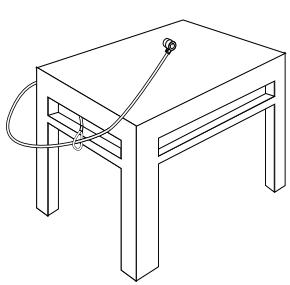
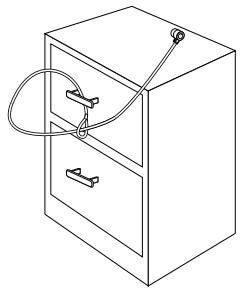
Securing the DEFCON CL to an object
Locking the DEFCON CL to your Notebook Computer

NOTE: HOLD THE DEFCON CL WITH BOTH HANDS FOR ADDITIONAL STABILITY WHILE INSERTING OR REMOVING THE LOCK.
1 Using the dials, enter the correct combination. The combination appears in the windows.
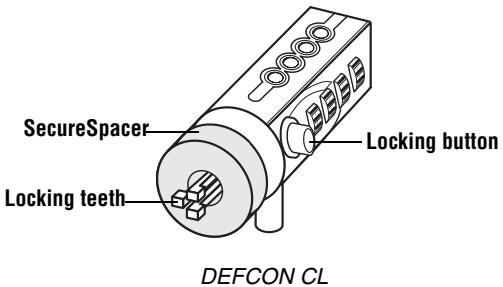
2 Press and hold the locking button to align the locking teeth.

NOTE: FOR THE LOCKING BUTTON TO DEPRESS COMPLETELY YOU MUST ENTER THE CORRECT COMBINATION.
3 Insert the DEFCON CL into your notebook computer's lock slot and release the locking button.

NOTE: DUE TO THE VARIATION IN THE SIZE OF THE SECURITY SLOTS ON VARIOUS NOTEBOOK MODELS, YOU MAY FIND THAT THERE IS SOME SLACK BETWEEN THE LOCK AND THE COMPUTER. THE SUPPLIED DEFCON SECURESPACERS ARE THE BEST SOLUTION FOR OPTIMAL FIT AND SECURITY.
4 Turn the dials to conceal your combination.
Due to differences in the size of the security slots on various notebook computers, you may find that there is some slack between the DEFCON locking device and the computer. The DEFCON SecureSpacers provide optimal fit and security.
Using the DEFCON SecureSpacers
1 Insert your DEFCON locking device into the computer's lock slot.
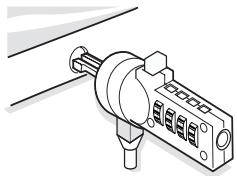
2 Pull the DEFCON locking device away from the computer and check whether the gap is excessive.
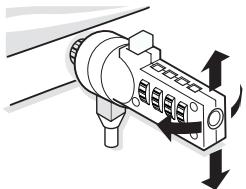
3 If so, try each of the SecureSpacers to determine which one fits the gap. The SecureSpacers come in three sizes: 1.6 ~mm , 0.8 ~mm , and 0.4 ~mm .

NOTE: DO NOT REMOVE THE ADHESIVE STRIP FROM ANY OF THE SECURESPACERS UNTIL YOU DECIDE WHICH ONE TO USE.
4 Once you know which SecureSpacer you are going to use, remove the locking device from the computer.
Then remove the adhesive strip from the back of the SecureSpacer and attach the spacer to the DEFCON lock.
Unlocking the DEFCON CL

WARNING: DO NOT ATTEMPT TO REMOVE THE DEFCON CL WITHOUT USING THE COMBINATION. TO DO SO WILL PHYSICALLY DAMAGE YOUR NOTEBOOK COMPUTER.
1 Using the dials, enter the correct combination.
2 The combination appears in the windows.
3 Press and hold the locking button to realign the locking teeth.
4 Remove the DEFCON CL from your notebook computer's lock slot.
DEFCON Security Base Plate
Included with your DEFCON CL Combo Cable Lock is the Security Base Plate for the security of desktop computers.
Using the DEFCON Security Base Plate
1 Choose a solid location to attach the DEFCON Security Base Plate: a piece of furniture, or metal
cabinet. If you plan to use the two screws, you can use the base plate as a template to pre-drill the holes.
2 Use the abrasive pad, then the alcohol wipe to prepare the area when you will attach the DEFCON Security Base Plate.
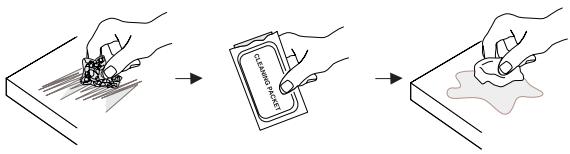
3 After the alcohol dries, remove the backing on the base plate to expose the adhesive and place it on the prepared location. If desired, secure the base with the two screws.
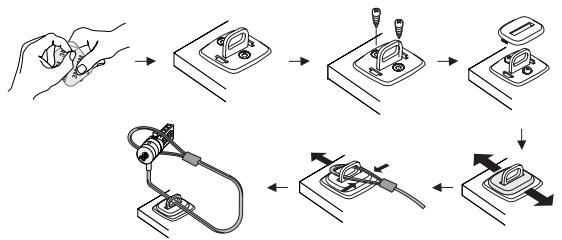

NOTE: WHEN USING THE ADHESIVE BACKING, APPLY AT ROOM TEMPERATURE -60^ (16^) , AND ALLOW IT TO BOND FOR MORE THAN 24 HOURS. NOT RECOMMENDED FOR USE OUTDOORS OR IN A HIGH HUMIDITY ENVIRONMENT. BONDING TO GLASS, CERAMIC TILE, WATER-ABSORBENT MATERIALS, COPPER, BRASS, OR PLASTICIZED VINYL WITHOUT PRIMER SURFACE ARE NOT
RECOMMENDED. TARGUS RECOMMENDS USING BOTH ADHESIVE AND SCREWS TO PROVIDE MAXIMUM SECURITY. USING ONLY THE ADHESIVE PROVIDES MARGINAL SECURITY.
4 Place the DEFCON Security Base Plate cover as shown and slide it to the left or right to secure it in place.
5 Insert your DEFCON cable lock.
Specifications
General
Weight: 184.3 g
Locking device
Dimensions:31 x 29.9 x 20.8 mm
Colour: Black Nickel
Cable
Length: 2.1 m
Diameter: 4 mm
Material: Vinyl coated steel
DEFCON is a trademark of Targus Group International. All other trademarks are the property of their respective owners.
Recording Your Combination
For your convenience, record your combination in the space provided. When recording the combination, read from top to bottom using the number closest to the locking button as the starting point.
Targus assumes no responsibility for lost, misplaced or forgotten combinations.

Top combination window



Bottom combination window
TAPΓYC 3AΛΙΝΤΗΟ ΜΥCTΡΟΥΚΤΒΟ 3A HOΥΤΕΥΚ DEFCON® CL 3ΑΚΠΙΟΥΒΑΙΣΟ YΥCTΡΟΥΚΤΒΟ C KOMBΗΑζη
BbVeDeHne
Благдары В, чу 3akynixte Tapryc 3aцитно устюсТВО 3a HOYt6yK DEFCON® CL 3aklnuvaio устюсТВО C KOM6nHaця. DEFCON CL Bn nomara DA 3aцитinte BAЯця сelen HoYt6yK OT KpaX6ba nocpeDCTBOM CmehЯema KJIQUaJaC qeTnpuizppeHa KOM6nHaця. KJIQUaJaKaTa C npomEnJIbBa KOM6nHaця eINIMHInpa HxJdaTA OT KJIQUOBE N Bn PO3BOJЯBa nepINOdUneCKn DA CmehЯTe KOM6nHaцяТа 3a no-ToJMa CnrgpHOCT.
OcbEN To3n HapbUHnik 3a nOTpeBnteJI, KOMnJIeKtBJCTCbDbPxa:
- DEFCON CL
- YnJIbTHInTeJN DEFCON SecureSpacers

BHIMAHHE: 3A ДА ИЗПОЛ3BATE DEFCON CL ИЛДС CMEHINTE KOMБИHALIURA, TPRБА ДА ИЗБЕPETE HACTORIATA KOMБИHALIURA.
OTKJIIOUyBaHe Ha DEFCON CL

BEJIEXKKA: HE CE ONIITBAIITE DA OTCTPAHINTE DEFCON CL B3 DA IN3IOJ3BATE KOMBIIHALIURA. IOIOBEH ONIIT BNI MOJBI DA IOBPEIN BAISHI HOYTBYK.
1 KaTo 3nON3BaTe DnCKOBeTe, BbBeJeTe BApHaTa KOMBnHaCnIa.
2KoMbHaacnraTcneBRAVBnpO3OpYeTa.
3HaTncheTe n 3aDpBxKTe 6yToHa 3a 3akIIOUBaHe 3a da ce NpOpeJr 3akIIOuBaUHte 3b6uN.
4. OTeTpaHete DEFCON CL ot OTbopa 3a 3akJIIOUbaHe Ha BaIINr HOYt6yK.
Базова Пл actина DEFCON Security
KOMNJIeKtBt DEFCON CL Combo Cable Lock BKNIOUvBa 6a3Oba pIaCTnHa 3a NOBNUBaHe CnrypHocT Ta Ha HAcTOJHInTe KOMNIOTpu.
3aKJIIOUBaIoo yCTpOoiCTBO
Pazmepn: 31 × 29.9 × 20.8 ~mm
LBJT: uepeHnkeI
Ka6eI
Дьлжина: 2.1m
Диаметьр: 4mm
MATEPnA: CTOMaC BUNHINOBO NOKpNTne
DEFCON e 3ana3eMa Kapka Ha Targus Group International. BcHcN dpyrna 3ana3eMn Kapka ca Co6ctBeHOCT Na cbOTBeHTHe IM pRITExkATEmI.
3a\Pu\c\BaHeKoMbHaCuJa
Ha BaWata
3a BaIe yIobcTBo, 3aIIuIeTe KOMbHaunra Ta Cn Ha npedocTaBeHOTomrCTo.Korato3aNNCBateKoMbHaunra Ta, Yetete OTrope HADOny, KaTo N3NONBATE KaTo OTnpabHa Toka ZnPpata Na-6JIn3O Do 3akNIOvBaUma ByTOH.
Tapryc He Hocn OTROBOPoCT 3a n3ry6eHn nn 3a6paBeHn KOMbHaCn.
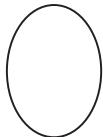
3aKnUcbaB 6yToH
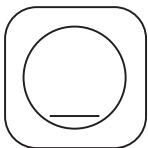
Hai-norpo hnpo3opoe TOMK6bHaunetaT
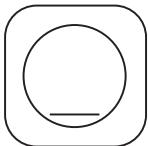

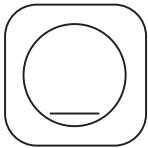
Hai-donHnpo30peyOT KOMbHaHnTa7a
BEZPECNOST NOTEBOOKU TARGUS DEFCON® CL KOMBINAČNI KABELOVÁ ZÁMEK
Uvod
DEFCONCL
- DEFCON SecureSpacers

VAROVÁNÍ: CHCETE-LI POUZIVAT DEFCON CL NEBO RESETOVAT KOMBINACI, MUSITE NASTAVIT ZÁMEK NA AKTUÁLNI KOMBINACI.
Nastavení kombinace
- DEFCON CL
- DEFCON SecureSpacers

ADVARSEL: FOR AT ANVENDE DEFCON CL ELLER AT AENDRE KOMBINATIONSKODEN SKAL DU FØST INDSTITLE LASEN I DENS KORREKTE KOMBINATIONSLASEKODE.
Indstil
kombinationskoden
- DEFCON CL
- DEFCON SecureSpacers

VAROITUS: DEFCON CL:N KAYTTAMISEKSI SINUN TULEE ASETTAA LUKON AVAUSNUMEROYHIDSTELMA ENNEN TURVAVAIJERIN KAYTTÖONOTTOA TAI KOODIN UUDELLEEN ASETUSTA.
Yhdistelmän asennus
Dokiún tou ouvδuaσoú
PpOToI pPooprnoTe Tnv KLeiOapia OToV φOpnto oac UTOLOVoiTn:
1 TupioTe Ta kavtpav yia va TTETUXETNv aTOKpuyn Tou ouvouaouou.
2 ETIOTpEyTE OTO uVbuaoMu TOU exTe KAthetaEi.
3ELeVTe av to koupti KkEioWmuOc Eivai TnEvo p i KATU.
DEFCONCL
- DEFCON SecureSpacers

UPOZORENJE: DA BISTE KORISTILI DEFCON CL IILI RESETIRALI KOMBINACIJU, BRAVU MORATE POSTAVITI NA TRENUTAÇNU KOMBINACIJU.
DEFCONCL
- DEFCON SecureSpacers

VIGYÁZAT: A DEFCON CL HASNZÁLATÁHOZ VAGY UJ KOMBINÁCIÓ MEGADÁSAHOZ SZUKSEG VAN ELOSZÖR AZ AKTUÁLIS KOMBINÁCIÖT MEGADNI.
DEFCONCL
- DEFCON SecureSpacers

PPERSPEJIMAS: NOREDAMI NAUDOTIS DEFCON CLARBA PAKEISTI KOMBINACIJA, TURITE UZRAKTE NUSTATYTI REIKIAMAKOMBINACIJA
- DEFCON CL
- DEFCON SecureSpacers

WAARSCHUWING: OM DE DEFCON CL TE KUNNEN GEBRUKEN OF DE CODE VAN HET COMBINATIESLOT TE WIJZIGEN, MOET U DE HUIDIGE COMBINATIECODE INSTELLLEN.
Preender o DEFCON CL
DEFCON Security Base Plate
DEFCONCL
- DEFCON SecureSpacers

ATENTIE: PENTRU A UTILIZA SISTEMUL DE INCHIDERE DEFCON CL SAU PENTRU A RECONFIGURA COMBINATIA DE CIFRE, TREBUIE MAI INTAI SÄ CONFIGURATI COMBINATIA CURRENTA.
Configurarea combinatiei decifre
YcTaHOBka CnCTeMbI DEFCON CL B HoYTo6yK

PIMMEUHHE;ДЛДОПЛНITEьHOJYCTOУNBOCTNIPIN YCTAHOBKE INI CHRTN 3AMKA DEPRKNTCCUCTEMY DEFCON CL OBEENIM PYKAMI.
1 BBeDnte npaBnIbHyIO KOM6HnAuIO C nOMOuBo ⅢKan BBOda uΦpa.
B OKhax noRbntc KOMbHaCnIuΦp.
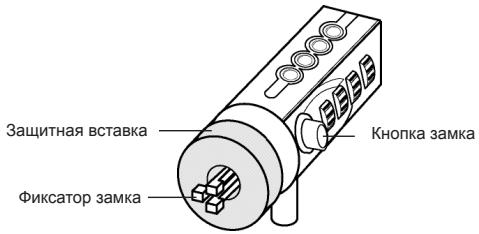
Cucmema DEFCON CL
2Haxmnte uyepeKnBaTe KhoNkY 3Amka, YTo6blΦNKcaTOp BCTaI B NIOJoxHeNe 6NOKIpOBKn.

P\PUMEUYHHE: YTObbl KHOPIKA 3AMKA BbIa IIOJIHOCTbO OTKATA, HEOBXOJIMO BBECTN PIPABINbHyU KOMBHALcHIO.
3BCTaBbTe 3AMOK DEFCON CL BФИКСИРУОПИΝΙΝΑЗ KOMПБЮТЕРИ NGYCTNTE KHOПКΥ 3AMKa.

IPMMEUHNE: TAK KAK PA3MEP OTBEPCTNIOI 3AMOK MEHRETcB PA3hBIX PA3MEPAX HOYTBYKOB, Bbl MOKETE O5HPAYKNTb HE6OJIbIOWI 3A3OP MEXJy 3AMKOM N KOPNYCOM KOMTbIOTPA. IJIN O6ECPTeEHN HADEXKHOTO COBMUEHIN I B630PiACHOCTN OTTTMAJBHbIM PEUEHEM RBJIOTc4AUHTHbIE BCTABKN DEFCON.
4ПовернITEшкалы,чтобсckрьтБTekушeeЗауне KOMинанци.
Tak ka pa3Mep OTBepCTnno 3AMOK MeHReTcB pa3hIx pa3Mepax HOYTOyKOB, Bbl MOKeTe 0bHapuykntb He6OlbwOo 3aOp MExky 3aMKOM n Kopnycom KOMNbHTepa. 3aUINTHbIe BCTabKN DEFCON oecneuBaIOT ONTMaJIbHOe COBMeueHne
I6e3oNaChOCTb.
ИспOLTь3OBaHнe 3auntHBIX BCTaBOK DEFCON
1 BCTaBbTe cTOnOpHoe yCtpoiCTBO DEFCON BФнксрюши п3 HOyT6yka.
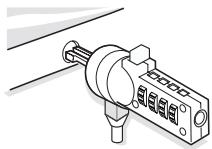
2□ BbTaunTe cToonpHoe ycTpoiCtBO DEFCON n3 fKcnpUoIero na3a HoYtOyka n npOBepbTe, He ue3MepeH IIN 3a3Op.
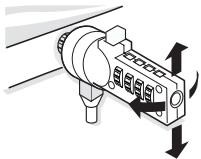
3口ПисИшКOM 60ЛьшOM 3a3ope haДnte NOxOJaIyU 3aIHTHyIO BCTaBky. B KOMJIeKr BXOJr Tpr pa3Mepa 3aIITbIX BCTaBOK:1.6 MM,0.8 MM n 0.4 MM.

ПРМЕЧАНЕ: HE CHИМAJTE KЛЕЙКУО ЛЕТС 3AДNTьIX BCTABOK, ПOKA Bbl HE CДЕЛАПОКOHΥATEЛБиВуВΙБОР.
4ПослЕ Вьбopa 3aциТнОВ BCtавКИ hyхнoro pa3Mepa
BbTaunTe cTOnOpHoe yCtPoIcTBo I3 KOMNbIoTepa. PocIe 3TOrO cHmMtTe KneKyU JIeHTy C 3aJHeY auctn BCTaBKn I HaKJIeTe BCTaBky Ha 3Amok DEFCON.
Снытne 3amka DEFCON CL

PNEДУПЕХДЕНИЕ: HE ПыТАЙTEСь CHRTь 3AMOK DEFCON CL BE3 BBOДA ПРABИльHOЛ KOMБИHAЦМЗКА. Вbl MOЖETE HAHECTN MEXAHYNCHEKNE IOBPEXDEHЯ HOYTEKY.
1C NOMOUII KAI BBEINTE HxHyIO KOMBHaIIO.
2BBeHHeHHaKOMbHaUaNIOBbTcBOKhA.
3Haxmnte uyepeKnBaTe KhONkY 3Amka, yTo6bl y6paTb qNKcatOp n3 noJIOKeHn8 6IoKnPOBKn.
4. BbTaunTe 3aMOK DEFCON CL n3Фнксруюцero na3a HoYt6yka.
3auntna onopa DEFCON
B KOM6HnHPOBaHHbI KOMPJIeKT 3aUHTHOI CNUCTeMbI DEFCON CL BxOJNT 3aUHTHAp Onpa Ipn 3aUHTbI HAcTObhBIX KOMpbIOTePOB.
- DEFCON CL
- DEFCON SecureSpacers

VARNING: FÜR ATT ANVÄNDA DEFCON CL ELLER ÅTERSTÄLLA
KOMBINATIONEN MÄSTE DU STÄLLA IN LÄSET PÄ GÄLLANDE
KOMBINATION.
DEFCONCL
- DEFCON SecureSpacers

UYARI: DEFCON CL'YI KULLANMAK ICIN VEYA KOMBINASYONU SIFIRLAMAK ICIN KILIDI MEVCUT KOMBINASYONAAYARLANAMIZ GEREKIR.
- BG -Блгарский (e3nk)
- CZ - Ceitina
- DE - Deutsch
- Setting the Combination
- Testing the Combination
- Securing the DEFCON CL
- Locking the DEFCON CL to your Notebook Computer
- Using the DEFCON SecureSpacers
- Unlocking the DEFCON CL
- DEFCON Security Base Plate
- Using the DEFCON Security Base Plate
- Specifications
- General
- Locking device
- Cable
- Recording Your Combination
- TAPΓYC 3AΛΙΝΤΗΟ ΜΥCTΡΟΥΚΤΒΟ 3A HOΥΤΕΥΚ DEFCON® CL 3ΑΚΠΙΟΥΒΑΙΣΟ YΥCTΡΟΥΚΤΒΟ C KOMBΗΑζη
- BbVeDeHne
- OTKJIIOUyBaHe Ha DEFCON CL
- Базова Пл actина DEFCON Security
- 3a\Pu\c\BaHeKoMbHaCuJa
- Ha BaWata
- BEZPECNOST NOTEBOOKU TARGUS DEFCON® CL KOMBINAČNI KABELOVÁ ZÁMEK
- Uvod
- Nastavení kombinace
- Indstil
- kombinationskoden
- Yhdistelmän asennus
- Dokiún tou ouvδuaσoú
- Preender o DEFCON CL
- Configurarea combinatiei decifre
- YcTaHOBka CnCTeMbI DEFCON CL B HoYTo6yK
- ИспOLTь3OBaHнe 3auntHBIX BCTaBOK DEFCON
- Снытne 3amka DEFCON CL
- 3auntna onopa DEFCON
Brand : TARGUS
Model : PA410E
Category : Laptop lock