
PA410S - Laptop lock TARGUS - Free user manual and instructions
Find the device manual for free PA410S TARGUS in PDF.



| Product Type | Cable laptop lock with combination lock |
| Brand | TARGUS |
| Model | PA410S (DEFCON SCL) |
| Weight | 184.3 g |
| Lock dimensions | 31 x 54 x 24 mm |
| Cable diameter | 4 mm |
| Cable material | Vinyl-coated steel |
| Color | Black nickel |
| Lock type | 4-digit combination |
| Combination setting | Factory preset combination, user-resettable only |
| Compatibility | Standard laptop security slot |
| Included parts | DEFCON SCL lock, cable, security spacers (3 sizes), security mounting plate, screws, abrasive and alcohol pads |
| Main functions | Anti-theft attachment to fixed object, combination locking, use with desktop computer plate |
| Care and cleaning | Clean with a soft, dry cloth. Avoid solvents. |
| Security | 4-digit combination, no key, cannot be reset without original combination |
| Repairability | Parts not user-repairable. In case of malfunction, contact TARGUS customer service. |
Frequently Asked Questions - PA410S TARGUS
User questions about PA410S TARGUS
0 question about this device. Answer the ones you know or ask your own.
Ask a new question about this device
Download the instructions for your Laptop lock in PDF format for free! Find your manual PA410S - TARGUS and take your electronic device back in hand. On this page are published all the documents necessary for the use of your device. PA410S by TARGUS.
USER MANUAL PA410S TARGUS
notebook security
DEFCON® SCL
serialised
combination
cable lock

USERGUIDE
TABLE OF CONTENTS
GB - English
TARGUS NOTEBOOK SECURITY DEFCON® SCL SERIALISED COMBINATION CABLE LOCK 5
BG -Блгарский (e3nk)
TAPYUC 3AUNTHO YCTPOINCTBO 3A HOYTEVK DEFCON® SCL 3AKIIOUBAUIO YCTPOINCTBO CbC CEPIHAKOMBINA
CZ - Ceitina
SERIOVY KOMBINAÇNIZÁMEK DEFCON® SCLPROBEZPECNOST NOTEBOOKU TARGUS 23
DE - Deutsch
TARGUS NOTEBOOK SECURITY DEFCON® SCL SERIENMÄSSIGES KOMBINATIONSKABELSCHLOSS 31
DK-Dansk
TARGUS SIKKERHEDS DEFCON® SCL SERIAL KOMBINATIONSK-ABELLÁS TIL BÆRBAR COMPUTER 40
EE - Eesti
TARGUS SULEARVUTI TURVALISUSE DEFCON® SCL SEERIAKOMBINATSIOONIGA KAABELLUKK 49
ES - Espanol
CERRADURA CON CABLE TARGUS NOTEBOOK SECURITY DEFCON® SCL COMBINACION 57
FI - Suomi
TARGUS DEFCON® SCL KANNETTAVAN TIEKONEEN SARJALLISTUVA YHDISTELMATURVAAJIERI 66
FR - Français
CABLE ANTIVOL À COMBINAISON DEFCON® SCL DE TARGUS POUR ORDINATEUR PORTABLE 75
GR - Eληνικα
KAEIAIAPIA KAANQDN DEFCON® SCL THZ TARGUS ME ΣEIPAIKONIOHMENO ΣYNΔYAΣMO ΠA THN AΦAΛEIA ΦOPHTΩN YYANOIGTQN 84
HR - Hrvatski
TARGUS DEFCON® SCL SERJALIZIRANI KOMBINACIJSKI KABEL ZA ZAKLJUCAVANJE ZA SIGURNOST PRIJENOSNOG RACUNALA 93
HU - Magyar
TARGUS NOTEBOOK SECURITY DEFCON® SCL SOROS KOMBINÁCIOS KÁBELZÁR 101
IT - Italiano
TARGUS NOTEBOOK LUCCHETTO DA CAVO A COMBINAZIONE SERIALIZZATA DEFCON® SCL 110
LT - Lietuviskai
TARGUS NESIOJAMOJO KOMPIUTERIO APSAUGINIS DEFCON® SCL SERJINIS KOMBINACINIS LAIDINIS UZRAKTAS 119
LV - Latviešu
TARGUS PIEZIMJUDATORADROSBASDEFCON SCL KOMBINACIJASKABELA SLEDZIS 127
NL - Nederlands
SERIEEL DEFCON® SCL COMBINATIE-KABELSLOT VAN TARGUS VOOR DE VEILIGHEID VAN UW NOTEBOOK 135
NO - Norsk
TARGUS DEFCON® SCL SERIEKOMBINASJONSKABELLÁS FOR NOTEBOOK-SIKKERHET 144
PL - Polski
LINKA ZABEZPIECZAJAC TARGUS Z SERYJNYM ZAMKIEM SZFYFROWYM DEFCON® SCL 153
PT - Português
TRAVA A CABO COM COMBINACION EM SERIE DEFCON® SCL D TARGUS NOTEBOOK SECURITY 162
RO - Români
SISTEM DE INCHIDERE TARGUS PENTRU SIGURANTA NOTE-BOOK-ULUI DEFCON® SCL CU CABLU ŞI COMBINATIE DE CIFRE IN SERIE. 171
RU - Pycckn
CEPNHbI 3AaHTbI TPOCSIK IJIHOYtBuKOB DEFCON KOMPAHIN TARGUS C KOIOBbIM 3AMKOM C 3AADAHbIM KOJOM 179
SE - Svenska
TARGUS SÄKERHET FÖR BARBARA DATORER DEFCON® SCL SERIEKCOMBINATIONSLÁS MED KABEL 188
SI - Slovensko
SERIJSKA KOMBINACIJSKA KABELSKA KLJUÇAVNICA DEFCON® SCL TARGUS - VARNOST PRENOSNIH RACUNALNIKOV ......... 197
SK - Slovencina
KOMBINOVANY SERIALIZOVANY BEZPECNOSTNY ZAMOK DEFCON® SCL NA NOTEBOOK OD SPOLOCNOSTI TARGUS ......... 205
TR - Türçç
TARGUS LAPTOP GUVENLIIGI IÇIN DEFCON® SCL SERİ KOMBINASYON KABLO Kılıdi 213
TARGUS NOTEBOOK SECURITY
DEFCON® SCL
SERIALISED
Thank you for purchasing the Targus Notebook Security DEFCON® SCL Serialised Combination Cable Lock. The DEFCON SCL helps protect your valuable notebook computer from theft using a serialised four-digit combination lock. The preset combination lock eliminates the need for keys and makes it impossible to reset your combination.
In addition to this user's guide, this package contains:
- DEFCON SCL Serialised Combination Cable Lock
- DEFCON SecureSpacers
- DEFCON Security Base Plate

WARNING: TO USE THE DEFCON SCL YOU MUST RECORD THE PRESET COMBINATION PRIOR USE.
Serialised combination
- Locate the combination dials and windows on the lock.

DEFCON SCL
2 The preset combination appears on a sticker that is attached at the back of this user guide.

NOTE: ALTERNATIVELY, YOU MAY RECORD THE COMBINATION IN ANOTHER SECURE, EASY-TO-FIND PLACE, AND KEEP IT AWAY FROM THE NOTEBOOK COMPUTER.
3 Turn the dials to disguise the combination.
Testing the Combination
Before attaching the lock to your notebook computer:
1 Turn the dials to return to the serialised combination.
2 Check that the locking button depresses completely.
Securing the DEFCON SCL
Select an object in the room to which you will secure your notebook computer with the DEFCON SCL. Choose a large, heavy piece of furniture such as a table or desk.
1 Take the looped end of the cable and wrap it around the selected object.

NOTE: WRAP THE CABLE AROUND A PART OF THE OBJECT THAT WILL DETER AN INTRUDER FROM SLIPPING THE CABLE OFF (FOR EXAMPLE, A TABLE OR DESK LEG WITH A CROSS BAR OR A DRAWER HANDLE).
2 Feed the lock through the looped end of the cable as shown.
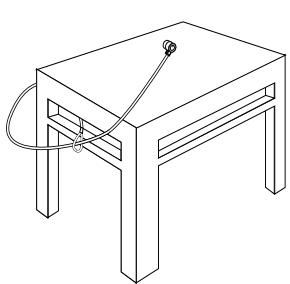
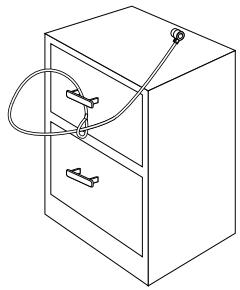
Securing the DEFCON SCL to an object
Locking the DEFCON SCL to your Notebook Computer

NOTE: HOLD THE DEFCON SCL WITH BOTH HANDS FOR ADDITIONAL STABILITY WHILE INSERTING OR REMOVING THE LOCK.
1 Using the dials, enter the correct combination. The combination appears in the windows.
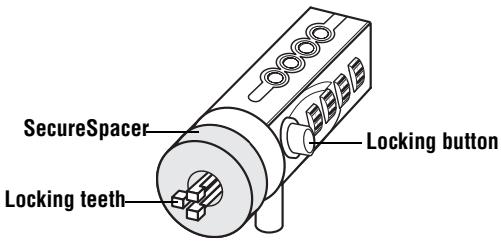
DEFCON SCL
2 Press and hold the locking button to align the locking teeth.

NOTE: FOR THE LOCKING BUTTON TO DEPRESS COMPLETELY YOU MUST ENTER THE CORRECT COMBINATION.
3 Insert the DEFCON SCL into your notebook computer's lock slot and release the locking button.

NOTE: DUE TO THE VARIATION IN THE SIZE OF THE SECURITY SLOTS ON VARIOUS NOTEBOOK MODELS, YOU MAY FIND THAT THERE IS SOME SLACK
BETWEEN THE LOCK AND THE COMPUTER. THE SUPPLIED DEFCON SECURESPACERS ARE THE BEST SOLUTION FOR OPTIMAL FIT AND SECURITY.
4 Turn the dials to conceal your combination.
Due to differences in the size of the security slots on various notebook computers, you may find that there is some slack between the DEFCON locking device and the computer. The DEFCON SecureSpacers provide optimal fit and security.
Using the DEFCON SecureSpacers
1 Insert your DEFCON locking device into the computer's lock slot.

2 Pull the DEFCON locking device away from the computer and check whether the gap is excessive.
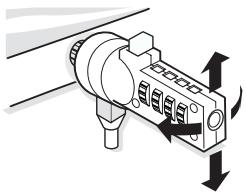
3 If so, try each of the SecureSpacers to determine which one fits the gap. The SecureSpacers come in three sizes: 1.6 ~mm , 0.8 ~mm , and 0.4 ~mm .

NOTE: DO NOT REMOVE THE ADHESIVE STRIP FROM ANY OF THE SECURESPACERS UNTIL YOU DECIDE WHICH ONE TO USE.
4 Once you know which SecureSpacer you are going to use, remove the locking device from the computer. Then remove the adhesive strip from the back of the SecureSpacer and attach the spacer to the DEFCON lock.
Unlocking the DEFCNSCL

WARNING: DO NOT ATTEMPT TO REMOVE THE DEFCON SCL WITHOUT USING THE COMBINATION. TO DO SO WILL PHYSICALLY DAMAGE YOUR NOTEBOOK COMPUTER.
1 Using the dials, enter the correct combination.
2 The combination appears in the windows.
3 Press and hold the locking button to realign the locking teeth.
4 Remove the DEFCON SCL from your notebook computer's lock slot.
DEFCON Security Base Plate
Included with your DEFCON SCL Combo Cable Lock is the Security Base Plate for the security of desktop computers.
Using the DEFCON Security Base Plate
1 Choose a solid location to attach the DEFCON Security Base Plate: a piece of furniture, or metal cabinet. If you plan to use the two screws, you can use the base plate as a template to pre-drill the holes.
2 Use the abrasive pad, then the alcohol wipe to prepare the area when you will attach the DEFCON Security Base Plate.
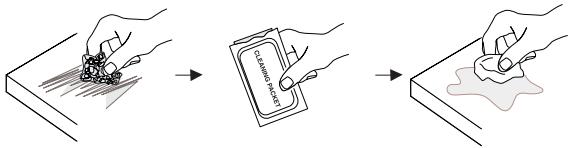
3 After the alcohol dries, remove the backing on the base plate to expose the adhesive and place it on the prepared location. If desired, secure the base with the two screws.
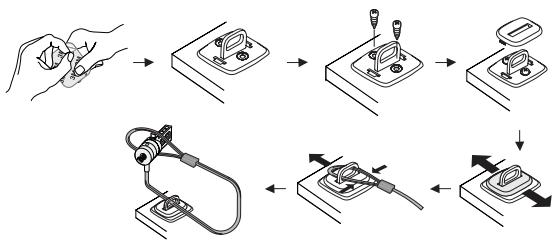

NOTE: WHEN USING THE ADHESIVE BACKING, APPLY AT ROOM TEMPERATURE -60^ (16^) , AND ALLOW IT TO BOND FOR MORE THAN 24 HOURS. NOT RECOMMENDED FOR USE OUTDOORS OR IN A HIGH HUMIDITY ENVIRONMENT. BONDING TO GLASS, CERAMIC TILE, WATER-ABSORBENT MATERIALS, COPPER, BRASS, OR PLASTICIZED VINYL WITHOUT PRIMER SURFACE ARE NOT RECOMMENDED. TARGUS RECOMMENDS USING BOTH ADHESIVE AND SCREWS TO PROVIDE MAXIMUM SECURITY. USING ONLY THE ADHESIVE PROVIDES MARGINAL SECURITY.
4 Place the DEFCON Security Base Plate cover as shown and slide it to the left or right to secure it in place.
5 Insert your DEFCON cable lock.
Specifications
General
Weight: 184.3 g
Locking device
Dimensions:31 x 54 x 24 mm
Colour: Black Nickel
Cable
Length: 2 m
Diameter: 4 mm
Material: Vinyl coated steel
DEFCON is a trademark of Targus Group International. All other trademarks are the property of their respective owners.
TAPГYC 3AПИTHO YCTPOИCTBO 3A HOYTEУК DEFCON® SCL 3AKЛЮЧВАЦО YCTPOИCTBO CBС CEPИHA KOMBИHAЦЯ
BbVeDeneHne
Блары в, ue 3akunxte Tapryc 3auntho yctpoictBO 3a hoyt6yK DEFCON SCL 3aknoubaoo yctpoictBO cbc cepinHa kombuauia. DEFCON SCL bni nomara da 3aunite Baunie zhen Hoyt6yK OT KpaXb noceDCTBOM cepinHa kIouanka C YeTnpunupeha Kombunaia. IpeBaPntno 3aadaeHata KombunaeyimnHnpa Hxkdata ot KIOUObe n BN pONBOLBA nepNoDiueckn da Cmehare Kombunaeta 3a No-rotjMa CNpyhocT.
Ocben To3n HapbUnk 3a NtpeBnte, KOMnIeKTBcBdRpka:
DEFCON SCL 3aKJIIOUBaIoo yCTpoIcTBO cIc cepnHa KOMBInHaIe
- YnltbThnteN DEFCON SecureSpacers
DEFCON Security 6a30Ba nlaactnHa

BHIMAHINE:3A DA I3IIOJI3BATE DEFCON SCL TPRIBBA ITbPBO DA 3AINIJETE INPEIDBAPINTENHO 3AIADEHATA KOMBINAHLI.
CepniHa KombinaZna
1 HaMepeTe uΦpOBuTe DnCKObe n npO3OpUeTaHa KJIouaJIkata.
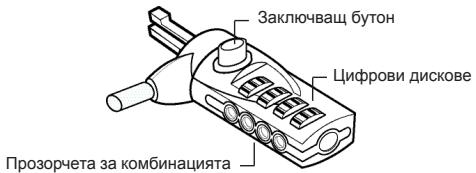
DEFCON SCL
2口 PnpedbapntenH 3aadaeHaTa KOMbHaCua e 3aIncaHa Ha IepeHa, npKpeHa Ha Tbp6a Ha To3n HapbYnK 3a notpeBNTeHa.

BEJIEXKKA:OCBEH TOBA,MOKETE DA 3ANIUNETE KOMBINAHAJRA HA IpyTO HADEXJHO,IOCTbINHO MRCTO IA PbXTE HA PA3NIUYO MRCTO OT HOYTEyKA.
3□ 3aBbPteTe DnCKOBeTe, 3a Da npKpneTe KOMbHaunraTa.
TecBaHe Ha KOM6HauZyTa
Ipei Da npKpEnite KInouaKkata KbM BaWnH HoYToyK:
1□3aBbPTeTe DnCKOBeTe, 3a Da ce BbPHeTe KbM cepuHaTakOMbuHaun.
2□Проверетe Дади 3akJIOUBaIuIaT 6yToH XJIbTBA HAnbJIHO.
Прикpenbaне на DEFCON SCL
I36epe Te pEmet B cTaTa, KbM KOTo Da npKpeNtE CBOH HOYbYc NOMOaTa Ha DEFCON SCL. I36epeTe COINHa TeKka act OT Me6eInpOBKaTa, KaTO HApnMpem Maca INI bIOpo.
1 B3eMeTe KpaHa Ka6ena C npMkata n ro yBnTe OKoJo N36paHnI ppeMTe.

BEJIEXKKA: YBNIIE KABEJIA OKOJO YACT OT INPEJMETA, KOYTO HRAMA DA IO3BOJIN HA KPAIENEJA DA IN3XJU3N KABEJIA (HANPIMEP, KPAH KA BIPOO JINM MACA C HANPEUYHA IPREDA JIN MDPbJKATA HA UEKMEJDKETO).
2□Ппекаар Te KIчалкata пe3 прмкata Na Kaбena, KaKTo e POKa3aHo Na ИИСТрацЯт.
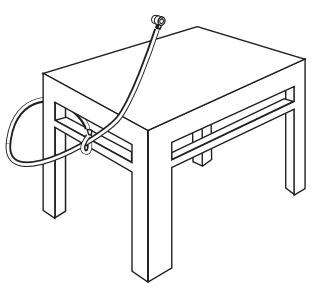
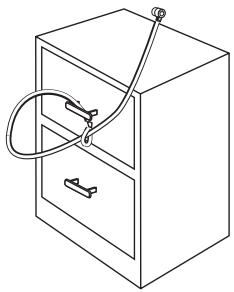
3aKpeneme DEFCON SCL KbM HkaKaBe npedMem
3aKJIoueTe DEFCON SCL KbM Baшся HOуT6yK

BEJEXKKA: JPBJXTE DEFCON SCL C JBE PbIe 3A IIO-TOJIrMA CTABNJHOCT IOKATO IOCTABTRE INI CBAJIYRA KJIIOUHAIJKATA.
1 KaTo n3NoJ3BaTe the dials, BbBeTe npaBnHaTa KOM6uHaCuIy.
Kombunaeta Ce noBBA B npO3OpYeTa.
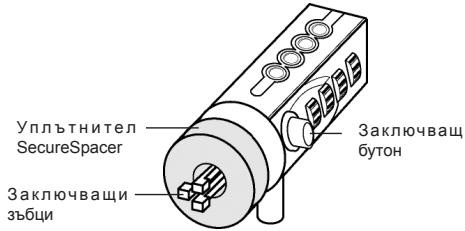
DEFCON SCL
2□ HatncheTe n 3aDpBxTe 3aKJIIOUyBaIuIg 6yToH, 3a da n3paBnIte 3aKJIIOUyBaIuIg 3b5uI.

BEJIEXKA: 3A DA XJbTHE HANTbHIO 3AKJIHOUBAUINBAYTOH TPREBBA DA BBeDETE IPABUNIHATKOMBUNHAUIN.
3口ПрмушeteDEFCONCLВOTbopa3aKlquyakhaBaшян HOYt6yкиOCBO6oDeTe 3akIIOvBaшяn6byToH.

BEJIEXKA: NOPADI PA3PINKITE B PA3MEPINTE HA OTBOPNTE 3A KJIOAHIKI HA PA3NIHHTME MODEIHN HOYTBUYN,MOXEJA3ABEJEKNTEN3BECTHAXIA5NHA
MEXKJY KJIIOUHAIKAI N KOMNIOTbPA.IPEIOCTABEHITE DEFCON YIJIbTHEHINCA HAI-IOBPOTO PEUIEHNE 3A ONTIMAJHO CbOTBETCTBNE IN CnIpyPHOCT.
4□3aBbptete the dials, 3a da npnKpneTe cBoTa KOMbHaun.
IopaДn pa3Nknte B pa3Mepnte Ha OTbOpnte 3a KlnOuAnKn Ha pa3NUnHNTe MoJeIn HOyT6yU, MOKe Ja 3a6BeJnxTe n3BeCTHa XnaBnHa Mekdy DEFCON KlnOuAnKaTa N KOMnIObpa. IpeJoCTabeHnte DEFCON ynIbTHeHnca Hn-Do6pTo peSeHne 3a ONtImaJIHO CbOTBcETCTBne nCnryPhOCT.
Използваны DEFCON yпьт themselves
1 BmKHeTe 3aKJIuOyBaIooTo yCtpoIcTBO DEFCON B OTBopa 3a 3aKIIIOUHbAHe Ha KOMNIOTpba.
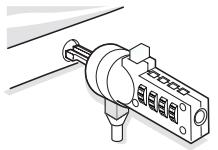
2口 N3terIeTe 3aknUvaIoTo yctpoiCTBO DEFCON npes OTBopa n npobepTe dani npolykata e npekaJIeHO roJMa.
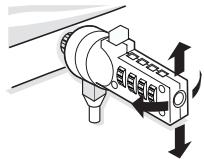
3Ako da, n3npo6BaIte BceKn ot SecureSpacers, 3a da npueHnTe KOH Hau-Do6pe 3anbJbRa npolykata. SecureSpacers ce npednarat B Tpr na3mepa: 1.6MM, 0.8MM n 0.4MM.

BEJIEXKKA: HE OTCTPAHRAIYE 3AJENBAUATA JIEHTA OT HIKOJ OT SECURESPACERS, DOKATO HE PEIJNTE KOJ UCE I3PON3BATE.
4CnE Kato peWnte KOI SecureSpacer ue n3no13BaTe,OTcTaPHeTe 3aKlNoUbaIoTo yCTpoiCTBO OT KOMNIObpa.CnE TOBA OTcTaPHeTe 3aJeNbAuaTa IeHTaOTzAdHaTauactHa SecureSpacer npInkpenete SecureSpacer KbM KJIouaIkaT ADEFCON.
OTKJIIOUbaHe Ha DEFCON SCL

BEJIEXKKA: HE CE ONIITBAIte DA OTCTPAHINTE DEFCON SCL BE3 DA IN3PON3BATE KOMBNIHALJRA. IIOIOSEH ONIIT Bn MOIbI DA IOBPEIN BAWIA HOYTBYK.
1 KaTo 3nOJ3BaTe DnCKOBTe, BbBeJeTe BApHaTa KOMBnHaCnIa.
2KombunaTcpeBBAVpO3OpTeTa.
3HaTnchTeH 3aDpBxTe 6yToHa 3a3akIIOvBaHe 3a da ce NOppeJr 3akIIOvBaUHTe 3b6uN.
4. OTCTpaHete DEFCON SCL oT OTbopa 3a 3akJIIOUbaHe Ha BaIINr HOYToK.
Базова Пл actина DEFCON Security
KOMNJIeKbT DEFCON SCL Combo Cable Lock BKNIOUBA 6a3Oba pIaCTnHa 3a NOBNUBaHe CnrypHocCTTa Ha HAcTOJINHe KOMNIOTpu.
Dokiún tou ouvδuaσoú
PpOToI pPoapTnOeTe Tnv KkEiδaipia OTOv φoPnto oac UToLoayoiTn:
1 Tupiote ta kavtpav yia va ETIOtpeyete OTOV 6ipaiKoToinmuvo uovuaa.
2 ELeVTe av to koupti KkEioWmuToC eivai TnEvO p i KATU.
Preender o DEFCON SCL
DEFCON Security Base Plate
KOMPAHIN TARGUS C KOIOBbIM
3AMKOM C 3AДАнHBIM KOДOM
BVeIeHne
БлардамВасяпкуЗштог�ТорскаДЯнНоубков DEFCON®SCL komпани TargusC КODыIM 3AMKOM C 3aДаньIM KODOM.CИСТЕМADEFCON SCLnomoraet 3aцntNbцhenьНоубуКOT кражс nnomoьу сетьрхцфpoвOrO КODOBORO3AMKa C 3aДаньIM KODOM.KODoby 3amok C 3aДаньIMKODOM yctpaHЯг.THeOBxOДIMOCbB KJIQUax И HeJaETBO3MOKHOCTHnI3MeHЯт bKODOBYU KOMBHaUNHO.
Kpome INHCTpykCIN PONb3OBaTeTn B DaHHbIK KOMPJIeKT BXOJAT:
3aunTHbI TpOcNK DEFCON SCL C KOIOBbIM 3aMKOM C 3aDaHHbIM KOIDOM
3aunThbIe BCTaBKn DEFCON
3auntnaonopaDEFCON

ПЕДУПЕЖDEHИЕ: ПЕPEDHAJIOMИСПОЛБ3OBAHЯ
KOJOBOI0 3AMKA DEFCON SCL HEOBXOJIMO
3AINCATb 3AADHHYIO KOMBHNALIIO LINΦP.
3aandaHnaIuΦp
KOM6nHaζη
1 PaçnoIoxNte ŠkaJIbI N OKHa Kɔda Ha 3aMKe.
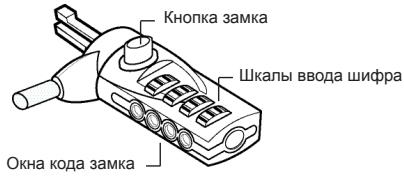
Cucmema DEFCON SCL
2□3aHaHnKaOMbHaZnUΦpYka3Ha HaHaKJIeKeHa nocJeHneCTpaHnCe daHHo INCHpykUn.

ПРИМЕЧАНЕ: Вbl MOЖETE TAKOKE 3APINICATb KOMБИHAЦИ N UБРТБ EE OT HOΥТБУКВ ДPyгО B63ОПACHОЕ ЛIGКODUCTUYHOE MECTO.
YcTaHOBka CnCTeMbI DEFCON SCL B HoyToyK

PIMMEUHANE:ДПЯДОПЛНЕЛьНОУСТОУВОCTNIPIN YCTAHOBKE NIN CHRTYN 3AMKA DEPRKNTCNUCTEMY DEFCON SCL OEBMNI PYKAMI.
1 BVeDInTe npaBnIbHyIO KOMbHaCNIIO C NOMOuBIO shkAIN BVOda WnΦpa.
BOKHAXIPOBNTcKOMbHaCmUzNΦp.
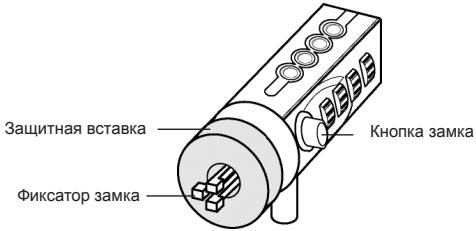
Cucmema DEFCON SCL
2□Haxmnte uyepeKnBaTe KhONkY 3Amka, YTo6blΦNKcATOp BCTan B NpOJKeHne 6NOKIpOBKn.

PIMMEUHHE: YTObI KHOIIKA 3AMKA BbIa IIOJIHOCTbO OTKATA, HEOBXOJIMO BBECTI PABINbHYo KOMBENHALIO.
3BCTaBbTe 3aMOK DEFCON SCL BФИКСИРУЮПИΝΙΝΑЗ KMЛБЮТЕРИ NGYCTITE KHOПКΥ 3aMka.

PIMMEAHHE: TAK KAK PA3MEP OTBEPCTIINQD 3AMOK MEHRETcB BA3HbIX PA3MEPAX HOYTEKOB, BBI MOXETE 06HAPYKITb HEBOJIshO 3A3OP
MEXJY 3AMKOM KOPITYCOM KOMTbOTEPA. JIJI Y OBJCEPENH HAJEXKHO TO CBMEUHIN I B3OJNACCHOIT ONTIMAIJIbHbIM PEUHEHEM JBJIOTC3AUNTHbIE BCTABKN DEFCON.
- YctaHOBNTe KpbIshky 3aunTHoN onOpby DEFCON, KaK NOKa3aHO Ha pncyHKe, IN BcTaBbTe ee Ha MeCTO DnJxHeHm BJeBO nJIN BnPaBO.
5 BCTaBbTe 3aunTHbI TPOcN DEFCON.
Cneunokauin
067ne
Bec: 184.3 g
BloKIpOBoUHoe yctpoiCTBO
Pa3Mepbl: 31× 54× 24mm
LBeT: YepHbI HKeJIb
Ka6eJb
Динha: 2m
Диаметр: 4mm
MaTePnai: CtaJIb C BUNHINOBbIM NOKpbITHeM
DEFCONЯIJIETcTO TROBOMAPKO KOMNHN Targus Group International. JIObIe DpyrE ToTROBbIe MAPKIN RAJIANTcO6CTBeHHoCTbIO COOTBETCTBYUOxH BnadeJIbueB.
TARGUS SÄKERHET FÖR BÄRBARA
DATORER DEFCON® SCL
SERIEKOMBINATIONS LÅS MED KABEL
Introduction
Visit our Website at www.targus.com Features and specifications subject to change without notice. ©2008 Targus Group International, Inc. and Targus (UK), Inc.
- TABLE OF CONTENTS
- GB - English
- BG -Блгарский (e3nk)
- CZ - Ceitina
- DE - Deutsch
- DK-Dansk
- EE - Eesti
- ES - Espanol
- FI - Suomi
- FR - Français
- GR - Eληνικα
- HR - Hrvatski
- HU - Magyar
- IT - Italiano
- LT - Lietuviskai
- LV - Latviešu
- NL - Nederlands
- NO - Norsk
- PL - Polski
- PT - Português
- RO - Români
- RU - Pycckn
- SE - Svenska
- SI - Slovensko
- SK - Slovencina
- TR - Türçç
- TARGUS NOTEBOOK SECURITY
- DEFCON® SCL
- SERIALISED
- Serialised combination
- Testing the Combination
- Securing the DEFCON SCL
- Locking the DEFCON SCL to your Notebook Computer
- Using the DEFCON SecureSpacers
- Unlocking the DEFCNSCL
- DEFCON Security Base Plate
- Using the DEFCON Security Base Plate
- Specifications
- General
- Locking device
- Cable
- TAPГYC 3AПИTHO YCTPOИCTBO 3A HOYTEУК DEFCON® SCL 3AKЛЮЧВАЦО YCTPOИCTBO CBС CEPИHA KOMBИHAЦЯ
- BbVeDeneHne
- CepniHa KombinaZna
- DEFCON SCL
- TecBaHe Ha KOM6HauZyTa
- Прикpenbaне на DEFCON SCL
- 3aKJIoueTe DEFCON SCL KbM Baшся HOуT6yK
- Използваны DEFCON yпьт themselves
- OTKJIIOUbaHe Ha DEFCON SCL
- Базова Пл actина DEFCON Security
- Dokiún tou ouvδuaσoú
- Preender o DEFCON SCL
- KOMPAHIN TARGUS C KOIOBbIM
- 3AMKOM C 3AДАнHBIM KOДOM
- BVeIeHne
- 3aandaHnaIuΦp
- KOM6nHaζη
- Cucmema DEFCON SCL
- YcTaHOBka CnCTeMbI DEFCON SCL B HoyToyK
- Cneunokauin
- BloKIpOBoUHoe yctpoiCTBO
- Ka6eJb
- TARGUS SÄKERHET FÖR BÄRBARA
- DATORER DEFCON® SCL
- SERIEKOMBINATIONS LÅS MED KABEL
- Introduction
Brand : TARGUS
Model : PA410S
Category : Laptop lock