
110.137 - Refrigerator BARTSCHER - Free user manual and instructions
Find the device manual for free 110.137 BARTSCHER in PDF.


| Product type | Mini refrigerated table |
| Brand | BARTSCHER |
| Model | 110.137 |
| Dimensions (W x D x H) | 1045 x 690 x 875 mm |
| Net weight | 83.8 kg |
| Power supply | 230 V ~ 50 Hz, 0.25 kW |
| Temperature range | +2°C to +10°C |
| Refrigerant | R134a (190 g) |
| Usable capacity | 300 L |
| Exterior material | Nickel-chrome steel |
| Worktop | W 1045 x D 690 x H 40 mm |
| Drawers | 2 GN 1/1 drawers (500 x 673 x 243 mm), max. variable height 175 mm |
| Included accessories | 1 GN 1/1 shelf (375 x 673 mm) |
| Cooling type | Air cooled, ventilated |
| Defrost | Automatic (3 cycles/24h) + manual |
| Controls | Digital controller with LED display, ON/OFF switch |
| Safety instructions | Do not use for flammable products; installation by professional; minimum clearance: 5 cm rear, 10 cm sides, 30 cm top |
| Cleaning | Unplug before cleaning; soft cloth and non-abrasive cleaner; do not use water jet |
| Maintenance | Regular condenser cleaning |
| Repairability | Interventions by qualified after-sales service; use original parts |
| Intended use | Refrigeration of food products in professional environment (catering) |
Frequently Asked Questions - 110.137 BARTSCHER
User questions about 110.137 BARTSCHER
0 question about this device. Answer the ones you know or ask your own.
Ask a new question about this device
Download the instructions for your Refrigerator in PDF format for free! Find your manual 110.137 - BARTSCHER and take your electronic device back in hand. On this page are published all the documents necessary for the use of your device. 110.137 by BARTSCHER.
USER MANUAL 110.137 BARTSCHER
Mini refrigerated cabinet
with circulation cooling
from page 17 to 32
GB/UK
Mode d'emploi
1.1 Information about the instruction manual 18
1.2 Key to symbols 18
1.3 Liability and Warrantees 19
1.4 Copyright protection 19
1.5 Declaration of conformity 19
2. Safety 20
2.1 General information 20
2.2 Safety instructions for use of the device 20-21
2.3 Intended use 21
3.Delivery,packaging and storage 22
3.1 Delivery check 22
3.2 Packaging 22
3.3 Storage 22
4. Technical data 23
4.1 Overview of parts 23
4.2 Technical specification 24
5. Installation and operation 24
5.1 Safety instructions 24-25
5.2 Installation and connection 25
5.3 Operating 25-29
6. Cleaning and maintenance 29
6.1 Safety advice 29
6.2 Cleaning 29-30
6.3 Safety instructions for maintenance 2930
7. Possible Malfunctions 31
8.Waste disposal 32
Bartscher GmbH
1.1 Information about the instruction manual
This instruction manual contains information about the installation, operation and maintenance of the device and should be consulted as an important source of information and reference guide.
Awareness of the safety instructions and instructions for use in this manual will ensure the safe and correct use of the device.
In addition to the information given here, you should comply with any local Health and safety Controls and generally applicable safety regulations.
The instruction manual forms part of the product and should be kept near the device and easily accessible for anyone carrying out the installation, servicing, maintenance or cleaning.
1.2 Key to symbols
In this manual, symbols are used to highlight important safety instructions and any advice relating to the device. The instructions should be followed very carefully to avoid any risk of accident, personal injury or material damage.

WARNING!
This symbol highlights hazards, which could lead to injury.
Please follow the instructions very carefully and proceed with particular attention in these cases.

WARNING! Electrical hazard!
This symbol draws attention to potential electrical hazards. If you do not follow the safety instructions, you may risk injury or death.

CAUTION!
This symbol highlights instructions, which should be followed to avoid any risk of damage, malfunctioning and/or breakdown of the device.

NOTE!
This symbol highlights tips and information, which have to be followed for an efficient and trouble-free operation of the device.
1.3 Liability and Warrantees
All the information and instructions in this manual take into account standard safety regulations, current levels of technical engineering as well as the expertise and experience we have developed over the years.
The instruction manual was translated with all due care and attention. However, we do not accept liability for any translation errors. The German version of this instruction manual is definitive.
If the delivery consists of a special model, the actual scope of delivery may differ from the descriptions and illustrations in this manual. This is also the case for special orders or when the device has been modified in line with new technology. If you have any questions, you should contact the manufacturer.

NOTE!
Read the instruction manual carefully before using the device. The manufacturer does not accept liability for any damage or malfunction resulting from not following the instructions for use.
The instruction manual should be kept near the device, easily accessible for anyone wishing to work with or using it. We reserve the right to make technical changes for purposes of developing and improving the useful properties.
1.4 Copyright protection
The instruction manual including any texts, drawings, images or other illustrations is copyright. No part of this publication may be reproduced, transmitted or used in any form or by any means without permission in writing from the manufacturer. Any person who commits any unauthorized act in relation to this publication shall be liable to claims for damages. All rights reserved.

NOTE!
The contents, texts, drawings, pictures and any other illustrations are copyright and subject to other protection rights. Any person unlawfully using this publication is liable to criminal prosecution.
1.5 Declaration of conformity
The device complies with the current standards and directives of the EU.
We certify this in the EC declaration of conformity.
If required we will be glad to send you the according declaration of conformity.
2. Safety
This section provides an overview of all important safety aspects.
In addition every chapter provides precise safety advice for the prevention of dangers which are highlighted by the use of the above mentioned symbols.
Furthermore, attention should be paid to all pictograms, markers and labels on the device, which must be kept in a permanent state of legibility.
By following all the important safety advice you gain an optimal protection against all hazards as well as the assurance of a safe and trouble-free operation.
2.1 General Information
This device is designed in accordance with the presently applicable technological standards. However, the device can pose a danger if handled improperly and inappropriately.
Knowing the contents of the instruction manual as well as avoiding mistakes and thus operating this device safely and in a fault-free manner is very essential to protect yourselves from the hazards.
To prevent hazards and to ensure optimum efficiency, no modifications or alterations to the device that are not explicitly approved by the manufacturer may be undertaken.
This device may only be operated in technically proper and safe condition.
2.2 Safety instructions for use of the device
The specifications regarding the industrial safety are based on the Regulations of the European Union applicable at the time of manufacturing the device.
If the device is used commercially, the user is obliged to ensure that the said industrial safety measures concur with the state of the rules and regulations applicable at the time in question for the entire period of use of the device and to comply with the new specifications.
Outside the European Union, the industrial safety laws applicable at the place of installation of the device and the regional territorial provisions must be complied with.
Besides the industrial safety instructions in the instruction manual, the general safety and accident prevention regulations as well as environment protection regulations applicable for area of application of the device must be followed and complied with.

CAUTION!
The device is not intended for use by individuals (including children) with physical or mental disabilities, insufficient experience, and/or insufficient knowledge unless such persons are under the care of a person responsible for their safety or have received instructions regarding appropriate use of the device.
Children should be observed to ensure that they are not playing with the device.
o Preserve this manual safely. When passing on/selling the device to a third party, the manuals must be handed over along with the device.
○ Every person using the device must act in accordance to the manuals and under consideration of the safety advice.
The device is to be used indoors only.
2.3 Intended use

CAUTION!
This device is intended for commercial use only and should be operated by qualified personnel in professional food service organizations.
Safe operation is only guaranteed when using the device for its intended purpose.
Any technical interventions, as well as assembly and maintenance are to be made by a qualified customer service only.
The mini refrigerated cabinet is only intended for cooling appropriate food products. Do not use the mini refrigerated cabinet for:
storage of flammable or explosive materials such as ether, alcohol, oil or glue;
storage of pharmaceutical products or blood.

CAUTION!
Any use going beyond the intended purpose and/or any different use of the device is forbidden and is not considered as conventional.
Any claims against the manufacturer or his authorized representative as a consequence of experiencing damages resulting from unconventional use are impossible.
The operator is liable for all damages resulting from inappropriate use.
3. Transport, packaging and storage
3.1 Delivery check
Please check the delivery upon completeness and transport damage immediately after receipt.
In case of visible damage do not accept or accept the delivery with reservation only.
Note the extent of damage on the carrier's bill of delivery. Trigger off the complaint.
Hidden damages should be reclaimed immediately after notice, as claims for damages can only be asserted within the effective period for complaints.
3.2 Packaging
Please do not throw away the covering carton of your device as it might be useful for storage purposes, when moving or, in case of damages, when the device must be sent back to a repair center. The outer and inner packing material should be removed completely from the device before installation.

NOTE!
If you liked to dispose the packing, consider the regulations applicable in your country. Supply re-usable packing materials to the recycling.
Please inspect the device upon completeness. In case any part is missing please contact our customer service center immediately.
3.3 Storage
Keep the package closed until installation and under consideration of the outside indicated positioning- and storage markings.
Packages should be stored under consideration of the following:
- Do not store outdoors.
- Keep it dry and dust-free.
- Do not expose it to aggressive media.
- Do not expose it to direct sunlight.
- Avoid mechanical shocks and vibration.
In case of longer storage (> 3 months) make sure you check the state of the packaging and the parts regularly. If required refresh or renew.
4. Technical data
4.1 Overview of parts
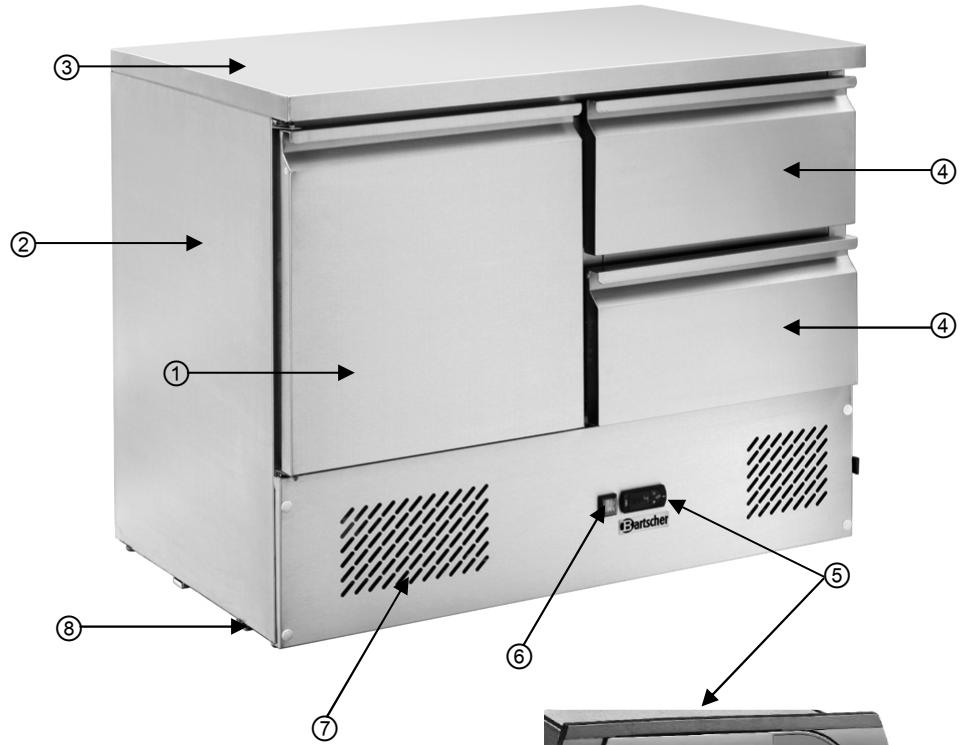
① Shelf
② Casing
③ Work surface
④ Drawer
⑤ Digital temperature regulator
(6) ON/OFF switch with integrated control light
⑦ Ventilation ducts
⑧ Adjustable legs
4.2 Technical specification
| Name | Mini refrigerated cabinet with circulation cooling |
| Article no.: | 110.137 |
| Construction: | 1 door, 2 shelves GN 1/1 of depth: 150 mm |
| Material: | chrome-nickel steel |
| Power: | 230 V ~ 50 Hz 0.25 kW |
| Temperature range: | 2℃ – 10℃ |
| Coolant: | R134a / 190 g |
| Capacity: | 300 litres |
| Total dimensions: | W 1045 x D 690 x H 875 mm |
| Work surface dimensions: | W 1045 x D 690 x H 40 mm |
| Shelf dimensions: | W 500 x D 673 x H 243 mm |
| Adjustable shelf height: | max. 175 mm |
| Accessories: | 1 container shelf GN 1/1, W 375 x D 673 mm |
| Weight: | 83.8 kg |
We reserve the right to make technical changes!
5. Installation and operation
5.1 Safety instructions

WARNING! Electrical hazard!
The device must only be connected to a properly installed single socket with protective contact.
Never yank cord to disconnect from outlet.
Cable must not touch any hot parts.
- See that the cable does not touch any heat sources or sharp edges. Do not let the cable dangle over the counter edge.
- Do not use the device in case it does not function properly, has been damaged or dropped.
- Do not use any accessory or spare parts that have not been recommended by the manufacturer. These can be dangerous for the user or lead to damages of the device or personal injury, and further, the warranty expires.
- Do not lay the cable over carpets or heat insulations. Do not cover the cable. Keep away the cable from operating range and do not dunk it into water.
- Do not move or tilt the device when in operation.

WARNING! Hazard via electrical current!
The device can cause injuries due to improper installation!
Before installation the local power grid specification should be compared with that of the device (see type label).
Connect the device only in case of compliance!
Take note of the security advice!
5.2 Installation and connection

CAUTION!
Installation and connection of the unit may only be performed by certified specialists.
- Unpack the unit and remove the packing material. Remove the entire protective foil from the unit.
- Place the unit on a flat, secure surface that can support its weight.
- Never place the unit on a flammable surface (e.g. carpet).
- Do not place the unit near an open flame, electric ovens, coal furnaces or other sources of heat such as direct sunlight. High temperatures may have a negative effect on cooling power and increase energy consumption.
- Place the unit so as to allow proper air circulation. Keep a minimum distance of 5 cm from the rear, 10 cm at the sides and 30 cm from the ceiling or shelves.
- Never cover the unit's ventilation ducts.
- Do not place the unit where high levels of ambient humidity occur. Such high humidity may damage the unit.
- The electrical circuit in the socket must be secured to at least 16A. Only connect the device directly to the wall socket; do not use any extension cords or power strips.
- Place the device so that the plug is easily accessible and can be quickly removed from its socket in case of necessity.
5.3 Operating
- Clean the unit after unpacking and again before connecting it to a power source (see 6.2 Cleaning).
- Connect the unit to a single grounded outlet.
-
Turn the unit on using the ON/OFF switch at the front. The green control light will come on.
-
After turning the unit on, the LED display will show the following symbols: and 念 . The factory pre-set temperature will also be shown.
- During first use, allow the unit to reach the desired temperature prior to placing any food products or beverages inside.
Digital temperature regulator
Display and functions
Primary temperature settings are established at the factory and correspond to a working temperature in the unit of approx. 2^ - 10^ .
During normal use, the display will show the temperature as measured by the sensor. The LED will also show the current state of functions (table 1), and by using the 3 buttons some functions can be activated/deactivated (table 2).
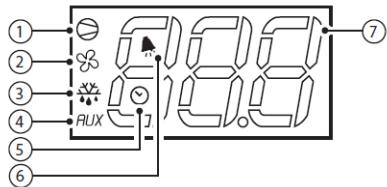
Tab. 1
| LED | Function | Normal working mode | Start | |||
| ON | OFF | Flashing | ||||
| ① | Compressor | On | Off | Needed | ON | |
| ② | Ventilator | On | Off | Needed | ON | |
| ③ | Defrost | On | Off | Needed | ON | |
| ④ | AUX | Aux | Unit is on | Unit is off | - | ON |
| ⑤ | Time | RTC function is available and/or active and set for at least 1 time period | RTC function is not available or turned off, or no time period has been set | - | ON, if the RTC function is available | |
| ⑥ | Alarm | All | No alarm | - | ON | |
| ⑦ | Digital display | Composed of 3 lighted values with comma/period and range of -199...999. See parameters /4, /5, /6 for the display of values detected by sensor, values in °C/ °F and after the comma/period | ||||
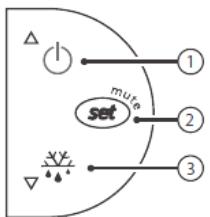
Button functions
Tab. 2
| Button | Normal work mode | Start | |||
| Pressing buttons individually | Pressing buttons together | ||||
| ① | UP ON/OFF | Longer than 3 sec.: alternating display of ON/OFF | Pressed together – constant operation mode turned on / off | - | |
| ③ | Down Defrost | Longer than 3 sec.: Defrost turned on / off | Pressed together – RESET of paramaters activated | 1 sec: Programming version displayed | |
| ② | Set mute | 1 sec.: display/ setting of - longer than 3 sec.: access to paramater configuration menu (enter code 22) - Deactivates signal (buzzer). | - | 1 sec: reset current EZY settings | |
Setting desired values (required temperature)
To regulate and change desired values:
- Press set for one second: the set value will begin flashing;
increase or lower the value by pressing or ^ + y ; - confirm the new value by pressing set
Defrost
Automatic defrost
The unit automatically defrosts 3 times per 24 hours. The internal clock is activated the first time the unit is turned on.
If you want to reset the automatic defrost cycle, press and hold ^ y x for over 3 seconds. The display will show the symbol y x . The unit will immediately begin automatic defrost, then the next defrost will begin in 8 hours.
Manual defrost
Manual defrost can be activated at any time in addition to automatic defrost: to do so, press and hold ^* for over 3 seconds.
Manual defrost will begin, and the display will show the symbol

NOTE!
If you wish to change other settings or parameters, instructions on how to do so can be found in the information included concerning temperature control, or such changes can be performed by qualified service personnel.
Tips for the user
- The refrigerated cabinet should be filled when it reaches the desired temperature, which will be readable on the display.
- Never place warm food products, liquids or uncovered food products inside the refrigerated cabinet.
- Use hermitically sealable containers for storing food products and beverages, to prevent mixing of aromas inside the refrigerated cabinet.
- When first filling the refrigerated cabinet, open and fill only one shelf to prevent the unit from tipping over.
- While placing products inside the refrigerated cabinet, ensure that sufficient space is left between the inside walls of the unit and food products, in order to guarantee proper air circulation inside the unit.
-
When there are larger amounts of products inside the unit and/or the door and drawers are held open longer, more energy is used and the unit can more easily become damaged.
-
To reduce loss of cold, do not keep the door or drawers open longer than necessary and do not open them too often.
- To avoid unpleasant odors forming inside the refrigerated cabinet, it is recommended to observe the best-by date on food products.
- If a sudden power outage occurs, do not open the doors and cabinets if possible to avoid loss of cold.
- After a power outage or after removing the unit's plug from its socket, do not re-connect the unit to a power source for at least 5 minutes.
6. Cleaning and maintenance
6.1 Safety advice
Before beginning with repair or cleaning works make sure the device has been disconnected from power socket (pull the power plug!!!) and has cooled down.
o Do not use any acid agents and make sure no water ingresses the device.
To protect yourself from electric shock, never immerse the device, its cables and the plug in water or other liquids.

CAUTION!
The device is not suited for direct washing via water jets. Therefore, you must not use any kind of pressure water jet for cleaning the device!
6.2 Cleaning
Clean the refrigerated cabinet regularly.
○ Remove the plug from its socket before cleaning the unit.
Clean the interior of the shelf and drawers with a disinfectant appropriate for food service applications.
○ Wash the exterior of the unit with a moist, soft cloth. Dry the unit thoroughly.
- Never use abrasive cleaning substances such as scouring powder, substances containing alcohol, or solvents, as they may damage the unit's surface.
After cleaning, dry and polish the surface with a soft, dry cloth.
If the unit is not going to be used for a longer period of time:
remove the plug from its socket;
remove all food products from the refrigerated cabinet;
clean the interior and exterior of the refrigerated cabinet with a moist, soft cloth and mild cleaning agent. Wipe the unit down with clean water and dry thoroughly.
leave the door and drawers open for some time to allow the unit to dry thoroughly.
6.3 Safety instructions for maintenance
Check the mains connection cable for damage from time to time. Never operate the device when the cable is damaged. A damaged cable must immediately be replaced by customer service or a qualified electrician to avoid dangers.
In case of damage or malfunction, please contact your stockist or our customer service centre. Pay attention to the troubleshooting tips in pt. 7.
○ Only a qualified technician and using original spare parts and accessories should carry out repairs and maintenance of the device. Do not attempt to repair the device yourself.
Maintenance
So that the cooling unit will function properly for a long period of time, perform the following maintenance work on the condenser regularly:
o remove the unit's plug from its socket
open the cooling unit to get access to the condenser.

WARNING! Danger of burns!
The compressor's surface may be very hot during normal use.
Never touch it with bare hands.
○ Use a vacuum cleaner or brush to delicately clean the surface of the condenser, following the ridges.
Close the shelf after cleaning.

CAUTION!
Handle the cable carefully - do not pull it!
7. Possible Malfunctions
| Problem | Cause | Solution |
| Does not cool | Plug improperly inserted into socket. Safety fuse has disconnected power source. Power outage Damaged temperature regulator. | Remove plug and reinsert properly into socket. Check fuses, connect unit to another socket. Check power supply. Contact a sales agent. |
| Not enough cooling power | Unit is near a heat source or in direct sunlight. Poor air circulation inside the unit. Products placed inside the unit are too hot. Refrigerated cabinet is overfilled. | Ensure proper distance between refrigerated cabinet and heat source. Ensure proper distance from walls and other objects. Allow products to cool before placing them inside the refrigerated cabinet. Do not overfill the refrigerated cabinet; remove unneeded food products if possible. |
The above situations are only examples designed to assist you in determining the possible sources of problems. If such problems or other similar ones occur, immediately turn off the unit and do not use it. Contact qualified personnel or a sales agent in order to arrange examination of the unit and its repair.
8. Waste disposal
Discarding old devices
At the end of its service life the discarded device has to be disposed in accordance with the national regulations. It is advisable to contact a company which is specialized in waste disposal, or just contact the local disposal service in your community.

WARNING!
To exclude any abuse and the dangers involved make the waste device unfit for use before disposal. For that purpose disconnect device from mains supply and remove mains connection cable from the device.

NOTE!
For the disposal of the device please consider and act according to the national and local rules and regulations.
Bartscher GmbH
4.2 Indications techniques
- Mini refrigerated cabinet
- with circulation cooling
- Mode d'emploi
- Safety 20
- 3.Delivery,packaging and storage 22
- Technical data 23
- Installation and operation 24
- Cleaning and maintenance 29
- Possible Malfunctions 31
- 8.Waste disposal 32
- Information about the instruction manual
- Key to symbols
- WARNING!
- WARNING! Electrical hazard!
- CAUTION!
- NOTE!
- Liability and Warrantees
- Copyright protection
- Declaration of conformity
- Safety
- General Information
- Safety instructions for use of the device
- Intended use
- Transport, packaging and storage
- Delivery check
- Packaging
- Storage
- Technical data
- Overview of parts
- Technical specification
- Installation and operation
- Safety instructions
- WARNING! Hazard via electrical current!
- Installation and connection
- Operating
- Digital temperature regulator
- Display and functions
- Setting desired values (required temperature)
- Defrost
- Automatic defrost
- Manual defrost
- Tips for the user
- Cleaning and maintenance
- Safety advice
- Cleaning
- If the unit is not going to be used for a longer period of time:
- Safety instructions for maintenance
- Maintenance
- WARNING! Danger of burns!
- Possible Malfunctions
- Waste disposal
- Discarding old devices
- Indications techniques
Brand : BARTSCHER
Model : 110.137
Category : Refrigerator