
DUAL TRIGGER WIRELESS - Gaming Accessories TRUSTMASTER - Free user manual and instructions
Find the device manual for free DUAL TRIGGER WIRELESS TRUSTMASTER in PDF.


| Product type | Wireless game controller |
| Brand | TRUSTMASTER |
| Model | DUAL TRIGGER WIRELESS |
| Power | Batteries (non-rechargeable) |
| Battery life | Automatic standby after 5 minutes of inactivity |
| Connectivity | Wireless via gameport receiver |
| Compatibility | Consoles equipped with a controller port (PlayStation) |
| Number of buttons | 8 analog action buttons, 2 digital action buttons, 2 analog sticks, directional pad, START, SELECT, MODE, MAPPING, CONNECT buttons |
| Special features | Programmable triggers, two independent vibration motors, automatic standby mode, automatic channel switching for up to 4 controllers |
| Memory | EEPROM for saving configuration |
| Indicator lights | MODE light (blue), CONNECT light |
| Switch | 3 positions: OFF, ON, VIB |
| Package contents | Controller, gameport receiver, manual |
| Care | Avoid contact with liquids, do not twist cables |
| Safety | In case of electrostatic discharge, unplug and reconnect |
| Warranty | 2 years from date of purchase |
| Technical support | Website thrustmaster.com, phone (numbers by country) |
| Manual available in | French, English, German, Spanish, Italian, Dutch, Portuguese |
| Number of manual pages | 28 |
Frequently Asked Questions - DUAL TRIGGER WIRELESS TRUSTMASTER
User questions about DUAL TRIGGER WIRELESS TRUSTMASTER
0 question about this device. Answer the ones you know or ask your own.
Ask a new question about this device
Download the instructions for your Gaming Accessories in PDF format for free! Find your manual DUAL TRIGGER WIRELESS - TRUSTMASTER and take your electronic device back in hand. On this page are published all the documents necessary for the use of your device. DUAL TRIGGER WIRELESS by TRUSTMASTER.
USER MANUAL DUAL TRIGGER WIRELESS TRUSTMASTER
- Programmable and progressive triggers
- 8 analog action buttons
- START + SELECT buttons
- 2 analog mini-sticks + 2 digital action buttons
- D-Pad (Point Of View)
-
Switch (Gamepad OFF / Vibration On/Off)
-
MODE button (Analog / Digital)
- MAPPING button (for programming trigger functions)
- CONNECT button
- 2 built-in independent motors
- Gameport receiver
SAFETY NOTICE
- Do not twist or pull on the cable.
- Do not spill liquid on the cable and/or connectors.
- In the event of malfunction during use due to electrostatic emission, please exit the game and unplug the device from the console. Resume normal game play by plugging the device back in and restarting the game.
INSTALLATION
- Remove the gamepad's battery compartment cover.
- Insert batteries, then replace the cover.
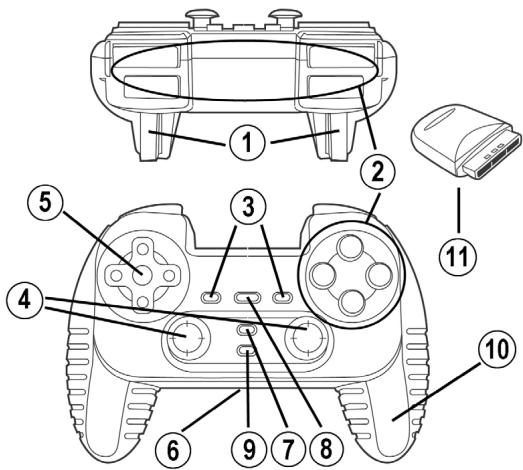
- Plug the gameport receiver (11) into a controller port on your console.
- Turn on the gamepad using the switch (6).
- Turn on your console and start up your game.
You are now ready to play!
ADVANCED FUNCTIONS
-
Switch (6):
-
OFF position = gamepad is turned off.
- ON position = gamepad is turned on, vibration mode is off (saves battery power).
-
VIB position = gamepad is turned on, vibration mode is on (uses more battery power).
-
MODE button (7): press this button to switch between modes.
-
Analog mode (default): MODE button (7) lights up blue.
-
Digital mode: MODE button (7) is not lit up.
-
CONNECT button (9): press this button to switch between modes.
- "Connect" LED is flashing quickly = no signal between gamepad and receiver.
- "Connect" LED is lit up = strong signal between gamepad and receiver.
- "Connect" LED is off = gamepad is in sleep mode.
-
"Connect" LED is flashing slowly = low battery power (vibration function will be disabled in order to save power). In this case, please change batteries to revert to the normal "vibrating" configuration.
-
SLEEP MODE:
-
The gamepad automatically turns off when not in use for 5 minutes.
-
To "wake" it, press any button.
-
MULTIPLAYER / CHANNEL AUTO-SWITCHING INFORMATION:
-
You can play with up to 4 Dual Trigger Gamepads. All channels are detected automatically.
- When playing in multiplayer mode, if you wish to switch gamepads in the course of a game, press the RECEIVER and CONNECT buttons on your gamepad simultaneously.
TRIGGER MAPPING
All analog buttons and mini-stick directions (axes) can be mapped to the left and right triggers (except D-Pad and START, SELECT, L3 and R3 buttons).
- MAPPING button (8) (used to map left and right triggers):
- Press and release the MAPPING button (LED flashes slowly).
- Press and release the button or direction you want to assign to the trigger (LED flashes quickly).
- Press and release the trigger assigned to this function (LED turns off).
- EEPROM:
Your gamepad includes an internal memory chip, which stores your last mapping configuration even if you turn your gamepad off.
- TRIGGER BEHAVIOR:
Triggers react differently according to whether you map 2 separate analog axes, one same analog axis or 2 separate analog buttons to them. Below are 3 different examples (in this case, for racing games).
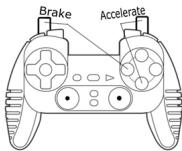
- 2 analog buttons are mapped to the 2 triggers.
This configuration is the most useful for racing games. - This enables you to separately regulate analog control of the left and right triggers (there is no "master" trigger).
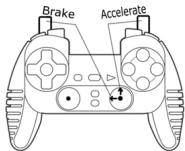
- 2 separate axes are mapped to the 2 triggers.
- This enables you to separately regulate analog control of the left and right triggers (there is no "master" trigger).
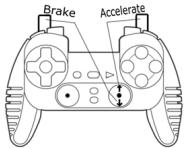
One same axis is mapped to the 2 triggers.
- In this case the left trigger is the "master" trigger.
If you press the left and right triggers together, your car will brake.
- This allows you to use the right trigger to control your car's speed, and briefly use the left trigger for powerful braking control.
EXAMPLES OF OTHER POSSIBLE MAPPING
The triggers provide intuitive performance in all types of games: action and FPS (progressive zoom, view, lateral movement or fire), racing (progressive gas, brake, emergency brake, manual transmission), sports (progressive pass, shoot, punch or jump...) and more.
Thus, many mapping configurations are available, according to the possibilities offered by your game.
COPYRIGHT
© 2004 Guillemot Corporation S.A. All rights reserved. Thrustmaster® is a registered trademark of Guillemot Corporation S.A. PlayStation® is a registered trademark of Sony Computer Entertainment Inc. All other trademarks and brand names are hereby acknowledged and are property of their respective owners. Illustrations not binding. Contents, designs and specifications are subject to change without notice and may vary from one country to another.
TECHNICAL SUPPORT
If you encounter a problem with your product, please go to http://its.thrustmaster.com and click Technical Support. From there you will be able to access various utilities (Frequently Asked Questions (FAQ), the latest versions of drivers and software) that may help to resolve your problem. If the problem persists, you can contact the Thrustmaster products technical support service ("Technical Support"):
By email:
In order to take advantage of technical support by email, you must first register online. The information you provide will help the agents to resolve your problem more quickly. Click Registration on the left-hand side of the Technical Support page and follow the on-screen instructions. If you have already registered, fill in theUsername and Password fields and then click Login.
By telephone:
| United Kingdom | 020 7216 0047 | price of a national phone call, Monday to Friday from 12PM to 10PM |
| United States / Canada | 514-279-9911 | price of a long distance phone call, Monday to Friday from 7AM to 5PM (Eastern time) |
| Australia | 1902 262 514 | $1.98/min, Monday to Friday from 9AM to 6PM |
| Denmark | 82 33 28 58 | price of a national phone call, Monday to Friday from 1PM to 10PM |
| Finland | 09 81 71 01 54 | price of a national phone call, Monday to Friday from 2PM to 11PM |
| Norway | 23 50 01 16 | price of a national phone call, Monday to Friday from 1PM to 10PM |
| Sweden | 08-51992032 | price of a national phone call, Monday to Friday from 1PM to 11PM |
Warranty information
Worldwide, Guillemot Corporation S.A. ("Guillemot") warrants to the consumer that this Thrustmaster product will be free from material defects and manufacturing flaws for a period of two (2) years from the original date of purchase. Should the product appear to be defective during the warranty period, immediately contact Technical Support, who will indicate the procedure to follow. If the defect is confirmed, the product must be returned to its place of purchase (or any other location indicated by Technical Support).
Within the context of this warranty, the consumer's defective product will, at Technical Support's option, be either repaired or replaced. Where authorized by applicable law, the full liability of Guillemot and its subsidiaries (including for indirect damages) is limited to the repair or replacement of the Thrustmaster product. The consumer's legal rights with respect to legislation applicable to the sale of consumer goods are not affected by this warranty.
This warranty shall not apply: (1) if the product has been modified, opened, altered, or has suffered damage as a result of inappropriate or abusive use, negligence, an accident, normal wear, or any other cause not related to a material defect or manufacturing flaw; (2) in the event of failure to comply with the instructions provided by Technical Support; (3) to software not published by Guillemot, said software being subject to a specific warranty provided by its publisher.
Additional warranty provisions
In the United States of America and in Canada, this warranty is limited to the product's internal mechanism and external housing. Any applicable implied warranties, including warranties of merchantability and fitness for a particular purpose, are hereby limited to two (2) years from the date of purchase and are subject to the conditions set forth in this limited warranty. In no event shall Guillemot Corporation S.A. or its affiliates be liable for consequential or incidental damage resulting from the breach of any express or implied warranties. Some States/Provinces do not allow limitation on how long an implied warranty lasts or exclusion or limitation of incidental/consequential damages, so the above limitation may not apply to you. This warranty gives you specific legal rights, and you may also have other legal rights which vary from State to State or Province to Province.
FAQs, tips and drivers available at www.thrustmaster.com
For use with / Für / Pour
Playstation ^ 2
Wireless Dual Trigger
Gamepad
For use with / Für / Pour

Playstation ^ 2
Benutzerhandbuch
TECHNISCHE DATEN
INFORMACAO DA GARANTIA
Brand : TRUSTMASTER
Model : DUAL TRIGGER WIRELESS
Category : Gaming Accessories