
NAT05 XS - Headphone amplifier NAIM - Free user manual and instructions
Find the device manual for free NAT05 XS NAIM in PDF.



| Product Type | FM Tuner |
| Brand | NAIM |
| Model | NAT05 XS |
| Dimensions (H × W × D) | 70 × 432 × 301 mm |
| Frequency Range | VHF/FM 87.5 - 108 MHz (Europe) |
| Preset Memory | 99 stations |
| Output Level | 600 mV for 100% modulation |
| Power Supply | 100-120 V or 220-240 V, 50/60 Hz |
| Power Consumption | Not specified, but compatible with an optional external power supply |
| Audio Outputs | DIN (preferred) and RCA-phono |
| Antenna Input | Coaxial 75 Ω |
| Remote Control | NARCOM 4 (multifunction) |
| Main Functions | FM reception, automatic search, presets, mono/stereo follow mode, output selection |
| Maintenance and Cleaning | Disconnect the unit before cleaning; use a dry cloth; do not use chemicals |
| Safety | Class 1 device, mandatory grounding; do not open without disconnecting; use a 13 A fuse |
| Spare Parts and Repairability | Repairs exclusively by an authorized dealer or Naim factory; contact: +44 (0)1722 426600 |
| General Information | Burn-in of about one month for optimal performance; can remain powered on continuously |
Frequently Asked Questions - NAT05 XS NAIM
User questions about NAT05 XS NAIM
0 question about this device. Answer the ones you know or ask your own.
Ask a new question about this device
Download the instructions for your Headphone amplifier in PDF format for free! Find your manual NAT05 XS - NAIM and take your electronic device back in hand. On this page are published all the documents necessary for the use of your device. NAT05 XS by NAIM.
USER MANUAL NAT05 XS NAIM
In order to comply with current European safety regulations it is essential that the Naim loudspeaker connectors supplied with amplifiers and loudspeakers are used.
Do not under any circumstances allow anyone to modify your Naim equipment without first checking with the factory, your retailer, or your distributor. Unauthorized modifications will invalidate your guarantee.
Equipment must not be exposed to dripping or splashing and no objects filled with liquid, such as vases, should be placed on the equipment.
Batteries (battery pack or batteries installed) shall not be exposed to excessive heat such as sunshine, fire or the like.
For your own safety do not under any circumstances open Naim equipment without first disconnecting it from the mains.
Warning: an apparatus with CLASS I construction shall be connected to a mains socket outlet with a protective earthing connection.
Where the mains plug or an appliance coupler is used as the disconnect device, the disconnect device shall remain readily operable. To disconnect the equipment from the mains remove the mains plug from the mains outlet.
The following label is attached to all mains powered equipment:

Page Section
E1 1 Connections
E1 2 Mains Power
E2 3 General Installation
E3 4 NAT05 XS Installation
E4 5 NAT05 XS Operation
E5 6 NARCOM4RemoteHandset
E6 7 NAT05 XS Connections
E6 8 NAT05 XS Specification
E6 9 Declaration of Conformity
Products that display the crossed-out wheeled bin logo cannot be disposed of as domestic waste. These products must be disposed of at facilities capable of re-cycling them and appropriately handling any waste byproducts. Contact
your local authority for details of the nearest such facility. Appropriate recycling and waste disposal helps conserve resources and protects the environment from contamination.

Introduction
Naim products are conceived with performance as the top priority. Careful installation will help ensure that their full potential is achieved. This manual covers the NAT05 XS FM tuner. It begins with some general installation notes and statutory safety warnings. Product specific information begins in Section 4.
1 Connections
It is important for both safety and performance that any standard cables supplied are not modified.
1.1 Analogue Audio Interconnect Cables
If options are available with your equipment and installation, DIN interconnect sockets should be used in preference to phono sockets. One end of each Naim audio interconnect cable is marked with a band to establish its correct orientation. The band denotes the end that connects to the signal source. Naim Hi-Line interconnect cables will provide the best results.
Audio interconnect plugs and sockets should be kept clean and free from corrosion. The easiest way to clean them is to switch off the equipment, pull the plugs out of their sockets, and push them back in again. Contact cleaners and "enhancers" should not be used as the film they deposit may degrade the sound.
2 Mains Power
Where fused plugs are used 13 amp fuses should be fitted. Fuses of a lower rating will fail after a period of use. Do not wire voltage dependent resistors or noise suppressors into mains plugs. They degrade the mains supply and the sound.
2.1 Mains Plug Wiring
In some territories a mains plug may need to be fitted to the supplied mains lead. As the colours of the wires in the mains lead may not correspond with the coloured markings identifying the terminals in the plug proceed as follows:
The wire coloured GREEN-AND-YELLOW must be connected to the terminal in the plug marked by the letter E or by the safety earth symbol or coloured GREEN or GREEN and YELLOW.
The wire coloured BLUE must be connected to the terminal in the plug marked with the letter N or coloured BLACK.
The wire coloured BROWN must be connected to the terminal in the plug marked with the letter L or coloured RED.
2.2 Equipment Fuses
Mains powered Naim equipment is fitted with a mains fuse on the rear panel adjacent to the mains input socket. Replace it if necessary only with the spare fuse supplied or with an identical fuse. Repeated failure of the fuse points to a fault that should be investigated by your retailer or Naim itself.
2.3 Non-rewirable Mains Plugs
If a non-rewirable plug is cut from a mains lead (for whatever purpose) the plug MUST be disposed of in a way to render it totally useless. Considerable shock hazard exists if the cut-off plug is inserted into a mains outlet.
2.4 Mains Circuits and Cables
A hi-fi system usually shares a mains circuit with other household equipment, some of which can cause distortion of the mains waveform. This distortion can in turn lead to mechanical hum from mains transformers. Some Naim transformers are large in size, making them relatively sensitive to such distortion, and it may be necessary to take account of transformer hum when siting your equipment.
Transformer hum is not transmitted through the speakers and has no effect on the performance of the system; however, a separate mains circuit may reduce it. Such a circuit (ideally with a 30 or 45 Amp rating) will also generally improve system performance. Advice on the installation of a separate mains circuit should be sought from a qualified electrician.
Only use either the mains cable and plugs supplied or a Naim Power-Line mains cable.
Introduction
3 General Installation
Naim equipment is designed to offer the finest performance possible, avoiding compromise wherever practical. This can lead to circumstances that may be unfamiliar. The notes that follow contain advice specifically related to Naim equipment as well as more general warnings about the use of domestic audio products. Please read them carefully.
3.1 Siting The Equipment
In order to reduce the risk of hum audible from the loudspeakers, power supplies and power amplifiers should be located a reasonable distance away from other equipment. The maximum separation distance for connected equipment is that allowed by the standard interconnect lead.
Some Naim equipment is extremely heavy. Check the weight of the equipment prior to lifting and if necessary use more than one person so that it can be moved safely. Ensure that your equipment rack or table can easily support the weight and is stable.
3.2 Switching On
Source components and power supplies should be switched on before the power amplifiers. Always switch amplifiers off and wait a minute before connecting or disconnecting any leads. Always use the power switch on the product rather than a mains outlet switch.
A "thump" may be heard from the loudspeakers as power amplifiers are switched on. This is normal, will not cause any loudspeaker damage and does not point to any fault or problem. A mild "pop" may also be heard shortly after equipment is switched off.
3.3 Running In
Naim equipment takes a considerable time to run in before it performs at its best. The duration varies, but under some conditions the sound may continue to improve for over a month. Better and more consistent performance will be achieved if the system is left switched on for long periods. It is worth remembering however that equipment left connected to the mains can be damaged by lightning.
3.4 Radio Interference
In some circumstances, depending on where you live and the earthing arrangements in your home, you may experience radio frequency interference. Controls on broadcasting in some territories allow very high levels of radio frequency radiation and both the choice and exact siting of equipment may be critical. Susceptibility to radio frequency interference is related to the wide internal bandwidth necessary for high sound quality. A radio frequency filter kit is available for some Naim equipment
but sound quality will be progressively compromised as more elements of the kit are fitted. In situations of extreme radio interference Naim equipment may be unsuitable.
3.5 Lightning Precautions
Your Naim hi-fi system can be damaged by lightning and should be turned off and disconnected from the mains when there is risk of lightning. For complete protection all mains plugs and any aerial cables should be disconnected when not in use.
3.6 Problems?
Consumer protection varies from country to country. In most territories a retailer must be prepared to take back any equipment he has sold if it cannot be made to work satisfactorily. A problem may be due to a fault in the system or its installation so it is essential to make full use of your dealer's diagnostic skills. Please contact your local distributor, or Naim directly, if any difficulties cannot be resolved.
Some Naim equipment is made in special versions for different territories and this makes it impracticable to arrange international guarantees. Please establish the local guarantee arrangements with your retailer. Contact Naim directly for help and advice if necessary.
3.7 Service and Updates
It is essential that repairs and updates are only carried out by an authorised Naim retailer or at the Naim factory. Many components are custom made, tested or matched and appropriate replacements are often unobtainable from other sources.
Direct contact to Naim for service or update information should be made initially through Customer Services:
Tel: +44 (0)1722 426600
Email: info@naimaudio.com
Please quote the product serial number (found on its rear panel) in all correspondence.
4 NAT05 XS Installation
The NAT05 XS should be installed on a dedicated equipment stand intended for the purpose. Do not stand it directly on top of another item of equipment. It should be installed in its final location before connecting cables or switching on. Ensure also that the system volume is turned down before switching on.
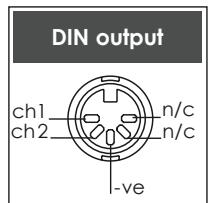
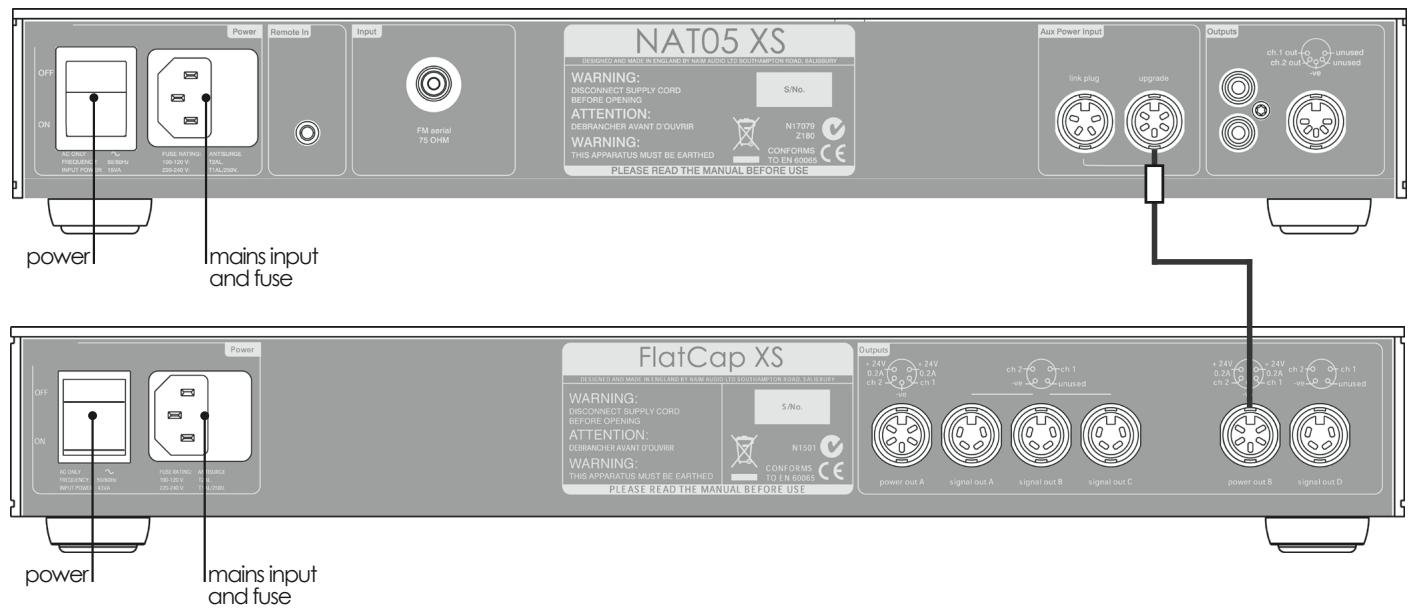
A number of power supply upgrade options are possible for the NAT05 XS. A diagram illustrating the connection of one of these is shown in Section 7. Contact your local retailer or distributor for advice if necessary on power supply connection.
4.1 Aerial Requirements
The NAT05 XS aerial input socket must be connected via 75Ω low-loss coaxial cable to a suitable aerial.
Ideally the aerial should be mounted on the roof, clear of obstructions and as high as possible. Use of an aerial preamplifier may disturb the muting operation of the tuner and may cause cross-modulation problems (interference from an adjacent strong radio broadcast). Such preamplifiers should only be used as a last resort.
Radio broadcasts are usually transmitted from different sites even though the target areas of the services may be similar. This means that unless the transmitters are in almost the same direction looking from your house, an aerial aligned on one transmitter will give less than optimum performance on the other. In these circumstances you should fit an aerial rotator, or a less directional aerial if appropriate. The more sensitive and directional the aerial you use, the worse will be the reception in directions other than the one towards which the aerial is pointing. If you are particularly interested in receiving a wide range of VHF transmissions an aerial rotator is a necessity. Your retailer will be familiar with local conditions and will be able to advise you on which stations you can expect to receive satisfactorily.
4.2 Audio Outputs
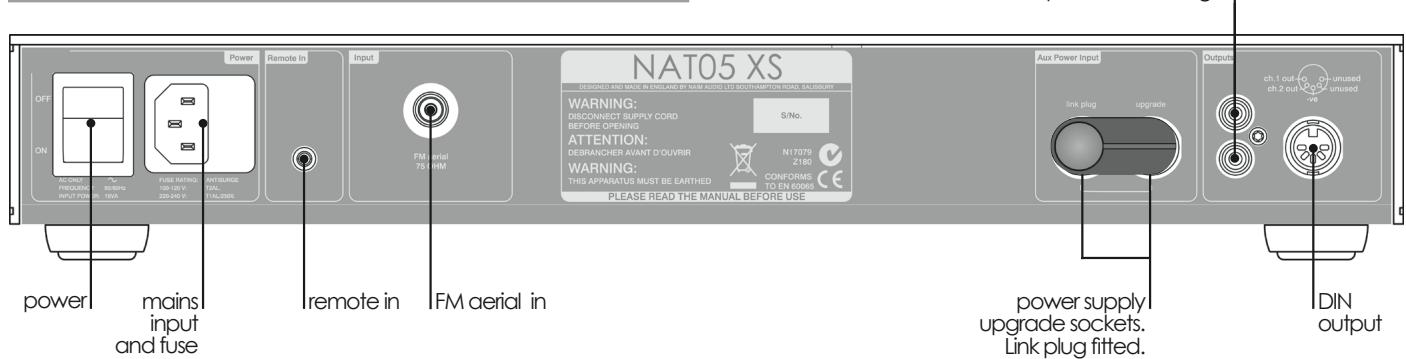
The NAT05 XS is fitted with both DIN and RCA-phono output sockets. Use of the DIN option is preferred, however, if the RCA-phono option is to be used it must be selected once the NAT05 XS is switched on. Section 5.2 describes output socket selection.
4.3 Power Supply Upgrades
The NAT05 XS can be upgraded through the addition of an external FlatCap or Hi-Cap power supply. The external supply works with the internal power supply of the NAT05 XS to offer both a greater number of separate supplies and more sophisticated voltage regulation.
The upgrade power supply is connected to the NAT05 XS via a 240^ five-pin DIN cable. Ensure that both the power supply and NAT05 XS are switched off when making connections. Remove the link plug and connect the supply cable ensuring that the connectors are securely attached. From their respective power switches, switch on the power supply followed by the NAT05 XS. Diagram 7.2 illustrates the connection of an external power supply.
5 NAT05 XS Operation
Once the NAT05 XS is installed and all connections are secure it can be switched on. If an upgrade power supply is connected this should be switched on first. After switch-on the tuner will remain muted for 25 seconds while control systems and circuits stabilise. During this time all four front panel buttons will illuminate.
5.1 Front Panel Buttons and Handset Keys
The NAT05 XS can be operated either from its front panel buttons or from the remote handset (switched to tuner mode). The handset also provides control of station preset memory and recall facilities. Section 6.1.3 describes preset memory and recall. The front panel buttons and handset keys operate as follows (handset keys are shown in brackets):
mode: Toggles the tuner through three operational modes: frequency, scan and preset. Preset mode is covered further in Section 6.1.3.
down: In frequency mode, the down button or left (↓)
(↓) key adjusts tuning frequency downwards in 50kHz steps or continuously if held.
In scan mode, the down button or left ( ) key causes the tuner to "scan" down the FM band searching for signals above a preset level. The tuner will stop at each tuned station and, using the remote handset, the option to store the station as a preset will be available (see Section 6.1.3). If no satisfactory signals are found during the first scan, a second scan at a lower preset signal level will automatically commence.
In preset mode, the down button or left ( ) key causes the tuner to step sequentially down through previously stored stations.
up: Controls the tuner in a similar manner to the () down button and left ( key.
mono: Combinations the left and right channels to (mon) produce a mono output signal. Switching to mono can reduce background noise with weak stereo signals. The mono setting is stored when a station is saved as a preset.
Note: The front panel mono button indicator will illuminate when mono is selected.
5.2 Output Socket Selection
A pair of RCA-phono output sockets are fitted on the NAT05 XS rear panel to provide an alternative to the preferred DIN socket. Proceed as follows to select the RCA-phono sockets.
Press and hold the remote handset mode key (handset in tuner mode), or the front panel mode button, until the mode button indicator flashes. Further operations of the mode key or button will now cycle through each combination of the two socket types (DIN only, RCA-phono
only or both). The selected option is indicated on the tuner display as shown below:
| Socket Option | Tuner Display |
| DIN | 0 |
| Phono | 0 0 |
| Both | 0 0 0 |
To avoid compromised sound quality, do not select both socket types unless their simultaneous use is unavoidable.
Press and hold the mode key or button a second time to exit from socket selection mode. Socket selection mode will automatically exit after five minutes if no key or button is pressed.
5.3 Front Display and Indicators
The NAT05 XS front panel display and indicators provide visual feedback on tuner operation.
Display
Displays tuned frequency, selected preset number or "--" indicating that no preset number is allocated to a specific tuned frequency. Allocation of tuned frequencies to preset numbers is covered in Section 6.1.3.
Indicators
stereo: Indicates that both a stereo signal is received and stereo operation is selected.
freq: Indicates that the tuner is operating in frequency mode.
scan: Indicates that the tuner is operating in scan mode.
preset: Indicates that the tuner is operating in preset mode.
5.4 Fault Conditions
The NAT05 XS will indicate that a power supply or link plug is incorrectly installed by flashing all four front panel buttons. The output of the tuner will be muted in this state.
If the mains voltage drops too far below its nominal level the tuner output will be muted and all four front panel buttons will illuminate. After the mains voltage recovers there will be a 2 second delay before the output returns to normal.
NARCOM Remote Handset
6 NARCOM 4 Remote Handset
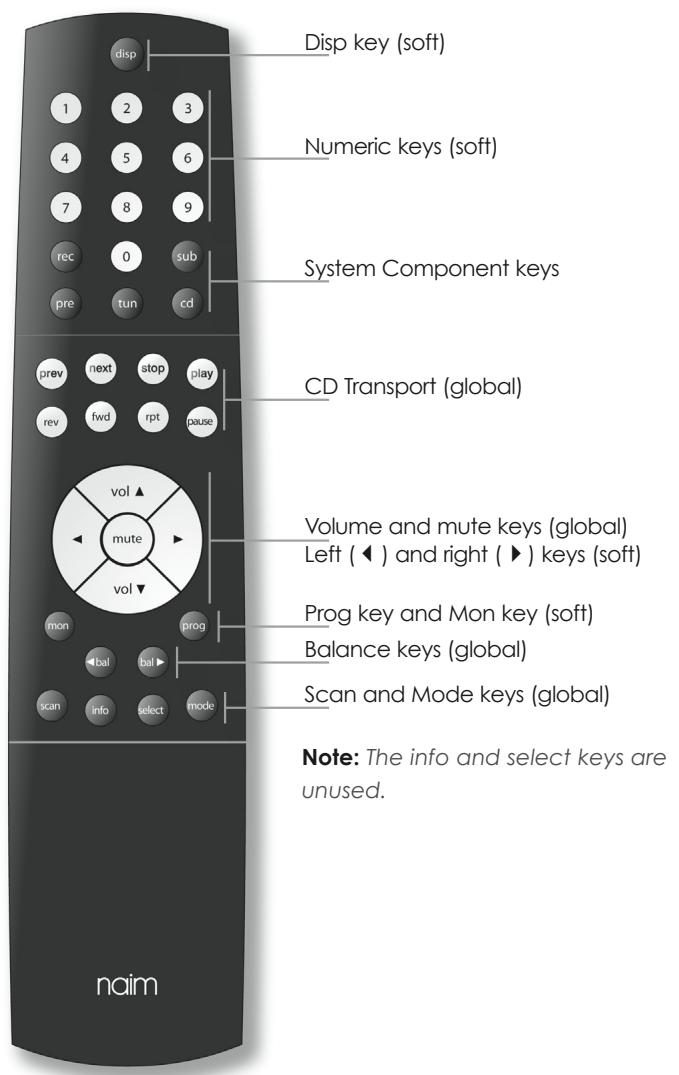
The NARCOM 4 remote handset is a multi-functional remote control handset designed to be used with Naim CD players, integrated amplifiers, preamplifiers, preset tuners and subwoofoers.
To fit batteries, remove the battery cover and insert the batteries into the body taking care with their orientation. Replace the battery cover.
6.1 Using NARCOM 4 with the NAT05 XS
Operation of the NARCOM 4 handset is based around three types of keys: System Component Keys, Global Keys and Soft Keys.
6.1.1 System Component Keys
System Component Keys keys switch the operation of the Soft Keys into modes appropriate to each system component: CD player, tuner (tun) preamplifier, etc.
Global Keys operate specific component functions regardless of the System Component Key setting and are available at all times.
6.1.2 Gobal Keys
Global Keys operate as follows:
vol ( \& ) : Adjusts the preamplifier volume and the volume control position.
mute: Reduces the preamplifier volume to zero. A second press restores the volume.
bal ( & ) : Adust channel balance on appropriately equipped products.
CD Transport: Control CD transport and track selection.
scan: Switches the tuner to scan mode and starts a scan from the current frequency upwards. When a station is found the scan will stop. Pressing the scan key will resume the scan.
mode: Switches the tuner between frequency, scan and preset modes.
6.1.3 Soft Keys
In tuner mode the Soft Keys are used to store station presets. Soft keys operate as follows:
The prog key enables specific FM station frequencies to be assigned to preset memories. To assign a station to a preset either tune manually by inputting the station frequency directly from the numeric keypad or by using the left (↓), right (▶) or scan keys. Stations found by the tuner scanning the FM band can also be saved as presets.
When a station is tuned press and hold the prog key. The tuner is now in preset program mode: the preset indicator will flash and the display will show -- on the left hand side. Enter the desired preset number from the numeric keypad or by using the left ( ) and right (▶) keys. On its right hand side the display will show - or Pif the preset number
is already in use. If the preset number is already in use a different preset number can be entered at this point. Exit from program mode and save the new or overwritten preset by pressing and holding the prog key. To exit from preset program mode without saving (or overwriting) a preset, select 0 0 on the numeric keypad.
To erase a preset number, select the preset and press and hold the disp key.
The disp key can also be used to switch the tuner display on and off. When the display is switched off it will illuminate temporarily when a front panel button or handset key is pressed.
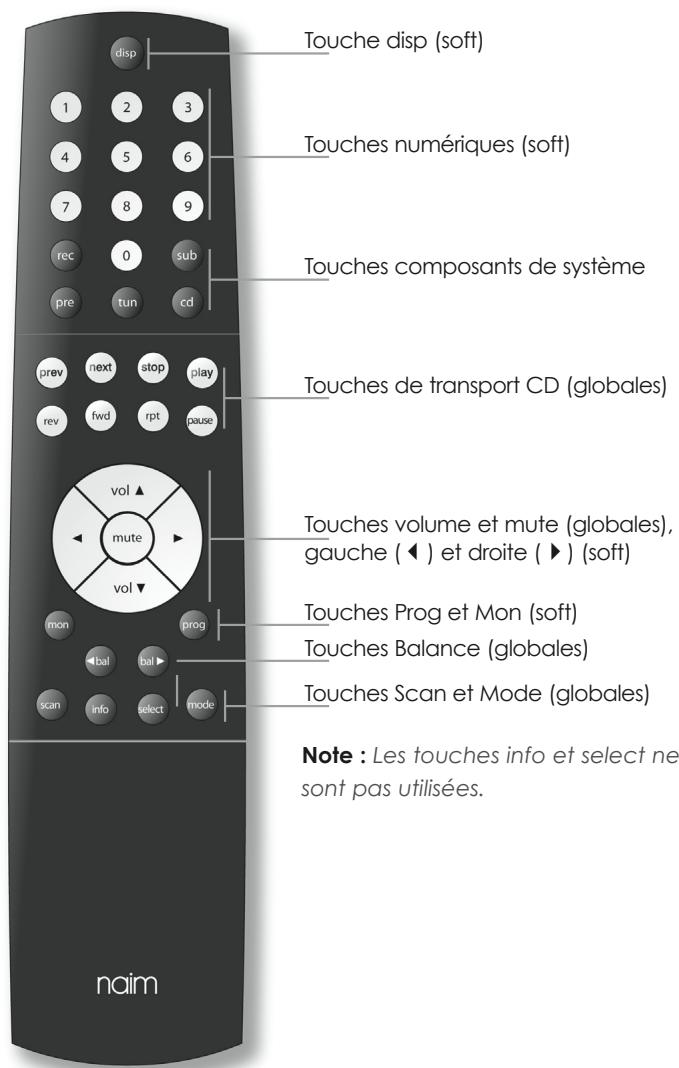
6.2 NARCOM 4 Keys
NAT05 XS Connections and Specification
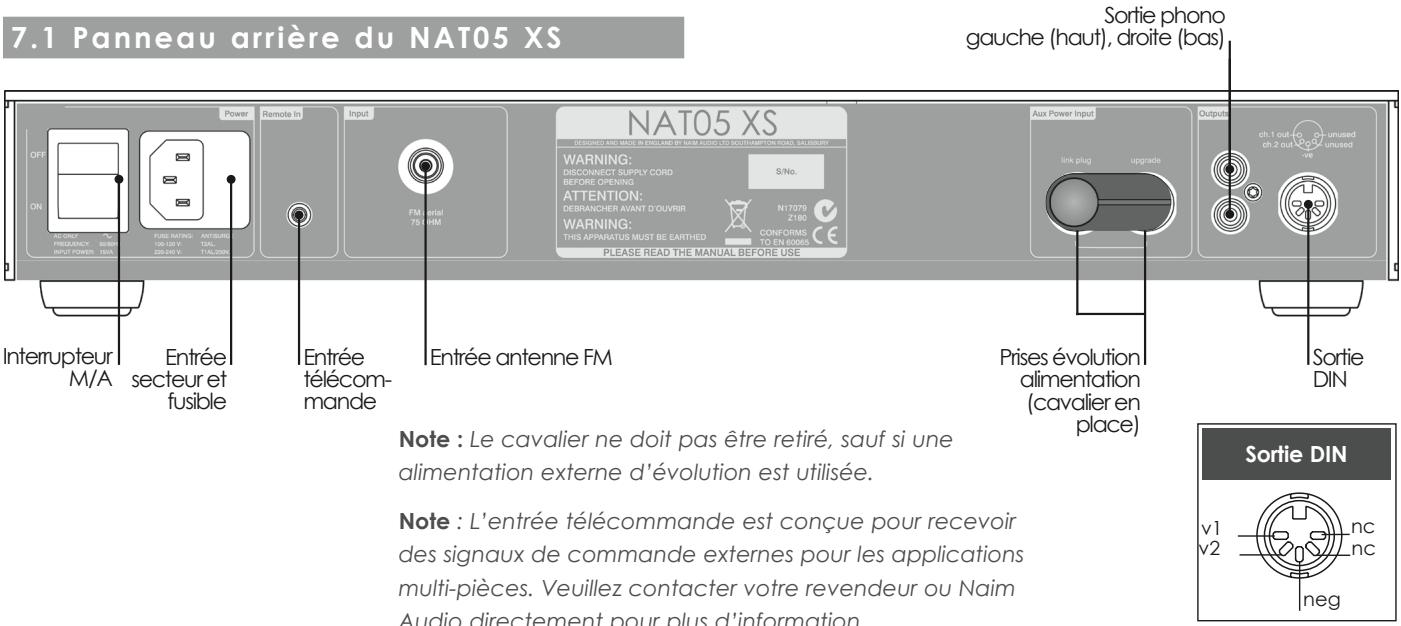
7 NAT05 XS Connections
7.1 NAT05 XS Rear
Note: The power supply link plug should be fitted unless an external upgrade power supply is in use.
Note: The remote input is intended to accept external control signals for multi-room applications. Contact your retailer or Naim Audio directly for further information.
7.2 NAT05 XS Connected to FlatCap XS Power Supply
8 NAT05 XS Specification
Tuning Range (Europe):
VHF/FM 87.5 - 108MHz
(Tuning range regional variations set internally) 99 stations
Preset Memory:
Output Level:
9 Declaration of Conformity
Manufacturer
Naim Audio Limited, Southampton Road, Salisbury, England, SP1 2LN
Product
NATO5 XS
Safety
EN 60065 - Audio video and similar electronic apparatus. Safety requirements.
EMC
EN 55013 - Sound and television broadcast receivers and associated equipment.
EN55020 - Electromagnetic immunity of broadcast receivers and associated equipment.
EN 61000-3-2 - Limits for harmonic current emissions.
EN 61000-4-2 - Testing and measurement. Electrostatic discharge immunity.
Inhalt
SICHERHEITSHINWEISE
4 NAT05 XS - Installation
NAT05 XS - Anschlüsse
7 NAT05 XS Anschlüsse
Naim Audio Limited, Southampton Road, Salisbury, England, SP1 2LN
Produkt
NAT05 XS
Sicherheit
6.2 Touches NARCOM 4
NAT05 XS Branchements et specifications
7. NAT05 XS : Branchements
Fabricant : Naim Audio Limited, Southampton Road, Salisbury, England, SP1 2LN
Produit : NAT05 XS
Produxtore Naim Audio Limited, Southampton Road, Salisbury, England, SP1 2LN
Prodotto NAT05 XS
- Page Section
- Introduction
- Connections
- Analogue Audio Interconnect Cables
- Mains Power
- Mains Plug Wiring
- Equipment Fuses
- Non-rewirable Mains Plugs
- Mains Circuits and Cables
- General Installation
- Siting The Equipment
- Switching On
- Running In
- Radio Interference
- Lightning Precautions
- Problems?
- Service and Updates
- NAT05 XS Installation
- Aerial Requirements
- Audio Outputs
- Power Supply Upgrades
- NAT05 XS Operation
- Front Panel Buttons and Handset Keys
- Output Socket Selection
- Front Display and Indicators
- Display
- Indicators
- Fault Conditions
- NARCOM Remote Handset
- NARCOM 4 Remote Handset
- Using NARCOM 4 with the NAT05 XS
- System Component Keys
- Gobal Keys
- Soft Keys
- NAT05 XS Connections and Specification
- NAT05 XS Connections
- NAT05 XS Connected to FlatCap XS Power Supply
- NAT05 XS Specification
- Declaration of Conformity
- Inhalt
- SICHERHEITSHINWEISE
- NAT05 XS - Installation
- NAT05 XS - Anschlüsse
- NAT05 XS Anschlüsse
- Touches NARCOM 4
- NAT05 XS Branchements et specifications
- NAT05 XS : Branchements
Brand : NAIM
Model : NAT05 XS
Category : Headphone amplifier