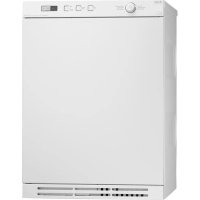
T711 - Tumble drier ASKO - Free user manual and instructions
Find the device manual for free T711 ASKO in PDF.


User questions about T711 ASKO
0 question about this device. Answer the ones you know or ask your own.
Ask a new question about this device
Download the instructions for your Tumble drier in PDF format for free! Find your manual T711 - ASKO and take your electronic device back in hand. On this page are published all the documents necessary for the use of your device. T711 by ASKO.
USER MANUAL T711 ASKO
IMPORTANT! To get the best performance from your dryer, read all operating instructions before using it for the first time.
DRYER
CONTENTS
IMPORTANT SAFETY INSTRUCTIONS 2
SAFETY FEATURES 2
ASKO DRYER FEATURES 3
ENERGY SAVING TIPS 3
INSTALLATION INSTRUCTIONS 4
PREPARING THE LAUNDRY 10
T711 OPERATING INSTRUCTIONS 12
T721 OPERATING INSTRUCTIONS 13
T731 OPERATING INSTRUCTIONS 14
T761 AND T781 OPERATING INSTRUCTIONS 17
CARE AND MAINTENANCE INSTRUCTIONS 22
TROUBLESHOOTING 24
PRODUCT WARRANTY 25
INDEX 26
IMPORTANT SAFETY INSTRUCTIONS
WARNING!
To reduce the risk of fire, electric shock, or injury to persons when using your appliance, follow basic precautions, including the following:
Read all instructions before using the appliance.
- Do not wash or dry articles that have been previously cleaned in, washed in, soaked in, or spotted with gasoline, dry-cleaning solvents, cooking oils, other flammable or explosive substances as they give off vapors that could ignite or explode.
- Do not allow children to play on or in the appliance. Children should be closely supervised when near the appliance.
Before the appliance is removed from service or discarded, remove the door to the drying compartment.
Do not reach into the appliance if the drum is moving.
Do not install or store this appliance where it will be exposed to the weather.
Do not tamper with controls.
Do not attempt to repair or replace any part of the appliance or perform any servicing unless specifically recommended in this guide.
Do not use fabric softeners or dryer sheets unless the manufacturer gives written assurance that the product will not damage a tumble dryer.
Do not heat-dry items containing:
- vinyl, plastic, foam rubber or similarly textured rubberlike materials
- fiberglass
- wool unless the label specifies "washable"
Clean the lint filter before or after each load.
Keep the area around the exhaust opening and adjacent surrounding areas free from the accumulation of lint, dust and dirt.
The interior of the machine should be cleaned periodically by an authorized ASKO service agent.
Do not place items exposed to cooking oils in your dryer. Items contaminated with cooking oils may contribute to a chemical reaction that could cause a load to catch fire.
Electrical installation, if required, must be done by a licensed electrician.
Do not operate appliance while away from the home.
Do not heat dry items that have been dry-cleaned.
The dryer is made and marked to facilitate recycling. When it is no longer useful, contact your local refuse collection service for advice on how to properly dispose of the dryer for purposes of recycling.
WARNING!
This appliance must be properly grounded. GROUNDING INSTRUCTIONS
A) Grounding instructions for a grounded, cord-connected appliance
In the event of malfunction or breakdown, grounding will reduce the risk of electric shock by providing a path of least resistance for electric current. This appliance is equipped with a cord having an equipment-grounding conductor and a grounding plug. The plug must be plugged into an appropriate outlet that is properly installed and grounded in accordance with all local codes and ordinances.
To reduce the risk of fire, this appliance must be exhausted outdoors or the equivalent. Do not exhaust into a chimney, wall, ceiling or concealed space in a building.
WARNING!
Improper connection of the equipment-grounding conductor can result in a risk of electric shock. Check with a qualified electrician or service representative or personnel if you are in doubt as to whether the appliance is properly grounded.
Do not modify the plug provided with the appliance. If it will not fit the outlet, have a proper outlet installed by a qualified electrician.
B) Grounding instructions for a permanently connected appliance:
This appliance must be connected to a grounded metal, permanent wiring system, or an equipment-grounding terminal or lead on the appliance.
NOTE: This manual does not cover every possible condition and situation that may occur. Use common sense and caution when installing, operating, and maintaining any appliance.
SAFETY FEATURES
CHILD-SAFE DOOR CATCH
ASKO dryers have a child-safe magnetic door catch that allows the door to be easily opened from the inside.
CHILD-SAFE START FEATURE
You can program Models T731, T761 and T781 not to start unless the Start button is held down for three seconds. This is to prevent children from inadvertently starting the machine. Refer to the operating instructions for these models to program this safety feature.
AUTOMATIC DOOR SWITCH
A door switch automatically stops the dryer when the door is opened. The dryer will not start again until you close the door and press the Start button.
OVERHEAT PROTECTION
ASKO dryers have an overheat protection switch that automatically turns off the machine if the temperature gets too high. Refer to page 3 for more information.
ASKO DRYER FEATURES
Your new energy-efficient ASKO dryer is designed to give you maximum drying performance using less energy. To make the most of the dryer's functions and features, we recommend that you read this manual carefully before using your machine for the first time. For operating instructions, refer to the section in this guide for your specific model.
Below is an illustration of the parts and features of your ASKO dryer.
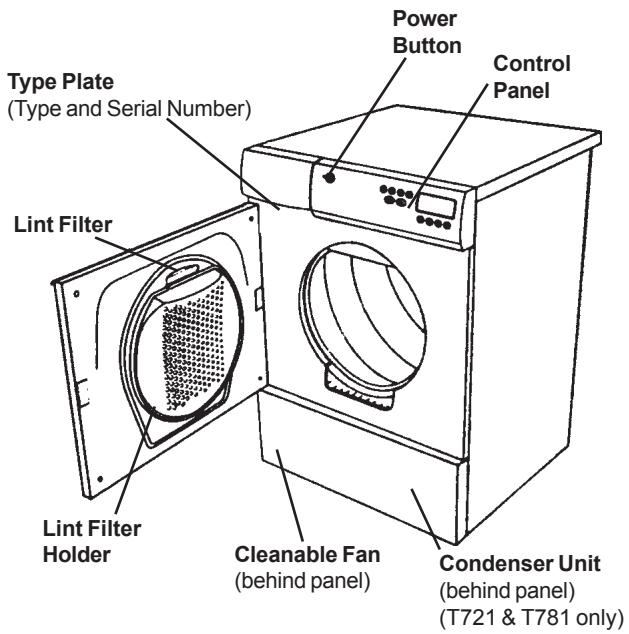
DRYING SYSTEMS
ASKO dryers come with three different drying systems:
SensidryTM
Models T731, T761 and T781 have our state-of-the-art Sensidry system. These machines are equipped with a humidity sensor that ensures different fabrics always dry thoroughly. This sensor turns off the heat when the laundry has reached the appropriate dryness.
Thermostat-Control
Model T711 has a thermostat that controls the temperature by turning the heating element on and off to maintain the selected drying temperature (Normal or Low) within +/- 5^ F.
Timer-Control
Model T711 has timer-controlled drying in addition to the two automatic (thermostat-controlled) programs.
Model T721 offers only timed drying. You can set the dryer to run from 30 minutes to 190 minutes.
ENERGY SAVING TIPS
Dry consecutive loads to avoid reheating the dryer.
Do not overload the dryer.
Use the highest spin speeds allowed for the garments.
Do not put extremely wet clothes into the dryer.
Model T731 has timer-controlled drying in addition to the four automatic programs.
When using a timed drying program, be careful not to dry the clothes too long. It's best to use a shorter time; then if the load isn't dry, you can set the timer for a few more minutes.
OVERHEAT PROTECTION
ASKO dryers are designed with an overheat protection switch that will automatically turn the machine off if the temperature gets too high. The machine will not start until it has cooled down sufficiently.
If the unit shuts down because of overheating, check that the lint filter exhaust hose, vent duct, and the condenser unit are free of lint. These components need to be cleaned on a regular basis. Additionally, the lint filter may need to be cleaned with warm, soapy water and a soft brush a few times a year to ensure the filter screen is not blocked. Using dryer sheets (not recommended) can also cause this problem.
Should the machine turn itself off because of overheating, it will not be possible to restart the unit until it has cooled down sufficiently. This could possibly take up to thirty minutes.
To restart the unit once it has cooled down, press the "Start" button.
NOTE: If your dryer overheats frequently, it may not be vented properly or the room in which it is located may not have sufficient air circulation. Contact your installer to have these issues checked out.
COOL-DOWN
Every program on an ASKO dryer ends with a cool-down cycle to reduce wrinkling.
Dry like fabrics together (i.e., heavy fabrics together, light fabrics together).
Clean the lint filter after each load.
Do not over-dry clothes when using the timed program.
Spin the clothes at no less than 800 rpm.
INSTALLATION INSTRUCTIONS
Read these instructions carefully and completely before you install the machine. The installation should be carried out by a qualified person who is familiar with all local codes and ordinances for electrical and plumbing connections.
NOTE: Cosmetic damage must be reported to your dealer within five days from the date of purchase. After unpacking the dryer, thoroughly check the unit for cosmetic damage.
SPECIFICATIONS
| Height | 33-1/2”–34-1/2 (850–876 mm) |
| Width | 23-7/16” (595 mm) Plus exhaust hose connection |
| Depth | T761/T781: 23-7/16" (595 mm) T711/T721/T731: 24-7/16” (620 mm) |
| Weight | 86 lbs (39 kg) |
| Drum material | Stainless Steel |
Outer casing Stove-enamelled hot-dipped galvanized steel
| Power requirement | 2800 watts (T711: 3300 watts) |
| For connection | Single-phase, 230 V, 30 Amp |
| Internal fuse | 15 amp. (T711: no fuses) |
| Heating element | 2500 watts (T711: 3000 watts) |
CONNECTING THE EXHAUST DUCT TO THE DRYER (T711/T731/T761)
NOTE: You will need to purchase a UL-CSA-approved 4-inch ridged metal exhaust duct.
The dryer is delivered with the stub pipe attached to the rear exhaust outlet, but the exhaust duct can be attached to either the right or left exhaust outlet.
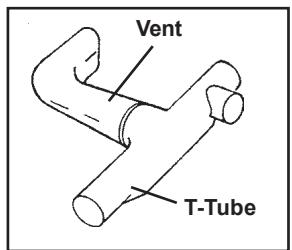
ASKO dryers have a "T-style" exhaust vent that allows you to connect the duct on the rear or on the left or right side.
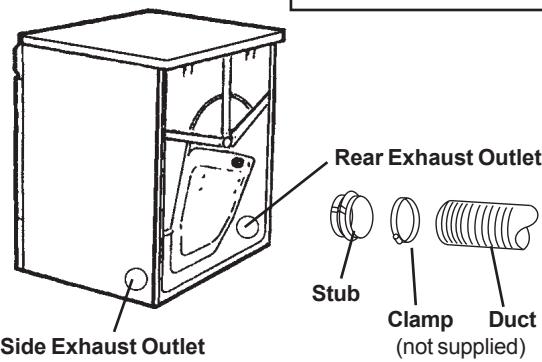
CONNECTING THE EXHAUST DUCT TO THE REAR OUTLET
To connect the exhaust duct to the rear outlet, follow the steps below:
- Push the duct onto the stub pipe and secure it with a clamp.
- With the duct attached, insert the stub pipe into the hole. It should snap into place.
- After you push the dryer into place, check for kinks in the duct.
NOTE: Excessive duct length and too many bends can impede drying performance. We recommend that you cut off any excess exhaust duct and run the duct with as few bends as possible. Make any necessary bends as gentle as possible.
NOTE: Maximum duct length of 22 feet is allowed. Subtract 4 feet of duct for each 90^ elbow.
CONNECTING THE EXHAUST DUCT TO THE LEFT OR RIGHT SIDE OUTLET
To connect the exhaust duct to the left or right side outlet, follow the steps below:
- Using a flathead screw-driver, turn the exhaust outlet cover you plan to use to the right or left to align the tabs holding the cover in place.
- Remove the exhaust outlet cover.
- Remove the stub pipe from the rear exhaust outlet and place it in the outlet you plan to use.
- Push the duct onto the stub pipe and secure it with a clamp.
- With the duct attached, insert the stub pipe into the hole. It should snap into place.
- After you push the dryer into place, check for kinks in the duct.
- Use the exhaust outlet cover you removed from the to cover the rear exhaust outlet.
WARNING!
To reduce the risk of fire, this appliance must be exhausted OUTDOORS or the equivalent.
Never cover the end of the dryer stub or exhaust duct with anything to catch lint, except for UL approved vent basket.
CONNECTING TO A VENTILATION DUCT (T711/T731/T761)
You will need a UL-CSA-approved, 4-inch ridged metal exhaust duct.
NOTE: The more bends and the longer the duct, the less air will circulate through the machine, which will impede drying performance. We recommend that you cut off any excess exhaust duct and run the duct with as few bends as possible. And make any necessary bends as gentle as possible.
NOTE: Maximum duct length of 22 feet is allowed. Subtract 4 feet of duct for each 90^ elbow.
If more than 20 feet of duct is needed, the diameter must be increased to 6'' or 8'' (152 mm or 203 mm).
NOTE: When installing in warm climates (77° F and above) with high humidity levels, do not route the air exhaust duct upwards.
To connect the exhaust duct to a ventilation outlet, follow the steps below:
- Connect the exhaust duct to a ventilation exhaust fitting or to a discharge through the wall.
- Secure the duct joint to the outlet stub on the machine.
- Run the duct with as few bends as possible to the point of discharge.
WARNING!
This appliance should not be exhausted into a chimney, a wall, a ceiling, or a concealed space of a building. Only a metal ventilation grill should be used.
If the duct is taken to a wall outlet, a ventilation grill should be fitted to prevent reverse flow of cold air. Fit the ventilation grill to the outside or inside of the wall.
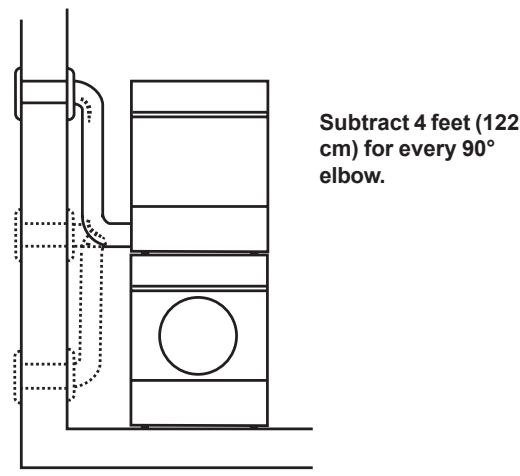
Installation Examples
Ventilation grill
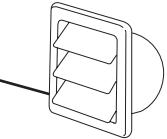
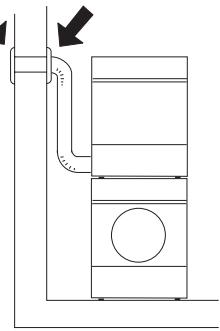
Make sure nothing is blocking the ventilation grill.
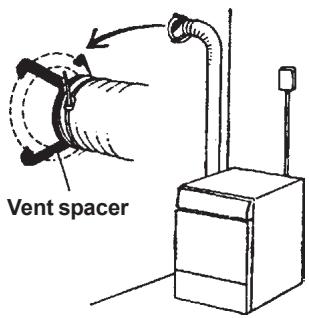
If there is only one vent duct from the room, a vent spacer must be fitted.
CONDENSATION DRAIN CONNECTION (T721 AND T781)
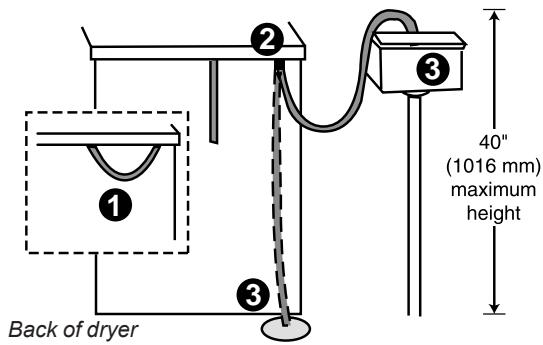
Install the dryer so the condensed water will continuously flow into a drain or sink. To do this, follow the instructions below:
- Disconnect the short hose (1) from the blue connection. (It's okay to let the hose hang down.)
- Connect the rubber hose supplied with the dryer to the blue nipple (2).
- Run the hose to a drain or sink, as illustrated.
NOTE: The drain hose must not be more than 40" above the floor.
LEVELING THE MACHINE
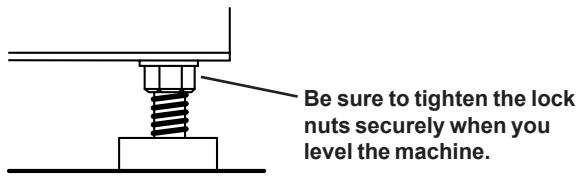
It is important that the machine is level. Each foot on the dryer is adjustable, so you can level the unit on any surface. Once it is level, securely tighten the lock nuts on the feet.
FREESTANDING INSTALLATION
The dryer can be placed next to the washing machine. It is essential that the machine is leveled and the locknuts are tight to eliminate vibration noise.
There should be at least 1/2 (12 mm) of space between the washer and dryer.
BUILT-IN INSTALLATION
ASKO dryers can be installed beneath a cabinet or worktop with a minimum height of 34" (864 mm). There must be a gap of about 1/2 (12 mm) all around the machine, including between the rear edge of the machine top panel and the back wall. The opening width must be at least 24-1/2" (622 mm).
Space must also be available for the exhaust hose on the left, right or rear of the machine. See the diagram for hole sizes and positions. Note that the hole measurements are to the center of the hole.
CONDENSING DRYERS (T721/T781)
The condensing models work best when they have good air circulation. Therefore, we don't recommend they be installed beneath a cabinet. If it is necessary, however, be sure to leave a gap of at least 1/2 (12 mm) on all sides.
Install the dryer so the condensed water will continuously flow into a drain or sink, you will need a drain outlet behind the unit. The maximum drain height is 40" (1016 mm). (See page 4.)
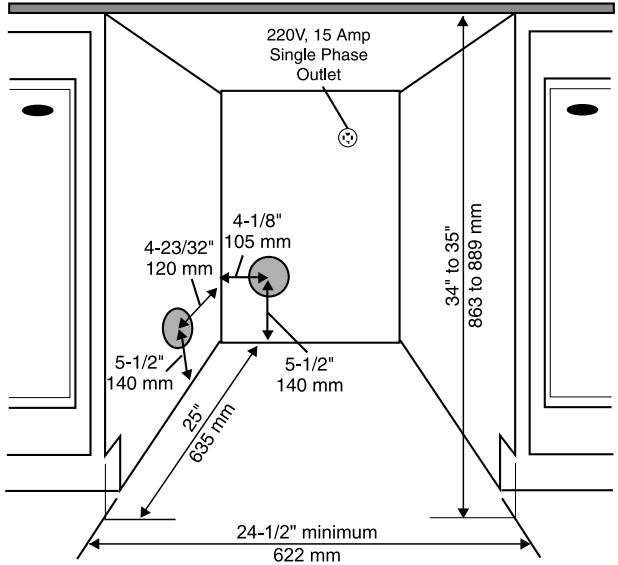
NOTES: The height adjustment for the dryer is 33-1/2" to 34-1/2" (850 mm to 876 mm). Do not raise it higher than 34-1/2".
Hole measurements are from center of hole.
ELECTRICAL CONNECTIONS
WARNING!
This appliance must be properly grounded. Refer to the "Important Safety Instructions" on page 2 for grounding instructions.
The power supply cord must be grounded. If the machine is to be used in a wet area, the supply must be protected by a residual current device.
Connection to a permanently wired supply point must be made only by a qualified electrician.
As supplied: Single-phase, 230 V, 60 Hz, 2500 Watt heater rating (T711: 3000 W) 30 A fuse required
NOTE: In Canada, the dryer is delivered ready-fitted with a four-prong plug intended for connection to a single-phase supply.
WARNING:
The receptacle on the rear of the machine is designed to accommodate ASKO washers ONLY (rated 208-240 V.) To use this receptacle, you must use the ready-fitted plug supplied with the washing machine or an equivalent.
ASKO washers rated 208-240 V have two internal fuses of 15 A each.
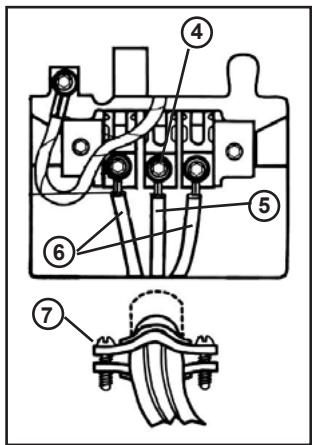
CONNECTING A 3-WIRE POWER CORD
WARNING!
Before starting this procedure, be sure the power is turned off at the breaker/fuse box.
Power Supply Cord
You will need a 3-wire power supply cord with three No. 10 copper wires and a matching 3-wire receptacle of NEMA Type 10-30R, as illustrated below:
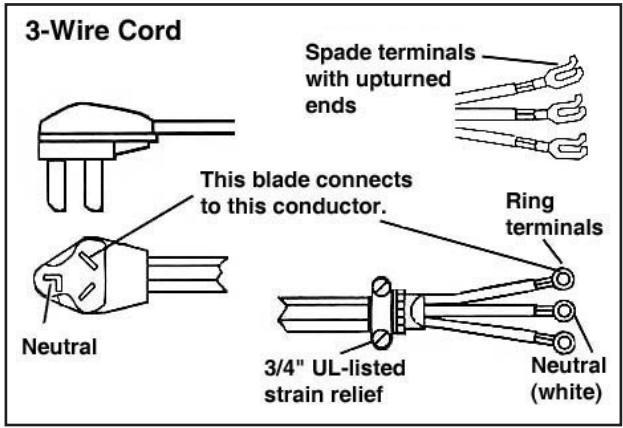
To connect a 3-wire power cord to the dryer, follow the steps below.
NOTE: The numbers in the illustration below correlate to the step numbers.
- Turn the power off at the breaker/fuse box.
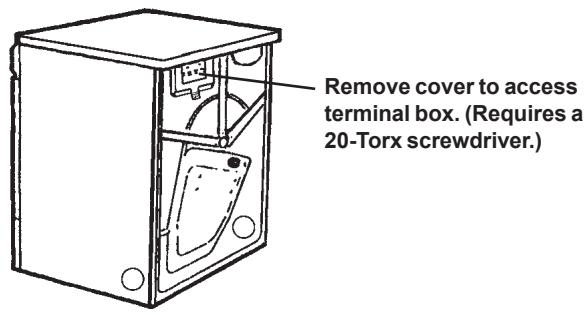
- Remove terminal block cover.
- Use the strain relief attached below the terminal block opening.
- Loosen or remove center terminal block screw.
- Connect neutral (white) wire of power supply cord to the center, silver-colored terminal screw. Tighten screw.
- Connect the other wires to outer screws.
- Tighten the strain relief screws.
- Replace terminal box cover on back of dryer.
- Plug dryer into wall receptacle.
- Turn power on at breaker/fuse box.
CONNECTING A 4-WIRE POWER CORD
WARNING!
Before starting this procedure, be sure the power is turned off at the breaker/fuse box.
Power Supply Cord
You will need a 4-wire power supply cord with four No. 10 copper wires and a matching 4-wire receptacle of NEMA Type 14-30R, as illustrated below. The fourth wire must be identified with a green cover and the neutral conductor by a white cover.
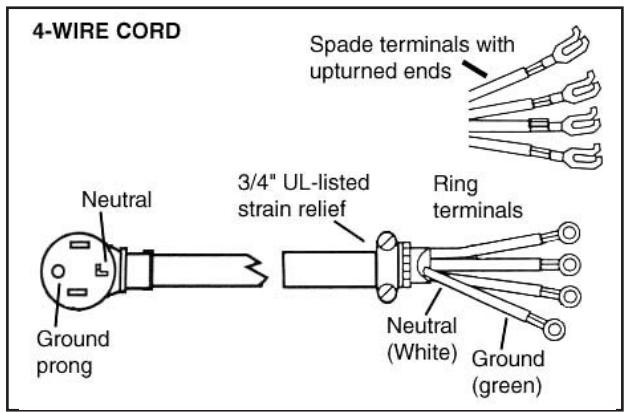
To connect a 3-wire power cord to the dryer, follow the steps below.
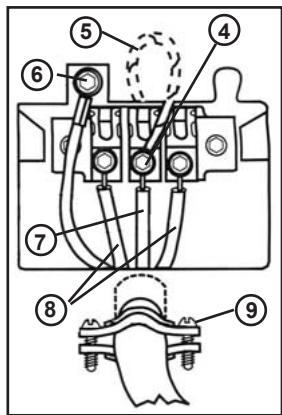
NOTE: The numbers in the illustration below correlate to the step numbers.
- Turn the power off at the breaker/fuse box.
- Remove terminal block cover.
- Use the strain relief attached below the terminal block opening.
- Remove center terminal block screw.
- Remove ground wire (green with yellow stripes) from external ground connector screw. Fasten under center, silver-colored terminal block screw.
- Connect ground (green) wire of cord to external ground conductor screw.
- Connect neutral (white) wire of cord under center screw of terminal block.
- Connect the other wires to outer screws.
- Tighten the strain relief screws.
- Replace terminal box cover on back of dryer.
- Plug dryer into wall receptacle.
- Turn power on at breaker/fuse box.
STACKED INSTALLATION
ASKO dryers can be mounted on top of any matching ASKO washer. Mounts are supplied with the machine. The metal brackets are attached to the lower back of the unit. The plastic cups are packed inside the dryer.
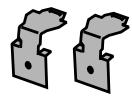
Two metal brackets for securing the dryer to the washer


Two plastic cups to secure the dryer legs.
To install the dryer on top of the washer, follow the steps below:
- Remove the two outside screws (A) (20 torx) from the back of the washer and use them to secure the metal brackets (B), as illustrated below.
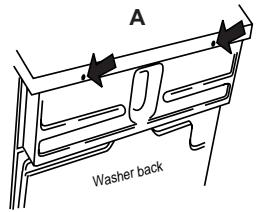
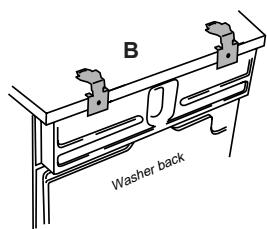
- To ensure the dryer is correctly positioned on top of the washer, you will need to align the plastic cups with the front top edge of the washer. To position the plastic cups, break off the left tab on the cup to be placed on the right side of the washer and break off the right tab on the cup to be placed on the left side of the washer.
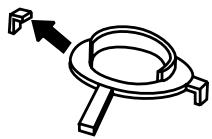
Plastic cups
- Remove the protective paper from the self-adhesive surface beneath the cups. Being careful not to press the adhesive surface against the top of the washing machine, use the tabs to position the cups (as illustrated below) then press them firmly into place.
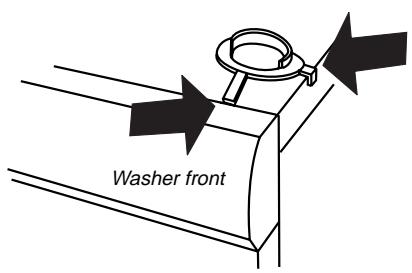
-
Once the cups are correctly in place, break off the remaining plastic tabs.
-
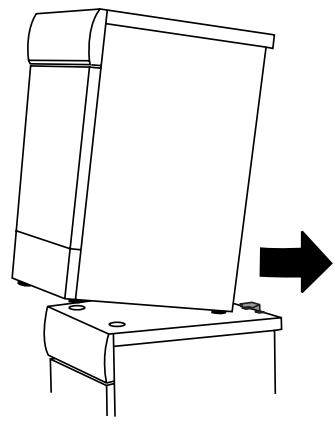
Lift the dryer into position. Raising the front edge, push the dryer backwards until it engages with the brackets on the back of the washer.
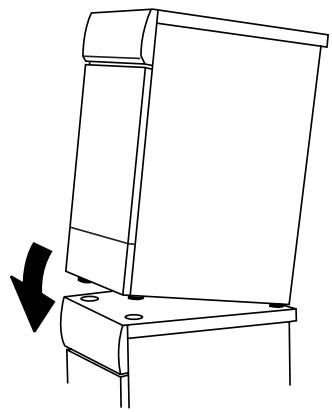
- Carefully lower the front of the dryer, making sure the feet fit into the plastic cups.
Stacked Installation
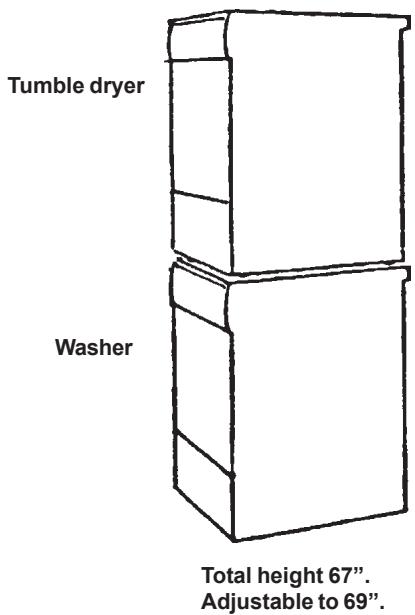
WARNING! Never stack a washer on top of a dryer!
REVERSING THE DOOR HINGES
The door hinges on ASKO dryers are reversible. The dryers are shipped left-hinged. To reverse them, follow the steps below:
WARNING!
Switch off the main power supply before you start this procedure.
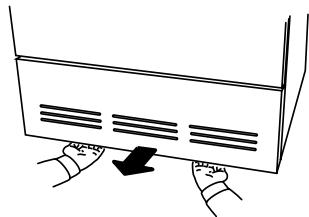
- Remove the two 20 torx screws on the bottom of the bottom panel then grasp the bottom of the panel and pull it forward and down.
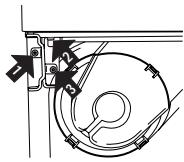
- Remove the bottom hinge bracket by removing the three screws holding the bracket in place.
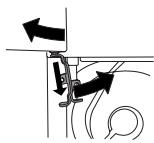
- Supporting the door from the bottom, pull it out and to the left as you turn the hinge bracket counterclockwise.
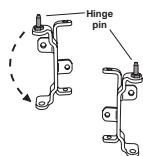
- Remove the hinge pin at the top of the hing bracket.
- Turn the hinge bracket upside down and put the hinge pin into the top hole.
- Transfer the top hinge pin to the right side of the dryer casing.
-
Loosen the two screws on both outer edges of the door so you can remove the magnetic door catch and the cover plate.
-
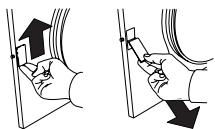
Remove the magnetic catch by pushing it up then lifting it out from the bottom.
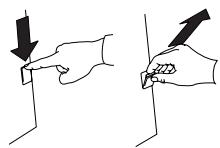
- Remove the cover plate on the opposite side of the door by pushing it down then lifting it out from the top.
-
Reverse steps 8 and 9 to place the door catch and cover plate into their new positions.
-
Tighten the screws on the sides of the doors to hold the magnetic catch and cover plate in place.
-
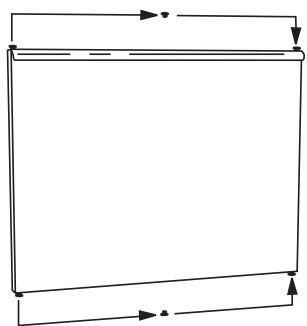
Using a flathead screwdriver, carefully remove the plastic plugs in the upper and lower edge of the door and place them in the empty holes on the opposite side.
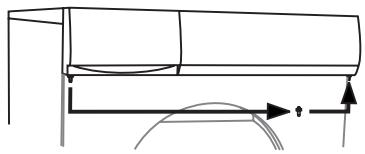
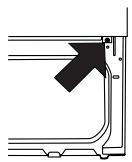
- Remove the screw in the top right corner of the bottom panel. (If you have a condenser dryer, you will have to open the condenser unit door.)
- Now you are ready to mount the door on the right side. Holding the door at an angle (as illustrated), fit the hinge pin into the top hole.
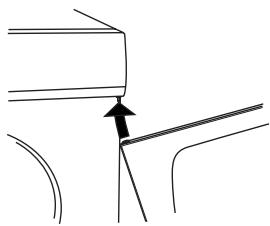
- Position the bottom hinge bracket and secure it with the screws in the order illustrated at right (a, b, c).
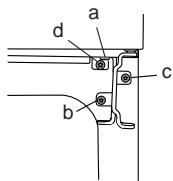
-
Replace the screw you removed in step 13 (d).
-
Replace the lower panel.
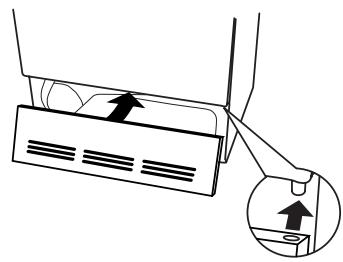
- Turn back on the main power.
With proper attention to how you prepare your laundry items for washing and drying, your wardrobe and linens will look like new for years.
SORTING THE LAUNDRY
For best drying results, clothes should be sorted properly. Most importantly, you should follow the care label instructions (see next page).
Below are some suggestions on how to sort your laundry for drying.
Permanent press items should be dried together. For the most wrinkle-free results when drying permanent press items, you should fill the machine only half full. These items also should be removed promptly from the dryer and hung up or folded right away.
Dry heavy fabrics together and lightweight fabrics together.
Dry fabrics that shed lint (chenille, terry cloth, etc.) separately from fabrics that collect lint (synthetics, velveteen, corduroy, etc.).
Separate non-colorfast fabrics from light-colored items.
If the care label says "Wash Separately," the fabric is likely to lose color (excess dye) for the first few washings. To minimize the possibility of the dye transferring to white or lighter colored items, dry new colored garments with items of similar color or alone. Bright reds and oranges on cottons are the dyes most likely to transfer colors.
NOTE: Refer to "Important Safety Instructions" on page 2 for a list of specific materials that should never be put in a tumble dryer.
FABRIC SOFTENER SHEETS
We recommend that you do not use fabric softener sheets in the dryer. Over time, the chemicals on these sheets can build up inside the lint filter and clog the holes that circulate the air.
DRYING TIMES
Drying times will vary due to the amount of laundry in the machine, moisture content, type of fabric, air temperature and humidity. The length of the vent hose can also affect drying times. (See "Connecting to a Ventilation Duct" on page 5 for the recommended installation.)
GENERAL LAUNDRY ADVICE
Read all recommended care labels carefully. If the care label says "Drip dry," "Line dry" or Dry flat," do not dry that item in the dryer. Certain fabrics will melt or become dangerously flammable if heated, while others may lose their shape.
Remove any sharp ornaments, pins or buckles to prevent snags.
Empty pockets and turn them inside out.
Close zippers and hooks to prevent snagging.
Tie sashes and strings to prevent tangling.
Mend any small rips to prevent them from enlarging.
Turn colored cotton garments, velvet and finer knitwear inside out before washing.
Turn delicate items, sweaters and T-shirts inside out to prevent pilling and to protect the prints.
Prewash severely soiled items.
Wash and dry colored fabrics separately the first time.
Thoroughly rinse down items, such as comforters (Super rinse).
Use fabric softener to eliminate static electricity in synthetic garments and to soften cotton.
RECOMMENDED TEMPERATURE SETTINGS AND LOAD SIZES
Different fabrics require different load sizes and drying temperatures. The table below gives recommended
temperature settings and load sizes for different fabrics.
| Fabric Type | Temp Setting | Load Size |
| Cotton w/out elastic and/or decorative trim | Normal | Full |
| Linen – white and colorfast | Normal | Half |
| Cotton/polyester blends | Low | Half |
| Polyester/acrylic blends | Low | Half |
| Rayon and acetate | Low | Half |
| Washable silk and nylon * | Low | Third |
- Always refer to the care label on the garment to determine if it can be tumble dried. (See page 11.) Some wool and silk and hand-washable items should not be tumble dried. These items should be removed from the washer then pressed out in a terry towel to remove excess water before being hung up or laid flat to dry.
CARE LABEL INSTRUCTIONS
Most clothes and other washable items have recommended care labels. Read these labels carefully! Care label instructions and warnings should be followed for the best cleaning results.
The table below defines the symbols used on fabric care labels. (NOTE: Some manufacturers may use slightly different symbols.)
As an example, the symbols in the label illustrated below mean: wash in warm water on permanent press setting. Use non-chlorine bleach. Dry on permanent press setting. Iron on low temperature setting.

CARE LABEL SYMBOLS
WASH CYCLE

Normal wash cycle

Permanent Press or Wrinkle Resistant setting

Gentle/Delicate setting

Hand wash only

Do not wash

Do not wring. Hang dry, drip dry, or dry flat
WASH WATER TEMPERATURE
Maximum water temp 200^ / 95^
···
Maximum water temp 160^ / 70^
·
Maximum water temp 140^ / 60^
···
Maximum water temp 120^ / 50^
.
Maximum water temp 105^ / 40^
.
Maximum water temp 85^ F / 30^ C
BLEACH INSTRUCTIONS

Any bleach when needed

Only non-chlorine bleach

Do not bleach
DRY CLEAN SYMBOL

Dry clean only
TUMBLE DRY CYCLE

Machine dry

Normal setting

Permanent Press or Wrinkle Resistant setting

Gentle or Delicate setting

Do not tumble dry
TUMBLE DRY HEAT SETTING

Any heat

High heat

Medium heat

Low heat

No heat/Air fluff
SPECIAL DRYING INSTRUCTIONS

Line dry or hang to dry

Drip dry (do not spin or wring)

Dry flat

Dry in shade
IRONING INSTRUCTIONS

Ironing is necessary

High temperature setting

Medium temperature setting

Low temperature setting

Do not iron or press with heat

Iron without steam
T711 OPERATING INSTRUCTIONS
WARNING! To reduce the risk of electric shock or injury to persons, read the "Important Safety Instructions" section on page 2 before operating this appliance.
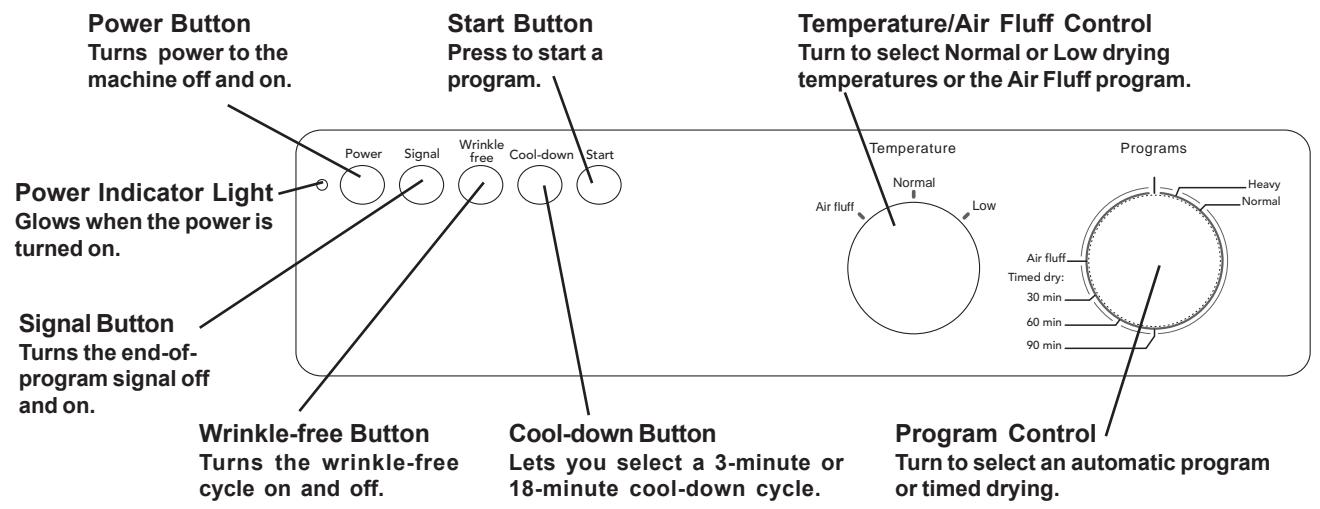
THE CONTROL PANEL
POWER BUTTON
The Power button turns the power to the machine on and off. When the power is on, the power indicator light glows red. The power must be on before you can start the machine.
START BUTTON
This button starts the dryer. If you open the door during a program, the dryer will stop tumbling automatically. To continue the program, close the door and press Start.
PROGRAM CONTROL
This model has two preset programs:
Heavy - for heavy items, such as jeans or thick towels
Normal - for cottons, permanent press, synthetics, etc.
These programs work with a thermostat that measures the exhaust temperature coming out of the dryer and automatically turns the machine off when the clothes are appropriately dry.
Timed Drying (30, 60 or 90 minutes)
If you prefer, you can set the Program Control knob to a specific number of minutes to dry the laundry. When you choose timed drying, you must set the Temperature Control knob to Normal or Low.
Air Fluff Program
The Air Fluff program is designed to shake dust out of fabrics, air them, or soften them. This program does not activate the heating element.
TEMPERATURE CONTROL
Normal
This temperature setting should be used for heavier fabrics, such as denim, cotton, linen, etc.
Low
This temperature setting should be used for lighter, more delicate fabrics, such as synthetics, permanent press, acrylics, etc.
Air Fluff
This setting does not activate the heating element. It simply circulates the air as the clothes tumble to shake out the dust and refresh the clothes.
OPTIONS
Signal
When this button is depressed (on), a signal will sound for three seconds when the program is complete. Note: The Cool-down button must also be pressed in for the signal to sound.
Wrinkle-free
The Wrinkle-free option prevents garments from wrinkling if you're unable to remove them right away. When this button is depressed (on), the drum will continue to rotate for three seconds every minute after they drying program is complete, until the door is opened or one hour has passed. If the signal is on, it will sound each time the wrinkle-free program activates.
Cool-down
When this button is depressed (on), the cool-down time is increased from 3 minutes to 18 minutes. This option can not be selected with the Anti-crease option.
INTERRUPTING OR CANCELLING A PROGRAM
To interrupt a program, simply open the door. The dryer will stop tumbling automatically. To continue the program, close the door and press Start. The program will continue from the point it was interrupted.
To cancel a program, press the Power button to turn off the power or turn the Program Control knob clockwise until the dryer stops.
T721 OPERATING INSTRUCTIONS
WARNING! To reduce the risk of electric shock or injury to persons, read the "Important Safety Instructions" section on page 2 before operating this appliance.
THE CONTROL PANEL
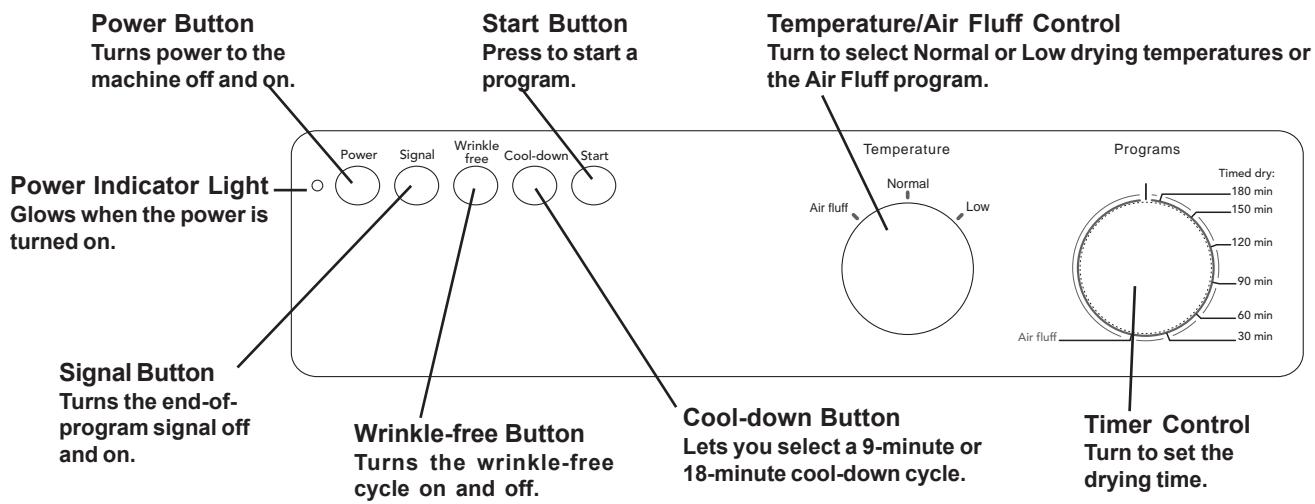
POWER BUTTON
The Power button turns the power to the machine on and off. When the power is on, the power indicator light glows red. The power must be on before you can start the machine.
START BUTTON
Press this button to start the dryer. If you open the door during a program, the dryer will stop tumbling automatically. To continue the program, close the door and press Start.
TIMER CONTROL KNOB
Use this knob to set the number of minutes you want to dry the laundry.
Air Fluff Program
The Air Fluff program is designed to shake dust out of fabrics, air them, or soften them.
TEMPERATURE CONTROL
Normal
This temperature setting should be used for heavier fabrics, such as denim, cotton, linen, etc.
Low
This temperature setting should be used for lighter, more delicate fabrics, such as synthetics, permanent press, acrylics, etc.
Air Fluff
This setting does not activate the heating element. It simply circulates the air as the clothes tumble to shake out the dust and refresh the clothes.
OPTIONS
Signal
When this button is depressed (on), a signal will sound for three seconds when the program is complete. Note: The Cool-down button must also be pressed in for the signal to sound.
Wrinkle-free
The Wrinkle-free option prevents garments from wrinkling if you're unable to remove them right away. When this button is depressed (on), the drum will continue to rotate for three seconds every minute after they drying program is complete, until the door is opened or one hour has passed. If the signalis on, it will sound each time the wrinkle-free program activates.
Cool-down
When this button is depressed (on), the cool-down time is increased from 9 minutes to 18 minutes. This option cannot be selected with the Wrinkle-free option.
INTERRUPTING OR CANCELLING A PROGRAM
To interrupt a program, simply open the door. The dryer will stop tumbling automatically. To continue the program, close the door and press Start. The program will continue from the point it was interrupted.
To cancel a program, press the Power button to turn off the power or turn the Timer Control knob clockwise until the dryer stops.
T731 OPERATING INSTRUCTIONS
WARNING! To reduce the risk of electric shock or injury to persons, read the "Important Safety Instructions" section on page 2 before operating this appliance.
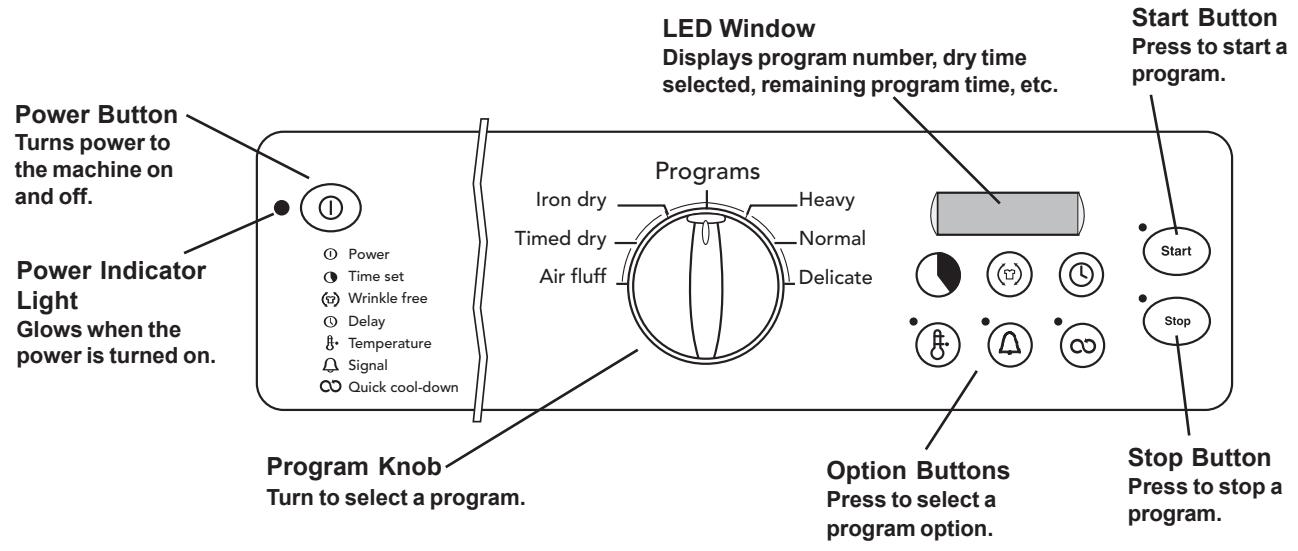
THE CONTROL PANEL
POWER BUTTON
The Power button turns the power to the machine on and off. When the power is on, the power indicator light glows red. The power must be on before you can start the machine.
PROGRAM KNOB
Turn this knob to select a program. The programs are described on the following page.
12:00 Position - This is where the line on the knob aligns with the line above the knob. When the knob is in this position, "00" displays on the LED to indicate no program has been chosen.
START BUTTON
After you have selected a program and the desired options, press this button to start the dryer. The red indicator light next to the Start button will come on. The indicator light will go off when the program ends or has been cancelled.
STOP BUTTON
You can stop or cancel a program by pressing and holding the Stop button until the dryer stops. When you press Start, the program will start from the beginning.
INTERRUPTING OR CANCELLING A PROGRAM
To interrupt a program, simply open the door. The dryer will stop tumbling automatically. To continue the program, close the door and press Start. The program will continue from the point it was interrupted.
To cancel a program, press and hold the Stop button
until the Stop indicator light goes off (approximately 3 seconds). You will have to reselect a program and press Start to restart the dryer.
LED WINDOW
The LED window displays the program number for the Sensidry programs, as illustrated below:
P1
The corresponding program numbers are:
Heavy = P1
Delicate = P3
Normal = P2
Iron Dry = P4
When you select Timed Dry, the LED displays the number of minutes selected, plus the cool-down time, as illustrated below:
20
When you select Air Fluff, the LED displays the number of minutes selected, as illustrated above. With both programs 5 and 6, as the program advances, the LED displays the remaining time.
"End" on the LED indicates the program is complete.
"C" indicates the program is in the cool-down cycle.
PROGRAMS
Your ASKO dryer has our state-of-the-art Sensidry system. This means it has a humidity sensor that ensures different fabrics always dry thoroughly. This sensor turns off the heat when the laundry has reached the appropriate dryness.
The Heavy, Normal, Delicate and Iron Dry programs are automatic (Sensidry) programs designed for certain types of loads, as defined in the table below. The sensor detects different levels of humidity with each program. It is important, therefore, to select the appropriate program for the type of load you are drying.
If you prefer, you can select Timed Dry, which does not
activate the humidity sensor. You should be careful when using this option not to overdry the fabrics. This program automatically uses the Low temperature setting, but you can change it to Normal by depressing the Temperature button.
When using Timed Dry, it's best to use a shorter time; then if the load isn't dry, you can set the timer for a few more minutes.
NOTE: Always follow the care label instruction.
| Program | Definition |
| Heavy (P1) | For items that are extremely difficult to dry, such as jeans and thick towels. |
| Normal (P2) | Cotton w/out elastic and/or decorative trim. |
| Delicate (P3) | Cotton with elastic and/or decorative trim, linen (white and colorfast). |
| Iron dry (P4) | Synthetics, polyester, cotton/polyester blends. |
| Timed Dry | Any fabric that can be machine dried. (See note below.) |
| Air Fluff | This setting does not heat. It simply circulates the air as the clothes tumble to shake out the dust and refresh the clothes. (See note below.) |
NOTE: When using Timed Dry and Air Fluff, you must set the number of minutes for the program to run. (See "Time" in the "Option Buttons" section below for details.)
OPTION BUTTONS
The option buttons allow you to select program time, normal or low temperature, anti-crease, delayed start, buzzer and quick cooling. Each of these options is defined in more detail in the following paragraphs.
TIME SET
If you set the program knob to Timed Dry or Air Fluff, you must select the length of drying time by pressing this button until the number of minutes you wish to dry the load displays on the LED. The time advances in 5-minute increments and you can select between 5 and 90 minutes. If you pass the time you wanted to select, continue to press the button until the correct time displays.
WRINKLE-FREE
The Wrinkle-free option prevents garments from wrinkling if you're unable to remove them right away. You can select one, two, or three hours by pressing the Wrinkle-free button until the number of hours you prefer displays, as illustrated below:
1h
NOTE: "0" on the LED indicates the option is not active.
When you set a time, the drum will continue to rotate after the program is complete for three seconds every minute until the door is opened or the selected time (1-3 hours) has passed. If the buzzer is on, it will sound each time the anti-crease program activates.
DELAY
This option lets you set the dryer to start at the most convenient time. This feature is also useful in areas where utility companies offer discount rates during off-peak hours. You can set delayed start from 1 hour to 24 hours, in one-hour increments.
To set a delayed start time, press the button until the number of hours you wish to delay starting the machine displays on the LED, as illustrated below:
1h
If you pass the time you wanted to select, continue to press the button until the correct time displays. If you decide not to delay starting the unit, continue to press the button until "0" displays.
Press Start and the unit will start after the number of hours you selected has passed.
To cancel Delay Start after you have pressed the Start button, press and hold the Stop button until the LED displays the program number or, if the program knob is set on 5 or 6, the number of minutes. You can then press Start and the unit will start right then.
TEMPERATURE
You have two temperature options: Normal and Low. The Normal setting should be used for heavier fabrics, such as denim, cotton, linen, etc. The Low setting should be used for lighter, more delicate fabrics, such as synthetics, permanent press, acrylics, etc.
The indicator light will stay lit when Low is selected. It will remain off when Normal is selected.
SIGNAL
Press this button to set a signal to sound for three seconds when a program is complete. The indicator light will stay lit when this option is on.
If you selected the Wrinkle-free option, the signal will sound every time the drum rotates.
QUICK COOL-DOWN
Every program, except Air Fluff, ends with a cool-down cycle that tumbles the clothes without heat to reduce wrinkling. The Cool-down button lets you choose between the Normal cool-down cycle (15 minutes) or a Quick cool-down cycle (5 minutes). The indicator light will stay lit when Quick is selected.
CHANGING OPTION SETTINGS
You cannot change the option settings after you have pressed Start. To change a setting, hold down the Stop button until the unit stops, make your change, then press Start again. The program will restart from the beginning.
PROGRAM MEMORY
The dryer is designed to retain the settings last selected with each program. For example, if you select Normal, the Low temperature option, a 2-hour anti-crease, and Quick cool-down, next time you select Normal these options will automatically be selected.
CHILD-SAFE START FEATURE
You can program the dryer not to start unless the Start button is held down for three seconds. This is to prevent children from inadvertently starting the machine. To program this function, follow the steps below:
- Turn the machine off then on again. ("00" should show on the LED.)
- Press the Start button five times in succession then press the Wrinkle-free button five times. (This must be done within 15 seconds.)
- Within three seconds, press the Wrinkle-free button again to select Child-safe start. The LED will display "3" to indicate the Child-safe start is active. (If the child-safe start has already been activated, "0" will display after you press the Wrinkle-free button.)
T731 ERROR MESSAGES
Error messages will display on the LED if a fault occurs while a program is in progress. The table below defines each possible error message. If the message still
displays after you have checked the possible solutions, call a service technician.
| MESSAGE | ERROR |
| F1 | Call a service technician. |
| F2 | There may have been a power outage. Check the breaker box and fuses. The dryer is programmed to stop after a maximum of 3 hours drying time. If it has run this long, let it cool and try to start the program again. Try turning the power off then on again. If the message remains, call a service technician. |
| F3 | This indicates a thermistor fault. Call a service technician. |
| F4 | This indicates the overheat protection device has activated. Clean the lint filter and try running the program again. |
| F5 | This indicates a fault in the moisture sensor. Running a dry program with dry clothes or an empty machine could also cause this error. Try opening the door. If the message remains, call a service technician. |
T761 AND T781 OPERATING INSTRUCTIONS
WARNING! To reduce the risk of electric shock or injury to persons, read the "Important Safety Instructions" section on page 2 before operating this appliance.
THE CONTROL PANEL
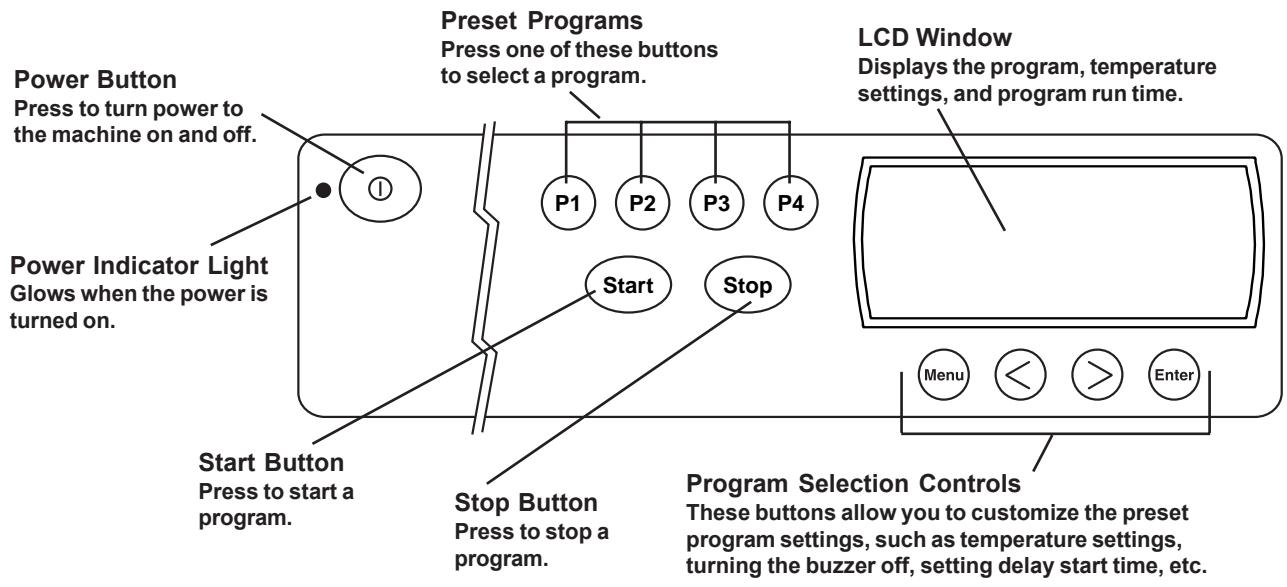
POWER BUTTON
The Power button turns the power to the machine on and off. When the power is on, the power indicator light glows red. The power must be on before you can set the programs or start the machine.
START BUTTON
Once you have selected a program (P1-P4) and set the desired options, press this button to start the dryer.
STOP BUTTON
You can stop or cancel a program by pressing Stop until the dryer stops (about three seconds). If you stop the dryer this way, it cancels the program in progress.
INTERRUPTING OR CANCELLING A PROGRAM
To interrupt a program, simply open the door. The dryer will stop tumbling automatically. To continue the program, close the door and press Start. The program will continue from the point it was interrupted.
To cancel a program, press and hold the Stop button until the dryer stops (about three seconds). To restart the dryer, you will have to reselect a program and press Start.
UNDERSTANDING THE LCD WINDOW
The LCD window is easy to read and understand. The illustration below explains each item on the LCD window. The LCD window also displays the menus and options
available when you customize the preset programs (see page 18).
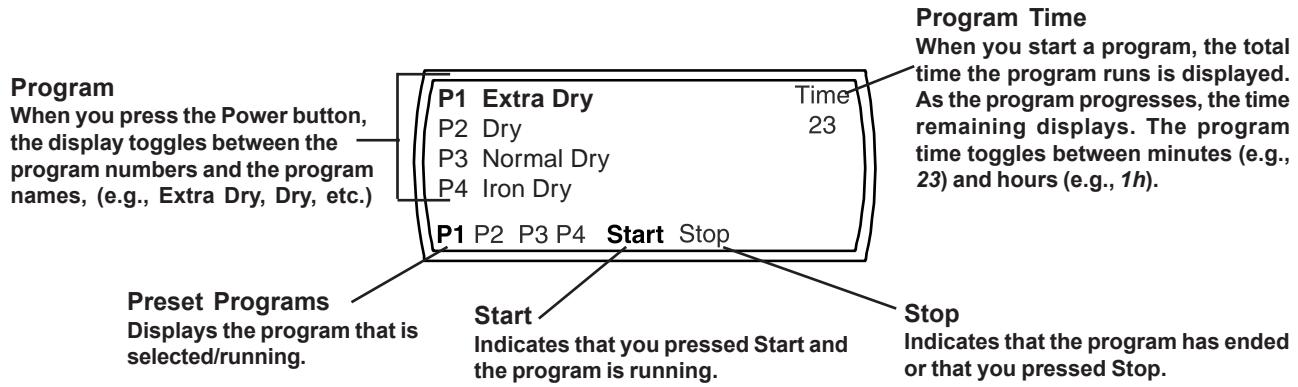
THE PRESET PROGRAMS
ASKO dryers are delivered with the four most commonly used programs. The table below lists the preset programs and the settings for each. To select a program, simply press one of the program buttons and press Start. For additional programming options, refer to "Customizing the Preset Program Buttons" below.
With ASKO's Sensidry™ system, you need never worry about over-drying your laundry. Just select the proper program for the type of fabric you're drying and Sensidry does the rest. Once you select a program, Sensidry monitors the temperature and measures the humidity level. When it detects the appropriate measurements, it automatically shuts off the machine.
| Preset Program | Dry Cycle | Dry Temp | Cooling Time | Buzzer | Anti-Createase |
| P1 | Heavy | Normal | Quick(1) | On | 1 hr. |
| P2 | Normal | Normal | Quick | On | 1 hr. |
| P3 | Delicate | Normal | Quick | On | 1 hr. |
| P4 | Iron Dry | Low (2) | Quick | On | 1 hr. |
NOTES: (1) The Quick cooling time is 5 minutes.
(2) On Model T781, the dry temperature for program P4 is Normal.
WARNING! Some fabrics may not be able to withstand extremely hot temperatures. Always refer to the garment care label to recommended wash temperatures.
CUSTOMIZING THE PRESET PROGRAM BUTTONS
In addition to the preset programs listed above, you can customize the preset buttons to use any of the programs listed in the table below. This table also lists the pre-programmed settings for each program. For example, if you select Normal dry on the program menu, it is automatically programmed to dry at the low temperature, cool-down for 15 minutes (normal time), run the anti-crease cycle for one hour, and set off the buzzer when the program ends. You can modify some of these settings. (See "Dry Program Options" below.)
AVAILABLE PROGRAMS
| Program | Dry Temp | Cooling Time | Anti-Creatase | Buzzer |
| Heavy | Normal | 15 minutes | 1 hour | On |
| Normal | Normal | 15 minutes | 1 hour | On |
| Delicate | Low | 15 minutes | 1 hour | On |
| Iron Dry | Low | 15 minutes | 1 hour | On |
| Air fluff | n/a | n/a | 1 hour | On |
| Timed dry | Low | 15 minutes | 1 hour | On |
PROGRAM OPTIONS
The table below defines the program options. The next table lists all of the programs on the Program menu as well as the settings and options available with each.
OPTION DEFINITIONS
| Options | Definitions |
| Quick Cool-down | This option tumbles the clothes without heat for a few minutes after the program ends to reduce wrinkling. The Normal cool-down tumbles for 15 minutes; the Quick for 5 minutes. |
| Signal | If this option is on, a signal sounds for 3 seconds at the end of the program. |
| Wrinkle-free | This option is designed to prevent wrinkling if you're unable to remove them from the dryer right away. After the program ends, the drum will continue to rotate for three seconds every minute until the door is opened or one hour has passed. You can turn this option off or choose 1, 2, or 3 hours. |
| Temperature | You have three temperature options: Normal, Low, and Air Fluff. Normal is for heavier fabrics, such as denim, cotton, and linen. Low is for lighter, more delicate fabrics, such as synthetics. Air Fluff does not activate the heating element. It simply circulates the air as it tumbles to shake out the dust and refresh the clothes. |
| Delay | You can set a delayed start from 1 to 24 hours. This option is useful in areas where utility companies offer discount rates for off-peak hours. |
| Timed Dry | You can set the program length, from 5 to 90 minutes. |
The table below lists the options available with each dry program. These options can be temporary or permanent, depending on your preference. Refer to the "Programming Instructions" setting below for detailed instructions on how to navigate the program menu and make temporary and permanent changes to the programs.
OPTIONS AVAILABLE WITH EACH PROGRAM
| Program | Dry Temp | Cooling Time (1) | Anti-Createase | Buzzer | Delay Start |
| Extra Dry | Normal or Low | Normal or Quick | 1, 2, or 3 hours | On or Off | 1 to 24 hours |
| Dry | Normal or Low | Normal or Quick | 1, 2, or 3 hours | On or Off | 1 to 24 hours |
| Normal Dry | Normal or Low | Normal or Quick | 1, 2, or 3 hours | On or Off | 1 to 24 hours |
| Iron Dry | Normal or Low | Normal or Quick | 1, 2, or 3 hours | On or Off | 1 to 24 hours |
| Air fluff (2) | n/a | n/a | 1, 2, or 3 hours | On or Off | 1 to 24 hours |
| Timed dry (2) | Normal or Low | Normal or Quick | 1, 2, or 3 hours | On or Off | 1 to 24 hours |
NOTES: (1) The Normal cool-down cycle is 15 minutes; the Quick cycle is 5 minutes.
(2) The Air fluff and Timed dry programs require you to select a program time. You can select from 5 to 90 minutes, in 5-minute increments.
PROGRAMMING INSTRUCTIONS
Below are the basic instructions for changing a preset program. The following paragraphs explain the menus and how to navigate through them. You can make temporary (one-time) program changes, or you can make permanent changes.
- Press the button for the preset program you want to change (P1-P4). The program you select will display in the lower left corner of the LCD window.
- Press MENU until the menu you want to change displays (e.g., Programs, Temperature, etc.).
- Press > to scroll through the available options or to toggle between off and on.
- Press ENTER to save you settings and return to the Main Program screen. The LCD will display your new settings.
- If you want to use this setting temporarily (for this one load), START. When the program ends it will revert back to the previous setting.
- If you want to save this setting permanently, press ENTER again then press START. The program will retain the change. See "Navigating the Menus" below for detailed instructions on creating customized programs.
NAVIGATING THE MENUS
The following paragraphs explain how to navigate through the menus and change the preset programs. If you don't want to make changes in all of the menus, continue to press MENU until the one you do want to change displays.
To restore a preset program to the factory default settings, simply press the button for the preset program (P1-P4) you want to restore and hold it down while you press ENTER. The program will revert to the factory default settings.
If you change your mind in the process of changing a program, press the Power button to switch the dryer off. When you switch the power back on, the program will be as originally set.
Remember, the first step to customizing a preset program is to press the button for the program you want to customize (P1-P4).
The Program Menu
The Program menu lets you set the dry program you prefer. You would also use this menu to set the machine for a Timed Dry or Air Fluff program. (See "Timed Dry and Air Fluff" on this page.)
- Press MENU until "Select Program" displays.
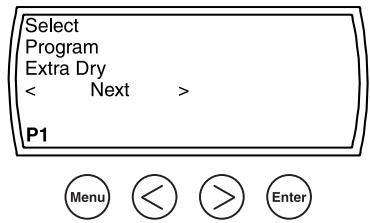
- Press > to scroll through the program choices (Extra Dry, Dry, Normal Dry, etc.)
- When your preference displays, press ENTER. The LCD will display the new program setting.
- If you only want to use this setting temporarily (for this one load), press START. When the program ends it will revert back to the previous setting.
- If you want to save this setting permanently, press ENTER again then press START. The program will retain the change.
Timed Dry and Air Fluff
When you select Timed Dry or Air Fluff on the program menu, the word "Time" and a number (of minutes) will flash in the upper right corner of the LCD window. This indicates you must select a program time (5 to 90 minutes in 5-minute increments).
- Press MENU until "Select time" displays.
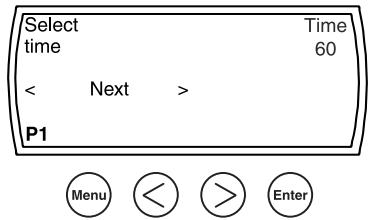
- To change the number, simply press an Arrow button until the length of time you want the program to run displays.
- If you only want to use this setting temporarily (for this one load), press START. When the program ends it will revert back to the previous setting.
- If you want to save this setting permanently, press ENTER again then press START. The program will retain the change.
When you press START, the time remaining for the program to run displays in the bottom right-hand corner of the LCD window, as illustrated below:
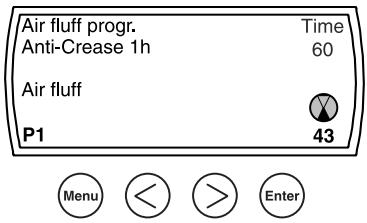
The remaining time toggles between the minutes remaining (e.g., 23) and the hour(s) remaining (e.g., 1h ).
The Temperature Menu
This menu lets you select a Normal or Low temperature. Only the temperatures available for the dry program you selected will display.
- Press MENU until "Select temperature" displays.
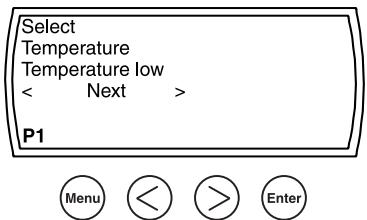
- Use the Arrow buttons to toggle between the Normal and Low temperature settings.
- If you only want to use this setting temporarily (for this one load), press START. When the program ends it will revert back to the previous setting.
- If you want to save this setting permanently, press ENTER again then press START. The program will retain the change.
The Delayed Start Program
This program lets you delay starting the dryer for up to 24 hours. This feature is useful in areas where utility companies offer discount rates during off-peak hours.
When you select Delayed Start on the program menu, you must select a delay time (1 to 24 hours).
- Press MENU until "Select time for delayed start" displays.
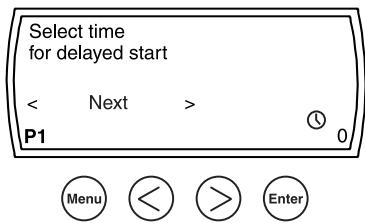
- In the bottom right corner of the LCD window, a clockface and a zero will flash. To change the zero, simply press an Arrow button until the LCD displays the number of hours you want to delay starting the program (1-24 hours).
- If you only want to use this setting temporarily (for this one load), press START. When the program ends it will revert back to the previous setting.
- If you want to save this setting permanently, press ENTER again then press START. The program will retain the change.
When you press START, the clockface and the hours you set for the delay will display, as illustrated below:
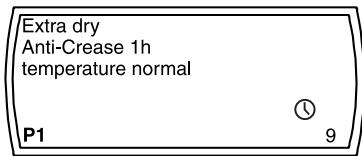
Selecting Options
This lets you select Buzzer, Anti-crease, and Normal or Quick Cooling. Only the options available with the program you selected will display. (See tables on page 14.)
- Press MENU until "Select Options" displays.
- Continue to press MENU to scroll through the options.
- Press an Arrow button to toggle between Off and On
- If you only want to use this setting temporarily (for this one load), press START. When the program ends it will revert back to the previous setting.
- If you want to save this setting permanently, press ENTER again then press START. The program will retain the change.
RESTORING A PRESET PROGRAM
To restore a preset program to its factory default settings, simply press the button (P1-P4) for the preset program you want to restore and hold it down while your press ENTER. The program will revert to its factory default settings.
CHANGING THE LANGUAGE ON THE LCD DISPLAY
There are eleven languages available for the LCD window:
English
French
Spanish
Portuguese
Italian
German
Swedish
Danish
Norwegian
Netherlands
Finnish
To change the language, follow the steps below:
- Turn the machine off then on again.
- Press ENTER five times in succession then press P1 five times. (This must be done within 15 seconds.)
- When the Language menu displays, press an Arrow button to advance through the menu to the desired language.
- Once the correct language displays, press ENTER to program the LCD window to display the language you selected.
CHILD-SAFE START
As a safety measure, you can program the T761 and T781 not to start unless the Start button is held down for three seconds. To do this, follow the steps below:
- Turn the machine off then on.
- Press ENTER five times, then press P3 five times. (This must be done within 15 seconds.)
- "Delayed start" displays with "0" flashing in the lower right corner. Press the Right Arrow button to toggle the display to "3."
CHILD-SAFE MENU BUTTON
Please note that when you set the child-safe Start button, the Menu button is automatically programmed to delay for three seconds before it becomes active. This prevents a child from accidentally changing the program settings.
When you want to change a program, press the Menu button for three seconds to activate the menus. The Menu button will work normally (without the 3-second delay) until you have completed your changes. If it is not pressed for two minutes, it will automatically revert back to the child-safe mode.
T761 AND T781 ERROR MESSAGES
Error messages will display in the LCD window if a fault occurs while a program is in progress. The table below defines each possible error message. If the message
still displays after you have checked the possible solutions, call a service technician.
| ERRORMESSAGE | SOLUTION |
| Maximum program time | Make sure both fuses are intact. Clean the lint filter. Make sure exhaust hose is clear (T761). |
| Overflow (T781) | Clear message by turning the power off then on. Make sure the condensed water container is empty. If draining into a drain pipe, make sure the black rubber hose is not kinked or blocked. The drain should not be higher than 40 inches from the floor. Make sure the condensation pump is not blocked. |
| Sensor | This can appear if there are dry clothes in the drum when the unit is started. Cancel the error message by opening the door or turning the power off then on. |
| Thermistor | Call a service technician. |
CLEANING THE LINT FILTER
The wear on fabrics in a tumble dryer is insignificant. The lint caught in the lint filter is dust and fiber residue that has been formed when the garments have been worn. The lint filter must be cleaned after each load. If this is not done, drying performance will suffer, as insufficient air will pass through the drum. The machine may also overheat after a while, which will cause it to stop automatically.
To clean the lint filter, follow the steps below:
- Grasp the handle and pull it toward you.
- Remove the filter from the holder.
- Open the filter and gently brush away any lint.
- Fold the filter together and return it to the holder on the door.
- Push the holder in until it snaps into place.
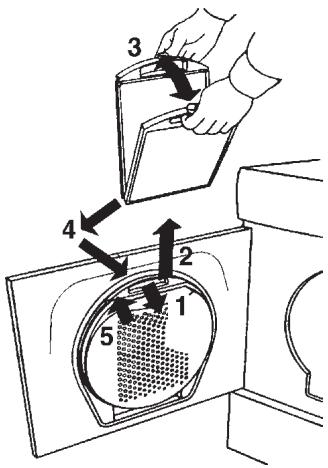
NOTE: If you use dryer sheets (not recommended), you may occasionally need to wash the lint filter with warm water and a soft brush to clean any blocked holes.
CLEANING THE CONTROL PANEL
To clean the control panel, use only a soft, warm, damp (not wet) cloth. To prevent penetration of water into the door lock and electrical components, never spray water or cleaning solvent of any kind on the control panel.
Also, never use abrasive cleaners or scouring pads on the outer surfaces because they will scratch the finish and possibly remove the writing on the control panels. Some paper towels may also scratch the finish.
CLEANING THE EXHAUST HOSE-
T711, T731, AND T761 ONLY
About once a year you should remove the exhaust hose and clean it. At this time, you should also clean the exhaust outlet on the machine and the ventilation duct.
Periodically, you should check the dryer exhaust outside to be sure the air flow is strong and nothing is blocking the vent.
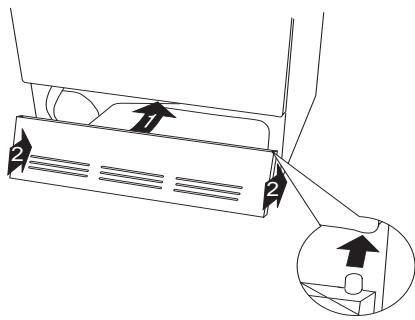
CLEANING THE FAN
The fan should be cleaned at least once a year. If you have pets, you should clean it more often. To clean the fan, follow the steps below:
- Turn off the main power to the machine.
- Remove the two 20-torrx screws on the bottom of the front panel then grasp the bottom of the panel and pull it forward and down.
- Unscrew the two 10-torx safety screws (A) on the bottom of the fan cover and fold out the four tabs (B).
- Remove the fan cover.
- Hold the fan in place while you unscrew the nut.
- Pull out the fan and clean it with a brush and water.
- Replace the fan and screw the nut securely.
- Replace the fan cover and fold the lugs back into place. Replace the safety screws.
- Replace the front panel.
- Turn back on the main power.
CLEANING THE CONDENSER-T721 AND T781
The condenser should be cleaned on a regular basis, preferably monthly. If you have pets, you should probably clean it more often. To clean the condenser, follow the steps below:
- Turn off the main power to the machine.
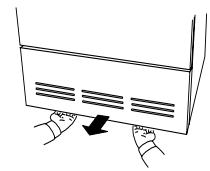
- Remove the two 20-torx screws on the bottom of the front panel then grasp the bottom of the panel and pull it forward and down.
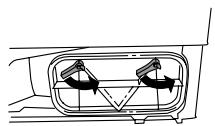
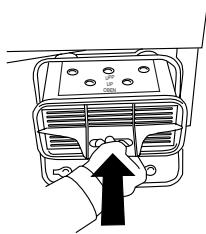
- Turn the levers on the condenser cover counterclockwise to release it then pull it down.
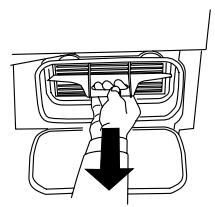
- Pull out the condenser.
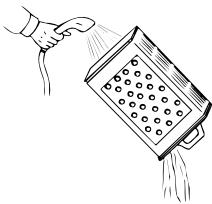
- Spray the filter with warm water until all of the lint is removed.
WARNING!
Do not put the condenser into a dishwasher. Do not use any sharp metal objects or a wire brush to clean the condenser. Also, do not poke anything between the fins.
- Make sure the side marked "UP" does face up and carefully replace the condenser into the unit.
- Close the condenser cover.
- Replace the front panel.
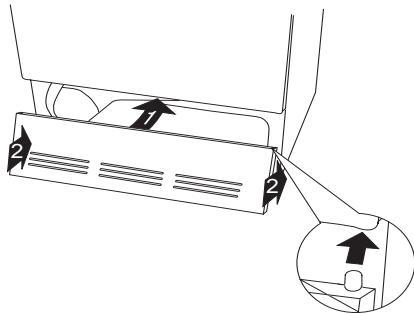
- Turn back on the main power.
TROUBLESHOOTING
If you experience a problem with your dryer, you should review the following list of frequently encountered situations or go to our website at www.askousa.com. It could save you the cost and inconvenience of a service call.
Even though the product is under warranty, if the problem is not caused by defective product workmanship or materials, you will be charged for a service call. Refer to page 25 to determine what is and is not covered under your warranty. If you're still not sure, contact the AM Advisory Center before you call a serviceman.
BEFORE YOU CALL
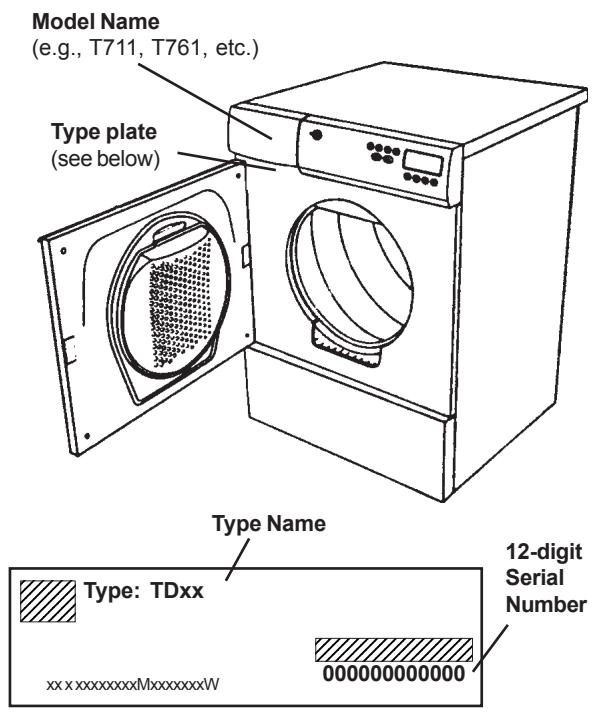
Before calling for service or contacting ASKO regarding a warranty issue, make a note of the model name, type number and serial number. The model is on the left front of the control panel. The type plate with the type name and serial numbers is located behind the door in the upper left corner. (See illustration at right.)
The machine won't start.
Make sure the door is closed securely.
Models T721/T781: Make sure the condensation tank is empty. (See page 22).
Make sure the Power is turned on.
Check that you set the program or time correctly.
Check that the electric plug is securely in the socket.
Check the house breaker/fuses and the fuses on the back of the dryer.
If all of the above options are eliminated, the overheat protection has probably been activated. See "Overheat Protection" on page 3 for possible causes and instructions on how to restart the unit.
The machine starts but it stops when I release the power button.
The overheating protection has probably activated. See "Overheat Protection" on page 3 for possible causes and instructions on how to restart the unit.
The machine takes too long to dry my laundry.
Check that the lint filter is clean.
If you use dryer sheets (not recommended), you may need to wash the lint filter with warm water and a soft brush to clean any blocked holes.
Be careful not to overload the dryer because the warm air needs sufficient room to circulate properly and the clothes need room to tumble freely.
The laundry should only be damp when it comes
out of the ASKO washer. If it seems too wet, try using a faster or longer spin cycle.
Make sure the outside vent exhaust is not blocked.
My clothes are coming out wrinkled.
You should remove the clothes as soon as the dryer signals the end of the cycle. If you can't remove the clothes right away, use the Anti-crease option.
Dry heavy fabrics together and light fabrics together.
Dry only permanent press items together.
Dry in smaller loads.
Use slower spin speeds.
Use fabric softener in the rinse program.
You may be using the wrong wash temperature. Try using a lower wash temperature, especially for permanent press and delicate items.
The motor is running but the drum isn't turning.
This usually means a belt is broken. Call a servicer.
The machine makes a funny noise.
A slight rumbling may be heard when you first turn on the dryer. This is normal and it should only last a few seconds.
MODELS T711, T721, T731, T761, T781
Be sure to complete the Warranty Registration Card you received with your appliance and mail it to AM Appliance Group to validate your appliance warranty.
Cosmetic damage must be reported to your dealer within five days from the date of purchase. After unpacking the dryer, thoroughly check the unit for cosmetic damage.
FOR RESIDENTIAL INSTALLATIONS ONLY
| LENGTH OF WARRANTY | AM APPLIANCE GROUP WILL PAY FOR: |
| Three-Year Full From date of purchase. | ASKO replacement parts and/or repair labor to correct defect in materials or workmanship. Service must be provided by an authorized ASKO service agent. |
| Fourth & Fifth Year Limited Three year full plus fourth and fifth year limited from date of purchase. | ASKO replacement parts (labor cost not included) for any defective solid-state controls, timers, motors, or pumps. Service must be provided by an authorized ASKO service agent. |
| Lifetime | ASKO replacement parts (labor cost not included) of the stainless steel drum if it fails to hold water due to a manufacturing defect, such as rusting or cracking. Service must be provided by an authorized ASKO service agent. |
FOR NON-RESIDENTIAL INSTALLATIONS
| Six-Month Full Warranty From date of purchase. | ASKO replacement parts and/or repair labor to correct defect in materials or workmanship. Service must be provided by an authorized ASKO service agent. |
AM APPLIANCE GROUP WILL NOT PAY FOR:
A. Service calls to:
- Correct the installation of the appliance.
- Repair damage due to shipment, delivery, installation, misuse or abuse.
- Instruct how to use the appliance.
- Replace house fuses or correct house wiring.
- Correct house plumbing, including drainage problems related to improper installation.
- Clean or service air device in drain line.
B. Repair and/or replacement parts for failure of product if appliance is used for other than home/residential use.
C. Damage resulting from accident, fire, floods, acts of God, alteration, misuse, abuse, improper installation, or installation not in accordance with local electrical or plumbing codes.
D. Any shipping costs for parts during the limited warranty period.
E. Replacement parts or repair labor costs for units operated outside the Continental United States.
F. Pickup and delivery. ASKO washers are designed to be repaired in the home.
IN NO EVENT SHALL AM APPLIANCE GROUP BE RESPONSIBLE FOR ANY INCIDENTAL OR CONSEQUENTIAL DAMAGES.
Some states will not allow the exclusion or limitation of incidental or consequential damages, so this exclusion or limitation may not apply to you. This warranty gives you specific legal rights and you may also have other rights which vary from state to state.
For warranty service, contact the dealer from whom you purchased the unit or an authorized ASKO service agent. Service will be provided during normal business hours. Should you have a service problem that can not be resolved locally, contact AM Appliance Group at the numbers listed below. Before calling for service or contacting AM Appliance Group regarding a warranty issue, make a note of the model, type name, and serial number (see page 24).
Write to us at:
AM Appliance Group
P.O.Box 851805
Richardson, Texas 75085-1805
www.askousa.com
Or call our
ASKO Advisory Center a
Division of AM Appliance Group at
800-898-1879 or
972-238-0794
INDEX
A
| Air Fluff program | |
| T711 | 12 |
| T721 | 13 |
| T731 | 15 |
| T761 & T781 | 19 |
| Anti-crease option | |
| T711 | 12 |
| T721 | 13 |
| T731 | 15 |
| T761-T781 | 18 |
| Automatic door switch | 2 |
B
| Built-in installation | 6 |
| Buzzer option | |
| T711 | 12 |
| T721 | 13 |
| T731 | 16 |
| T761/T781 | 18 |
C
| Care and cleaning | 22 |
| Care label symbols | 11 |
| Changing the LED readouts (T761/T781) | 20 |
| Child-safe start | 2 |
| T731 | 16 |
| T761/T781 | 20 |
| Condensation container, emptying (T721/T781) | 22 |
| Condensation drain connection (T721/T781) | 5 |
| Condenser, cleaning (T721/T781) | 23 |
| Control panel | |
| T711 | 12 |
| T721 | 13 |
| T731 | 14 |
| T761/T781 | 17 |
| Control panel, cleaning | 22 |
| Cool-down | 3 |
| T711 | 12 |
| T721 | 13 |
| T731 | 16 |
| T761/T781 | 18 |
| Cosmetic damage | 4, 25 |
| Customizing the preset programs (T761/T781) | 18 |
D
| Damage, cosmetic | 4, 25 |
| Delayed start | |
| T731 | 15 |
| T761 and T781 | 18, 20 |
| Door, cleaning | 22 |
| Door hinges, reversing | 9 |
| Dryer features | 3 |
| Drying problems | 11, 24 |
| Drying times | 10 |
| Duct connection | 4 |
E
6, 7
Energy saving tips 3
Error messages T731 16 T761 & T781 21
Exhaust duct cleaning 22 connecting 4
F
| Fabric softener sheets | 10 |
| Fan, cleaning | 23 |
| Freestanding installation | 6 |
H
Hinges, reversing 9
1
Installation instructions 4-9
L
Languages, changing the LED (T761/T781) 20
Laundry tips 10
LCD window (T761/T781) 17
LED window (T731) 14
Lint filter 22
Load sizes, recommended 10
M
Magnetic door lock 2
Menu, programming (T761/T781) 19
0
| Operating instructions | |
| T711 | 12 |
| T721 | 13, 14 |
| T731 | 14–16 |
| T761/T781 | 17–20 |
| Overheat protection | 3 |
P
Power cord connection 7
Preset programs (T761/T781)
customizing 18
restoring 20
Problem-solving 24
Program menu (T761/T781) 19
| Programs and program options | |
| T711 | 12 |
| T721 | 13 |
| T731 | 15 |
| T761/T781 | 18 |
R
Remaining time indication 14
Restoring a preset program (T761/T781) 20
5
Safety features and instructions 2
| Sensidry | 3 |
| Service | 25 |
| Solutions to problems | 24 |
| Sorting the laundry | 10 |
| Specifications | 4 |
T
Temperature control T711 12
T721 13
T731 15
T761&T781 18,20
Temperature menu (T761/T781) 20
Temperature settings 10
Thermostat Control 3
Troubleshooting 24
V
Ventilation duct connection 4, 5
W
Warranty information 25