ALIO CD-FM - Radio TANGENT - Free user manual and instructions
Find the device manual for free ALIO CD-FM TANGENT in PDF.

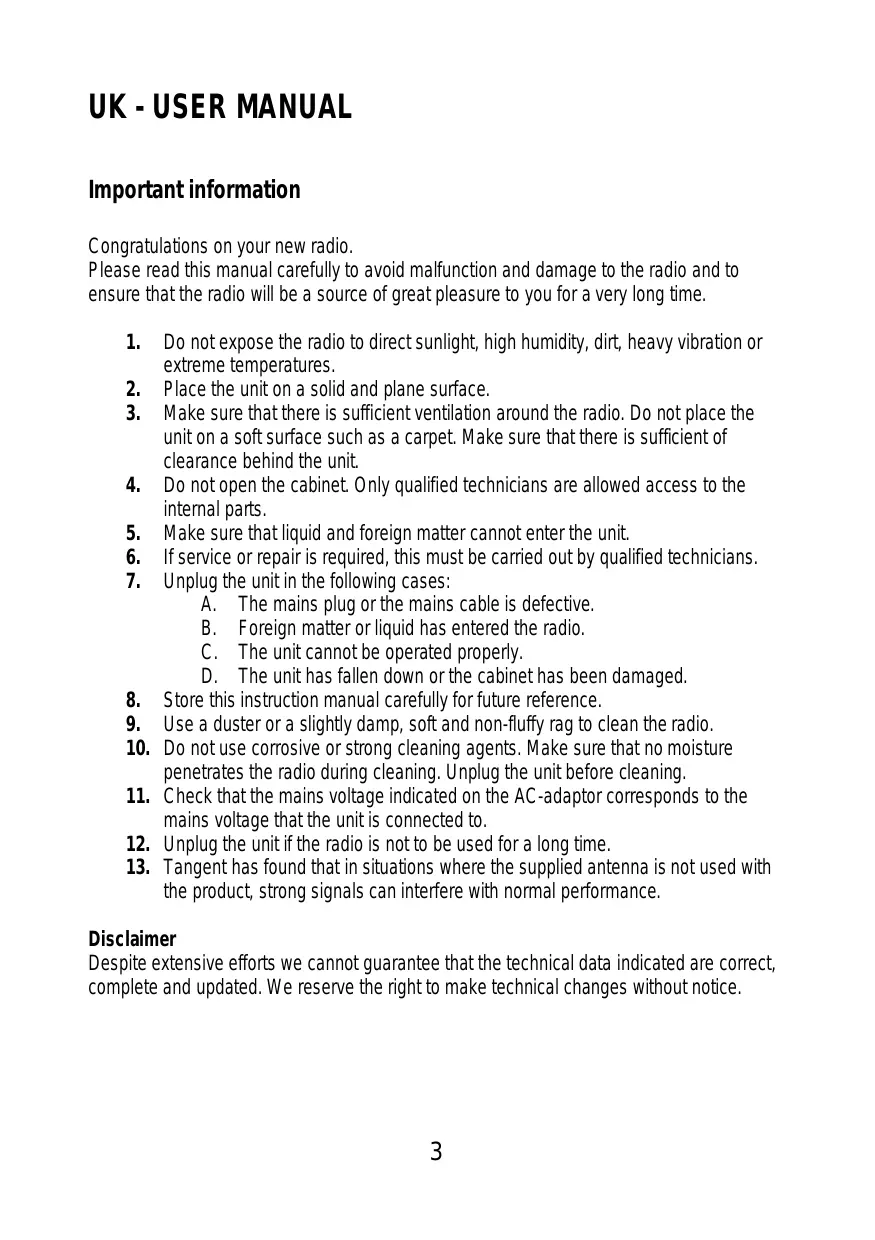


| Product type | Radio alarm clock with CD player and FM tuner |
| Brand | TANGENT |
| Model | ALIO CD-FM |
| Dimensions (W × H × D) | 210 × 135 × 200 mm |
| Weight | Approximately 1.5 kg (estimate) |
| Power supply | 12 V DC / 2 A (AC adapter included) |
| Speaker | 3.5-inch full-range |
| Output power | 10 W RMS @ 1% THD |
| Radio band | FM 87.5 – 108 MHz |
| CD player | CD, WMA, MP3 (ID3 tag) |
| Connectivity | Stereo AUX input (3.5 mm jack), iPhone/iPod dock |
| Main functions | Alarm, Snooze, Sleep, 8 FM presets, remote control, RDS information display |
| Cleaning and maintenance | Use a soft, lint-free cloth slightly damp; do not use corrosive products; unplug before cleaning |
| Safety | Do not expose to moisture, direct sunlight or extreme temperatures; do not open the casing; ensure adequate ventilation |
| Spare parts / repairability | Repair by qualified technicians only; no spare parts specified |
| General information | Manual available in multiple languages; check power supply voltage before connecting |
Frequently Asked Questions - ALIO CD-FM TANGENT
User questions about ALIO CD-FM TANGENT
0 question about this device. Answer the ones you know or ask your own.
Ask a new question about this device
Download the instructions for your Radio in PDF format for free! Find your manual ALIO CD-FM - TANGENT and take your electronic device back in hand. On this page are published all the documents necessary for the use of your device. ALIO CD-FM by TANGENT.
USER MANUAL ALIO CD-FM TANGENT
FM Radio, iPhone/iPod docking, CD player and AUX
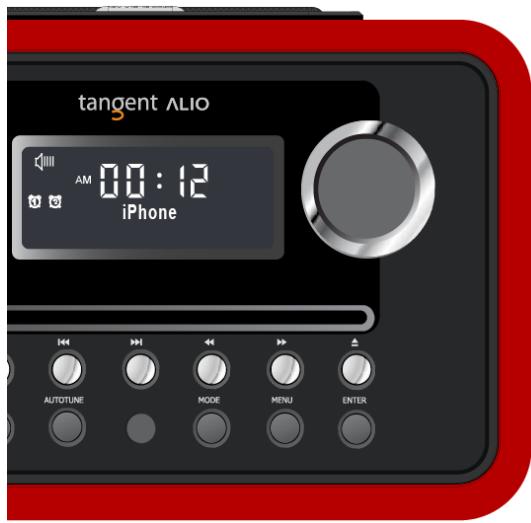
USER MANUAL
MODE D'EMPLOI
Contents 2
UK-USERMANUAL 3
Important information 3
Front panel 4
Top panel. 6
Rear panel 7
Remote control 8
Menu Description in FM Mode 10
Menu Description in iPhone/AUX Mode 11
Menu Description in CD Mode 11
Specifications 13
UK - USER MANUAL
Important information
Congratulations on your new radio.
Please read this manual carefully to avoid malfunction and damage to the radio and to ensure that the radio will be a source of great pleasure to you for a very long time.
- Do not expose the radio to direct sunlight, high humidity, dirt, heavy vibration or extreme temperatures.
- Place the unit on a solid and plane surface.
- Make sure that there is sufficient ventilation around the radio. Do not place the unit on a soft surface such as a carpet. Make sure that there is sufficient of clearance behind the unit.
- Do not open the cabinet. Only qualified technicians are allowed access to the internal parts.
- Make sure that liquid and foreign matter cannot enter the unit.
- If service or repair is required, this must be carried out by qualified technicians.
- Unplug the unit in the following cases:
A. The mains plug or the mains cable is defective.
B. Foreign matter or liquid has entered the radio.
C. The unit cannot be operated properly.
D. The unit has fallen down or the cabinet has been damaged.
- Store this instruction manual carefully for future reference.
- Use a duster or a slightly damp, soft and non-fluffy rag to clean the radio.
- Do not use corrosive or strong cleaning agents. Make sure that no moisture penetrates the radio during cleaning. Unplug the unit before cleaning.
- Check that the mains voltage indicated on the AC-adaptor corresponds to the mains voltage that the unit is connected to.
- Unplug the unit if the radio is not to be used for a long time.
- Tangent has found that in situations where the supplied antenna is not used with the product, strong signals can interfere with normal performance.
Disclaimer
Despite extensive efforts we cannot guarantee that the technical data indicated are correct, complete and updated. We reserve the right to make technical changes without notice.
Front panel
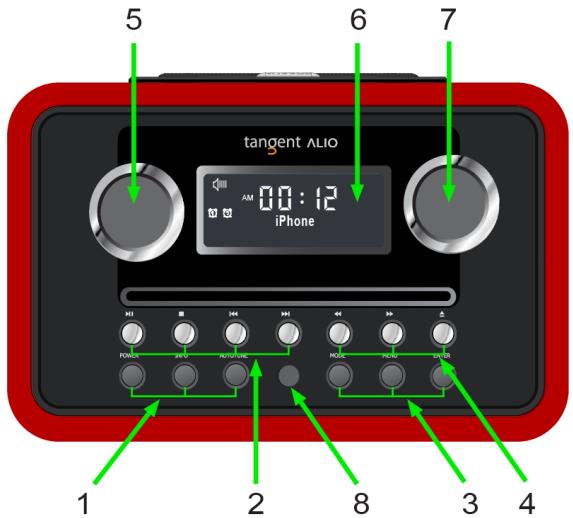
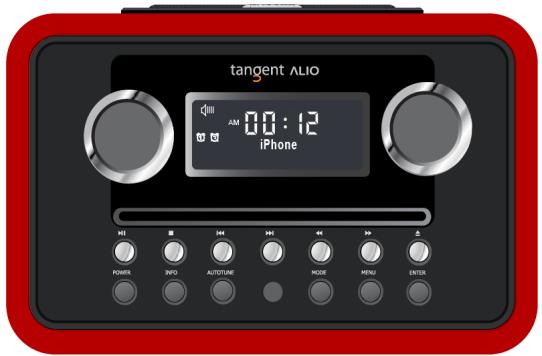
- POWER, INFO and AUTOTUNE:
A. POWER: Press this button to toggle the radio between ON and standby.
B. INFO: In FM mode, while receiving a broadcast signal, press this button to display queue information.
C. AUTOTUNE: In FM mode, press this button to autotune.
2.
iPhone/iPod and CD mode only:
A. Press or once to go to the previous or next track respectively.
B. Press▶to pause, press▶ again to continue enjoying.
C. Press to stop, press to exit stop.
- MODE, MENU and ENTER:
A. MODE: Press this button to shift between FM, iPhone, CD and AUX. CD and AUX are only featured when a plug or disc is present.
B. MENU: Press this button to access the menu.
C. ENTER: a. Press this button to confirm.
4.
CD_mode_only:
A. While playing a track, press and hold or to fast back- or forward.
B. Press to eject a CD from the CD slot.
- VOLUME:
Turn this knob CW to increase the volume or CCW to decrease the volume.
- DISPLAY SCREEN: LCD featuring special icons.
- TUNE: Turn this knob to browse options and in FM mode stations can be tuned manually in 0.05MHz steps.
- IR Receiver: Infrared receiver eye.
Top panel
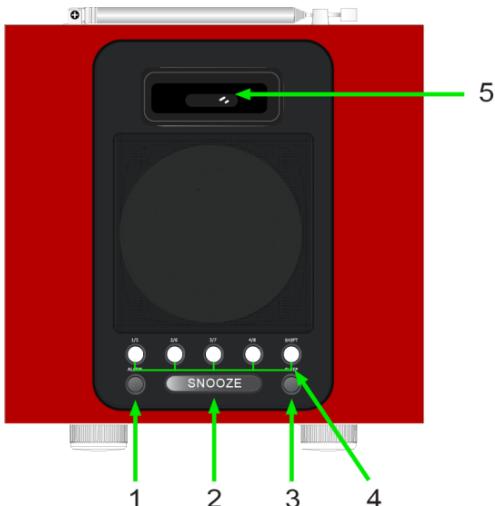
- ALARM: Press this button to set an alarm.
- SNOOZE: When an alarm is given, press this button to postpone it for 7 minutes (default). While under SNOOZE function, the display of the radio will indicate Snooze, during this time, if you press any another button, snooze will be canceled.
- SLEEP: Press this button to amend the sleep setting.
- Preset buttons 1/5 2/6 3/7 4/8 and SHIFT: FM_mode_use_only;
A. To store a station in preset 1-4: press and hold the preferred preset button, until the display indicates 'Preset # stored'.
B. To store a station in preset 5-8: press the SHIFT button once, press and hold the preferred preset button, until the display indicates 'Preset # stored'.
C. To recall a stored in preset station 1-4: press the preferred preset button once.
D. To recall a stored in preset station 5-8: press the SHIFT button once, press the preferred preset button once.
- iPhone/iPod Docking: For playback and charging an iPhone/iPod.
Rear panel
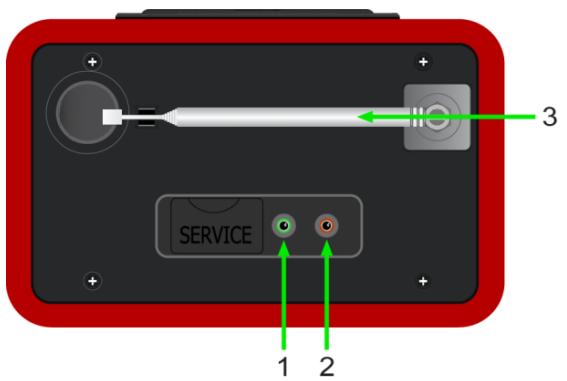
- AUX: Connect any stereo or mono audio source to this stereo input.
- POWER SUPPLY: 12VDC---2.0A use this input to connect the radio's DC power supply.
- EXTERNAL ANTENNA: The radio comes with a telescopic antenna. To improve FM reception, angle the antenna for best the reception.
Remote control

- POWER: Press this button to toggle the radio between ON and standby.
- A. ▲: For navigation of the menu, iPhone/iPod and CD.
B. ENTER: Press this button to confirm.
- MEMORY: No function.
- +TUNING-:
Stations can be tuned manually in 0.05MHz steps.
- INFO, AUTOTUNE and ST/MO:
A. INFO: In FM mode, while receiving a broadcast signal, press this button to display queue information.
B. AUTOTUNE: In FM mode, press this button to autotune.
C. ST/MO: In FM mode, press this button to shift between stereo or mono.
- MODE and
A. MODE: Press this button to shift between FM, iPhone, CD and AUX. CD and AUX are only featured when a plug or disc is present.
B. Press this button to mute or unmute.
- +VOL: Press this button to adjust the volume level.
- Same as front panel section.
- Preset buttons 1/6 2/7 3/8 4/9 5/10 and SHIFT: Same as top panel section.
- MENU: Press this button to access the menu.
- DIM: Press this button to adjust dimmer.
- : Press to eject a CD from the CD slot.
Menu Description in FM Mode



Bnss nepap saeepu
Menu Description in iPhone/AUX Mode
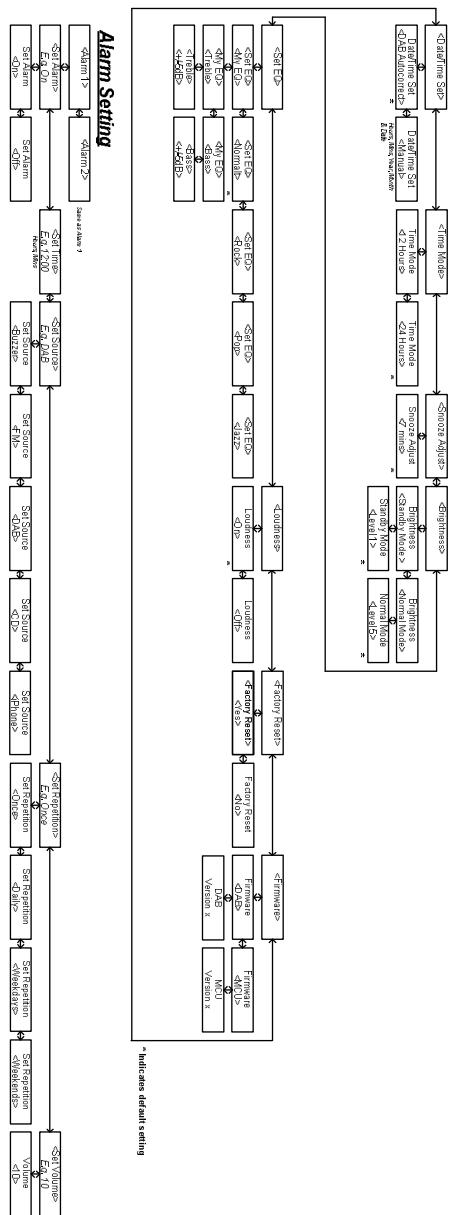
Menu Description in CD Mode
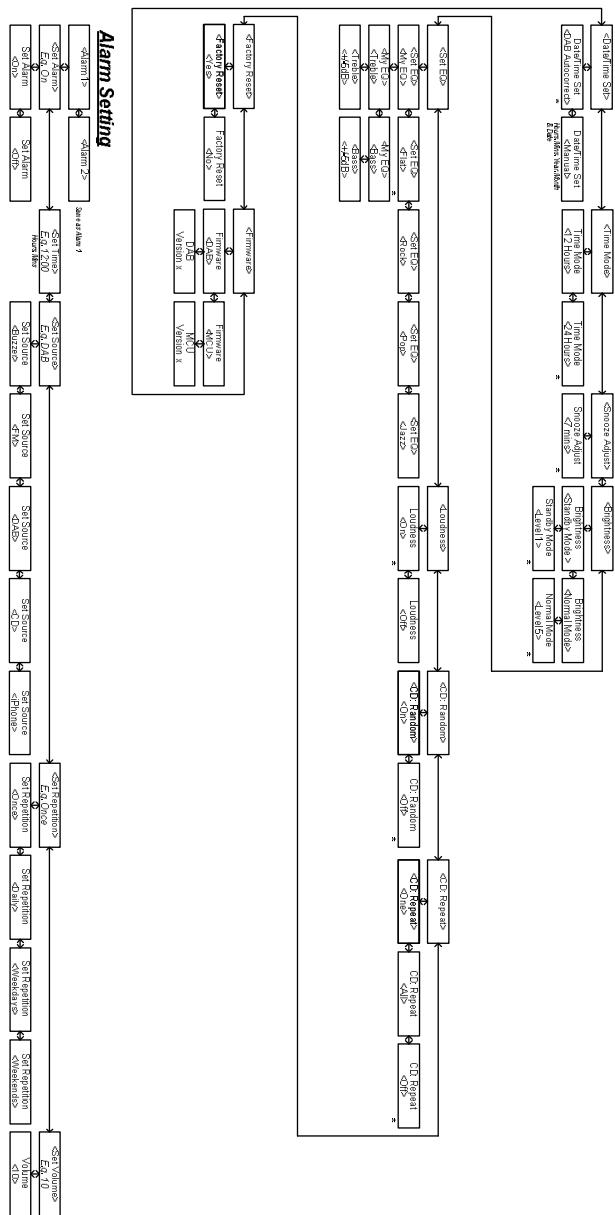
Specifications
Speaker: 3.5" wide range speaker
Power Output: 10 Watt RMS@1% THD
Connections: 3,5mm jack for stereo analog audio AUX input
12 V DC input
Power: DC 12V/2A
Tuner Band: FM (87.5 - 108MHz)
CD Decoding: Regular CD, WMA and MP3 (ID3-tag)
Dimensions: 210 × 135 × 200 mm (W × H × D)
All specifications are subject to change without notice.

Made for iPhone

Made for iPod
iPhone, iPod, iPod classic, iPod nano, iPod shuffle, and iPod touch are trademarks of Apple Inc., registered in the U.S. and other countries. iPad is a trademark of Apple Inc.
Sommaire
iPhone, iPod, iPod classic, iPod nano, iPod shuffle, and iPod touch are trademarks of Apple Inc., registered in the U.S. and other countries. iPad is a trademark of Apple Inc.
Inhaltsverzeichnis
iPhone, iPod, iPod classic, iPod nano, iPod shuffle, and iPod touch are trademarks of Apple Inc., registered in the U.S. and other countries. iPad is a trademark of Apple Inc.
Inhoudsopgave
iPhone, iPod, iPod classic, iPod nano, iPod shuffle, and iPod touch are trademarks of Apple Inc., registered in the U.S. and other countries. iPad is a trademark of Apple Inc.
Indhold
Indhold 50
DK-BRUGERMANUAL 51
Vigtig information 51
Frontpanel 52
Toppanel. 54
Bagpanel. 55
Fjernbetjening. 56
Beskrivelse af FM-menuen 58
Beskrivelse af menuerne for iPhone/AUX. 59
Beskrivelse af CD-menuen 60
Specificationer 61
DK - BRUGERMANUAL
Vigtig information
Strømforsyning: DC 12V/2A
Frekvensbänd: FM (87,5 - 108MHz)
CD-afkodning: Normal CD, WMA og MP3 (ID3-tag)
Mäl: 210 × 135 × 200 mm (B x H x D)
iPhone, iPod, iPod classic, iPod nano, iPod shuffle, and iPod touch are trademarks of Apple Inc., registered in the U.S. and other countries. iPad is a trademark of Apple Inc.
Innehåll
Innehall 62
SE - BRUKSANVISNING 63
Viktig information 63
Frampanel 64
Övre panel 66
Bakpanel. 67
Fjarrkontroll 68
Menybeskrivning i FM Mode 70
Menybeshrivning i iPhone/AUX Mode 71
Menybeshkrivning i CD Mode. 72
Specificationer 73
SE - BRUKSANVISNING
Viktig information
Grattis till din nya radio.
iPhone, iPod, iPod classic, iPod nano, iPod shuffle, and iPod touch are trademarks of Apple Inc., registered in the U.S. and other countries. iPad is a trademark of Apple Inc.
Sisallysluettelo
iPhone, iPod, iPod classic, iPod nano, iPod shuffle, and iPod touch are trademarks of Apple Inc., registered in the U.S. and other countries. iPad is a trademark of Apple Inc.
Indice
- Pulsanti pre-impostati 1/6 2/7 3/8 4/9 5/10 e SHIFT:
iPhone, iPod, iPod classic, iPod nano, iPod shuffle, and iPod touch are trademarks of Apple Inc., registered in the U.S. and other countries. iPad is a trademark of Apple Inc.
Contedio
iPhone, iPod, iPod classic, iPod nano, iPod shuffle, and iPod touch are trademarks of Apple Inc., registered in the U.S. and other countries. iPad is a trademark of Apple Inc.
Contudos
iPhone, iPod, iPod classic, iPod nano, iPod shuffle, and iPod touch are trademarks of Apple Inc., registered in the U.S. and other countries. iPad is a trademark of Apple Inc.
DESIGN - PERFORMANCE - AFFORDABILITY
THE OBJECTIVE OF EVERY TANGENT PRODUCT IS THAT FUNDAMENTALLY CORRECT DESIGN CAN PRODUCE A PRODUCT CAPABLE OF ACHIEVING EXCELLENT PERFORMANCE AND AFFORDABILITY.
www.tangent-audio.com
Item no.: 40631.01


- UK - USER MANUAL
- Important information
- Disclaimer
- Front panel
- Top panel
- Rear panel
- Remote control
- Menu Description in FM Mode
- Menu Description in iPhone/AUX Mode
- Menu Description in CD Mode
- Specifications
- Made for iPhone
- Made for iPod
- Sommaire
- Inhaltsverzeichnis
- Inhoudsopgave
- Indhold
- DK - BRUGERMANUAL
- Vigtig information
- Innehåll
- SE - BRUKSANVISNING
- Viktig information
- Grattis till din nya radio.
- Sisallysluettelo
- Indice
- Contedio
- Contudos
Brand : TANGENT
Model : ALIO CD-FM
Category : Radio