
PICCOLO - Thermometer Hygrometer IROX - Free user manual and instructions
Find the device manual for free PICCOLO IROX in PDF.



User questions about PICCOLO IROX
0 question about this device. Answer the ones you know or ask your own.
Ask a new question about this device
Download the instructions for your Thermometer Hygrometer in PDF format for free! Find your manual PICCOLO - IROX and take your electronic device back in hand. On this page are published all the documents necessary for the use of your device. PICCOLO by IROX.
USER MANUAL PICCOLO IROX
INDOOR THERMO/HYGROMETER WITH MIN./MAX. MEMORY
IROX PICCOLO
USER'S MANUAL
1. Introduction
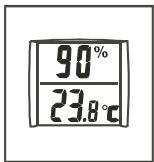
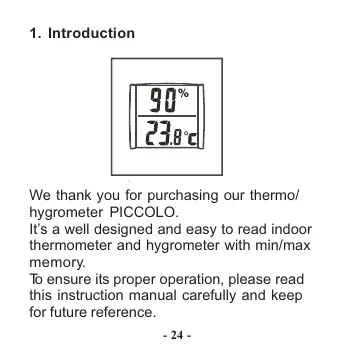
We thank you for purchasing our thermo/hygrometer PICCOLO.
It's a well designed and easy to read indoor thermometer and hygrometer with min/max memory.
To ensure its proper operation, please read this instruction manual carefully and keep for future reference.
2. Battery installation
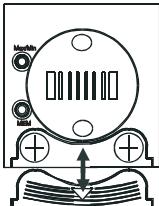
Press and slide down the battery lid to get access to the battery compartment.
Insert 2 pieces LR44 button cell batteries with positive (+) polarity facing up. Then close the battery lid.
3. Recording and reading the Max/Min memory
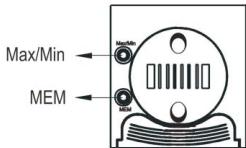
Please note: The Min/Max Data will only be recorded if the Memory Mode has been activated (Icon,"MEM" active on the display). All such records will be deleted when you leave the Memory-Mode
- Press the MEM button to enter the memory mode and to start the recording of the Min/Max-Data.
- Press the Min/Max button to read the maximum temperature/humidity
- Press the Min/Max button to read the minimum temperature/humidity
- To stop the recording and to clear the memory, press the MEM key (Icon , MEM" disappears from the display)
4. Stand installation
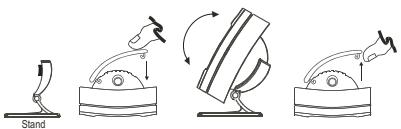
- Push in one side according the above instructions
- Move up or down for the desired viewing angle
- Lift off the one side to remove the stand
5. Precautions
This product is engineered to give you years of satisfactory service if you handle it carefully. Here a few precautions:
- Do not immerse the unit in water
- Do not clean the unit with abrasive or corrosive materials. They may scratch the plastic parts and corrode the electronic circuit.
- Do not subject the unit to excessive force, shock, dust, temperature or humidity, which may result in malfunction, shorter electronic life span, damaged battery and distorted parts.
- Do not tamper with the unit's internal components. Doing so will invalidate the warranty on the unit and may cause unnecessary damage. The unit contains no
user-serviceable parts.
- Only use fresh batteries as specified in the user's manual. Do not mix new and old batteries as the old ones may leak.
- Always read the user's manual thoroughly before operating the unit
6. Specifications
Proposed operation range:
Temperature : 0^ to +50^ , resolution 0,1°C
Rel. humidity : 20% to 99%, resolution 1%
Sensing cycle : approx. 10 seconds
Power : 2 pcs LR44 batteries
Dimensions : 68 x 58 x 33 mm
Weight : 55g
IROX
Gerät / Modèle / Nome del prodotto / product
Händler (Adrese) / Nom du revendeur (Adresse)
Nome del negoziente (indirizzo) / Dealer's name (address):
www.irox.com
Kaufdatum / Date d'achat / Data d'acquisito / Date of purchase