
FLIP66 - Smartwatch IROX - Free user manual and instructions
Find the device manual for free FLIP66 IROX in PDF.


User questions about FLIP66 IROX
0 question about this device. Answer the ones you know or ask your own.
Ask a new question about this device
Download the instructions for your Smartwatch in PDF format for free! Find your manual FLIP66 - IROX and take your electronic device back in hand. On this page are published all the documents necessary for the use of your device. FLIP66 by IROX.
USER MANUAL FLIP66 IROX
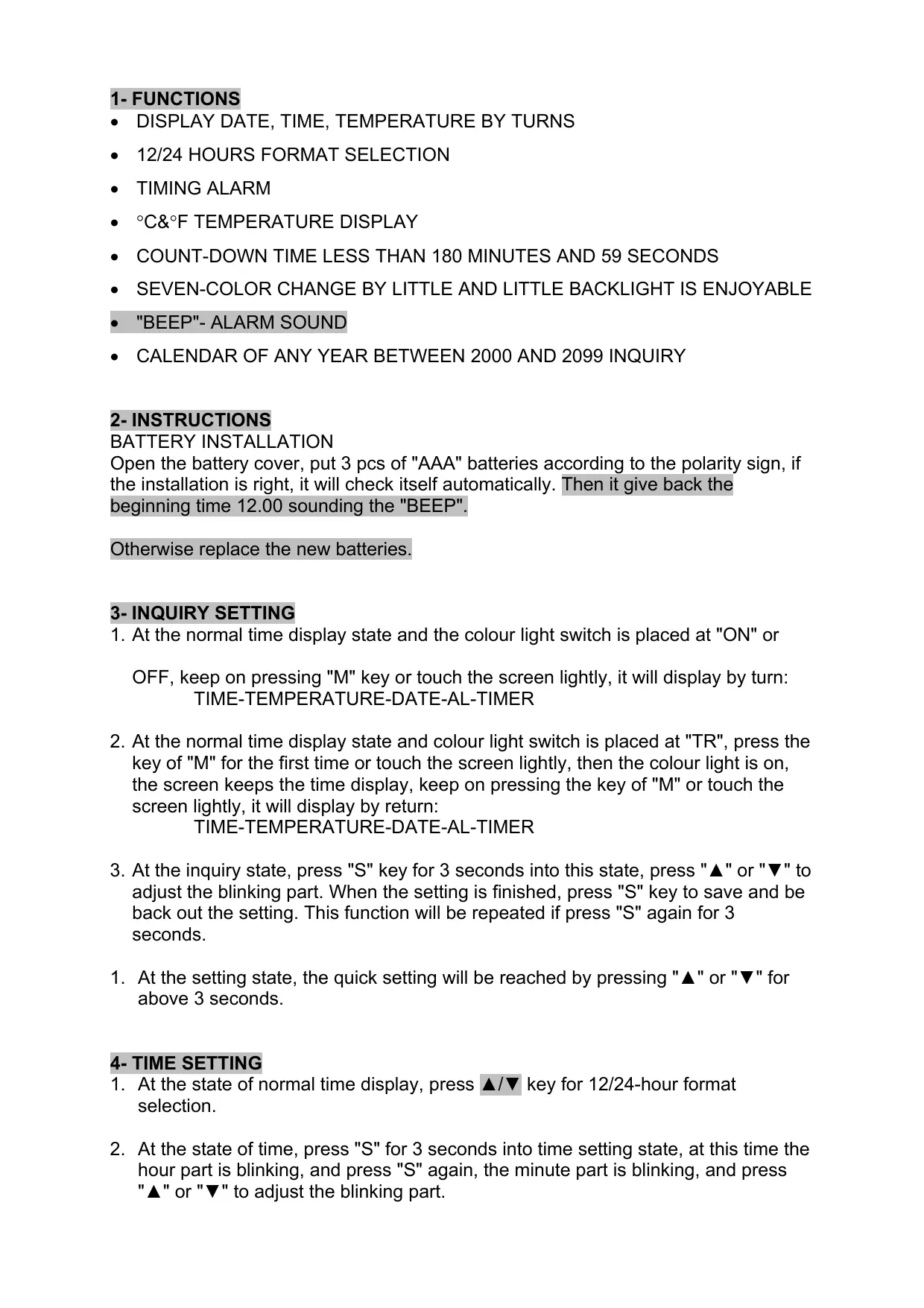
Open the battery cover, put 3 pcs of "AAA" batteries according to the polarity sign, if the installation is right, it will check itself automatically. Then it give back the beginning time 12.00 sounding the "BEEP".
Otherwise replace the new batteries.
3- INQUIRY SETTING
- At the normal time display state and the colour light switch is placed at "ON" or
OFF, keep on pressing "M" key or touch the screen lightly, it will display by turn: TIME-TEMPERATURE-DATE-AL-TIMER
- At the normal time display state and colour light switch is placed at "TR", press the key of "M" for the first time or touch the screen lightly, then the colour light is on, the screen keeps the time display, keep on pressing the key of "M" or touch the screen lightly, it will display by return:
TIME-TEMPERATURE-DATE-AL-TIMER - At the inquiry state, press "S" key for 3 seconds into this state, press "▲" or "▼" to adjust the blinking part. When the setting is finished, press "S" key to save and be back out the setting. This function will be repeated if press "S" again for 3 seconds.
- At the setting state, the quick setting will be reached by pressing "▲" or "▼" for above 3 seconds.
4-TIME SETTING
-
At the state of normal time display, press / key for 12/24-hour format selection.
-
At the state of time, press "S" for 3 seconds into time setting state, at this time the hour part is blinking, and press "S" again, the minute part is blinking, and press "▲" or "▼" to adjust the blinking part.
5-TEMPERATURE INQUIRY
At the state of time, press "M" one time into temperature display state and the temperature inquiry will be ok. Press ▲/▼ for °C&°F selection
6- YEARCALENDAR SETTING
At the state of time, press "M" key for two times, then press "S" into the state of year calendar setting for 3 seconds. Press "S" to set the year, month and day in turn. Press "▲" or "▼" to adjust the blinking parts. The weekday will be changed according to the setting of year, month and day.
7-COUNT-DOWN TIME SETTING
At the state of time, press "M" for four times, then press "S" for 3 seconds into the count-down time setting state. Press "S" to set the count-down time, minute, second, on or pause by turn. Press "▲" or "▼" to adjust the blinking part.
When the count-down time, press "▲" to return the former setted time. The max for count-down time is 180 minutes and 59 seconds; the min is 1 minute. You will be reminded when the count-down time reaches zero by the regular sound "BEEP" and the alarm time is 60 seconds and the display is blinking in different colours, the alarm is end and the symbol is disappearing
8- ALARM TIME SETTING
At the state of time, press "M" three times, then press "S" for 3 seconds into alarm setting. Press "S" to set the alarm hour, minute turn on and turn off function. Press
"▲" or "▼" to adjust the blinking part, if there is a symbol of " display, then the alarm is turned on. It reaches the setted alarm time, 60 seconds of "BEEP" is going.
No the symbol of " ", the alarm is turned off. When reaching the alarm time, the alarm is arising until the alarm time is end.
COLOUR-LIGHT ENJOYMENT
When the "BACK LIGHT" switch is placed the position of "TR", any key operation, inquiry, alarm can control the change of seven-colour light. When at the position of "ON", the seven-colour light will be changeable little by little. When at the position of "OFF" the colour light will be off.
DISPLAY CONTROL
When the "RETURN TO TIME" switch is placed at the position of "ON" at any state and no any operation in 10 seconds, it displays time automatically, and when the switch is at the position of "OFF" the display will keep the last state all the time.
9-IMPORTANT NOTICE
ATTENTIONS
-
If there are any phenomena of low alarm sound, paucity, blurry time display no colour light or dark light, please replace new batteries.
-
The colour light is for short time enjoyment, not turn on the colour light for long time.
- At any abnormal phenomenon, please press "RESET" to turn it on again.
- Reset the time and alarm batteries replaced.
- At any abnormal state, please get the professional help or contact our company.