
2635W - Wireless Network Card SMC - Free user manual and instructions
Find the device manual for free 2635W SMC in PDF.


User questions about 2635W SMC
0 question about this device. Answer the ones you know or ask your own.
Ask a new question about this device
Download the instructions for your Wireless Network Card in PDF format for free! Find your manual 2635W - SMC and take your electronic device back in hand. On this page are published all the documents necessary for the use of your device. 2635W by SMC.
USER MANUAL 2635W SMC
2.4GHz 11Mbps Wireless Cardbus Adapter
2.4GHz 11Mbps Wireless Cardbus Adapter
2,4 GHz 11 Mbit/s Wireless Cardbus Adapter
Carte Cardbus Wireless 2.4GHz 11Mbps
Adaptador Cardbus inalambrico de 2,4 GHz y 11 Mbps
Scheda Cardbus wireless 2.4 GHz 11 Mbps
2,4 GHz 11 Mbps Wireless Cardbus Adapter
2.4GHz 11Mbps Wireless Cardbus Adapter
Quick Installation Guide
Thank you for choosing the SMC Networks EZ Connect™ 2.4GHz 11Mbps Wireless Cardbus Adapter. This EZ Quick Installation Guide provides simple setup instructions. For additional information, see the manual included on the CD-ROM.
Box Contents:
- One EZ Connect 11Mbps Wireless Cardbus Adapter
- One Quick Installation Guide
- One EZ Installation Wizard and Documentation CD*
Before you begin installation, please verify the following:
- All of the box contents are included.
An available Cardbus PCMCIA Type II slot. - Windows 98/ME/2000/XP (have the Windows Installation CD-ROM ready for use during driver installation).
- A minimum of 1 MB of free disk space for driver and utility program.
- Another IEEE 802.11b compliant device installed in your network, such as the Barricade Wireless Cable/DSL Broadband Router (SMC7004VWBR), or another wireless adapter, such as the EZ Connect™ Wireless USB Adapter (SMC2662W).
*Please run the EZ Installation Wizard and Documentation CD BEFORE installing the SMC2635W.
Using EZ Installation Wizard
The EZ Installation Wizard makes the process as simple and Plug-and-Play as possible. Simply run the driver/utility program, reboot your machine and insert your EZ Connect 2.4GHz 11Mbps Wireless Cardbus Adapter SMC2635W. It is as easy as 1-2-3.
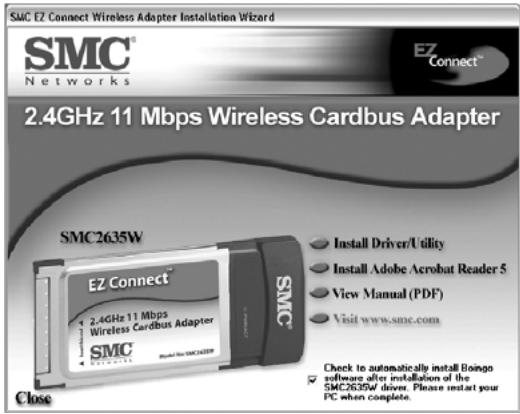
1) Insert the EZ Installation Wizard and Documentation CD into the CD-ROM driver and click [Install Driver/Utility] when the installation screen appears.
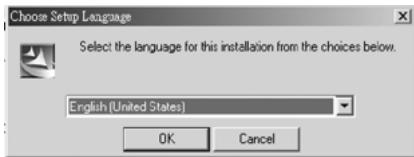
2) The Choose Setup Language dialog box will now appear.
3) Select the appropriate language and click [OK].
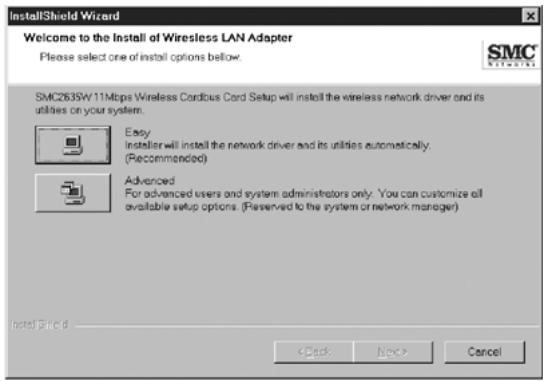
4) The auto-run program will display the InstallShield Wizard.
5) Select [Easy] and follow the on-screen instructions to complete the installation.
6) The [Country Select] dialog box will appear.
7) Select the appropriate country.

8) Click [Finish] to complete the setup.
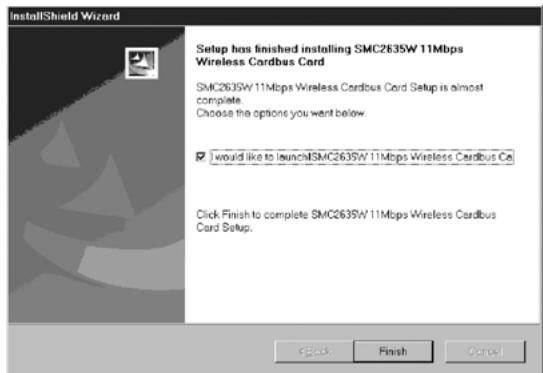
9) Please shut down your machine and insert your SMC2635W adapter. Once the Windows Operating System is booted up, it will find the new hardware and automatically install it.
EZ Connect™ 2,4 GHz 11 Mbit/s Wireless Cardbus Adapter SMC2635W
Federal Communication Commission Interference Statement
This equipment has been tested and found to comply with the limits for a Class B digital device, pursuant to Part 15 of the FCC Rules. These limits are designed to provide reasonable protection against harmful interference in a residential installation. This equipment generates, uses and can radiate radio frequency energy and, if not installed and used in accordance with the instructions, may cause harmful interference to radio communications. However, there is no guarantee that interference will not occur in a particular installation. If this equipment does cause harmful interference to radio or television reception, which can be determined by turning the equipment off and on, the user is encouraged to try to correct the interference by one of the following measures:
- Reorient or relocate the receiving antenna.
- Increase the separation between the equipment and receiver.
- Connect the equipment into an outlet on a circuit different from that to which the receiver is connected.
- Consult the dealer or an experienced radio/TV technician for help.
FCC Caution: Any changes or modifications not expressly approved by the party responsible for compliance could void the user's authority to operate this equipment.
This device complies with Part 15 of the FCC Rules. Operation is subject to the following two conditions: (1) This device may not cause harmful interference, and (2) this device must accept any interference received, including interference that may cause undesired operation.
IMPORTANT NOTE:
FCC Radiation Exposure Statement: This equipment complies with FCC radiation exposure limits set forth for an uncontrolled environment. This equipment should be installed and operated with minimum distance 20cm between the radiator & your body.
This transmitter must not be co-located or operating in conjunction with any other antenna or transmitter.
Industry Canada - Class B
This digital apparatus does not exceed the Class B limits for radio noise emissions from digital apparatus as set out in the interference-causing equipment standard entitled "Digital Apparatus," ICES-003 of the Department of Communications.
Full installation manuals are provided on the Installation CD-Rom. Manuals in other languages than those included on the CD-Rom are provided on www.smc-europe.com (section support).
Firmware and Drivers
For latest driver, technical information and bug-fixes please visit www.smc-europe.com (section support).
Limited Lifetime Warranty Statement
For detailed information on SMC's limited lifetime warranty please check the English full manual on this CD-Rom or visit www.smc-europe.com (section support, product registration).
Contact SMC
Contact details for your relevant countries are available on www.smc-europe.com and www.smc.com.
Statement of Conditions
In line with our continued efforts to improve internal design, operational function, and/or reliability, SMC reserves the right to make changes to the product(s) described in this document without notice. SMC does not assume any liability that may occur due to the use or application of the product(s) described herein. In order to obtain the most accurate knowledge of installation, bug-fixes and other product related information we advise to visit the relevant product support page at www.smc-europe.com before you start installing the equipment. All information is subject to change without notice.
Limitation of Liability
In no event, whether based in contract or tort (including negligence), shall SMC be liable for incidental, consequential, indirect, special or punitive damages of any kind, or for loss of revenue, loss of business or other financial loss arising out of or in connection with the sale, installation, maintenance, use, performance, failure or interruption of its products, even if SMC or its authorized reseller has been advised of the possibility of such damages.
Copyright
Information furnished by SMC Networks, Inc. (SMC) is believed to be accurate and reliable. However, no responsibility is assumed by SMC for its use, nor for any infringements of patents or other rights of third parties which may result from its use. No license is granted by implication or otherwise under any patent or patent rights of SMC. SMC reserves the right to change specifications at any time without notice.
Trademarks
SMC is a registered trademark and EZ Connect is a trademark of SMC Networks, Inc. Other product and company names are trademarks or registered trademarks of their respective holders.