
FPBM189KF - Fridge FRIGIDAIRE - Free user manual and instructions
Find the device manual for free FPBM189KF FRIGIDAIRE in PDF.



| Product Type | Microwave Oven with Integrated Hood |
| Brand | FRIGIDAIRE |
| Model | FPBM189KF |
| Power Supply | 120 V, 60 Hz, 15 A, dedicated circuit |
| Appliance Weight (with contents) | 50 kg (110 lb) |
| Dimensions (W x H x D) | 76.2 x 43.2 x 33 cm (approximate) |
| Vent Type | Recirculation, horizontal or vertical venting |
| Maximum Duct Diameter | 15.2 cm (6 in) round or 8.3 x 25.4 cm (3 1/4 x 10 in) rectangular |
| Maximum Duct Length | 42.7 m (140 ft) |
| Main Functions | Microwave, exhaust hood, turntable, lighting |
| Filters | 2 metal grease filters and 2 charcoal filters (recirculation) |
| Filter Maintenance | Charcoal filters: replace every 6 to 12 months |
| Electrical Safety | 3-prong grounding plug, do not use an extension cord |
| Mounting Type | Above a range, on wall with mounting plate |
| Installation Hardware Provided | Screws, wing nuts, washers, templates, vent assembly, etc. |
| Available Replacement Parts | Filters, turntable, vent assembly, grease filters |
| General Information | 24-page use and installation manual |
Frequently Asked Questions - FPBM189KF FRIGIDAIRE
User questions about FPBM189KF FRIGIDAIRE
0 question about this device. Answer the ones you know or ask your own.
Ask a new question about this device
Download the instructions for your Fridge in PDF format for free! Find your manual FPBM189KF - FRIGIDAIRE and take your electronic device back in hand. On this page are published all the documents necessary for the use of your device. FPBM189KF by FRIGIDAIRE.
USER MANUAL FPBM189KF FRIGIDAIRE
INSTALLATION INSTRUCTIONS
Over The Range Microwave Oven
BEFORE YOU BEGIN
- IMPORTANT Save these instructions for local inspector's use.
- IMPORTANT Observe all governing codes and coordinates.
NOTE TO INSTALLER - Be sure to leave these instructions with the Consumer.
NOTE TO CONSUMER - Keep these instructions for future reference. - SKILL LEVEL – Installation of this appliance requires basic mechanical and electrical skills.
Read these instructions completely and carefully.
- Proper installation is the responsibility of the installer.
- Product failure due to improper installation is not covered under the Warranty.
- Please read all instructions thoroughly before installing the Over the Range Microwave Oven. Two people are recommended to install this product.
- If a new electrical outlet is required, its installation should be completed by a qualified electrician before the Over the Range Microwave Oven is installed. See 3 ELECTRICAL GROUNDING INSTRUCTIONS on page 2.
1 MOUNTING SPACE
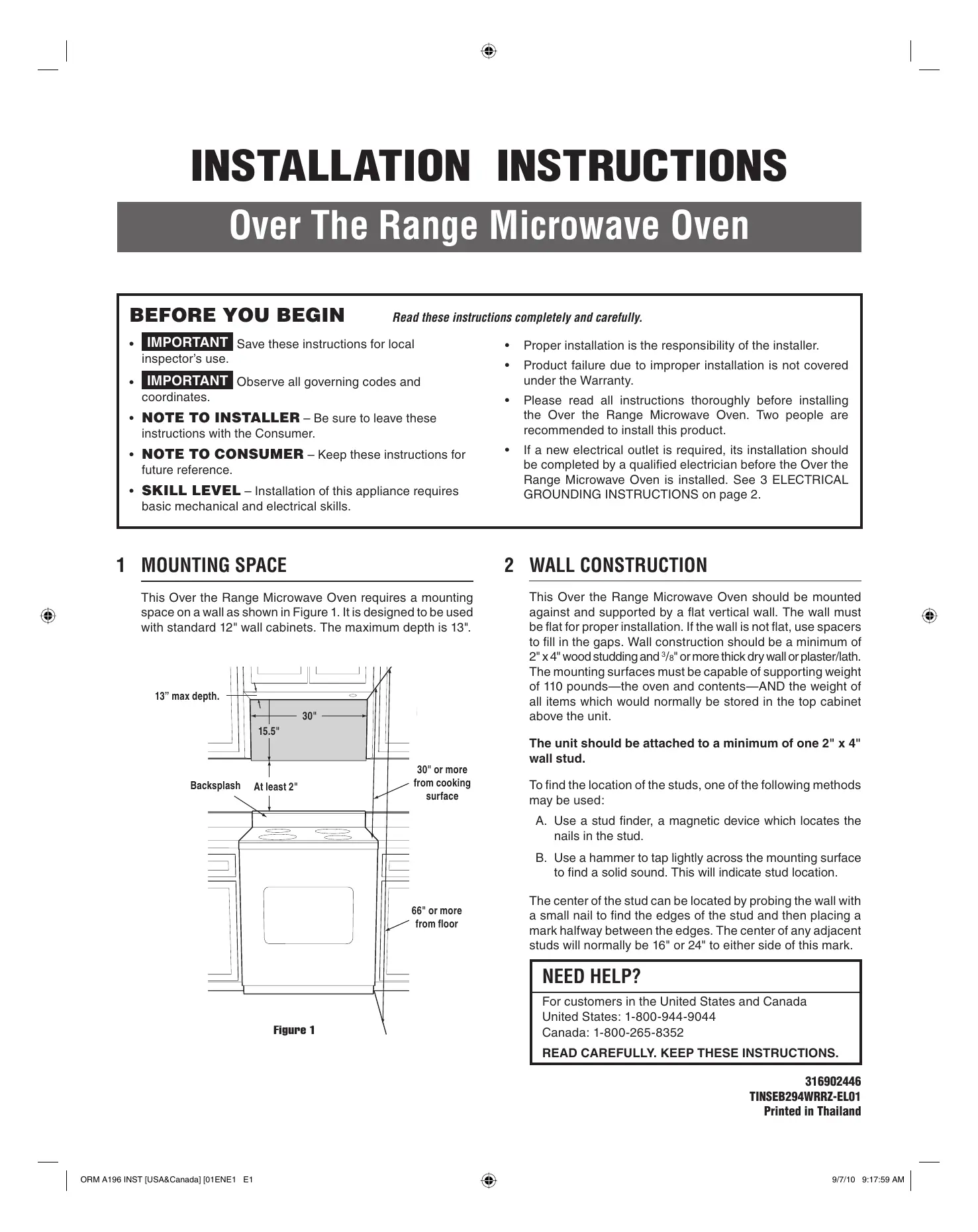
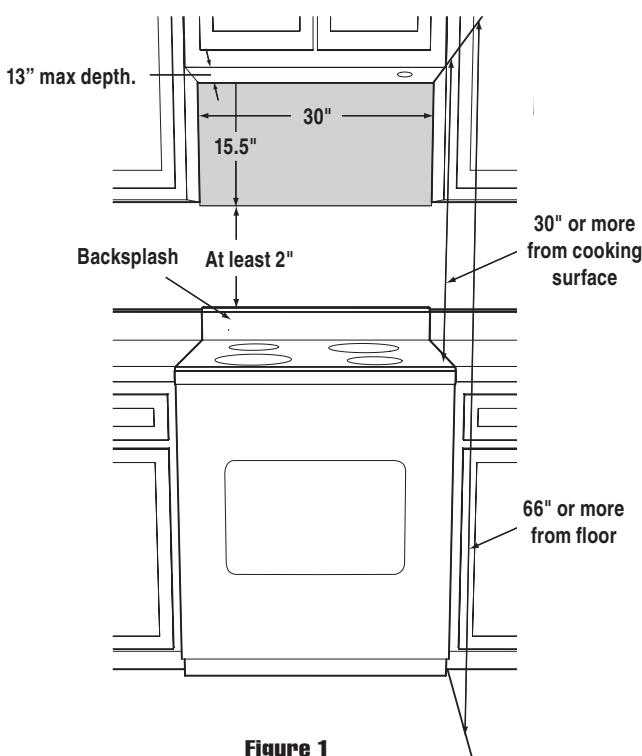
This Over the Range Microwave Oven requires a mounting space on a wall as shown in Figure 1. It is designed to be used with standard 12" wall cabinets. The maximum depth is 13".
2 WALL CONSTRUCTION
This Over the Range Microwave Oven should be mounted against and supported by a flat vertical wall. The wall must be flat for proper installation. If the wall is not flat, use spacers to fill in the gaps. Wall construction should be a minimum of 2'' × 4'' wood studding and 3/8'' or more thick dry wall or plaster/lath. The mounting surfaces must be capable of supporting weight of 110 pounds—the oven and contents—AND the weight of all items which would normally be stored in the top cabinet above the unit.
The unit should be attached to a minimum of one 2'' × 4'' wall stud.
To find the location of the studs, one of the following methods may be used:
A. Use a stud finder, a magnetic device which locates the nails in the stud.
B. Use a hammer to tap lightly across the mounting surface to find a solid sound. This will indicate stud location.
The center of the stud can be located by probing the wall with a small nail to find the edges of the stud and then placing a mark halfway between the edges. The center of any adjacent studs will normally be 16'' or 24'' to either side of this mark.
NEED HELP?
For customers in the United States and Canada
United States: 1-800-944-9044
Canada: 1-800-265-8352
READ CAREFULL. KEEP THESE INSTRUCTIONS.
3 ELECTRICAL GROUNDING INSTRUCTIONS
This appliance must be grounded. This oven is equipped with a cord having a grounding wire with a grounding plug. It must be plugged into a wall receptacle that is properly installed and grounded in accordance with the National Electrical Code and local codes and ordinances. In the event of an electrical short circuit, grounding reduces risk of electric shock by providing an escape wire for the electric current.
WARNING - Improper use of the grounding plug can result in a risk of electric shock.
ELECTRICAL REQUIREMENTS
The oven is equipped with a 3-prong grounding plug. DO NOT UNDER ANY CIRCUMSTANCES CUT OR REMOVE THE GROUNDING PIN FROM THE PLUG.
DO NOT USE AN EXTENSION CORD. If the power supply cord is too short, have a qualified electrician or serviceman install an outlet near the appliance.
The Power Supply Cord and plug must be connected to a separate 120 Volt AC, 60Hz , 15 Amp, or more branch circuit, single grounded receptacle. The receptacle should be located inside the cabinet directly above the Microwave Oven mounting location as shown in Figure 2.
NOTE:
- If you have any questions about the grounding or electrical instructions, consult a qualified electrician or serviceperson.
- Neither Electrolux nor the dealer can accept any liability for damage to the oven or personal injury resulting from failure to observe the correct electrical connection procedures.
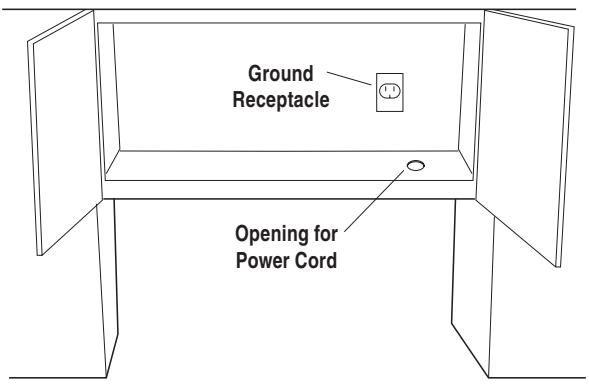
Figure 2
4 HOOD EXHAUST DUCT
When the hood is vented to the outside, a hood exhaust duct is required. All ductwork must be metal; absolutely do not use plastic duct. Check that all connections are made securely. Please read the following carefully:
EXHAUST CONNECTION: The hood exhaust has been designed to connect to a standard 3^1/4 x 10" rectangular duct. If round duct is required, a rectangular-to-round adapter must be used.
REAR EXHAUST: If a rear or horizontal exhaust is to be used, care should be taken to align the exhaust with the space between the studs, or wall should be prepared at the time it is constructed by leaving enough space between wall studs to accommodate exhaust.
MAXIMUM DUCT LENGTH: For satisfactory air movement, the total duct length of 3^1/4 x 10" rectangular or 6" diameter round duct should not exceed 140 feet.
Elbows, adapters, wall caps, roof caps, etc. present additional resistance to air flow and are equivalent to a section of straight duct which is longer than their actual physical size. When calculating the total length, add the equivalent lengths of all transitions and adapters plus the length of all straight duct sections. Figure 3 shows the approximate feet of equivalent length of some typical ductwork parts. Use the values in parentheses for calculating air flow resistance equivalent, which should total less than 140 feet.
NOTE:
Furnace duct sealing tape is recommended to seal duct connections to the Exhaust Dampener Assembly.
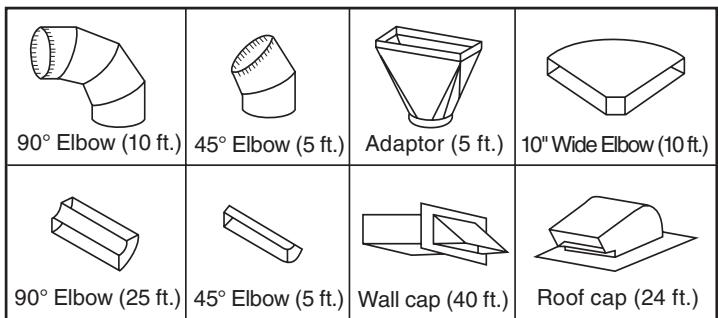
Figure 3
5 TOOLS RECOMMENDED FOR INSTALLATION
Phillips Screwdriver
Electric Drill
1/2", 5/8" and 3/32" Drill Bits
- 1 12 " Wood Bit or Metal Hole Cutter (if metal cabinet is used)
- Saw to cut exhaust opening (if needed)
- Protective Drop Cloth for product and range - you may also use carton for protection
- Scissors
Pencil
Measure
- Tape
6 INSTALLATION HARDWARE
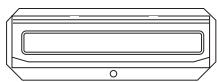
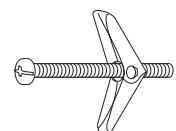
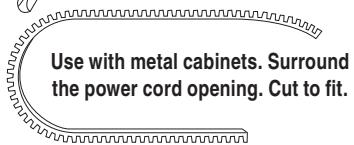
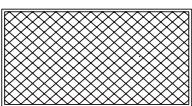
The INSTALLATION HARDWARE items ① - ⑥ are in a small bag. All items are in a bag packed below the oven.
| Item | Name | Quantity |
| ① | Wood Screw 5 x 35 mm | 6 |
| ② | Toggle Bolt 3/16" | 4 |
| ③ | Top Cabinet Screw 5 x 93 mm | 2 |
| ④ | Flat Washer 30 mm diameter | 2 |
| ⑤ | Grommet | 1 |
| ⑥ | Tapping Screw 4 x 8 mm | 4 |
| ⑦ | Exhaust Damper Assembly | 1 |
| ⑧ | Grease Filter | 2 |
| ⑨ | Rear Cushion | 1 |
| ⑩ | Installation Instructions | 316902446 |
| ⑪ | Top Template | 316902447 |
| ⑫ | Wall Template | 316902448 |
①


⑦
(5)
⑧
Figure 4
Parts shown not to common scale.
- Open the bottom of the carton, bend the carton flaps back and tilt the oven over to rest on plastic foam pad. Lift carton off oven and remove all packing materials, Installation Instructions, Wall Template, Top Template, Turntable and Turntable Support; however, DO NOT REMOVE THE WAVEGUIDE COVER, which is located on the ceiling in the oven cavity. SAVE THE CARTON AS IT MAY MAKE INSTALLATION EASIER.
- CHECK THE OVEN.
Check the oven for any damage, such as misaligned or bent door, damaged door seals and sealing surfaces, broken or loose door hinges and latches and dents inside the cavity or on the door. If there is any damage, do not operate the oven and contact your dealer or Electrolux AUTHORIZED SERVICER.
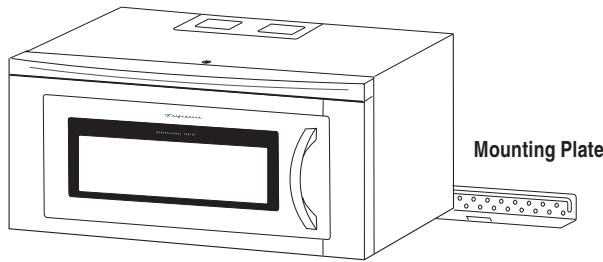
Figure 5
8 VENTILATION SYSTEM (PREPARED OVEN FOR INSTALLATION)
This Over the Range Microwave Oven is designed for adaptation to three types of hood ventilation systems. Select the type required for your installation.
RECIRCULATING — non-vented, ductless. Follow installation procedure (A). Recirculating requires the use of the Charcoal Filters, which have already been installed in the oven.
HORIZONTAL EXHAUST - outside ventilation. Follow installation procedure (B).
VERTICAL EXHAUST - outside ventilation. Follow installation procedure (C).
(A) RECIRCULATING: NON-VENTED, DUCTLESS OPERATION
The unit is shipped assembled for recirculating.
NOTE:
- The Exhaust Damper Assembly is not required for recirculating exhaust.
- The Charcoal Filters should be replaced every 6 to 12 months, depending on use.
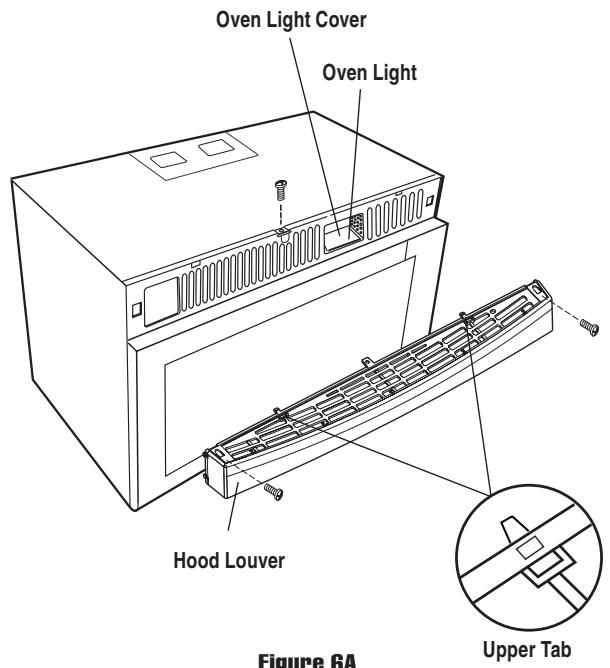
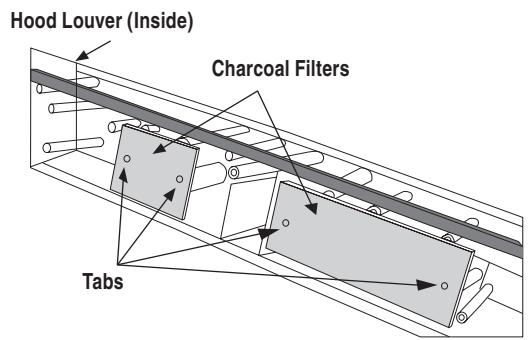
Figure 6B
(B) HORIZONTAL EXHAUST: OUTSIDE VENTILATION
- Remove 3 screws from back edge and 5 screws from the top of Fan Cover Bracket. Save 3 screws to use them to attach Exhaust Damper Assembly to the wall later and discard remaining 5. Remove Fan Cover Bracket by sliding it in the opposite direction of the arrow on the Fan Cover Bracket, as shown in Figure 7.
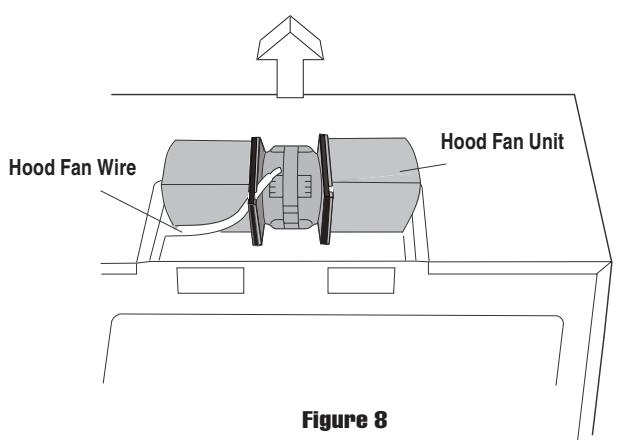
- Lift Hood Fan Unit carefully and slip wires out of cavity. See Figure 8. CAUTION: Do not pull or stretch Hood Fan Wire.
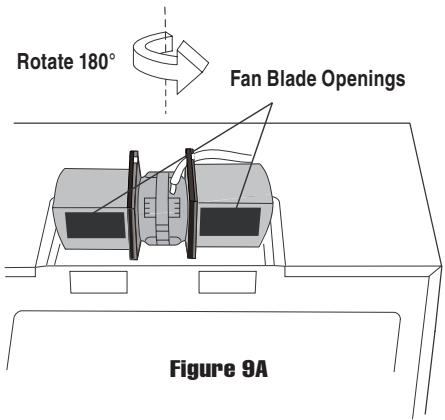
- Rotate the Hood Fan Unit 180^ so that the Fan Blade Openings are facing the back of the oven. See Figure 9A on page 5.
- Replace Hood Fan Wire from (A) to (B). See Figure 9B on page 5. Replace Hood Fan Unit into the oven. Be careful not to pinch the Hood Fan Wire and the Hood Fan Unit. See Figure 9C on page 5.
- Put the wire back into cavity. See Figure 10A on page 5.
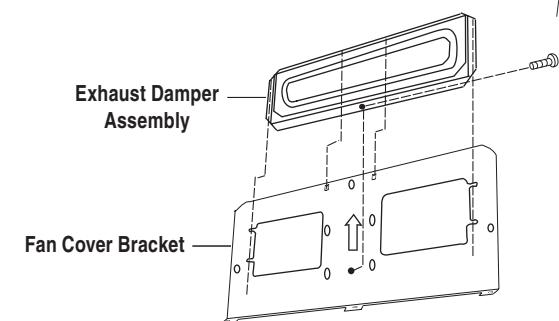
- Assemble the Exhaust Damper Assembly to the Fan Cover Bracket by sliding it into the slits in the same direction as the arrow. Use 1 Tapping Screw 4 × 8 mm from the INSTALLATION HARDWARE and tighten into place. See Figure 10B on page 5.
- This assembly will be mounted to the Outside Rear Exhaust cutout in future instructions. See WALL TEMPLATE for further procedures.
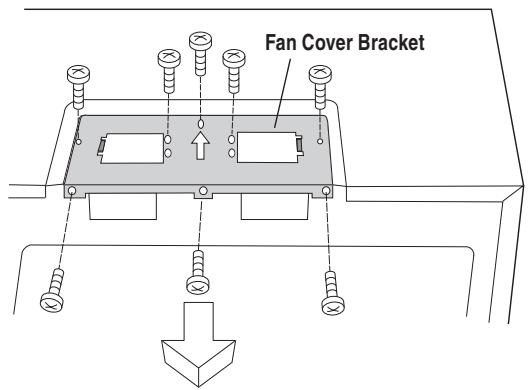
Figure 7
Change the position of wire to left side hole
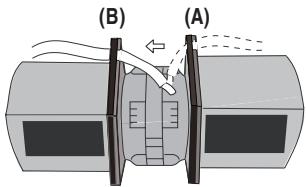
Figure 9B
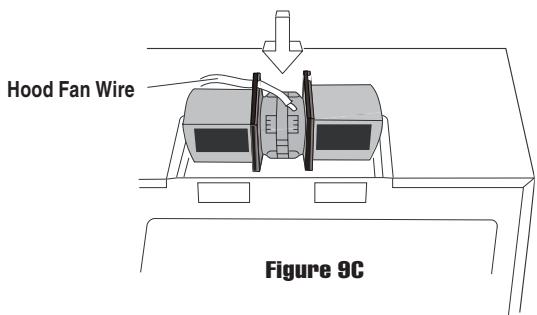
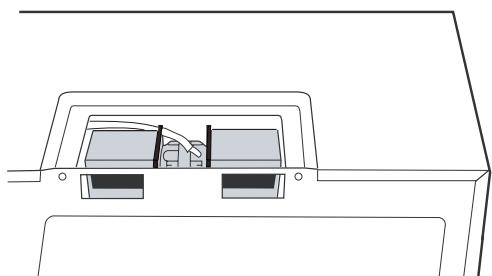
Figure 10A
Save the assembly for future instructions.
Oven Rear Side
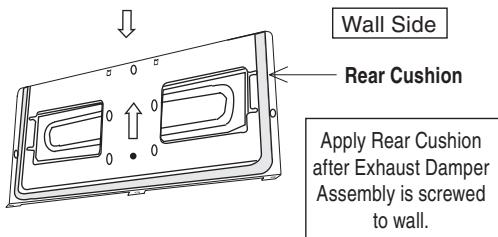
Figure 10B
(C) VERTICAL EXHAUST: OUTSIDE VENTILATION
- Remove and save 3 screws from back edge and 5 screws from the top of the Fan Cover Bracket to use at Step 5. Remove Fan Cover Bracket by sliding it in the opposite direction of the arrow on the Fan Cover Bracket as shown in Figure 11.
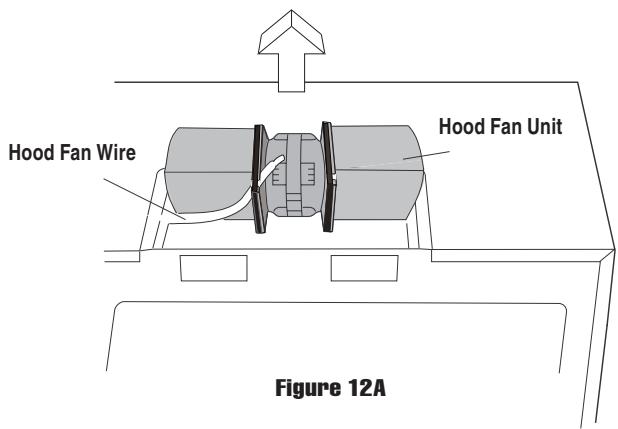
- Lift Hood Fan Unit carefully and slip wires out of cavity. See Figure 12A. CAUTION: Do not pull or stretch Hood Fan Wire.
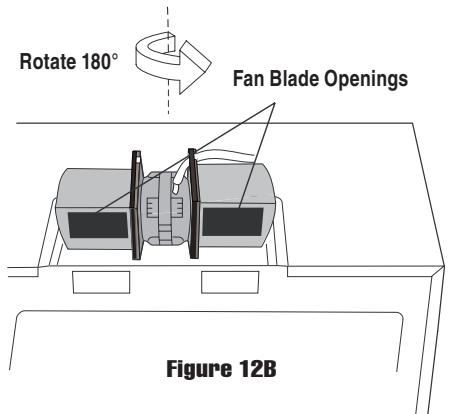
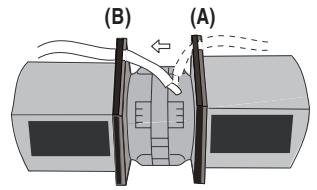
- Rotate the Hood Fan Unit 180^ so that the Fan Blade Openings are facing the back of the oven. See Figure 12B on page 6. Replace Hood Fan Wire from (A) to (B). See Figure12C on page 6. Then rotate the Hood Fan Unit 90^ so that the Fan Blade Openings are facing the top of the oven. See Figure 13 on page 6. Replace Hood Fan Unit into the oven. Be careful not to pinch the lead wire between the inner bracket and the Hood Fan Unit. Put the lead wire into Wire Box.
- Replace the Fan Cover Bracket by sliding it into the slits in the same direction as the arrow on the Fan Cover Bracket. Make sure the fan blades are visible through the top openings in the oven before proceeding. See Figure 14 on page 6.
- Attach the Fan Cover Bracket to unit with the 3 screws from back edge and 4 screws except screw(A) from the top of the Fan Cover Bracket, which were removed at Step 1 above. See Figure 14 on page 6. Screw (A) will be used at MOUNTING OVEN THE WALL Step5 on page 7. The Hood Fan Unit is now rotated for vertical exhaust operation.
- Attach the Exhaust Damper Assembly to the fan cover bracket on the top of the outercase cabinet after mounting the oven. To attach the Exhaust Damper Assembly, refer to MOUNTING OVEN TO THE WALL, See Figure 20 on page 7 and TOP CABINET TEMPLATE.
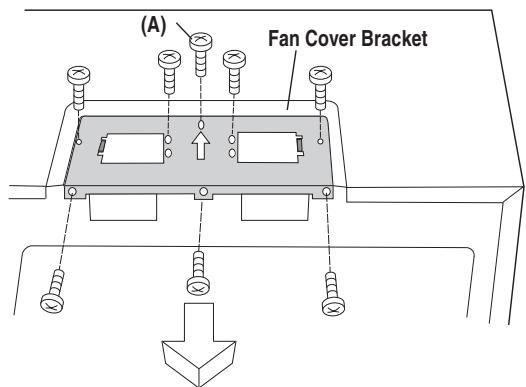
Figure 11
Change the position of wire to left side hole
Figure 12C
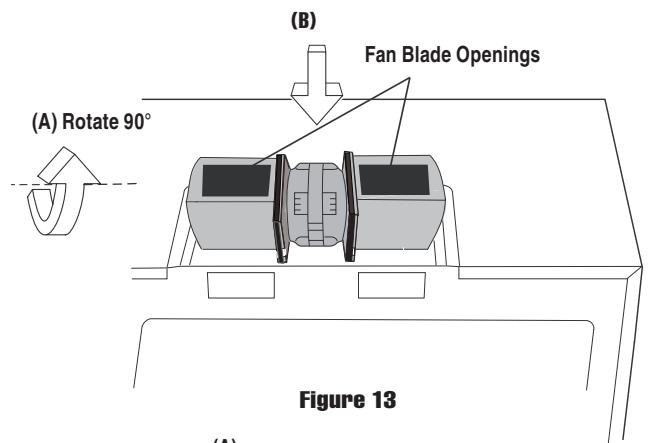

Figure 14
9 OVEN INSTALLATION
THIS OVEN CANNOT BE PROPERLY INSTALLED WITHOUT REFERRING TO THE MOUNTING INSTRUCTIONS FOUND ON BOTHTEMPLATES.
THE NEXT STEP IS TO READ AND FOLLOW MOUNTING INFORMATION ON BOTH TOP CABINET AND WALLTEMPLATES.
NOTE: THIS OVEN SHOULD BE ATTACHED TO AT LEAST ONE WALL STUD.
MOUNTING PLATE
- Separate Toggle Nuts, packed in the INSTALLATION HARDWARE, from 4 Toggle Bolts.
- USE the mounting template provided to Use wood screws to attach mounting plate to the stud or studs. Use Toggle Bolts to attach mounting plate through the holes at A, B, C and D UNLESS THOSE HOLES ARE LOCATED ON THE STUD. Insert one Toggle Bolt into A, B, C and D where appropriate (these correspond to holes of the Wall Template) and put the Toggle Nuts onto the Toggle Bolts. See Figure 15. Refer to instructions in Wall Template.

- Position the Mounting Plate with the Toggle Bolts attached at the wall location and insert Toggle Nuts and Bolts through the holes in the wall with the Toggle Nuts closed. See Figure 16. Use Wood Screws to attach the Mounting Plate to studs.
NOTE: Before insertion, be sure you leave a space more than the thickness of the wall between the Mounting Plate and the end of each of the Toggle Nuts (in the closed position). If you do not leave enough space, the Toggle Nut will not be able to open on the other side of the wall. Also, once a Toggle Nut opens, it cannot be withdrawn from the hole; therefore make sure all of the Toggles are in the correct position before insertion. - Align the Mounting Plate carefully and hold in position while tightening Toggle Bolts. Pull Toggle Bolt toward you and turn clockwise to tighten. See Figure 17.
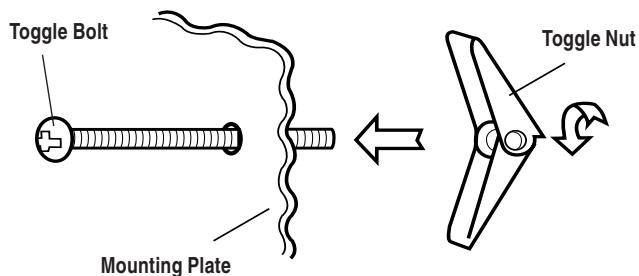
Figure 15
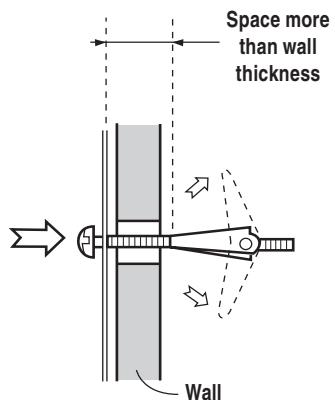
Figure 16
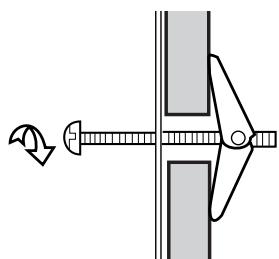
Figure 17
MOUNTING OVEN TO THE WALL
Two people are recommended to attach the Microwave Oven/ Hood to the Mounting Plate.
- Thread the power supply cord through the hole made in the bottom of the top cabinet.
- Install the oven by tilting it forward and sliding it onto two tabs of the Mounting Plate. Rotate the oven up so it rests against the wall. See Figure 18 on page 7.
- Use the two Top Cabinet Screws and two Flat Washers, supplied in the INSTALLATION HARDWARE, to attach the unit to the top cabinet. See Figure 19 on page 7.
- Secure the bottom of the oven to the Mounting Plate by using two Tapping Screws 4 × 8 mm from the INSTALLATION HARDWARE. See Figure 19 on page 7.
- (For Vertical Exhaust Only)
Attach the Exhaust Damper Assembly to the fan Cover Bracket on the top of the outercase cabinet by sliding it into the slits in the same direction as the allow using screw (A) which removed at (C) VERTICAL EXHAUST STEP 1 on page 5. See Figure 20 on page 7.
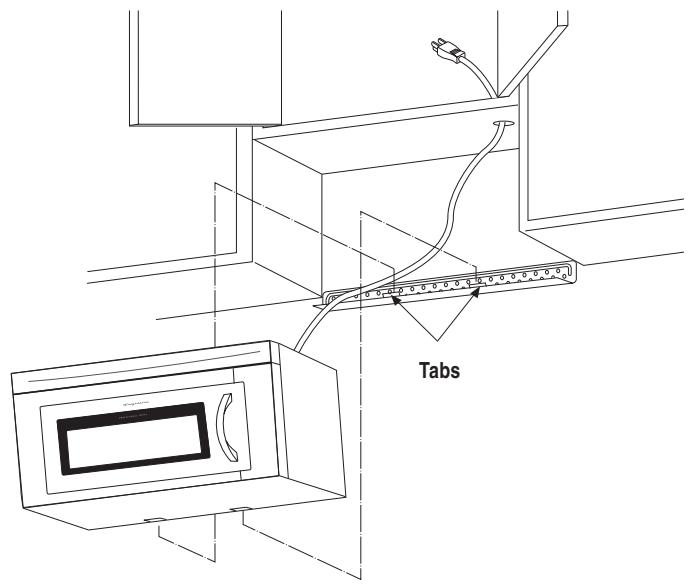
Figure 18
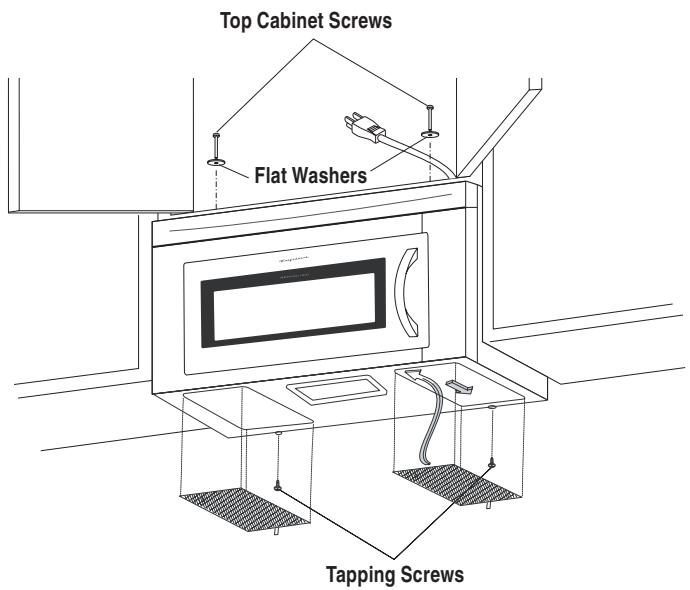
Figure 19
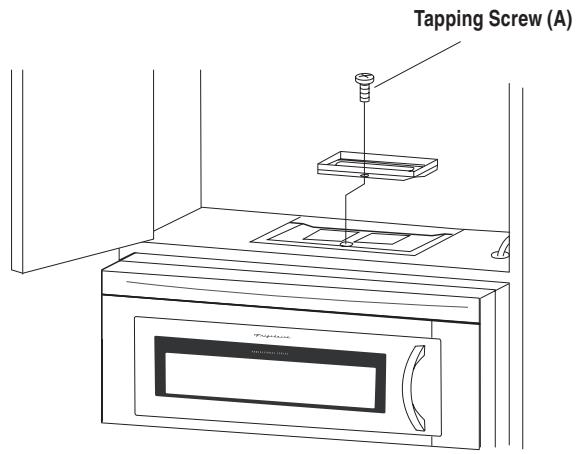
Figure 20
CHECKLIST FOR INSTALLATION
- Make sure the unit has been installed according to all of the Installation Instructions and the Wall and Top Cabinet Templates.
- Plug in the power cord.
- Keep these Installation Instructions.
NOTE:
Make sure to remove the tape at the turntable support before operation. See figure 21.
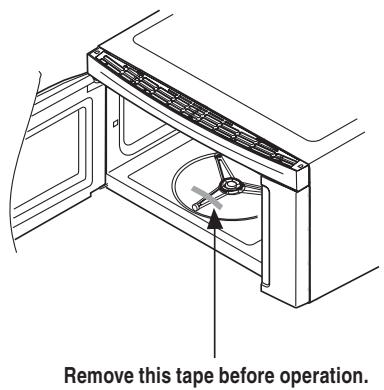
Figure 21
NOTES
INSTALLATION D'INSTRUCTION
4 CONDUIT D'EVACUATION DE LA HOTTE
- INSTALLATION INSTRUCTIONS
- Over The Range Microwave Oven
- BEFORE YOU BEGIN
- Read these instructions completely and carefully.
- MOUNTING SPACE
- WALL CONSTRUCTION
- NEED HELP?
- ELECTRICAL GROUNDING INSTRUCTIONS
- ELECTRICAL REQUIREMENTS
- NOTE:
- HOOD EXHAUST DUCT
- TOOLS RECOMMENDED FOR INSTALLATION
- INSTALLATION HARDWARE
- VENTILATION SYSTEM (PREPARED OVEN FOR INSTALLATION)
- RECIRCULATING: NON-VENTED, DUCTLESS OPERATION
- HORIZONTAL EXHAUST: OUTSIDE VENTILATION
- VERTICAL EXHAUST: OUTSIDE VENTILATION
- OVEN INSTALLATION
- MOUNTING PLATE
- MOUNTING OVEN TO THE WALL
- CHECKLIST FOR INSTALLATION
- NOTES
- INSTALLATION D'INSTRUCTION
- CONDUIT D'EVACUATION DE LA HOTTE
Brand : FRIGIDAIRE
Model : FPBM189KF
Category : Fridge