
E76 - Watch CITIZEN WATCH - Free user manual and instructions
Find the device manual for free E76 CITIZEN WATCH in PDF.


User questions about E76 CITIZEN WATCH
0 question about this device. Answer the ones you know or ask your own.
Ask a new question about this device
Download the instructions for your Watch in PDF format for free! Find your manual E76 - CITIZEN WATCH and take your electronic device back in hand. On this page are published all the documents necessary for the use of your device. E76 by CITIZEN WATCH.
USER MANUAL E76 CITIZEN WATCH
- Features 4
2.Before Using 5 - Setting the Time and Date 6
- Setting the Time
- Setting the Date
- Correcting the Time Difference
- Functions Unique to Solar Powered Watches 18
- Insufficient Charge Warning Function
- Time Setting Warning Function
- Overcharging Prevention Function
- Power Save Function
- General Reference for Charging Times 23
- Notes Regarding Handling of this Watch 24
- Charging Precautions
- Replacing the Secondary Battery 25
- All-Reset 26
- Reference Position Alignment 28
- Precautions 30
- Specifications 36
Crown Operation
-Models Equipped with a Crown Cover
Insert your fingernail between the case and crown cover and open the crown cover so that it opens to the outside.
- Always make sure to close the crown cover after operating the crown.
Although the crown can be operated by turning while pinching between your fingers or fingernails (Fig. 1), the crown can be turned more easily by turning while pressing against the crown with the thick portion of your finger (Fig. 2).
- Please refer to the manual for information on the procedures for setting the time and date, correcting time difference and setting the reference position.
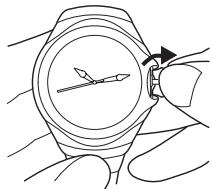
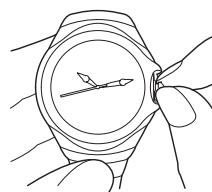
Fig.1
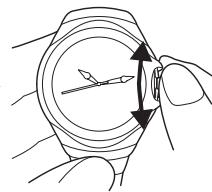
Fig.2
1. Features
This watch is a solar-powered watch that contains a solar cell in its face that drives the watch by converting light energy into electrical energy.
It is equipped with numerous functions including a virtual calendar that changes the date automatically (day, month and year change automatically through February 28, 2100 even in leap years), a time difference correction function that makes it possible to easily change the time difference without stopping the watch, and a power save function that reduces current consumption when the solar cell is not exposed to light.
2. Before Using
This watch is a solar-powered watch. Make sure to charge the watch prior to use by adequately exposing it to light.
A secondary battery is used in this watch to store electrical energy. This secondary battery is a clean energy battery that does not contain mercury or other toxic substances. Once fully charged, the watch circuit will continue to keep time for about 5 years without additional charging (when the power save 2 function is operating).
To use this watch comfortably, make sure to recharge it before it stops running completely. Since there is no risk of overcharging (Overcharging Prevention Function) no matter how much the watch is charged, it is recommended that the watch be recharged everyday.
3. Setting the Time and Date
If the watch is provided with a cover, open the cover to set the time or date, and then close the cover once the time or date has been set.

[Setting the Time]
- When the crown is pulled out to the second click (time setting position), the second hand rapidly advances to the 0 seconds position and stops.
Note: Align the hands at the reference position after performing the all-reset procedure when the second hand does not stop at the 0 seconds position.
- Turn the crown and set the time.
(1) When the crown is turned to the right, the hour and minute hands move forward (clockwise).
(2) When the crown is turned to the left, the hour and minute hands move backward (counter-clockwise).
- Turning the crown continuously causes the hands to advance rapidly. Turn the crown to either the left or right to stop the hands from advancing rapidly.
Note (1): When correcting in the forward direction, the date changes when the hour and minute hands indicate 12:00 AM. However, when the date is changed in the case the hands are advancing rapidly, the hour and minute hands pause at 12:00 AM and then resume advancing rapidly after the date has changed.
(2): When correcting in the backward direction, the date does not change even if the hour and minute hands pass 12:00 AM.
- Return the crown to the normal position in synchronization with a telephone time signal or other time service.
[Setting the Date]
This watch is provided with a virtual calendar function. Once it is set, the year, month and date change automatically, including leap years.
-
When the crown is pulled out to the first click (calendar correction position), the second hand moves to the year and month position stored in memory and stops.
-
Turn the crown and set the date.
(1) Turn the crown to the right to set the second hand to the position corresponding to the year (number of years elapsed since the most recent leap year) and month. Turning the crown continuously causes the second hand to advance rapidly.
Examples:
-
In the case of December in a leap year: Align the second hand at 0 seconds.
-
In the case of April in a year that is three years after the most recent leap year: Align the second hand at 23 seconds (between 4:00 and 5:00).
(2) The date is advanced by one day if the crown is turned to the left.
-
Turning the crown continuously causes the date to be advanced continuously.
Turn the crown to either the left or right to stop the date from advancing continuously. -
Always make sure to return the crown to the normal position after setting the date.
The second hand advances to the current seconds and the hands begin to move.
The date can be set easily by stopping advancing the date rapidly two to three days before the correct date and then advancing the date one day at a time.
The date automatically changes to the first day of the following month when the crown is returned to the normal position from the date correction state.
Examples:
- Normal Years:
March 1 when the date has been set to February 29, 30 or 31
October 1 when the date has been set to September 31
- Leap Years:
March 1 when the date has been set to February 30 or 31
October 1 when the date has been set to September 31
How to read the month:
January: Between 1:00 and 2:00
February: Between 2:00 and 3:00
December: Between 12:00 and 1:00
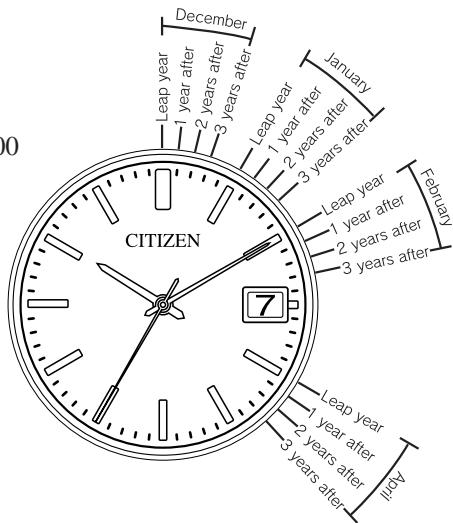
How to read the year:
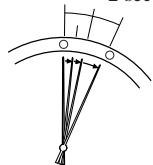
Leap year: First mark in each month zone
1 year after most recent leap year:Second mark in each month zone
2 years after the most recent leap year: Third mark in each month zone
3 years after the most recent leap year: Fourth mark in each month zone
| Year | Years elapsed | Year | Years elapsed |
| 2000 | Leap year | 2004 | Leap year |
| 2001 | 1st year after leap year | 2005 | 1st year after leap year |
| 2002 | 2nd year after leap year | 2006 | 2nd year after leap year |
| 2003 | 3rd year after leap year | 2007 | 3rd year after leap year |
[Correcting the Time Difference]
When button (A) is pressed and the crown is turned continuously, time difference can be corrected in 1 hour units. Time difference cannot be corrected continuously.
The time difference can be corrected for 30 seconds after button (A) has been pressed or for 30 seconds after time difference correction (after the hands finish moving).
- Put the crown in the normal position.
- When button (A) is pressed, the second hand makes one revolution to indicate that the watch is in the time difference correction state.
-
Correct the time difference by turning the crown to the right or left.
-
When the crown is turned continuously to the right, the minute and hour hands are corrected forward (clockwise) by one hour.
-
When the crown is turned continuously to the left, the minute and hour hands are corrected backward (counter-clockwise) by one hour.
Note (1): If the time difference is corrected in the forward direction, the date after the hands are finished moving is corrected by +1 day when the hour and minute hands pass 12:00 AM. Pay attention to AM and PM when correcting the time difference.
(2): When returning the time difference to its original setting, return the hour and minute hands in the opposite direction in which they were corrected. If the time difference is corrected in the backward direction, the date after the hands are finished moving is corrected by -1 day when the hour and minute hands pass 12:00 AM. This takes about two minutes, however, since the date is corrected in the forward direction.
Example: Setting the time difference of London (local time) when the time in Tokyo (home time) is 10:00 AM: The time difference between Tokyo and London is -9 hours. Since it is 1:00 AM in London when it is 10:00 AM in Tokyo, in the case of correcting the time difference at this time:
- Press button (A).
- Turn the crown to the left to turn the hands backward (counter-clockwise) by 9 hours.
Note: If the crown is turned to the right to move the hands clockwise to set the time to 1:00, the time will be 1:00 PM and the calendar function will not operate correctly, preventing the date from changing at the proper time.
—Case of Correcting Time Difference by -9 Hours —
![CITIZEN WATCH E76 - [Correcting the Time Difference] - 1](/content/2025/01/176741/images/ed2fb4b25e16c3bdb85dd613192d6b4a411b5a324e58b914e1a637463c998261.jpg)
Turned to the left
Turned to the right
![CITIZEN WATCH E76 - [Correcting the Time Difference] - 2](/content/2025/01/176741/images/6d3bdaa85d1d2161a949d33614fd1bfd1d1888777c3c11793efae2da76bdea68.jpg)
Turned to the right
: Direction of time difference correction
: Direction of returning time difference
: Direction of improper time
difference correction
The time difference cannot be corrected when the second hand is moving at two-second intervals indicating that the watch is insufficiently charged. Correct the time difference after charging the watch by exposing it to light so that the second hand returns to one-second interval movement.
When the date has shifted out of the calendar window
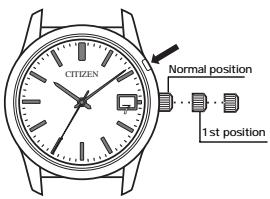
- Pull the crown out to the 1st position.
-
Turn the crown to the right while pressing button (A).
-
Continue turning the crown while pressing button (A) until the date appears in the center of the calendar window.
-
Return the crown to the normal position.
[Reference: Time Differences of Major World Cities Based on UTC]
| City name | Time difference | Daylight savings time | City name | Time difference | Daylight savings time |
| London | ±0 | ○ | Bangkok | +7 | × |
| Paris | +1 | ○ | Hong Kong | +8 | × |
| Cairo | +2 | ○ | Tokyo | +9 | × |
| Moscow | +3 | ○ | Sydney | +10 | ○ |
| Dubay | +4 | × | Noumea | +11 | × |
| Karachi | +5 | × | Auckland | +12 | ○ |
| Dakar | +6 | × | Honolulu | -10 | × |
- Cities (regions) in which daylight savings time is used are indicated with a , while those in which it is not are indicated with an × .
| City name | Time difference | Daylight savings time |
| Anchorage | -9 | ○ |
| Los Angeles | -8 | ○ |
| Denver | -7 | ○ |
| Chicago | -6 | ○ |
| New York | -5 | ○ |
| Caracas | -4 | × |
| Rio de Janeiro | -3 | ○ |
- The time difference and use of daylight savings time of each city are subject to change by the particular country.
4. Functions Unique to Solar-Powered Watches
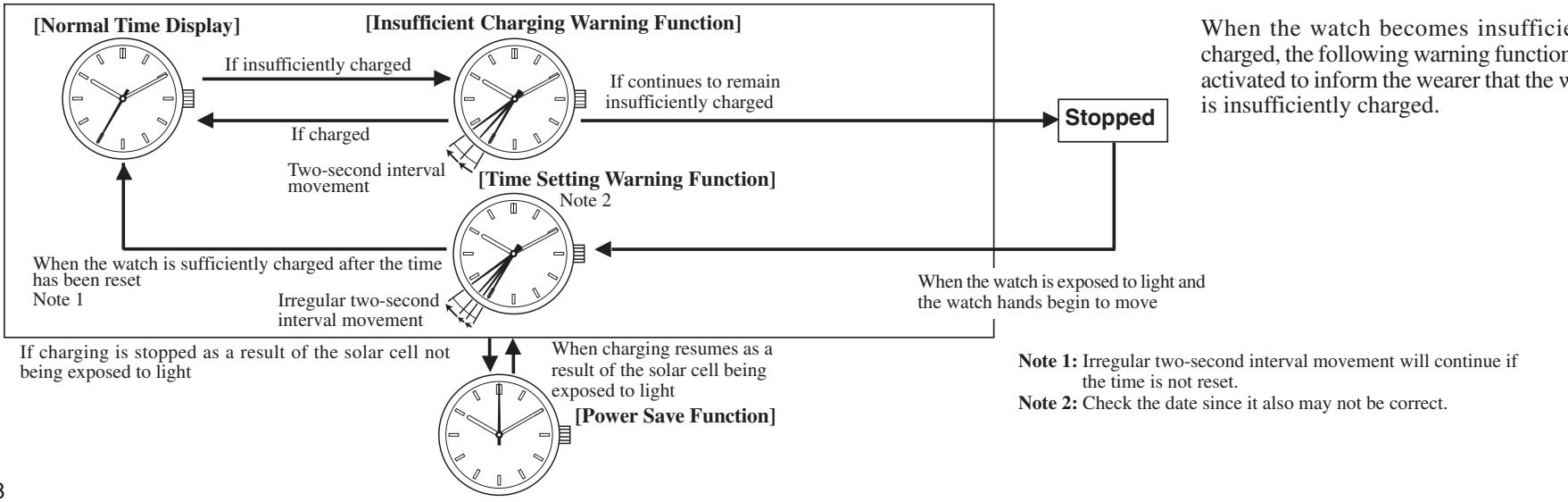
Two-second interval movement
2 seconds 2 seconds
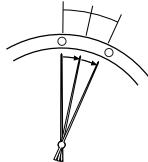
The second hand moves at two-second intervals to indicate that the watch is insufficiently charged. The watch stops after about 2 days have elapsed. Expose the watch to light to return the second hand to one-second interval movement.
Irregular two-second interval movement
2 seconds 2 seconds
When the watch is again exposed to light after stopping, although the second hand begins to move, since the time is incorrect, the second hand moves irregularly at two-second intervals to indicate that the time is incorrect. Reset the time after the watch has been sufficiently charged. The second hand will continue to move irregularly at two-second intervals unless the time is reset.
The overcharging prevention function is activated when the secondary battery is fully charged so that it is not charged further.
When power is no longer generated as a result of light not shining on the solar cell, the second hand stops and the watch enters the Power Save 1 state to reduce power consumption of the secondary battery. The minute and hour hands continue to keep time even through the second hand is stopped. Furthermore, operation of the calendar is linked with the movement of the hour and minute hands.
When the Power Save 1 state continues for about 3 days, the watch automatically switches to the Power Save 2 state and movement of the hour and minute hands as well as calendar operation stop to further reduce power consumption of the secondary battery more than Power Save 1.
Note: The power save function is not activated even when power is not generated as a result of light not shining on the solar cell during the time the secondary battery is fully charged and the overcharging prevention function is activated.
The power save function is canceled when the solar cell is exposed to light and power generation is resumed. Each of the hands advance rapidly to the current time and begin moving. The date is also advanced continuously to the current date.
5. General Reference for Charging Times=
The time required for recharging varies according to the model of the watch (color of the dial, etc.). The following times are shown below to serve only as a reference.
- Recharging time refers to the amount of time the watch is continuously exposed to light.
| Illuminance (lux) | Environment | Charging time | ||
| Charging time for 1 day of operation | Charging time from the stopped state to 1-second interval movement | Charging time from stopped state to fully charged | ||
| 500 | Inside an ordinary office | 2 hours | 27 hours | 22 days |
| 1,000 | 60-70 cm(24-28in.) under fluorescent light (30 W) | 1 hour | 14 hours | 11 days |
| 3,000 | 20 cm(8 in.) under fluorescent light (30 W) | 20 minutes | 5 hours | 82 hours |
| 10,000 | Outdoors, cloudy weather | 6 minutes | 2 hours | 26 hours |
| 100,000 | Outdoors, summer, under direct sunlight | 1.5 minutes | 45 minutes | 7 hours |
Full recharging time: Time required for recharging the watch from the stopped state to fully charged. Charging time for 1 day of operation: Time required for recharging the watch to run for 1 day at 1-second interval movement.
6. Notes Regarding Handling of this Watch=
Please note that if you wear long sleeves, the watch can easily become insufficiently charged as a result of it being concealed and unable to be exposed to light.
- When you take the watch off, try to place it in as bright a location as possible to ensure that it always keeps the correct time.
CAUTION Charging Precautions
- Avoid recharging at high temperatures (over about 60^ / 140^ ) since this may result in damage to the watch during recharging.
Examples:
- Charging the watch in close proximity to an incandescent lamp, halogen lamp or other light source that can easily reach high temperatures.
- Charging the watch in a location that reaches high temperatures such as on a car dashboard.
- When charging the watch with an incandescent lamp, always make sure the watch is at least 50cm(20 in.) away from the lamp so that it does not reach excessively high temperatures during charging.
7. Replacing the Secondary Battery
The secondary battery used in this watch does not have to be periodically replaced in the manner of ordinary batteries since it is able to be charged and discharged repeatedly.
8. All-Reset
The display of this watch may not read correctly as a result of being subjected to the effects of static electricity or strong impact and so forth. When this happens, perform the procedure described in "9. Reference Position Alignment" after performing the all-reset procedure described below.
- Pull out the crown to the second click (time setting position).
- The second hand moves to the 0-position stored in memory and stops.
- Continuously press button (A) for at least 2 seconds.
- The hour hand and minute hands performs a demonstration movement consisting of moving forward then backward and then forward again.
- The second hand makes one revolution in the forward direction. This completes the all-reset procedure. Always make sure to perform the reference position alignment procedure after performing all-reset.
Note (1): Demonstration movement is not performed when the watch is insufficiently charged. Perform the all-reset procedure only after charging the watch sufficiently.
(2): Do not perform the all-reset procedure while the date is changing. This can cause the date position to shift. If the date position should happen to become shifted out of position, pull out the crown to the first click after completing the all-reset procedure, and turn the crown to the left while pressing button (A) to set the date to the correct position.
9. Reference Position Alignment
After performing the all-reset procedure, align the hour and minute hands at their reference positions by pulling out the crown to the second click, and the second hand and date to their reference positions by pulling out the crown to the first click.
- Align the hour and minute hands at the 12:00 position with the crown pulled out to the second click.
(1) Turning the crown to the right moves the hour and minute hands forward.
(2) Turning the crown to the left moves the hour and minute hands backward. - Turning the crown to the right continuously causes the hour and minute hands to advance rapidly to the right, while turning the crown continuously to the left causes the hour and minute hands to advance rapidly to the left. Turn the crown to the left or right to stop the hands from advancing rapidly.
- Align the second hand at the 12:00 position with the crown pulled out to the first click. In addition, align the date at "1".
(1) Turning the crown to the right causes the second hand to move one second forward.
(2) Turning the crown to the left causes the date to move one day forward. -
Turning the crown continuously to the left causes the date to advance continuously. Turn the crown to the left or right to stop the date from advancing continuously.
-
Once each hand has been aligned at the 12:00 position and the date has been aligned at "1", return the crown to the 0 position (normal position).
Note (1): It takes about 1 second for the watch to store the reference position in memory. Once the reference position has been stored in memory, the second hand will begin irregular two-second interval movement. The reference position may not be stored in memory if the crown is operated before the start of irregular two-second interval movement after returning the crown to the normal position.
(2): The second hand will continue to remain stopped even if the crown is returned to the normal position unless the reference position alignment procedure is performed.
4. After performing the reference position alignment procedure, properly reset the time and date.
* The watch shows 12:00 AM after reference position alignment has been performed. Set the time and date by referring to "3. Setting the Time and Date" while paying attention to AM and PM.
10. Precautions
CAUTION: Water-resistance performance
There are several types of water-resistant watches, as shown in the following table.
The unit "bar" is roughly equal to 1 atmosphere.
*WATER RESIST(ANT) xx bar may also be indicated as W.R. xx bar.
| Indication | Specification | |
| Dial | Case(Case back) | |
| WATER RESIST or no indication | WATER RESIST(ANT) | Water-resistant to 3 atmospheres |
| WA 50 or WATER RESIST 50 | WATER RESIST(ANT) 5 bar or WATER RESIST(ANT) | Water-resistant to 5 atmospheres |
| WR 100/200 or WATER RESIST 100/200 | WATER RESIST(ANT) 10 bar/20 bar or WATER RESIST(ANT) | Water-resistant to 10/20 atmospheres |
For correct use within the design limits of the watch, confirm the level of water-resistance of your watch, as indicated on the dial and case, and consult the table.
| Examples of use | ||||
| Minor exposure to water (washing face, rain, etc.) | Moderate exposure to water (washing, kitchen work, swimming, etc.) | Marine sports (skin diving) | Scuba diving (with air tank) | Operation of the crown or button with moisture visible |
| OK | NO | NO | NO | NO |
| OK | OK | NO | NO | NO |
| OK | OK | OK | NO | NO |
- Water-resistance for daily use (to 3 atmospheres): This type of watch is water-resistant to minor exposure to water. For example, you may wear the watch while washing your face; however, it is not designed for use underwater.
- Upgraded water-resistance for daily use (to 5 atmospheres): This type of watch is water-resistant to moderate exposure to water. You may wear the watch while swimming; however, it is not designed for use while skin diving.
- Upgraded water-resistance for daily use (to 10/20 atmospheres): This type of watch may be used for skin diving; however, it is not designed for scuba or saturated diving using helium gas.
CAUTION:
- Be sure to use the watch with the crown pressed in (normal position). If your watch has a screw-type crown, be sure to tighten the crown completely.
- Do NOT operate the crown or button with wet fingers or when the watch is wet. Water may enter the watch and compromise water-resistance.
-
If the watch is used in seawater, rinse with fresh water afterward and wipe with a dry cloth.
-
If moisture has entered the watch, or if the inside of the crystal is fogged up and does not become clear within a day, immediately take the watch to your dealer or Citizen Service Center for repair. Leaving the watch in such a state will allow corrosion to form inside.
- If seawater enters the watch, place the watch in a box or plastic bag and immediately take it in for repair. Otherwise, pressure inside the watch will increase, and parts (crystal, crown, buttons, etc.) may come off.
CAUTION: Keep your watch clean.
- Leaving dust and dirt deposited between the case and crown may result in difficulty in pulling the crown out. Rotate the crown while in its normal position, from time to time, to loosen dust and dirt and then brush it off.
- Dust and dirt tend to be deposited in gaps in the back of the case or band. Deposited dust and dirt may cause corrosion and soil your clothing. Clean the watch occasionally.
Cleaning the Watch
-
Use a soft cloth to wipe off dirt, perspiration and water from the case and crystal.
-
Use a soft, dry cloth to wipe off perspiration and dirt from the leather band.
- To clean a metal, plastic, or rubber watchband, wash away dirt with mild soap and water. Use a soft brush to remove dust and dirt jammed in the gaps in the metal band. If your watch is not water-resistant, take it to your dealer.
NOTE: Avoid using solvents (thinner, benzine, etc.), as they may mar the finish.
CAUTION: Operating environment
- Use the watch within the operating-temperature range specified in the instruction manual.
Using the watch where temperatures are outside the specified range, may result in deterioration of functions or even stoppage of the watch. - Do NOT use the watch in places where it is exposed to high temperature, such as in a sauna.
Doing so may result in a skin burn.
- Do NOT leave the watch in a place where it is exposed to high temperature, such as the glove compartment or dash-board of a car.
Doing so may result in deterioration of the watch, such as deformation of plastic parts.
- Do NOT place the watch close to a magnet.
Timekeeping will become inaccurate if you place the watch close to magnetic health equipment such as a magnetic necklace or a magnetic latch of a refrigerator door or handbag clasp or the earphone of a mobile phone. If this has occurred, move the watch away from the magnet and reset the time.
- Do NOT place the watch close to household appliances that generate static electricity.
Timekeeping may become inaccurate if the watch is exposed to strong static electricity, such as is emitted from a TV screen.
- Do NOT subject the watch to a strong shock such as dropping it onto a hard floor.
- Avoid using the watch in an environment where it may be exposed to chemicals or corrosive gases.
If solvents, such as thinner and benzine, or substances containing such solvents come in contact with the watch, discoloration, melting, cracking, etc. may result. If the watch comes in contact with mercury used in thermometers, the case, band or other parts may become discolored.
11. Specifications
- Model: E76 *
- Type: Analog solar-powered watch
- Accuracy: Within ±15 seconds per month on average (when worn at normal temperatures of +5°C to +35°C/41°F to 95°F)
- Operating temperature range:
Watch operating temperature range: -10°C to +60°C/14°F to 140°F
- Display functions:
Time: Hours, minutes, seconds (the hour and minute hands move every 15 seconds and the second hand moves every second)
Calendar: Date display (with rapid correction function)
Month and years elapsed since leap year displayed by second hand (only displayed when correcting the date)
- Additional functions:
Power save 1 function
Power save 2 function
Time difference correction function (forward and backward correction in 1 hour units)
Insufficient charge warning function
Time setting warning function
Overcharging prevention function
- Continuous running times:
Fully charged to stopped: Approx. 5 years (when power save 2 function is operating)
2-second interval movement to stopped: Approx. 2 days
- Battery: Secondary battery
*Specifications are subject to change without notice.