
E21 - Wristwatch CITIZEN WATCH - Free user manual and instructions
Find the device manual for free E21 CITIZEN WATCH in PDF.


| Brand | CITIZEN WATCH |
| Model | E21 |
| Product Type | Solar analog watch (Eco-Drive) |
| Accuracy | ±15 seconds per month on average (at normal temperature) |
| Operating temperature range | -10°C to +60°C (watch); 0°C to +60°C (chronograph) |
| Power supply | Solar cell + rechargeable secondary battery |
| Power reserve after full charge | Approximately 8 months without additional exposure |
| Main functions | Chronograph (12h, 1/5 s), alarm (20s, ±5 min), charge indicator (4 levels), date |
| Care and cleaning | Wipe with a dry soft cloth; for metal/plastic/rubber band, wash with mild soapy water; avoid solvents |
| Safety | Do not expose to high temperatures (sauna, dashboard); avoid magnetic fields and shocks |
| Repairability | Repairs by Citizen Service Center; replacement of secondary battery only by a professional |
| Water resistance | Depending on model: 3, 5, 10 or 20 atm (see dial and case back) |
| Oscillator frequency | 32 768 Hz |
Frequently Asked Questions - E21 CITIZEN WATCH
User questions about E21 CITIZEN WATCH
0 question about this device. Answer the ones you know or ask your own.
Ask a new question about this device
Download the instructions for your Wristwatch in PDF format for free! Find your manual E21 - CITIZEN WATCH and take your electronic device back in hand. On this page are published all the documents necessary for the use of your device. E21 by CITIZEN WATCH.
USER MANUAL E21 CITIZEN WATCH
- Features 4 2. Before Using 5
- Names of Components 6
- Operating the Crown 8
- Setting the Time and Date 9
- Procedure for Setting the Time
- Procedure for Setting the Date
- Using the Chronograph 12
- Using the Alarm 16
- Viewing the Charge Indicator 18
- General Reference for Charging Times 20
- Functions Unique to Solar-Powered Watches 22
Insufficient Charge Warning Feature Over Charge Prevention Feature
- Handling Precautions 25
- Try to Keep the Watch Charged at all Times
- Charging Precautions
- Handling of Secondary Battery
- Replacing the Secondary Battery 27
- Using the Tachymeter (When Provided) 28
- All-Reset 29
- All-Reset Procedure
- Precautions 32
- Specifications 38
1. Features
This watch is a solar-powered watch that contains a solar cell in its face that drives the watch by converting light energy into electrical energy. It is also equipped with numerous functions including:
- a chronograph function capable of timing for up to 12 hours in 1/5 second units;
- an alarm function that sounds an alarm for 20 seconds when the set time is reached using a 12-hour indicator hand, and can be set to an accuracy of ±5 minutes; and,
- a charge indicator function that indicates the charged level of the secondary battery to one of four levels.
Repairs
All repairs performed on this watch, with the exception of repair of the band, are to be performed at CITIZEN. This is because special technologies and equipment are required to perform repairs, inspections and adjustments. Please make requests for repairs to Citizen Service Center when having your watch repaired.
2. Before Using
To use this watch comfortably, always make sure to charge the watch to level 3 of the charge indicator hand. Charge the watch by exposing the solar cell (watch face) to light by referring to section 9 entitled "General Reference for Charging Times". Once fully charged, the watch will continue to run for about 8 months without additional charging.
Before storing your watch, always make sure to charge it until the charge level indicator is pointing at least to level 3. Periodically charge your watch even while it is being stored.
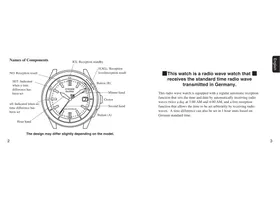
3. Names of Components
- This manual describes the procedure for using your watch based on the example of a model with the crown at the 3:00 position. The explanation is the same for other models except that the crown is at the 12:00 position instead of the 3:00 position.
- The alarm scale is divided into 10-second units, while the chronograph scale is divided into 1/5-second units.
☆The design may vary depending on the model.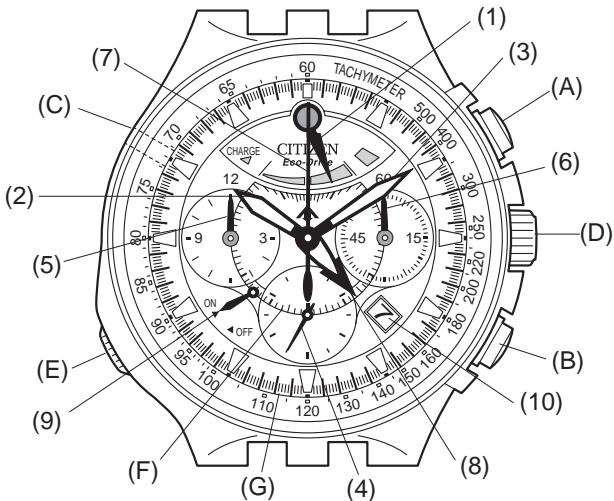
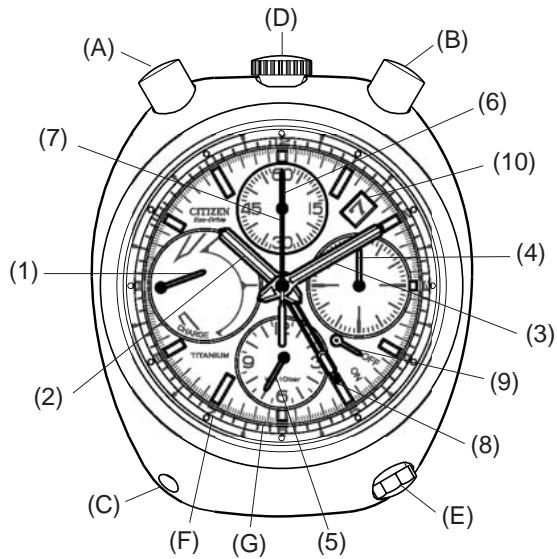
| 1. | Charge indicator hand |
| 2. | Hour hand |
| 3. | Minute hand |
| 4. | Second hand |
| 5. | Chronograph hour hand |
| 6. | Chronograph minute hand |
| 7. | Chronograph second hand |
| 8. | Alarm indicator hand |
| 9. | Alarm hand |
| 10. | Date |
| A. | Button (A) (start/stop) |
| B. | Button (B) (reset) |
| C. | Button (C) |
| D. | Crown |
| E. | Alarm crown |
| F. | Alarm scale |
| G. | Chronograph scale |
4. Operating the Crown
Once you have finished setting the time and so forth, always make sure to push the crown in to return it to the normal position (0 seconds position). If the crown is not pushed in far enough, it may stop at the calendar correction position. If the watch is used with the crown in this position, the date may be changed inadvertently or the crown may be damaged. If the crown of your watch is of the screw-lock type, operate the crown after first loosening the screw locking mechanism by turning the crown to the left. When finished operating the crown, turn the crown to the right while pushing in after having returned it to the normal position and tighten securely. Please be careful to ensure that the screw locking mechanism is tightened sufficiently since failure to do so can cause bending of the crown, incorrect time, or impaired water resistance.
5. Setting the Time and Date [Procedure for Setting the Time]
- Pull the crown out to the time correction position (second click) when the second hand has reached the zero seconds position.
- Set the time by turning the crown.
- The date changes at 12:00 AM. Pay attention to AM and PM when setting the time.
- Return the crown to the normal position (0 position) in synchronization with a telephone time signal or other time service.
![CITIZEN WATCH E21 - Setting the Time and Date [Procedure for Setting the Time] - 1](/content/2025/01/176738/images/b7f6c7bdffdb52571e4ea9f4b15e9ecb4572f8deabcd7673080ec08ccb42c1ee.jpg)
Helpful Hint for Accurately Setting the Time:
After stopping the second hand at the 0 seconds position, advance the minute and hour hands 4-5 minutes past the correct time and then move them back to the correct time. Setting the time in this manner eliminates any play in the gears of the watch movement. The hands of the watch can be made to advance at the correct time by pushing in the crown in synchronization with a telephone time signal or other time signal.
[Procedure for Setting the Date]
- This watch is not equipped with a fully automated calendar. It is necessary to correct the date by operating the crown to the first day of the following month in those months with less than 31 days (months having 30 days and February). (The date is displayed based on a 31 day cycle.)
![CITIZEN WATCH E21 - [Procedure for Setting the Date] - 1](/content/2025/01/176738/images/4e125916444126975a875e5564b051c2470b66f2ba4ba7801a9271cc3267fed4.jpg)
- Pull the crown out to the date correction position (first click).
- Set the date by turning the crown to the left. If the crown is turned to the right, nothing will happen and the date will not change.
- Do not attempt to set the date between the hours of around 9:00 PM and 1:00 AM. If the date is set during this time period, the date may not change on the following day.
- Once the date has finished being set, return the crown to the normal position (0 position).
- The date will change automatically at around 12:00 AM. If the date changes at 12:00 PM, advance the time by 12 hours.
6. Using the Chronograph
- The chronograph is capable of timing and displaying the time for up to 12 hours in 1/5 second units. The chronograph stops automatically when 12 hours have elapsed.
- When starting timing, first check that each of the chronograph hands has returned to 12:00. If the hands are not at 12:00, press button (B) to return them.
- The force required to press button (A) is slightly greater when starting timing for the first time to indicate that chronograph timing has begun. Firmly press button (A) until a clicking sound is heard.
[Timing Procedure]
- Press button (A) when the watch is in the chronograph reset state to start timing. Press button (A) again to stop timing.
- Timing starts and stops repeatedly each time button (A) is pressed.
Be careful not to press the alarm crown![CITIZEN WATCH E21 - [Timing Procedure] - 1](/content/2025/01/176738/images/e05ad083f4df38bf3e3c3755a1b3ced8e4134e1bb729958f775937f9da962e01.jpg)
[Chronograph Reset State]
Chronograph second hand
![CITIZEN WATCH E21 - [Chronograph Reset State] - 1](/content/2025/01/176738/images/a2571483e2daa9f711c28b1d6957b36e3585aac782a3a6e584113af9f7354b57.jpg)
[Note]
- When pressing button (A), be careful not to also press the alarm crown at the same time. This is particularly important in the case of models in which the crown is located at the 12:00 position.
- Press button (B) to reset the chronograph to 0 seconds after it has been stopped.
- The chronograph is not reset if button (B) is pressed while timing is in progress. To reset the time, press button (B) after first interrupting timing by pressing button (A).
- If the chronograph is repeatedly started and stopped without resetting, the chronograph hands may rarely shift from the 12:00 position after 12 hours have elapsed.
- When timing has continued for 12 hours, timing is stopped automatically and each of the chronograph hands stops at 12:00. In this case, always make sure to reset the chronograph before additional timing since it is not reset to zero at this time.
[Reset Procedure]
- Press button (A) to stop the chronograph.
- Press button (B) to reset the chronograph.
- This resets the chronograph following 12 hours of timing. Timing can be resumed by pressing button (A).
Note: Do not subject the watch to strong impacts while timing is in progress.
- The chronograph hands may rarely be shifted out of position if the watch is subjected to a strong impact either while timing is in progress or after the chronograph has stopped automatically after timing for 12 hours. In this case, reset the chronograph by following the procedure described above. Promptly have your watch repaired if any of the chronograph hands do not return to 12:00 even if the reset procedure has been performed.
[When Chronograph Second Hand has not been Properly Reset]![CITIZEN WATCH E21 - [Reset Procedure] - 1](/content/2025/01/176738/images/6a609907d9c35c9a030fb34ced96ac1f4e3116de02177959be9b2427bb27fe81.jpg)
7. Using the Alarm
- The alarm function uses a 12 hour indicator hand.
- When the alarm hand has been set to ON, the alarm sounds for 20 seconds when the set time is reached. Furthermore, the alarm will only sound once. Since the alarm is based on 12 hour clock, the alarm sounds twice in the AM and PM when it has been set.
- Since an indicator hand is used to set the alarm time, there is a certain degree of error in the set alarm time. The indicator hand should only be used as a rough indicator of the set alarm time.
[Procedure for Setting the Alarm Time]
- Pull the alarm crown out to the first click.
- Turn the alarm crown to set the alarm indicator hand to the time when you want the alarm to sound.
![CITIZEN WATCH E21 - [Procedure for Setting the Alarm Time] - 1](/content/2025/01/176738/images/67832c5eb82c49990be90a7ce701af9df6959965c857a8d6d428c33b569c4b77.jpg)
- In order to set the alarm time, advance the alarm indicator hand about 30 minutes past the desired set time and then turn it back (counter-clockwise) to the desired set time.
- Return the alarm crown to the normal position.
- Press the alarm crown to set the alarm hand to ON.
- This completes the procedure for setting the alarm time.
[Switching the Alarm ON and OFF]
- The alarm is switched between ON and OFF each time the alarm crown is pressed.
[Stopping the Alarm]
- The alarm is stopped by pressing the alarm crown while the alarm is sounding. Note that the alarm hand will also simultaneously be switched to OFF.
- Always make sure to wait at least 20 minutes before setting the alarm to ON again. The alarm will sound again if the alarm hand is set to ON before 20 minutes have passed since the alarm last sounded.
8. Viewing the Charge Indicator
- This charge indicator provides a general indication of the current level at which the secondary battery is charged to one of four levels.
- The charge indicator hand points to the center of each level.
- The charge indicator only provides a rough estimate of the level at which the secondary battery is charged. You can refer to this level when using your watch. It is recommended that the watch normally be charged to at least level 2.
Note: When the charge level indicator hand points to “CHARGE”, there is hardly any charge left in the secondary battery and the second hand moves at 2-second intervals. The secondary battery will become completely depleted about 7 days later at which time the watch will stop. Always make sure to charge the watch before it reaches this state.
Remaining Charge: 1. The approximate amount of time the watch will continue to operate without additional exposure to light. 2. This varies according to the usage frequency of the chronograph, alarm, etc.
[Viewing the Secondary Battery Charge Indicator]
| Level | First picture, - Charge - | Second picture, - Level 1 - | Third picture, - Level 2 - | Last picture - Level 3 - |
| Indicated charge level | CHARGE CITIZEN Eco-Drive | CHARGE CITIZEN Eco-Drive | CHARGE CITIZEN Eco-Drive | CHARGE CITIZEN Eco-Drive |
| Crown located at 3:00 position | ||||
| Crown located at 12:00 position | ||||
| Remaining Charge (reference value) | Empty -7 days | 7 days-5 months | 5 months-7 months | 7 months-8 months |
| Level at which insufficient charge warning feature is activated | Level at which watch is somewhat insufficiently charged (promptly charge the watch to level 3) | Level at which watch can be used without worrying about charging | Level at which watch is fully charged |
9. General Reference for Charging Times
The time required for charging varies according to the model of the watch (color of the dial, etc.). The following times are shown below to serve only as a reference.
- Charging time refers to the amount of time the watch is continuously exposed to light.
| Illuminance (lux) | Environment | Charging time | |||
| Charging time required for 1 day of operation | Charging time to level 1 (1-second interval movement) from stopped state | Charging time to level 2 from stopped state | Charging time to level 3 (fully charged) from stopped state | ||
| 500 | Inside an ordinary office | 3.5 hours | 40 hours | —— | —— |
| 1,000 | 60-70 cm (24-28 in.) under a fluorescent lamp (30 W) | 2 hours | 18 hours | —— | —— |
| 3,000 | 20 cm (8 in.) under a fluorescent lamp (30 W) | 35 minutes | 6 hours | 100 hours | 150 hours |
| 10,000 | Outdoors, cloudy weather | 11 minutes | 2 hours | 30 hours | 45 hours |
| 100,000 | Outdoors, summer, under direct sunlight | 2 minutes | 25 minutes | 5.5 hours | 8.5 hours |
Charging time for 1 day of operation:
Time required for charging the watch to run for 1 day at 1-second interval movement.
Full charging time:
Time required for charging the watch from the stopped state to fully charged.
Level 1: The watch is not charged sufficiently for one-second interval movement. Charge the watch at least to level 2.
10. Functions Unique to Solar-Powered Watches
If the watch has changed from the normal time display to the insufficient charge warning display, charge the watch by allowing light to shine on it while referring to section 9 entitled "General Reference for Charging Times" until the charge level indicator hand points to "Level 3".
[Normal Time Display]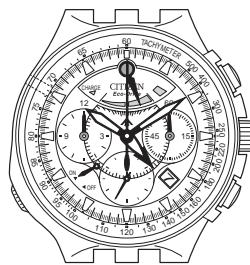
When the watch becomes insufficiently charged as a result of not being exposed to light. When the watch is charged as a result of being exposed to light.
[Insufficient Charge Warning Display]
The second hand changes from 1-second interval movement to 2-second interval movement.
2 seconds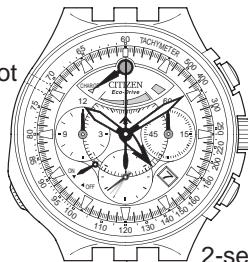
2-second interval movement continues if the watch is insufficiently charged.
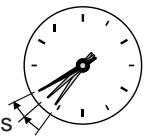
If the watch is continued to be used for about 7 days without charging,
All hands stop moving.
[Stopped]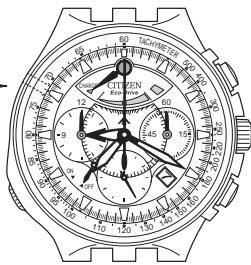
Note: Once the watch has stopped, it will not start running immediately even if exposed to light. A minimum of 10 minutes are required until the watch starts running again.
Charge the watch by exposing to light until the charge level indicator hand points to Level 3.
[Insufficient Charge Warning Feature]
This feature indicates that the watch has become insufficiently charged when the second hand changes from 1-second interval movement to 2-second interval movement. When this occurs, promptly charge your watch. Furthermore, the chronograph and alarm functions will not operate in this state.
[Over Charge Prevention Feature]
When the secondary battery becomes fully charged as a result of light shining into the watch dial (solar cell), the over charge prevention feature is activated automatically to prevent the secondary battery from being charged further. This prevents the secondary battery as well as timekeeping accuracy, functions and performance of the watch from deteriorating no matter how much the watch is charged.
11. Handling Precautions
Try to keep the watch charged at all times.
Please note that if you frequently wear long sleeves, the watch can easily become insufficiently charged because of being hidden and not exposed to light. Try to keep the watch charged especially during the winter.
CAUTION: Charging Precautions
- Avoid charging the watch at high temperatures (about 60°C / 140°F or higher) since allowing the watch to reach a high temperature during charging can cause deformation or discoloration of external components as well as a malfunction of movement components.
Examples:
- Charging by placing the watch too close to a light source that may become hot such as an incandescent lamp or halogen lamp.
- Charging by placing the watch on an automobile dashboard that can easily reach a high temperature.
- When charging the watch with an incandescent lamp, halogen lamp or other light source that may reach a high temperature, always make sure to place the watch at least 50 cm (20 in.) away from the light source to prevent the watch from reaching a high temperature.
WARNING: Handling of Secondary Battery
- Never attempt to remove the secondary battery from the watch.
- If the secondary battery must unavoidably be removed, store it out of the reach of small children to prevent accidental swallowing.
- If the secondary battery should happen to be swallowed, consult a physician immediately and seek medical attention.
- Send in your watch for repairs when it is necessary to replace the secondary battery.
12. Replacing the Secondary Battery
Although it is not necessary to replace the secondary battery, there are rarely cases in which defective charging may occur. For example, promptly send in your watch for repairs if it is not charged to Level 3 even when charged according to the General Reference for Charging Times.
13. Using the Tachymeter (When Provided)
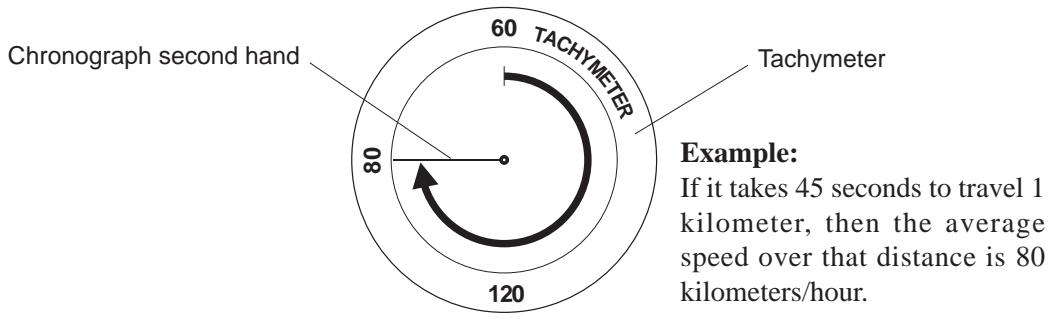
The tachymeter feature is used to measure traveling speed such as that of an automobile. In the case of this watch, the average speed can be approximately determined for a certain distance by measuring how many seconds it takes to travel 1 kilometer (measuring range: maximum 60 seconds). To determine average speed, start the chronograph simultaneous to the start of measurement. Stop the chronograph when the vehicle has traveled 1 kilometer. An approximation of the average speed over that distance can be determined by the position of the chronograph second hand at that time.
14. All-Reset
- This watch may not keep time properly as a result of being subjected to the effects of static electricity, magnetism, strong impact and so forth. When this happens, perform the All-Reset procedure.
- Before performing the All-Reset procedure, make sure to charge the watch until the charge level indicator hand is pointing at least to Level 2 and that the chronograph is in the reset state.
[All-Reset Procedure]
- Pull the crown out to the time correction position (second click) when the second hand has reached the zero seconds position.
- Press buttons (B) and (C) simultaneously.
- The alarm sounds, the charge level indicator hand moves to "Level 3" and the watch automatically performs the reference position alignment procedure.
- Return the crown to the normal position.
- The charge level indicator hand performs a demonstration movement (pendulum movement) and the second hand begins 1-second interval movement. Furthermore, the charge level indicator hand points to level 2 or level 3.
- This completes the All-Reset procedure. Immediately correctly set the time, alarm and other settings by following the procedure for each setting before using the watch. Furthermore, send in your watch for repairs when the All-Reset procedure cannot be performed.
State after All-Reset has been Completed![CITIZEN WATCH E21 - [All-Reset Procedure] - 1](/content/2025/01/176738/images/d8b63a86aa3c0efa463646529ad2b244979f9b92cd3dbdc48d1d4fded20f2188.jpg)
15. Precautions
WARNING: Water-resistance performance
There are several types of water-resistant watches, as shown in the following table.
The unit "bar" is roughly equal to 1 atmosphere.
- WATER RESIST(ANT) xx bar may also be indicated as W.R. xx bar.
| Indication | Specifications | |
| Dial | Case (case back) | |
| WATER RESIST or no indication | WATER RESIST(ANT) | Water-resistant to 3 atmospheres |
| WR 50 or WATER RESIST 50 | WATER RESIST(ANT) 5 bar or WATER RESIST(ANT) | Water-resistant to 5 atmospheres |
| WR 100/200 or WATER RESIST 100/200 | WATER RESIST(ANT) 10bar/20 bar or WATER RESIST(ANT) | Water-resistant to 10/20 atmospheres |
For correct use within the design limits of the watch, confirm the level of water-resistance of your watch, as indicated on the dial and case, and consult the table.
| Examples of use | ||||
| Minor exposure to water (washing face, rain, etc.) | Moderate exposure to water (washing, kitchen work, swimming, etc.) | Marine sports (skin diving) | Scuba diving (with air tank) | Operation of the crown or button with moisture visible |
| OK | NO | NO | NO | NO |
| OK | OK | NO | NO | NO |
| OK | OK | OK | NO | NO |
WARNING: Water-resistance performance
- Water-resistance for daily use (to 3 atmospheres): This type of watch is water-resistant to minor exposure to water. For example, you may wear the watch while washing your face; however, it is not designed for use underwater.
- Upgraded water-resistance for daily use (to 5 atmospheres): This type of watch is water-resistant to moderate exposure to water. You may wear the watch while swimming; however, it is not designed for use while skin diving.
- Upgraded water-resistance for daily use (to 10/20 atmospheres): This type of watch may be used for skin diving; however, it is not designed for scuba or saturated diving using helium gas.
CAUTION
- Be sure to use the watch with the crown pressed in (normal position). If your watch has a screw-lock type crown, be sure to tighten the crown completely.
- Do NOT operate the crown or button with wet fingers or when the watch is wet. Water may enter the watch and compromise water-resistance.
- If the watch is used in seawater, rinse with fresh water afterward and wipe with a dry cloth.
- If moisture has entered the watch, or if the inside of the crystal is fogged up and does not become clear within a day, immediately take the watch to your dealer or Citizen Service Center for repair. Leaving the watch in such a state will allow corrosion to form inside.
- If seawater enters the watch, place the watch in a box or plastic bag and immediately take it in for repair. Otherwise, pressure inside the watch will increase, and parts (crystal, crown, buttons, etc.) may come off.
CAUTION: Keep your watch clean.
- Leaving dust and dirt deposited between the case and crown may result in difficulty in pulling the crown out. Rotate the crown while in its normal position, from time to time, to loosen dust and dirt and then brush it off.
- Dust and dirt tend to be deposited in gaps in the back of the case or band. Deposited dust and dirt may cause corrosion and soil your clothing. Clean the watch occasionally.
Cleaning the Watch
- Use a soft cloth to wipe off dirt, perspiration and water from the case and crystal.
- Use a soft, dry cloth to wipe off perspiration and dirt from the leather band.
- To clean a metal, plastic, or rubber watchband, wash away dirt with mild soap and water. Use a soft brush to remove dust and dirt jammed in the gaps in the metal band. If your watch is not water-resistant, take it to your dealer.
NOTE: Avoid using solvents (thinner, benzine, etc.), as they may mar the finish.
CAUTION: Operating environment
- Use the watch within the operating-temperature range specified in the instruction manual. Using the watch where temperatures are outside the specified range, may result in deterictions or even stoppage of the watch.
- Do NOT use the watch in places where it is exposed to high temperature, such as in a sauna. Doing so may result in a skin burn.
- Do NOT leave the watch in a place where it is exposed to high temperature, such as the glove compartment or dashboard of a car.
- Doing so may result in deterioration of the watch, such as deformation of plastic parts.
- Do NOT place the watch close to a magnet. Timekeeping will become inaccurate if you place the watch close to magnetic health equipment such as a magnetic necklace or a magnetic latch of a refrigerator door or handbag clasp or the earphone of a mobile phone. If this has occurred, move the watch away from the magnet and reset the time.
- Do NOT place the watch close to household appliances that generate static electricity. Timekeeping may become inaccurate if the watch is exposed to strong static electricity, such as is emitted from a TV screen.
- Do NOT subject the watch to a strong shock such as dropping it onto a hard floor.
- Avoid using the watch in an environment where it may be exposed to chemicals or corrosive gases.
If solvents, such as thinner and benzine, or substances containing such solvents come in contact with the watch, discoloration, melting, cracking, etc. may result. If the watch comes in contact with mercury used in thermometers, the case, band or other parts may become discolored.
Periodical inspections
Your watch needs inspection once in every two or three years for safety and long use. To keep your watch water-resistant, the packing needs to be replaced regularly.
Other parts need to be inspected and replaced if necessary.
Ask for Citizen genuine parts upon replacement.
16. Specifications
- Model: E21*
- Type: Analog solar-powered watch
- Timekeeping accuracy: Within ±15 seconds per month on average (when worn at normal temperatures of +5°C to +35°C / 41°F to 95°F)
- Crystal oscillator frequency: 32,768 Hz
- Operating temperature range: Watch operating temperature range:
-10°C to +60°C/14°F to 140°F
Chronograph operating temperature range:
0°C to +60°C / 32°F to 140°F
- Display functions: Time: Hours, minutes, seconds
- Date: Date (with rapid correction feature)
- Additional functions: - Chronograph (timing for up to 12 hours in 1/5 second units)
- Alarm (12-hour clock indicator hand)
Duration of alarm sounding: 20 seconds
Alarm set time accuracy: ±5 minutes
- Charge level indicator (4-level, fan-shaped indicator) Insufficient charge warning feature (2-second interval movement) Over charge prevention feature
- Continuous Operating Times:
- Time until watch stops without charging after being fully charged: Approx. 8 months (continuous operating time varies depending on the frequency at which the alarm, chronograph and other functions are used)
- Time from 2-second interval movement to stopped: Approx. 7 days
- Battery: Secondary battery, 1
- Specifications are subject to change without notice.


- FEATURES
- REPAIRS
- BEFORE USING
- NAMES OF COMPONENTS
- OPERATING THE CROWN
- SETTING THE TIME AND DATE [PROCEDURE FOR SETTING THE TIME]
- HELPFUL HINT FOR ACCURATELY SETTING THE TIME
- [PROCEDURE FOR SETTING THE DATE]
- USING THE CHRONOGRAPH
- [TIMING PROCEDURE]
- [CHRONOGRAPH RESET STATE]
- [NOTE]
- [RESET PROCEDURE]
- USING THE ALARM
- [PROCEDURE FOR SETTING THE ALARM TIME]
- [SWITCHING THE ALARM ON AND OFF]
- [STOPPING THE ALARM]
- VIEWING THE CHARGE INDICATOR
- GENERAL REFERENCE FOR CHARGING TIMES
- FUNCTIONS UNIQUE TO SOLAR-POWERED WATCHES
- [INSUFFICIENT CHARGE WARNING FEATURE]
- [OVER CHARGE PREVENTION FEATURE]
- HANDLING PRECAUTIONS
- TRY TO KEEP THE WATCH CHARGED AT ALL TIMES
- CAUTION: CHARGING PRECAUTIONS
- EXAMPLES
- WARNING: HANDLING OF SECONDARY BATTERY
- REPLACING THE SECONDARY BATTERY
- USING THE TACHYMETER (WHEN PROVIDED)
- ALL-RESET
- [ALL-RESET PROCEDURE]
- PRECAUTIONS
- WARNING: WATER-RESISTANCE PERFORMANCE
- CAUTION
- CAUTION: KEEP YOUR WATCH CLEAN
- CLEANING THE WATCH
- CAUTION: OPERATING ENVIRONMENT
- PERIODICAL INSPECTIONS
- SPECIFICATIONS
Brand : CITIZEN WATCH
Model : E21
Category : Wristwatch