
C65 - Wristwatch CITIZEN WATCH - Free user manual and instructions
Find the device manual for free C65 CITIZEN WATCH in PDF.


| Product type | Solar-powered analog-digital hybrid watch |
| Brand and model | Citizen Watch C65 (Calibre C650-00A) |
| Power supply | Rechargeable secondary battery via built-in solar cell |
| Accuracy | ±15 seconds per month (at normal temperature 5°C to 35°C) |
| Operating temperature | 0°C to 55°C |
| Battery life (full charge) | Up to 4 years in Power Save 2 mode |
| Water resistance | Resistant to 5 bar (50 m) – suitable for swimming |
| Main functions | Time display (analog and digital), calendar, three alarms, chronograph (24 h), timer (99 min), time zones, UTC time, charge indicator, energy saving (Power Save 1 and 2), manual Power Save function |
| Special modes | Automatic Power Save, manual Power Save, insufficient charge warning function, time adjustment warning function, overcharge protection |
| Crown and buttons | Three-position crown (normal, first click, second click), buttons A and B for navigation and adjustment |
| Glass material | Not specified – typically mineral glass or sapphire (to be confirmed) |
| Case material | Not specified – stainless steel probable |
| Strap material | Not specified – leather, metal or rubber depending on model |
| Maintenance and cleaning | Clean with a soft cloth; for metal bracelet, use soapy water and a soft brush; avoid solvents |
| Safety | Do not expose to high temperatures (>60°C), avoid magnetic fields and strong shocks |
| Spare parts and repairability | Rechargeable battery replaceable only by an authorized Citizen service center; do not use any other type of battery |
| General information | Combined solar watch, maintenance-free battery operation, daily charging recommended |
Frequently Asked Questions - C65 CITIZEN WATCH
User questions about C65 CITIZEN WATCH
0 question about this device. Answer the ones you know or ask your own.
Ask a new question about this device
Download the instructions for your Wristwatch in PDF format for free! Find your manual C65 - CITIZEN WATCH and take your electronic device back in hand. On this page are published all the documents necessary for the use of your device. C65 by CITIZEN WATCH.
USER MANUAL C65 CITIZEN WATCH
Please charge the watch fully before use by exposing it to light.
When the watch does not operate according to the instruction manual, it is insufficiently charged.
Charge the watch for at least 3 hours approximately 20 cm (8 in) away from a fluorescent or incandescent lamp (30 W) as a light source. When charging, do not place the watch too close to the light source to prevent the watch from becoming too hot.
- When charging the watch under direct sunlight, charge for at least 50 minutes.
CONTENTS
- Features 6 2.Before Using 7
- Names of Components and Major Functions 8
- Switching the Mode (Display Functions) 12
- Checking 0-Position of Each Hand 13
- Accessing Times or Dates of Major Cities 18
- Switching Analog Time and Digital Time 20
- Setting the Time 22
- Setting the Date 25
- Using the Alarm Mode 28
- Using the Chronograph 32
- Using the Timer 34
- Using Zone Setting 36
- All-Reset 43
- Functions Unique to Solar Powered Watches 46
Insufficient Charge Warning Function, Time Setting Warning Function, Overcharging Prevention Function, Power Save 1, Power Save 2, Manual Power Save, Charge Indicator
- General Reference for Charging Times 59
- Notes Regarding Handling of this Watch 60
- Replacing The Secondary Battery 61
- Using the Register Ring 62
- Precautions 66
- Specifications 72
1. Features
This watch is a combination solar-powered watch that contains a solar cell in its face that drives the watch hands, alarm, chronograph, timer and numerous other functions by converting light energy into electrical energy.
It is also equipped with convenient functions including three power save modes that reduce power consumption when light is not shining on the solar cell, and a "charge indicator" that roughly indicates how much the secondary battery is charged.
2. Before Using
This watch is a solar-powered watch. Before using, allow light to shine onto the watch so that it is sufficiently charged.
If the manual power save function has been activated, cancel it before charging. (Refer to p.58 for information on the procedure for canceling the manual power save function.)
A secondary battery is used in this watch to store electrical energy. This secondary battery is a clean energy battery that does not contain mercury or other toxic substances. Once fully charged, the watch will continue to run for a maximum of 4 years without additional charging (when in the power save 2 mode).
[Proper Use of this Watch]
To use this watch comfortably, make sure to recharge it before it stops running completely. There is no risk of overcharging the watch no matter how often it is recharged (Overcharging Prevention Function).
It is recommended that the watch be recharged everyday.
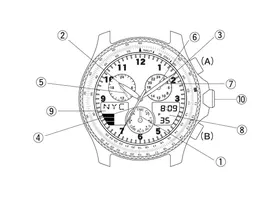
3. Names of Components and Major Functions
| Name/Mode | Time | Calendar | Alarm 1 | Alarm 2 |
| ①Mode hand | TME | CAL | AL-1 | AL-2 |
| ②Hour hand | Always indicates “hours” | |||
| ③Minute hand | Always indicates “minutes” | |||
| ④Second hand | Always indicates “second” | |||
| ⑤24 hour hand | Always indicates “24-hour time” in conjunction with hours and minutes | |||
| ⑥UTC hour hand | Always indicates “UTC hours” | |||
| ⑦UTC minute hand | Always indicates “UTC minutes” | |||
| ⑧Digital display 1 | Hours, minutes, seconds, A/P, SMT (when set to daylight savings time) | Month, date, day, SMT (when set to daylight savings time) | Hours, minutes, A/P, alarm (ON/OF) | |
| ⑨Digital display 2 | City name | |||
| Charge indicator | ||||
| Alarm 3 | Chronograph | Timer | Zone setting |
| AL-3 | CHR | TMR | SET |
| Always indicates “hours” | |||
| Always indicates “minutes” | |||
| Always indicates “second” | |||
| Always indicates “24-hour time” in conjunction with hours and minutes | |||
| Always indicates “UTC hours” | |||
| Always indicates “UTC minutes” | |||
| Hours, minutes, A/P, alarm (ON/OF) | Measured time (seconds, minutes, 1/100 seconds) | Remaining time display (minutes, seconds) | City name (SET/OFF) SMT (ON/OF) |
| City name | Measured time (hours) | Set time (minutes) | City name |
| Charge indicator | |||
| Name /Mode | Crown position | Time | Calendar | Alarm 1 | Alarm 2 |
| ⑩Crown | Normal position | Mode switching | |||
| 1st click | -------- | ||||
| 2nd click | Time correction | Date correction | Alarm time correction | ||
| Button (A) | Normal position | Changing the city | |||
| 1st click | -------- | ||||
| 2nd click | Switching location to be corrected | ||||
| Button (B) | Normal position | Changing the city | |||
| 1st click | -------- | Switching alarm (ON/OF) | |||
| 2nd click | Switching SMT (ON/OF)Switching between "seconds" correction and "24 hour time" correction | -------- | Switching alarm (ON/OF) | ||
| Alarm 3 | Chronograph | Timer | Zone setting |
| Mode switching | |||
| ----- | Changing the city | ||
| Alarm time correction | 0-position setting | Set time correction | City name, time difference setting |
| Changing the city | Start/stop | Changing the city | |
| ----- | Switching city name (SET/OFF) | ||
| Switching location to be corrected | ----- | Switching location to be corrected | |
| Changing the city | Split, reset | Reset | Changing the city |
| Switching alarm (ON/OF) | ----- | Switching SMT (ON/OF) | |
| Switching alarm (ON/OF) | ----- | ||
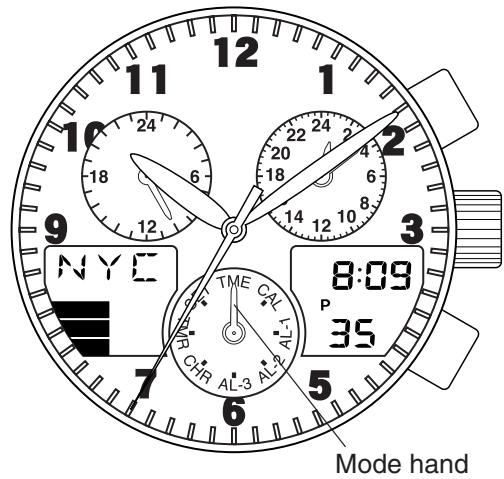
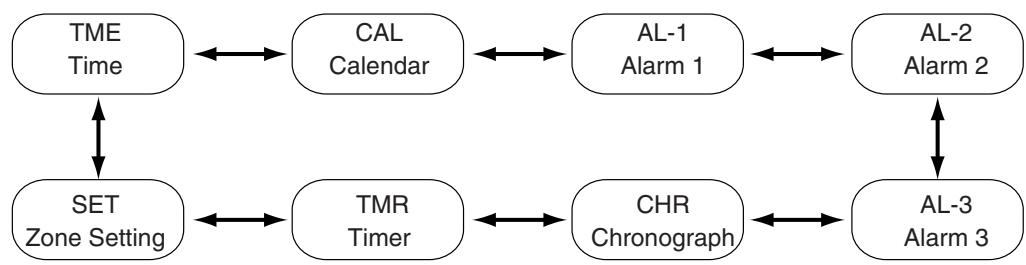
4. Switching the Mode (Display Functions)
In addition to the time and date modes, this watch is also equipped with three additional modes consisting of the alarm, chronograph and timer modes. The mode can be switched by turning the crown. Check the current mode with the mode hand.
5. Checking 0-Position of Each Hand
Before using this watch, check that the 0-position (base position of each hand) is set correctly to ensure that the functions of the watch operate properly by performing the following procedure.
<0-Position Check>
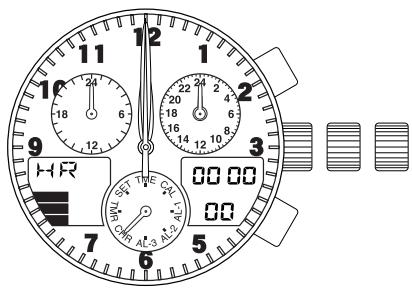
- Turn the crown while in the normal position to set the mode hand to the chronograph [CHR] mode.
- Pull the crown out to the second click (0-position correction position).
- The second hand, minute hand, hour hand, 24-hour hand, UTC hour hand, and UTC minute hand rapidly advance to the 0-position (12:00 position).
Note:
- When each hand is not at the 0-position, perform the "0-position correction" procedure. If this 0-position is out of alignment, each hand will not indicate the correct position.
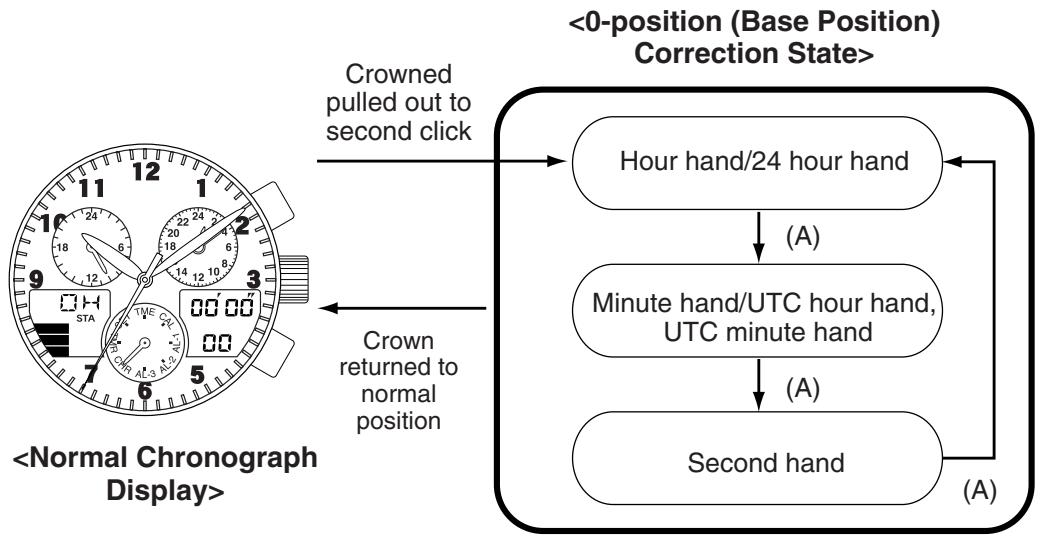
<0-Position Correction (Setting to the Watch Base Position)>
When setting the 0-position of each hand, always make sure to turn the crown forward (clockwise) to set each hand to its 0-position in the clockwise direction.
- Turn the crown while in the normal position to set the mode hand to the chronograph [CHR] mode.
- Pull the crown out to the second click (0-position correction position).
- The second hand, minute hand, hour hand, 24-hour hand, UTC hour hand, and UTC minute hand rapidly advance to the position stored in memory.
- "HR" lights during digital display 2 indicating that the watch is in the correction state.
- Turning the crown forward (clockwise) allows correction to be made in the positive direction. Turning the crown continuously allows the 0-position to be corrected continuously.
- Pressing button (A) switches the correction location between "MIN" (minute hand) and "SEC" (second hand) each time it is pressed.
- Turn the crown forward (clockwise) to align each hand at the 0-position at each correction location. Although correction can be made in the negative direction by turning the crown backward (counter-clockwise), always make sure to set the 0-position by turning the crown forward to ensure that the 0-position is set correctly.
- The 24 hour hand is corrected in conjunction with the hour hand.
- The UTC hour and minute hands are corrected in conjunction with the minute hand.
- The second hand can only be corrected in the forward (clockwise) direction only.
- After correcting, return the crown to the normal position.
- After correcting the 0-position of each hand, reset the time, calendar and other modes before using the watch.
Note:
- None of the buttons on the watch operate during movement of each hand. Operate the buttons only after the hands have stopped moving.
6. Accessing Times or Dates of Major Cities
The time or date of major cities pre-registered in this watch can be easily accessed by pressing the buttons.
- Turn the crown to set the mode hand to the time [TME] or [CAL] calendar mode.
- When button (A) is pressed, the times or dates of major cities are displayed while scrolling up each time it is pressed.
- When button (B) is pressed, the times or dates of major cities are displayed while scrolling down each time it is pressed.
- Pressing button (A) or (B) continuously causes the display to advance rapidly.
| Display on watch | City name | Time difference | Daylight savings time | Display on watch | City name | Time difference | Daylight savings time |
| UTC | Universal time constant | ±0 | --- | TYO | Tokyo | +9 | × |
| LON | London | ±0 | ○ | SYD | Sydney | +10 | ○ |
| PAR | Paris | +1 | ○ | NOU | Noumea | +11 | × |
| ROM | Rome | +1 | ○ | AKL | Auckland | +12 | ○ |
| CAI | Cairo | +2 | ○ | HNL | Honolulu | -10 | × |
| IST | Istanbul | +2 | ○ | ANC | Anchorage | -9 | ○ |
| MOW | Moscow | +3 | ○ | LAX | Los Angeles | -8 | ○ |
| KWI | Kuwait | +3 | × | DEN | Denver | -7 | ○ |
| DXB | Dubai | +4 | × | CHI | Chicago | -6 | ○ |
| KHI | Karachi | +5 | × | MEX | Mexico City | -6 | × |
| DAC | Dacca | +6 | × | NYC | New York | -5 | ○ |
| BKK | Bangkok | +7 | × | YUL | Montreal | -5 | ○ |
| SIN | Singapore | +8 | × | CCS | Caracas | -4 | × |
| HKG | Hong Kong | +8 | × | RIO | Rio de Janeiro | -3 | ○ |
| PEK | Beijing | +8 | × | BUE | Buenos Aires | -3 | × |
- Cities (regions) in which daylight savings time is used are indicated with a \(\bigcirc\), while those in which it is not are indicated with an \(\times\).
- The time difference and use of daylight savings time of each city are subject to change by the particular country.
7. Switching Analog Time and Digital Time
This watch is able to switch between analog time display and digital time display.
- Turn the crown to set the mode hand to the time [TME] mode.
- Press buttons (A) and (B) simultaneously.
- After a confirmation tone sounds, the watch switches the time of the city displayed by analog display and the time of the city displayed by digital display.
- If buttons (A) and (B) are simultaneously pressed when in the calendar [CAL] mode, the watch switches the date of the city displayed by analog display and the date of the city displayed by digital display (the times are switched at this time as well).
Analog time: 10:10 AM (Tokyo: TYO) Digital time: 8:10 PM (New York: NYC) Analog time: 8:10 PM (New York: NYC) Digital time: 10:10 AM (Tokyo: TYO)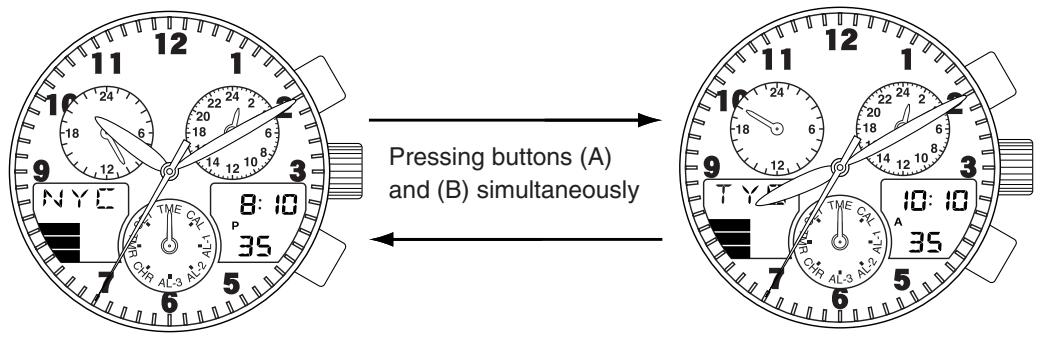
8. Setting the Time (Time is corrected by digital display)
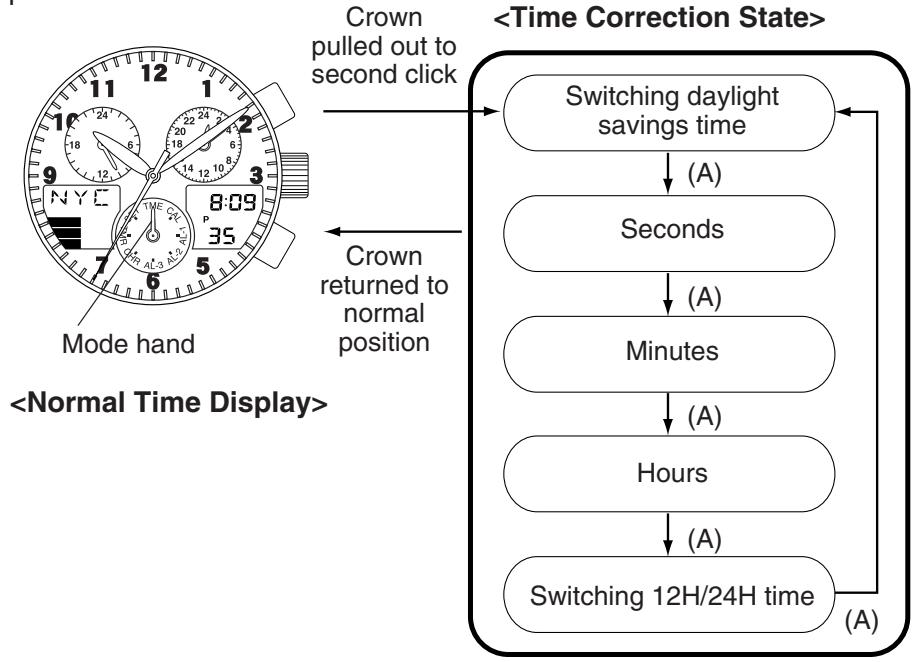
- When digital time is corrected, the second, minute, hour, 24 hour and UTC hour and minute hands of the analog time are corrected automatically in conjunction with digital time.
- Turn the crown and set the mode hand to the time [TME] mode.
- Press either button (A) or button (B) to access the city to be corrected.
- When the crown is pulled out to the second click (time setting position), the watch enters the time correction state.
- When button (A) is pressed, the location to be corrected changes each time it is pressed. Select the location to be corrected. (The location that is flashing is the location that can be corrected.)
- When button (B) is pressed in the [SMT] daylight savings time correction state, daylight savings time can be set (ON) or canceled (OF).
- "Seconds" return to zero when button (B) is pressed in the "seconds" correction state.
- When the crown is turned forward (clockwise) in the "hour" or "minute" correction states, correction is made in the positive direction. Turning the crown continuously allows "hours" or "minutes" to be corrected continuously. Although correction can be made in the negative direction when the crown is turned backward (counter-clockwise), always make sure to turn the crown forward to ensure that the time is set correctly.
- Switching "12H/24H time" is performed by pressing button (B).
- After corrections have been completed, return the crown to the normal position.
Notes:
- Daylight savings time can be set for each city.
- When the time is set for any one city, the times of other cities, including UTC time, are corrected automatically.
- When changing the time, the crown and buttons do not respond even if operated. Ensure that the required procedures have been performed correctly by first checking that the time has changed.
9. Setting the Date (Date is corrected by digital display)
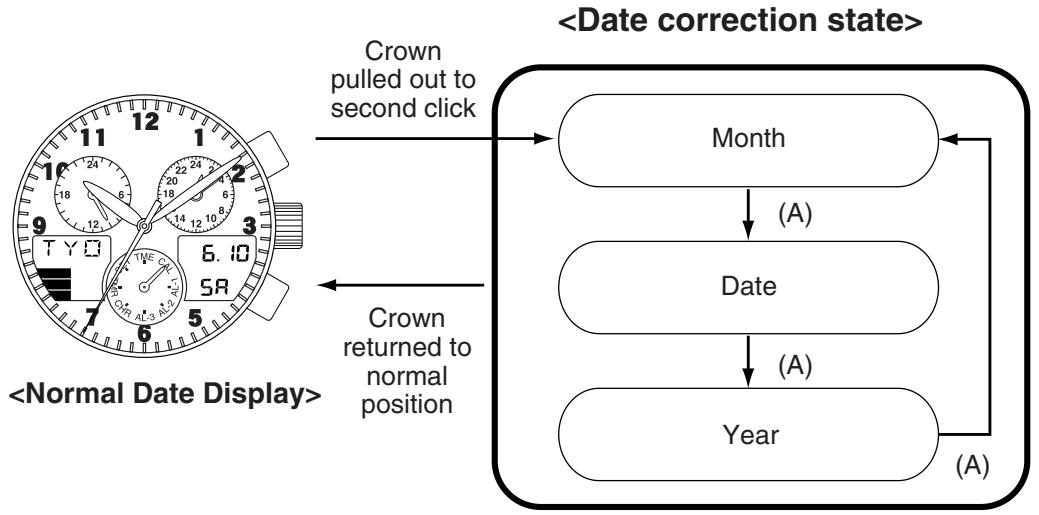
- Turn the crown and set the mode hand to the calendar [CAL] mode.
- Press either button (A) or button (B) to access the city to be corrected.
- When the crown is pulled out to the second click (date setting position), the watch enters the date correction state.
- When button (A) is pressed, the location to be corrected changes each time it is pressed. Select the location to be corrected so that it is flashing.
- When the crown is turned forward (clockwise), correction is made in the positive direction. When the crown is turned backward (counter-clockwise), correction is made in the negative direction. Turning the crown continuously allows corrections to be made rapidly.
- After corrections have been completed, return the crown to the normal position.
Notes:
- When the date is set for any one city, the dates of other cities, including UTC time, are corrected automatically.
- The year can be set from 2000 to 2099.
- The day is corrected automatically when the year, month and date are set.
- Since this watch is equipped with an auto-calendar function, it is not necessary to correct the date at the end of the month.
- When the date has been set to a non-existent date, the watch automatically displays the 1st day of the following month when the watch is returned to the normal display.
10. Using the Alarm Mode
The alarm setting procedure and other procedures for alarm use are the same for Alarm 1, 2 and 3. Only the tone that sounds is different.
The alarm sounds for 15 seconds when the set time is reached once a day. When the alarm is sounding, it can be turned off by pressing button (A) or (B).
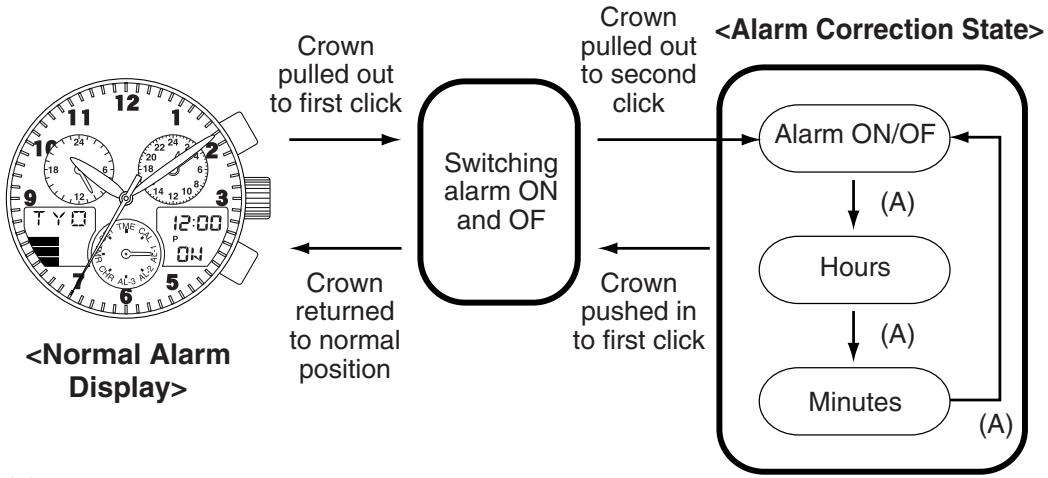
- Turn the crown and set the mode hand to either the Alarm 1, 2 or 3 [AL-1, 2 or 3] mode.
- Press either button (A) or button (B) to access the city to be corrected.
- When the crown is pulled out to the second click (alarm time setting position), the watch enters the alarm correction state.
- When button (A) is pressed, the location to be corrected changes each time it is pressed. Select the location to be corrected so that it flashes.
- The alarm can be set (ON) or canceled (OFF) by pressing button (B) when the watch is in the alarm ON/OFF correction state.
- When the crown is turned forward (clockwise) in the "hours" or "minutes" correction state, correction is made in the positive direction. When the crown is turned backward (counter-clockwise), correction is made in the negative direction.
- Turning the crown continuously allows corrections to be made rapidly.
- After corrections have been completed, return the crown to the normal position.
Note:
- When the time mode is set to the 12-hour time display, the alarm time also uses a 12-hour time display. Pay attention to AM and PM when setting the alarm time.
The alarm can be switched ON and OFF by pulling out the crown to the first click even when not in the alarm correction state.
- Pull out the crown to the first click in the alarm mode to allow the alarm to be switched ON and OFF.
- Pressing button (B) switches the alarm ON and OFF each time it is pressed.
- Return the crown to the normal position after the alarm has been set to ON or OFF.
- Pressing buttons (A) and (B) simultaneously during the normal alarm display causes the alarm to sound for as long as they are pressed.
11. Using the Chronograph
The chronograph is able to measure and display time up to a maximum of 23 hours, 59 minutes, 59.99 seconds in 1/100th second units. After 24 hours have elapsed, the chronograph automatically returns to the chronograph reset display (00'00"00) and stops.
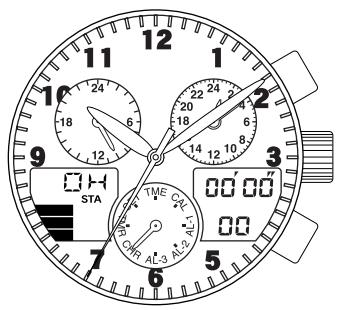
- Turn the crown to set the mode hand to the chronograph [CHR] mode.
- Pressing button (A) repeatedly starts and stops the chronograph each time it is pressed.
- Split time is displayed for 10 seconds when button (B) is pressed during chronograph measurement.
- The "SPL" mark flashes during split time display.
- Pressing button (B) while the chronograph is stopped returns the chronograph to the chronograph reset display.
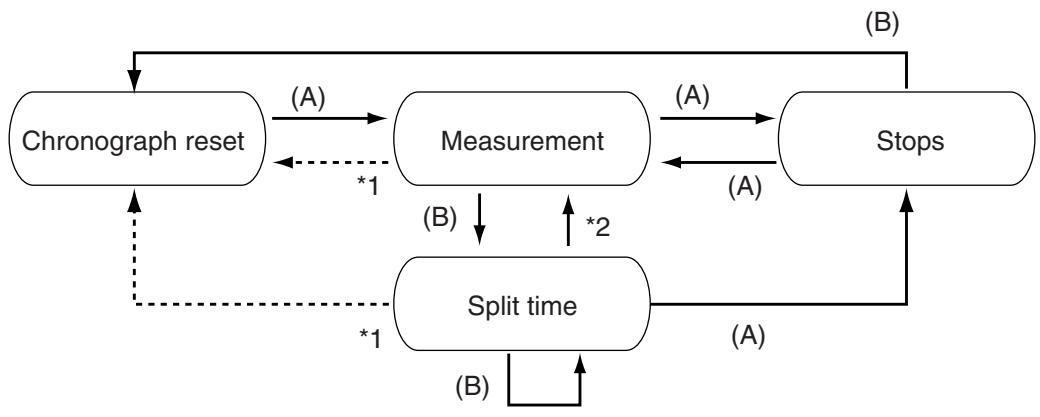
1: Returns automatically after timing for 24 hours 2: Returns automatically after 10 seconds
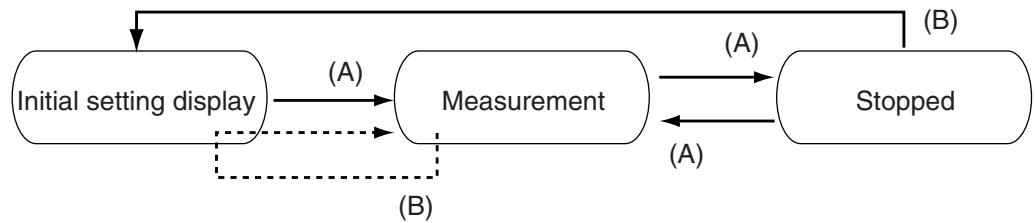
12. Using the Timer
The timer can be set to a maximum of 99 minutes in 1 minute units. When the set time has elapsed, a tone indicating that the set time is up sounds for about 5 seconds, after which the timer returns to the timer initial setting display.
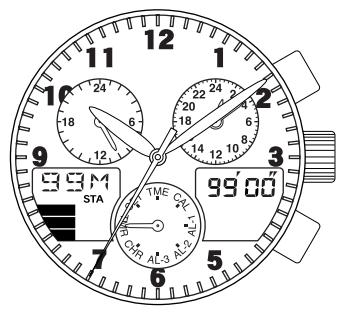
- Turn the crown to set the mode hand to the timer [TMR] mode.
- Pull out the crown to the second click (timer setting position) to enter the "minutes" correction state.
- When the crown is turned forward (clockwise) in the "hours" or "minutes" correction state, correction can be made in the positive direction. When the crown is turned backward (counter-clockwise), correction can be made in the negative direction.
- After setting, return the crown to the normal position.
- Press button (A) to start the timer.
- Pressing button (A) again during measurement stops the timer.
- Pressing button (B) during measurement returns the watch to the timer initial setting display and resumes measurement.
- Pressing button (B) when the timer is stopped returns the watch to the timer initial setting display.
13. Using Zone Setting
The zone setting function enables only those cities for which "SET" has been selected to be easily accessed (displayed) in each mode. Daylight savings time can also be set for each city. In addition, the user is also able to arbitrarily register one city and time difference.
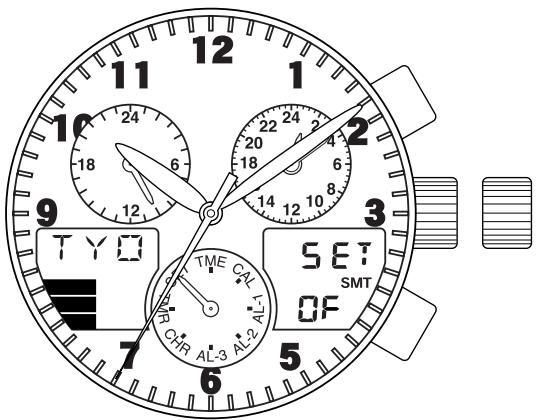
- Turn the crown while in the normal position and set the mode hand to the mode setting [SET] mode.
- The city can be changed by pulling out the crown to the first click (for changing cities between SET and OFF and for setting the location for switching to daylight savings time).
- Turn the crown to access the city to be set.
- Turning the crown continuously causes the cities to advance rapidly.
- Press button (A) to set the city and press button (B) to set daylight savings time.
- After setting, return the crown to the normal position.
- When button (A) or button (B) is pressed while the watch is in the zone setting [SET] mode (with the crown in the normal position), the city name and SET or OFF are displayed each time the button is pressed.
- Only those cities for which SET is displayed can be accessed from each mode.
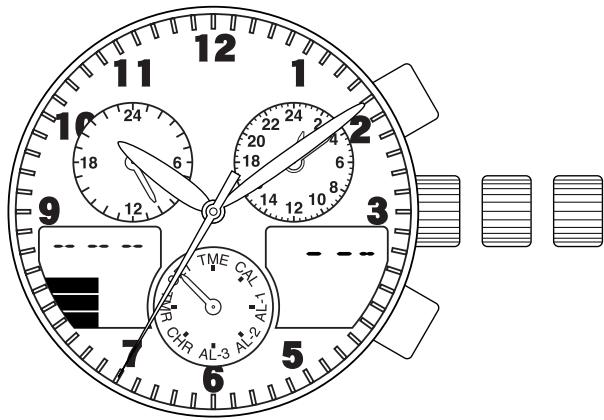
- Turn the crown while in the normal position and set the mode hand to the zone setting [SET] mode.
- When the crown is pulled out to the second click (city setting position), the watch enters the correction state for the third letter of the city name.
- Turning the crown displays those characters that are used for city names.
- Turning the crown continuously causes the characters to advance rapidly.
- The correction location changes each time button (A) is pressed.
- When button (A) is pressed during the correction state of the first character of the city name, the watch enters the correction state for the time difference from UTC.
- Turn the crown to display the time difference.
- After setting, return the crown to the normal position.
- Letters of the alphabet (A to Z)
- Numbers (0-9)
- Symbols (---: hyphens, blank spaces)
When the crown is turned forward (clockwise), the display changes in the order of letters (A-Z), numbers (0-9) and then symbols (blank spaces, --: hyphens). When the crown is turned backward (counter-clockwise), the display sequence is opposite that when turning the crown forward.
The location having the same time difference among the 30 cities pre-registered in this watch is displayed first. However, a city is not displayed if the time difference of a registered city has not been set.
- Turn the crown to set the mode hand to the zone setting [SET] mode.
- When the crown is pulled out to the second click (city setting position), the watch enters the city name correction state.
- Turn the crown to change the display of the registered city name to "-- --".
- After canceling registration, return the crown to the normal position.
14. All-Reset
When this watch indicates an abnormal display or does not function properly (no display, alarm continues to sound, etc.) as a result of being subjected to the effects of static electricity or strong impact and so forth, perform the all-reset procedure described below.
When performing the all-reset procedure, first make sure that the watch is sufficiently charged and that the charge indicator is lit.
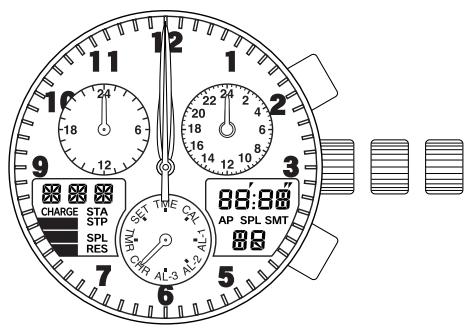
- Turn the crown to set the mode hand to the chronograph [CHR] mode.
- Pull out the crown to the second click (0-position correction mode).
- The second hand, minute hand, hour hand, 24-hour hand, UTC hour hand, and UTC minute hand rapidly advance to the 0 position stored in memory.
- Press buttons (A) and (B) simultaneously and then release.
- All segments of the digital display are shown when either of the buttons is released.
- This fully lit display is canceled when the crown is returned to the normal position.
- After canceling, a confirmation tone is sounded, after which each of the hands performs a demonstration movement in the order of the second hand, minute hand, UTC minute hand, UTC hour hand, and 24-hour hand to indicate that the all-reset procedure is finished.
- After the demonstration movement, pull the crown out to the second click to switch the watch to the watch base position setting state.
Always make sure to set the 0 position (base position) for the hour hand, minute hand, second hand, 24-hour hand, and UTC hour and minute hands while referring to "5. Checking 0-Position of Each Hand <0-Position Correction>".
Note:
- After setting the 0 position (base position) for each hand, correctly reset the time, calendar, and other modes before using the watch.
15. Functions Unique to Solar-Powered Watches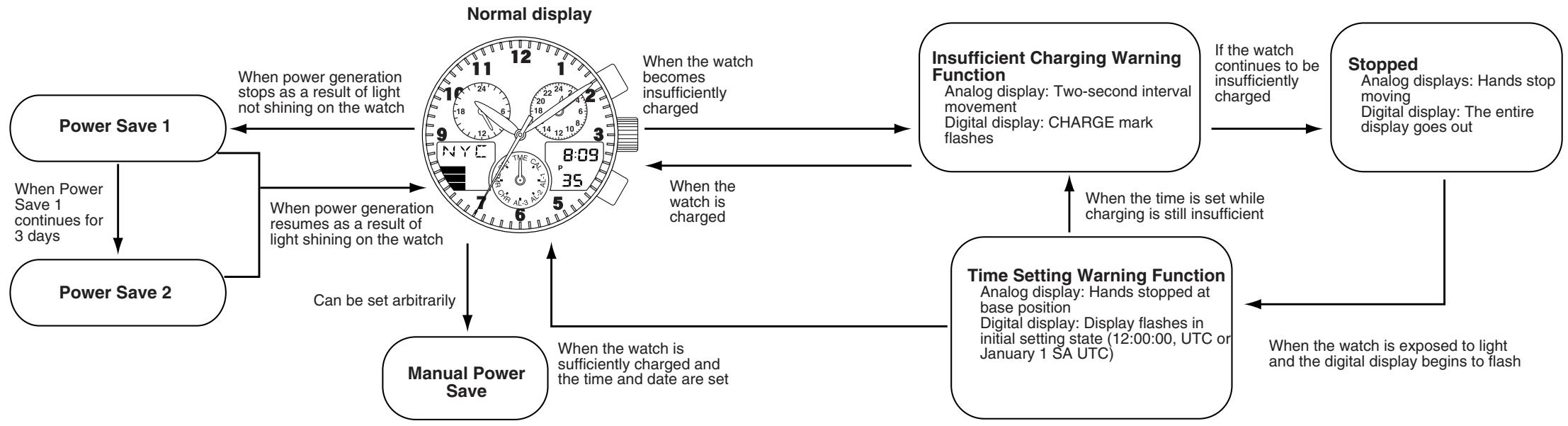
[Insufficient Charging Warning Function] (Analog Display)
Regardless of the display (mode) of the watch at the time, when the watch becomes insufficiently charged, the watch changes to the time display and the second hand begins to move at two-second interval movement. Although the 24-hour hand, hour hand, and minute hand continue to keep the correct time, the watch stops after about 1.5 days have elapsed after the insufficient charging warning function is activated. When this happens, charge the watch by exposing it to light so that it returns to one-second interval movement. However, if the watch again becomes insufficiently charged without setting the time after it has been sufficiently charged by exposing it to light as a result of having stopped due to being insufficiently charged, it will not return to the normal display unless the time is set after again sufficiently charging.
Two-second interval movement![CITIZEN WATCH C65 - [Insufficient Charging Warning Function] (Analog Display) - 1](/content/2025/01/176728/images/1082229a130c3580bc0a2f5c41859ff74fe4b85835b76fa0b7a71c5451e5a08c.jpg)
(Digital Display)
"CHARGE" flashes on digital display area 2 in all modes.
- The watch displays the normal time display regardless of the position of the crown (pulled out to the first or second click) in each mode except for the calendar mode.
- When the watch is in the calendar mode, the normal date display is displayed regardless of the position of the crown.
Notes:
- Crown operations do not function (except for mode switching (with the crown in the normal position)) in any of the modes.
- Button operations do not function, except for changing the city name (UP/DOWN), in any of the modes.
- The alarm tone does not sound even if it is set.
- The chronograph is interrupted and reset even if measurement is in progress.
- Timing by the timer is immediately interrupted even if timing is in progress.
- In the case the watch switches to the insufficient charging warning function as a result of being insufficiently charged, it takes a minimum of 30 minutes for the watch to return to the normal operating state even if sufficiently exposed to light.
When the insufficient charging warning function is canceled as a result of exposing the watch to light and sufficiently charging, the watch returns to the mode indicated by the mode hand.
[Time Setting Warning Function]
(Analog Display)
The watch stops when insufficient charging continues for about 1.5 days. When the watch is charged by exposing to light after having stopped due to insufficient charging, each hand is rapidly advanced to the base position and stops. Each hand remains stopped until the time is reset.
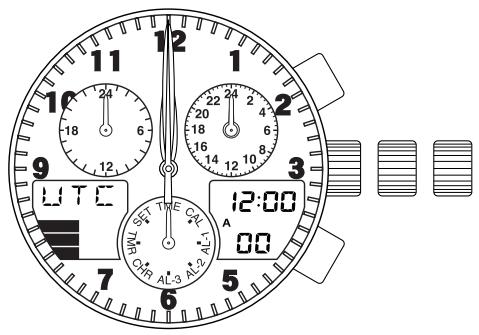
(Digital Display)
The initial setting display (12 hours, 00 minutes, 00 seconds, UTC or January 1 SA) flashes in the time or calendar mode.
- Set the mode hand to the time mode and pull the crown out to the second click to set the time. Flashing of the digital display is only canceled in the time mode. After correcting the time, return the crown to the normal position.
- Set the mode hand to the calendar mode and pull the crown out to the second click to set the date. Flashing of the digital display is canceled in the calendar mode.
- After correcting the date, return the crown to the normal position.
Note:
- The time setting warning function will not be canceled unless the time is first set followed by setting the date.
- It takes a minimum of 30 minutes until the watch switches to the time setting warning display after the watch has stopped due to insufficient charging even if the watch is exposed to light.
[Overcharging Prevention Function]
The overcharging prevention function is activated when the secondary battery is fully charged so that it is not charged further. This allows the user to charge the watch without any risk of overcharging.
[Power Save 1]
When power is not generated as a result of the solar cell not being exposed to light, the second hand stops when it reaches the zero seconds position and the watch automatically enters the power save state to inhibit power consumption of the secondary battery.
(Analog Display)
- The second hand stops at the base position (12:00).
- Other hands continue to keep the correct time.
(Digital Display)
- In coordination with the analog second hand stopping at the zero seconds position, the entire digital display goes out. However, the alarm, chronograph and other functions continue to measure time internally even though there is no display.
Power Save 1 is canceled when power generation resumes as a result of exposing the solar cell to light.
- The second hand rapidly advances to the current time and begins one-second interval movement.
- The digital display reappears simultaneous to resumption of power generation.
Notes:
- During the time the secondary battery is fully charged and the overcharging prevention function is activated, the power save function is not activated even if power generation is interrupted as a result of the solar cell not being exposed to light. In addition, the power save function is similarly not activated when the solar cell is exposed to intense light and temporarily becomes fully charged.
[Power Save 2]
When the watch reaches the first 12:00 AM position (when the 24 hour hand, hour hand, minute hand and UTC minute hand all reach the reference position) after the Power Save 1 state has continued for 3 days, it enters the Power Save 2 state.
(Analog Display)
- The 24 hour hand, hour hand, minute hand, second hand and UTC minute hand stop at the reference position (12:00).
- The UTC hour hand stops moving immediately.
(Digital Display)
- The digital display remains completely out, continuing from the Power Save 1 state.
Notes:
- Crown and button operations do not function in any mode.
- The alarm tone does not sound even if it is set.
- The tone indicating that time is up does not sound in the timer mode.
Similar to Power Save 1, Power Save 2 is canceled when power generation resumes as a result of exposing the solar cell to light.
Each hand rapidly advances to the current time and begins to move. The digital display reappears simultaneously with the resumption of power generation. However, the chronograph returns to the reset state and the timer switches to the initial setting display.
[Manual Power Save]
When not using the watch for an extended period of time, activating the manual power save function after first charging the watch until all three bars of the graphic display of the secondary battery charge indicator are lit enables the watch to be stored for a longer period of time.
Furthermore, do not charge the watch while the manual power save function is activated. First cancel the manual power save function before charging.
- The manual power save function is activated by setting the city name to "C65" and the time difference to "0" while following the procedure described in section 13 on Using Zone Setting, and then returning the crown to the normal position.
(Analog Display)
Each hand stops moving at its current location.
(Digital Display)
- The entire digital display is not lit.
Notes:
- None of the button operations function in any mode.
- The mode does not change even when the mode hand is attempted to be moved by turning the crown.
Each hand rapidly advances to the current time and Manual Power Save is canceled when the crown is pulled out to the second click.
Return the crown to the normal position after canceling the manual power save function.
Each hand rapidly advances to the current time and begins to move. - The digital display reappears simultaneous to resumption of power generation, and the alarm sounds for the set duration. However, the chronograph returns to the reset state and the timer switches to the initial setting display.
[Charge Indicator]
The charge indicator provides a simple graphic indication in digital display area 2 of the amount of charge remaining in the secondary battery.
Fully charged![CITIZEN WATCH C65 - [Charge Indicator] - 1](/content/2025/01/176728/images/bbc4aa00ff09ec491215c356ef58a4cfc16b423ba4bb1b04bed2e3aa03e68bd6.jpg)
Sufficiently charged![CITIZEN WATCH C65 - [Charge Indicator] - 2](/content/2025/01/176728/images/d4b6ab397477c95001ca425bf1cdacaeb3e0b43a7d3e9c365b564b00aaad3d66.jpg)
Low charge![CITIZEN WATCH C65 - [Charge Indicator] - 3](/content/2025/01/176728/images/e0803ff8980ea728c62ddc4f9ad78dcad8583051520e4c9792d9403242ef92bd.jpg)
Hardly any charge![CITIZEN WATCH C65 - [Charge Indicator] - 4](/content/2025/01/176728/images/fe2228703fe1403bc751597a4cb7adc39ebfb1c31c8c7e26d49565aed69e07ce.jpg)
When none of the bars of the graphic display are lit, the secondary battery has essentially become completely discharged and the second hand begins two-second interval movement. Since the watch will stop due to insufficient charging if this state continues for about 1.5 days, sufficiently charge the watch by exposing to light.
16. General Reference for Charging Times
The time required for recharging varies according to the model of the watch (color of the dial, etc.). The following times are shown below to serve only as a reference.
- Recharging time refers to the amount of time the watch is continuously exposed to light.
| Illuminance (lx) | Environment | Charging time | ||
| Charging time for 1 day of operation | Charging time from the stopped state to one-second interval movement | Charging time from stopped state to fully charged | ||
| 500 | Inside an ordinary office | 2 hours 30 minutes | 15 hours | 182 hours |
| 1,000 | 60-70 cm (24-28 in.) under fluorescent light (30 W) | 1 hour | 8 hours | 87 hours |
| 3,000 | 20 cm (8 in.) under fluorescent light (30 W) | 20 minutes | 3 hours | 29 hours |
| 10,000 | Outdoors, cloudy weather | 6 minutes | 1 hour 30 minutes | 9 hours |
| 100,000 | Outdoors, summer, under direct sunlight | 3 minutes | 50 minutes | 5 hours |
Full recharging time: Time required for recharging the watch from the stopped state to fully charged. Charging time for 1 day of operation: Time required for recharging the watch to run for 1 day at one-second interval movement.
17. Notes Regarding Handling of this Watch
- Please note that if you routinely wear long sleeves, the watch can easily become insufficiently charged as a result of it being concealed and unable to be exposed to light.
- When you take the watch off, try to place it in as bright a location as possible to ensure that it always keeps the correct time.
Notes: Charging Precautions
- Avoid recharging at high temperatures (over about 60°C / 140°F) since this may result in damage to the watch as a result of reaching excessively high temperatures.
Examples: Charging the watch in close proximity to an incandescent lamp, halogen lamp or other light source that can easily reach high temperatures, charging the watch in a location that reaches high temperatures such as on a car dashboard.
- When charging the watch with an incandescent lamp, always make sure the watch is at least 50 cm (20 in.) away from the lamp so that it does not reach excessively high temperatures during charging.
18. Replacing The Secondary Battery
Unlike ordinary batteries, the secondary battery used in this watch doesn't have to be periodically replaced due to repeated charging and discharging.
CAUTION
- Never use another battery different from the secondary battery used in this watch.
- The watch structure is so designed that a different kind of battery other than that specified cannot be used to operate it. In case a different kind of battery such as a silver battery is used by some chance, there is a danger that it will be overcharged to burst, causing damage to the watch and even to the human body.
19. Using the Register Ring
The bezel design may vary depending on the model.
[Calculation function]
Note the following points when using this function. Use the calculation function of this watch only as a guide. These scales do not indicate the position of the decimal point.
![CITIZEN WATCH C65 - [Calculation function] - 1](/content/2025/01/176728/images/daa4213ddcb5ce980e51a646ea57bc86a703f82ae9591c9dafa7aeabd3864355.jpg)
Speed index
Outer scale
(distance scale)
Inner scale
(Time scale)
A. Navigational calculation
1) Time required
Example: Obtain the time required for the flight of an aircraft at 180 knots for 450 nautical miles.
Answer: Align "18" on the outer scale with the SPEED INDEX (▲) on the inner scale. Then, "45" on the outer scale corresponds to "2:30" on the inner scale (time scale). Thus, the time required for the flight is 2 hours and 30 minutes.
2) Knots (air speed)
Example: Obtain the knots (air speed) for 240 nautical miles with a flight time of 1 hour and 20 minutes.
Answer: Align "24" on the outer scale with "1:20" on the inner scale (time scale). Then, the SPEED INDEX (△) on the inner scale corresponds to "18" on the outer scale. Thus, the air speed for the flight is 180 knots.
3) Flight distance
Example: Obtain the air distance when the air speed is 210 knots and the flight time is 40 minutes.
Answer: Align "21" on the outer scale with the SPEED INDEX (▲) on the inner scale. Then, "40" on the inner scale corresponds to "14" on the outer scale. Thus, the air distance of the flight is 140 nautical miles.
4) Rate of fuel consumption
Example: Obtain the rate of fuel consumption (gallons / hour) when the flight time is 30 minutes and the fuel consumption is 120 gallons.
Answer: Align "12" on the outer scale with "30" on the inner scale. Then, the SPEED INDEX (▲) on the inner scale corresponds to "24" on the outer scale. Thus, the fuel consumption is 240 gallons per hour.
5) Fuel consumption
Example: Obtain the fuel consumption required for a flight when the rate of fuel consumption is 250 gallons per hour and the flight time is 6 hours.
Answer: Align "25" on the outer scale with the SPEED INDEX (▲) on the inner scale. Then, "6:00" on the inner scale (time scale) corresponds to "15" on the outer scale. Thus, the fuel consumption is 1,500 gallons.
6) Estimated flight time
Example: Obtain the estimated flight time when the rate of fuel consumption is 220 gallons per hour and the aircraft has 550 gallons of fuel.
Answer: Align "22" on the outer scale with the SPEED INDEX (▲) on the inner scale. Then, "55" on the outer scale corresponds to "2:30" on the inner scale (time scale). Thus, the estimated flight time is 2 hours and 30 minutes.
7) Difference in altitude
The difference in altitude can be obtained from the rate of descent and the descent time.
Example: Obtain the difference in altitude when an aircraft continues descending for 23 minutes at a rate of 250 feet per minute.
Answer. Align "25" on the outer scale with "10" on the inner scale. Then, "23" on the inner scale corresponds to "57.5" on the outer scale. Thus, the difference in altitude is 5,750 feet.
8) Rate of climb (or descent)
The rate of climb (or descent) can be obtained from the time required to reach an altitude.
Example: Obtain the rate of climb when an aircraft reaches an altitude of 7,500 feet after climbing for 16 minutes.
Answer. Align "75" on the outer scale with "16" on the inner scale. Then, "10" on the inner scale corresponds to "47" on the outer scale. Thus, the rate of climb is 470 per minute.
9) Time of climb (or descent)
The time required for climb can be obtained from the altitude to be reached and the rate of climb (or descent).
Example: Obtain the time of climb when an aircraft is to climb to 6,300 feet at a rate of 550 feet per minute.
Answer. Align "55" on the outer scale with "10" on the inner scale. Then, "63" on the outer scale corresponds to "11.5" on the inner scale. Thus, the time of climb is 11 minutes and 30 seconds.
10) Conversion
Example: Convert 30 statute miles into nautical miles and kilometers.
Operation: Align "30" on the outer scale with STAT (▲) on the inner scale. Then, NAUT (▲) on the inner scale corresponds to "26" nautical miles on the outer scale, and "12 km" (s) on the inner scale corresponds to "48.2" km on the outer scale.
B. General Calculation Functions
1) Multiplication
Example: 20 × 15
Operation: Align "20" on the outer scale with "10" on the inner scale. Then, "15" on the inner scale corresponds to "30" on the outer scale. Take into account the position of the decimal point and add one zero to obtain 300. Note that with the scales of this watch, the position of the decimal point cannot be obtained.
2) Division
Example: 250/20
Operation: Align "25" on the outer scale with "20" on the inner scale. Then, "10" on the inner scale corresponds to "12.5" on the outer scale. Take into account the position of the decimal point to obtain 12.5.
3) Proportion
Example: 30 / 20 = 60 / x
Operation: Align "30" on the outer scale with "20" on the inner scale. Then, "60" on the outer scale corresponds to "40" on the inner scale. At this point, the proportion for every value on the inner and outer scales is 30:20.
4) Square root
Example: Square root of 225
Operation: Turn the outer scale slowly and find a value that corresponds to both "22.5" on the outer scale and "10" on the inner scale. In this example, "22.5" on the outer scale corresponds to "15" on the inner scale, and "10" on the inner scale corresponds to "15" on the outer scale. Thus, the answer is 15.
20. Precautions
CAUTION: Water-resistance performance
There are several types of water-resistant watches, as shown in the following table.
The unit "bar" is roughly equal to 1 atmosphere.
- WATER RESIST(ANT) xx bar may also be indicated as W.R. xx bar.
| Indication | Specification | |
| Dial | Case (Case back) | |
| WATER RESIST or no indication | WATER RESIST(ANT) | Water-resistant to 3 atmospheres |
| WR 50 or WATER RESIST 50 | WATER RESIST(ANT) 5 bar or WATER RESIST(ANT) | Water-resistant to 5 atmospheres |
| WR 100/200 or WATER RESIST 100/200 | WATER RESIST(ANT) 10bar/20 bar or WATER RESIST(ANT) | Water-resistant to 10 / 20 atmospheres |
For correct use within the design limits of the watch, confirm the level of water-resistance of your watch, as indicated on the dial and case, and consult the table.
| Examples of use | ||||
| Minor exposure to water (washing face, rain, etc.) | Moderate exposure to water (washing, kitchen work, swimming, etc.) | Marine sports (skin diving) | Scuba diving (with air tank) | Operation of the crown or button with moisture visible |
| OK | NO | NO | NO | NO |
| OK | OK | NO | NO | NO |
| OK | OK | OK | NO | NO |
- Water-resistance for daily use (to 3 atmospheres): This type of watch is water-resistant to minor exposure to water. For example, you may wear the watch while washing your face; however, it is not designed for use underwater.
- Upgraded water-resistance for daily use (to 5 atmospheres): This type of watch is water-resistant to moderate exposure to water. You may wear the watch while swimming; however, it is not designed for use while skin diving.
- Upgraded water-resistance for daily use (to 10/20 atmospheres): This type of watch may be used for skin diving; however, it is not designed for scuba or saturated diving using helium gas.
CAUTION
- Do NOT operate the crown or button with wet fingers or when the watch is wet. Water may enter the watch and compromise water-resistance.
- If the watch is used in seawater, rinse with fresh water afterward and wipe with a dry cloth.
- If moisture has entered the watch, or if the inside of the crystal is fogged up and does not become clear within a day, immediately take the watch to your dealer or Citizen Service Center for repair. Leaving the watch in such a state will allow corrosion to form inside.
- If seawater enters the watch, place the watch in a box or plastic bag and immediately take it in for repair. Otherwise, pressure inside the watch will increase, and parts (crystal, crown, buttons, etc.) may come off.
CAUTION: Keep your watch clean.
- Dust and dirt tend to be deposited in gaps in the back of the case or band. Deposited dust and dirt may cause corrosion and soil your clothing. Clean the watch occasionally.
Cleaning the Watch
- Use a soft cloth to wipe off dirt, perspiration, and water from the case and crystal.
- Use a soft, dry cloth to wipe off perspiration and dirt from the leather band.
- To clean a metal, plastic, or rubber watchband, wash away dirt with mild soap and water. Use a soft brush to remove dust and dirt jammed in the gaps in the metal band. If your watch is not water-resistant, take it to your dealer.
If your watch is not water-resistant, take it to your dealer.
NOTE: Avoid using solvents (thinner, benzine, etc.), as they may mar the finish.
CAUTION: Operating environment
- Use the watch within the operating-temperature range specified in the instruction manual. Using the watch where temperatures are outside the specified range may result in deterioration of functions or even stoppage of the watch.
- Do NOT use the watch in places where it is exposed to high temperature, such as in a sauna. Doing so may result in a skin burn.
- Do NOT leave the watch in a place where it is exposed to high temperature, such as the glove compartment or dashboard of a car. Doing so may result in deterioration of the watch, such as deformation of plastic parts.
- Do NOT place the watch close to a magnet. Timekeeping will become inaccurate if you place the watch close to magnetic health equipment such as a magnetic necklace or a magnetic latch of a refrigerator door or handbag clasp or the earphone of a mobile phone. If this has occurred, move the watch away from the magnet and reset the time.
If this has occurred, move the watch away from the magnet and reset the time.
- Do NOT place the watch close to household appliances that generate static electricity. Timekeeping may become inaccurate if the watch is exposed to strong static electricity, such as is emitted from a TV screen.
- Do NOT subject the watch to a strong shock such as dropping it onto a hard floor.
- Avoid using the watch in an environment where it may be exposed to chemicals or corrosive gases. If solvents, such as thinner and benzine, or substances containing such solvents come in contact with the watch, discoloration, melting, cracking, etc. may result. If the watch comes in contact with mercury used in thermometers, the case, band, or other parts may become discolored.
21. Specifications
- Caliber No.: C650-00A
- Type: Combination solar-powered watch
- Accuracy: Within ±15 seconds per month (when worn at normal temperatures of +5°C to +35°C / 41°F to 95°F)
- Operating Temperature Range:
Watch operating temperature range: 0°C to +55°C (32°F to 131°F)
- Display Functions:
Analog Time: Seconds, minutes, hours, 24 hours, UTC minutes, UTC hours, mode Digital Time: Seconds, minutes, hours, city name, daylight savings time, A/P - Calendar: Month, date, day, city name - Alarm 1: Hours, minutes, A/P, city name, ON/OFF - Alarm 2: Hours, minutes, A/P, city name, ON/OFF - Alarm 3: Hours, minutes, A/P, city name, ON/OFF - Chronograph: Chronograph hours, chronograph minutes, chronograph seconds, chronograph 1/100 seconds, SPL, 24 hour measurement
- Timer: Timer remaining minutes, timer remaining seconds, set minutes (timer setting range: 99 minutes to 1 minute in 1 minute units)
- Zone setting: City name (SET/OFF), daylight savings time (ON/OF), display setting and cancellation for each city, setting of ON/OF for daylight savings time for each city
- Additional Functions
- Switching between main time (analog) and sub-time (digital)
- Power Save 1: Automatically stops second hand movement and liquid crystal display
- Power Save 2: Automatically stops watch functions
- Manual Power Save: Enables watch functions to be stopped arbitrarily (forcibly)
- Power indicator: Approximate indication of secondary battery charging level. Insufficient charging warning function
- Time setting warning function. Overcharging prevention function
- Continuous running times:
Fully charged to stopped: Roughly 4 years (when Power Save 2 function is operating)
Two-second interval movement to stopped: Roughly 1.5 days
- Battery: Secondary battery
- Specifications are subject to change without notice.


- PLEASE CHARGE THE WATCH FULLY BEFORE USE BY EXPOSING IT TO LIGHT
- CONTENTS
- FEATURES
- BEFORE USING
- [PROPER USE OF THIS WATCH]
- NAMES OF COMPONENTS AND MAJOR FUNCTIONS
- SWITCHING THE MODE (DISPLAY FUNCTIONS)
- CHECKING 0-POSITION OF EACH HAND
- NOTE
- ACCESSING TIMES OR DATES OF MAJOR CITIES
- SWITCHING ANALOG TIME AND DIGITAL TIME
- SETTING THE TIME (TIME IS CORRECTED BY DIGITAL DISPLAY)
- NOTES
- SETTING THE DATE (DATE IS CORRECTED BY DIGITAL DISPLAY)
- USING THE ALARM MODE
- USING THE CHRONOGRAPH
- USING THE TIMER
- USING ZONE SETTING
- ALL-RESET
- [INSUFFICIENT CHARGING WARNING FUNCTION] (ANALOG DISPLAY)
- (DIGITAL DISPLAY)
- [TIME SETTING WARNING FUNCTION]
- (ANALOG DISPLAY)
- [OVERCHARGING PREVENTION FUNCTION]
- [POWER SAVE 1]
- [POWER SAVE 2]
- [MANUAL POWER SAVE]
- [CHARGE INDICATOR]
- GENERAL REFERENCE FOR CHARGING TIMES
- NOTES REGARDING HANDLING OF THIS WATCH
- REPLACING THE SECONDARY BATTERY
- CAUTION
- USING THE REGISTER RING
- [CALCULATION FUNCTION]
- NAVIGATIONAL CALCULATION
- GENERAL CALCULATION FUNCTIONS
- PRECAUTIONS
- CAUTION: WATER-RESISTANCE PERFORMANCE
- CAUTION: KEEP YOUR WATCH CLEAN
- CLEANING THE WATCH
- CAUTION: OPERATING ENVIRONMENT
- SPECIFICATIONS
Brand : CITIZEN WATCH
Model : C65
Category : Wristwatch