
B876 - Wristwatch CITIZEN WATCH - Free user manual and instructions
Find the device manual for free B876 CITIZEN WATCH in PDF.


| Product Type | Analog quartz watch with three hands |
| Caliber | B876 |
| Accuracy | ±15 seconds per month (at normal temperature) |
| Power Source | Light-rechargeable secondary battery (solar) |
| Battery Life | Approximately 6 months after full charge; approximately 3 days after the movement starts at 2-second intervals |
| Display | Hours (local and 24-hour), minutes, seconds, date |
| Special Features | Dual time zone, insufficient charge warning, quick start, time setting warning, overcharge protection |
| Operating Temperature | -10°C to +60°C |
| Water Resistance | Varies by model (check the dial indication: 3, 5, 10 or 20 ATM) |
| Rotating Bezel | Present on some models, with 23 city names for reading world time |
| Care and Cleaning | Wipe with a soft cloth; for metal bracelets, use mild soapy water; avoid solvents |
| Safety | Do not expose to high temperatures, magnetic fields, strong shocks, or chemicals |
| Replacement Parts | The secondary battery is not user-replaceable; contact an authorized service center |
| General Information | Manufacturer: Citizen Watch Co.; quartz frequency: 32,768 Hz |
Frequently Asked Questions - B876 CITIZEN WATCH
User questions about B876 CITIZEN WATCH
0 question about this device. Answer the ones you know or ask your own.
Ask a new question about this device
Download the instructions for your Wristwatch in PDF format for free! Find your manual B876 - CITIZEN WATCH and take your electronic device back in hand. On this page are published all the documents necessary for the use of your device. B876 by CITIZEN WATCH.
USER MANUAL B876 CITIZEN WATCH
Insufficient Charge Warning Function 10 Quick Start Function 10 Time Setting Warning Function 11 Overcharge Prevention Function 11
E. CARE AND HANDLING DURING CHARGING 12 F. REPLACING THE SECONDARY BATTERY 13 G. TIME REQUIRED FOR CHARGING 14 H. USING THE ROTATING BEZEL 16
I. PRECAUTIONS 20 J. SPECIFICATIONS 26
A. BEFORE USING
This watch is powered not by an ordinary battery, but by converting photo energy to electrical energy.
Before using, expose to light and make sure the watch is sufficiently charged. See "G. TIME REQUIRED FOR CHARGING" for charging time reference.
A secondary battery is used in this watch to store electrical energy. This secondary battery is a clean energy battery which doesn't use any toxic substances such as mercury. Once fully charged, the watch will continue to run for about 6 months without further charging.
To use this watch comfortably, make sure that the watch is always recharged before it stops.
There is no concern for overcharging this watch. (Overcharge Prevention Function is included) We recommend that you recharge the watch everyday.
B. SETTING THE TIME AND DATE
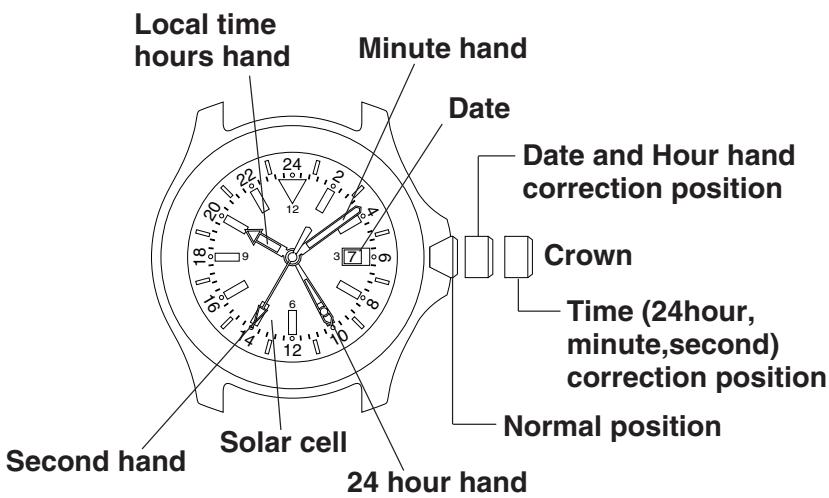
*If the crown is of the screw- type, set the time and calendar after first loosening the screw. Retighten the screw after the time and calendar have been set.
Setting the Time
(1) Pull the crown out to the time correction position. (The second hand stops when the crown is pulled out.) (2) Turn the crown to set the 24 hour hand and minute hand to the current time. At this time, the movement of the hour hand is linked with the movement of the 24 hour hand. (3) Push the crown back in to the normal position. (The second hand begins to move when the crown is pushed in.) (4) Pull the crown out to the date correction position. (1st click position) (5) Turn the crown to the right (clockwise direction) and set the hour hand to the current time. Pay attention to AM and PM since the location of the hour hand where the date changes is approximately 12:00 midnight. (6) Securely return the crown to the normal position.
Setting the Date
(1) Pull the crown out to the date correction position. (2) Turn the crown to the left (counter-clockwise direction) and set the date. (3) Securely return the crown to the normal position.
- Since the date is linked to the movement of the hour hand, the date changes when the hour hand approaches 12:00 midnight. Please note this operation when using as a dual time watch.
- Do not attempt to correct the calendar when the hour hand is between the hours of 9:00 PM and 1:00 AM. Setting the calendar during this time may result in the date not changing on the following day.
C. USING AS A DUAL TIME WATCH
This watch allows the hour hand only to be corrected independently without stopping the watch. It can be used as a dual time watch by setting the 24-hour hand and hour hand to different times. After correcting the time, the hour hand is used to indicate the "local time hours".
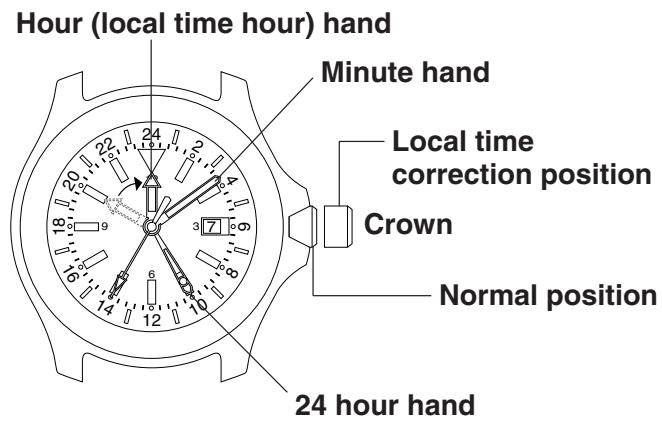
Correcting the Local Time Hours
(1) Pull the crown out to the local time correction position (1st click position). (2) Turn the crown to the right (clockwise direction) and set the hour hand to the desired time. The hour hand can be corrected in +1 hour increments in the clockwise direction. Set the time while paying attention to AM and PM. (3) Securely return the crown to the normal position.
- The hour hand cannot be corrected in the counter-clockwise direction. In addition, since the calendar is linked with the operation of the hour hand, it may be necessary to correct the calendar after correcting the hour hand depending on the time to which the hour hand was set.
D. FUNCTIONS OF SOLAR POWERED WATCH
If the charge becomes insufficient, a warning function will operate and the display changes, as below.
If insufficient charge continues
If sufficiently charged and time is set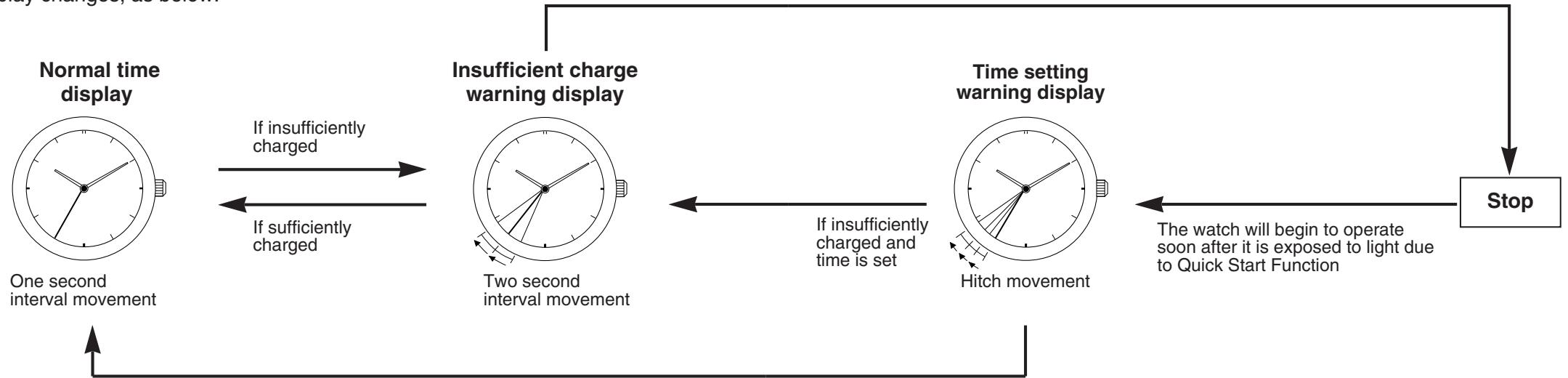
Insufficient Charge Warning Function
The second hand changes to a two-second interval movement to indicate insufficient recharging.
Even in such a case, the watch keeps correct time, but about 3 days after the two-second interval movement begins, the watch will stop. After exposing the watch to light, recharging takes place and the watch returns to one-second interval movement.
Two-second interval movement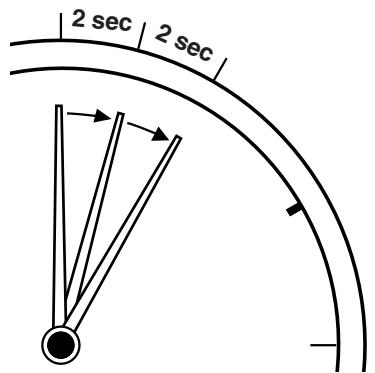
Quick Start Function
The watch will stop if it is completely discharged.
It will begin to operate soon after it is exposed to light.
(However, the time to start may vary according to the brightness of the light.)
Time Setting Warning Function
If the watch stops, subsequent exposure to light allows the Quick Start Function to start again, and the second hand moves with a hitch to indicate that the time is incorrect.
In this case, quickly recharge the watch and reset the time.
Otherwise, the hitch movement will continue.
Hitch movement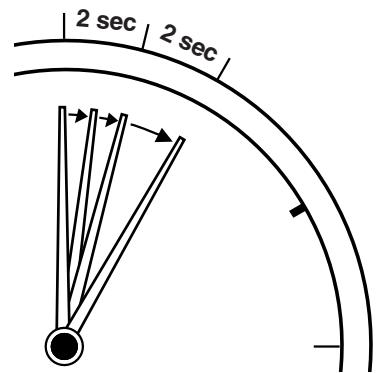
Overcharge Prevention Function
You can recharge without worry.
Once the secondary battery is fully recharged, the overcharging prevention feature comes into operation and prevents over-recharging.
E. CARE AND HANDLING DURING CHARGING
Notes on use
Take care to charge your watch during use.
Please note that if you wear long sleeves, the watch can easily become insufficiently charged because it is hidden and not exposed to light.
- When you take the watch off, place it in as bright a place as possible, and it will always continue to run properly.
Notes on recharging
- Avoid recharging at high temperatures (over about 60°C / 140°F), otherwise the watch will be damaged during recharging.
(e.g.,) Charging the watch near a light source that easily becomes hot, such as an incandescent lamp or a halogen lamp.
Charging in a place that easily becomes hot, such as a dashboard.
When you charge the watch by an incandescent lamp, take a distance about 50cm (20in.) from the light source to prevent extremely high temperature.
F. REPLACING THE SECONDARY BATTERY
Unlike ordinary batteries, the secondary battery used in this watch doesn't have to be periodically replaced due to repeated charging and discharging.
CAUTION
Never use another battery different from the secondary battery used in this watch.
The watch structure is so designed that a different kind of battery other than that specified cannot be used to operate it. In case a different kind of battery such as a silver battery is used by some chance, there is a danger that it will be overcharged to burst, causing damage to the watch and even to the human body.
G. TIME REQUIRED FOR CHARGING
Time required for recharging may vary according to the design (color of the dial, etc.) and operating environment. The following table will serve you as rough reference.
| Illuminance (lux) | Environment | Time required | ||
| From the stop state to the one second movement | One day usage | Empty to full | ||
| 500 | inside an ordinary office | 22 hours | 1 hour 30 minutes | 320 hours |
| 1000 | 60-70cm (24-28in.) under a fluorescent light (30W) | 11 hours | 45 minutes | 158 hours |
| 3000 | 20cm (8in.) under a fluorescent light (30W) | 3 hours 30 minutes | 15 minutes | 53 hours |
| 10000 | Exterior, cloudy | 1 hour | 5 minutes | 17 hours |
| 100000 | Exterior, summer, sunny | 14 minutes | 2 minutes | 6 hours |
- The recharging time is the time when the watch is continuously exposed to radiation.
Full recharging time ... The time required for a full recharge from a stopped state (empty to full).
One day usage: The time required for the watch to run for one day with one-second interval movement.
H. USING THE ROTATING BEZEL
This rotating bezel is provided on some models. It contains the names of 23 cities arranged in order of time difference. Using this bezel makes it possible to read the times in major cities (23) around the world.
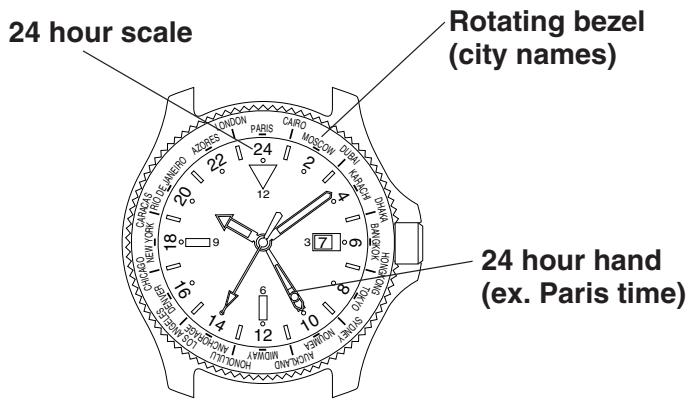
(1) First check that the current time is correct. (2) Turn the rotating bezel so that the city name at which the 24-hour hand has been set is aligned at the 24:00 position. The rotating bezel is normally used in this state.
Example: When the 24-hour hand has been set to Paris (FRANCE) time, align "PARIS" on the rotating bezel to the 24:00 position.
- This rotating bezel does not take daylight savings time into consideration.
Reading the Time of Other Cities
Turn the rotating bezel so that the city name at which the 24-hour hand has been set (example: Paris) is aligned at the position of the 24-hour hand. Read the time of another city by using the "24-hour scale" as a reference.
Example: When desiring to know the time in Tokyo while in Paris, the 24-hour hand is assumed to be set to the time in Paris.
(1) Align "Paris" on the rotating bezel to the position of the 24-hour hand. (2) Read the "24-hour scale" at the "TOKYO" position on the rotating bezel.
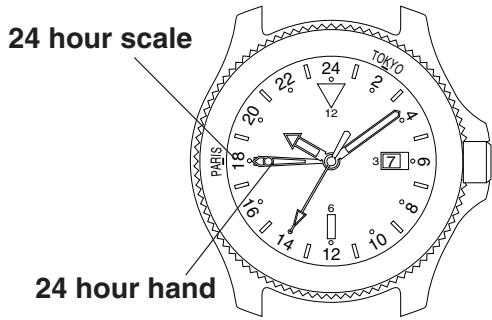
Paris: 18:10 / Tokyo: 2:10
■Reference: Time Differences of Major Cities Based on UTC
| Indication (City) | Time Difference | Indication (City) | Time Difference |
| UTC(universal time coordinated) | ±0 | NOUMEA | +11 |
| LONDON | ±0 | AUCKLAND | +12 |
| PARIS | +1 | MIDWAY( Islands ) | -11 |
| CAIRO | +2 | HONOLULU | -10 |
| MOSCOW | +3 | ANCHORAGE | -9 |
| DUBAI | +4 | LOS ANGELES | -8 |
| KARACHI | +5 | DENVER | -7 |
| DHAKA | +6 | CHICAGO | -6 |
| BANGKOK | +7 | NEW YORK | -5 |
| HONG KONG | +8 | CARACAS | -4 |
| TOKYO | +9 | RIO DE JANEIRO | -3 |
| SYDNEY | +10 | AZORES( Islands ) | -1 |
I. PRECAUTIONS
CAUTION: Water-resistance performance
There are several types of water-resistant watches, as shown in the following table.
| Indication | Specifications | |
| Dial | Case (case back) | |
| WATER RESIST or no indication | WATER RESIST(ANT) | Water-resistant to 3 atmospheres |
| WR 50 or WATER RESIST 50 | WATER RESIST(ANT) 5 bar or WATER RESIST(ANT) | Water-resistant to 5 atmospheres |
| WR 100/200 or WATER RESIST 100/200 | WATER RESIST(ANT) 10bar/20 bar or WATER RESIST(ANT) | Water-resistant to 10/20 atmospheres |
The unit "bar" is roughly equal to 1 atmosphere.
For correct use within the design limits of the watch, confirm the level of water-resistance of your watch, as indicated on the dial and case, and consult the table.
| Examples of use | ||||
| Minor exposure to water (washing face, rain, etc.) | Moderate exposure to water (washing, kitchen work, swimming, etc.) | Marine sports (skin diving) | Scuba diving (with air tank) | Operation of the crown with moisture visible |
| OK | NO | NO | NO | NO |
| OK | OK | NO | NO | NO |
| OK | OK | OK | NO | NO |
- WATER RESIST(ANT) xx bar may also be indicated as W.R. xx bar.
- Water-resistance for daily use (to 3 atmospheres): This type of watch is water-resistant to minor exposure to water. For example, you may wear the watch while washing your face; however, it is not designed for use underwater.
- Upgraded water-resistance for daily use (to 5 atmospheres): This type of watch is water-resistant to moderate exposure to water. You may wear the watch while swimming; however, it is not designed for use while skin diving.
- Upgraded water-resistance for daily use (to 10/20 atmospheres): This type of watch may be used for skin diving; however, it is not designed for scuba or saturated diving using helium gas.
CAUTION
- Be sure to use the watch with the crown pressed in (normal position). If your watch has a screw-type crown, be sure to tighten the crown completely.
- Do NOT operate the crown with wet fingers or when the watch is wet. Water may enter the watch and compromise water-resistance.
- If the watch is used in seawater, rinse with fresh water afterward and wipe with a dry cloth.
- If moisture has entered the watch, or if the inside of the crystal is fogged up and does not become clear within a day, immediately take the watch to your dealer or Citizen Service Center for repair. Leaving the watch in such a state will allow corrosion to form inside.
- If seawater enters the watch, place the watch in a box or plastic bag and immediately take it in for repair. Otherwise, pressure inside the watch will increase, and parts (crystal, crown, buttons, etc.) may come off.
CAUTION: Keep your watch clean.
- Leaving dust and dirt deposited between the case and crown may result in difficulty in pulling the crown out. Rotate the crown while in its normal position, from time to time, to loosen dust and dirt and then brush it off.
- Dust and dirt tend to be deposited in gaps in the back of the case or band. Deposited dust and dirt may cause corrosion and soil your clothing. Clean the watch occasionally.
Cleaning the Watch
- Use a soft cloth to wipe off dirt, perspiration and water from the case and crystal.
- Use a soft, dry cloth to wipe off perspiration and dirt from the leather band.
- To clean a metal, plastic, or rubber watchband, wash away dirt with mild soap and water. Use a soft brush to remove dust and dirt jammed in the gaps in the metal band. If your watch is not water-resistant, take it to your dealer.
NOTE: Avoid using solvents (thinner, benzine, etc.), as they may mar the finish.
CAUTION: Operating environment
- Use the watch within the operating-temperature range specified in the instruction manual.
Using the watch where temperatures are outside the specified range, may result in deterioration of functions or even stoppage of the watch.
- Do NOT use the watch in places where it is exposed to high temperature, such as in a sauna.
Doing so may result in a skin burn.
- Do NOT leave the watch in a place where it is exposed to high temperature, such as the glove compartment or dashboard of a car.
Doing so may result in deterioration of the watch, such as deformation of plastic parts.
- Do NOT place the watch close to a magnet.
Timekeeping will become inaccurate if you place the watch close to magnetic health equipment such as a magnetic necklace or a magnetic latch of a refrigerator door or handbag clasp or the earphone of a mobile phone. If this has occurred, move the watch away from the magnet and reset the time.
- Do NOT place the watch close to household appliances that generate static electricity.
Timekeeping may become inaccurate if the watch is exposed to strong static electricity, such as is emitted from a TV screen.
- Do NOT subject the watch to a strong shock such as dropping it onto a hard floor.
- Avoid using the watch in an environment where it may be exposed to chemicals or corrosive gases.
If solvents, such as thinner and benzine, or substances containing such solvents come in contact with the watch, discoloration, melting, cracking, etc. may result. If the watch comes in contact with mercury used in thermometers, the case, band or other parts may become discolored.
J. SPECIFICATIONS
- Type: Analog Quartz with 3 Hands
- Caliber No.: B876
- Accuracy: Within ±15 sec/month (within a normal
temperature range of +5°C / 41°F to
+35°C/95°F)
- Quartz oscillator frequency: 32,768Hz
- IC: C/MOS-LSI (1 pc.)
- Operational temperature range: -10°C / 14°F +60°C / 140°F
- Display features: Time: hour (localtime hour), minute, second,
24-hour clock
Calendar: date
- Additional features: Insufficient charge warning
Quick start
Time setting warning
Overcharge prevention
- Continuous operating time: Approx. 6 months (from full recharge to stop)
Approx. 3 days (from two-second interval
movement to stop)
- Battery: Secondary battery
*Specifications are subject to change without prior notice.


- BEFORE USING
- SETTING THE TIME AND DATE
- SETTING THE TIME
- SETTING THE DATE
- USING AS A DUAL TIME WATCH
- CORRECTING THE LOCAL TIME HOURS
- FUNCTIONS OF SOLAR POWERED WATCH
- INSUFFICIENT CHARGE WARNING FUNCTION
- QUICK START FUNCTION
- TIME SETTING WARNING FUNCTION
- OVERCHARGE PREVENTION FUNCTION
- CARE AND HANDLING DURING CHARGING
- NOTES ON USE
- TAKE CARE TO CHARGE YOUR WATCH DURING USE
- NOTES ON RECHARGING
- REPLACING THE SECONDARY BATTERY
- CAUTION
- TIME REQUIRED FOR CHARGING
- USING THE ROTATING BEZEL
- READING THE TIME OF OTHER CITIES
- PRECAUTIONS
- CAUTION: WATER-RESISTANCE PERFORMANCE
- CAUTION: KEEP YOUR WATCH CLEAN
- CLEANING THE WATCH
- CAUTION: OPERATING ENVIRONMENT
- SPECIFICATIONS
Brand : CITIZEN WATCH
Model : B876
Category : Wristwatch