
SPEED WHEEL 5 - Racing wheel GENIUS - Free user manual and instructions
Find the device manual for free SPEED WHEEL 5 GENIUS in PDF.


| Brand | GENIUS |
| Model | SPEED WHEEL 5 |
| Product type | Racing wheel |
| Compatibility | PC (Windows), PlayStation 3 |
| Power supply | USB port (5 V, 500 mA) |
| Connection | USB, pedal cable included |
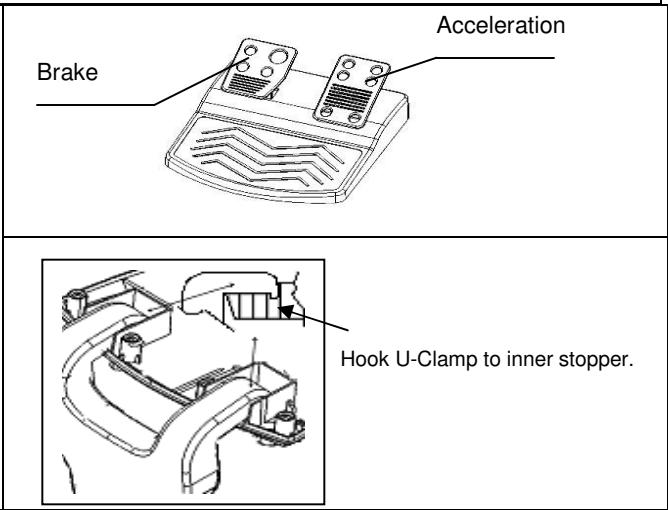
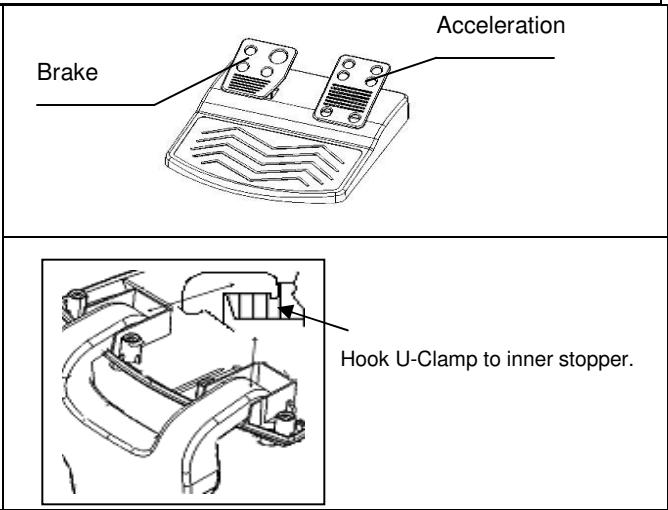
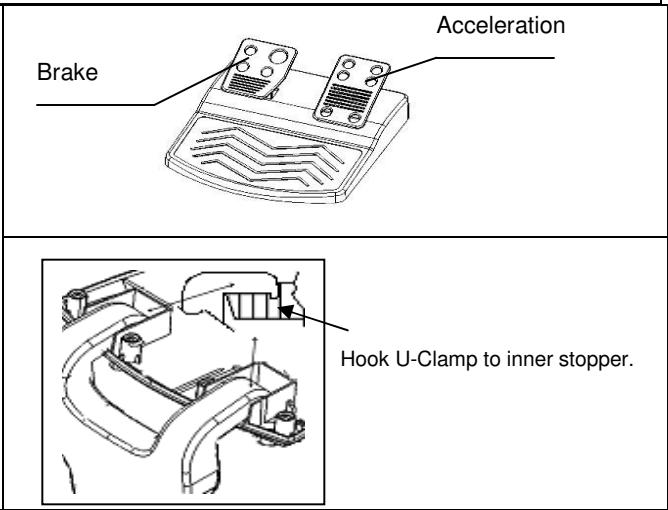
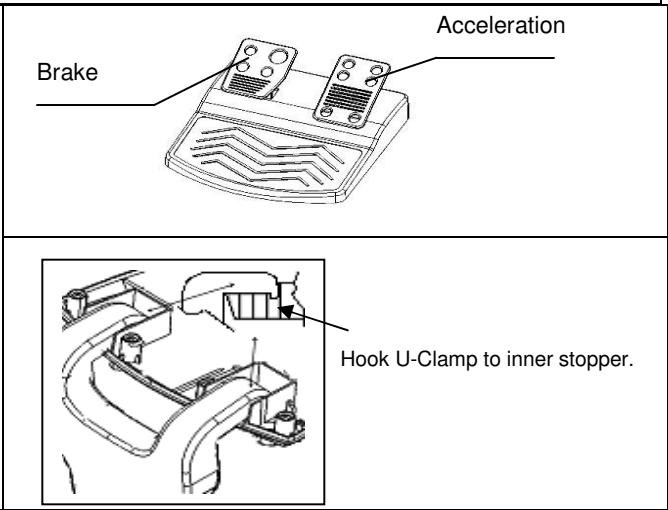
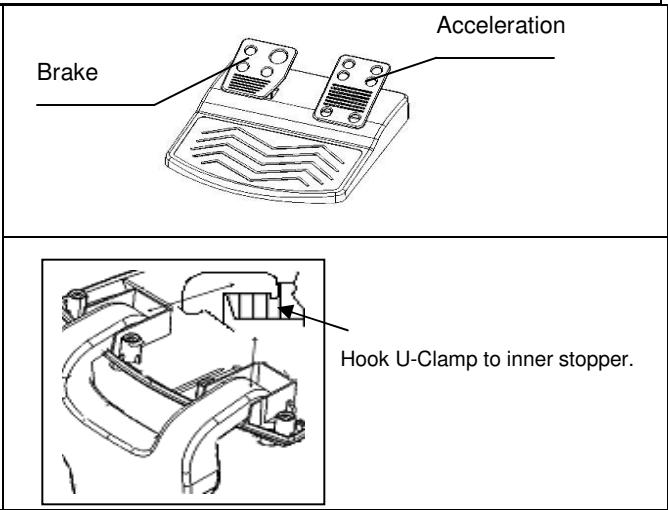
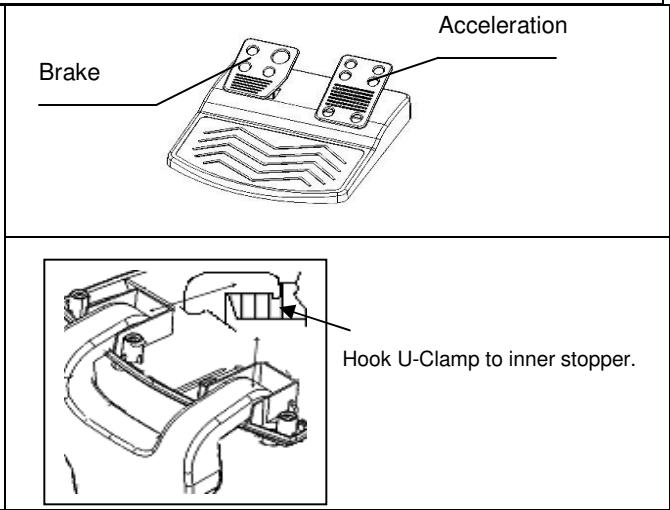
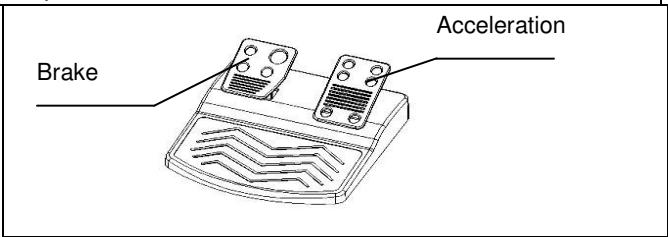
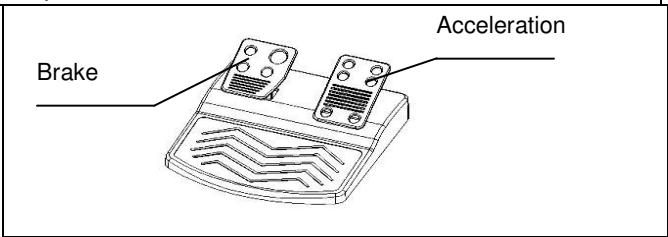
| Pedal set included | Yes, with accelerator and brake pedals |
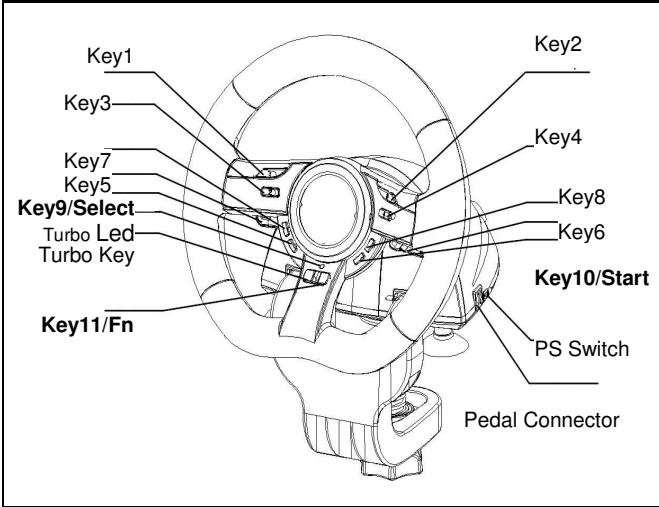
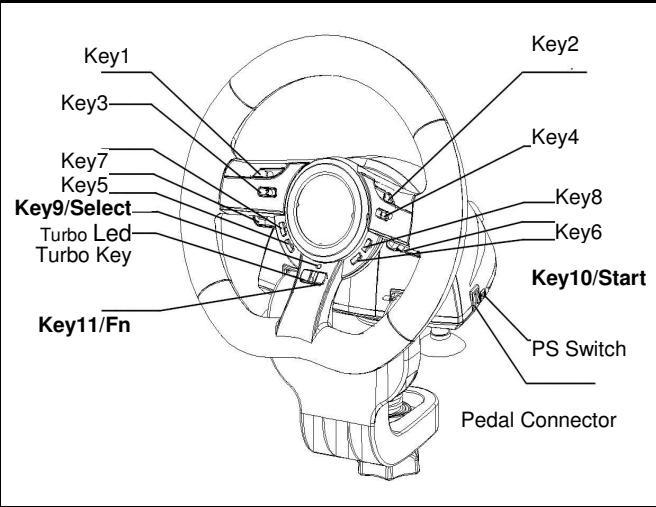
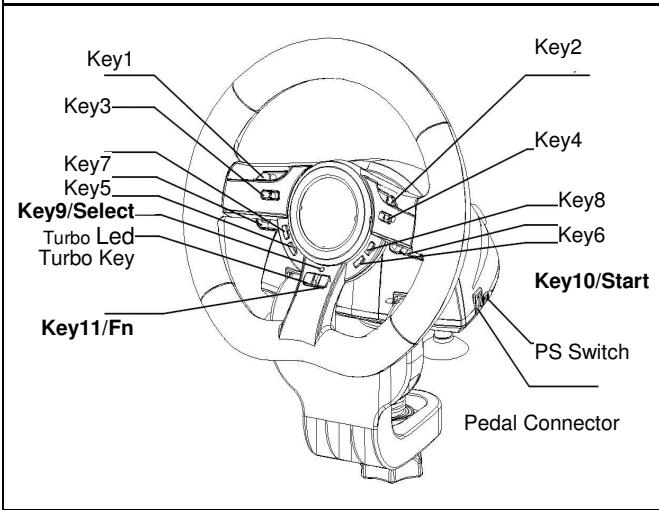
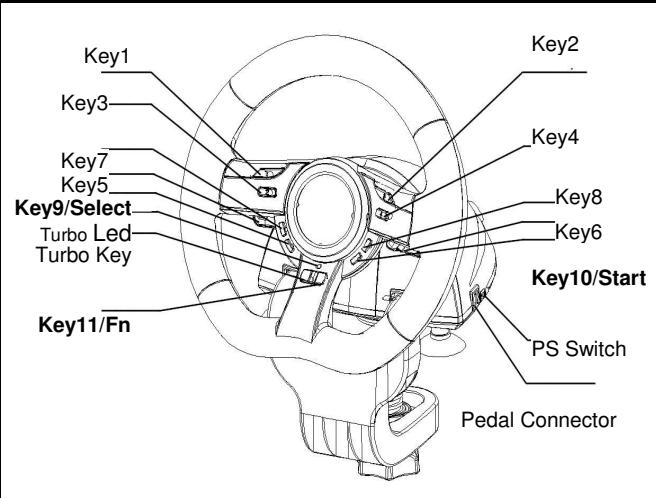
| Number of buttons | 10 numbered buttons + Select, Start, PS, Turbo buttons |
| Turbo function | Yes, adjustable from 2 to 16 Hz |
| Button mapping function | Yes, on buttons 5,6,7,8 and pedals |
| PS3 mode | Yes, selectable via switch |
| Direction mode | Yes, can be activated via Select button |
| Rotation angle | Approximately 180° (estimation) |
| Dimensions (W x D x H) | Approximately 28 x 28 x 28 cm (estimation) |
| Weight | Approximately 1.2 kg (estimation) |
| Material | ABS plastic |
| Package contents | Steering wheel, pedal set, cable, driver CD, user manual |
| Care and cleaning | Clean with a soft, dry cloth. Avoid liquids. |
| Safety | Use on a stable and flat surface. Do not expose to moisture. |
| Spare parts and repairability | Contact GENIUS after-sales service for parts. |
| Warranty | 2 years (standard) |
Frequently Asked Questions - SPEED WHEEL 5 GENIUS
User questions about SPEED WHEEL 5 GENIUS
0 question about this device. Answer the ones you know or ask your own.
Ask a new question about this device
Download the instructions for your Racing wheel in PDF format for free! Find your manual SPEED WHEEL 5 - GENIUS and take your electronic device back in hand. On this page are published all the documents necessary for the use of your device. SPEED WHEEL 5 by GENIUS.
USER MANUAL SPEED WHEEL 5 GENIUS
Federal Communications Commission (FCC) Notice
This device complies with Part 15 of the FCC Rules. Operation is subject to the following two conditions: (1) this device may not cause harmful interference, and (2) this device must accept any interference received, including interference that may cause undesired operation.
This equipment has been tested and found to comply with the limits of a Class B digital device, pursuant to Part 15 of the FCC Rules. These limits are designed to provide reasonable protection against harmful interference in a residential installation.
This equipment generates, uses and can radiate radio frequency energy and, if not installed and used in accordance with the instructions, may cause harmful interference to radio communications. However, there is no guarantee that interference will not occur in particular installations, if this equipment does cause harmful interference to radio or television reception, which can be determined by turning the equipment off and on, the user is encouraged to try to correct the interference by one or more of the following measures:
- Reorient / Relocate the receiving antenna.
- Increase the separation between the equipment and receiver.
- Connect the equipment into an outlet on a circuit different from that the receiver is connected.
- Consult the dealer or an experienced radio / TV technician for help.
CAUTION: Changes or modifications not expressly approved by the manufacturer responsible for compliance could void the user's authority to operate the equipment.
Disclaimer
The following does not apply to any country where such provisions are inconsistent with local law: KYE Systems Corp. makes no warranties with respect to this documentation, whether expressed or implied. All material is provided "as is". This includes, but is not limited to, any implied warranties of merchantability and fitness is for a particular purpose. The information covered in this document is subject to change without notice.
KYE Systems Corp. assumes no responsibility for any errors that may appear in this document.
All brand names mentioned in this manual are trademarks or registered trademarks of their respective companies.
Copyright © 2006 KYE Systems Corp. All rights reserved.
Speed Wheel 5 Pro/Speed Wheel 5
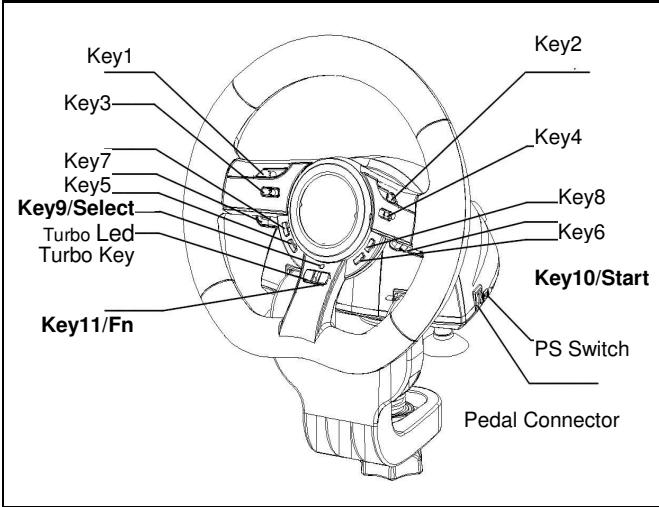
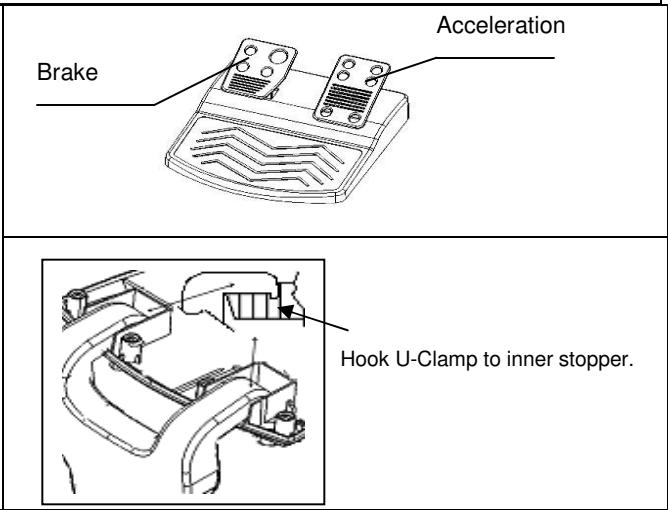
Software Installation: Install the driver first before you install Speed Wheel 5 Pro to the system. The Wheel will not support the vibration function, if the driver is not installed.
- Insert the driver CD into your CD-ROM; wait for a few seconds for your PC to load the disc; the auto run program is executed and the opening installation screen appears. Please follow the on-screen instructions.
- If your system doesn't launch the installation software automatically, you can locate the file in the directory of your CD drive and click on it, then follow the on-screen instruction to install the software.
Hardware Installation
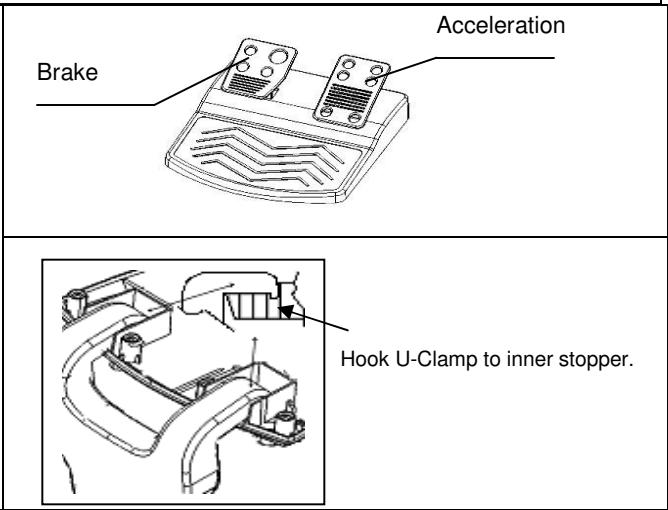
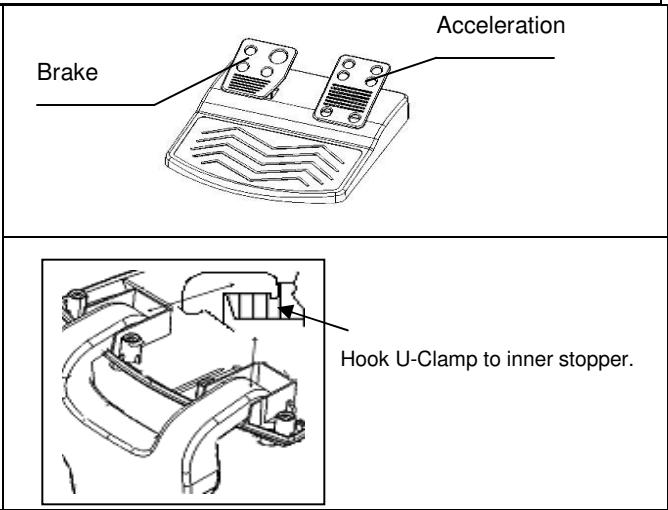
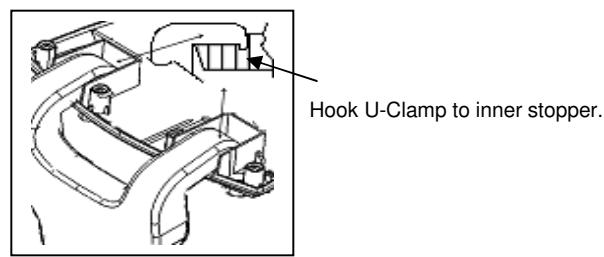
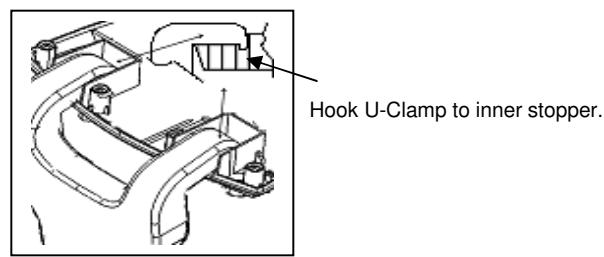
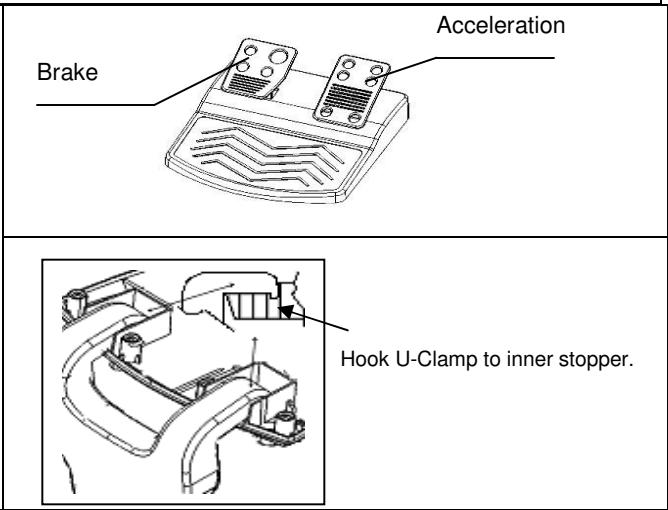
- Plug the Wheel to an USB port on the PC/PS or a USB Hub. And, connect the Pedal to the main unit with the included cable. After connection, system will "Find a new hardware" and complete the installation.
- Go to Game Controllers page and select "Advanced". It should work as a wheel. Or a game pad with compatible electrical function design. Check the installation again if it is not correct.
| Turbo Speed Setting | Key Remapping Setting | PS3 Mode | Select Key | Start Key | PS Key |
| Turbo+ Key10/Start | Key_10/START + Turbo | Switch to PS Position | Key_9 | Key_10 | Key_Fn at PS mode |
Turbo Function:
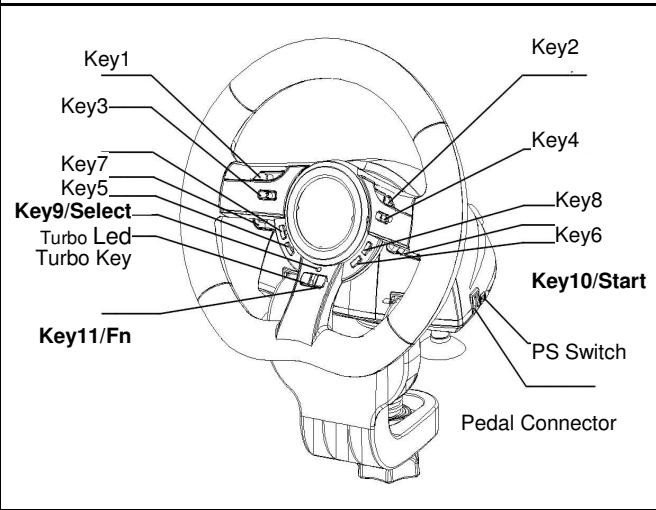
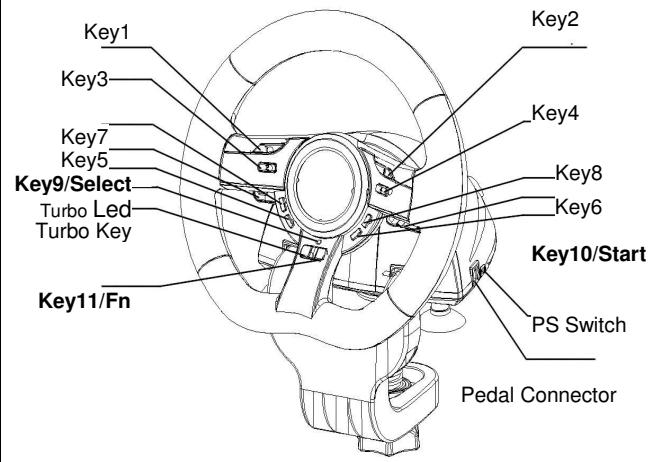
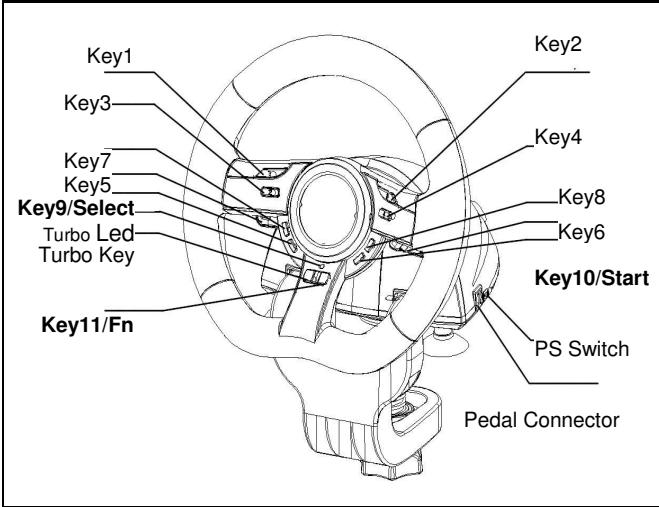
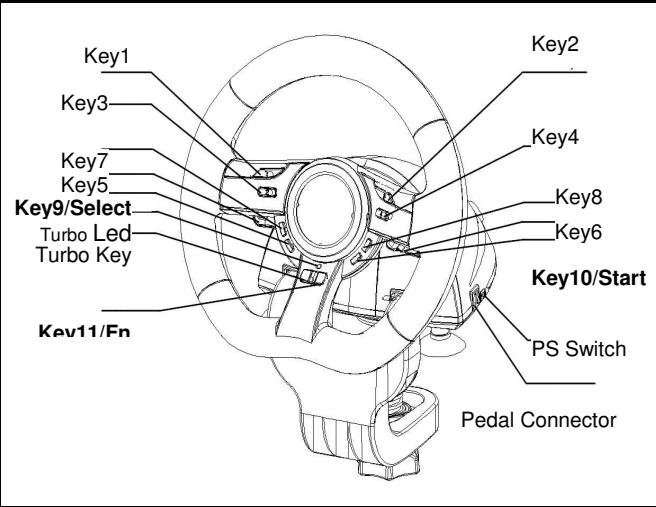
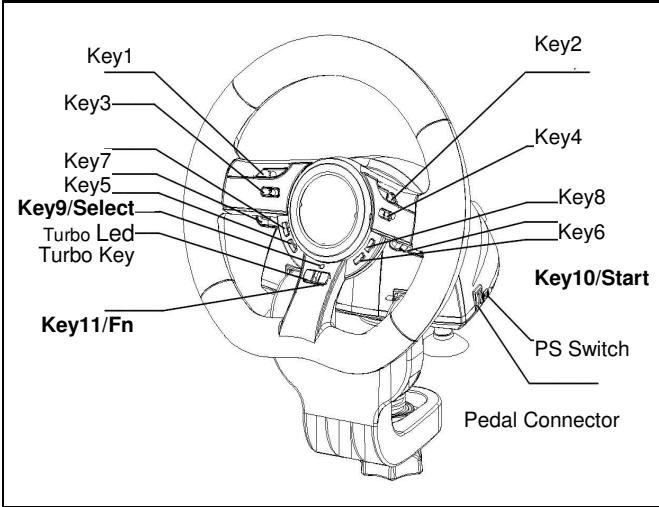
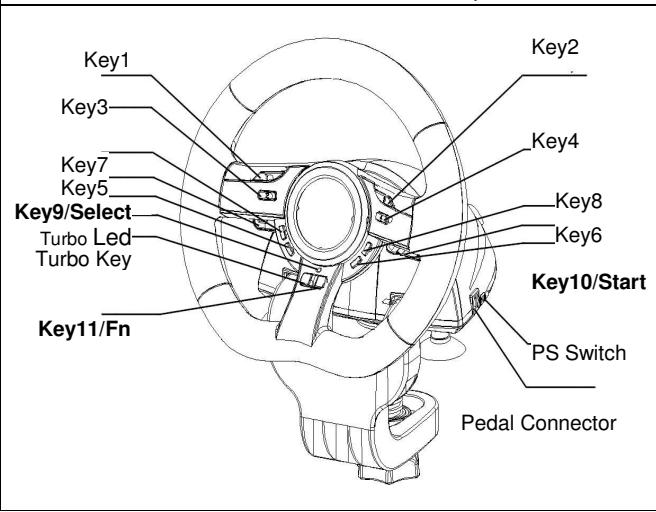
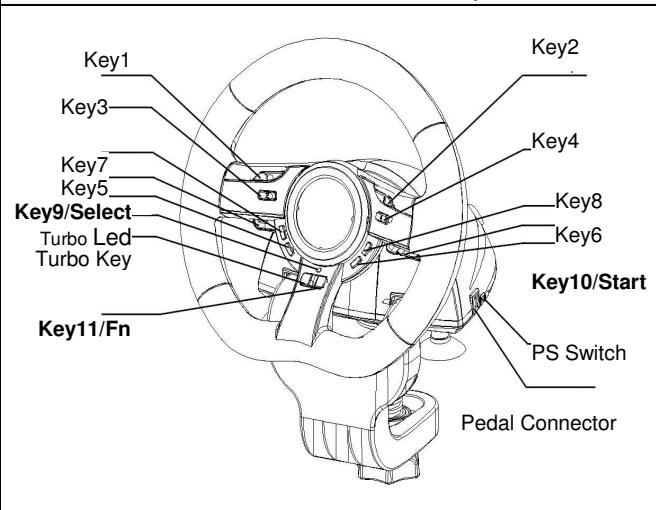
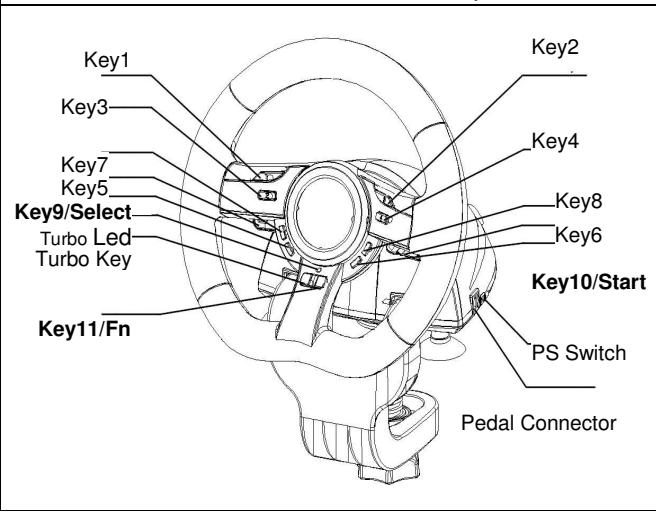
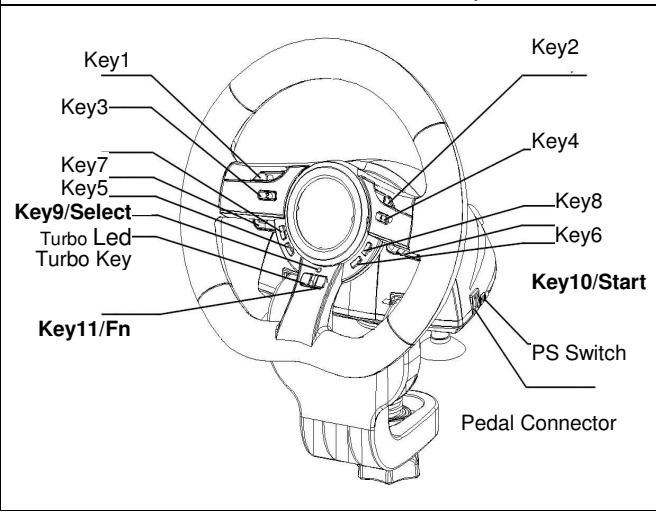
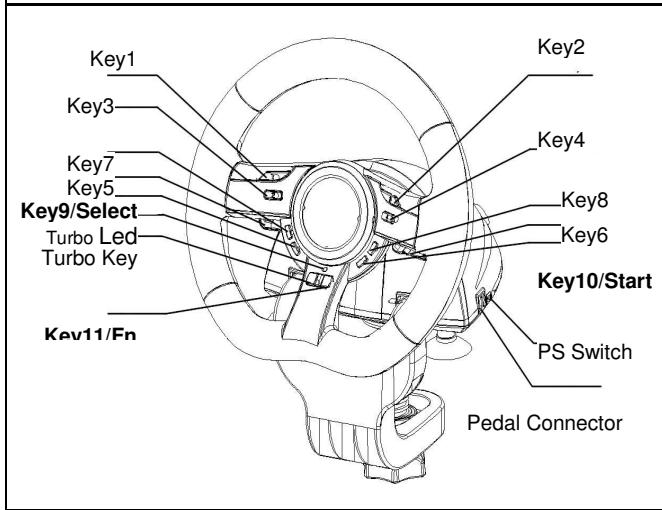
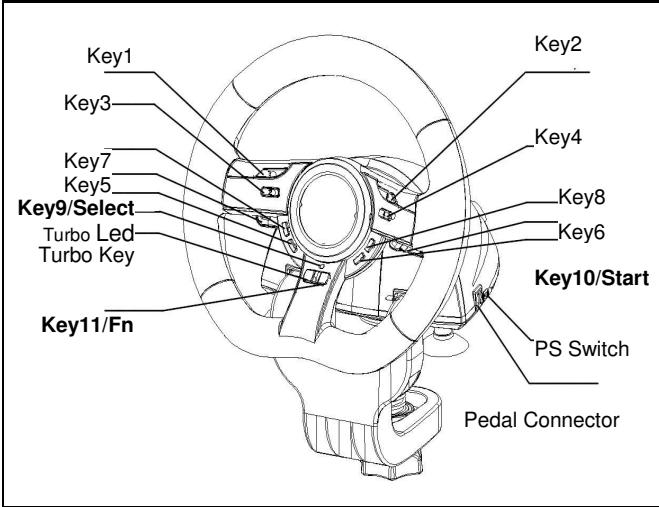
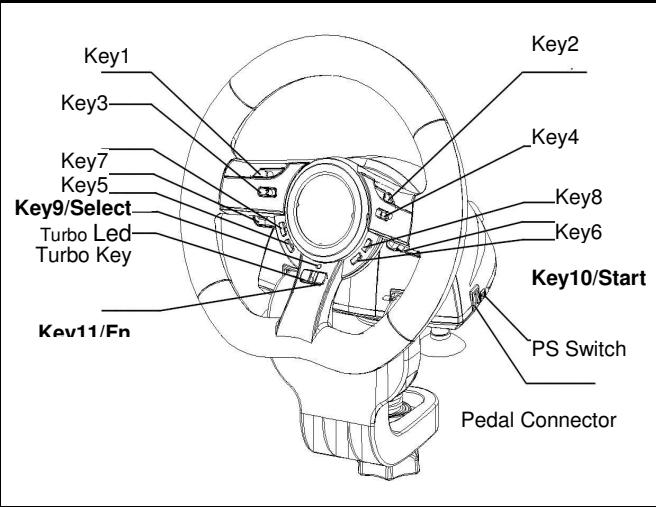
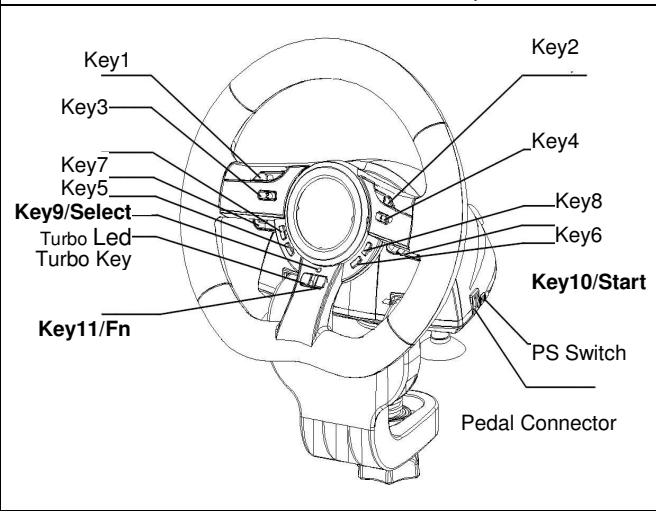
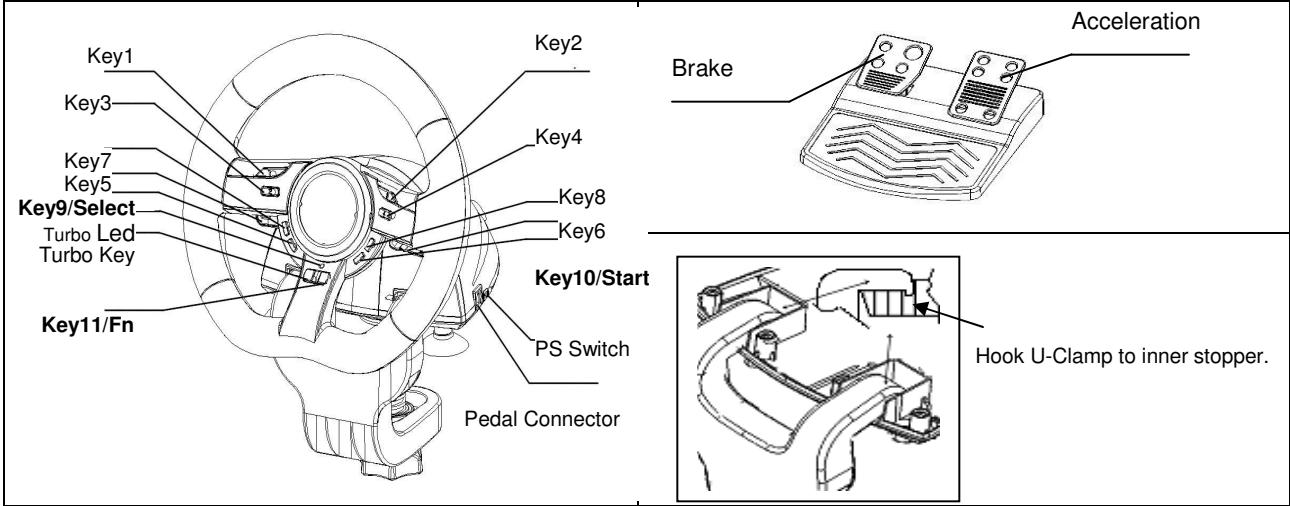
- Set/Clear Turbo Function: Press and hold the TURBO button, then press any action Key 1,2,3,4,5,6,7,8,11, or Brake Pedal to set the turbo function for it. Turbo LED will flash accordingly. To release the Turbo function, repeat the same procedures.
- Set Turbo Speed: Press and hold the Turbo button, then press the Key_10/START button only. The Turbo/Macro speed will be adjusted cyclically from 2->4->8->16->2 Hz, each time the Key_10/START button is pressed.
Direction Key Function for Game SetUp Page:
- Press Key9-Select for 2 seconds to set Direction-Key Mode. Turbo LED will be lit to show this mode. The following Key will act as each direction controlling: UP Key 5; DOWN Key 6; RIGHT Wheel Turn to right; LEFT Wheel Turn to left
- Press Key9-Select 2 seconds again to release Direction_Key Mode. Turbo LED will be at normal status.
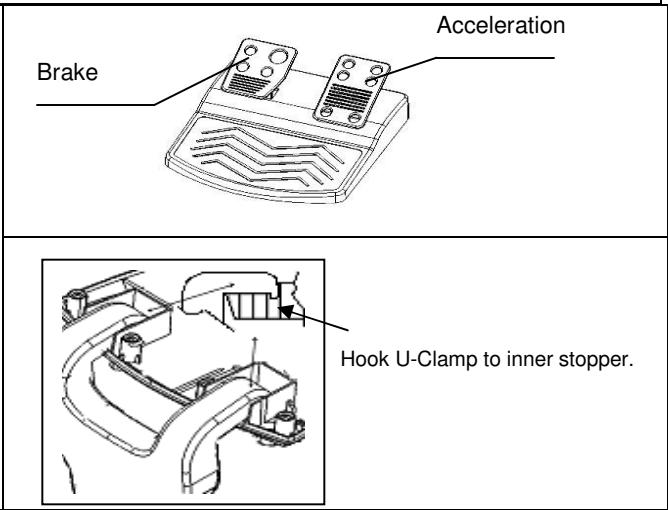
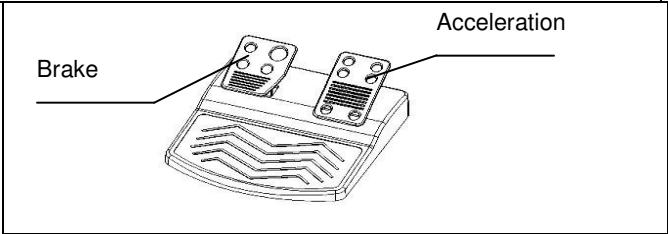
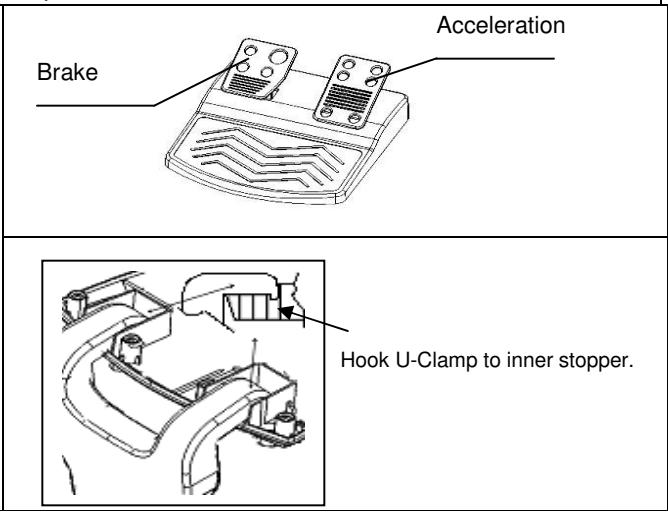
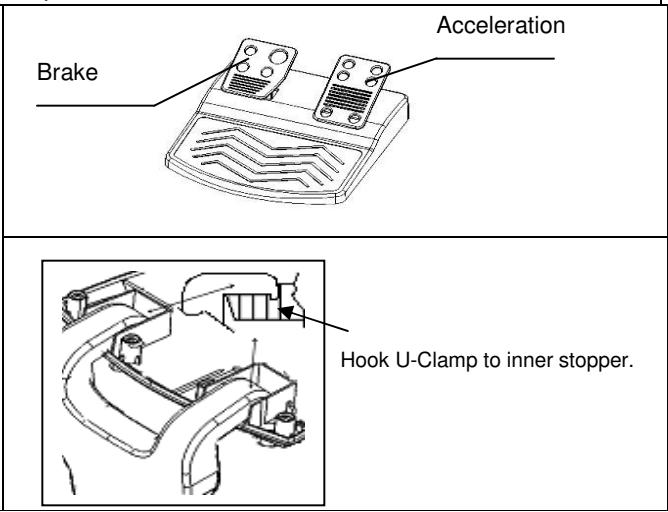
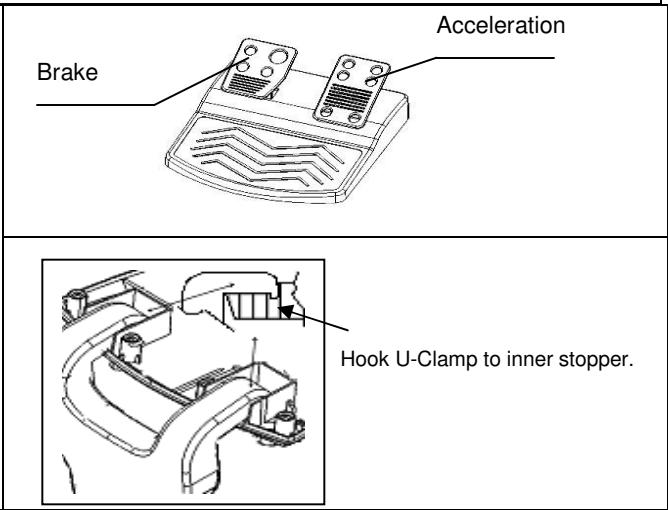
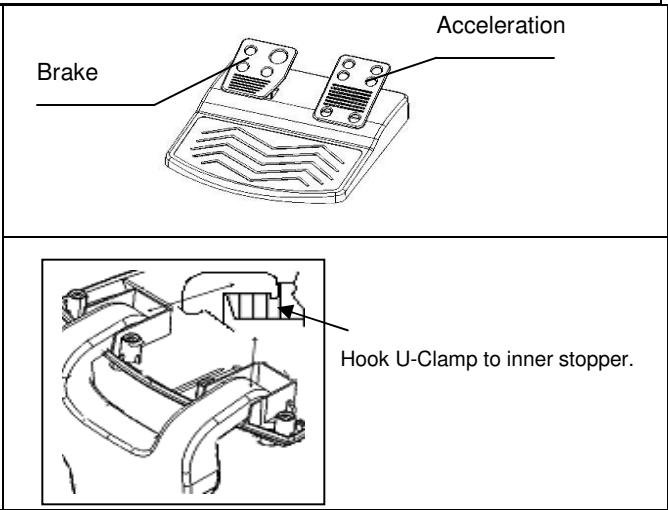
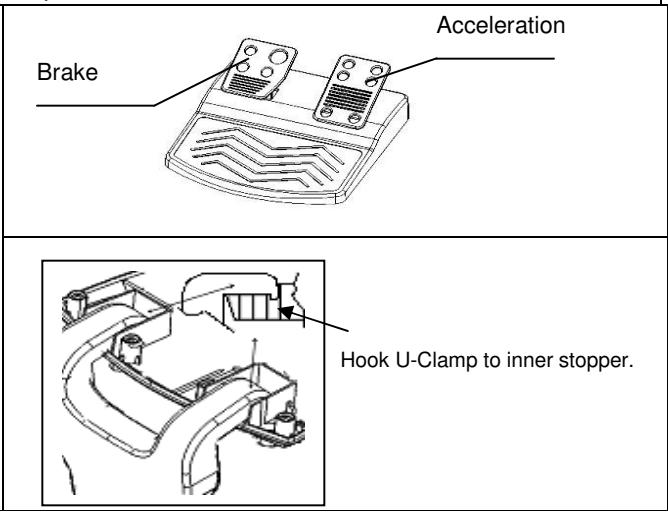
Key Mapping Functions: The main purpose of Key Mapping Function is to duplicate the function of SOURCE Key to TARGET KEY. For certain racing game, the brake and acceleration function may be not relative to the BRAKE pedal or ACCELERATION pedal. With the help of Key Mapping, we will be able to duplicate the function to our favor hardware key. Please note that we can only set the Key_Mapping function at Key 5/6/7/8, Brake Pedal and Acceleration pedal. For each Key_Mapping operation, you will only can duplicate one key to another.
- Set Key Mapping Function: Press and hold Key_10/Start, and press Key_Turbo at the same time. TURBO LED will be fast blinking. Press your favor TARGET key which you would like to copy that function to it. TURBO LED will be slow blinking now. Then, press the SOURCE key to duplicate its function to the TARGET key to complete the procedure. TURBO LED will be off to indicate the function duplication is complete. Proceed the procedures again for another function duplication.
- Release Key Mapping Function: Press and hold Key_10/Start, and press Key_Turbo at the same time. TURBO LED will be fast blinking. Press theTARGET key which you would like to release that function. TURBO LED will be slow blinking now. Then, Press and hold Key_10/Start, and press Key_Turbo at the same time to release the function. TURBO LED will be off to indicate the releasing is complete. Proceed the procedures again for each function releasing.
- The hardware function of the wheel buttons may vary in different games. Before proceeding to game settings from the OPTION inside the game, always read your game's manual carefully to set the best game settings.
Speed Wheel 5 Pro/Speed Wheel 5
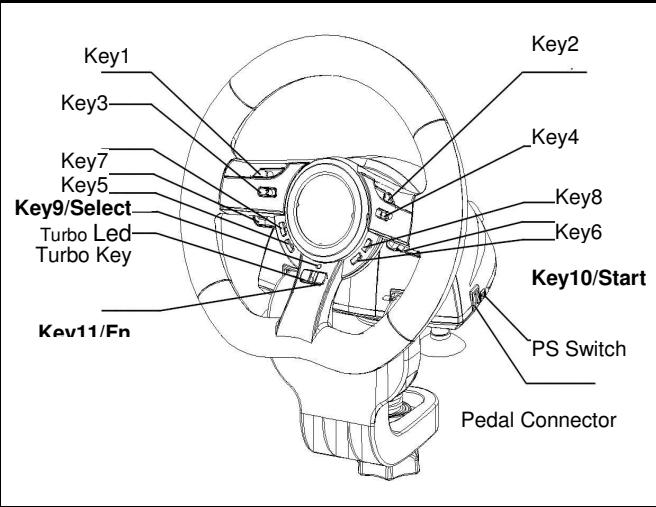
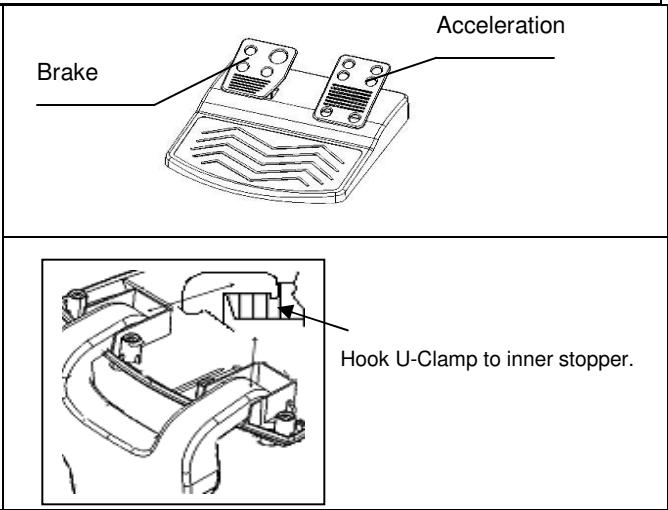
YctaHObKa o6OpyDoBaHn
IopKIOHHTe pyb K npOy USB Ha KOMBIOtepe nnn pnpCTaBke PS3. IOpKnIOUHTe neaI K OCHOBHY 6nOKy (kaebb BxOHT B KOMNKeT noCTaBkn). Pocne 3TO rO kpoETc oKHO "Haundeno HOBOE obOpdyOBaHme" u bJeT pnOn3BeDena yctaHOBAk 3TO rO obOpdyOBaHna.
- BCTaBbTe KOMnAkrT-DnCK C dpaBnBepom B DnCKOBOD KOMnAkrT-DnCKOB. IIOJOnIte HeckOJIbKO CeKHyI, YTObbl DnCK 3arpy3nIcra.
- Ecnn Cnctema ABToMaTneckn npOteT yCTaHOBJIeHHbI KOMNaKT-DnCK, OTKpoeTc OKHO yCTaHOBKn. CneDuYTe nHCTpyKUJAM.
A. YctahOBka yctpoiCtBa
- Пдклочи Крови пьт Grandias К поту USB на Компьоте илк конценту OSB.
- Ecnny npabnblno nodklouhen K Kombltepy, Ho he pa6oTaET B KOHKpeTHOn Irpe, nepeiDHTe Ha cTpaHcy «IrpobbIe KOHTpOJIlepbI» N bIbepeITe «IOnOJIHNTeBHO”, a 3aTe m npOBepbTe, bIbpaH JIn dJa napAmetpa «Wheel»
| Turbo Speed Setting | Key Remapping Setting | PS3 Mode | Select Key | Start Key | PS Key |
| Turbo+ Key10/Start | Key_10/START + Turbo | Switch to PS Position | Key_9 | Key_10 | Key_Fn at PS mode |
Функця «Turbo»
- BkIIOUeHne n OTKIIOUeHne cyHKcun «Turbo»: haxMITE n ydepkxBaIte KhoNky TURBO. Дя HabTpoKnФyHKcUn «Turbo» Дя odHoi n3 KhoNOK (3a NcKJIIOUeHneM 9 n 10), haxMITE ha 3Ty KhoNky.
- Hacptpoika ckopoctn pa60tby fynkunn «Typ6o»: ydeprknBaite haxaToi kHONky TURBO, 3aTe m haxmnte ToIbko Ha KNONky START. Ппкдом haxatniHa kHONky START ckopoc7b pa60tby fynkUnn «Typ6o» uKInuueckn nepeKluoyaeTc8: 2->4->8->16->2Tc.
Функца Вьбopa HanpaBHeHna HcTpaHnce HacTpoKnИрbl
- YdepKbAte HkaToI KhOky Select B TeueHne DByx cekyHd. 3arOpntc HndkaTOp Turbo (o3haaet, TTO yHKnBbIbopa HanpaBnEHH BkJIIOUeHa).
HanpaBHeHne BbIbpaTeTcNcIyUoM o6pa30m: KhoIka 5 = BBEPX, KhoIka 6 = BHn3, nOBopOT pyJra BnPaBO = BnPABO, nOBopOT pyJra BnEBO = BJIeBO. - Дя откlioуеня Функции Вьобора наразлени BHOБь удрживайт eнжатой Кногку Select b Teченie dByx cekyHd. ИнданkaTOp Turbo BepHTcB OobiHuOe coCTOЯHne.
Speed Wheel 5 Pro/Speed Wheel 5
Hardwareinstallation
Speed Wheel 5 Pro/Speed Wheel 5
Speed Wheel 5 Pro/Speed Wheel 5
Speed Wheel 5 Pro/Speed Wheel 5
Speed Wheel 5 Pro/Speed Wheel 5
Instalacao do software
Speed Wheel 5 Pro/Speed Wheel 5
Instalacao do Software
Speed Wheel 5 Pro/Speed Wheel 5
Speed Wheel 5 Pro/Speed Wheel 5
Speed Wheel 5 Pro/Speed Wheel 5
Szoftver telepitése
Speed Wheel 5 Pro/Speed Wheel 5
Speed Wheel 5 Pro/Speed Wheel 5
Instalacija softvera
Speed Wheel 5 Pro/Speed Wheel 5
Instalare software
Speed Wheel 5 Pro/Speed Wheel 5
Eykataoan loyioikou
Speed Wheel 5 Pro/Speed Wheel 5
Yazilimin Kurulumu
Speed Wheel 5 Pro/Speed Wheel 5
YctaHOBJIeHnO6JaHaHHN
3'eHaTe KepMo 3 nopTom USB Ha PIK/PS3. 3'eHaTe PendaB 3 roNoBHOIO OdnHnueo 3a DOnOMoroIO Ka6eHIO, Ioo HadaeTbC. PicJra 3'eHaHHcNCTema nOKaXe "3HaIeHO HOBe oBnaHnH" Ta 3aBepWtB yCTaHOBnHnH.
| Turbo Speed Setting | Key Remapping Setting | PS3 Mode | Select Key | Start Key | PS Key |
| Turbo+ Key10/Start | Key_10/START + Turbo | Switch to PS Position | Key_9 | Key_10 | Key_Fn at PS mode |
Функця Turbo:
- YctahOBJIeHnB/BuaIaJIeHnFyHKuII Turbo:HaTncHITb Ta yTpIMyIe KhoNky TURBO,notim HaTncHITb 6yDb kHONky KIM KHOJOK 9-10,IO6 npns3HaunTu IIO cyHKUIO.
Speed Wheel 5 Pro/Speed Wheel 5
Speed Wheel 5 Pro/Speed Wheel 5
Speed Wheel 5 Pro/Speed Wheel 5
Programinés irangos idiegimas
Speed Wheel 5 Pro/Speed Wheel 5
BafnapamaJbIK kacaKaTaMaHbI oHaTy
Pyndi PIK/ Ouih KOHdbipfcbIHbI (PS3) USB ycbiHa KocbiH3. PedaJIg Jia6dbIK jinhafBIme 6ipe KeIre H abpbl Heri3ri 6nokka KocbiH3. Kocblim Xy3ere acpbifraH coH Kyue "KaHa KpybjfBiTaabdi" cOaH coH opHaTybl aAkrTaHbI.
- Wheel dpaBepi xa3bIraH bIKaAM dNCKHI dNCKI yCbHa caJIbIHbI3; KOMnbIOTeP dNCKHI JyKTereHwe 6ipHeWe cekHyd Kytih3.
- Erep kombioTepeeri Jyue Jxha bikwam dinckhi e3diireH eKNTbH etin opHaTbINFaH 6oIca, e3diireH jery 6aFapnAmacbi icke acbplnaDb da, opHaTuDb bactay beHBeSeti naDa 6oJaDb. BeHBeTteri Hcckaynapra cyenHi3.
TexHnkaJIbIK Jx6IbIKTbI OpHaTy
- Wheel onbH nepheTakcbH KOMbIOpTeperi USB nopTbHa Hemece USB xa6bHa opHaTbHb3.
-
Erep oubH nepheTaKtacB kOMNbOtepre dpybc JkAflhaBIn, bipak OyBH OHaHaHaJa xMBC icTeMece, Game Controllers (OyBH KOHTpONnepnepi) beIH aMbHb3 Da, "Advanced" (KocbIMsa) beIH TaHdAn, nepheKaTacBbH jKanblnaybIbW "Wheel" ekeHH TeKcepHj3.
| Turbo Speed Setting | Key Remapping Setting | PS3 Mode | Select Key | Start Key | PS Key |
| Turbo+ Key10/Start | Key_10/START + Turbo | Switch to PS Position | Key_9 | Key_10 | Key_Fn at PS mode |
Typ6oФункцЯсbl:
- Typ6oФункцясьн Ophaty/Axkbpaty: Typ6o TymmeWirin 6acbIn yctan TpybHb3 da coaH coH 9-10 TymewikTepeH backka Ke3 KeIrrhen TyMeWiKti cofah aphanfah Typ6oФункцясьн opHaTy ywiH 6acbHb3.
- Turbo JbIaMdbIbH opHaTy: TURBO 6aTbIPmacbH y3dikc3 6acbHb3, cOan coH START 6aTbIPmacbH 6ip pet 6acbHb3. Turbo JbIaMdbIf bI START 6aTbIPmacbH ep Ke3 6acbIFaH caBH 2->4->8->16->2 Iu aHaJIbIMdbI type 6aTaNAdbl.
OuHbIbI 6anTay 6eImine apHaJIaH 6eIceHdi 6aFbIT yHKcIraCbI:
- TaHday TuyMeuirin eki cekynd bacbIn yctan typbHb3, Typ6o wambl xaHaadbl da "BaFbIT cyHKnraCbHbH" 6eJceHdi Kyire KewipijreHdirin bIndpedi.
TemeHderinep 6aft-baFapdbb6ackapy peiin atkapadbl: 5-5i tyMeik=KOFAPbl (UP); 6-5bl tyMeik = TOMEH (DOWN); Pynbdl bHa 6py = OH (RIGHT); Pynbdl cofra 6py = COJI (LEFT). - Baft ΦyHKzIaBcH KaTaN aKbIpaTy yuih TaHay tyMeuiriH eki cekyHd bacbHb3. Typ6 oambl KaJIbITb Kyre KeWeedi.
TymMewiKФyHKcIaCbIHKaIraIayФyHKcIaIapbl
Kei6ip kapbic ObyHdapbHdaftekey MeH XblDAMDaTy fynKcIynapb TEKEIII neaIb He XblIAMATKbllneJaBdapbHa KaTbICTb BoJIMayb MyMkiH. TyMeWIK fynKcIyrcbIH KaTaNay fynHKcIyrcbIH KEMeri apKbJIbI fynKcIyHbE3KaJAYbHb3daftb TYMeWIKTepe Kewipin opHaTybHb3fa 60anaIb.
SpeedWheel 5 cepnacb tymeik yHKnucbH kaTaNay fynKcNcBn TEK faHa 5/6/7/8 TYMeiKepi, TEXEITIIN He KblAMATKblI neaIbapb yin H fana opHa Ta anaIb. Op6ip tymeik fynKcNcBn KaTaNay ypici bip teikTH FyHKuCbH ekHIb bip TeIKTe fHa KaTaNay MymkiHirige He.
- TyMeiK fynKcIaBn KaTaNay fynKcIaBn OpHaTy: 10/Start (Bactay) XHe Turbo (Typ6o) TyMeuiri ekeyin Katap 6acbl n yctan typbHb3. Typ6o WAmbl XbInbJIbKTan TyMeiK fynKcIaBn KaTaNay fynKcIaBn HbN 6eIceHdi Kyre KeWipJREHirin KepCteDi. Ocbf yHKcIaBn TaafbHdaFbHb3 KeRrE COHfbl TyMeiKti bacHb3. Typ6o WAmbl EHI JxMEn XbInbIKTaIbD. Codah coH, COHfbl TyMeiKke fynKcIaBn KeWipy ysiH ERl3TI TyMeiKti bacHb3 da, FyHKcIaBn KeWipy yprdicin aakTaHb3. Typ6o WAmbl EwiN fynKcIaBn Hk KeWipjirReHirin Bindipei. Backa fynKcIaBn KeWipy ysiH de ocb lypdicti kaTanaHb3.
- Tymeik fHKnrcbH KaTajay fHKnrcbH axbipaty: 10/Start (Bactay) xeHe Turbo (Typ6o) TyMeuire ekeyi H Ktap bacbl yctan TypbHb3. Typ6o lambl xbldam Xblnbktaa bactaDbI. Herizr tyMeikTeK eUipireh fHKnrcbH axbipatkbH3 KeIreH COHbI TyMewiTi bcsHb3. Typ6o lambl endi jkaMEn XblnbkTaanDbI. CoaH coH, fyHKnraHb axbipaty uhi 10/Start Xhe Typ6o fHKnrcbH kaTap bacbl yctan TypbHb3. Typ6o lambl eui n fHKnraHbA xkbipatbIfaHdbfBih biinipeidi. Op6ip fHKnraHb axbipaty uhiocbiy picti KaTanaHb3. TyMeiK fHKnrcbH KaTajay fHKnrcbH axbipaty uhi SpeedWheel 5 KpbJfbcIn axbipatbyh3ra da 60anaBl.
- Pynb TyuMeiikTepiHf yHKunnaapbAp oBbIHa aptpyPi 6OlybMyMkiH. OyBuHHbIH iHiDi eri IAPAMETP apKbIbO bHnnapaMetpJIepiOpHaTnac 6ypbH OByHHbIH eH OHtaJIbI npaMetpJIepiOpHaTy MaKCaTBIHda OHbIH HcCKayIbIFbIH MyKmrtOKbl NbIKaHbIHb3 a63aJ.
Speed Wheel 5 Pro/Speed Wheel 5
0jz1
Jgss 100000000000000000000000000000000000000000000000000000
Jill Jai "j j j j j j j j j j j j j j j j j j j j j j j j j j j j j j j j j j j j j j j j j j
| Turbo Speed Setting | Key Remapping Setting | PS3 Mode | Select Key | Start Key | PS Key |
| Turbo+ Key10/Start | Key_10/START + Turbo | Switch to PS Position | Key_9 | Key_10 | Key_Fn at PS mode |
:(yj)4c yj 4a
10-9 15a la jj jbj biai (yj) aee yj jy jbi: (yjj) aee yj aai
145 (yjill) 2
: aalb baaa aaii aaii gill