
KEYBOARD - Keyboard PALM - Free user manual and instructions
Find the device manual for free KEYBOARD PALM in PDF.



| Product type | Foldable universal wireless keyboard |
| Brand | PALM (palmOne) |
| Model | KEYBOARD |
| Category | Keyboard |
| Dimensions (folded) | Approximately 11 x 4 x 1.5 cm |
| Weight | Approximately 120 g |
| Power supply | 2 AAA batteries (not included) |
| Connectivity | Infrared (IR) |
| Compatibility | Palm OS, Symbian OS, Pocket PC |
| Main functions | Foldable keyboard, adjustable IR arm, device retention bar, shortcuts and special characters |
| Provided software | Keyboard driver on CD-ROM |
| System requirements | Windows 98/Me/2000/XP or Mac OS 9.x/OS X 10.3, Palm Desktop software installed |
| Required memory | 100 KB (Palm OS) or 300 KB (Pocket PC) |
| Maintenance and cleaning | Clean with a soft, dry cloth. Do not use solvents. |
| Safety | Use only recommended batteries. Remove batteries when not in use for extended periods. Keep out of reach of children. |
| Spare parts and repairability | Contact palmOne customer service. No spare parts available commercially. |
| Environment | Operating temperature: 0°C to 40°C. Humidity: 20% to 80% non-condensing. |
Frequently Asked Questions - KEYBOARD PALM
User questions about KEYBOARD PALM
0 question about this device. Answer the ones you know or ask your own.
Ask a new question about this device
Download the instructions for your Keyboard in PDF format for free! Find your manual KEYBOARD - PALM and take your electronic device back in hand. On this page are published all the documents necessary for the use of your device. KEYBOARD by PALM.
USER MANUAL KEYBOARD PALM
Getting Started with Your
Universal Wireless Keyboard by palmOne
Universal Wireless Keyboard von palmOne
Clavier sans fil universal de palmOne
The Universal Wireless Keyboard by palmOne is a full-featured foldable keyboard that works with many Palm OS® Symbian OS, and Pocket PC devices.
What you'll do in this guide:
- Install the keyboard driver on your Palm OS or Pocket PC device.
- Attach your device to the keyboard.
After you complete these steps, refer to the User Guide on the CD for information on using the keyboard's shortcuts and special characters, and customizing the keyboard for your touch.
NOTE For a complete list of devices that are compatible with the keyboard and instructions on installing the keyboard driver on Symbian OS devices, visit www.palmOne.com/intl.
System requirements
Before installing the keyboard driver, make sure that your computer has Palm Desktop software installed and is running the following system software:
Windows: Windows 98/Me/2000/XP
Mac (Palm OS only): Mac OS 9.x or OS X, version 10.3 or earlier
Install the keyboard driver
Before beginning the installation, delete all other external IR keyboard drivers from your device to prevent conflicts. (Do not delete the driver for the built-in keyboard, if your device has one.) Make sure that your device has sufficient free memory for the installation. On Palm OS devices, you need at least 100K of free memory; on Pocket PC devices, you need at least 300K.
NOTE For information about installing the keyboard driver on Symbian OS devices, visit www.palmOne.com/intl.
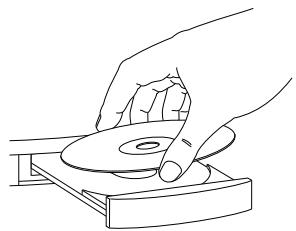
1 Insert the Wireless Keyboard driver CD into your computer's CD drive.
Continued
2 Copy the driver onto your computer. Follow the steps for your computer system:
Windows: Follow the instructions that appear on your computer screen to copy the driver onto your computer.
NOTE If the installation does not begin, open the CD in Windows Explorer and double-click the Setup.exe file.
Mac: Double-click the Keyboard.prc file.
3 Synchronize your device with your computer. Once synchronization is complete, follow the instructions that appear on your device's screen to complete the installation.
NOTE If you need help with synchronization, refer to the documentation that came with your device.

Attach your device to the keyboard
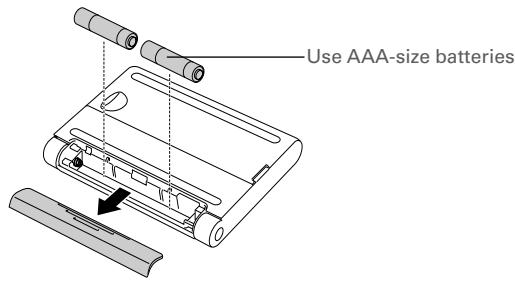
1 Turn the keyboard over and insert the batteries.
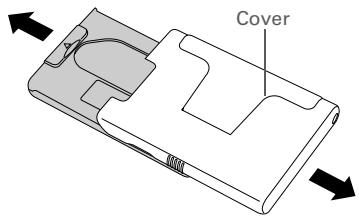
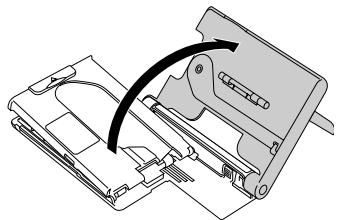
2 Slide the keyboard cover to the right and open it.
Continued
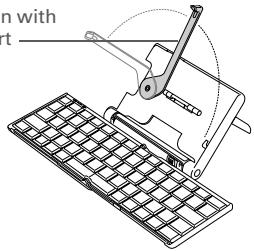
3 Unfold the keyboard. Then open the IR wand to the vertical or horizontal position.
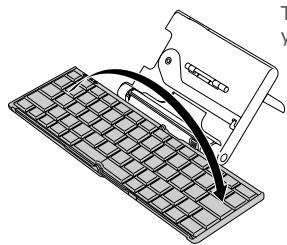
The wand must align with your device's IR port
4 Pull up the retainer bar, and lean your device against the cover.
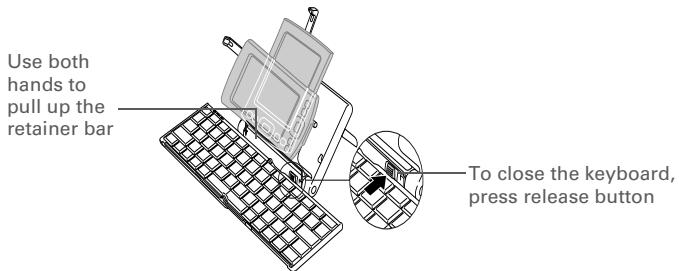
5 That's it. See the User Guide on the CD for information about your keyboard's special features.
Copyright and Trademark
© 2004 palmOne, Inc. All rights reserved.
palmOne, the palmOne logo, and Palm OS are among the trademarks or registered trademarks owned by or licensed to palmOne, Inc. All other brand and product names are or may be trademarks of, and are used to identify products or services of, their respective owners.
Disclaimer and Limitation of Liability
palmOne, Inc. assumes no responsibility for any damage or loss resulting from the use of this guide.
palmOne, Inc. assumes no responsibility for any loss or claims by third parties which may arise through the use of this software. palmOne, Inc. assumes no responsibility for any damage or loss caused by deletion of data as a result of malfunction, dead battery, or repairs. Be sure to make backup copies of all important data on other media to protect against data loss.
[!] IMPORTANT Please read the End User Software License Agreement with this product before using the accompanying software program(s). Using any part of the software indicates that you accept the terms of the End User Software License Agreement.
Agency Compliance Information
Product regulatory and compliance information can be found in the User Guide file located on the product CD.
Erste Schritte
400 N. McCarthy Blvd.
Milpitas, California 95035
United States of America
PN:406-10201-00
Brand : PALM
Model : KEYBOARD
Category : Keyboard