
LM 400 - Audio Equalizer JBSYSTEMS - Free user manual and instructions
Find the device manual for free LM 400 JBSYSTEMS in PDF.


| Product type | Dimmer / 4-channel light controller |
| Brand | JBSYSTEMS |
| Model | LM 400 |
| Number of channels | 4 independent channels |
| Max power per channel (resistive) | 1500 W |
| Max power per channel (inductive) | 700 W |
| Max total power | 3000 W |
| Power supply | Mains 230 V AC, 50 Hz |
| Dimensions (approx.) | 483 x 44 x 150 mm (19" 1U) |
| Weight (approx.) | 2 kg |
| Operating modes | Hold Dim, Hold Sound, Program Sound, Program Speed |
| Audio input | Music level 100 mV to 1500 mV |
| Control output | 0-10V (compatible with LitePuter P404D, P4015) |
| Special functions | Full On, Standby, Speed X10, Background (backlight), Burst, Mode Select, Program Select |
| Maintenance and cleaning | Clean with a dry, soft cloth. Do not use abrasive products. |
| Safety | Respect the max power per channel and total. Disconnect before maintenance. Use additional power blocks if necessary. |
| Spare parts and repairability | Additional power blocks available as an option. |
Frequently Asked Questions - LM 400 JBSYSTEMS
User questions about LM 400 JBSYSTEMS
0 question about this device. Answer the ones you know or ask your own.
Ask a new question about this device
Download the instructions for your Audio Equalizer in PDF format for free! Find your manual LM 400 - JBSYSTEMS and take your electronic device back in hand. On this page are published all the documents necessary for the use of your device. LM 400 by JBSYSTEMS.
USER MANUAL LM 400 JBSYSTEMS
To use the different possibilities of this unit in the best possible way, we recommend to read these instructions carefully.
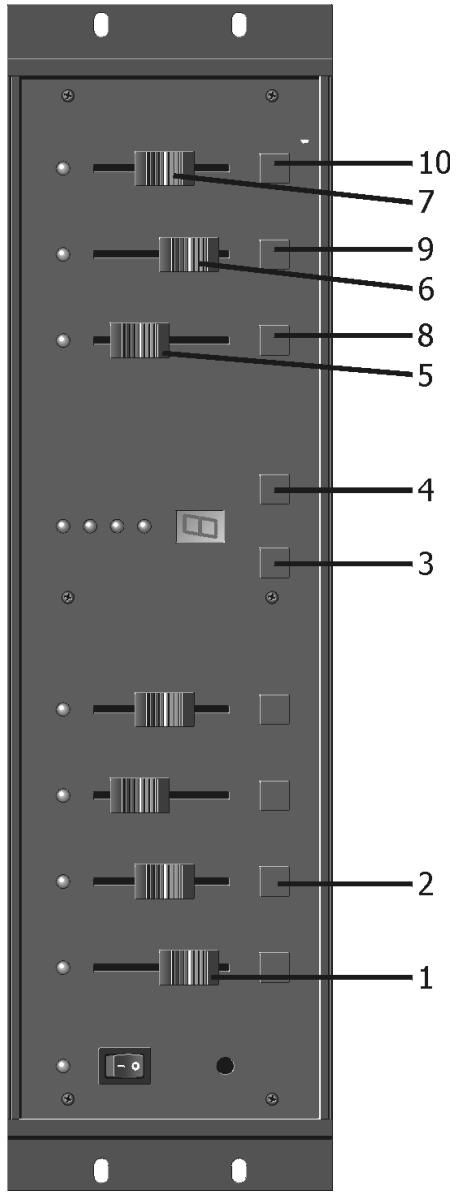
FEATURES
- Individual channel sliders.
-
Flash button, to flash output at maximum level.
-
Mode Select
-
Hold Dim: manual control of the four channels with sliders (1) and Dim Master (5).
- Hold Sound: music to light mode, Bass (Ch1), Mid (Ch2), High (Ch3), Anti Bass (Ch4).
- Program Sound: 10 preset programs are running to the beat of the music.
-
Program Speed: 10 preset programs are running on a steady speed, adjustable with slider (7) and button (10).
-
Program Select
Selects programs 1 to 9, program '0' automatically cycles through all nine programs.
- Dimmer Master
Slider controls maximum output level of channels.
- Background
Slider controls minimum output level of channels.
- Program Speed
Slider controls the running speed in 'Program Speed' mode.
- Full On
Puts on all four channels at maximum output.
- Standby
Stops all outputs.
- Speed X10
Used with program speed slider (7), to offer two levels of speed.
- Sensitivity
Sets the minimum level of sliders output.
- Audio Input
Level for audio control input 200mV - 1500mV .
13. Signal Output
0-10V output for controlling external power packs Liteputer P404D and P-4015.
14. Maximum Output Power
1500 Watt per channel resistive
700 Watt per channel inductive
15. When you use the 'Hold Dim' mode, you have to make sure you stay under 3000 W (power supply).
For higher power you need to work with additional dimmer packs.
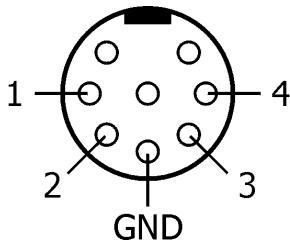
16. Output (0-10V):
FRANCAIS
Brand : JBSYSTEMS
Model : LM 400
Category : Audio Equalizer