
7T82 - Quartz watch SEIKO - Free user manual and instructions
Find the device manual for free 7T82 SEIKO in PDF.


| Product type | Quartz watch |
| Brand | SEIKO |
| Model | 7T82 |
| Caliber | 7T82 |
| Movement | Analog quartz |
| Display | Hands (hours, minutes, small second) and date |
| Chronograph | 1/100th second, 1/10th second, second and retrograde minute (40 min) |
| Chronograph capacity | Up to 120 minutes |
| Additional functions | Tachymeter, telemeter (depending on model) |
| Power source | SEIKO SR927W battery |
| Battery life | Approximately 3 years (less if chronograph is used frequently) |
| End-of-life indicator | Second hand jumps every 2 seconds |
| Accuracy | ±15 seconds per month (at normal temperature) |
| Quartz frequency | 32 768 Hz |
| Operating temperature | -10°C to +60°C |
| Maintenance | Avoid magnetic fields, shocks, extreme temperatures; clean with a soft cloth |
| Battery replacement | Entrust to an authorized SEIKO dealer |
| Safety | Non-rechargeable battery, do not short-circuit, keep out of reach of children |
| Repairability | Contact an authorized SEIKO dealer |
| Warranty | See the attached international warranty |
Frequently Asked Questions - 7T82 SEIKO
User questions about 7T82 SEIKO
0 question about this device. Answer the ones you know or ask your own.
Ask a new question about this device
Download the instructions for your Quartz watch in PDF format for free! Find your manual 7T82 - SEIKO and take your electronic device back in hand. On this page are published all the documents necessary for the use of your device. 7T82 by SEIKO.
USER MANUAL 7T82 SEIKO
You are now the proud owner of a SEIKO 1/100-Second Retrograde Chronograph Cal. 7T82. For best results, please read the instructions in this booklet carefully before using your SEIKO Analogue Quartz Watch. Please keep this manual handy for ready reference.
TACHYMETER (for models with tachymeter scale on the dial) 17
TELEMETER (for models with telemeter scale on the dial) 19
BATTERY CHANGE 21
NECESSARY PROCEDURE AFTER BATTERY CHANGE 23
TROUBLESHOOTING 24
SPECIFICATIONS 26
For the care of your watch, see "TO PRESERVE THE QUALITY OF YOUR WATCH" in the attached Worldwide Guarantee and Instruction Booklet.
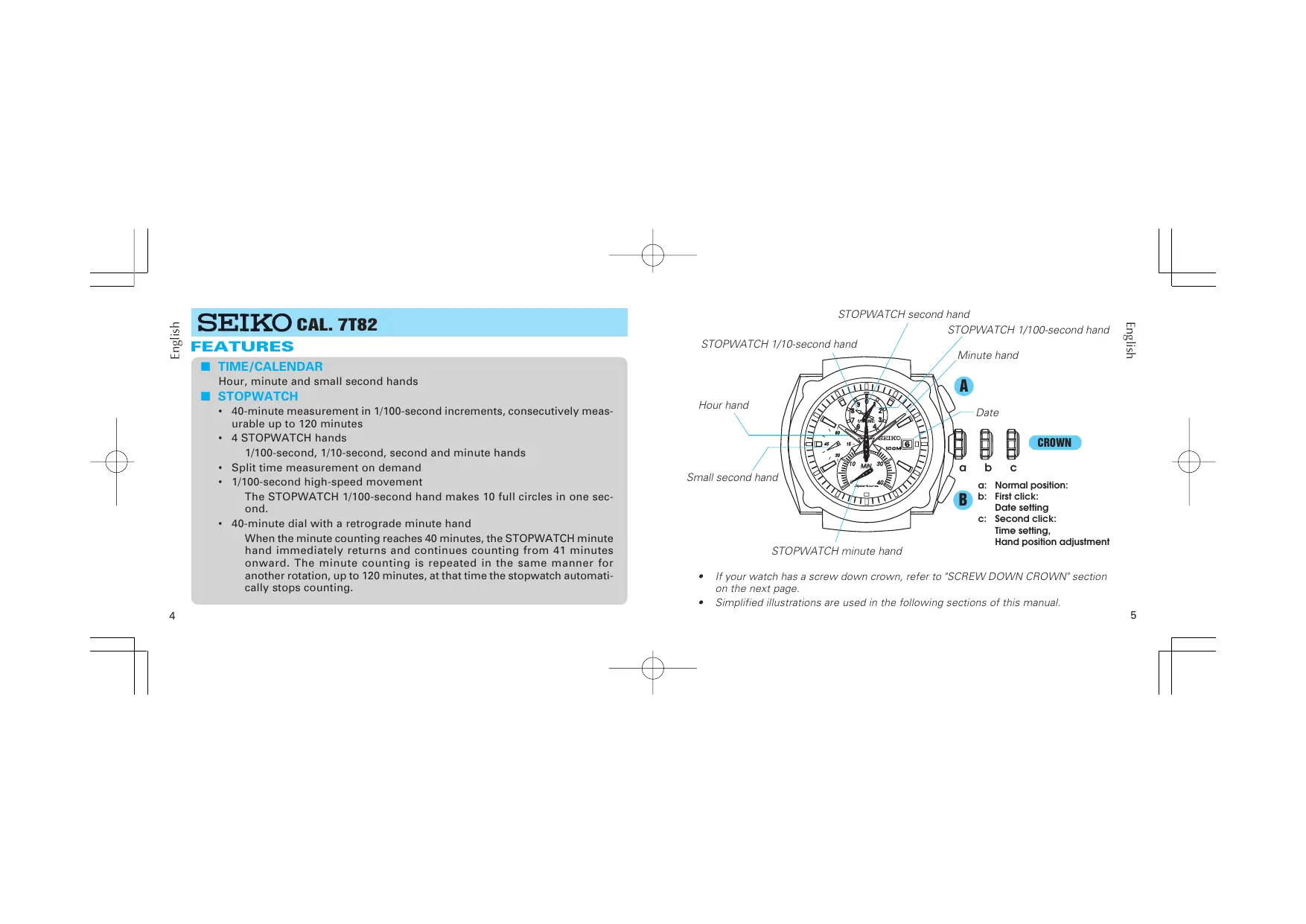
SEIKO CAL. 7T82
FEATURES
TIME/CALENDAR
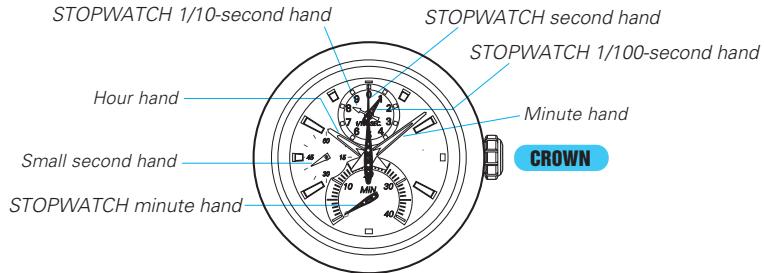
Hour, minute and small second hands
STOPWATCH
- 40-minute measurement in 1/100-second increments, consecutively measurable up to 120 minutes
4 STOPWATCH hands 1/100-second, 1/10-second, second and minute hands - Split time measurement on demand
- 1/100-second high-speed movement The STOPWATCH 1/100-second hand makes 10 full circles in one second.
- 40-minute dial with a retrograde minute hand When the minute counting reaches 40 minutes, the STOPWATCH minute hand immediately returns and continues counting from 41 minutes onward. The minute counting is repeated in the same manner for another rotation, up to 120 minutes, at that time the stopwatch automatically stops counting.
STOPWATCH second hand
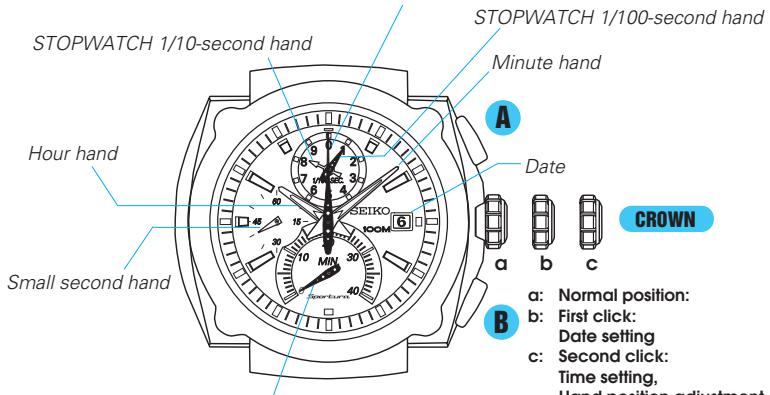
STOPWATCH minute hand
- If your watch has a screw down crown, refer to "SCREW DOWN CROWN" section on the next page.
- Simplified illustrations are used in the following sections of this manual.
SCREW DOWN CROWN
- Some models have a screw down crown to prevent accidental operation and help maintain water-resistant quality.
- To use the crown, it is necessary to unlock the crown first before pulling it out, and it is important to securely screw the crown in after each use.
The crown must be securely locked in the case except when you use it to set the watch.
Turn the crown counterclockwise to unscrew it. The crown is released and projected outward from its original position.
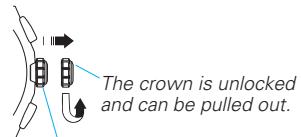
The crown is locked.
Turn the crown clockwise while pressing it to the case until it is screwed all the way in and locked.
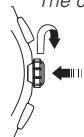
- When screwing the crown in, ensure that the crown is correctly aligned and turn it gently. If it is too hard to turn, unscrew it first, and then rewind it. Do not screw it in by force as it may damage the thread of the screw or the case.
TIME ANDCALENDAR SETTING AND STOPWATCH HAND POSITION ADJUSTMENT
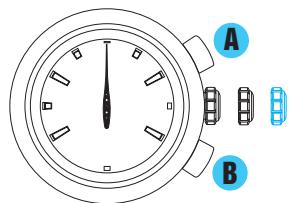
- This watch is designed so that the following adjustments are made with the crown at the second click position:
1) time setting
2) stopwatch hand position adjustment
Once the crown is pulled out to the second click, be sure to make both the above adjustments 1) and 2) at the same time.
The date adjustment is done with the crown at first click position.
1) TIME AND CALENDAR SETTING
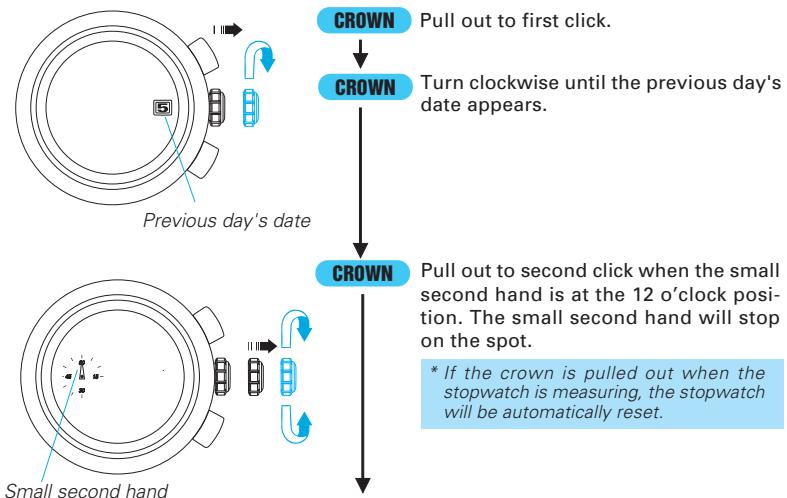
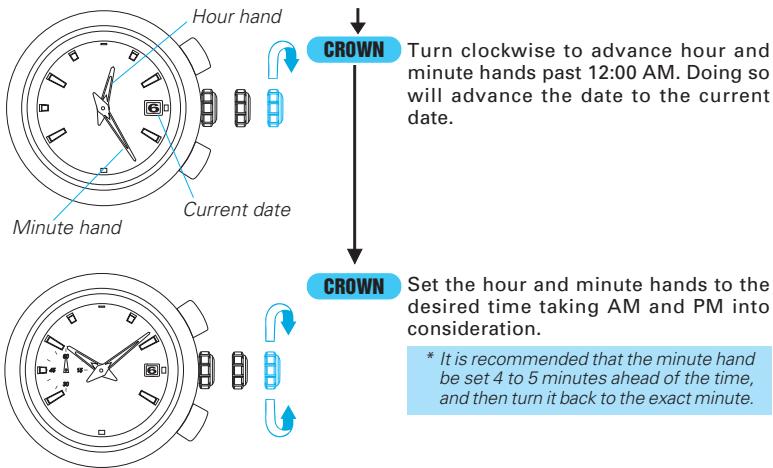
- It is necessary to adjust the date at the end of February and 30-day months.
- Do not set the date between 9:00 p.m. and 1:00 a.m. Otherwise, the date may not change properly.
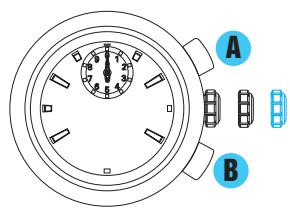
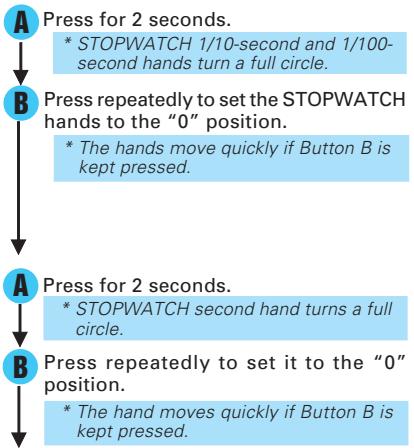
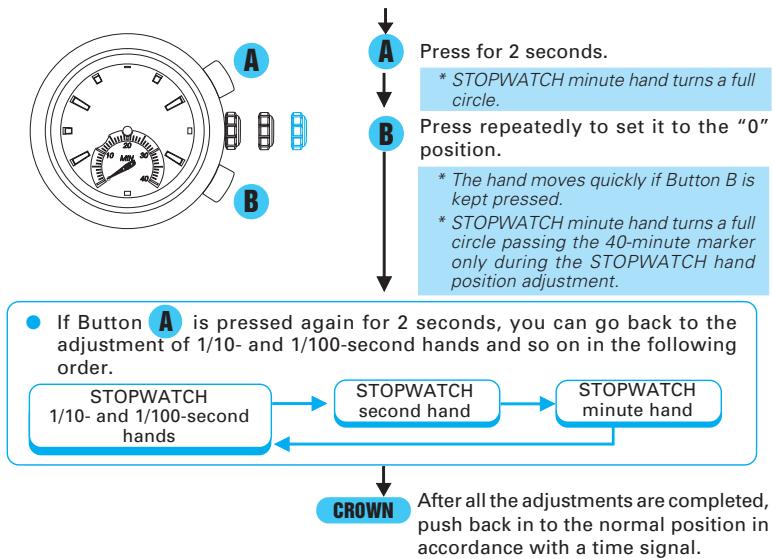
2) STOPWATCH HAND POSITION ADJUSTMENT
☆ If the STOPWATCH hands are not in the "0" position, follow the procedure below to set them to the "0" position.
HOW TO USE THE STOPWATCH
- The stopwatch features a 40-minute dial with a retrograde minute hand.
- The stopwatch can consecutively measure up to 120 minutes in 1/100-second increments. When the measurement reaches 120 minutes, the stopwatch automatically stops counting.
- Split time measurement is possible.
- After 3 minutes of timing from a start, the STOPWATCH 1/100-second and 1/10-second hands remain pointing to the "0" position until the watch is stopped or split time measurement is made, at such a time, they move to display the measured time. They start to move for a maximum of three minutes after the watch is restarted or the split time display is released.
The time measured is indicated by the four stopwatch hands below.
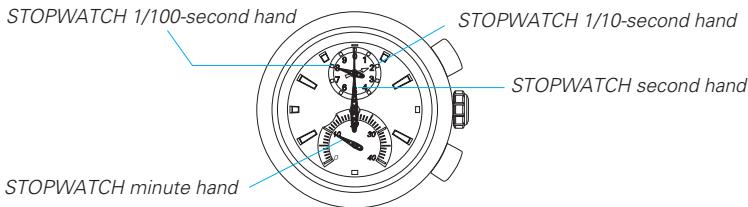
- Reading the 1/100-second and 1/10-second hands requires extra attention.
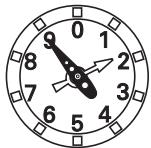
- The display illustrated at the left should be read as "19," not "29." When the 1/100-second hand is moving toward larger numbers, the 1/10 second hand comes close to the next marker, which may cause you to wrongly read the hands as "29."
- When the minute counting reaches 40 minutes, the STOPWATCH minute hand immediately returns and continues counting from 41 minutes onward. The minute counting is repeated in the same manner for another rotation, up to 120 minutes, at that time the stopwatch automatically stops.
- The final position of the STOPWATCH minute hand, after completing 120 minutes of counting, is illustrated below.
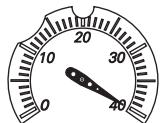
- Before starting to use the stopwatch again, make sure to reset the stopwatch by pressing Button B.
While the STOPWATCH hands are moving
- Press Button A to stop the stopwatch.
- Press Button B to reset the stopwatch.
While the STOPWATCH hands are stopped
(When the stopwatch is stopped)
- Press Button B to reset the stopwatch.
(When the split time measurement is displayed while the stopwatch is measuring.)
- Press Button B to release the split time display and return to the normal display
- Press Button A to stop the stopwatch
- Press Button B to reset the stopwatch
(When the split time measurement is displayed and the stopwatch is stopped.)
- Press Button B to release the split time display.
- Press Button B to reset the stopwatch.
Standard measurement

START

STOP

RESET
Accumulated elapsed time measurement

START

STOP

RESTART

STOP

RESET
- Restart and stop of the stopwatch can be repeated by pressing Button A.
Split time measurement

START

SPLIT

SPLIT

STOP


RESET
RELEASE
- Measurement and release of split time can be repeated by pressing Button B.
- If the time measured reaches 120 minutes while the split time is being displayed, the stopwatch automatically stops counting and releases the split time display, showing "40' 00" 00." Before starting the next measurement, make sure to reset the stopwatch by pressing Button B.
Measurement of two competitors

START

FINISH TIME OF 1ST
COMPETITOR

2ND COMPETITOR FINISHES

FINISH TIME OF 2ND
COMPETITOR

RESET
DEMONSTRATION FUNCTION OF THE STOP-WATCH HAND MOVEMENT
- The demonstration function allows you to view the movement of the four STOPWATCH hands.
Each of the four STOPWATCH hands demonstrates high-speed movements and when the demonstration is finished, they return to the original position.
- How to view the demonstration
- Reset the stopwatch.
- Refer to "HOW TO USE THE STOPWATCH" section of this manual.
- Press Button B for 2 seconds or longer.
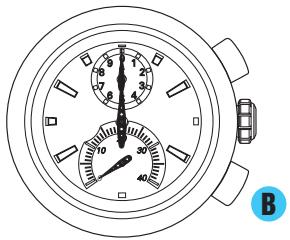
- After approximately 3 seconds, the demonstration finishes, and the stopwatch is reset for the next use.
- If either Button A or B is pressed during a demonstration, the demonstration will be stopped and the stopwatch will be reset.
TACHYMETER
(for models with tachymeter scale on the dial)
To measure the hourly average speed of a vehicle
Use the stopwatch to determine how many seconds it takes to go 1 km or 1 mile.
Tachymeter scale indicated by STOPWATCH second hand gives the average speed per hour.
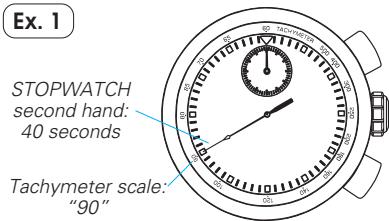
90" (tachymeter scale figure) x 1 (km or mile) = 90 km/h or mph
- Tachymeter scale can be used only when the time required is less than 60 seconds.
Ex. 2: If the measuring distance is extended to 2km or miles or shortened to 0.5km or miles and STOPWATCH second hand indicates "90" on tachymeter scale:
90" (tachymeter scale figure) × 2 (km or mile) = 180km / h or mph
90" (tachymeter scale figure) × 0.5 (km or mile) = 45km / h or mph
To measure the hourly rate of operation

Use the stopwatch to measure the time required to complete 1 job.

Tachymeter scale indicated by STOPWATCH second hand gives the average number of jobs accomplished per hour.
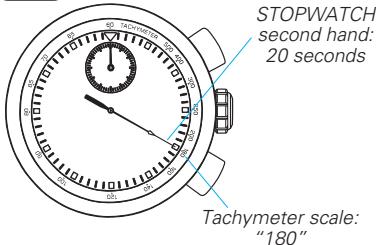
Ex. 1
"180" (tachymeter scale figure) x 1 job
= 180 jobs/hour
Ex. 2: If 15 jobs are completed in 20 seconds:
"180" (tachymeter scale figure) x 15 jobs = 2700 jobs/hour
TELEMETER
(for models with telemeter scale on the dial)
The telemeter can provide a rough indication of the distance to the source of light and sound.
- The telemeter indicates the distance from your location to an object that emits both light and sound. For example, it can indicate the distance to the place where lightning struck by measuring the time elapsed after you see a flash of lightning until you hear the sound.
- A flash of lightning reaches you almost immediately while the sound travels to you at a speed of 0.33km /second. The distance to the source of the light and sound can be calculated on the basis of this difference.
- The telemeter scale is so graduated that the sound travels at a speed of 1km in 3 seconds.*
- Under the condition of temperature of 20^ C( 68^ F) .

CAUTION
The telemeter provides only a rough indication of the distance to the place where lightning struck, and therefore, the indication cannot be used as the guideline to avoid the danger of lightning. It should also be noted that the speed of the sound differs depending on the temperature of the atmosphere where it travels.
HOW TO USE THE TELEMETER
Before beginning, check that the stopwatch has been reset.
START
(Flash of light)
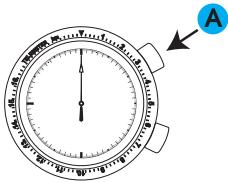
Press button A to start the stopwatch as soon as you see the light.
STOP
(Crash of thunder)
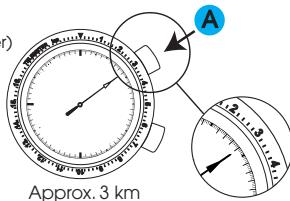
2 When you hear the sound, press button A to stop the stopwatch.
3 Read the telemeter scale that the stopwatch second hand points to.
Please note that the stopwatch second hand moves in 1-second increments and does not always point exactly to the graduations of the telemeter scale. The telemeter scale can be used only when the measured time is less than 60 seconds.
BATTERY CHANGE
3 Years
The miniature battery which powers your watch should last approximately 3 years. However, because the battery is inserted at the factory to check the function and performance of the watch, its actual life once in your possession may be less than the specified period. When the battery expires, be sure to replace it as soon as possible to prevent any malfunction. For battery replacement, we recommend that you contact an AUTHORIZED SEIKO DEALER and request SEIKO SR927W battery.
- If the stopwatch is used for more than 2 hours a day, the battery life may be less than the specified period.
- After the battery is replaced with a new one, set the time/calendar and adjust the stopwatch hand position.
Battery life indicator
When the battery nears its end, the small second hand moves at two-second intervals instead of normal one-second intervals. In that case, have the battery replaced with a new one as soon as possible.
- The watch remains accurate while the small second hand is moving at two-second intervals.

WARNING
- Do not remove the battery from the watch.
- If it is necessary to take out the battery, keep it out of the reach of children. If a child swallows it, consult a doctor immediately.

CAUTION
- Never short-circuit, heat or otherwise tamper with the battery, and never expose it to fire. The battery may burst, become very hot or catch fire.
- The battery is not rechargeable. Never attempt to recharge it, as this may cause battery leakage or damage to the battery.
NECESSARY PROCEDURE AFTER BATTERY CHANGE
After the battery is replaced with a new one, or when an abnormal display appears, follow the procedures below to reset the built-in IC. The watch will resume its normal operation.
- Pull out the crown to the second click.
- Press Button A and B at the same time.
- Push the crown back in to the normal position and check if the hands move as normal.
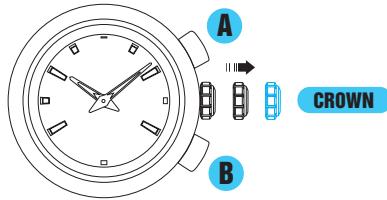
- Resetting the IC will initialize the watch. Before starting to use the watch, it will be necessary to set the time and adjust the STOPWATCH hands to the "0" position. Refer to "TIME AND CALENDAR SETTING AND STOPWATCH HAND POSITION ADJUSTMENT" section of this manual.
TROUBLESHOOTING
45183
| Trouble | Possible causes |
| The watch stops operating. | The battery has run down. |
| The small second hand moves at two-second intervals. | The battery nears its end. |
| The watch temporarily gains or loses time. | The watch has been left or worn in extremely high or low temperatures. |
| The watch has been left close to an object with a strong magnetic field. | |
| You drop the watch, hit it against a hard surface, or wear it while playing active sports. The watch is exposed to strong vibrations. | |
| The STOPWATCH hands do not return to the “0” position when the stopwatch is reset. | The watch has been affected by magnetism or exposed to strong shocks or vibrations. |
| The inner surface of the glass is clouded. | Moisture has entered the watch because the gasket has deteriorated. |
| The date changes at 12 o'clock noon. | AM/PM is not properly set. |
| Solutions |
| Have the battery replaced with a new one immediately by the retailer from whom the watch was purchased. |
| Return the watch to a normal temperature so that it works accurately as usual, and then reset the time. The watch has been adjusted so that it works accurately when it is worn on your wrist under a normal temperature range between 5 °C and 35 °C. |
| Correct this condition by moving and keeping the watch away from the magnetic source. If this action does not correct the condition, contact the retailer from whom the watch was purchased. |
| Reset the time. If the watch does not return to its normal accuracy after resetting the time, contact the retailer from whom the watch was purchased. |
| Reset the stopwatch hands to the “0” position. Follow the procedure in “TIME AND CALENDAR SETTING AND STOPWATCH HAND POSITION ADJUSTMENT.” |
| Contact the retailer from whom the watch was purchased. |
| Advance the hour hands for 12 hours to correctly set the time and date. |
- In the event of any other problem, please contact the retailer from whom the watch was purchased.
SPECIFICATIONS
1 Frequency of crystal oscillator 32,768 Hz (Hz = Hertz ... Cycles per second)
2 Loss/gain (monthly rate) ± 15 seconds at normal temperature range (5 °C ~ 35 °C)
3 Operational temperature range -10 ^ C +60^
4 Driving system . Step motor, 4 pieces
5 Display system Time/calendar Hour, minute and small second hands
Date is displayed in numerals.
Stopwatch STOPWATCH 1/100-second hand (0.1 second/360 degrees) STOPWATCH 1/10-second hand (1 second/360 degrees) STOPWATCH second hand (60 seconds/360 degrees) STOPWATCH minute hand (40 minutes/240 degrees)
6 Battery SEIKO SR927W, 1 piece
7 Battery life. Approximately 3 years If the stopwatch is used for longer than 2 hours a day, the battery life may be shorter than the specified period.
8 Battery life indicator
9 IC(Integrated Circuit) C-MOS-IC,1 piece
- The specifications are subject to change without prior notice for product improvements.
- SEIKO CAL. 7T82
- FEATURES
- TIME/CALENDAR
- STOPWATCH
- STOPWATCH second hand
- SCREW DOWN CROWN
- TIME ANDCALENDAR SETTING AND STOPWATCH HAND POSITION ADJUSTMENT
- 1) TIME AND CALENDAR SETTING
- 2) STOPWATCH HAND POSITION ADJUSTMENT
- HOW TO USE THE STOPWATCH
- While the STOPWATCH hands are moving
- While the STOPWATCH hands are stopped
- Standard measurement
- Accumulated elapsed time measurement
- Split time measurement
- RELEASE
- Measurement of two competitors
- DEMONSTRATION FUNCTION OF THE STOP-WATCH HAND MOVEMENT
- - How to view the demonstration
- TACHYMETER
- (for models with tachymeter scale on the dial)
- To measure the hourly rate of operation
- Ex. 2: If 15 jobs are completed in 20 seconds:
- TELEMETER
- (for models with telemeter scale on the dial)
- CAUTION
- HOW TO USE THE TELEMETER
- START
- STOP
- BATTERY CHANGE
- Years
- Battery life indicator
- WARNING
- NECESSARY PROCEDURE AFTER BATTERY CHANGE
- TROUBLESHOOTING
- SPECIFICATIONS
Brand : SEIKO
Model : 7T82
Category : Quartz watch