
8F56 - Quartz watch SEIKO - Free user manual and instructions
Find the device manual for free 8F56 SEIKO in PDF.


| Product Type | Analog quartz watch |
| Movement | Caliber SEIKO 8F56 (high precision, perpetual calendar) |
| Case diameter | Approximately 40 mm diameter |
| Case thickness | Approximately 10 mm |
| Weight | Approximately 80 g (depending on strap) |
| Case material | Stainless steel |
| Glass | Mineral (hardened) |
| Strap | Leather or steel, interchangeable |
| Power | Button cell CR1620 (battery life up to 10 years) |
| Accuracy | ±15 seconds per year |
| Calendar | Perpetual, automatic adjustment of months and leap years until 2099 |
| Main functions | Hours, minutes, seconds, date, day, month, year |
| Water resistance | 5 bar (50 m) – suitable for surface swimming |
| Power reserve | Continuous battery power, no winding |
| Maintenance and cleaning | Clean with a soft cloth; avoid contact with solvents, magnetic fields, and strong impacts |
| Safety | Not suitable for diving; avoid operating the crown underwater |
| Spare parts and repairability | Battery, strap, glass, crown, gaskets available at authorized dealers |
| General information | Made in Japan; user manual included |
Frequently Asked Questions - 8F56 SEIKO
User questions about 8F56 SEIKO
0 question about this device. Answer the ones you know or ask your own.
Ask a new question about this device
Download the instructions for your Quartz watch in PDF format for free! Find your manual 8F56 - SEIKO and take your electronic device back in hand. On this page are published all the documents necessary for the use of your device. 8F56 by SEIKO.
USER MANUAL 8F56 SEIKO
INSTRUCTIONS (P. 43)
ISTRUZIONI (P. 63)
You are now the proud owner of a SEIKO Analogue Quartz Watch Cal. 4F56/8F56. For best results, please read the instructions in this booklet carefully before using your SEIKO Analogue Quartz Watch. Please keep this manual handy for ready reference.
For the care of your watch, see "TO PRESERVE THE QUALITY OF YOUR WATCH" in the attached Worldwide Guarantee and Instruction Booklet.
SEIKO CAL. 4F56, 8F56
PERPETUALCALENDAR
- Once set, the calendar automatically adjusts for odd and even months including February of leap years up to February 28, 2100.
It indicates the month, date and the number of years since the last leap year.
DUAL TIME DISPLAY
(only for models with the 24-hour hand)
The time of an area in a different time zone can be displayed.
- When you travel abroad, the time and date of the place you visit can easily be shown on the watch.
WORLD TIME DISPLAY
(only for models with the 24-hour hand and rotating bezel for world time display)
The times of 22 cities throughout the world can be displayed.
HIGH ACCURACY
- Loss/gain: Annual rate of less than 20 seconds
(Model without 24-hour hand)
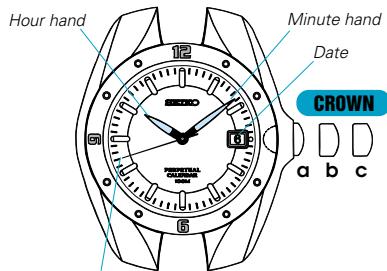
Second hand
(Model with 24-hour hand)
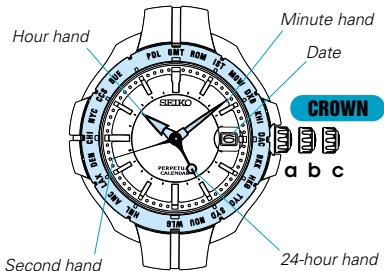
b:First click
c: Second click
Before using the watch:
- Because the calendar is preadjusted at the factory, you only need to set the time and date, and the calendar will automatically update itself.
-
Before using the watch, be sure to read "HOW TO CHECK THE CALENDAR", and then set the time and date correctly following the procedure in "TIME (DUAL TIME for models with 24-hour hand) / DATE SETTING".
-
In case the calendar indication is not correct after the time/date setting is made, consult the retailer from whom the watch was purchased or an AUTHORIZED SEIKO DEALER.
TIME (DUAL TIME for models with 24-hour hand) / DATE SETTING
For models without 24-hour hand
CROWN
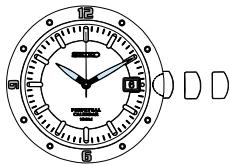
Pull out to second click when the second hand is at the 12 o'clock position, and turn to set the minute hand.
Push back completely in accordance with a time signal.
Pull out to first click, and turn to set the hour hand and date.
Push back completely.
For models with 24-hour hand
The 24-hour hand can be used either as an AM/PM indicator that turns a full circle in 24 hours, or as a dual time hand that indicates the time of an area in a different time zone, as you require.
CROWN
Pull out to second click when the second hand is at the 12 o'clock position.
To use the 24-hour hand as an AM/PM indicator:
Turn to set the minute and 24-hour hands to the current time of your area.
To use the 24-hour hand as a dual time hand (same procedure):
Turn to set the minute and 24-hour hands to the time of a different area.
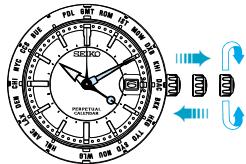
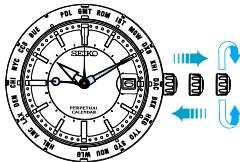
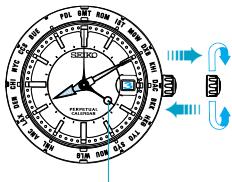
24-hour hand (showing the current time of your area)
Push back completely in accordance with a time signal.
Pull out to first click and turn to set the current date of your area.
Turn to set the hour hand to the current time of your area.
Push back completely.
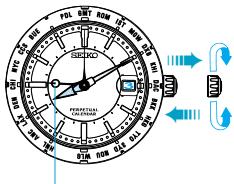
24-hour hand (showing the time of a different area)
TIME DIFFERENCE ADJUSTMENT DURING TRIP
- The hour hand can be set independently of the other hands. Therefore, when you are traveling around different time zones, the time and date of the place you visit can easily be shown on the watch only by turning the hour hand.
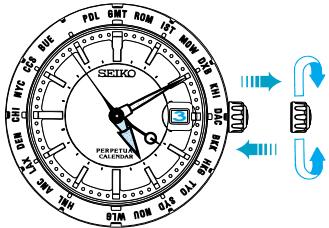
CROWN
Pull out to first click.

Turn to set the hour hand and date to the time and date of the place you visit.

Push back completely.
- The 24-hour hand keeps indicating the time of the area you have selected in the "TIME (DUAL TIME for models with 24-hour hand)/DATE SETTING".
- How to calculate the time difference between two cities
Ex.) When you move from Rome to New York:
[A] Rome time : +1 hour from GMT
[B] New York time : -5 hours from GMT
So the time difference between Rome and New York is:
[B] - [A] = (-5) - (+1) = -6 (hours)
You should move the hour hand back 6 hours.
TIME DIFFERENCES
(As of March, 1999)
GMT = Greenwich Mean Time
| GMT ± (hours) | Major cities in respective time zones | GMT ± (hours) | Major cities in respective time zones |
| 0 | London*, Casablanca, Dakar | +12 | Wellington*, Fiji Islands*, Auckland* |
| + 1 | Paris*, Rome*, Amsterdam*, Frankfurt*, Berlin* | -11 | Midway Islands |
| + 2 | Cairo*, Athens*, Istanbul*, Kiev*, Cape Town, Tripoli | -10 | Honolulu |
| + 3 | Moscow*, Mecca, Nairobi | -9 | Anchorage* |
| + 4 | Dubai | -8 | Los Angeles*, San Francisco*, Vancouver*, Dawson (Canada)* |
| + 5 | Karachi, Tashkent | -7 | Denver*, Edmonton (Canada)* |
| + 6 | Dacca | -6 | Chicago*, Mexico City* |
| + 7 | Bangkok, Phnom Penh, Jakarta | -5 | New York*, Washington, D.C.*, Montreal* |
| + 8 | Hong Kong, Manila, Beijing, Singapore | -4 | Caracas, Santiago (Chile)* |
| + 9 | Tokyo, Seoul, Pyongyang | -3 | Rio de Janeiro*, Buenos Aires |
| +10 | Sydney*, Guam, Khabarovsk* | -2 | |
| +11 | Nouméa (New Caledonia), Solomon Islands | -1 | Azores*, Cape Verde Islands |
The cities marked with ** (asterisk) use daylight saving time (summer time).
WORLD TIME DISPLAY
(only for models with the 24-hour hand and rotating bezel for world time display)
- By using the 24-hour hand and rotating bezel, the times of 22 cities in different time zones throughout the world can be read from the dial.
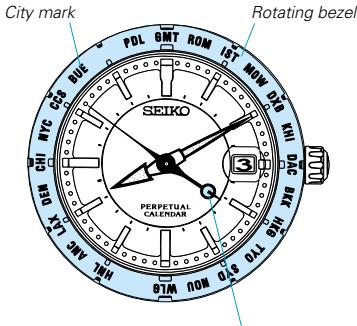
24-hour hand
Turn the rotating bezel so that the city mark corresponding to the area whose time has been set in the "TIME (DUAL TIME for models with 24-hour hand)/DATE SETTING" aligns with the 24-hour hand.
Each city mark on the bezel indicates the time of the city or area it represents. Read the times in the various cities, referring to the 24-hour marks on the dial.
- Marks on the bezel and names of cities/areas
| Marks on the bezel | Name of city or area | Marks on the bezel | Name of city or area |
| G M T | Greenwich | N O U | Nouméa |
| R O M | Rome | W L G | Wellington |
| I S T | Istanbul | H N L | Honolulu |
| M O W | Moscow | A N C | Anchorage |
| D X B | Dubai | L A X | Los Angeles |
| K H I | Karachi | D E N | Denver |
| D A C | Dacca | C H I | Chicago |
| B K K | Bangkok | N Y C | New York |
| H K G | Hong Kong | C C S | Caracas |
| T Y O | Tokyo | B U E | Buenos Aires |
| S Y D | Sydney | P D L | Azores |
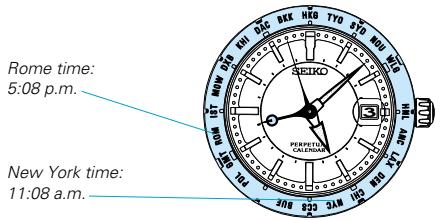
Example of use
If you are in Rome and wish to know the time of New York:
Set "ROM" on the bezel to the 24-hour hand.

Read the time that "NYC" on the bezel points to in the 24-hour indication.
Rome : 17:08 5:08 p.m.
New York: 11:08 → 11:08 a.m.
24-HOUR DISPLAY
(only for models with the 24-hour hand and rotating bezel for 24-hour display)
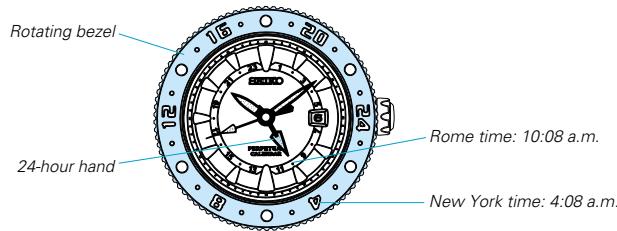
Example of use
- By using the 24-hour hand and rotating bezel, the times of areas in different time zones throughout the world can be read from the dial.
If you are in Rome and wish to know the time of New York:
Check that "24" on the rotating bezel is at the 12 o'clock position.
Calculate the time difference between Rome and New York by referring to "How to calculate the time difference between two cities" on page 8. () The time difference is -6 hours.)
Turn the rotating bezel clockwise by 6 hours.
- When the time of your area is ahead of the time of the desired place, turn the bezel clockwise.
When the time of your area is behind the time of the desired place, turn the bezel counterclockwise.
Read the 24-hour mark on the rotating bezel that the 24-hour hand points to.
- The time of your area can be known by reading the 24-hour mark on the dial that the 24-hour hand points to.
HOW TO CHECK THE CALENDAR
Second hand
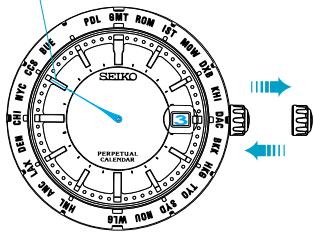
CROWN
Pull out to first click, and push back in to normal position within a second.
The watch shows the calendar in the following order:
- Leap year
(Second hand)
- Month
CALENDAR frame)
- Date
CALENDAR frame)
1. Leap year indication
The second hand moves quickly at five-second intervals and stops to indicate the number of years that have passed since the last leap year. Before pulling out the crown to the first click, check and remember where the second hand is so that you can read how many seconds it has advanced.
| Quick movement of second hand | 5 seconds | 10 seconds | 15 seconds | 20 seconds |
| Number of years since the last leap year | 1 year | 2 years | 3 years | 4 years (leap year) |
| Year | 1997 | 1998 | 1999 | 2000 |
| 2001 | 2002 | 2003 | 2004 | |
| 2005 | 2006 | 2007 | 2008 | |
| · | · | · | · | |
| · | · | · | · | |
| · | · | · | · | |
| 2093 | 2094 | 2095 | 2096 | |
| 2097 | 2098 | 2099 | - |
English
2. Current month
The current month is shown in the calendar frame for 5 seconds.
- January is represented by "1", February "2", and so on.
3. Current date
The numeral in the calendar frame returns to the current date.
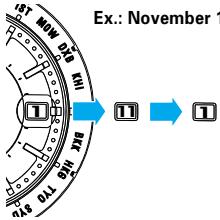
- When the month and date are represented by the same numeral as in the case of "January 1st", "February 2nd" and so on, the numeral in the calendar frame quickly advances and moves back by one to indicate that the month and date numerals are identical.
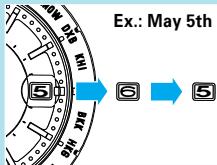
After the calendar has been displayed, the second hand starts moving quickly and then resumes normal movement.
NOTES ON USING THE WATCH
(for models with screw lock type crown)
To unscrew the crown:
Turn the crown counterclockwise. (Then pull it out for setting the time or checking the calendar)
To screw in the crown:
With the crown at the normal position, turn it clockwise while pressing it.
TIME (DUAL TIME) / DATE SETTING
- When setting the date, turn the crown counterclockwise to advance the date and clockwise to move it back. The date changes one day by turning the hour hand two full circles.
- The date changes between 11:45 p.m. and 0:30 a.m. while the watch is in operation and between 9:00 p.m. and 3:00 a.m. when it is changed manually by turning the hands. Therefore, note the following.
[AM/PM checking]
When setting the hour hand, check that AM/PM is correctly set.
- When setting the time by advancing the hands, turn the hour hand past the 3 o'clock marker. If the date advances, the time is set for the AM period. If it does not change, the time is set for the PM period.
- When setting the time by turning back the hands, turn the hour hand past the 9 o'clock marker. If the date moves back, the time is set for the PM period. If it does not change, the time is set for the AM period.
[Setting the time between 9:00 p.m. and 3:00 a.m.]
- If the time is adjusted to the time period between 9:00 p.m. and 3:00 a.m., the date may not change properly. The watch, however, will indicate the date properly after 3:00 a.m.
-
To prevent this from occurring, first turn back the hour hand past 9:00 p.m., checking that the date moves back to the previous day, and then, advance the hands to the desired time.
-
When setting the minute hand, advance it 4 to 5 minutes ahead of the desired time and then turn it back to the exact time.
The hour hand moves in one hour increments. - When adjusting the date and hour hand, turn the crown slowly. In doing so, the other hands may move slightly. However, this is not a malfunction.
TIME DIFFERENCE ADJUSTMENT DURING TRIP
- To put back the time, turn the crown clockwise. To advance the time, turn it counterclockwise.
- When moving back the hour hand past the 12 o'clock marker to set it to a time between 9:00 p.m. and 0:00 a.m., put back the hour hand further past 8:00 p.m., and then advance it to the desired hour.
TIME DIFFERENCE
- The time differences and the use of daylight saving time (summer time) may change in some areas or countries when they are so decided by the countries concerned.
HOW TO CHECK THE CALENDAR
- If the crown is pulled out to the second click instead of the first click and pushed back in to the normal position, the watch will not show the calendar.
Do not leave the crown at the first or second click when you use the watch, as this will shorten the battery life.
Note on the leap second
One day normally is said to consist of 86,400 seconds. In fact, it can be longer or shorter than this because of irregular changes in the rotation cycle of the earth. When the accumulated fluctuations in the length of a day total plus or minus one second, one second must then be added or subtracted as a correction factor. This is known as a "leap second".
The leap second correction is executed every year or two simultaneously throughout the world on the basis of information collected by astronomical observatories all over the world. The correction is effected between 11:59'59" p.m. and 0:00'00" a.m. GMT either on December 31 or on June 30, during which one second is added or subtracted.
When this happens, please adjust your watch accordingly.
Please refer to your newspaper for information on the leap second.
BATTERY CHANGE

[Cal. 4F56]

[Cal. 8F56]
The miniature battery which powers your watch should last approximately 5 years (Cal. 4F56) / 10 years (Cal. 8F56). However, because the battery is inserted at the factory to check the function and performance of the watch, its actual life once in your possession may be less than the specified period. When the battery expires, be sure to replace it as soon as possible to prevent any malfunction. For battery replacement, we recommend that you contact an AUTHORIZED SEIKO DEALER and request SEIKO CR1612 (Cal. 4F56) / SEIKO CR2412 (Cal. 8F56) battery.
- If the watch is left with the crown at the first or second click, if the calendar checking function is used frequently, and/or if the watch is left in temperatures outside the normal temperature range (5° C ~ 35° C or 41° F ~ 95° F) for a long time, the battery life may be less than the specified period.
Battery life indicator
When the second hand starts moving at two-second intervals instead of the normal one-second interval, replace the battery with a new one as soon as possible. Otherwise, the watch will stop operating in two weeks.
- The time accuracy is not affected even if the second hand is moving at two-second intervals.
- While the second hand is moving at two-second intervals, the date will not change and the watch will not show the calendar even if the crown is pulled out to the first click.
- If the watch is left in very low temperatures, the second hand may temporarily start moving at two-second intervals and the date does not change to the next. When the watch returns to normal temperature, however, this condition will be corrected and the correct date will be displayed on the next day.
If the second hand still moves at two-second intervals and the date does not change properly, replace the battery with a new one.
- Checking and adjustment of the calendar after battery change
The calendar function is not affected by battery changes. However, after the battery is replaced with a new one, be sure to check that the calendar is correct. (See "HOW TO CHECK THE CALENDAR")
If the watch does not indicate the leap year, month and date correctly, have the watch adjusted by an AUTHORIZED SEIKO DEALER.

WARNING
- Do not remove the battery from the watch.
- If it is necessary to take out the battery, keep it out of the reach of children. If a child swallows it, consult a doctor immediately.

CAUTION
- Never short-circuit, heat or otherwise tamper with the battery, and never expose it to fire. The battery may burst, become very hot or catch fire.
- The battery is not rechargeable. Never attempt to recharge it, as this may cause battery leakage or damage to the battery.
English
SPECIFICATIONS
1 Frequency of crystal oscillator
2 Loss/gain (Annual rate)
196,608 Hz (Hz = Hertz ... Cycles per second)
± 20 seconds when used on the wrist approximately 12 hours a day, at normal temperature range (5^ 35^) (41^ 95^)
- Monthly rate of loss/gain may amount to approximately 4 seconds depending on the condition of use.
3 Operational temperature range
4 Driving system
-10^ +60^ ( 14^ 140^ )
Step motor for the time indication Ultrasonic motor for the calendar indication
5 Display system
Time
Hour, minute, second and 24-hour hands (Some models do not have a 24-hour hand)
Date
Displayed in numerals.
6 Battery
SEIKO CR1612, 1 piece (Cal. 4F56)
SEIKO CR2412, 1 piece (Cal. 8F56)
7 Battery life indicator
8 IC(Integrated Circuit)
C-MOS-LSI, 1 piece
9 Magnetic resistance
4,800 A/m (60 gauss)
- The specifications are subject to change without prior notice for product improvement.
- SEIKO CAL. 4F56, 8F56
- PERPETUALCALENDAR
- DUAL TIME DISPLAY
- WORLD TIME DISPLAY
- HIGH ACCURACY
- (Model without 24-hour hand)
- (Model with 24-hour hand)
- Before using the watch:
- TIME (DUAL TIME for models with 24-hour hand) / DATE SETTING
- For models without 24-hour hand
- CROWN
- For models with 24-hour hand
- To use the 24-hour hand as an AM/PM indicator:
- To use the 24-hour hand as a dual time hand (same procedure):
- TIME DIFFERENCE ADJUSTMENT DURING TRIP
- - How to calculate the time difference between two cities
- TIME DIFFERENCES
- (only for models with the 24-hour hand and rotating bezel for world time display)
- Example of use
- 24-HOUR DISPLAY
- (only for models with the 24-hour hand and rotating bezel for 24-hour display)
- HOW TO CHECK THE CALENDAR
- Leap year indication
- Current month
- Current date
- NOTES ON USING THE WATCH
- TIME (DUAL TIME) / DATE SETTING
- [AM/PM checking]
- [Setting the time between 9:00 p.m. and 3:00 a.m.]
- TIME DIFFERENCE
- Note on the leap second
- BATTERY CHANGE
- Battery life indicator
- - Checking and adjustment of the calendar after battery change
- WARNING
- CAUTION
- English
- SPECIFICATIONS
Brand : SEIKO
Model : 8F56
Category : Quartz watch