
HU 60.1 ET - Humidifier ALPATEC - Free user manual and instructions
Find the device manual for free HU 60.1 ET ALPATEC in PDF.

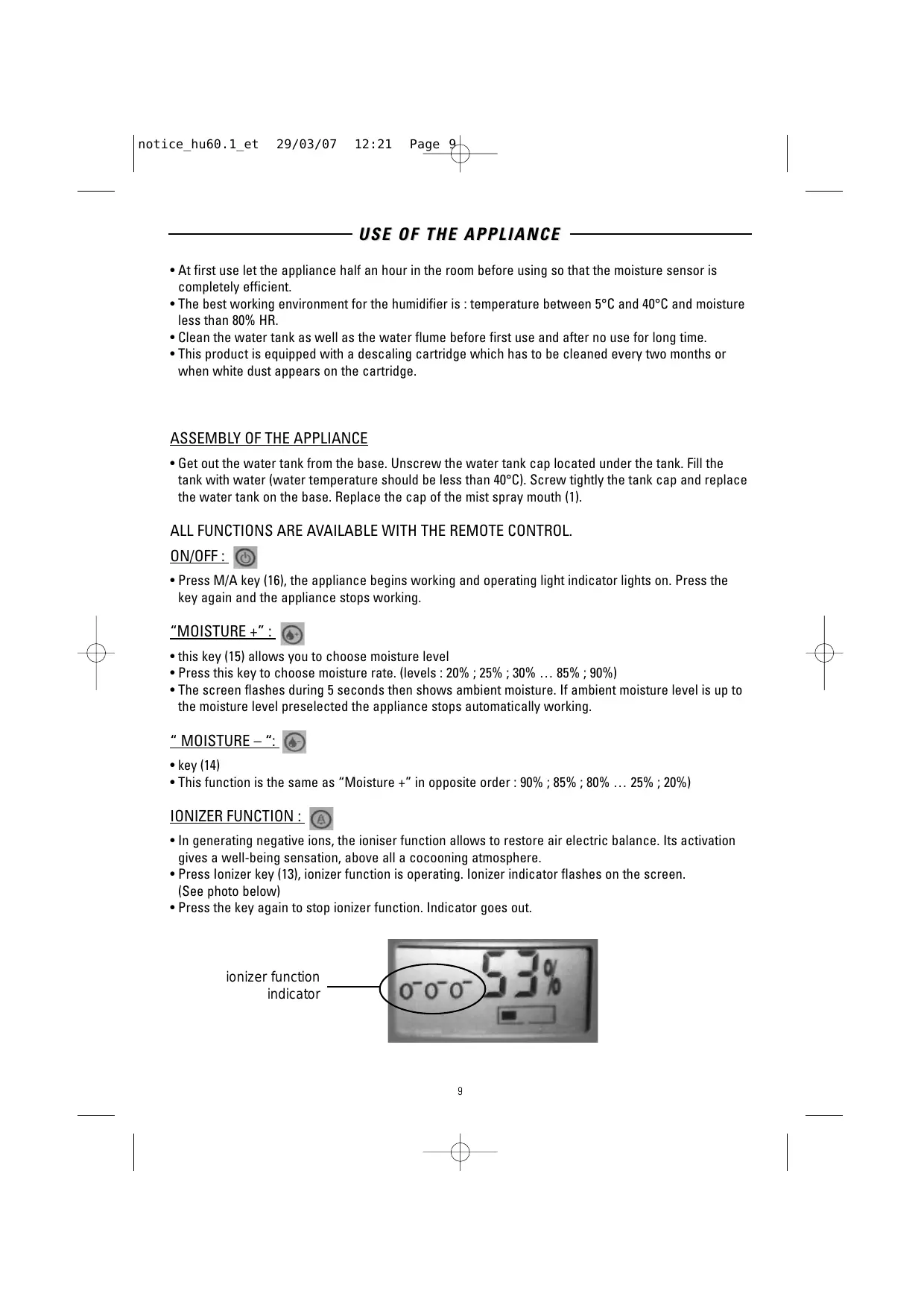

| Product type | Humidifier |
| Brand | ALPATEC |
| Model | HU 60.1 ET |
| Power supply | 220-240 V ~ 50 Hz |
| Diffusion rates | 3 modes: I (high), II (medium), III (low) |
| Humidity setting | 20% to 90% in 5% increments |
| Timer | 2h, 4h, 8h or 12h |
| Ionizer | Yes, generates negative ions |
| Adjustable nozzle | Yes, to direct the mist |
| Display | LCD screen |
| Remote control | Included |
| Anti-scale cartridge | Removable and cleanable |
| Automatic shut-off | When the tank is empty or target humidity is reached |
| Transducer | Part to clean regularly with descaler |
| Cleaning | Descaling the transducer, cleaning the tank and valve |
| Safety | Do not immerse, do not use outdoors, unplug before cleaning |
| Included accessories | Remote control, anti-scale cartridge |
Frequently Asked Questions - HU 60.1 ET ALPATEC
User questions about HU 60.1 ET ALPATEC
0 question about this device. Answer the ones you know or ask your own.
Ask a new question about this device
Download the instructions for your Humidifier in PDF format for free! Find your manual HU 60.1 ET - ALPATEC and take your electronic device back in hand. On this page are published all the documents necessary for the use of your device. HU 60.1 ET by ALPATEC.
USER MANUAL HU 60.1 ET ALPATEC
SOLUTIONS CLIMATIQUES
HUMIDIFCATEUR
Humidifier
HU 60.1 ET
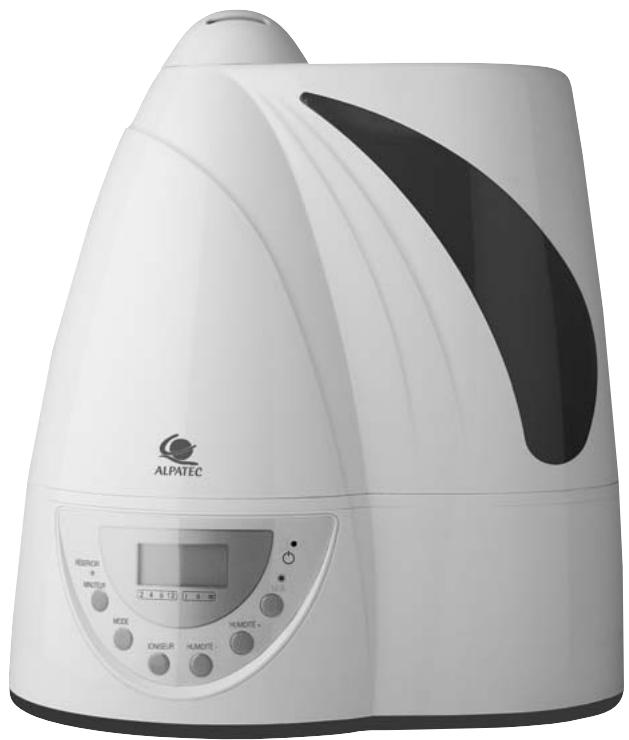
MODE D'EMPLOI USER MANUAL WEB
F R A N C A I S
For your comfort and safety, ALPATEC has checked all the steps of manufacturing. The products have been made for you to enjoy their design and easiness to use. ALPATEC, a complete range of air conditioners, coolers, fans and heaters for your complete satisfaction.
CAUTION
PLEASE READ ALL THESE INSTRUCTIONS CAREFULLY BEFORE USING THIS APPLIANCE
- Make sure that the voltage rating on the type plate corresponds to your main voltage. Any error in connecting the appliance invalidates the guarantee.
- Never leave the appliance unsupervised when in use.
- Keep out of reach of children.
- Only use this appliance for domestic purposes and in the way indicated in these instructions. Never use for any other purposes.
- Never immerse the product in water or any other liquid for any reasons. Respect the instructions for cleaning.
- Do not use the appliance outside and always place it in a dry environment.
- Do not use if you have wet hands.
- Keep the appliance far from hot or electric sources. Never place the appliance into direct sunlight.
- Never pull the cord to unplug or move the appliance.
- Unplug the appliance before cleaning or changing any parts of the appliance or when it's not in use.
- Always switch off the appliance before unplugging it.
- Do introduce neither sharp metallic objects, nor fingers inside the appliance.
- From time to time, check the cord. Never use the cord, the plug or the appliance when they show any sign of damage. Make sure the cord never comes into contact with the hot parts of the appliance.
Do not wind the cord around the appliance and do not bend it. - The cord length of this product has been selected to reduce the possibility of being injured. If more cord length is needed, an extension cord may be used. Ensure not to let it hang down the working area where someone could accidentally pull or trip over it.
- Ensure that the power supply cable does not hang down from the work surface as it could be easily pulled, particularly by small children, thereby causing serious accidents.
- If the cord or the plug is getting more and more hot, contact a qualified electrician.
- Never repair the appliance yourself. All interventions made by a non-qualified person can be dangerous; in this case guarantee conditions would cancel. As well as the change of the cord has to be done by a competent electrician.
- When operating, please do not touch the water or parts is water flume.
- Do not let power on when waterless.
- In case of strange noise or smell, turn off and unplug the appliance.
Install the appliance on a flat and steady surface. - Keep the appliance far from heat source and electronic equipment.
- The mist spraying from the humidifier should not be face to furniture.
THE MANUFACTURER WILL NOT ASSUME ANY RESPONSIBILITY IN CASE OF NON ADHERENCE TO THIS RECOMMENDATION. SAVE THESE INSTRUCTIONS CAREFULLY.
DESCRIPTION OF THE APPLIANCE
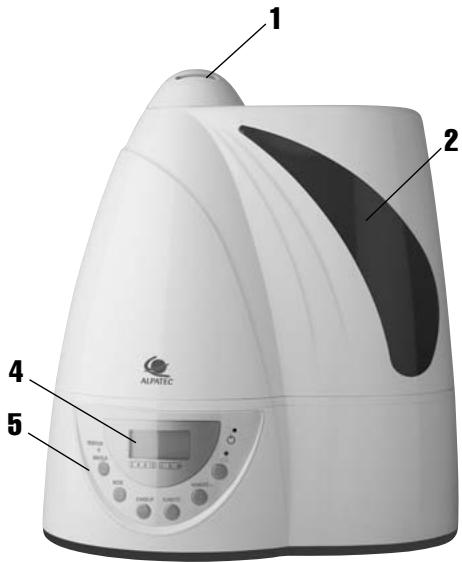
- Mist spray mouth
- Water tank
- Water flume
- LCD screen
- Control panel
- Power cord
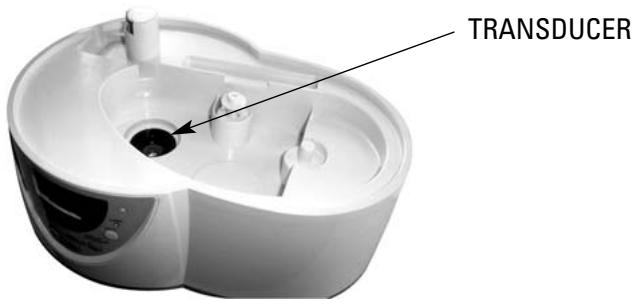
- Transducer
- Water-inlet
- Handle.
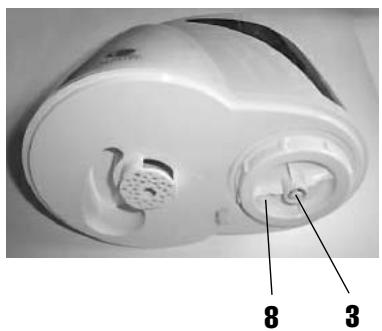
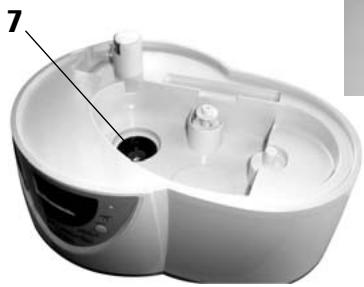
18
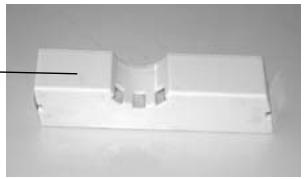
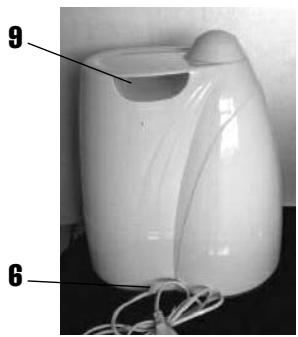
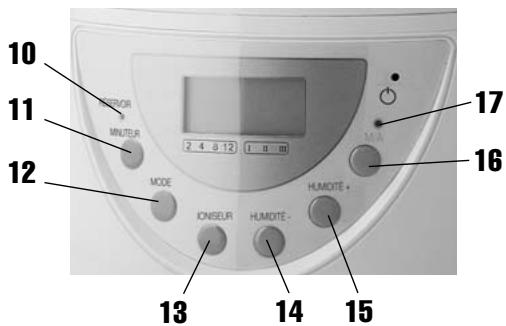
Description of the control panel
- Waterless indicator
- Timer key
- Mode key
- Ionizer key
- "Moisture +" key
- "Moisture -" key
- On/Off key
- Operating indicator
- Descaling cartridge
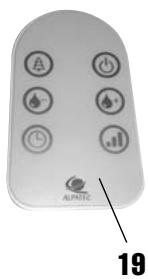
- Remote control
USE OF THE APPLIANCE
- At first use let the appliance half an hour in the room before using so that the moisture sensor is completely efficient.
- The best working environment for the humidifier is : temperature between 5°C and 40°C and moisture less than 80% HR.
- Clean the water tank as well as the water flume before first use and after no use for long time.
- This product is equipped with a descending cartridge which has to be cleaned every two months or when white dust appears on the cartridge.
ASSEMBLY OF THE APPLIANCE
- Get out the water tank from the base. Unscrew the water tank cap located under the tank. Fill the tank with water (water temperature should be less than 40°C ). Screw tightly the tank cap and replace the water tank on the base. Replace the cap of the mist spray mouth (1).
ALL FUNCTIONS ARE AVAILABLE WITH THE REMOTE CONTROL.
ON/OFF:
- Press M/A key (16), the appliance begins working and operating light indicator lights on. Press the key again and the appliance stops working.
"MOISTURE +":
- this key (15) allows you to choose moisture level
- Press this key to choose moisture rate. (levels: 20%; 25%; 30% ... 85%; 90%)
- The screen flashes during 5 seconds then shows ambient moisture. If ambient moisture level is up to the moisture level preselected the appliance stops automatically working.
"MOISTURE-":
key (14)
- This function is the same as "Moisture +" in opposite order : 90% ; 85% ; 80% ... 25% ; 20%)
IONIZER FUNCTION :
- In generating negative ions, the ioniser function allows to restore air electric balance. Its activation gives a well-being sensation, above all a cocooning atmosphere.
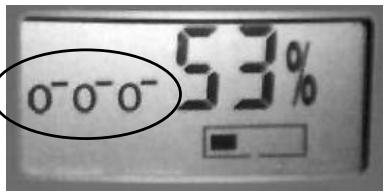
- Press Ionizer key (13), ionizer function is operating. Ionizer indicator flashes on the screen. (See photo below)
- Press the key again to stop ionizer function. Indicator goes out.
ionizer function indicator
MODE:

- Press mode key (12). Mode function will be alternatively changed from mode I (means constant and large mist), to mode II (means constant and middle mist), to mode III (means constant and small mist).
TIMER:

- Press timer key (11) to program the appliance on 2 hours, 4 hours, 8 hours or 12 hours.
- If the water tank is empty, waterless light indicator lights on and an alarm sounds.
CLEANING AND MAINTENANCE
- Clean the transducer with descending detergent. Get out the water tank from the base, empty the base and drop 10ml of descending detergent on the transducer. (See picture below)
- Wait about 2 to 5 minutes then wash with a brush and rinse plentifully with clear water.
- Clean the water tank with a little soft detergent and half of the tank of water. Screw the tank cap and shake it up and down several times, and then use water to rinse.
- If there is waste left in water flume, clean it with a damp cloth and detergent, then rinse with water.
- If the humidifier has not been working for a long time, clean it as described above.
- Cleaning of the descending cartridge: take out the cartridge and soak it into salt liquid (one big spoon of salt in a glass of water) for about 60 minutes. Rinse with clear water and replace in the product.
TROUBLE SHOOTING
| Trouble | Possible problem | Treatment |
| LCD screen does not light on. There is no mist | - Is there a problem with power supply. - The plug is not connected to the socket | - Insert the plug again. |
| LCD screen lights on but there is no mist | - No water in the tank. | - Add water. |
| The mist spray has an unpleasant smelling. | - New appliance. - Water is dirty or has been too much time in the water tank. | - Open the water tank, lay it for 12 hours in a stady and cool place. - Clean the water tank and add clean water. |
| Mist volume is low | - The transducer is dirty. - Water is dirty or has been too much time in the water tank. | - Clean the transducer as described in cleaning instructions. - Clean the water tank and add clean water. |
| There is a strange noise | - Water tank is not properly placed on the base. - Water level in the tank is too low. | - Set the water tank properly. - Add water. |

Instructions on environment protection
Do not dispose of this product in the usual household garbage at the end of its life cycle; hand it over a collection point for the recycling of electrical and electronic appliances. The symbol on the product, the instructions for use or the packing will inform about the methods of disposal. The materials are recyclable as mentioned in its marking. By recycling or others forms of re-utilization of old appliances, you are making an important contribution to protect our environment.
Please inquire at the community administration for the authorized disposal location.
ALPATEC
SOLUTIONS CLIMATIQUES
03/07



- HUMIDIFCATEUR
- HUMIDIFIER
- MODE D'EMPLOI USER MANUAL WEB
- F R A N C A I S
- CAUTION
- DESCRIPTION OF THE APPLIANCE
- DESCRIPTION OF THE CONTROL PANEL
- USE OF THE APPLIANCE
- ASSEMBLY OF THE APPLIANCE
- ALL FUNCTIONS ARE AVAILABLE WITH THE REMOTE CONTROL
- ON/OFF
- MOISTURE
- IONIZER FUNCTION
- MODE
- TIMER
- CLEANING AND MAINTENANCE
- TROUBLE SHOOTING
- INSTRUCTIONS ON ENVIRONMENT PROTECTION
Brand : ALPATEC
Model : HU 60.1 ET
Category : Humidifier